element14 Community
element14 Community
    Register Log In
  • Site
  • Search
  • Log In Register
  • Community Hub
    Community Hub
    • What's New on element14
    • Feedback and Support
    • Benefits of Membership
    • Personal Blogs
    • Members Area
    • Achievement Levels
  • Learn
    Learn
    • Ask an Expert
    • eBooks
    • element14 presents
    • Learning Center
    • Tech Spotlight
    • STEM Academy
    • Webinars, Training and Events
    • Learning Groups
  • Technologies
    Technologies
    • 3D Printing
    • FPGA
    • Industrial Automation
    • Internet of Things
    • Power & Energy
    • Sensors
    • Technology Groups
  • Challenges & Projects
    Challenges & Projects
    • Design Challenges
    • element14 presents Projects
    • Project14
    • Arduino Projects
    • Raspberry Pi Projects
    • Project Groups
  • Products
    Products
    • Arduino
    • Avnet & Tria Boards Community
    • Dev Tools
    • Manufacturers
    • Multicomp Pro
    • Product Groups
    • Raspberry Pi
    • RoadTests & Reviews
  • About Us
  • Store
    Store
    • Visit Your Store
    • Choose another store...
      • Europe
      •  Austria (German)
      •  Belgium (Dutch, French)
      •  Bulgaria (Bulgarian)
      •  Czech Republic (Czech)
      •  Denmark (Danish)
      •  Estonia (Estonian)
      •  Finland (Finnish)
      •  France (French)
      •  Germany (German)
      •  Hungary (Hungarian)
      •  Ireland
      •  Israel
      •  Italy (Italian)
      •  Latvia (Latvian)
      •  
      •  Lithuania (Lithuanian)
      •  Netherlands (Dutch)
      •  Norway (Norwegian)
      •  Poland (Polish)
      •  Portugal (Portuguese)
      •  Romania (Romanian)
      •  Russia (Russian)
      •  Slovakia (Slovak)
      •  Slovenia (Slovenian)
      •  Spain (Spanish)
      •  Sweden (Swedish)
      •  Switzerland(German, French)
      •  Turkey (Turkish)
      •  United Kingdom
      • Asia Pacific
      •  Australia
      •  China
      •  Hong Kong
      •  India
      • Japan
      •  Korea (Korean)
      •  Malaysia
      •  New Zealand
      •  Philippines
      •  Singapore
      •  Taiwan
      •  Thailand (Thai)
      • Vietnam
      • Americas
      •  Brazil (Portuguese)
      •  Canada
      •  Mexico (Spanish)
      •  United States
      Can't find the country/region you're looking for? Visit our export site or find a local distributor.
  • Translate
  • Profile
  • Settings
Altium CircuitStudio
  • Products
  • Manufacturers
  • Altium CircuitStudio
  • More
  • Cancel
Altium CircuitStudio
Altium CircuitStudio Forum Custom designators and comments in PCB Footprints
  • Blog
  • Forum
  • Documents
  • Events
  • Polls
  • Members
  • Mentions
  • Sub-Groups
  • Tags
  • More
  • Cancel
  • New
Join Altium CircuitStudio to participate - click to join for free!
Actions
  • Share
  • More
  • Cancel
Forum Thread Details
  • State Not Answered
  • Locked Locked
  • Replies 3 replies
  • Subscribers 88 subscribers
  • Views 1323 views
  • Users 0 members are here
Related
This discussion has been locked.
You can no longer post new replies to this discussion. If you have a question you can start a new discussion

Custom designators and comments in PCB Footprints

friedifriedrich
friedifriedrich over 6 years ago

When creating a new component circuit studio automatically generates designator and comment texts in the top overlay layer.

I would like to have those texts in the assembly text top layer.

So I place two texts with ".Designator" and ".Comment" as string which works fine, but now I have both texts, mine and the automatically generated ones.


Is it possible to remove the automatically generated designators and comments in PCB footprints of components ?

  • Cancel
Parents
  • tarribred61
    0 tarribred61 over 6 years ago

    This is a valid question and I don't know how to do what you want and haven't needed to do this myself.  However, I had thought it could be simply done as a workaround by filtering for text on the top overlay layer and then drag selecting the text (while holding the CTRL key since it is not free text) and then hiding the text with the PCB Inspector tool.


    I can get as far as the last step but it won't let me hide the text.This is presumably because filtering can only go as far as all text and so includes text other than designators.  That is, there may be text for numbering of connectors or a + sign on a capacitor that is also on top overlay.  Since this is also text it passes the filter but I would not want to hide it even if I could.


    I found I can set rotation, and whimsically, I can change the string so all the text says the same thing.  However, I can't change many of the other parameters (such as hide, bold, lock) unless I tediously pick all the .designator type text.  What parameters can and cannot be changed is not intuitive to me and is not at professional use level in my opinion.


    I'm responding to your post because it is another case where we as users need to have improved ability to filter so it is much more like in Altium Designer.  There is definitely some room here for improved functionality in a future release (hopefully sooner rather than later).

    • Cancel
    • Vote Up 0 Vote Down
    • Cancel
Reply
  • tarribred61
    0 tarribred61 over 6 years ago

    This is a valid question and I don't know how to do what you want and haven't needed to do this myself.  However, I had thought it could be simply done as a workaround by filtering for text on the top overlay layer and then drag selecting the text (while holding the CTRL key since it is not free text) and then hiding the text with the PCB Inspector tool.


    I can get as far as the last step but it won't let me hide the text.This is presumably because filtering can only go as far as all text and so includes text other than designators.  That is, there may be text for numbering of connectors or a + sign on a capacitor that is also on top overlay.  Since this is also text it passes the filter but I would not want to hide it even if I could.


    I found I can set rotation, and whimsically, I can change the string so all the text says the same thing.  However, I can't change many of the other parameters (such as hide, bold, lock) unless I tediously pick all the .designator type text.  What parameters can and cannot be changed is not intuitive to me and is not at professional use level in my opinion.


    I'm responding to your post because it is another case where we as users need to have improved ability to filter so it is much more like in Altium Designer.  There is definitely some room here for improved functionality in a future release (hopefully sooner rather than later).

    • Cancel
    • Vote Up 0 Vote Down
    • Cancel
Children
  • e14softwareuk
    0 e14softwareuk over 6 years ago in reply to tarribred61

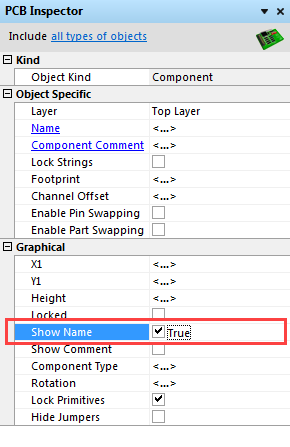
    In the PCB editor you can hide all the designators for selected components by using the object inspector Show Name property. Use the component filter to make sure just components are selected otherwise the option will not appear.

    image

    • Cancel
    • Vote Up 0 Vote Down
    • Cancel
element14 Community

element14 is the first online community specifically for engineers. Connect with your peers and get expert answers to your questions.

  • Members
  • Learn
  • Technologies
  • Challenges & Projects
  • Products
  • Store
  • About Us
  • Feedback & Support
  • FAQs
  • Terms of Use
  • Privacy Policy
  • Legal and Copyright Notices
  • Sitemap
  • Cookies

An Avnet Company © 2026 Premier Farnell Limited. All Rights Reserved.

Premier Farnell Ltd, registered in England and Wales (no 00876412), registered office: Farnell House, Forge Lane, Leeds LS12 2NE.

ICP 备案号 10220084.

Follow element14

  • X
  • Facebook
  • linkedin
  • YouTube