element14 Community
element14 Community
    Register Log In
  • Site
  • Search
  • Log In Register
  • Community Hub
    Community Hub
    • What's New on element14
    • Feedback and Support
    • Benefits of Membership
    • Personal Blogs
    • Members Area
    • Achievement Levels
  • Learn
    Learn
    • Ask an Expert
    • eBooks
    • element14 presents
    • Learning Center
    • Tech Spotlight
    • STEM Academy
    • Webinars, Training and Events
    • Learning Groups
  • Technologies
    Technologies
    • 3D Printing
    • FPGA
    • Industrial Automation
    • Internet of Things
    • Power & Energy
    • Sensors
    • Technology Groups
  • Challenges & Projects
    Challenges & Projects
    • Design Challenges
    • element14 presents Projects
    • Project14
    • Arduino Projects
    • Raspberry Pi Projects
    • Project Groups
  • Products
    Products
    • Arduino
    • Avnet & Tria Boards Community
    • Dev Tools
    • Manufacturers
    • Multicomp Pro
    • Product Groups
    • Raspberry Pi
    • RoadTests & Reviews
  • About Us
  • Store
    Store
    • Visit Your Store
    • Choose another store...
      • Europe
      •  Austria (German)
      •  Belgium (Dutch, French)
      •  Bulgaria (Bulgarian)
      •  Czech Republic (Czech)
      •  Denmark (Danish)
      •  Estonia (Estonian)
      •  Finland (Finnish)
      •  France (French)
      •  Germany (German)
      •  Hungary (Hungarian)
      •  Ireland
      •  Israel
      •  Italy (Italian)
      •  Latvia (Latvian)
      •  
      •  Lithuania (Lithuanian)
      •  Netherlands (Dutch)
      •  Norway (Norwegian)
      •  Poland (Polish)
      •  Portugal (Portuguese)
      •  Romania (Romanian)
      •  Russia (Russian)
      •  Slovakia (Slovak)
      •  Slovenia (Slovenian)
      •  Spain (Spanish)
      •  Sweden (Swedish)
      •  Switzerland(German, French)
      •  Turkey (Turkish)
      •  United Kingdom
      • Asia Pacific
      •  Australia
      •  China
      •  Hong Kong
      •  India
      • Japan
      •  Korea (Korean)
      •  Malaysia
      •  New Zealand
      •  Philippines
      •  Singapore
      •  Taiwan
      •  Thailand (Thai)
      • Vietnam
      • Americas
      •  Brazil (Portuguese)
      •  Canada
      •  Mexico (Spanish)
      •  United States
      Can't find the country/region you're looking for? Visit our export site or find a local distributor.
  • Translate
  • Profile
  • Settings
Altium CircuitStudio
  • Products
  • Manufacturers
  • Altium CircuitStudio
  • More
  • Cancel
Altium CircuitStudio
Altium CircuitStudio Forum Generate Outputs produces more files than requested
  • Blog
  • Forum
  • Documents
  • Events
  • Polls
  • Members
  • Mentions
  • Sub-Groups
  • Tags
  • More
  • Cancel
  • New
Join Altium CircuitStudio to participate - click to join for free!
Actions
  • Share
  • More
  • Cancel
Forum Thread Details
  • State Verified Answer
  • Locked Locked
  • Replies 11 replies
  • Answers 1 answer
  • Subscribers 90 subscribers
  • Views 1599 views
  • Users 0 members are here
  • generate outputs
Related
This discussion has been locked.
You can no longer post new replies to this discussion. If you have a question you can start a new discussion

Generate Outputs produces more files than requested

ziomau10
ziomau10 over 6 years ago

Hi all,

In some project I find that using a normal output generation definition causes the outputs files to be generated in a loop for two or even three times.

As an exampe, with a definition like this, and with no variants.
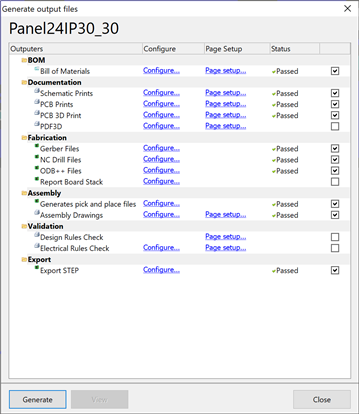
image

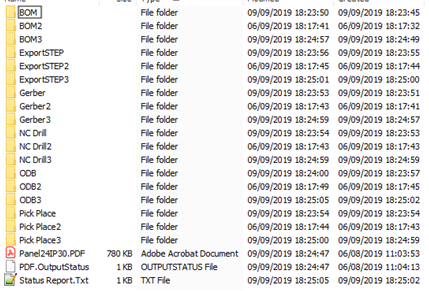
The output folder looks like:

image

where every output type is produced three times (in this case).
The folder contents are identical apart a slight difference in generation date.

The generation follows this scheme:
First generates all standard outputs, then instead of stopping continue overwriting the main pdv and proceeds generating all xxx2 outputs, and again overwrites once more the main pdf and continue generating the xxx3 folders.
This apparently without any specific settings change.

Dos anyone else experience this problem?

Regards.

Mau-

  • Cancel

Top Replies

  • ziomau10
    ziomau10 over 6 years ago in reply to ziomau10 +1 verified
    It seems I have found the problem. Looking around into the PrjPcb file I found the following section: OutputJobsCount=2 DocumentReferenceClass1=DocumentReference OutputJobFileName1=Panel24IP30.OutJob DocumentReferenceClass2…
  • clem57
    0 clem57 over 6 years ago

    Very strange indeed. The groups occur even minutes apart. If I were to guess, the button seems to have been "pushed" or "triggered" each time. How is the speed of your system? Maybe a click turned into more than 1.

    Clem

    • Cancel
    • Vote Up 0 Vote Down
    • Cancel
  • clem57
    0 clem57 over 6 years ago in reply to clem57

    ziomau10

    OK, I found a possible answer. https://windowsreport.com/mouse-clicks-twice-windows-10/  seems to be a culprit in some cases. You using Windows 10 by chance?

    • Cancel
    • Vote Up 0 Vote Down
    • Cancel
  • ziomau10
    0 ziomau10 over 6 years ago in reply to clem57

    Thanks for your answer, but I think it is not like you suggested.


    If it were, the second click should generate the same files overwriting only the first series.


    And also I can say that this is not the case, because if when the generation is over I wait and press the button again it starts a new generation overwriting the standard folders first and then continues to overwrite the xxx2 folders, as if it was programmed to do so.

    I think it is impossible that systematically my mouse is sending two clicks every time.


    Finally I am not experiencing this duplicated click in any other application on the same PC, with the same mouse.


    By the way, the PC is a Dell XPS with I9 processor and 32Gb Ram


    Thanks for you help.

    Regards

    Mau.


    PS: To be completely sure, I checked with a couple of apps like: https://www.clickspeedtest.info/mouse-test and I never saw a duplicated click or a click misinterpreted as a double click.

    • Cancel
    • Vote Up 0 Vote Down
    • Cancel
  • clem57
    0 clem57 over 6 years ago in reply to ziomau10

    Well, it would seem to be CS then.

    Sorry I could not help,

    Clem

    • Cancel
    • Vote Up 0 Vote Down
    • Cancel
  • ziomau10
    0 ziomau10 over 6 years ago in reply to clem57

    Thank you anyway ... I hope someone else may help ...

    Regards.

    Mau.

    • Cancel
    • Vote Up 0 Vote Down
    • Cancel
  • clem57
    0 clem57 over 6 years ago

    adamwebber Can you help with this problem?

    Clem

    • Cancel
    • Vote Up 0 Vote Down
    • Cancel
  • adamwebber
    0 adamwebber over 6 years ago in reply to clem57

    I have seen an error like this before.  Not exactly the same but I recollect something about it.  But I'm going to start by asking if you've copied and pasted this project or if you have changed the name between revisions? It's possible that your OutJob file is adding the same outputs over and over again when the project is copied or renamed.


    You will get outputs based on the contents of the *.OutJob file.  It's in your project directory.  Open it up with a text editor such as Notepad++.  You should see something like the following for each output that you desire:

    OutputType4=PCB 3D Print

    OutputName4=PCB 3D Print

    OutputCategory4=Documentation

    OutputDocumentPath4=

    OutputVariantName4=

    OutputEnabled4=1

    OutputEnabled4_OutputMedium1=3

    OutputEnabled4_OutputMedium2=3

    OutputEnabled4_OutputMedium3=0

    OutputEnabled4_OutputMedium4=0

    OutputDefault4=0


    I'm guessing that you are seeing three times the amount of outputs than you want.  They are all listed in order from 1 to whatever.  Maybe 15, I'm not sure.  But you've probably got them up to 45.  The easiest way to remedy this problem is to delete your *.OutJob file and create a new one in the 'Generate Outputs' command.  But I'm a proponent for saving information.  Before you delete it, just move it somewhere else so the project won't access it.  You can always edit the file and delete all the extras but that takes more time.  Unless you've got configurations that you don't want to lose, just get rid of the file.


    On a side note, I like to have a 3D view of both the top and the bottom layers in my PDF file.  When I generate the outputs I first make an output showing the Bottom layer.  Then I save a copy of the OutJob file.  Then I generate more outputs showing the Top layer.  Then I open up the OutJob file and insert the bottom 3D output under the Top 3D output.  But I need to change all of the numbering so that they are in order.  Then when I create the outputs, I will have a PDF with both the top and bottom views in 3D.  Altium has this feature built in but CS does not.  A lot of the troubleshooting that I've had to do is by looking at old Altium files and writing CS files to match.  All of the settings in CS are text-based so you can change a lot more stuff than you think.

    • Cancel
    • Vote Up 0 Vote Down
    • Cancel
  • ziomau10
    0 ziomau10 over 6 years ago in reply to adamwebber

    Thank you James,

    It could be close to the correct answer.

    I know that configuration files are text and sometimes I tweak them, because some details cannot be set using the user interface.

    Unfortunately this OutJob file seams clean.

    I don't fully understand all the details but the command: grep "^OutputType" Panel24IP30.OutJob

    Result in the following:

    OutputType1=BOM_PartType

    OutputType2=Schematic Print

    OutputType3=PCB Print

    OutputType4=PCB 3D Print

    OutputType5=Gerber

    OutputType6=NC Drill

    OutputType7=ODB

    OutputType8=Pick Place

    OutputType9=Assembly

    OutputType10=Design Rules Check

    OutputType11=Electrical Rules Check

    OutputType12=ExportSTEP

    OutputType13=Board Stack Report

    OutputType14=PDF3D


    Does not look like there are repetition of the output types and seems pretty following the Output Configuration dialog.


    Any other suggestion?

    Regards.

    Mau.

    • Cancel
    • Vote Up 0 Vote Down
    • Cancel
  • adamwebber
    0 adamwebber over 6 years ago in reply to ziomau10

    I don't know the problem could be.  Is this project the only one that has the problem or is it every project?  If it's just this one, my recommendation is to copy the schematic and pcb files into a new project and try again.  I know that I've had to do that with Altium a long time ago.  I haven't had the opportunity with CS yet. 

    • Cancel
    • Vote Up 0 Vote Down
    • Cancel
  • ziomau10
    0 ziomau10 over 6 years ago in reply to adamwebber

    Thank you for your reply.

    It's neither one nor all projects. It's a couple of projects among a couple of tens (i.e. about 10% or less)

    In one of these projects I removed the OutJob file and let CS create a new one.

    I set all the options through the dialog, but the result is the same.

    On that project with a brand new and clean OutJob file, I have three times the outputs.

    It must be something else.

    I will try to remove the PrjPcb and create a new one from scratch, then copying the files over ...

    I'll let you know the results.

    Regards.

    Mau.

    • Cancel
    • Vote Up 0 Vote Down
    • Cancel
>
element14 Community

element14 is the first online community specifically for engineers. Connect with your peers and get expert answers to your questions.

  • Members
  • Learn
  • Technologies
  • Challenges & Projects
  • Products
  • Store
  • About Us
  • Feedback & Support
  • FAQs
  • Terms of Use
  • Privacy Policy
  • Legal and Copyright Notices
  • Sitemap
  • Cookies

An Avnet Company © 2026 Premier Farnell Limited. All Rights Reserved.

Premier Farnell Ltd, registered in England and Wales (no 00876412), registered office: Farnell House, Forge Lane, Leeds LS12 2NE.

ICP 备案号 10220084.

Follow element14

  • X
  • Facebook
  • linkedin
  • YouTube