element14 Community
element14 Community
    Register Log In
  • Site
  • Search
  • Log In Register
  • Community Hub
    Community Hub
    • What's New on element14
    • Feedback and Support
    • Benefits of Membership
    • Personal Blogs
    • Members Area
    • Achievement Levels
  • Learn
    Learn
    • Ask an Expert
    • eBooks
    • element14 presents
    • Learning Center
    • Tech Spotlight
    • STEM Academy
    • Webinars, Training and Events
    • Learning Groups
  • Technologies
    Technologies
    • 3D Printing
    • FPGA
    • Industrial Automation
    • Internet of Things
    • Power & Energy
    • Sensors
    • Technology Groups
  • Challenges & Projects
    Challenges & Projects
    • Design Challenges
    • element14 presents Projects
    • Project14
    • Arduino Projects
    • Raspberry Pi Projects
    • Project Groups
  • Products
    Products
    • Arduino
    • Avnet & Tria Boards Community
    • Dev Tools
    • Manufacturers
    • Multicomp Pro
    • Product Groups
    • Raspberry Pi
    • RoadTests & Reviews
  • About Us
  • Store
    Store
    • Visit Your Store
    • Choose another store...
      • Europe
      •  Austria (German)
      •  Belgium (Dutch, French)
      •  Bulgaria (Bulgarian)
      •  Czech Republic (Czech)
      •  Denmark (Danish)
      •  Estonia (Estonian)
      •  Finland (Finnish)
      •  France (French)
      •  Germany (German)
      •  Hungary (Hungarian)
      •  Ireland
      •  Israel
      •  Italy (Italian)
      •  Latvia (Latvian)
      •  
      •  Lithuania (Lithuanian)
      •  Netherlands (Dutch)
      •  Norway (Norwegian)
      •  Poland (Polish)
      •  Portugal (Portuguese)
      •  Romania (Romanian)
      •  Russia (Russian)
      •  Slovakia (Slovak)
      •  Slovenia (Slovenian)
      •  Spain (Spanish)
      •  Sweden (Swedish)
      •  Switzerland(German, French)
      •  Turkey (Turkish)
      •  United Kingdom
      • Asia Pacific
      •  Australia
      •  China
      •  Hong Kong
      •  India
      • Japan
      •  Korea (Korean)
      •  Malaysia
      •  New Zealand
      •  Philippines
      •  Singapore
      •  Taiwan
      •  Thailand (Thai)
      • Vietnam
      • Americas
      •  Brazil (Portuguese)
      •  Canada
      •  Mexico (Spanish)
      •  United States
      Can't find the country/region you're looking for? Visit our export site or find a local distributor.
  • Translate
  • Profile
  • Settings
Altium CircuitStudio
  • Products
  • Manufacturers
  • Altium CircuitStudio
  • More
  • Cancel
Altium CircuitStudio
Altium CircuitStudio Forum Many errors in new v1.5 schematic editor
  • Blog
  • Forum
  • Documents
  • Events
  • Polls
  • Members
  • Mentions
  • Sub-Groups
  • Tags
  • More
  • Cancel
  • New
Join Altium CircuitStudio to participate - click to join for free!
Actions
  • Share
  • More
  • Cancel
Forum Thread Details
  • Locked Locked
  • Replies 7 replies
  • Subscribers 91 subscribers
  • Views 610 views
  • Users 0 members are here
Related
This discussion has been locked.
You can no longer post new replies to this discussion. If you have a question you can start a new discussion

Many errors in new v1.5 schematic editor

jmarkwolf
jmarkwolf over 7 years ago

I just installed CS v1.5 and started to edit a schematic started in v1.4, but immediately encountered major problems.


1. I tried to copy a Net Label to an additional pin but it copied text instead of a Net Label there. Then I had a great deal of trouble selecting and deleting the text.


2. Then I had a great deal of trouble adding a Net Label to the same pin, instead it added a line vertex everywhere I tried to plunk down the Net Label.


3. Then I had a great deal of trouble selecting the line segments either directly or with a window, to delete them, ultimately unsuccessful (see attached image).


4. I noticed that many menu items will all turn on at the same time (see attached image).


Didn't look any further. These are show stoppers.


Please advise how long I can expect for this to be remedied so I can complete the clients job, or how I can revert back to v1.4.
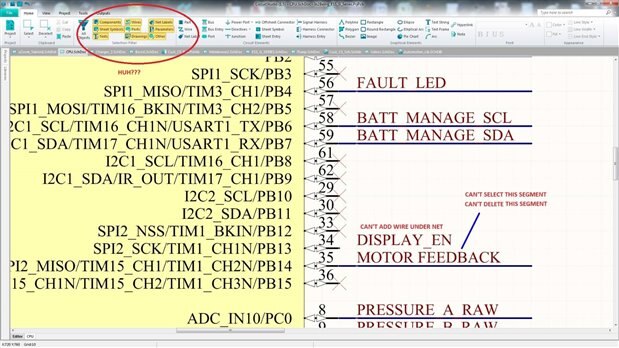


image

  • Cancel

Top Replies

  • adamwebber
    adamwebber over 7 years ago +2
    After reviewing the updates for the new revision, I opted not to renew my license. All of the "fixes" are not bug fixes and do not relate to what I want to accomplish in the program.
  • optoeng
    optoeng over 7 years ago

    Changes made to the 'Home' toolbar are misleading. They moved the 'Filter' toolset from the 'View' tab to the 'Home' tab and put it on the left side, where you expect to find tools like 'Wire' and 'Net Label'. Look a little further to the right and you'll see the tools you are looking for...

    • Cancel
    • Vote Up 0 Vote Down
    • Cancel
  • jmarkwolf
    jmarkwolf over 7 years ago in reply to optoeng

    Thanks Paul


    That little item ( a friggin' menu change ) would have been worthy of mention!


    Be sure to have something selected in this new filter menu, or you won't be able to select anything in your database apparently!


    I have an idea, why don't they just go back to the AD drop down menus and save the world a lot of trouble!? image

    • Cancel
    • Vote Up 0 Vote Down
    • Cancel
  • optoeng
    optoeng over 7 years ago in reply to jmarkwolf

    I think that you actually don't need to select anything in the Filter toolset to have access to all objects, but there are some confusing situations you can easily get into, where you inadvertently click on something in the Filter toolset and don't follow through with a selection.


    For me, the MOST frustrating thing about CS is that their 'support' team responds to so few messages of any kind. You're never aware of whether they acknowledge that a bug exists, what priority they have for investigating and fixing it, and so on. The 'Roadmap' mentioned in the blog would be a small step in the right direction.


    I'll bet that they congratulate themselves for how few bug reports they get, when it's just because most people have given up.

    • Cancel
    • Vote Up 0 Vote Down
    • Cancel
  • adamwebber
    adamwebber over 7 years ago

    After reviewing the updates for the new revision, I opted not to renew my license.  All of the "fixes" are not bug fixes and do not relate to what I want to accomplish in the program.

    • Cancel
    • Vote Up +2 Vote Down
    • Cancel
  • bugrobotics
    bugrobotics over 7 years ago in reply to adamwebber

    Same here James.

    • Cancel
    • Vote Up 0 Vote Down
    • Cancel
  • jamesharrimanaltium
    jamesharrimanaltium over 7 years ago in reply to jmarkwolf

    Hi Mark and Paul,


    The filter introduced in 1.5 is new in Schematic and is an additional filter in PCB, so both editors have a consistent filter.


    The Selection Filter enables selection of certain types of objects, OR'd together, e.g. a Component OR a Pad. Press both buttons so they are yellow, then make a selection on the PCB and only components and pads can be selected, but other objects can't be selected.


    Press the All Objects button (it becomes yellow), to enable all objects to be selected.


    Please note that the shortcut Shift + C will clear the selected objects in the schematic or PCB editors but will not change the Selection Filter buttons.


    Conversely, changing the Selection Filter buttons doesn't change the selection of objects. Therefore you can change the buttons and then add extra objects to your selection by holding the Shift key while selecting around other objects.


    Always check the bottom of the Inspector panel (F11) to see how many objects you have selected to ensure that your selection is what you intended.


    What about the PCB Filter?

    The PCB editor already has a panel called PCB Filter. The functionality of this panel is slightly different: This panel uses AND between the sections, for example, in the Groups section, click Components, then in the Objects section click Text. Click on the PCB and press Ctrl + A to select all. This will select Text AND Components, i.e. text that is part of a component such as a Designator. This can be further filtered to specific layers, hold Ctrl when enabling more than one layer in the PCB Filter.


    Best regards,


    James Harriman

    Altium

    • Cancel
    • Vote Up 0 Vote Down
    • Cancel
  • optoeng
    optoeng over 7 years ago in reply to jamesharrimanaltium

    Thanks for your reply and the tips. Perhaps we are entering a new era of customer support for CS.

    • Cancel
    • Vote Up 0 Vote Down
    • Cancel
element14 Community

element14 is the first online community specifically for engineers. Connect with your peers and get expert answers to your questions.

  • Members
  • Learn
  • Technologies
  • Challenges & Projects
  • Products
  • Store
  • About Us
  • Feedback & Support
  • FAQs
  • Terms of Use
  • Privacy Policy
  • Legal and Copyright Notices
  • Sitemap
  • Cookies

An Avnet Company © 2026 Premier Farnell Limited. All Rights Reserved.

Premier Farnell Ltd, registered in England and Wales (no 00876412), registered office: Farnell House, Forge Lane, Leeds LS12 2NE.

ICP 备案号 10220084.

Follow element14

  • X
  • Facebook
  • linkedin
  • YouTube