


From Buttons to Modern Touchscreens
 Introduction
Human–Machine Interfaces (HMIs) are the bridge between people and technology. From the earliest mechanical buttons to today’s sleek touchscreens, HMIs have continuously evolved to make machines easier, safer, and more intuitive to use. Bridgetek’s Embedded Video Engine (EVE) technology represents the latest step in this journey, combining graphics, touch, and audio into a single solution.
 ️ The Early Days: Buttons and Switches
Early HMIs, on products such as radios, thermostats, washing machines, and industrial control panels, relied on physical buttons, knobs, and switches. While reliable, they offered limited feedback and required more space on devices. As devices became more complex, designers faced significant compromises between supporting the device’s functionality whilst maintaining useability.
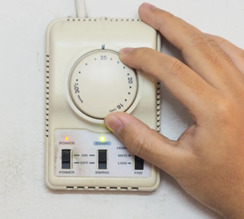
Early HMIs often consisted of mechanical controls and basic indications
 The Digital Shift: Introduction of LCDs and Keypads
LCD screens (such as dot matrix and fixed segment displays) allowed machines to present more information whilst also improving user friendliness and access to product functions, instead of relying only on lights or dials. The increasing use of Microcontrollers (MCUs) in these products was another factor enabling their use. Keypads and pushbuttons also provided more functionality compared to mechanical switches.
However, as users became accustomed to smartphones and tablets, and as products gained even more functionality, the limitations and lack of layout flexibility of fixed segment LCDs became more restrictive.
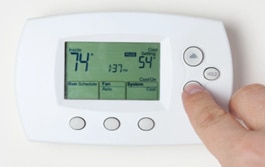
LCD Fixed-Segment displays offered many benefits over traditional controls and indicators but lack the flexibility of modern touch-enabled graphics displays
 The Modern Era: Smart HMIs with EVE
The Embedded Video Engine (EVE) from Bridgetek allows designers to embrace the trend toward richer and more immersive user interfaces which enhance the user experience beyond the previous generations of HMI. Instead of fixed segment displays, the designer now has a blank canvas to develop the optimal HMI for their device.
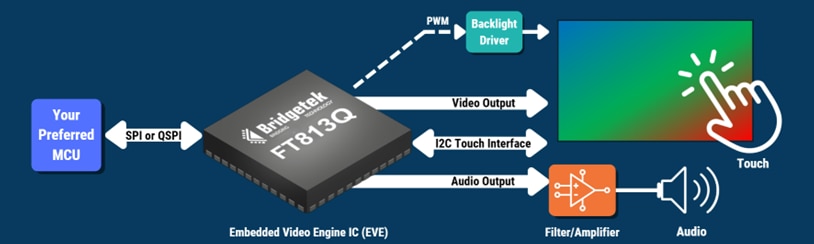
EVE devices such as the FT813 add powerful graphics, touch and audio capabilities to any MCU
- EVE allows designers to easily add full-colour graphics to their design on a range of displays, from small panels (3.5” or less) all the way up to large high-resolution displays up to 1920 x 1200 (15.6” for example). Adding images, icons, gauges and many other controls, as well as a range of fonts, allows strong reflection of the product brand and presents a smartphone-like experience for the user.
- Likewise, with EVE’s innovative touch engine, designers can harness capacitive multi-touch or resistive panels to add intuitive touch controls instead of mechanical buttons and keys. Touch tagging and tracking features make implementing on-screen buttons, icons, sliders, rotary controls fast and simple.
- EVE’s audio engine provides yet another way to enhance the user experience with minimal development time or additional MCU workload. Built-in sounds can be used for touch acknowledgement and user alerts as well as custom sound playback.
Connecting easily to any MCU over SPI or QSPI, designers can easily add EVE to existing and new products. With EVE, appliances, industrial systems, and automotive dashboards can deliver professional‑grade interfaces without requiring complex graphics programming and without the MCU having graphics capabilities. Rapid development via Bridgetek’s development modules, powerful free software tools, and extensive examples, empower designers to achieve fast time to market without compromising on the user experience.
 Real‑World Applications
EVE is ideal for a diverse range of applications, including:
- Smart Appliances: Coffee machines with interactive menus, ovens with recipe guides, HVAC systems with energy dashboards.
- Industrial Equipment: Clear, responsive controls that improve visibility of machine status and productivity.
- Automotive Systems: Sleek infotainment and control panels that meet and exceed consumer expectations.
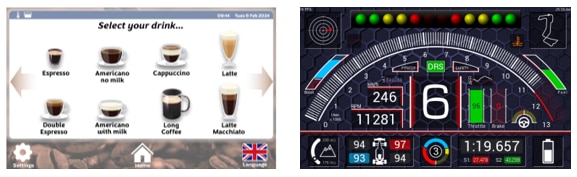
EVE helps designers transform the user experience in a wide range of industries and applications including coffee machines and automotive displays
 Conclusion
The evolution of HMIs reflects a broader trend: technology becoming more human‑centric. From mechanical buttons to dynamic touchscreens, each step has brought machines closer to people. Bridgetek’s EVE technology continues this journey, enabling manufacturers to deliver interfaces that are not only functional but also engaging, efficient, and future‑ready.