element14 Community
element14 Community
    Register Log In
  • Site
  • Search
  • Log In Register
  • Community Hub
    Community Hub
    • What's New on element14
    • Feedback and Support
    • Benefits of Membership
    • Personal Blogs
    • Members Area
    • Achievement Levels
  • Learn
    Learn
    • Ask an Expert
    • eBooks
    • element14 presents
    • Learning Center
    • Tech Spotlight
    • STEM Academy
    • Webinars, Training and Events
    • Learning Groups
  • Technologies
    Technologies
    • 3D Printing
    • FPGA
    • Industrial Automation
    • Internet of Things
    • Power & Energy
    • Sensors
    • Technology Groups
  • Challenges & Projects
    Challenges & Projects
    • Design Challenges
    • element14 presents Projects
    • Project14
    • Arduino Projects
    • Raspberry Pi Projects
    • Project Groups
  • Products
    Products
    • Arduino
    • Avnet & Tria Boards Community
    • Dev Tools
    • Manufacturers
    • Multicomp Pro
    • Product Groups
    • Raspberry Pi
    • RoadTests & Reviews
  • About Us
    About the element14 Community
  • Store
    Store
    • Visit Your Store
    • Choose another store...
      • Europe
      •  Austria (German)
      •  Belgium (Dutch, French)
      •  Bulgaria (Bulgarian)
      •  Czech Republic (Czech)
      •  Denmark (Danish)
      •  Estonia (Estonian)
      •  Finland (Finnish)
      •  France (French)
      •  Germany (German)
      •  Hungary (Hungarian)
      •  Ireland
      •  Israel
      •  Italy (Italian)
      •  Latvia (Latvian)
      •  
      •  Lithuania (Lithuanian)
      •  Netherlands (Dutch)
      •  Norway (Norwegian)
      •  Poland (Polish)
      •  Portugal (Portuguese)
      •  Romania (Romanian)
      •  Russia (Russian)
      •  Slovakia (Slovak)
      •  Slovenia (Slovenian)
      •  Spain (Spanish)
      •  Sweden (Swedish)
      •  Switzerland(German, French)
      •  Turkey (Turkish)
      •  United Kingdom
      • Asia Pacific
      •  Australia
      •  China
      •  Hong Kong
      •  India
      •  Japan
      •  Korea (Korean)
      •  Malaysia
      •  New Zealand
      •  Philippines
      •  Singapore
      •  Taiwan
      •  Thailand (Thai)
      •  Vietnam
      • Americas
      •  Brazil (Portuguese)
      •  Canada
      •  Mexico (Spanish)
      •  United States
      Can't find the country/region you're looking for? Visit our export site or find a local distributor.
  • Translate
  • Profile
  • Settings
Moto Mods
  • Products
  • Manufacturers
  • Moto Mods
  • More
  • Cancel
Moto Mods
Blog Porting the PaPiRus HAT to the MDK
  • Blog
  • Forum
  • Documents
  • Events
  • Polls
  • Files
  • Members
  • Mentions
  • Sub-Groups
  • Tags
  • More
  • Cancel
  • New
Join Moto Mods to participate - click to join for free!
  • Share
  • More
  • Cancel
Group Actions
  • Group RSS
  • More
  • Cancel
Engagement
  • Author Author: freund
  • Date Created: 11 Sep 2016 11:22 PM Date Created
  • Views 2182 views
  • Likes 2 likes
  • Comments 8 comments
  • eink
  • mdk
Related
Recommended

Porting the PaPiRus HAT to the MDK

freund
freund
11 Sep 2016

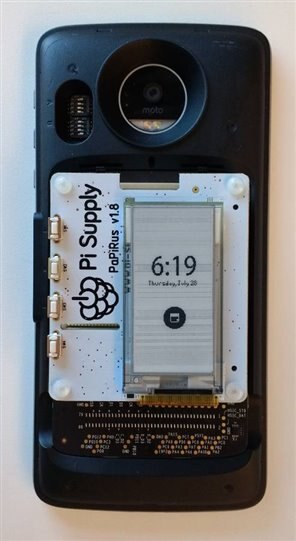
At the end of July, a couple of Motorola software engineers formed a Hackathon team to bring up the PaPiRus E-Ink display on a MotoZ phone using the new Mods Development Kit.  Most of the work consisted of porting the existing open-source display driver (epd.c) from the Raspberry Pi running Linux to the MDK running NuttX.  Although our team didn't have much prior hardware experience, we expected the porting effort should be relatively straight-forward since the MDK environment is designed to facilitate porting hardware and software from other platforms by making use of common hardware interfaces such as I2C, SPI and GPIO, and through it's RPi HAT Adapter card which aligns pins from RPi's GPIO to the MDK.


During the 2.5 day event (working late nights), the team was just able to bring up the display and draw an image.  After completing the work, the team artificially diced up the code changes into a series of 8 commits posted to this MDK epd Github link which roughly align to milestones described in subsequent posts below.  But I want to emphasize that this project was a learning experience for us, and was just done to the level of quality of a rushed hackathon project image. 


We hope this example demonstrates that without much experience, any software developer should be able to select a random hardware project from Raspberry Pi or other platforms and get them working on Motorola phones with relatively low effort.  And also hopefully inspire someone to continue work on this MDK PaPiRus driver.


-Jason Freund

Motorola Mobility
 

image

  • Sign in to reply
  • freund
    freund over 9 years ago

    Commit #3: “Raspberri Pi epd driver drop”  Dropping more original Pervasive Display source.

    • Makefile: No change from blinky
    • All headers and src are original epd source with original filenames
    • Cancel
    • Vote Up 0 Vote Down
    • Sign in to reply
    • More
    • Cancel
  • freund
    freund over 9 years ago

    Commit #2: Configuring the new project

    • Hdk-blinky.mnfs: Change name, remove unnecessary string
    • Defconfig:
      • Enable SPI1 for communicating from Mod to E-Ink display
      • Set VID=42 (Developer ID as per MDK instructions)
      • Enable RAW, disable RAW_BLINKY (Note, we could have followed the template to create a RAW_EPD, but it’s not necessary)
      • DISABLE_POSIX_TIMER: epd driver needs to use these timers from the MuC.  Fixed a compilation problem in epd.c.  Found to be necessary in later commit: d8088e2ff3b79e36a9cb441097ecab9aa320d792
    • Stm32_modsraw.c: Need to add a log statement so we can see our raw commands coming through from the phone to our kernel code.
    • Cancel
    • Vote Up 0 Vote Down
    • Sign in to reply
    • More
    • Cancel
  • freund
    freund over 9 years ago

    Commit #1: Creating a new MDK project


    In this step, we'll clone the MDK's sample "Blinky" project into a new "epd" project (named after the RPi "epd.c" display driver for PaPiRus)


    1. First copy the hdk-blinky.mnfs manifest and change the filename
    2. Create an "epd" directory (named after the RPi "epd.c" display driver), and copied muc/blinky/Make.defs, setenv.sh, defconfig to this folder
    3. Built the new "epd" project:

    $ export PATH=$PATH:$BUILD_TOP/manifesto:$BUILD_TOP/bootrom-tools

    $ cd $BUILD_TOP/nuttx/nuttx

    # Needed if you previously built any other project, and are now ready to switch to our new epd project

    $ make distclean

    $ cd $BUILD_TOP/nuttx/nuttx/tools

    # Copy files from epd directory to muc platform

    $ ./configure.sh hdk/muc/epd

    At this point, we should be ready to flash our new epd ("blinky") project as per the MDK flashing instructions.

    • Cancel
    • Vote Up 0 Vote Down
    • Sign in to reply
    • More
    • Cancel
<
element14 Community

element14 is the first online community specifically for engineers. Connect with your peers and get expert answers to your questions.

  • Members
  • Learn
  • Technologies
  • Challenges & Projects
  • Products
  • Store
  • About Us
  • Feedback & Support
  • FAQs
  • Terms of Use
  • Privacy Policy
  • Legal and Copyright Notices
  • Sitemap
  • Cookies

An Avnet Company © 2026 Premier Farnell Limited. All Rights Reserved.

Premier Farnell Ltd, registered in England and Wales (no 00876412), registered office: Farnell House, Forge Lane, Leeds LS12 2NE.

ICP 备案号 10220084.

Follow element14

  • X
  • Facebook
  • linkedin
  • YouTube