element14 Community
element14 Community
    Register Log In
  • Site
  • Search
  • Log In Register
  • Community Hub
    Community Hub
    • What's New on element14
    • Feedback and Support
    • Benefits of Membership
    • Personal Blogs
    • Members Area
    • Achievement Levels
  • Learn
    Learn
    • Ask an Expert
    • eBooks
    • element14 presents
    • Learning Center
    • Tech Spotlight
    • STEM Academy
    • Webinars, Training and Events
    • Learning Groups
  • Technologies
    Technologies
    • 3D Printing
    • FPGA
    • Industrial Automation
    • Internet of Things
    • Power & Energy
    • Sensors
    • Technology Groups
  • Challenges & Projects
    Challenges & Projects
    • Design Challenges
    • element14 presents Projects
    • Project14
    • Arduino Projects
    • Raspberry Pi Projects
    • Project Groups
  • Products & Partners
    Products & Partners
    • Arduino
    • Avnet & Tria Boards Community
    • Dev Tools
    • Manufacturers
    • Multicomp Pro
    • Product Groups
    • Raspberry Pi
    • RoadTests & Reviews
  • About Us
    About the element14 Community
  • Store
    Store
    • Visit Your Store
    • Choose another store...
      • Europe
      •  Austria (German)
      •  Belgium (Dutch, French)
      •  Bulgaria (Bulgarian)
      •  Czech Republic (Czech)
      •  Denmark (Danish)
      •  Estonia (Estonian)
      •  Finland (Finnish)
      •  France (French)
      •  Germany (German)
      •  Hungary (Hungarian)
      •  Ireland
      •  Israel
      •  Italy (Italian)
      •  Latvia (Latvian)
      •  
      •  Lithuania (Lithuanian)
      •  Netherlands (Dutch)
      •  Norway (Norwegian)
      •  Poland (Polish)
      •  Portugal (Portuguese)
      •  Romania (Romanian)
      •  Russia (Russian)
      •  Slovakia (Slovak)
      •  Slovenia (Slovenian)
      •  Spain (Spanish)
      •  Sweden (Swedish)
      •  Switzerland(German, French)
      •  Turkey (Turkish)
      •  United Kingdom
      • Asia Pacific
      •  Australia
      •  China
      •  Hong Kong
      •  India
      •  Japan
      •  Korea (Korean)
      •  Malaysia
      •  New Zealand
      •  Philippines
      •  Singapore
      •  Taiwan
      •  Thailand (Thai)
      •  Vietnam
      • Americas
      •  Brazil (Portuguese)
      •  Canada
      •  Mexico (Spanish)
      •  United States
      Can't find the country/region you're looking for? Visit our export site or find a local distributor.
  • Translate
  • Profile
  • Settings
Raspberry Pi Projects
  • Products & Partners
  • Raspberry Pi
  • Raspberry Pi Projects
  • More
  • Cancel
Raspberry Pi Projects
Blog 74HC595: Build a Keyboard/Keypad/Joypad and more!
  • Blog
  • Documents
  • Events
  • Polls
  • Members
  • Mentions
  • Sub-Groups
  • Tags
  • More
  • Cancel
  • New
Join Raspberry Pi Projects to participate - click to join for free!
  • Share
  • More
  • Cancel
Group Actions
  • Group RSS
  • More
  • Cancel
Engagement
  • Author Author: shabaz
  • Date Created: 19 Oct 2026 7:48 PM Date Created
  • Views 38 views
  • Likes 2 likes
  • Comments 2 comments
  • shift register
  • keyboard
  • rpiintermediate
  • keypad
  • rpibeginner
  • raspberry_pi_projects
  • 74hc595
Related
Recommended

74HC595: Build a Keyboard/Keypad/Joypad and more!

shabaz
shabaz
19 Oct 2026

Table of Contents

  • Introduction
  • 74HC595 Explained
  • Circuit
  • Code
  • LED Bonus
  • Building It

Introduction

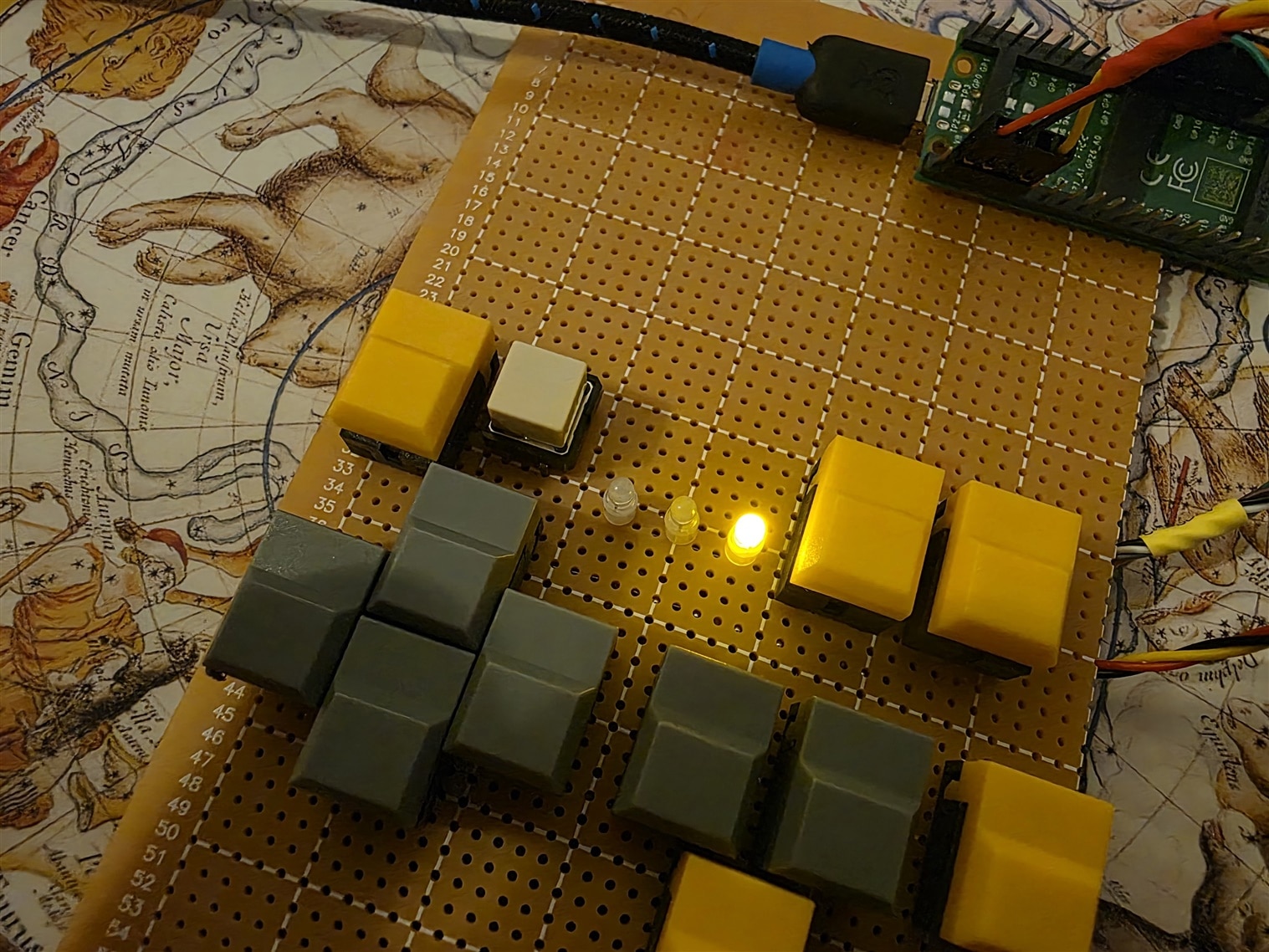
A while back, I attached a 4x4 keypad matrix to a microcontroller, and it took up eight GPIO inputs. This time around, I noticed I had a load of buttons from an unused project, and decided to rethink things, and ended up building a little custom keypad for the Pi Pico (it can be done with any microcontroller). This could be useful for robotics, gaming, all sorts of things really.

It was a quick weekend project, and I used the parts I had.

The usual problem to solve, as hinted above, is that many buttons can consume a lot of GPIO! Various solutions exist, and (in my opinion) one of the best approaches is to use a GPIO expander chip, because it also eliminates the need for repeated keyboard scanning. Many GPIO expanders have an interrupt output, so all the microcontroller needs to do is enable a GPIO interrupt and in the event that there’s a button change, simply read in the inputs using I2C or SPI.

In the absence of a GPIO expander, there are a few reduced-GPIO key scanning options, and one method is to use a parallel-input-to-serial-output shift register, and clock in all the inputs.

I didn’t have such a shift register, but I had the complete opposite; a serial-input-to-parallel output shift register. I decided to use that, and learned along the way that it’s actually not a bad solution if scanning is acceptable (but there’s a way to use the same circuit and partially eliminate scanning too, if desired). The '595 is a useful problem-solver.
image

74HC595 Explained

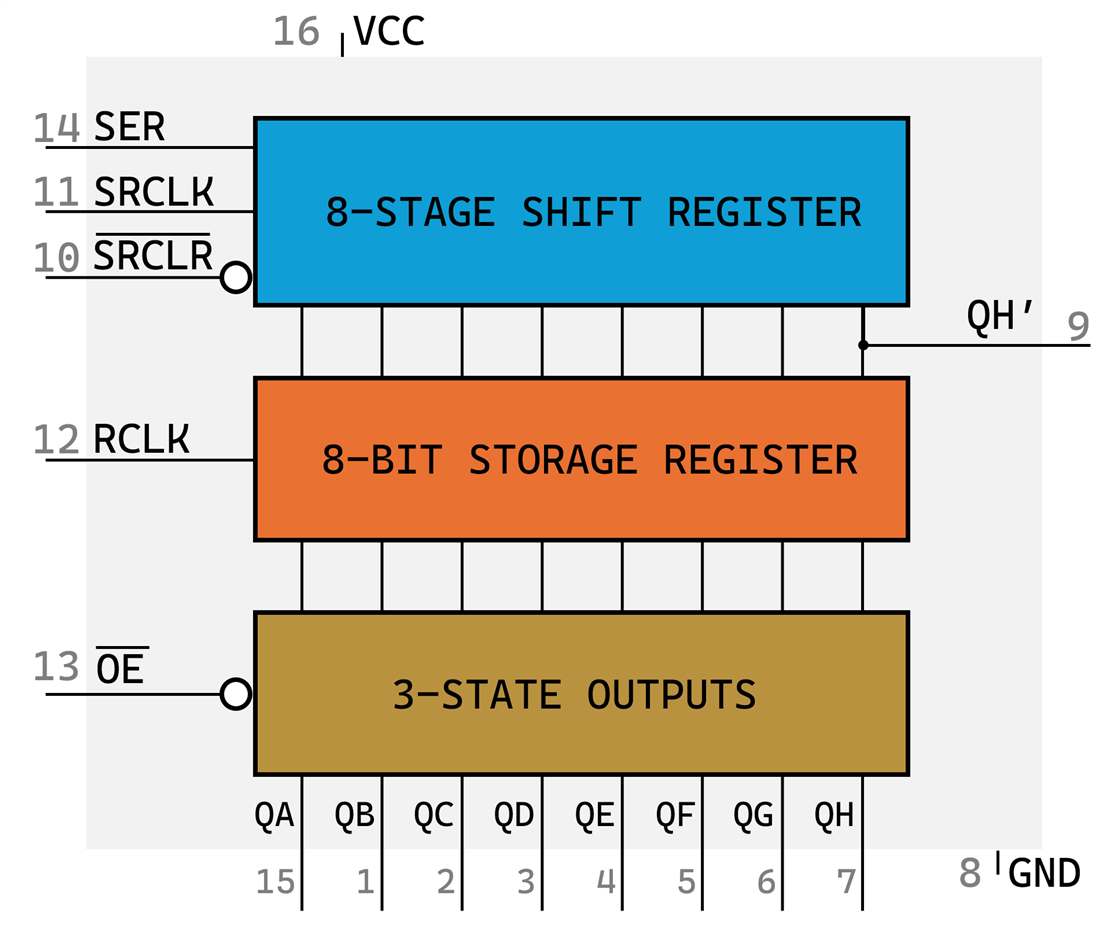
There are three parts to the ‘595. The blue part has three inputs, which are initially set low by the microcontroller. Set pin 10 high to keep the shift register out of reset. The other two inouts are a clock and data pair; set the SER data line, and pulse SRCLK high and low to push the bit into the shift register. On the right side, you could attach another shift register if desired.
image

Once the shift register contains the desired logic levels, the middle portion of the ‘595 can be used, by pulsing RCLK high and low. It will store the data into output registers, and you’ll see that on pins QA to QH, provided pin 13 (output enable) is wired low.

When joining up multiple ‘595s in a chain, usually pins 10, 11 and 12 are all wired together across all chain.

Circuit

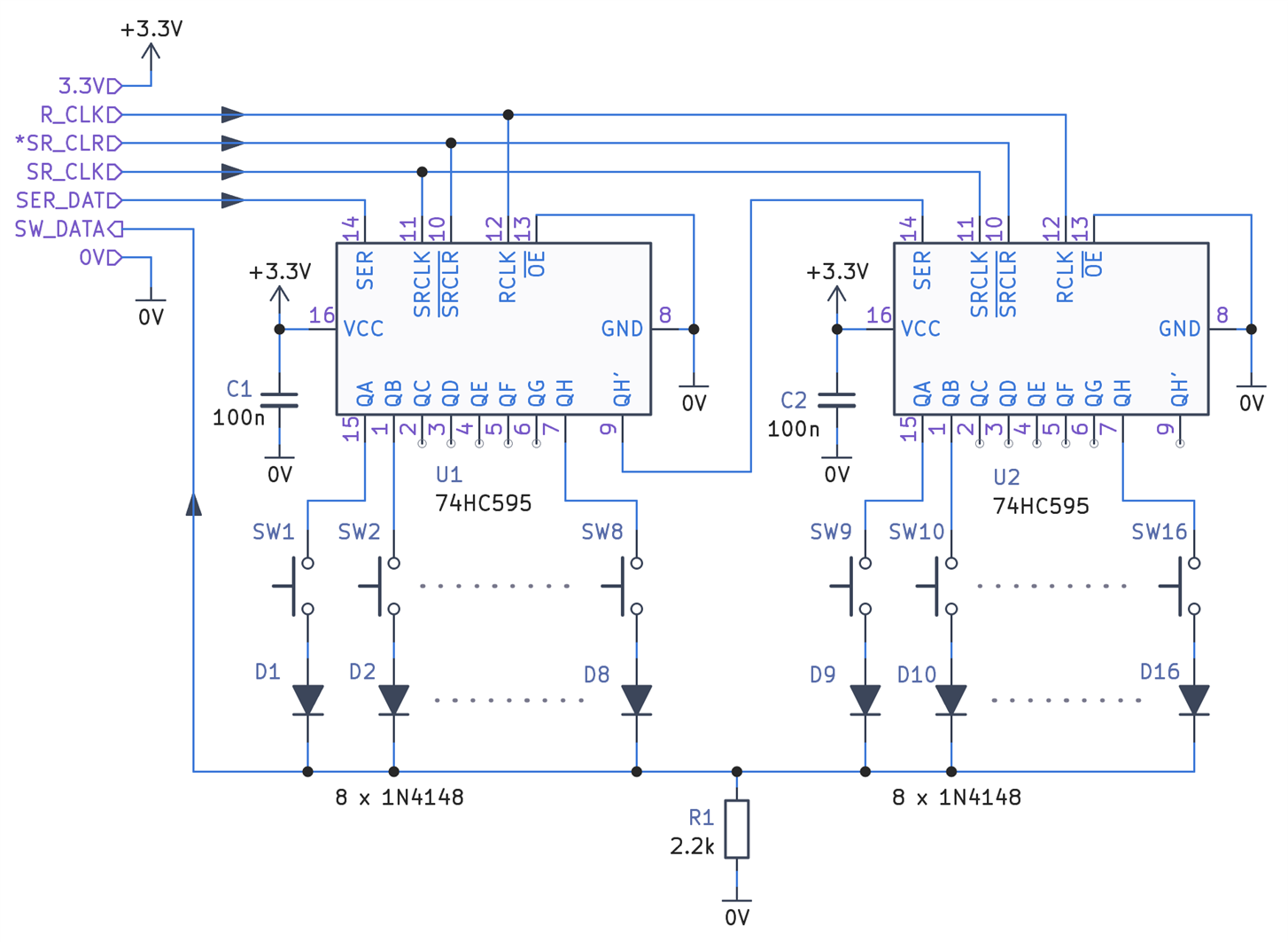
The result of the circuit and code is to apply a voltage to each push-switch, one at a time, and let the microcontroller sense when the common wire, SW_DATA, goes high. That will only occur if a user presses a button at the time when a voltage is being applied to the switch, therefore rapid scanning is needed, which is not always a major issue with microcontrollers, but it depends on the project if this is convenient or not.

To perform the scanning, three microcontroller output signals are needed for the shift register, but I used four to simplify the coding a little bit.

A weakness in this circuit is that there is nothing to pull the SW_DATA signal sharply down, so a low-value resistor (such as 2.2k as I’ve used) is needed, otherwise the settling time is quite long. If you see erroneous simultaneous button-presses whenever a button is pressed, then the cause is most likely too high a resistor value there.
image

Code

I wrote a very short Pi Pico demo program, that scans the buttons every 100 msec (in practise you’d want to set it to a faster rate), and displays via USB UART two 8-bit hexadecimal values, indicating button(s) pressed.

The way the code works, is that it sets the SER_DAT line high, and then pulses the shift register clock once, then sets SER_DAT low for the rest of the entire scan. That single high value will pulse its way through the shift register on 15 more clock pulses. After each clock pulse, the R_CLK signal is pulsed too; that registers the shift register value to the outputs, therefore driving just one switch line high. After a very short delay (couple of hundred nsec) the microcontroller reads the common switch line, and then the cycle repeats for the remainder switches.

LED Bonus

One of the key things about parallel-output registers, is that they can be used as outputs : ) I decided to append another 74HC595 (these ICs cost about $0.10) and use it for up to 8 LEDs.

image

The code (viewable/downloadable here) doesn’t change much. After all the keys have been scanned, the desired LED settings are clocked in, and then padded with enough zero bits to push past the first shift registers.

Because all the 595’s are chained and I’d joined all the RCLK signals together, it is not possible to solely do a key scan without affecting the LED outputs. However, in practical terms, it makes no difference, because the key scan happens within microseconds, thus leaving plenty of time until the next key scan, for the LED output registers to hold their desired levels.

Building It

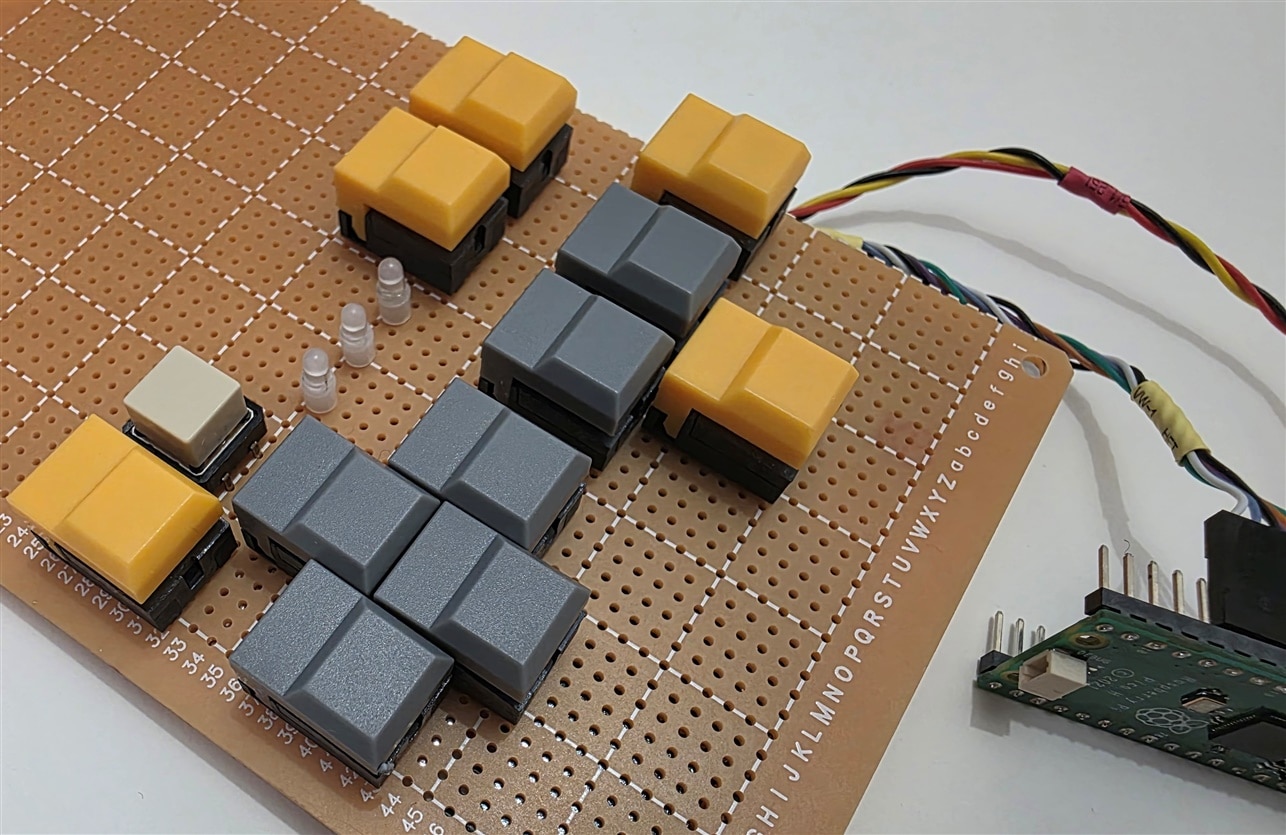
I used PB86 switches that I had purchased a while back, they are really convenient because they fit 0.1” perfboard if a couple of tiny plastic locator pegs are snipped off. The odd button in the photo is there for a purpose (I will use it to map different key layouts, if the user holds down that button and presses another).
image

This project is very easy to build because triple ‘595 boards are available:
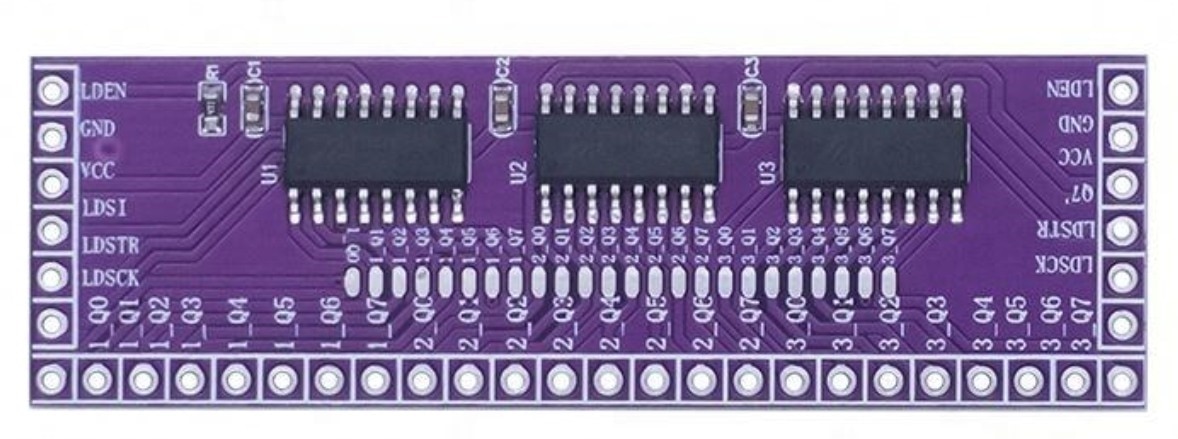
image

(Image source: Google Images)

I didn’t have such a board, so took the longer route. The underside is very messy.
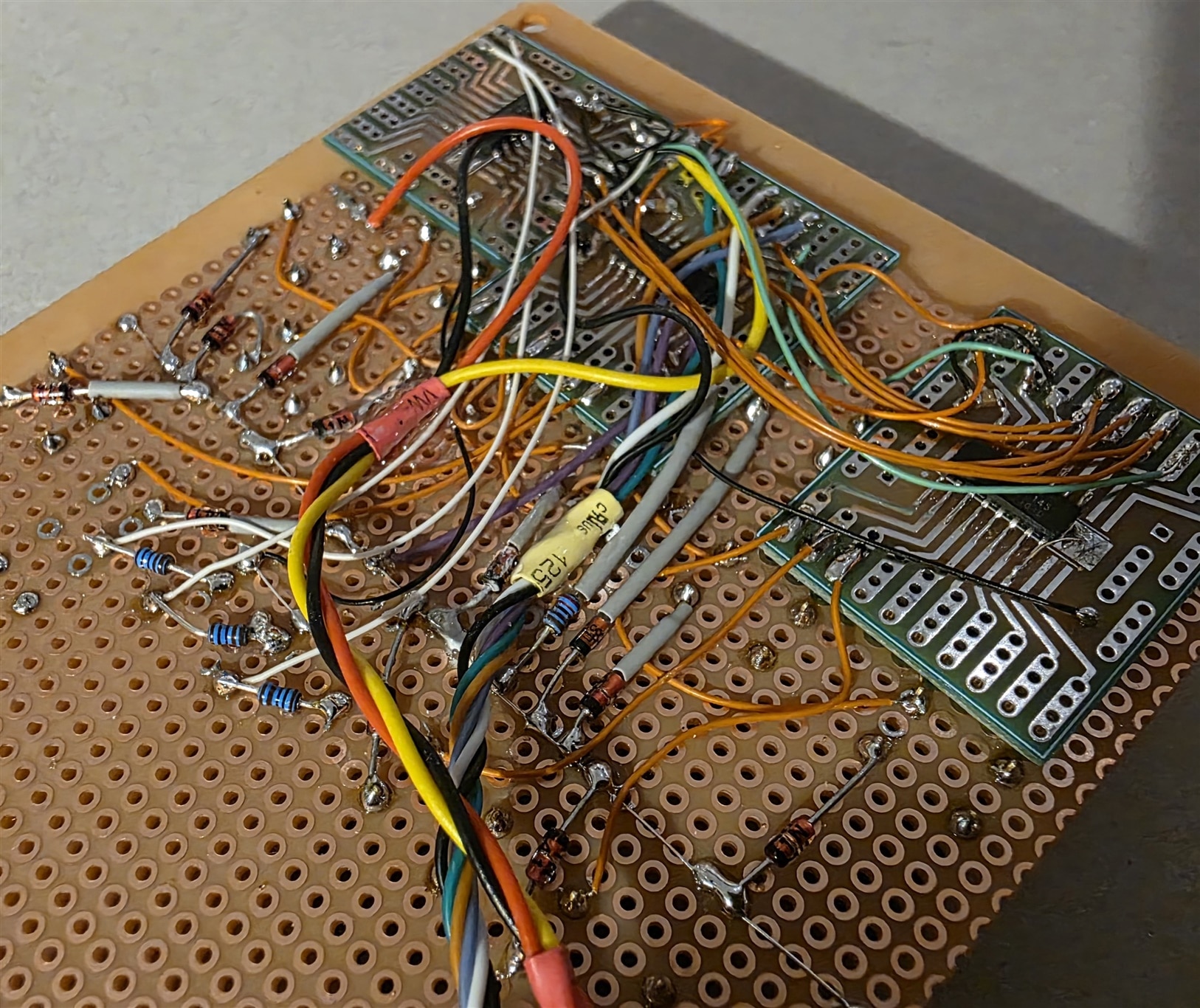
image

Anyway, this was just supposed to be a quick experiment, and it seems to work fine. The code is in the simple_keypad project repository, and it uses the Pi Pico C/C++ SDK, but it's so simple, that it would be easy to port to Arduino or other platforms.

Thanks for reading!

  • Sign in to reply
  • shabaz
    shabaz 1 hour ago in reply to geralds

    Hi Gerald,

    Interesting IC! And it has interrupt and switch debounce built-in.

    Several years ago I tried to reverse-engineer an old Z80 computer, I got to about 80% completion but have not had a chance to get back to it, they used an interesting IC, a peripheral expander with address bus. This is not the official circuit, just my attempt to give the signals plausible names. But it was interesting, it was clear they must be driving Port B (PB0-6) pins low one at a time (these select the row), and PA (columns) gets read. But they were also feeding all of PA into a very wide NAND gate, to somehow figure out if power save mode could be entered or exited, i.e. by seeing if any key was being pressed perhaps, and if a remote device was communicating via UART, since the *RXD line was part of the NAND gate inputs.

    image

    • Cancel
    • Vote Up 0 Vote Down
    • Sign in to reply
    • More
    • Cancel
  • geralds
    geralds 3 hours ago

    Hi Shabaz  shabaz !

    Nice circuit. "The running 1"or ("0")...

    I made such circuit with the keypad encoder MM74C922 (16keys), or xx923 (20keys).

    With this encoder you just need 1 IC. The outputs are 3-state, so you can connect it directly on a data bus.
    With a few logic gates you can expand the keypad matrix. 
    This is a very old device. Maybe you have one in your box.

    • Cancel
    • Vote Up 0 Vote Down
    • Sign in to reply
    • More
    • Cancel
element14 Community

element14 is the first online community specifically for engineers. Connect with your peers and get expert answers to your questions.

  • Members
  • Learn
  • Technologies
  • Challenges & Projects
  • Products
  • Store
  • About Us
  • Feedback & Support
  • FAQs
  • Terms of Use
  • Privacy Policy
  • Legal and Copyright Notices
  • Sitemap
  • Cookies

An Avnet Company © 2026 Premier Farnell Limited. All Rights Reserved.

Premier Farnell Ltd, registered in England and Wales (no 00876412), registered office: Farnell House, Forge Lane, Leeds LS12 2NE.

Follow element14

  • X
  • Facebook
  • linkedin
  • YouTube