element14 Community
element14 Community
    Register Log In
  • Site
  • Search
  • Log In Register
  • Community Hub
    Community Hub
    • What's New on element14
    • Feedback and Support
    • Benefits of Membership
    • Personal Blogs
    • Members Area
    • Achievement Levels
  • Learn
    Learn
    • Ask an Expert
    • eBooks
    • element14 presents
    • Learning Center
    • Tech Spotlight
    • STEM Academy
    • Webinars, Training and Events
    • Learning Groups
  • Technologies
    Technologies
    • 3D Printing
    • FPGA
    • Industrial Automation
    • Internet of Things
    • Power & Energy
    • Sensors
    • Technology Groups
  • Challenges & Projects
    Challenges & Projects
    • Design Challenges
    • element14 presents Projects
    • Project14
    • Arduino Projects
    • Raspberry Pi Projects
    • Project Groups
  • Products
    Products
    • Arduino
    • Avnet & Tria Boards Community
    • Dev Tools
    • Manufacturers
    • Multicomp Pro
    • Product Groups
    • Raspberry Pi
    • RoadTests & Reviews
  • About Us
  • Store
    Store
    • Visit Your Store
    • Choose another store...
      • Europe
      •  Austria (German)
      •  Belgium (Dutch, French)
      •  Bulgaria (Bulgarian)
      •  Czech Republic (Czech)
      •  Denmark (Danish)
      •  Estonia (Estonian)
      •  Finland (Finnish)
      •  France (French)
      •  Germany (German)
      •  Hungary (Hungarian)
      •  Ireland
      •  Israel
      •  Italy (Italian)
      •  Latvia (Latvian)
      •  
      •  Lithuania (Lithuanian)
      •  Netherlands (Dutch)
      •  Norway (Norwegian)
      •  Poland (Polish)
      •  Portugal (Portuguese)
      •  Romania (Romanian)
      •  Russia (Russian)
      •  Slovakia (Slovak)
      •  Slovenia (Slovenian)
      •  Spain (Spanish)
      •  Sweden (Swedish)
      •  Switzerland(German, French)
      •  Turkey (Turkish)
      •  United Kingdom
      • Asia Pacific
      •  Australia
      •  China
      •  Hong Kong
      •  India
      • Japan
      •  Korea (Korean)
      •  Malaysia
      •  New Zealand
      •  Philippines
      •  Singapore
      •  Taiwan
      •  Thailand (Thai)
      • Vietnam
      • Americas
      •  Brazil (Portuguese)
      •  Canada
      •  Mexico (Spanish)
      •  United States
      Can't find the country/region you're looking for? Visit our export site or find a local distributor.
  • Translate
  • Profile
  • Settings
Raspberry Pi Projects
  • Products
  • Raspberry Pi
  • Raspberry Pi Projects
  • More
  • Cancel
Raspberry Pi Projects
Blog Building a Render Farm with a Bitscope Blade Quatro - Setup of the controller
  • Blog
  • Documents
  • Events
  • Polls
  • Members
  • Mentions
  • Sub-Groups
  • Tags
  • More
  • Cancel
  • New
Join Raspberry Pi Projects to participate - click to join for free!
  • Share
  • More
  • Cancel
Group Actions
  • Group RSS
  • More
  • Cancel
Engagement
  • Author Author: Workshopshed
  • Date Created: 22 Jan 2017 12:09 AM Date Created
  • Views 3032 views
  • Likes 6 likes
  • Comments 13 comments
  • cluster
  • rpiexpert
  • raspberry_pi_projects
  • blender
Related
Recommended

Building a Render Farm with a Bitscope Blade Quatro - Setup of the controller

Workshopshed
Workshopshed
22 Jan 2017

Setup of the controller node


SSH

The latest raspbian disables SSH by default so I turned that on and changed the hostname and password.


External disk

As mentioned about this is a USB disk, so it was simply a case of plugging it in and it being detected. I had a problem detecting the old IDE disk so I swapped in a SATA disk I had spare.


I'm not much of a command line guru so I installed gparted a graphical disk utility that I'd used before for repairing problem disks. I formatted the disk with ext4 (as it won't be accessed outside the cluster) and gave it a suitable name. On reboot it was mounted automatically.


I did have to resort to a command prompt to make a new directory and grant permissions to all


sudo mkdir /mnt/external/images/
sudo chmod 777 /mnt/external/images


Sharing software

Samba Server

The software for sharing files on a LAN is called Samba. The setup is quite detailed so I followed the steps in Peter Legierski's blog post below. In summary the steps are, install, set password, configure samba and configure the firewall (iptables).


There are a few differences I needed:


  • the line "security = user" did not exist so had to be added
  • the path in the smb.conf file was changed to  /mnt/external/images
  • restarting the service requires service smbd restart not samba as in Pete's notes
  • iptables did not need configuring it defaults to all access


Samba Client

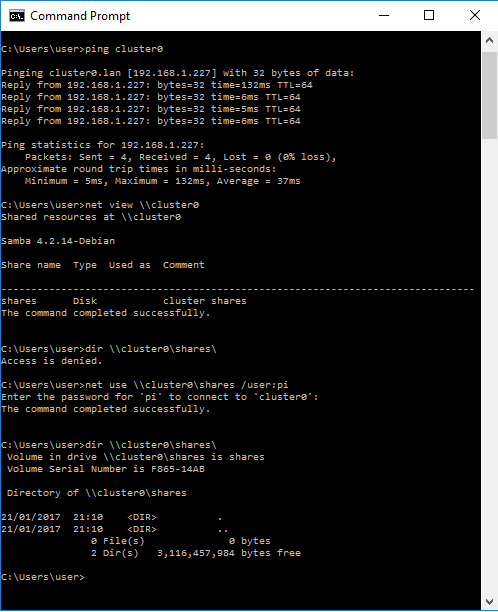
I checked that I could connect from my windows desktop.
image

I also configured the Pi to automatically mount the network share. The first step is to make a backup of the configuration.


sudo cp /etc/fstab /etc/fstab.bak


Add a mount point

sudo mkdir /mnt/network


Then edit the configuration file to contain the details of what to mount

sudo nano /etc/fstab


I added the following to connect my share to my mount point and to use an external file for credentials

//cluster0/shares /mnt/network cifs credentials=/etc/samba/user,noexec 0 0


Next create a file with the user account

sudo nano /etc/samba/user

Containing the username (pi) and password from when you setup the Samba share

username=pi
password=samba_user_password


And finally test it works with

sudo mount -a


I created a file in my folder and checked it could be read over the network with

ls /mnt/network

Network

The ethernet router I was using was configured to give out the same IP addresses as my wifi so I went with Niall McCarroll's suggestion of using static IP addresses. However, I found his suggestion of using /etc/network/interfaces does not work. You need to edit /etc/dhcpcd.conf


interface eth0
static ip_address=10.1.1.200/24
static domain_name_servers=192.168.1.254 8.8.8.8 4.2.2.1
metric 400


For my controller node, I needed to change the metric of the LAN connection so that it was higher than the default for the Wifi. Otherwise attempts to reach the internet were routed to the internal router. I also needed to add the DNS entry so that commands such as apt-get still work.


My /etc/hosts file was

10.1.1.200   cluster0
10.1.1.201   cluster1
10.1.1.202   cluster2
10.1.1.203   cluster3


Finally I tested the configuration with a reboot and

ping 10.1.1.200


What's next

The network and disk has taken me a bit longer than anticipated so there will be another part where I setup the nodes. This will likely follow the guidance of Niall McCarroll. I'll also need to get the nodes rendering from the shared drive.


Reference

GParted -- A free application for graphically managing disk device partitions

Mount an external hard disk on the Raspberry Pi

Building a Raspberry Pi mini cluster - part 1

Raspberry Pi [Part 2]: External drives, Samba and SFTP | self.li - blog by Peter Legierski

Cannot restart samba, samba.service is masked - Ask Ubuntu

Samba Guide

Samba Client Guide

PiHut - connecting to network storage at boot

Internal and External IP Addresses

  • Sign in to reply

Top Comments

  • shabaz
    shabaz over 9 years ago +1
    Hi Andy, This is a nice reference to setting up a system actually, even for those without the blade hardware. I always need to search around and double-check stuff like how to do the mount, I can never…
  • Workshopshed
    Workshopshed over 9 years ago in reply to Jan Cumps +1
    Hi Jan, it would seem not, the samba client code does not seem to support that the recommendation is to lock that file to root only access. But then it might be still visible if you had physical access…
  • Jan Cumps
    Jan Cumps over 9 years ago in reply to Workshopshed +1
    I've seen instructions where they say to make the file read/only (edit: here https://help.ubuntu.com/community/Samba/SambaClientGuide ) . What if we also revoke the read rights, except for root and the…
  • Jan Cumps
    Jan Cumps over 9 years ago in reply to Workshopshed

    I've seen instructions where they say to make the file read/only (edit: here https://help.ubuntu.com/community/Samba/SambaClientGuide) . What if we also revoke the read rights, except for root and the service owner)?

    • Cancel
    • Vote Up +1 Vote Down
    • Sign in to reply
    • More
    • Cancel
  • Workshopshed
    Workshopshed over 9 years ago in reply to Jan Cumps

    Hi Jan, it would seem not, the samba client code does not seem to support that the recommendation is to lock that file to root only access. But then it might be still visible if you had physical access to the disk or a backup.


    Perhaps an alternative would be to use SFTP rather than SAMBA. I'm going to use Niall McCarroll's idea of shared keys on each of the nodes so that can be done without passwords.

    How to: Mount a SFTP Folder (SSH + FTP) on Ubuntu Linux using SSHFS & Fuse « damontimm.com

    • Cancel
    • Vote Up +1 Vote Down
    • Sign in to reply
    • More
    • Cancel
  • Workshopshed
    Workshopshed over 9 years ago in reply to DAB

    Quite a lot of NAS drives are running Linux under the surface so perhaps you could go for that approach?


    How to build your own Raspberry Pi NAS | TechRadar

    • Cancel
    • Vote Up 0 Vote Down
    • Sign in to reply
    • More
    • Cancel
  • Workshopshed
    Workshopshed over 9 years ago in reply to DAB

    Sure you can DAB. If you do the SAMBA setup as mentioned above then you can map the PI as a network drive.

    Raspberry Pi [Part 2]: External drives, Samba and SFTP | self.li - blog by Peter Legierski


    If you want better performance then perhaps setting it up as an ISCSI device might work

    Answers found to questions forgotten: A crazy idea I had for an iSCSI Target based around a Raspberry Pi


    Or you could follow the steps from "Samba Client" on the Pi side and connect to a shared drive on the Windows Network.

    • Cancel
    • Vote Up 0 Vote Down
    • Sign in to reply
    • More
    • Cancel
  • DAB
    DAB over 9 years ago

    Nice post Andy.


    I am a complete noob with Linux so I have a question.


    Can I connect the RPi to my Windows network and access the hard disk on my Windows machine?


    I want to send images and data from the RPI to the Windows PC.


    DAB

    • Cancel
    • Vote Up 0 Vote Down
    • Sign in to reply
    • More
    • Cancel
<>
element14 Community

element14 is the first online community specifically for engineers. Connect with your peers and get expert answers to your questions.

  • Members
  • Learn
  • Technologies
  • Challenges & Projects
  • Products
  • Store
  • About Us
  • Feedback & Support
  • FAQs
  • Terms of Use
  • Privacy Policy
  • Legal and Copyright Notices
  • Sitemap
  • Cookies

An Avnet Company © 2026 Premier Farnell Limited. All Rights Reserved.

Premier Farnell Ltd, registered in England and Wales (no 00876412), registered office: Farnell House, Forge Lane, Leeds LS12 2NE.

ICP 备案号 10220084.

Follow element14

  • X
  • Facebook
  • linkedin
  • YouTube