element14 Community
element14 Community
    Register Log In
  • Site
  • Search
  • Log In Register
  • Community Hub
    Community Hub
    • What's New on element14
    • Feedback and Support
    • Benefits of Membership
    • Personal Blogs
    • Members Area
    • Achievement Levels
  • Learn
    Learn
    • Ask an Expert
    • eBooks
    • element14 presents
    • Learning Center
    • Tech Spotlight
    • STEM Academy
    • Webinars, Training and Events
    • Learning Groups
  • Technologies
    Technologies
    • 3D Printing
    • FPGA
    • Industrial Automation
    • Internet of Things
    • Power & Energy
    • Sensors
    • Technology Groups
  • Challenges & Projects
    Challenges & Projects
    • Design Challenges
    • element14 presents Projects
    • Project14
    • Arduino Projects
    • Raspberry Pi Projects
    • Project Groups
  • Products
    Products
    • Arduino
    • Avnet & Tria Boards Community
    • Dev Tools
    • Manufacturers
    • Multicomp Pro
    • Product Groups
    • Raspberry Pi
    • RoadTests & Reviews
  • About Us
  • Store
    Store
    • Visit Your Store
    • Choose another store...
      • Europe
      •  Austria (German)
      •  Belgium (Dutch, French)
      •  Bulgaria (Bulgarian)
      •  Czech Republic (Czech)
      •  Denmark (Danish)
      •  Estonia (Estonian)
      •  Finland (Finnish)
      •  France (French)
      •  Germany (German)
      •  Hungary (Hungarian)
      •  Ireland
      •  Israel
      •  Italy (Italian)
      •  Latvia (Latvian)
      •  
      •  Lithuania (Lithuanian)
      •  Netherlands (Dutch)
      •  Norway (Norwegian)
      •  Poland (Polish)
      •  Portugal (Portuguese)
      •  Romania (Romanian)
      •  Russia (Russian)
      •  Slovakia (Slovak)
      •  Slovenia (Slovenian)
      •  Spain (Spanish)
      •  Sweden (Swedish)
      •  Switzerland(German, French)
      •  Turkey (Turkish)
      •  United Kingdom
      • Asia Pacific
      •  Australia
      •  China
      •  Hong Kong
      •  India
      • Japan
      •  Korea (Korean)
      •  Malaysia
      •  New Zealand
      •  Philippines
      •  Singapore
      •  Taiwan
      •  Thailand (Thai)
      • Vietnam
      • Americas
      •  Brazil (Portuguese)
      •  Canada
      •  Mexico (Spanish)
      •  United States
      Can't find the country/region you're looking for? Visit our export site or find a local distributor.
  • Translate
  • Profile
  • Settings
Raspberry Pi Projects
  • Products
  • Raspberry Pi
  • Raspberry Pi Projects
  • More
  • Cancel
Raspberry Pi Projects
Blog Calculating Pi (3.14) on the Raspberry Pi 2-- How Fast Is It?
  • Blog
  • Documents
  • Events
  • Polls
  • Members
  • Mentions
  • Sub-Groups
  • Tags
  • More
  • Cancel
  • New
Join Raspberry Pi Projects to participate - click to join for free!
  • Share
  • More
  • Cancel
Group Actions
  • Group RSS
  • More
  • Cancel
Engagement
  • Author Author: Catwell
  • Date Created: 10 Mar 2015 9:21 PM Date Created
  • Views 5352 views
  • Likes 2 likes
  • Comments 30 comments
  • raspberry_pi_benchmarks
  • sbc
  • embedded
  • cabeatwell
  • raspberry_pi_2
  • raspberrypi2
  • raspberry_pi_projects
  • benchmark
  • pi2
Related
Recommended

Calculating Pi (3.14) on the Raspberry Pi 2-- How Fast Is It?

Catwell
Catwell
10 Mar 2015

image

This is the Raspberry Pi 2, which I used to calculate pi against other Pis. (Image via Raspberry Pi)


I received a Raspberry Pi 2, and immediately wanted to see how much of an improvement it was. Games seem smoother, especially first person shooters. Arcade emulation is buttery as well, however perceived speed wasn’t scientific enough for me so I decided it would be apt to calculate Pi, on the Pi.


To start with, I installed the Command Line Calculator, called BC


Easy to install… type at the command prompt:  sudo apt-get install bc


To calculate pi, I used the command line formula:  time echo "scale=2015; 4*a(1)" | bc -l


Scale is the number of decimal places to calculate. The a() portion is the Arc Tangent function. Obviously, the bc part is the bc utility.


The results for the three Pi models (original B, B+, and Pi 2), at stock clock frequency, were as follows (results in seconds):


Model B

Real  0m24.996s

User 0m24.660s

Sys 0m0.260s


Model B+

Real  0m24.940s

User 0m24.620s

Sys 0m0.250s


Pi 2

Real  0m15.575s

User 0m15.470s

Sys 0m0.090s


The model B and B+ results were the same, which isn’t surprising since the boards are almost identical. Unsurprisingly, added RAM has no influence on this simple calculation. Also, I ran the calculation several times and found the results varied, which was surprising.


The Pi2 had a 62% improvement in time over its predecessors. As it turns out, that the bc calculation was a single thread operation, and only one core is used, however the Pi2 beat it predecessors by 9.085 seconds with 3 cores tied behind its back.


I could extrapolate that if the load was shared across the cores, the Pi2 could calculate Pi in 3.8938 seconds. Which is about 155% improvement over the original Pi models. However, that is just a hypothesis.


To discover more about taxing all the cores in a benchmark, I discovered the following benchmark results.


Looking at the MP-MFLOPS


Using Roy Longbottom’s Android multithreading benchmark MP-MFLOPS, it’s clear that the Pi2 is noticeably faster, especially when it’s overclocked to the maximum @ 1,000MHz. Of course, this is with using all 4 cores of the ARM Cortex-A7 running 8 threads (2 Hyperthreads per-core) running 2 operations per-word and 32 respectively. The benchmark for the old RPi (single-core running @ 700MHz) achieved 43 MFLOPS @ 12.8 loops running 2 Ops/Word and 191 MFLOPS @ 12.8 loops running 32 Ops/Word respectively.


You will no doubt notice the difference in speed with the Pi2 and the use of all 4 of its cores utilizing 8 threads (higher numbers are better). The Pi2 clocked @ 900MHz came in with 494 MFLOPS @ 12.8 loops running 2 Ops/Word and 1581 @ 12.8 loops running 32 Ops/Word respectively. Crank the processor up to 1000MHz ups those numbers to 543 and 1588 @12.8 loops, making it considerably faster over the original Pi.


On 2 Ops/Word, the Pi2 (all 4 cores) is 1148% faster than the original. At 32 Ops/Word, the Pi2 (all cores) was approximately 83% faster and the original Pi B.


imageimage

Benchmarking the MFLOPS (via Roylongbottom)


MP-MFLOPS isn’t the only benchmarking tool that can be had for the Pi2 platform as Raspberry Pi blog user Dan Robinson benched the new board against the B+ using the SunSpider JavaScript tool to clock his speed. The app suite from Webkit runs JavaScript to measure real-world performance such as encryption and text manipulation, making it ideal for measuring the performance for web browsers as well as the Pi2. After benchmarking his board using SunSpider, Dan’s results were interesting to say the least with 4452.1ms for the Pi2 and a shocking 23692.7ms for the B+ (lower numbers are better). To put that into perspective, another blog user Martin O’Hanlon makes it easy to understand those differences sating ‘Minecraft server on a Pi1 = adequate, Minecraft server on a Pi2 = awesome’.
 

image

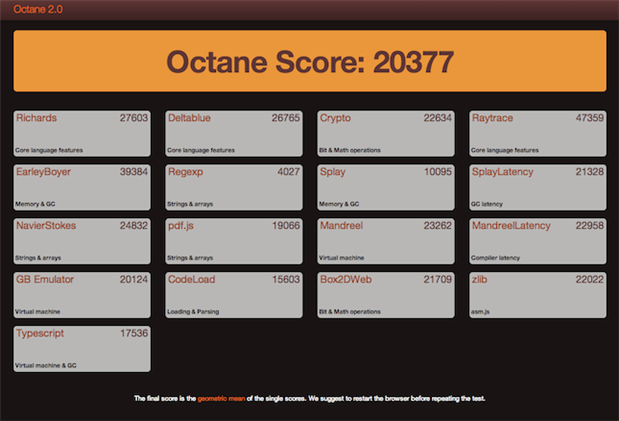
Google’s Octane 2.0 is just one of the few tools that users can use to benchmark the Pi2.


Another benchmark I found was was about video transcoding, done by Andrew Oakley on Raspberrypi.org. His results:

Transcoding Skinny Puppy’s “Pro-Test”, 360×270 Quicktime .MOV, 256kbps MP3, to same resolution MP4 at CRF 26, 96kbps, using avconv:

Raspberry Pi 1 (1x 700MHz ARMv6, 512MB RAM, Raspbian Wheezy): Average 1 frame per second. 18 mins to complete.

Raspberry Pi 2 (4x 900MHz ARMv7, 1GB RAM, Raspbian Wheezy): 28 FPS, 4 min 9 secs to complete –

Intel Celeron dual-core (2x 2.5GHz 686, 2GB RAM, Ubuntu Precise): 114 FPS, 1 min 3 secs


You can see the Pi 2 is getting results close to desktop processors. There are plenty of other benchmark tools on the internet that can be used to measure the performance of the Pi2, including Nbench, Google Octane and Unixbench as well as a host of others. After looking at some of those it becomes quite clear that the Raspberry Pi 2 is more of a desktop PC than a mere development board, which is certainly the case when it comes to the performance of the original Pi and even the B+.


C

See more news at:

http://twitter.com/Cabe_Atwell

  • Sign in to reply

Top Comments

  • gulfboy
    gulfboy over 10 years ago +1
    I tried running the Octane 2.0 test on my Pi 2 and got much lower results (example: Octane Score = 333 vs 20377 from your test) Which browser did you use?
  • Former Member
    Former Member over 10 years ago in reply to clem57 +1
    Overclocking by 11% CPU and RAM gave me a 10%+ improvement in user time from 72.58s to ~65s. I cannot get a further improvement in going from Python 2 to Python 3. Overclocked additions to /boot/config…
  • Former Member
    Former Member over 10 years ago in reply to clem57

    Overclocking by 11% CPU and RAM gave me a 10%+ improvement in user time from 72.58s to ~65s.  I cannot get a further improvement in going from Python 2 to Python 3.


    Overclocked additions to /boot/config.txt:

    arm_freq=1000

    sdram_freq=500

    core_freq=500

    over_voltage=6

    temp_limit=75

    boot_delay=0

    disable_splash=1   

    gpu_mem=256


    main.py:

    from pilib import *

    dscale(10010)

    pi = piagm2()


    python --version

    Python 2.7.3


    time python main.py

    real    1m5.046s

    user    1m4.990s

    sys    0m0.020s


    python3 --version

    Python 3.2.3


    time python3 main.py

    real    1m5.462s

    user    1m5.090s

    sys    0m0.060s

    • Cancel
    • Vote Up +1 Vote Down
    • Sign in to reply
    • More
    • Cancel
  • Former Member
    Former Member over 10 years ago in reply to clem57

    Ooooooooooh ... a multi processor beast.

    • Cancel
    • Vote Up 0 Vote Down
    • Sign in to reply
    • More
    • Cancel
  • clem57
    clem57 over 10 years ago in reply to Former Member

    real    1m12.707s

    user    1m12.580s

    sys    0m0.080s


    Okay that works, but tried to see returned value +p.

    Clem

    • Cancel
    • Vote Up 0 Vote Down
    • Sign in to reply
    • More
    • Cancel
  • Former Member
    Former Member over 10 years ago in reply to clem57

    hi Clem,

    You can view or download the source at this link:

    https://code.google.com/p/pythondecimallibrary/source/browse/


    You can download the sources  pdeclib.py  and  pilib.py  as either zip or tar.gz.  Or you can just view the source right there on-line (highlight the whole file) and copy it to one of your own files.


    To use them put the files in your python path. This can be a working directory too, that you cd into before you start python3.  They will run in python2, but they will run MUCH faster in python3 because of the new C Decimal module in python3.


    Once you have the REPL running, import the files as usual... if you import pilib it will in turn import pdeclib for you:


    from pilib import *


    ... then, set your dscale with:


    dscale(10010)


    ... then run the PI algorithm with:


    piagm2()


    That's all there is to it...   pdeclib.py contains the scientific functions library I wrote for the Decimal module.


    pilib.py contains a set of PI algorithms that you might find interesting in themselves; various methods used throughout history by folks like Machin, Euler, and others.


    Cheers,

    marcus

    image

    • Cancel
    • Vote Up 0 Vote Down
    • Sign in to reply
    • More
    • Cancel
  • clem57
    clem57 over 10 years ago in reply to Former Member

    real    0m21.066s

    user    2m3.806s

    sys    0m1.456s

    Linux Ubuntu 8 threads I7 P55 50 million digits.

    Clem


    PS more stats:


    Total Computation Time:         19.408 seconds  ( 0.005 hours )

    Total Time (with output + verify):  20.985 seconds  ( 0.006 hours )


    CPU Utilization:    621.857 %

    Multi-core Efficiency:  77.7321 %


    Last Digits:  Pi

    4127897300 0153683630 8346732220 0943329365 1632962502  :  49,999,950

    5130045796 0464561703 2424263071 4554183801 7945652654  :  50,000,000


    Version:        0.6.8.9460 (Linux - x64 SSE4.1 ~ Ushio)Processor(s):   Intel(R) Core(TM) i7 CPU 860 @ 2.80GHzLogical Cores:  8Physical Memory:3,343,609,856 (3.11 GiB)CPU Frequency:  3,044,327,904 Hz  (frequency may be inaccurate)


    Result File: Validation - Pi - 50,000,000.txt


    Benchmark Successful. The digits appear to be OK.

    • Cancel
    • Vote Up 0 Vote Down
    • Sign in to reply
    • More
    • Cancel
>
element14 Community

element14 is the first online community specifically for engineers. Connect with your peers and get expert answers to your questions.

  • Members
  • Learn
  • Technologies
  • Challenges & Projects
  • Products
  • Store
  • About Us
  • Feedback & Support
  • FAQs
  • Terms of Use
  • Privacy Policy
  • Legal and Copyright Notices
  • Sitemap
  • Cookies

An Avnet Company © 2025 Premier Farnell Limited. All Rights Reserved.

Premier Farnell Ltd, registered in England and Wales (no 00876412), registered office: Farnell House, Forge Lane, Leeds LS12 2NE.

ICP 备案号 10220084.

Follow element14

  • X
  • Facebook
  • linkedin
  • YouTube