element14 Community
element14 Community
    Register Log In
  • Site
  • Search
  • Log In Register
  • Community Hub
    Community Hub
    • What's New on element14
    • Feedback and Support
    • Benefits of Membership
    • Personal Blogs
    • Members Area
    • Achievement Levels
  • Learn
    Learn
    • Ask an Expert
    • eBooks
    • element14 presents
    • Learning Center
    • Tech Spotlight
    • STEM Academy
    • Webinars, Training and Events
    • Learning Groups
  • Technologies
    Technologies
    • 3D Printing
    • FPGA
    • Industrial Automation
    • Internet of Things
    • Power & Energy
    • Sensors
    • Technology Groups
  • Challenges & Projects
    Challenges & Projects
    • Design Challenges
    • element14 presents Projects
    • Project14
    • Arduino Projects
    • Raspberry Pi Projects
    • Project Groups
  • Products
    Products
    • Arduino
    • Avnet & Tria Boards Community
    • Dev Tools
    • Manufacturers
    • Multicomp Pro
    • Product Groups
    • Raspberry Pi
    • RoadTests & Reviews
  • About Us
    About the element14 Community
  • Store
    Store
    • Visit Your Store
    • Choose another store...
      • Europe
      •  Austria (German)
      •  Belgium (Dutch, French)
      •  Bulgaria (Bulgarian)
      •  Czech Republic (Czech)
      •  Denmark (Danish)
      •  Estonia (Estonian)
      •  Finland (Finnish)
      •  France (French)
      •  Germany (German)
      •  Hungary (Hungarian)
      •  Ireland
      •  Israel
      •  Italy (Italian)
      •  Latvia (Latvian)
      •  
      •  Lithuania (Lithuanian)
      •  Netherlands (Dutch)
      •  Norway (Norwegian)
      •  Poland (Polish)
      •  Portugal (Portuguese)
      •  Romania (Romanian)
      •  Russia (Russian)
      •  Slovakia (Slovak)
      •  Slovenia (Slovenian)
      •  Spain (Spanish)
      •  Sweden (Swedish)
      •  Switzerland(German, French)
      •  Turkey (Turkish)
      •  United Kingdom
      • Asia Pacific
      •  Australia
      •  China
      •  Hong Kong
      •  India
      •  Japan
      •  Korea (Korean)
      •  Malaysia
      •  New Zealand
      •  Philippines
      •  Singapore
      •  Taiwan
      •  Thailand (Thai)
      •  Vietnam
      • Americas
      •  Brazil (Portuguese)
      •  Canada
      •  Mexico (Spanish)
      •  United States
      Can't find the country/region you're looking for? Visit our export site or find a local distributor.
  • Translate
  • Profile
  • Settings
Raspberry Pi Projects
  • Products
  • Raspberry Pi
  • Raspberry Pi Projects
  • More
  • Cancel
Raspberry Pi Projects
Blog Solving Error: Unknown flash device: An OpenOCD Upgrade for Pi Pico / Xiao and other RP2040 Boards
  • Blog
  • Documents
  • Events
  • Polls
  • Members
  • Mentions
  • Sub-Groups
  • Tags
  • More
  • Cancel
  • New
Join Raspberry Pi Projects to participate - click to join for free!
  • Share
  • More
  • Cancel
Group Actions
  • Group RSS
  • More
  • Cancel
Engagement
  • Author Author: shabaz
  • Date Created: 19 May 2024 12:09 AM Date Created
  • Views 5659 views
  • Likes 9 likes
  • Comments 16 comments
  • pico-euro
  • openocd
  • rpiintermediate
  • pico
  • Xiao
  • xiao rp2040
  • rp2040
  • pico-eurocard
  • raspberry_pi_projects
  • picoprobe
  • pi pico
Related
Recommended

Solving Error: Unknown flash device: An OpenOCD Upgrade for Pi Pico / Xiao and other RP2040 Boards

shabaz
shabaz
19 May 2024

Table of Contents

  • Introduction
  • What is the Problem?
  • What is the Long Solution
    • Flash Chip Identifiers
  • Short Solution
  • Summary

Introduction

There exists software called OpenOCD that plays a fairly crucial role in the software development process. In brief, the software (which runs on a PC) connects to a microcontroller for Flash uploading and debugging purposes.

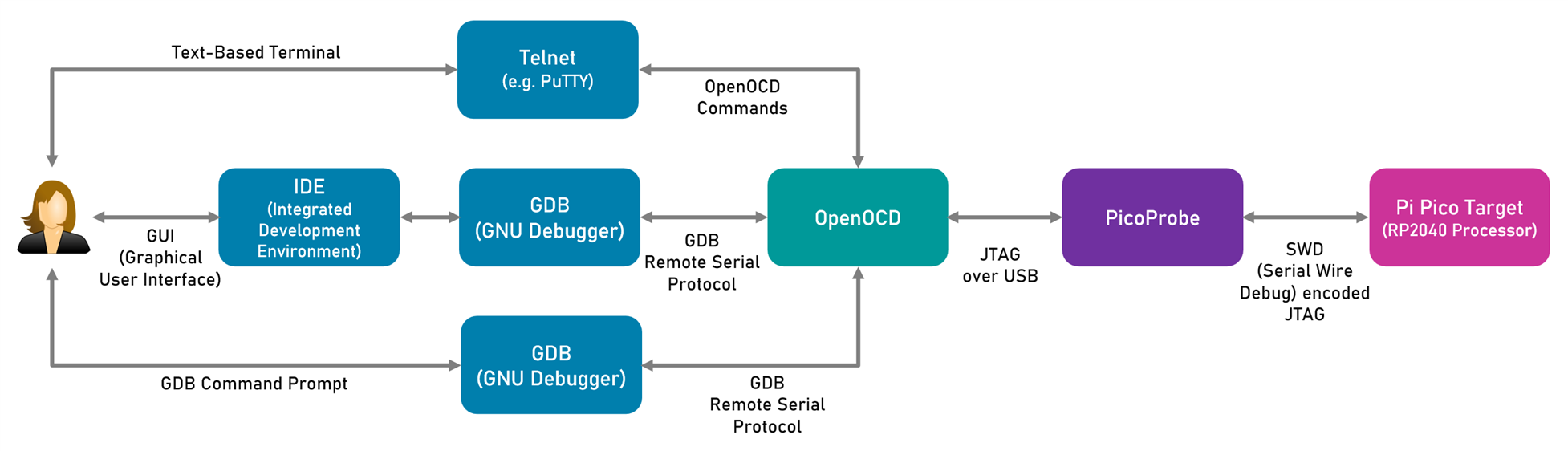
The purpose of this blog post is not to describe OpenOCD usage, the diagram below shows where OpenOCD is inserted as part of the overall programming and debug solution (if you're not using such a solution with your Pi Pico or other RP2040 microcontroller based board, it's highly recommended to explore it, because it allows for rapid programming and testing!).

This blog post is simply for one purpose: to explain how to resolve a problem when using OpenOCD with Pi Pico-like boards such as the (excellent) Xiao RP2040 .
image

What is the Problem?

The RP2040 microcontroller, like many other microcontrollers, uses an interface called JTAG for programming and debugging. There are two pins, labelled SWDIO and SWCLK (they might be abbreviated to SWD and SWC) which are used to transport JTAG. The interface is called Serial Wire Debug (SWD). On the Pi Pico board, you can see the interface at the opposite far end to the USB connector (some versions of the Pi Pico have the SWD interface pins elsewhere).

If you look in the diagram above, there are two Pi Pico boards. The purple one acts as a translator between USB and Serial Wire Debug. The pink one is the board that is being programmed or debugged.

That all works fine for Pi Pico boards. However, Jan Cumps  discovered an interesting problem; some RP2040 boards cannot work in the pink location. OpenOCD throws an error:

Info : accepting 'gdb' connection on tcp/50000
Error: Unknown flash device (ID 0x00156085)
Error: auto_probe failed

The problem is, that the Xiao RP2040 happens to use a different Flash chip compared to the original Pi Pico board. The Xiao board is not unique, there will be plenty of other RP2040 boards, all with different Flash chips. The ‘official’ OpenOCD release from raspberrypi.com is actually quite ancient; they have not bothered to keep it up-to-date, it doesn’t affect their Pi Pico board, but it will affect every piece of hardware based on the RP2040 if it happens to use a Flash chip which isn’t encoded inside the OpenOCD software.

What is the Long Solution

There may be a possibility to skip the check with OpenOCD, but that’s not as good as simply updating OpenOCD to support the Flash chip. That’s what we did!

The old Pi Pico datasheet used to explain how to build new OpenOCD releases, but it’s no longer present in the most recent datasheet versions.

In brief, the steps for Windows users are:

(a) Install MSYS2 on your PC

(b) Open up an MSYS2 MINGW64 terminal

(c) Type:

pacman -Syu

(d) Close the terminal (it may have closed anyway) and re-open it and type:

pacman -Su

(e) Close the terminal, and then re-open it, but this time as Administrator

(f) Type the following:

pacman -S mingw-w64-x86_64-toolchain git make libtool pkg-config autoconf automake texinfo mingw-w64-x86_64-libusb

(g) Close the terminal, and then re-open (not as Administrator)

(h) Create a folder, and then inside that, type:

git clone https://github.com/raspberrypi/openocd.git --branch picoprobe --depth=1

(i) Go to the openocd/src/flash/nor folder

(j) Edit the spi.c file and add the Flash chip identifier to it. This is discussed further below!

(k) Go back to the openocd folder, and then type:

./bootstrap
./configure --enable-picoprobe --disable-werror
make -j4

After all that, openocd will be built.

Flash Chip Identifiers

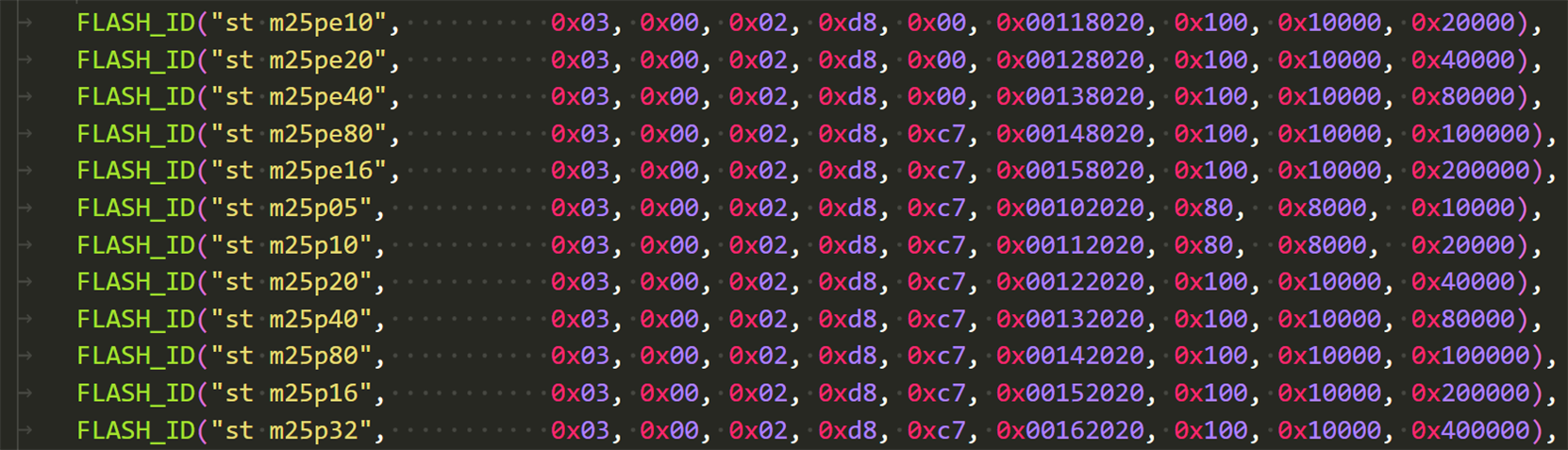
The spi.c file in the openocd/src/flash/nor folder contains dozens of Flash chip identifiers, as shown here:
image

We decided to simply replace the old raspberrypi.org spi.c file with the newer spi.c file at the official openocd page plus the additional spi.c change here.

Short Solution

Download the pre-built OpenOCD. You'll need to extract it with 7-Zip software.

This pre-built version was bundled together and tested by Jan on both Xiao RP2040 boards, and Pi Pico ones. It should also work with many other RP2040 boards.

Summary

OpenOCD is necessary to use the Serial Wire Debug (SWD) programming and debugging solution with the PicoProbe, which is an RP2040-based USB-to-SWD adapter.

You may encounter Error: Unknown flash device messages when attempting via SWD to program some RP2040 boards such as the Xiao RP2040.

The problem is resolved by modifying the OpenOCD source code to add a Flash memory identifier. Since that process is quite involved, a ready-built OpenOCD release for Windows is available to download.

Thanks for reading.

  • Sign in to reply
Parents
  • Jan Cumps
    Jan Cumps over 2 years ago

    If you used the Windows Installer for the Pico C SDK, the easiest way to update its OPENOCD installation is to:

    • back up SDK_ROOT/openocd/openocd.exe
    • copy shabaz' ZIPFILE/openocd/src/openocd.exe to SDK_ROOT/openocd/openocd.exe
    • back up SDK_ROOT/openocd/scripts/target/rp2040.cfg
    • copy ZIPFILE/openocd/tcl/target/rp2040.cfg to SDK_ROOT/openocd/scripts/target/rp2040.cfg

    Tested with a Pico RP2040 and XIAO RP2040, and SDK version 1.5.1.
    Expected to work with SDK 1.5.0 too, as it uses the exact same OPENOCD setup as 1.5.1.

    • Cancel
    • Vote Up 0 Vote Down
    • Sign in to reply
    • More
    • Cancel
  • Jan Cumps
    Jan Cumps over 2 years ago in reply to Jan Cumps

    I submitted two pull requests:

    to raspberry's git, to see if they'd accept it:
    https://github.com/raspberrypi/openocd/issues/98

    To openocd. Raspberry mentioned in someone else's pull request that they only accept openocd core file requests if there is an "in progress" request for openocd proper:
    8287: src/flash/nor/spi.c: add XIAO RP  support

    Any predictions?

    • Cancel
    • Vote Up 0 Vote Down
    • Sign in to reply
    • More
    • Cancel
  • Jan Cumps
    Jan Cumps over 2 years ago in reply to Jan Cumps

    Abandoned my request. There's one in progress: https://review.openocd.org/c/openocd/+/8223

    • Cancel
    • Vote Up 0 Vote Down
    • Sign in to reply
    • More
    • Cancel
  • doctea
    doctea over 1 year ago in reply to Jan Cumps

    Hi!  I'm the creator of the raspberrypi.com thread mentioned in your github issue.  Checking back in a year later I was excited to come across this post and that it seems like a fix has been found!

    However after replacing the 'broken' version of openocd with your fixed version, I'm getting a new error:

    C:/Users/doctea/.platformio/packages/tool-openocd-rp2040-earlephilhower/share/openocd/scripts/target/rp2040.cfg:42: Error: Unknown param: -dp-id, try one of: -chain-position, or -ignore-syspwrupack
    in procedure 'script'
    at file "embedded:startup.tcl", line 26
    at file "C:/Users/doctea/.platformio/packages/tool-openocd-rp2040-earlephilhower/share/openocd/scripts/target/rp2040.cfg", line 42

    It is possible that I haven't quite replaced things properly since my directory structure seems a bit different to the guide you gave up above (possibly because all my gubbins have been installed via platformio/earlephilhower platform rather than via the Pico C SDK installer?). 

    Is there something else I can do to check or solve this?

    Many thanks!

    • Cancel
    • Vote Up 0 Vote Down
    • Sign in to reply
    • More
    • Cancel
  • Jan Cumps
    Jan Cumps over 1 year ago in reply to doctea

    I had a similar error too, initially

    I got it working by replacing two files from shabaz ' zip to my existing openocd install. From my chat logs:

    • copied openocd_build_may_2024\openocd\tcl\target\rp2040.cfg
      to SDK_ROOT/openocd/scripts/target/xiao_rp2040.cfg

    • copied src/openocd.exe to SDK_ROOT/openocd

    • adapted the launch settings in VSCode to poin to the copied script:
      "configFiles": [
      "interface/cmsis-dap.cfg",
      "target/xiao_rp2040.cfg"
            ],
    • Cancel
    • Vote Up 0 Vote Down
    • Sign in to reply
    • More
    • Cancel
  • jjdean
    jjdean 11 months ago in reply to doctea

    Hi, were you ever able to solve this problem? I'm having the same issue after copying rp2040.cfg and openocd.exe from shabaz.

    Thanks

    • Cancel
    • Vote Up 0 Vote Down
    • Sign in to reply
    • More
    • Cancel
  • Jan Cumps
    Jan Cumps 11 months ago in reply to jjdean

    heads-up: the Raspberry Pico VSCode extension comes with an openocd version that has all of this solved.

    It installs it in your %USER%/.pico-sdk/openocd directory. No need anymore to struggle with custom builds.

    • Cancel
    • Vote Up 0 Vote Down
    • Sign in to reply
    • More
    • Cancel
Comment
  • Jan Cumps
    Jan Cumps 11 months ago in reply to jjdean

    heads-up: the Raspberry Pico VSCode extension comes with an openocd version that has all of this solved.

    It installs it in your %USER%/.pico-sdk/openocd directory. No need anymore to struggle with custom builds.

    • Cancel
    • Vote Up 0 Vote Down
    • Sign in to reply
    • More
    • Cancel
Children
No Data
element14 Community

element14 is the first online community specifically for engineers. Connect with your peers and get expert answers to your questions.

  • Members
  • Learn
  • Technologies
  • Challenges & Projects
  • Products
  • Store
  • About Us
  • Feedback & Support
  • FAQs
  • Terms of Use
  • Privacy Policy
  • Legal and Copyright Notices
  • Sitemap
  • Cookies

An Avnet Company © 2026 Premier Farnell Limited. All Rights Reserved.

Premier Farnell Ltd, registered in England and Wales (no 00876412), registered office: Farnell House, Forge Lane, Leeds LS12 2NE.

Follow element14

  • X
  • Facebook
  • linkedin
  • YouTube