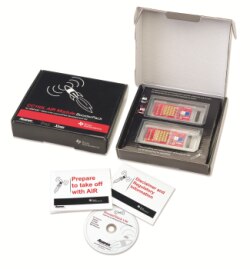
Ten (10) 430Boost-CC110L AIR Module BoosterPack kits will be made available to selected Element 14 Road Test applicants.
What exactly is a 430Boost-CC110L AIR Module BoosterPack kit?
The 430Boost-CC110L AIR Module BoosterPack kit is a development tool that enables design engineers to quickly develop wireless applications using Texas Instruments popular LaunchPad development tool. Retailing for approximately $20USD each, this BoosterPack kit features Anaren Integrated Radio (AIR) modules based on TI’s CC110L low-cost, low-power RF chip and operating at the global ISM bands at either 868MHz (Europe) or 915MHz (N. America).
Each of these 10 free BoosterPack kits will contain:
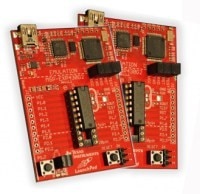
2 each A110LR09A-LPD BoosterPack boards (featuring Anaren AIR modules)
2 each MSP430G2553IN20 MSP430 Value Line microprocessors (pre-flashed w/ control firmware
1 CD (contains software, driver, applications notes, more)
1 step-by-step QuickStart Guide
What will you need to supply in order to operate your free BoosterPack?
In order to use this kit, you will need two of your own Texas Instruments LaunchPads, which will be provided to successful enrolees, free of charge. Additionally, you will need a PC and may want to have a soldering iron, solder, an x-jumper, and USB battery.
What would we like to see from the particpants?
We would like that the participants to blog and/or write about their experience with the kit -- and the AIR module itself on the kit.
Preference will be given to applicants whose applications / reasons for participating are concentrated on three types of wireless applications:
Industrial Sensor Applications
Remote Controls / Switching Applications
Star Network Applications (of any type)
More about TI's LaunchPad development Kit
There's no easier way to test and launch your applications than with Texas Instruments’ MSP-EXP430G2 LaunchPad development kit. Each LaunchPad features:
Integrated flash emulation for simple programming and debugging via USB (mini USB cable included)
Includes MSP430G2211IN14 and MSP430G2231IN14 Value Line devices
Breakout pins are easily accessible for interfacing external components or daughter cards
An added benefit of AIR-equipped BoosterPacks: Anaren's exclusive BoosterStack software!
When you install this AIR-equipped BoosterPack in the LaunchPad environment, you gain access to Anaren's BoosterStack software, featuring our exclusive AIR Traffic Control (ATC) GUI -- for real- time monitoring of your radio application's performance and data packet integrity. And because we give you full access to BoosterStack's source code, you can easily leverage the code in your own application! AIR BoosterStack Software / Firmware:
You're looking in wrong place, MSP-FET430UIF is USB composite class device providing one HID device and one COM port. Com port is used only for communication with HW UART on MSP430G2xxx MCU's, not for debugging or programming.
Do not give up!....It is difficult to diagnose your problem as there are so many variables..there does not seem much left to look for other than issues with some 'other' hardware on your system...if it was me I would uninstall the bluetooth drivers and use a USB mouse next...there does not seem to be a definitive answer to this problem, and TI should look into this problem as you are not alone....
Ok, I tried disabling all COM ports (all the open and closed BT ports and a few for my brother's old phone) and unfortunately this hasn't appeared to help. The only device left on the COM list is the Launchpad as can be seen in the attached picture. I also tried disabling my Bluetooth RFCOMM to prevent it re-opening the BT ports but this had no effect on the outcome. The error seems to prevail in this circumstance...
1. Right-click “Command Prompt” in Accessories and choose “Run as Administrator”
2. Enter “set devmgr_show_nonpresent_devices=1″ – without the quotes obviously
3. Enter “start devmgmt.msc”
4. In the box that opens, select “Show hidden devices” in the ‘view’ menu.
Now if you expand the section on COM ports, all the COM ports that have ever been created will be displayed, the non present ones being in grey. You can uninstall away anything that you don’t want (right click, select uninstall).
It could possibly be my mouse, I use a Microsoft wireless Mobile Mouse 4000 with proprietary bluetooth adapter. I guess it could also be my bluetooth, as it has opened a number of BT ports in the COM port list. I am unaware how to disable these BT ports without removing all BT drivers on my laptop. I have tried diabling the BT function but it seems to make no difference to the number of open BT ports
The only difference I could find between your settings and mine, is that the location in the FET Device properties is set as 0000.001d.0000.001.003.000.000.000.000
Do you have Air Booster pack on the lauchpad? I programmed mine without, and put on after programming...I have attached pic of my device in control panel...
Unfortunately not :/ I have tried everythiing I can think of to DL on my computer but still manage to get the same "Error initializing emulator: Could not find MSP-FET430UIF on specified COM port" error. Have you had any problems with this error in the past? Once again, thanks for the help
I browsed the TI forums and apparently it is a driver issue and has random fixes :/ I have tried looking for conflicting COM ports, and have tried disabling my Anti Virus software, as well as looking for other pieces of software that could be hogging the ports, but none so far.
Thanks David that was a very helpful and informative tutorial. Only problem is that i'm now getting the "Error initializing emulator: Could not find MSP-FET430UIF on specified COM port" error. Looks like i'll have to use the Elprotronic tool instead :/
I'm compiled firmware for my AIR boosterpack, no problems at all. Did you copied all files from CD\Firmware? Especially "_FactoryDefault" and "src" dirs? Typical project import in CCS, skips these directories. Look into CCS console window, there are more clues.
Thanks for the reply since I am running a free version of IAR i cannot download/compile the code due to size limitation. Is there an easy way to do this using CCS? When building the CCS project i am presented with a multitude of errors from the compiler and no option to download the code to the board.