Infineon DC Motor Shield w/ TLE94112EL for Arduino

View table of contents ...  

image


{tabbedtable} Tab LabelTab Content
About

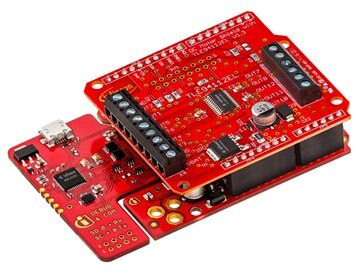
The Infineon DC motor shield is a small evaluation board equipped with  TLE94112EL for use with Arduino. The TLE94112EL is capable to drive up to 6 small DC motors in parallel mode or up to 11 DC motors in cascaded mode. All outputs can drive up to 0.9A. The outputs can be used stand-alone or combined to increase driving capability up to 3.6A.


image

Infineon DC Motor Shield with XMC1100 Boot Kit for Arduino


Features:

Driver with 12 half-bridge outputs to drive DC motors, resistive or inductive loads

  • Driver is protected against over-temperature, over-current, over-voltage, under-voltage and enables diagnosis of over-current, over-voltage, under-voltage
  • SPI interface with zero clock diagnosis
  • Enhanced EMC performance
  • Integrated PWM generator with 3 different frequencies (80Hz, 100Hz, 200Hz)


Benefits:

  • Shield enables compact design for multi-motor applications
  • Cost efficient design for multi-motor applications
  • Less communication with µC through integrated PWM generator and zero clock diagnosis
  • Lower cost by reducing external components to EME requirements


Applications:

  • Multi-motor applications
  • DC motors and voltage controlled bipolar stepper motors
  • Toys
  • HVAC systems


Click here to obtain XMC1100 Software for Arduino IDE

Important Dates

Enrollment Begins: Mar 12 2017

Enrollment Ends: Apr 18, 2017

RoadTesters Selected: Apr 25 2017 (estimated)

Product Shipped: May 19 2017

RoadTesting Begins: May 26 2017

Reminder/Update Email: July 10 2017*

Submit Reviews By: July 30 2017**


*The element14 RoadTest Staff will send this reminder/update email.

**If a RoadTester is unable to meet the deadline, please notify the RoadTest Program Lead, , as soon as possible before the deadline.

RoadTesters

The supplier selected the following applicants as official RoadTesters:


Terms & Conditions

DC Motor Shield with TLE94112EL for Arduino – RoadTest

Terms and Conditions

These are the terms and conditions which govern the DC Motor Shield with TLE94112EL for Arduino RoadTest contest. This Contest requires participants to submit an application indicating their previous experience with this type of equipment/component, information on what they would do to test the equipment/component, and the applicant’s desire to post a thorough review of their experience with images, photos, or other supplemental materials. Participants will be required to meet the Conditions for Participation.  The winners of this RoadTest will receive the item(s) listed below. RoadTest Reviews are due no later than 60 days after the receipt of the item(s). No other prizes are offered.

The Principal terms of the Competition:

The following words and phrases are used in these terms and conditions and have the meanings given to them below.

RoadTest: DC Motor Shield with TLE94112EL for Arduino

(RoadTest or Contest)

Key dates:

Applications Close: midnight (GMT) on 17 March 2017

Announcement of Winner (estimated): 24 Mar 2017


Prize:  DC Motor Shield with TLE94112EL for Arduino

Additional Prizes: none

Competition Site: https://www.element14.com/community/groups/roadtest?ICID=menubar_resources_roadtest

Site or element14 Community: www.element14.com/community

Judges: members of the element14 community team chosen at the Organiser’s discretion.

Judging Criteria, All of the following which will have equal weighting:

· Demonstrated competence with the technologies including links or descriptions of past projects

· Qualifications as indicated by current job role and/or schooling/vocational training;

· A thorough description of how the prize would be tested;

· Likelihood that the Applicant will blog about the prize and provide a review on element14.com;

· Originality;

· Innovation.

Organiser: Premier Farnell plc (registered in England and Wales under company number 876412) whose registered office is at Farnell House, Forge Lane, Leeds, UK

Conditions for Qualification: in addition to meeting the requirements of these terms, all persons applying to take part in the Contest (each one an Applicant) must:

· Provide a RoadTest application describing what he/she would do if awarded the Prize including similar previous projects, product experience and qualifications

Terms: these terms and conditions which govern the Competition and to which the Organiser reserves the right to make changes from time to time and the latest version of these Terms from time to time will be posted to the Site.

  1. Eligibility
  2. Applications:
  3. Selecting Winners:   
  4. Liability:
  5. General:

1.1 Save as set out in these Terms, the Contest is open to any natural or legal person, firm or company or group of natural persons or unincorporated body.

1.2 All Applicants must be aged at least 18 at the time of their application.

1.3 Applicants must not enter the RoadTest if doing so or taking part may:

1.3.1 cause the Organiser and/or themselves to be in breach of any agreement (including but not limited to any contract of employment) to which they are a party or in breach of any law, regulation or rule having the force of law to which the Organiser or the Applicant may be subject or any policy of the Organiser or the Sponsor;

1.3.2 Require the Organiser to obtain any licence, authorisation or permission to deal with the Applicant; or

1.3.3 Be in breach of any policy or practice of their employer. Some employers prohibit or restrict their employees from taking part in competitions such as these or receiving prizes under them and the Organiser respects those policies and practices.

The Organiser reserves the right to disqualify any Application made in breach of these Terms and to reject any Application which it reasonably believes may be or become in breach. The Organiser reserves the right to require evidence in such form as the Organiser may reasonably require of any Applicant’s compliance with any of these Terms and to disqualify any Applicant or Participant who cannot provide such evidence reasonably promptly. 

1.4 Multiple applications are not permitted.

1.5 Applications may not be submitted by an agent whether acting on behalf of an undisclosed principal or otherwise.

1.6 The Contest is NOT open to:

1.6.1 Any person or entity who is a resident or national of any country which is subject to sanctions, embargoes or national trade restrictions of the United States of America, the European Union or the United Kingdom;

1.6.2 Any employee, director, member, shareholder (as appropriate) or any of their direct families (parents, siblings, spouse, partner, children) (“Direct Families”) of the Organiser and Sponsors; or

2.1 Each Applicant must fully complete and submit a RoadTest Application by the Application Close.

2.2 By submitting a Registration Form, each Applicant:

2.2.1 Authorises the Organiser to use his or her personal data (as defined in the Data Protection Act 1998) for the purposes of running and promoting the RoadTest;

2.2.2 Authorises the Organizer to copy, reproduce and publish their application should they be accepted as a Participant;

2.2.3 Will be deemed to have read, accepted and agree to be bound by these Terms. Applicants are advised to print and keep safe these Terms;

2.2.4 Authorises the Organiser to copy, reproduce and use the Application and/or Review for the purposes of the RoadTest and as otherwise contemplated by these Terms. The Organiser will not be responsible for any inaccuracy, error or omission contained in any reproduction or use of the Project Blogs.

2.2.5 Licenses the Organiser to use the intellectual property in the Project (IP) for the purposes of this Contest. As between the Applicant and the Organiser the IP remains owned by the Applicant.

2.2.6 Grants the Organiser the right to use his or her likeness, photographs, logos, trademarks, audio or video recordings without restriction for the purposes of Contest or the promotion of it or the Site;

2.2.7 Agrees to participate positively in all publicity surrounding the Contest;

2.2.8 Agrees to be responsible for all expenses and costs incurred by him or her in preparing for, entering and participating in the Contest (save for any expenses expressly agreed by the Organiser to be borne by it in these Terms);

2.2.9 Confirms that he or she owns all IP used in his or her application or Project or Blogs and indemnifies the Organiser from any claim by a third party that use of any material provided by an Applicant to the Organiser infringes the intellectual property rights of any third party;

2.2.10 Agrees not to act in any way or fail to act in any way or be associated with any cause or group which would have a negative impact on the reputation of the Organiser and/or the RoadTest.

2.3 All applications submitted to this RoadTest must meet the following criteria:

2.3.1 Applicants must be the author, creator and owner of the proposed review idea. Applicants must not submit someone else’s idea;

2.3.2 The proposed application must be reasonably achievable by the within the time constraints of the Contest; 

2.3.3 Applications must not include or propose any of the following, the inclusion of which shall render any proposed application ineligible:

(a) Applications which relate to socially taboo topics, such as illicit drug use or sexual gratification;

(b) Applications that are or could reasonably be considered to be illegal, immoral, discriminatory or offensive as determined by the Organiser;

(c) Applications in relation to them which if accepted would infringe or breach any of the policies or terms of access or use of the Site.

2.4 No Application may contain any of the hazardous substances identified by Article 4 of Directive 2002/95/EC of the European Parliament on the Restrictions on the Use of Substances in Electronic and Electrical Equipment ("the Directive") or the use of such hazardous substances in the in any such Project must not exceed the maximum concentration values set out in the Directive.

3.1 Winners will be selected by the Organiser on the basis of the quality of his or her application and its adherence to these Terms.

3.2 The total number of Winners selected will be at least the minimum number set out above but the actual number is at the sole discretion of the Organizer and/or the Sponsor, if applicable.

3.3 The Organiser will use all reasonable efforts to announce the Winners via an update to the RoadTest page by the date listed above.

3.4 Winners agree to take part in all publicity which the Organiser or the Sponsor wishes to use to promote the RoadTest, the Products featured or other Contests with which the Organiser may be connected from time to time.

3.5 Details of the Winners may also be published in the media.

3.6 Winners are responsible for all applicable taxes, duties or other charges payable in relation to any prize.

3.7 

4.1 The Organiser hereby excludes all and any Liability arising out of the Contest or the acceptance, use, quality, condition, suitability or performance of any Prize, even where that Liability may arise from the Organiser’s negligence.

4.2 Nothing in these Terms will affect any Liability of the Organiser for death or personal injury arising from its negligence, for breach of Part II of the Consumer Protection Act 1987 (in the event that any entrant is entitled to claim rights under the Consumer Protection Act 1987) or for any matter in relation to which it would be illegal for the Organiser to exclude or to attempt to exclude its Liability.

4.3 Subject to 4.2, neither the Organiser, any parent company nor any subsidiary of the Organiser or such parent company or any of their directors, officers and employees (together referred to in these terms and the ‘Associates’) makes any guarantee, warranty or representation of any kind, express or implied, with respect to this Competition or the Prizes potentially available under it. Neither the Organiser nor any of its Associates shall be responsible for any Liability that may arise out of or in connection with person’s participation in this Competition, the claiming, redemption or value of any prizes under it, the use or enjoyment of such prizes or any events or circumstances arising out of or in connection with any of them. Any implied warranties of condition, merchantability or suitability or fitness for purpose of any of them are hereby expressly excluded. Wherever used in these Terms, ‘Liability’ shall mean any and all costs, expenses, claims, damages, actions, proceedings, demands, losses and other liabilities (including legal fees and costs on a full indemnity basis) arising directly or indirectly out of or in connection with the matter concerned. 

5.1 The RoadTest is organised and sponsored by the Organiser. The Organiser reserves the right to delegate all or any of its powers, rights and obligations arising in relation to the RoadTest to any Associate and certain such rights and powers are assumed by the Organiser on behalf of itself and each Associate. Reference to “Organiser” shall be deemed to include reference to each Associate.

5.2 The RoadTest may be terminated at any time if there are, in the sole opinion of the Organiser, an insufficient number of entries, or if the Applications are not of an appropriate standard for a competition of this nature. The Organiser has the right to cancel or suspend the RoadTest at any time due to circumstances outside its reasonable control.

5.3 The Organiser shall have the sole discretion to disqualify (without correspondence or right of appeal) any Applicant it considers to be adversely affecting the process or the operation of the RoadTest or to be in breach of these Terms or to be acting in a disruptive manner or with intent to annoy, abuse, threaten or harass any other Applicant or Participant.

5.4 The Organiser has the right to amend or add to these Terms from time to time. Revised Terms and Conditions will be posted on the Contest Site and it is a condition of entry to the RoadTest that Applicants agree to comply with these Terms and, if appropriate, such Terms as amended from time to time.

5.5 Headings are for convenience only and do not affect the interpretation or construction of these Terms and Conditions.

5.6 These Terms and the operation of the Contest shall be governed by and construed in accordance with English Law and any claim or matter arising under these Terms shall be subject to the exclusive jurisdiction of the English courts.

RoadTest Reviews
Comments
Anonymous
  • Hi Randall,


    it was what I supposed too but also Manuel is true that for some reason the board was packed with problems. It is not so easy inside a package, inside a plastic container, to eradicate an SMD soldered component, don't you think?


    Enrico

  • Manuel,


    I went back and looked at the XMC1100 package.


    It was enclosed in a plastic package.


    I noticed that it was loose in the plastic package and could slide beneath it.


    I'm wondering if one of the SMD components was damaged from it sliding around in the package via shipment.


    What do you think?


    Randall

  • Hello again Manuel,


    1st:

    The broken board with the SMD component: clearly, this is a broken board and no discussions needed [...]

    Totally agree. These are cases that happens; hopefully not but happens. What sound strange is what the assistance answered to the user that contacted the technical assistance for this issue: "just replace the board".


    2nd:

    The firmware or SW problem: this is, indeed, a strange problem and I forwarded this to the internal experts for the microcontrollers. In general, so far every XMC1100 board I plugged in my PC (many boards so far), ended up in an automatic notice that a firmware update is available if needed.

    I know what DAVE should do, I have already used the SEGGER J-Tag to debug other micro controllers and I have the same J-Tag SEGGER device shown by default in the SGGER software. The error on the gdeb server is what created the first alarms as when the debugging server does not start (in Linux) it is always a smpthom of some software / update issue. Good to add the alternative option in the GitHub documentation. What I point the attention on is that with Arduino IDE only you have no notice that the board firmware should be updated. This can create a lot of problems in the less expert users; it is expected that Adruino users will try to use the boards ignoring the DAVE environment as they always install only the Arduino IDE and expect to work with this.


    Just a last important point there are lot of users that work on Mac OSX. After following the setup instructions, updated the Arduino IDE to the last version 8.2 (as the previous 8.1 should not be used due an IDE issue with the Infineon board) and manually installed the SEGGER J-Link what happens is the following:


    1. Arduino IDE does not recognises the board only when trying to upload the compiled sketch. The sketch instead compiles and all seems correct.
    2. The SEGGER J-Link installs correctly under OSX
    3. Under OSX there is not a visibile J-Link lite application as it appears under Windows
    4. Launching the J-Link registration application the board ire correctly recognised as XMC 1100 and the user is prompted to register it. The procedure returns no errors, no matter if the board firmware has been updated or not. This point is critical because there is no symptom that something is not working
    5. Also after the board registration the same issue happens on the Arduino IDE
    6. Trying to re-register the same already registered board with J-Link Registration the board is recognised again as unregistered 4200 board.
    7. The registration always works fine but it has no effect.


    The conclusion can be - at least for now IMHO that this board is compatible with Arduino only in the Windows environment. I have tested on a single OSX machine so some variations on the behaviour described above may occur.


    Hope these last notes will be helpful to you.


    Your effort following our testing job is very appreciated. Enrico

  • I have updated the information on our GitHub XMC-for-Arduino and included a link to this discussion to show the problem and where it has been discussed originally, namely here.


    Hopefully, this helps the community to not face the same issues.

    If not, please contact me!


    Best regards,


    Manuel

  • I think we have now two problems here:


    1st:

    The broken board with the SMD component: clearly, this is a broken board and no discussions needed. Even if you fix it by manually soldering the components, one cannot assure that this is the only broken part. There could be several reasons for this from a clear manufacturing problem to a clear shipment problem or something in between. However, in the end we both come to the same conclusion (I think): the board was broken when it arrived, no matter of the initial reason, this was the main problem hindering to use it in the end.


    2nd:

    The firmware or SW problem: this is, indeed, a strange problem and I forwarded this to the internal experts for the microcontrollers. In general, so far every XMC1100 board I plugged in my PC (many boards so far), ended up in an automatic notice that a firmware update is available if needed.
    So, if you install the Arduino IDE, install SEGGER J-Link, install XMC-for-Arduino and connect your board for the first time, a pop-up should indicate a firmware update and help you to go over it. This is what I was trying to state by 'usual behaviour'. Obviously, if this is not happening if needed, I will add it to the documentation for GitHub and clearly state it as it will also help other ones if facing similar issues.

    The point is that the Arduino integration mainly executes XMC Flasher which does the flashing of the microcontroller while DAVE should open a GDB client connection switching to debugging mode. The Arduino IDE does not switch to debugging mode (not supported), it only uploads the code and the micro starts (I assume that in case of problems for XMC Flasher, still the 'Upload finished' pops up, but in reality, nothing has been uploaded).
    There are differences from the SW point of view for DAVE/Arduino IDE here, but everything ends in the point that the customer/user is not informed about the firmware update which is the real underlying problem here from our side and which definitely needs to be solved.


    You're right about the support statement, that time was too long from our side.

    Here a quicker reply is absolutely needed to solve these problems efficiently if you are working on the boards actively.

    Actually, this is the reason why I directly joined this discussion to allow quicker and dynamic exchange with you.


    I will organise a XMC1100 board internally and not update it if asked to reproduce the problems you are facing here, will give feedback as soon as I have it.


    What I would like to mention here is the effort you as well as the other testers are putting into the road test of our products.

    Please be informed that this falls on fruitful ground here at Infineon and that me as well as my colleagues are strongly appreciating it as it helps us to get the impression from a user's point of view. The stated problems will be tackled and I will assist with any further problems personally from my side.


    Thank you very much for your patience!


    Best regards,


    Manuel

  • Manuel,

    I am used to work with things almost unknown (to me) and I am not scared when (always) things does not work as expected.


    There are some points that I think are not what I was expecting: the first is just the question of the "obvious" firmware upgrade. I should admit that the first impression as you can see in the comments of the roadtesters was not very positive as some of the boards arrived broken (depends on the shipment? Maybe but sounds strange). The fact is that all we was oriented to potential hardware issues in our boards.


    In one of my previous posts I described clearly explained what was my issue, including focusing the attention not on the board (the Arduino form factor part) itself but on the J-Link programmer. The last comment was from Randall:


    Enrico,

    I forwarded your comment to Infineon. I'd like to know what they have to say.


    The next answer was the news that a new board was sent. You should admit that I was strongly oriented that also Infineon supposed some kind of hardware issue. But I was not yet convinced so I ordered another board to Infineon and got it in two days.

    The same post with photos etc was sent to Infineon support that answered after seven days. Is too much for me only? Maybe I am too compulsive, but I expect a faster response. No matter for this, it's a fact and I don't consider.


    I discovered the firmware upgrade need to the board, not the software after testing and checking every things (I have the luck to be able to test on several platforms and then I was already having a second board). To discover the upgrade issue - not mentioned in any paper available on the board from the Infineon site - you should just search and check the J-Flash application that is not mentioned to be used at all as it is clearly explained to install it or avoid installing if using DAVE. Arduino IDE should work by itself.


    Two deviating information: the Arduino IDE (the compatibility library from Infineon for the board) says "Upload completed". And nothing happens. DAVE Eclipse IDE instead says (I posted also the two screenshots) about an error. Just in a hidden part you can have the intuition to see what happens to the J-Link lite on the board firmware.

    Frankly I discovered this workaround just playing with all the pieces installed by DAVE. As it is not considered necessary, and it is not mandatory for the RadTest completion all those jus use the Arduino IDE never discover this detail spontaneously.


    The approach Gerald describes is the usual behaviour of the Arduino IDE integration if one plugs in a board with old firmware

    It is appreciated if you explain what you mean exactly with this point; maybe I have not understood exactly what is the Arduino comparison reference.


    Thank you for the support. Enrico

  • I was not aware of these problems so far and as not everyone might be fully aware of the integration of XMC into the Arduino IDE here at Infineon, I'd like to kindly apologize for the problems.
    We are working on it and I would like to directly support you to improve your experience and get it smoothly running. Please do not hesitate to contact me anytime if you have further problems or need help. Full commitment from my side!


    In addition, please open also issue tickets in the GitHub for XMC if specific problems arise with the SW implementation, makes it easier to track the problems and provide solutions on a SW level.


    Best regards,


    Manuel

  • Sorry for the inconvenience and all the problems so far.

    I was taking a look and trying to reproduce the problems from our side, but had no success so far.


    The approach Gerald describes is the usual behaviour of the Arduino IDE integration if one plugs in a board with old firmware.

    Usually, a window should pop up by the SEGGER software which tells you about an update of the firmware.


    The J-Link configurator has a dedicated button for updating the firmware as well:

    image


    I'd like to mention this as it might be helpful for manual update.


    The reason why the COM led is not blinking might be that you haven't opened a COM connection via the VCOM port, have you?


    LED Modes should be (if I recall correctly):
         LED DBG blinking -> mainly only power supplied, e.g. by a pure power connector from a socket
         LED DBG permanent -> connected to a PC with debugging software

         LED COM off -> no COM connection

         LED COM on -> a COM connection has been established


    In addition, the problem with the Mac confuses me as the SEGGER should not flash the devices via the COM port (just to mention here: if you have plugged in two XMC boards at the same time, no matter which COM port you choose in Arduino, always a specific board will be flashed, i.e. the boards are not identified by the COM port, but by the ID or the order of plugging them in, need to fix this somehow.)


    However, there is the XMC Flasher in the Arduino integration as a wrapper around the J-Link (actually, this executes all the commands for flashing).

    There might be problems with the Mac implementation which we need to reproduce/test (we are mainly working with Windows and Linux, but not Linux on Macs, so we need some time for testing, sorry for that).


    Are there currently open or pain points? I am happy to help you over here to get the boards running.


    Best regards,


    Manuel

  • Hi Randall,


    thank you the board arrived today. I am sorry as we all though that it was hardware problem while it was SEGGER firmware upgrade. Now the two boards (the first for roadtesting and mine I bought from Infineon for comparison are working fine. Unfortunately they replied with the solution I found just two days ago after delivering me the new board.


    Enrico

  • The board below the motor shield is the already mentioned XMC1100 boot kit which has the Arduino UNO formfactor.

    Indeed, there exists the integration into the Arduino IDE which can be found at the given link (here), you can also find more information about the board on the Wiki page here.


    If you have further questions, please do not hesitate to ask me.


    Manuel

  • We are currently planning to release also an Arduino library for the shield comprising the functions in the well known way.

    Sorry for any inconvenience, the link leads to the integration of the XMC family into the Arduino IDE. However, on the GitHub account all Arduino integrations of our products is/will be stored which are continuously released step by step.


    Manuel

  • I am almost sure that this method works ... My sequence was similar to yours. After that both the two boards are working now with the update they today answered me (faster, 7 days only) that I had to updated the jtag software.

    Sorry but I am laughing again about their suggestion. Nice idea to replace the board image


    Cheers, Enrico


    P.S. Keep me updated if the method works and if you find some trouble updating let me know.

  • Thanks much for this Enrico, I will give it a try.  As for the Infineon Customer service, I won't "beat a dead horse into the ground"....lol...but when they sent me the reply that I needed to update Java, etc. and that the board wasn't broken, I replied with another email that simply said, "See picture" and included the picture of the de-soldered SMD component and board.  I sent that e-mail on Friday, May 19.  I received a reply from them yesterday (Monday, May 29, 10 days later) and this is what it said--"Thanks for your request.  We recommend to replace the board.  Best Regards.".......lol.....anyway, I got the replacement from Randal but I am in the middle of performing tests with the Arduino, so I will use your information above to try to get the new XMC1100 to work properly.   Thanks again!


    Tom

  • Hello Gerald,


    2. I installed the Seeger tools from Segger's web site.

    Then i connected the XMC board, without the motor board on USB.

    The driver told that a new firmware was needing - it was then installed automatically.

    Thank you for your answer. In these cases it is useful to cross-check the behaviour as I have not a complete scenario; it is the first time I see how the stuff works. As far as I see, you have anyway updated the firmware. For some reason despite I have initially followed exactly the same path my board firmware update (that is the segger part, as you can imagine there is no firmware to be updated on the board itself as the firmware is what we will upload with the sketches) did not appeared until I have not launched specifically the JFlasher.


    Take in account that exploring how Dave works after compilation the upload is done - as well as in the Arduino IDE - through the external application JFlasher lite from SEGGER. The difference and advantage, at least under certain aspects, is that with DAVE you can develop in C/C++ and debug realtime the board while with the Arduino IDE you don't. I think that there are also other less evident advantages like the better use of the processor power instead of the Arduino compatibility layer that set the board one step down in its performances.


    Enrico

  • Hi Enrico,


    My boards are working well. ... uff,, uff,,,, todayimage

    I had no problem installing the drivers.

    1. I installed DAVE from Infineon. With that you gets the Segger drivers.

    2. I installed the Seeger tools from Segger's web site.

    Then i connected the XMC board, without the motor board on USB.

    The driver told that a new firmware was needing - it was then installed automatically.

    3. I installed the Arduino board library package and the TLE94112EL-sketch into the Arduino compiler.

    Well in the sketch was a wrong "code" - the source writer have forgot deleting two characters (Se) in the first line.

    4. I connected all boards and cables - then i uploaded the compiled motor driver to the XMC

    -> they working fine.

    Now I'm testing the motor controller with two motors.

    - 1. DC brushed-motor ~ 12V, 70mA (~800mA..900mA  blocking current)

    - 2. DC brushless - fan motor, 12V ~110mA, from an old PS for cooling the chip if there getting some reason by testing.


    This was with the Arduino compiler.

    With DAVE i didn't testing yet.

    Here you have to do more carefully, like what you suggested above (e.g. configuring to XMC1100-032; or similar).


    Best Regards,

    Gerald

    ---

  • Hello and


    Solved the problem affecting (some or all the Infineon XMC boards


    In the meantime waiting your second (sic!) board I decided to invest 60 Euros (21 for the board + a lot for shipment) and bought one urgently from Infineon that arrived just now. I was absolutely curious to see what do they do with the "common, poor end-user/developer". So, see what happened:


    I received the board and immediately tried to connect to the computer in both Mac and Windows 7 machines getting always the same result: on Mac the serial connection is not recognised (but the J-Link Lite from Segger is installed correctly following the instructions of Infineon) while on the Windows 7 machine the serial installs correctly and the board seems to be uploaded by the Arduino IDE (last update, DAVE + Segger installed etc.) and after more than one minute I see Upload complete but the board remain the same.


    I wondered and formulated the following hypothesis:


    1. The board is ok as I have checked with the tester and verified soldering, connections etc. with the schematics from Infineon

    2. The Arduino IDE is ok

    3. The SEGGER J-Link lite has something wrong not mentioned by Infineon in none of the related documents to the XMC 1100 board

    4. it is a problem of some software setting


    Following on these considerations I have investigated on what was added to the Windows 7 machine after installing DAVE and the Arduino IDE library supporting the XMC Infineon boards.


    Proedure followed to solve the problem

    Together with the DAVE Eclipse launcher on the desktop there are these two icons

    image

    When the Arduino IDE uploading starts the following text is shown on the IDE console:

    --------------------------

    Infineon XMC Flasher Lite

    Copyright Infineon Technologies 2017

    --------------------------

    Operating System: Windows 7


    Initialisation

    --------------------------

    Loading JLink Library...

    JLink Library Version: V6.0d

    As the sketch uploading to the board is flashed with the J-Link SEGGER I have lunched the JFlash-V6.00d icon and got the windows shown below

    image

    As shown the device board is recognised correctly. SO I have tried from the menu the following opton: Target >> Test >> Hardware then one of the available choices (no matter what)

    • Activate BUSY
    • Deactivate BUSY
    • Activate OK
    • Deactivate OK

    The idea was to see if some kind of reactivity exists between the flasher and the board, possibly without impacting on the board features. This was not possible (I mean the bootloader and CPU setting) as this tool just manages the J-Link lite - the detachable part of the board used as the programmer.


    As I have launched one of the commands I saw a dialog message: the board j-Link firmware is not updated. Do you want to update now?

    I have confirmed and after a while with a log showing me the uploading process (less than a minute) I have closed the program, removed and attached the board again (the USB virtual serial port has changed) and tried to upload the sketch from the Arduino IDE again.


    It worked! Upload is very fast and what is shown after the upload on the IDE console now has more sense image image image image image image !!!!


    --------------------------

    Infineon XMC Flasher Lite

    Copyright Infineon Technologies 2017

    --------------------------

    Operating System: Windows 7


    Initialisation

    --------------------------

    Loading JLink Library...

    JLink Library Version: V6.0d


    Configuring Device

    Device Name : XMC1100-0032

    Interface   : SWD

    Speed       : 4000


    File Upload

    --------------------------

    Uploading C:\Users\TECHCO~1\AppData\Local\Temp\arduino_build_452093/TLE94112EL_Shield_Arduino_Example_Sketch.ino.hex

    ... Done

    --------------------------

    ... Finished Succesfully


    I suggest to try this procedure to all the roadtesters tat experience the same problem or anyway to be sure that the firmware on the j-Link lite flasher is the last updated, compatible with the OS.


    BTW ... At the actual date I am again waiting for some kind of answer from the Infineon technical support. Randall, I am curious to know what did they told when you sent back my first analysis.


    Enrico

  • Hai Element-14


    I got the  kit for Roadtest.


    I am very sorry to say that the kit I got is damaged. XMC1100 is causing a USB Reset on PC

  • Many thanks Randall! Please send me the tracking when you can so I am sure I don't miss the shipment image image


    Cheers, Enrico.

  • Hello Fred,


    it's a mistake to compare the DAVE development environment respect the Arduino IDE. The second is a limited system that has a lot of advantages for its simplicity and educational purposes. Probably there was very few other tools that helped users to know the microcontrollers than the Arduino IDE. And it is just this sotware (never forget that it is a proting of something more complex and the very original idea is Wiring). So every producer that want to reach a very large audience creating interest to its own micro has a sort of obliged path: make a board based on Arduino form factor, make it compatible with the Arduino IDE and ... voilá, le jeux sont fait!

    So welcome that also Infineon followed this path as well as Texas, Chipkit and may many other.


    What you should compare respect to DAVE instead is the development IDE available for any different kind of microcontroller: PSoC Creator for the Cypress PSoC family, TI Visual studio based IDE for their microcontrollers (including the power management features and the specific ultra low power features of the MSP43x family), DAVE for the Infineom XMC MCU series and obviosuly the AVR studio for Atmel chips that has also a very useful plugin to integrate the Arduino sketches ported to the C++ high level iDE (porting is unidirectiona).


    Enrico