NXP LPC8N04 Dev Board with Integrated NFC - Review

View table of contents ...  

RoadTest: NXP LPC8N04 Dev Board with Integrated NFC

Author: gsgill112

Creation date:

Evaluation Type: Development Boards & Tools

Did you receive all parts the manufacturer stated would be included in the package?: True

What other parts do you consider comparable to this product?:

What were the biggest problems encountered?: The kit didn't function

Detailed Review:

INTRODUCTION

First of all, I would like to thank Element14 Community for selecting me as an official Road Tester for NXP LPC8N04 Dev Board. This was the first Road test I was doing with an product from NXP.


I usually don't like NXP as they are so Business minded that they have least community impact (That is purely my perception). They do have a good community but their dev boards are professionally targeted. This one here is an Exception fro that trend. (Maybe they learned something from Freescale's FRDM line of kits after they acquired them)


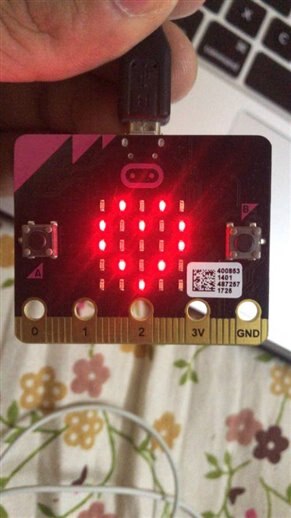
Coming to the review here are couple of photos of the kit and a reference pic of BC Micro:bit platform.


imageimage


image


FEATURES

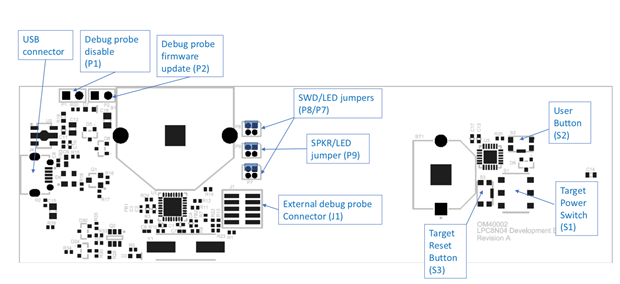
image     This kit features an LPC8N04 Micro-controller boasting an Arm Cortex M0+ MCU clocked at 8 MHz (Specially taking care of Low power there image)

image     It has One user programmable button

image     One switch to select the power

image     5x7 Led Matrix something similar to BBC Micro

image     There is a On board Speaker with amp image

image     Plus there is no dev board without debugging section image
 

image


KIT UNBOXING AND REVIEW

So, here is a Kit Review of the NXP LPC8N04 Dev Board ,


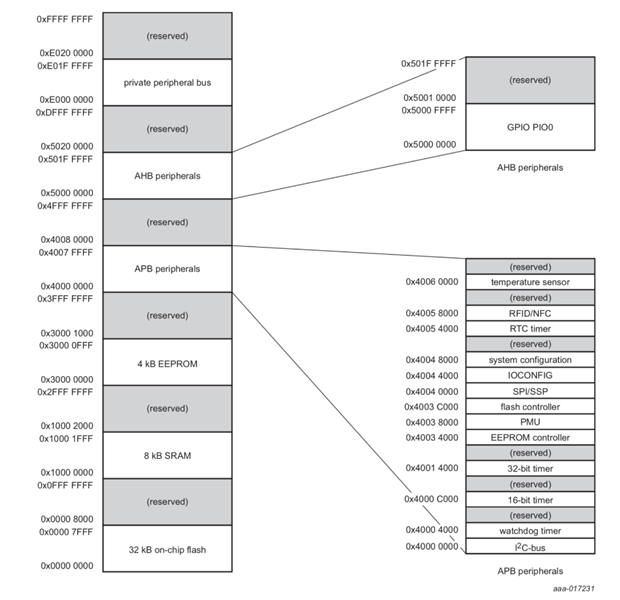
Interestingly I took a snap short of memory map and you can see within a APB peripherals there is a Temp sensor followed by a memory map of RFID/NFC an RTC and finally the 4 KB EEPROM, 8kB SRAM and 32 Kb on-Chip flash image
 

image

PROBLEMS FACED

Coming onto the most important part of the review, the problems faced, I am SAD to say that I don't have anything to write as the Board did Not function !! the only thing I was getting was an LED Blink on the LED Matrix which is supposed to be there but nothing beyond that.


Another Issue I think is with the quality of the components used, The CR2032 Coin cell connector was of a really bad quality, and during my first time use only I damaged the locking mechanism of the Debugger section.


Thirdly, The selector switch for the LED Matrix / Speaker / Debugger are based on small 50 Mil Headers and I feel, NXP should give extra jumpers as they tend to loosen out and fall.


PART I

In this part I tried the Demo App, Unfortunately neither the iPhone 7 which I have nor the OnePlus 3T of my dad was able to recognise the NFC Connection ?

P.S> I have tested both the devices with standard NTAG213 Stick on tag I had laying around from my previous project and both of them recognised the tag and was able to read the NDEF string on them. (The Android phone was able to write too. image)

imageimage

This was what I was constantly getting on my Mobile.


NOTE :: IPHONE DO SCAN AN NFC TAG AS SHOWN IN THE SCREEN SHORTS BELOW , This is a SONY Bluetooth Headphones scanned on an IPHONE.

imageimage

So, the Board should also have been detected as it also uses the same Tag Emulation ??


PART II

I was not able to download the MCUXpresso IDE initially, it tool couple of E-Mails and Opening a Querry to NXP. But I am glad NXP Respong Quickly, apparently there was some issue with my account and it took about 4-5 days for them to resolve the issue after which I Was able to download the Software.


You do need to download a separate package for the board support, or you can get that during the installation.


I yet have to test the Board with the NXP, but first I am working on debugging on what is the real issue with the board ?


CONCLUSION

In conclusion this is the first board I have seen with really low clock speeds running an ARM architecture. If you are interested in developing NFC based apps, specially Terminal apps/ accessory look no further. And given that NXP is the best selling NFC IP image you can't go wrong.


But if you want a cheep Dev Board play with I would suggest get an NFC Expansion board with something like STM8/MSP430 and Vola image you are all set for the journey.


Also it would have been great if NXP would have provided some Tags to play with as

1.      They are cheep

2.      The kit supports NFC emulation  image


REFERENCES

1.     LPC8N04 Device Page

2.     LPC8N04 Development Kit Page

3.      LPC8N04 Board Design Files

4.     LPC8N04 Datasheet

5.     LPC8N04 User Guide

6.     LPC8N04 User Guide for Dev Board

7.     LPC8N04 Android App Demo

8.     NXP MCUXpresso IDE

9.     LPC8N04 BSP for MCUExpresso


Thanks and Regards

GS GILL


PS. I yet have to test few functionalities of the kit , I will post the comments on those later as a blog post image

Anonymous
  • you can download example applications also image


    They are compressive yet has useful pre written code that you can take advantage of image


    Hope this helps


    Regards,

    GS Gill

  • Never mind... just realized that it's built into MCUXpresso (v10.2) already....image

  • The LPC8n04 looks really interesting from the perspective that it's a REALLY simple Cortex chip.  Great possibilities from a teaching perspective. 


    While I see that there is a direct download for the MCUXpresso board support package from the NXP site, I can't find a download from within the SDK Builder tool.  Will this be fixed in the near future?


    thanks!


    James


    image

  • Sounds nice!!!! good luck


    regards

  • Hi all


    I am happy to inform that I got the Board Working.

    I did Reflow the IC and did reprogram the board using MCUXPRESSO IDE and it worked. So I am not sure wether it was the Hardware or the Software?? Nonetheless the Kit is Now Working Hurrayyy !!


    I will be posting a blog Post soon image


    Regards,

    GS Gill

  • Hi GS,


    Thanks for giving us another shot. Its not always easy to stay up with all the innovators out there, but we are making big efforts to make our products accessible to all. Feedback is always welcome from anyone using our products!


    Best regards,

    Brendon

  • Hi, 


    TO be Honest, I felt NXP is more of a corporate company as they never came forward aiding the Community. Only Once I can remember is when the took Freescale and FRDM boards were available as part of NXP.


    So, I was so impressed to see that NXP has finally looked into Maker Community section and is making great progress. In fact After this Road Test disaster (I still have to find some time revisiting the Kit), I was not willing to apply for any NXP roadtest. But the Active Community interaction made me change my mind and I did apply for LPCXpresso 51U68 Dev Board.


    Its great of You and NXP putting so much effort in Community. And I would be happy to help image


    Regards,

    GS Gill

  • Hi Rod,


    thanks for the heads up. I'll look out for that and write some guidance notes. I've also alerted one of our team who is currently looking at any updates needed for our getting started info, and will be watching out for the feedback.


    thanks

    Brendon

  • Hi Gurinder,


    Absolutely no need to apologise for any delay image , especially when you are busy.


    I roadtested a NXP board some months ago and really struggled - I turned to the NXP forum but wasn't too lucky in finding the help or the basic explanations I required. As a consequence, my roadtest fell quite flat, but was a truthful account of how awkward I found the board. It was that experience that made me pleased to see you getting some feedback from the manufacturer....albeit a little too late.


    Good luck when you get around to trying out the board again, I'm sure any updates from you will be warmly welcomed by all readers.


    Rod

  • Hi 14rhb, I know , I am king occupied with some stuff Rt Now, I an scheduled to get back with this kit next to next week. I will update then. , Sorry for the delays.


    Regards,

    GS Gill

  • Thats Great Brendon I am looking forward for that.


    Regards,

    GS Gill

  • Hi Brendon ,


    I'm really pleased to see NXP taking an active interest in their product review, as you have here. I believe the roadtest reviews are undertaken by a wide range of people; some professional developers with similar boards and some by complete newcomers to that actual area, but with a requirement or passion to learn. Your assistance, although really welcome, has probably come a bit too late for the actual review. That said, could use your replies to get the board working....maybe an update would be useful if he can get the board to do interesting stuff?


    I draw your attention to another NXP roadtest due up soon LPCXpresso 51U68 Dev Board and make the suggestion that you, or a NXP engineer, make a brief introduction on that page and get ready to point the roadtesters in the right direction if they get completely stuck. This might be as simple as pointing them to your NXP forums or explaining a basic principle that prevents them understanding the next steps to take.


    Rod

  • Thanks GS - we take on board all you are saying and will take a new look at the possibility to include getting started guides. FYI, we are working on adding the pin connection info to all our boards, starting by placing that pin info on the web site (photo carousel on the Overview page).


    Best regards,

    Brendon

  • I have amended the Review to rectify my misunderstanding .


    Regards,

    GS Gill

  • Hi Brendon,


    1.  I am absolutely Sorry for the Misunderstanding , It is a 14443 Type A NFC Tag (Emulates as)

    I just referred the data sheet again and got this.

    image


    2.   Regarding the " getting started guide" I know the tools do change, but as you have a getting started guide online which is excellent I do feel that if a QSG Kinna document is there in the Box it is really helpful. QR codes for downloading the application on App Store is fine and absolutely brilliant, but a QSG with a pinout diagram would be really Awesome An example would be

    TI MSP430 Launchpad QSG slac432a.pdfand and add something like this to it Image result for ti launchpads QSG


    3.    I have not complained about the documentation or the community as they are Awesome and I did really like them.


    4.   Regarding the Mobile Phones , I understand that an iPhone is not supported, but if the Device is emulated as a NFC tag , It should be able to read it moving on I did mention in my previous comment that I have tried an Android phone supported with NFC (Borrowed from my dad) and it also didn't work as per the QSG.  So I do feel I have a Faulty board , Though I do need some further Testing which I will do later.


    I hope This is more Clear image


    Regards,

    GS Gill

  • Quote "The LPC8N04 demo application can be downloaded for free from the Google Play Store. Search for “NXP LPC8N04 NFC Demo.”"


    I did try it on One Plus 3T (NFC enable) and it did not work , the Android Phone refused to scan the board with the NXP LPC8N04 Demo app as well as the NXP tag app.


    Regards,

    G S Gill


    P.S> I did mention I may have a faulty board !! I need to thorough test 

  • Thanks for reviewing the product. I have a few questions and comments.


    It looks like you maybe misunderstood that this part is not a reader (i.e. doesnt read tags) but rather has an integrated NFC interface to enable it to communicate with NFC readers. This is why we don't put sample tags in the box.


    You mention that we don't supply a getting started guide; instead of this we put a URL on the box and say "for information and documentation please visit http://www.nxp.com/demoboard/om40002" and put a QR code on the box; when you scan that it will take you to the web site. We dont put instructions in the box as these can become out of date with tool versions, etc. as stock can be in our distributors for a few months. Although you say you didnt find this, you found all the features of the board, so I am wondering how you found that information? On our website we include step-by-step tutorials and videos, and a full user manual with these steps explained.


    iPhones currently provided only very limited access to NFC functions for Apps at the moment, so that is why you need an Android phone or tablet for best results. As David points out above, this board is complemented by an app that is specifically designed for it; this isnt the app you have been using so far, so please do try this one instead.


    At NXP we are making great efforts to continuously improve our support to the developer community. Please visit us at https://community.nxp.com and check out our the training resources at nxp.com.

  • It looks like you're not using the correct NXP application on your phone. NFC TagInfo is useful for reading NFC tags. After a 30 second scan of the user guide that's not how the out of the box application is supposed to behave. From section 3.2.1: The LPC8N04 demo application can be downloaded for free from the Google Play Store. Search for “NXP LPC8N04 NFC Demo.”


    Also, why the reference photo of a Micro:bit? What is it a reference for?