


ESP32 Bit Pirate is an open-source firmware inspired by the original Bus Pirate, designed to turn inexpensive ESP32-S3 development boards into versatile hardware debugging and experimentation tools.
The project started as a way to interact with common hardware interfaces such as I2C, SPI and UART without having to write dedicated firmware for every experiment.
Since then, it has evolved into a much broader ecosystem combining embedded protocol analysis, wireless communication, firmware extraction, USB adapters and browser-based debugging tools.
With the recent releases of v1.7 and v1.8, several new capabilities have been introduced, including LoRa and Meshtastic analysis, improved protocol sniffing, additional hardware support and, perhaps most interestingly, an experimental SDR implementation using the ESP32-S3's built-in Wi-Fi radio.
One Firmware, Many Hardware Interfaces
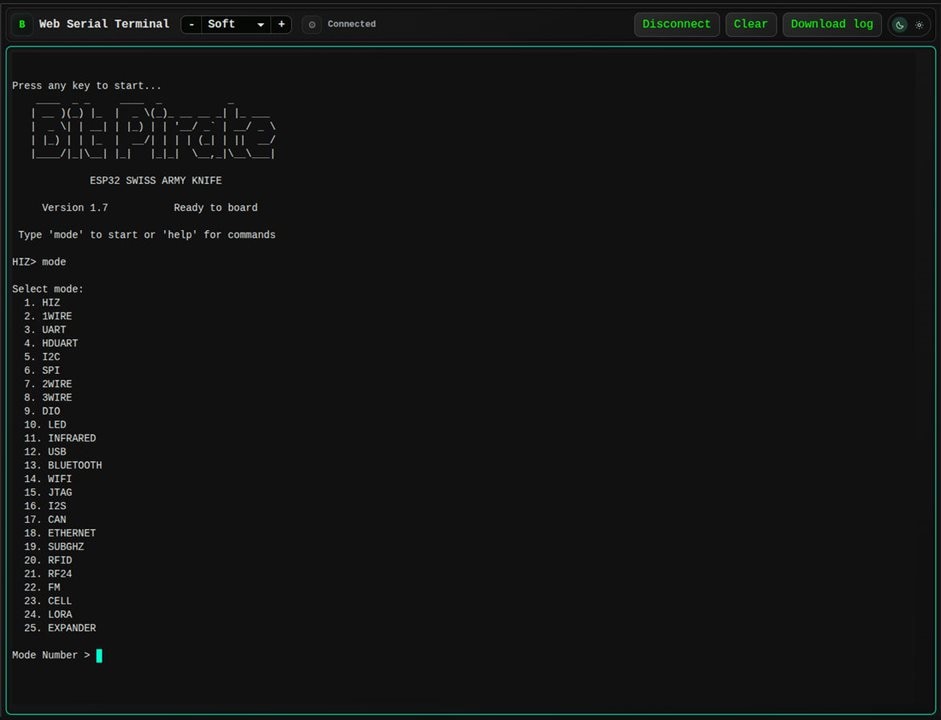
At its core, ESP32 Bit Pirate provides a command-line interface for interacting with connected hardware.
Instead of repeatedly writing and flashing custom Arduino sketches, users can connect a compatible ESP32-S3 board and immediately start exploring different communication protocols.
The firmware supports I2C, SPI, UART, 1-Wire, CAN, JTAG/SWD, GPIO, infrared, Wi-Fi, Bluetooth, Sub-GHz, LoRa, RFID and several other interfaces.
Depending on the hardware, it can be used to inspect communication buses, identify connected devices, dump EEPROM and flash memories, capture signals, interact with radio modules or automate experiments.
The same firmware can be accessed through USB Serial, a Wi-Fi web interface or dedicated browser-based tools.
All supported boards share the same firmware functionality, although some features require additional hardware modules.
Project website:
https://geo-tp.github.io/ESP32-Bit-Pirate/
New: Using the ESP32-S3 as a Software-Defined Radio
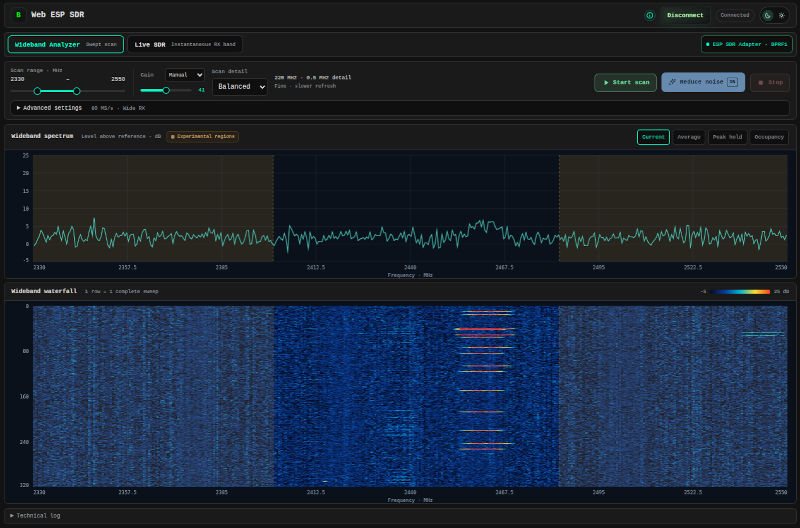
One of the most interesting additions in version 1.8 is the experimental ESP SDR adapter.
The ESP32-S3 contains a 2.4 GHz Wi-Fi radio, but its capabilities are usually exposed through the standard Wi-Fi and Bluetooth software stacks.
By accessing the radio hardware at a lower level, it is possible to capture raw I/Q samples and use them for basic software-defined radio experiments.
ESP32 Bit Pirate now provides a dedicated USB adapter that streams these samples to a browser-based SDR interface.
The Web ESP SDR application includes live spectrum and waterfall visualization, wideband frequency scanning, peak detection, occupancy tracking, adjustable receiver settings and signal calibration.
Two main operating modes are available:
Live SDR provides a real-time spectrum and waterfall around a selected center frequency, allowing users to inspect nearby RF activity.
Wideband Analyzer sweeps across a configurable frequency range, combining measurements to visualize activity over a much broader portion of the spectrum.
The interface also includes frequency references for common Wi-Fi, BLE, Zigbee and nRF24 channels.
The most reliable operating range remains the standard 2.4 GHz ISM band (2400–2483.5 MHz). Experimental tuning outside this range is possible, but reception quality, frequency accuracy and receiver behavior are not guaranteed.
It is important to understand that the ESP32-S3 is not a dedicated wideband SDR receiver. Out-of-band signals may also produce harmonics, images or other artifacts.
Nevertheless, it is an interesting demonstration of what can be achieved using the radio hardware already present in a low-cost microcontroller.
Try the Web ESP SDR:
https://geo-tp.github.io/ESP32-Bit-Pirate/web-tools/esp-sdr/
LoRa and Meshtastic Analysis
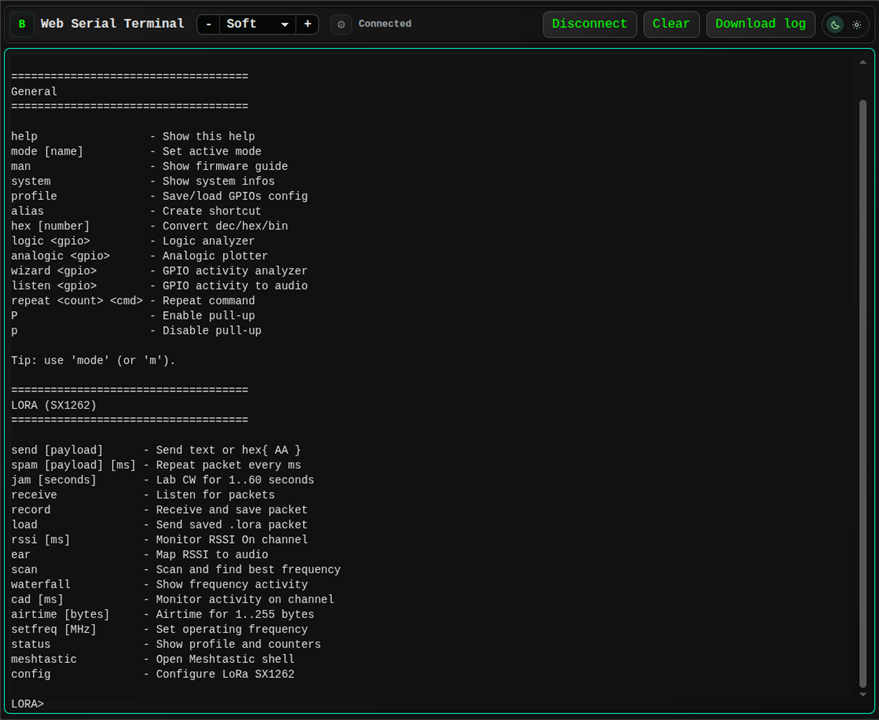
Version 1.7 introduced support for SX1262 LoRa transceivers, expanding Bit Pirate's capabilities beyond its existing Sub-GHz and 2.4 GHz interfaces.
The dedicated LoRa mode allows users to transmit and receive packets, inspect signal strength, scan frequency activity, perform Channel Activity Detection and visualize radio activity.
Radio parameters such as frequency, bandwidth, spreading factor, coding rate, preamble and transmit power can be configured directly from the interface.
Received packets can also be recorded and replayed with their original radio configuration.
A dedicated Meshtastic analysis shell was introduced alongside these capabilities, allowing users to inspect, send and receive Meshtastic packets.
The objective is not to replace a conventional Meshtastic node, but to provide a convenient interface for debugging and experimenting with LoRa-based communications.
Boards such as the Heltec WiFi LoRa 32 V4 and Heltec Vision Master T190 can take advantage of their integrated SX1262 transceivers without requiring additional radio modules.
Improved I2C Sniffing and Protocol Analysis
Version 1.8 also introduces several improvements to the existing wired protocol tools.
The I2C sniffer has been reworked around the ESP32-S3's RMT peripheral, providing improved passive signal capture and optional address filtering.
A new frequency measurement command allows users to determine the actual I2C clock frequency directly from the SCL line without relying on the configured bus speed.
The measurement reports the estimated frequency, clock period and HIGH/LOW timing.
Other improvements include better handling of configured I2C frequencies, expanded SPI flash identification, configurable WP/HOLD pins and reliability improvements to JTAG/SWD scanning.
These additions are particularly useful when working with unfamiliar embedded devices or troubleshooting communication problems.
Firmware Extraction and Analysis Directly in the Browser
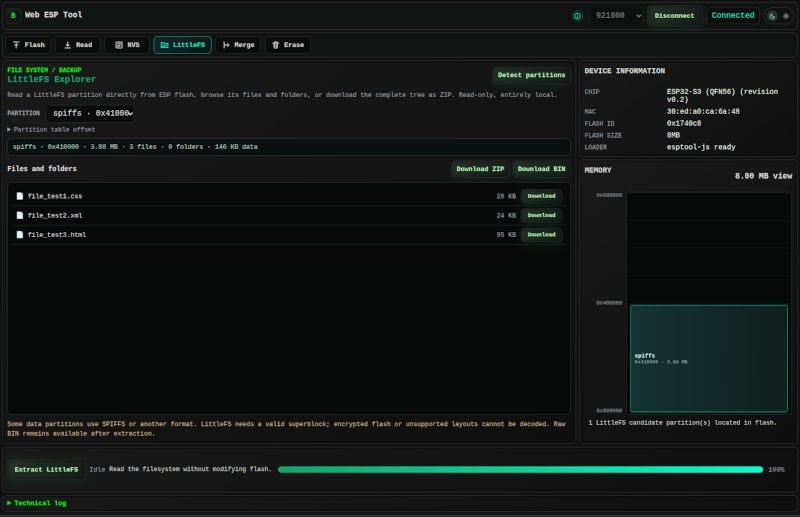
The browser-based toolkit continues to grow alongside the firmware.
In version 1.8, the ESP Tool gained support for extracting NVS partitions and LittleFS filesystems from ESP32 devices.
NVS extraction allows users to inspect stored configuration data and recover readable keys and values.
LittleFS extraction provides access to files stored inside compatible flash partitions.
These features complement existing tools for SPI flash programming, logic analysis, ESP32 flashing, STM32 and AVR programming, and direct GPIO/I2C/SPI control.
Another useful component is the Python Scripting Lab, which uses Pyodide to execute Python directly in the browser while communicating with Bit Pirate through Web Serial.
This makes it possible to automate hardware experiments, bus scans and data collection without setting up a local Python environment.
The idea behind these tools is to make common embedded debugging workflows accessible through a browser, from connecting to a device and extracting firmware to inspecting the resulting data.
Explore the Web Tools:
https://geo-tp.github.io/ESP32-Bit-Pirate/web-tools/
ESP32-C5/C6 Bus Expander and Zigbee

ESP32 Bit Pirate also has a companion project called ESP32 Bus Expander, which extends the available wireless capabilities using additional ESP32 devices.
The recently released Bus Expander v0.3 introduces a reworked Zigbee mode and several stability improvements.
Using an ESP32-C5 or ESP32-C6, users can explore IEEE 802.15.4 communication, scan Zigbee channels, discover devices, monitor network traffic and experiment with coordinator functionality.
Both boards are supported through the project's Web Flasher.
This companion approach allows Bit Pirate to extend its capabilities beyond the peripherals available on the ESP32-S3 itself.
Bus Expander:
https://github.com/geo-tp/ESP32-Bus-Expander
More Boards and Hardware Accessories
Hardware compatibility has also expanded significantly.
ESP32 Bit Pirate now supports a wide variety of ESP32-S3 development boards, ranging from inexpensive ESP32-S3 Super Mini modules to portable devices such as the M5Stack Cardputer, Cardputer ADV, M5StickS3 and LILYGO T-Embed.
Recent additions include the Unexpected Maker ProS3 and 4 MB ESP32-S3 Super Mini boards.
The M5Stack Cardputer ADV also benefits from support for the official CC1101 radio accessory, allowing users to experiment with Sub-GHz communication using a compact, portable setup.
Additional improvements include ILI9341 SPI display support and updated GPIO configurations across several supported boards.
All supported boards provide access to the same Bit Pirate features, with hardware-dependent functionality enabled through appropriate modules or accessories.
Getting Started
Getting started with ESP32 Bit Pirate does not require compiling the firmware.
The project provides a Web Flasher that allows users to select their board and install the appropriate firmware directly from a compatible browser.
Once installed, the device can be controlled through a conventional serial terminal or the browser-based Web Serial interface.
The project website also includes documentation, wiring guides, supported hardware information and practical recipes covering common debugging tasks.
For developers who prefer automation, Python scripts can interact with the firmware directly through its command-line interface or dedicated USB adapters.
Web Flasher:
https://geo-tp.github.io/ESP32-Bit-Pirate/webflasher/
Documentation:
https://github.com/geo-tp/ESP32-Bit-Pirate/wiki
What's Next?
ESP32 Bit Pirate continues to evolve as an open-source project, with contributions from developers experimenting with different boards, protocols and hardware interfaces.
The goal remains the same: make hardware exploration and debugging more accessible by combining inexpensive microcontrollers with flexible firmware and tools that are easy to use.
The latest SDR implementation is a good example of this approach. Rather than requiring another specialized instrument, it explores what can be achieved with hardware that many makers already own.
There is still plenty of room for improvement, particularly around RF analysis, protocol capture and browser-based workflows.
Feedback, testing and contributions are always welcome!
GitHub repository:
https://github.com/geo-tp/ESP32-Bit-Pirate
Latest release (v1.8):
https://github.com/geo-tp/ESP32-Bit-Pirate/releases/tag/v1.8
Project website:
https://geo-tp.github.io/ESP32-Bit-Pirate/
Top Comments