


Table of Contents
1. Introduction
Transitioning from a completed prototype to a reproducible, high quality manufacturable product requires thorough validation that the assembled PCB’s coming off the production line do what they are supposed to do.
This is known as a Functional Circuit Test (FCT).
However, orchestrating such tests in a controlled fashion, capturing device responses and observable outcomes, plus abstracting human operator inputs can be quite a challenge and is often a hefty project in its own right, especially if trying to automate.
This is not a new problem and there are existing solutions out there from custom open-source desktop applications through to more powerful industry based solutions such as labVIEW.
No doubt, the DIY route will be considered, especially at the early stages of the product lifecycle. This blog captures the early stage experience, from developing a custom desktop application in Python, which uses the standard USB to TTL converter, through to developing a web browser application which uses WebUSB.
The blog is about hardware and software interface issues. It is not about FCT methodology.
2. Using existing USB to TTL Converters with a Python desktop application

The above video simply shows the UART debug log from an existing PSRAM example for the Metro RP2350 board. Here I’m mimicking the scenario where the board is powered separately (i.e. not from a USB cable) and you are accessing the debug serial port to ascertain if the board’s PSRAM is functioning or not. Note that I do not care about the actual values. Here I am merely concerned about efficient data capture.
As you can see, the above methodology works fine if this evaluation was a once off for a single board. The challenge comes when you have to repeat this test multiple times for hundreds of boards, especially if you want to record the multiple pass/fail results. The data storage could simply be on the local computer or it might need to be pushed to a remote server somewhere for real-time or off-line review.
Either way, you are now pushed into the realm of desktop application developer or you purchase commercial software for this purpose.
To solve this as a DIY solution, one method would be to write up a Python script to capture the data on your computer. In the code below, I went a step further and published data to an online MQTT broker for offline analysis (note this script was done by AI):
import serial
import sys
import paho.mqtt.client as mqtt

# --- Configuration ---
# Serial Settings
PORT = '/dev/ttyUSB0'
BAUDRATE = 115200
TIMEOUT = 1

# MQTT Settings (Updated for Shiftr.io)
MQTT_BROKER = "--enter_instance_identifier_here---.cloud.shiftr.io"  # Hostname only (no mqtt://)
MQTT_PORT = 1883
MQTT_USER = "--- enter authorised user name here ---"
MQTT_PASS = "--- enter token here ----"
MQTT_TOPIC = "done_counter"  # Shiftr.io visualizes topics as paths

# KEYWORD TO SEARCH FOR
KEYWORD = "done"
# ---------------------

def on_connect(client, userdata, flags, rc, properties=None):
    """Callback for when the MQTT client connects to the broker."""
    if rc == 0:
        print(f"--- Successfully connected to Shiftr.io ({MQTT_BROKER}) ---")
    else:
        print(f"--- MQTT Connection failed with code {rc} ---")

def main():
    # 1. Initialize and configure the MQTT Client
    mqtt_client = mqtt.Client(callback_api_version=mqtt.CallbackAPIVersion.VERSION2)
    mqtt_client.on_connect = on_connect

    # Apply your username and password credentials
    mqtt_client.username_pw_set(username=MQTT_USER, password=MQTT_PASS)

    try:
        print(f"--- Connecting to Shiftr.io Broker: {MQTT_BROKER}... ---")
        mqtt_client.connect(MQTT_BROKER, MQTT_PORT, 60)
        # Start the background network loop
        mqtt_client.loop_start()
    except Exception as e:
        print(f"[MQTT Error]: Could not connect to broker. {e}", file=sys.stderr)
        sys.exit(1)

    # 2. Initialize Serial Port & Counter
    done_counter = 0
    print(f"--- Attempting to connect to {PORT} at {BAUDRATE} baud ---")

    try:
        with serial.Serial(PORT, BAUDRATE, timeout=TIMEOUT) as ser:
            print(f"--- Successfully connected to {PORT} ---")
            print(f"--- Watching for keyword: '{KEYWORD}' ---")
            print("--- Press Ctrl+C to stop ---\n")

            ser.reset_input_buffer()

            while True:
                if ser.in_waiting > 0:
                    line = ser.readline()

                    try:
                        decoded_line = line.decode('utf-8', errors='ignore').strip()
                        print(f"[Serial In]: {decoded_line}")

                        # Check if keyword is in the line
                        if KEYWORD in decoded_line.lower():
                            done_counter += 1
                            print(f" -> Found '{KEYWORD}'! Current Count: {done_counter}")

                            # Publish the counter value
                            result = mqtt_client.publish(MQTT_TOPIC, payload=str(done_counter), qos=1)

                            if result.rc == mqtt.MQTT_ERR_SUCCESS:
                                print(f" -> Published '{done_counter}' to '{MQTT_TOPIC}'")
                            else:
                                print(f" -> [MQTT Pub Error]: Failed to queue message.")

                    except Exception as decode_error:
                        print(f"[Decode Error]: {decode_error}", file=sys.stderr)

    except serial.SerialException as e:
        print(f"\n[Serial Error]: Could not open port {PORT}. Details: {e}", file=sys.stderr)
    except KeyboardInterrupt:
        print("\n--- Script stopped by user. Cleaning up... ---")
    finally:
        # 3. Clean up connections safely
        print("--- Disconnecting MQTT Client... ---")
        mqtt_client.loop_stop()
        mqtt_client.disconnect()
        print("--- Exited safely. ---")

if __name__ == '__main__':
    main()
So, thanks to Python (and AI!) this option has become much simpler that having to develop these type of applications in C / C++ / C# etc.
Still, the challenge with this approach is that using this code is not very flexible (in Linux, USB interface can be ACMx or USBx) or portable, especially if moving from say a LinuxOS computer to a WindowsOS computer, for example, and you need access to the connected serial comms port.
This is where WebUSB can help.
3. Using WebUSB and a browser webpage
3.1 Overview of WebUSB
WebUSB is a web platform API that enables direct, low-level communication between browser-based JavaScript applications and USB devices. It allows web applications to interact with custom or vendor-specific USB hardware without requiring native drivers, browser extensions, or platform-specific software.
It was introduced in 2017 and is maintained as a W3C Community Group specification. It has a similar status as Web Bluetooth, which is also not an official, universal web standard.
3.1.1 Embedded Device / Firmware Perspective
Every USB device identifies its function to the computer using an industry-standard identifier called a Class. For example, a keyboard uses the Human Interface Device (HID) class, while a flash drive uses the Mass Storage class. When the operating system sees these codes, it automatically locks down the device using its own built-in drivers. If the OS claims the device, the browser can't touch it.
To bypass this, WebUSB relies on a built-in loophole: the Vendor-Specific Class.
By setting your device's interface class to Vendor-Specific, you are telling the operating system: "There is no standard driver for this hardware. Hands off." Because the OS leaves the connection open, the browser is free to step in, claim the raw USB endpoints, and handle the communication directly via JavaScript.
In other words, on the device side, WebUSB does not define a new USB class but instead provides a discovery and announcement mechanism layered on standard USB transfers.
Thus the embedded device firmware needs to handle two main things: Discovery (telling the OS/browser it supports WebUSB) and Communication (handling the actual data).
The Discovery Mechanism (BOS & Descriptors):
When you plug the device in, the host operating system queries the Binary Object Store (BOS). To support WebUSB, your firmware must return a specific Platform Capability Descriptor inside this store (think of this as a cryptographic handshake and a billboard):
- The GUID: Your BOS descriptor must include a specific, hardcoded WebUSB identifier (
3408b638-09a9-47a0-8bfd-a0768815b665). This tells the browser, "Yes, I speak WebUSB." - The Landing Page URL: The descriptor also points to a URL descriptor. When plugged in, the OS can parse this and throw a native desktop notification (e.g., "Click here to connect to this device"), sending the user straight to your web app.
Control Requests & Data Transfers:
Once discovered, the browser communicates with your firmware using two types of USB requests:
- Control Transfers (Setup Stage): The browser sends vendor-specific control requests (using custom
bRequestcodes you define) to read the landing page URL or request landing page landing landing capabilities. - Bulk or Interrupt Transfers (Data Stage): Once the browser claims the interface, the wire protocol is entirely up to you. WebUSB doesn't care if you stream raw JSON, packed binary structs, or AT commands over your bulk IN/OUT endpoints.
In reality, Modern USB device stacks such as TinyUSB, simplify adoption, as it offers cross-MCU support (e.g., nRF52, SAMD, STM32), while Zephyr RTOS includes a dedicated WebUSB sample (board-specific due to peripheral variations) - the demonstration below uses Zephyr RTOS.
The device protocol itself remains application-defined over the raw transfers.
3.1.2 Web API Perspective
From the browser side, WebUSB exposes the USB protocol stack (control, bulk, interrupt, and isochronous transfers) to sandboxed JavaScript running in secure contexts (HTTPS).
Once a USBDevice is obtained (i.e. paired and connected), applications can open the device, select configurations, claim interfaces exclusively, and perform raw USB data transfers.
Unfortunately, there’s no support for it in Firefox and Safari, and is currently only supported in Chromium-based browsers (such as Chrome, Edge, etc.).
The best way to explain is by way of example.
3.2. Practical Application (Functional Circuit Test Interface)
3.2.1 Embedded Device Firmware
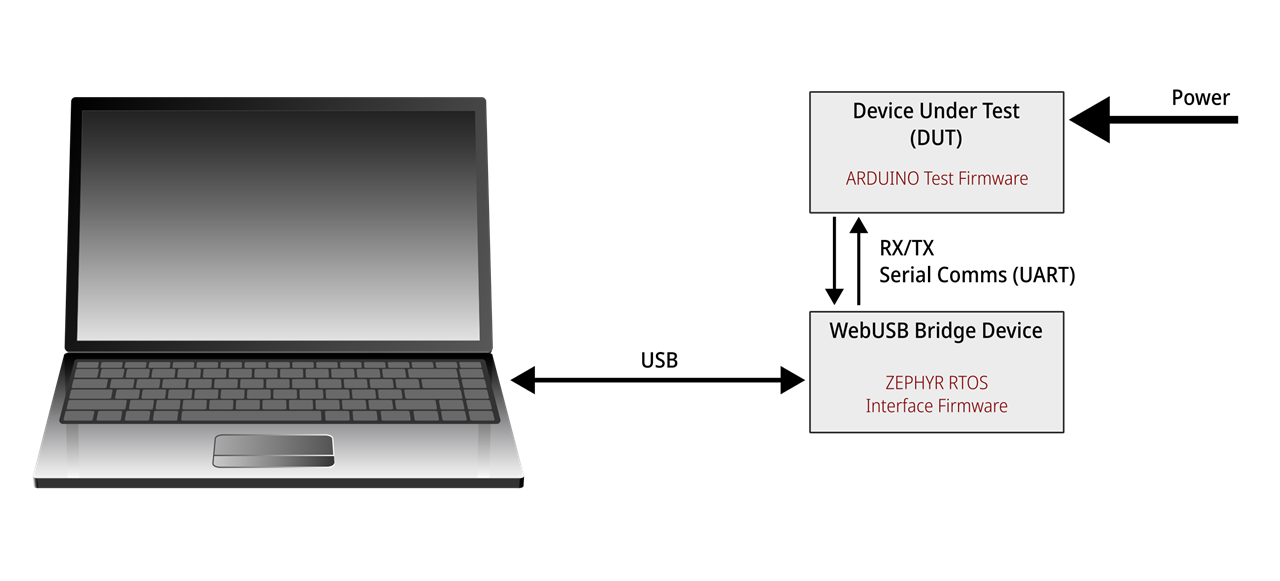
If your PCB undergoing a FCT includes a microcontroller then it's quite likely that you'll use test firmware to handle various test scenarios. In my demonstration below, I used an Adafruit Metro RP2350 as my DUT and the test firmware was developed on the Arduino IDE. In my Arduino Code I simply used keywords to control the different tests. The two test cases included were copies of existing Arduino library examples.
/*
  PSRAM Test

  This section of code tests the onboard ram of RP2350 based boards with external
  PSRAM.

  This example code is in the public domain.

*/

// NeoPixel Ring simple sketch (c) 2013 Shae Erisson
// Released under the GPLv3 license to match the rest of the
// Adafruit NeoPixel library


#if !defined(RP2350_PSRAM_CS)

void setup() {
  Serial1.begin(115200);
  Serial1.println("This example needs an RP2350 with PSRAM attached");
}

void loop() {
}

#else

#include <Adafruit_NeoPixel.h>

// Device ID
#define DEVICEID      "AdafruitMetro2350-20260622-17h00m00"

// NeoPixels pin and number pixels
#define PIN           25
#define NUMPIXELS     1

// Time (in milliseconds) to pause between pixels
#define DELAYVAL 500

#define CHUNK_SIZE 131072
#define PMALLOCSIZE (CHUNK_SIZE * 13)

Adafruit_NeoPixel pixels(NUMPIXELS, PIN, NEO_GRB + NEO_KHZ800);

uint32_t t_now = 0L;
uint8_t tmp[CHUNK_SIZE];
uint8_t mems[1024 * 1024 * 1] PSRAM;

uint8_t *mem = mems;
uint8_t *pmem = (uint8_t *)pmalloc(PMALLOCSIZE);


String inputString = "";      // a String to hold incoming data
bool stringComplete = false;  // whether the string is complete

int FunctionTestNo = 0;

int ColCount = 0;

bool debugging = false;
bool test1delay = false;

void setup() {

  // reserve 200 bytes for the inputString:
  inputString.reserve(128);

  Serial1.begin(115200);

  // INITIALIZE NeoPixel strip object (REQUIRED)
  pixels.begin();
  pixels.clear(); // Set all pixel colors to 'off'


}

void loop() {
  if (Serial1.available()) {
    delay(1);
    while (Serial1.available()) {
      // get the new byte:
      char inChar = (char)Serial1.read();
      // add it to the inputString:
      if (inChar != '\r') inputString += inChar;
      // if the incoming character is a newline, set a flag so the main loop can
      // do something about it:
      if (inChar == '\n') {
        stringComplete = true;
      }
    }
  }

  // print the string when a newline arrives:
  if (stringComplete) {
    // check if the content matches keywords:
    if (inputString.startsWith("deviceid")) {
      Serial1.println(DEVICEID);
      Serial1.printf("PSRAM Size: %d\r\n", rp2040.getPSRAMSize());
    }
    else if (inputString.startsWith("test1")) {
      FunctionTestNo = 1;
    }
    else if (inputString.startsWith("test2")) {
      FunctionTestNo = 2;
    }
    else if (inputString.startsWith("debug")) {
      debugging = !debugging;     //toggle boolean flag
    }
    else if (inputString.startsWith("stop")) {
      for(int i=0; i<NUMPIXELS; i++) {
        pixels.setPixelColor(i, pixels.Color(0, 0, 0));
        pixels.show();
        pixels.clear();
      }
      FunctionTestNo = 0;
      debugging = false;
      t_now = 0;
    }

    // clear the string:
    inputString = "";
    stringComplete = false;
  }
  if (!stringComplete) {
    if (FunctionTestNo == 1) FunctionTest1();
    else if (FunctionTestNo == 2) FunctionTest2();
  }

}

void FunctionTest1() {
  int i;
  if (t_now == 0) {
    static int cntr = 1;

    mem = mems;
    if (debugging) Serial1.printf("%05d: Filling %d memory locations @%p with random values and verifying in %d byte chunks.\r\n", cntr++, sizeof(mems), mem, CHUNK_SIZE);

    for (size_t m = 0; m < (sizeof(mems) / CHUNK_SIZE); m++) {
      for (i = 0; i < CHUNK_SIZE; i++) {
        tmp[i] = (char)random(0, 255);
        mem[i] = tmp[i];
      }

      for (i = 0; i < CHUNK_SIZE; i++) {
        if (mem[i] != tmp[i]) {
          if (debugging)  Serial1.printf("Memory error @%p(%d), was 0x%02x, should be 0x%02x\r\n", mem, i, *mem, tmp[i]);
          delay(10);
        }
      }
      if (debugging) Serial1.write('.');
      if (debugging) Serial1.flush();
      mem += CHUNK_SIZE;
    }

    Serial1.printf("\r\nDone, testing %d bytes\r\n", sizeof(mems));

    if (debugging) Serial1.printf("\r\nBefore pmalloc, total PSRAM heap: %d, available PSRAM heap: %d\r\n", rp2040.getTotalPSRAMHeap(), rp2040.getFreePSRAMHeap());
    pmem = (uint8_t *)pmalloc(PMALLOCSIZE);
    if (!pmem) {
      if (debugging) Serial1.printf("Error: Unable to allocate PSRAM chunk!\r\n");
      return;
    }
    if (debugging) Serial1.printf("After pmalloc, total PSRAM heap: %d, available PSRAM heap: %d\r\n", rp2040.getTotalPSRAMHeap(), rp2040.getFreePSRAMHeap());

    if (debugging) Serial1.printf("Allocated block @%p, size %d\r\n", pmem, PMALLOCSIZE);

    t_now = millis();
  }
  else {
    if (test1delay) {
      if ((millis() - t_now) > 1000) {
        test1delay = false;
        t_now = 0;
      }
    }
    else {
      if ((millis() - t_now) > 3000) {
        mem = pmem;
        for (size_t m = 0; m < (PMALLOCSIZE / CHUNK_SIZE); m++) {
          for (i = 0; i < CHUNK_SIZE; i++) {
            tmp[i] = (char)random(0, 255);
            mem[i] = tmp[i];
          }

          for (i = 0; i < CHUNK_SIZE; i++) {
            if (mem[i] != tmp[i]) {
              if (debugging) Serial1.printf("Memory error @%p(%d), was 0x%02x, should be 0x%02x\r\n", mem, i, *mem, tmp[i]);
              delay(10);
            }
          }
          if (debugging) Serial1.write('.');
          if (debugging) Serial1.flush();
          mem += CHUNK_SIZE;
        }

        Serial1.printf("Done, testing %d allocated bytes\r\n", sizeof(mems));

        free(pmem); // Release allocation for next pass
        if (debugging) Serial1.printf("After free, total PSRAM heap: %d, available PSRAM heap: %d\r\n", rp2040.getTotalPSRAMHeap(), rp2040.getFreePSRAMHeap());

        test1delay = true;
        t_now = millis();
      }
    }
  }
}


void FunctionTest2() {
  pixels.clear(); // Set all pixel colors to 'off'
  // The first NeoPixel in a strand is #0, second is 1, all the way up
  // to the count of pixels minus one.
  for(int i=0; i<NUMPIXELS; i++) { // For each pixel...

    // pixels.Color() takes RGB values, from 0,0,0 up to 255,255,255
    // Here we're using a moderately bright green color:
    if (t_now == 0) {
      if (ColCount == 0) {
        if (debugging) Serial1.println("RED LED");
        pixels.setPixelColor(i, pixels.Color(50, 0, 0));
        ColCount++;
      }
      else if (ColCount == 1) {
        if (debugging) Serial1.println("GREEN LED");
        pixels.setPixelColor(i, pixels.Color(0, 50, 0));
        ColCount++;
      }
      else if (ColCount == 2) {
        if (debugging) Serial1.println("BLUE LED");
        pixels.setPixelColor(i, pixels.Color(0, 0, 150));
        ColCount = 0;
      }
      t_now = millis();
      pixels.show();   // Send the updated pixel colors to the hardware.
    }
    else {
      if ((millis() - t_now) > DELAYVAL) {
        t_now = 0;
      }
    }
  }

}

#endif
The focus of this blog is on the WebUSB Bridge Device. This code was developed using an existing Zephyr RTOS webUSB example. I modified this code to act as a bridging device. It was also tailored for a Seeed Studio Xiao RP2040 dev board. Here I used PIO to create a new UART1 interface. I kept the existing UART0 interface for debugging purposes.
I typically start my Zephyr applications by devising the device tree for any hardware interfaces/peripherals. I this case I needed a new UART1 port (here you can use the generic "app.overlay" for this purpose):
/ {
	aliases {
		uart1 = &pio1_uart1;
	};
};

&pinctrl {
	pio1_uart1_default: pio1_uart1_default {
		rx_pins {
			pinmux = <PIO1_P4>;
			input-enable;
			bias-pull-up;
		};

		tx_pins {
			pinmux = <PIO1_P3>;
		};
	};
};

&pio1 {
	status = "okay";

	pio1_uart1: uart1 {
		pinctrl-0 = <&pio1_uart1_default>;
		pinctrl-names = "default";

		compatible = "raspberrypi,pico-uart-pio";
		current-speed = <115200>;
		status = "okay";
	};
};

&spi0 {
	status = "disabled";
};
The standard Zephyr RTOS only allows for PIO RX polling. This is not particularly suitable for my application, so I added in Interrupt functionality. This required a custom "Kconfig" to tell the compiler that I plan to use some custom definitions in my firmware.
# Copyright (c) 2023 Nordic Semiconductor ASA
# SPDX-License-Identifier: Apache-2.0

# Source common USB sample options used to initialize new experimental USB
# device stack. The scope of these options is limited to USB samples in project
# tree, you cannot use them in your own application.
source "samples/subsys/usb/common/Kconfig.sample_usbd"

config UART_RPI_PICO_PIO_INTERRUPT_DRIVEN
	bool "Raspberry Pi Pico PIO UART interrupt support"
	help
	  Enable interrupt-driven API for UART PIO driver.

source "Kconfig.zephyr"
Then I needed to create my specific project config file (prj.conf). This is an essential requirement for all Zephyr projects. This is where you can modify the USB specifics, such as giving the USB device a user friendly name.
CONFIG_USB_DEVICE_STACK_NEXT=y
CONFIG_CDC_ACM_SERIAL_INITIALIZE_AT_BOOT=n

CONFIG_LOG=y
CONFIG_USBD_LOG_LEVEL_WRN=y
CONFIG_UDC_DRIVER_LOG_LEVEL_WRN=y
CONFIG_SAMPLE_USBD_PID=0x000A
CONFIG_SAMPLE_USBD_20_EXTENSION_DESC=y
CONFIG_SAMPLE_USBD_MANUFACTURER="RPI PICO"
CONFIG_SAMPLE_USBD_PRODUCT="e14 USB FCT"

CONFIG_UART_INTERRUPT_DRIVEN=y
CONFIG_RING_BUFFER=y

CONFIG_MAIN_STACK_SIZE=4096
CONFIG_SYSTEM_WORKQUEUE_STACK_SIZE=4096
CONFIG_HEAP_MEM_POOL_SIZE=16384
CONFIG_LOG_BUFFER_SIZE=8192

# Custom PIO UART Driver configs
CONFIG_UART_RPI_PICO_PIO=n
CONFIG_UART_RPI_PICO_PIO_INTERRUPT_DRIVEN=y
CONFIG_DYNAMIC_INTERRUPTS=y
Then it was time to modify the existing webUSB code:
/*
 * Copyright (c) 2023-2024 Nordic Semiconductor ASA
 *
 * SPDX-License-Identifier: Apache-2.0
 */

#include <zephyr/kernel.h>
#include <zephyr/device.h>
#include <zephyr/sys/ring_buffer.h>
#include <zephyr/sys/util.h>
#include <string.h>
#include <zephyr/drivers/uart.h>

#include <sample_usbd.h>

#include <zephyr/sys/byteorder.h>
#include <zephyr/usb/usbd.h>
#include <zephyr/usb/class/usbd_hid.h>
#include <zephyr/usb/msos_desc.h>

#include <zephyr/logging/log.h>
LOG_MODULE_REGISTER(main, LOG_LEVEL_INF);

/*
 * There are three BOS descriptors used in the sample, a USB 2.0 EXTENSION from
 * the USB samples common code, a Microsoft OS 2.0 platform capability
 * descriptor, and a WebUSB platform capability descriptor.
 */
#include "webusb.h"
#include "msosv2.h"
#include "sfunc.h"

const struct device *uart1 = DEVICE_DT_GET(DT_ALIAS(uart1));

/* Define a ring buffer to handle UART polling */
RING_BUF_DECLARE(uart_ringbuf, 4096);

/* Semaphore to wake up the main loop when a newline is received */
K_SEM_DEFINE(uart_rx_sem, 0, K_SEM_MAX_LIMIT);
static volatile uint32_t newlines = 0;

/* Interrupt Service Routine (ISR) fired whenever the UART has data */
static void uart_rx_isr(const struct device *dev, void *user_data)
{
	uint8_t c;

	if (!uart_irq_update(dev)) {
		return;
	}

	if (!uart_irq_rx_ready(dev)) {
		return;
	}

	while (uart_fifo_read(dev, &c, 1) == 1) {
		if (ring_buf_put(&uart_ringbuf, &c, 1) == 0) {
			LOG_WRN("Ring buffer full, dropping byte");
		} else if (c == '\n') {
			newlines++;
			k_sem_give(&uart_rx_sem);
		}
	}
}

/* Helper to filter out bootloader and OS startup logs */
static bool is_boot_log(const uint8_t *buf, size_t len)
{
	const char *prefixes[] = {
		"ESP-ROM:", "Build:", "rst:", "SPIWP:", "mode:", "load:",
		"SHA-256", "Calculated:", "Expected:", "Attempting to boot",
		"entry ", "I (", "W (", "*** Booting Zephyr OS"
	};

	for (int i = 0; i < ARRAY_SIZE(prefixes); i++) {
		size_t prefix_len = strlen(prefixes[i]);

		/* Search for the signature anywhere in the received line */
		for (size_t offset = 0; offset + prefix_len <= len; offset++) {
			if (strncmp((const char *)&buf[offset], prefixes[i], prefix_len) == 0) {
				return true;
			}
		}
	}

	return false;
}

static void msg_cb(struct usbd_context *const usbd_ctx,
		   const struct usbd_msg *const msg)
{
	LOG_INF("USBD message: %s", usbd_msg_type_string(msg->type));

	if (usbd_can_detect_vbus(usbd_ctx)) {
		if (msg->type == USBD_MSG_VBUS_READY) {
			if (usbd_enable(usbd_ctx)) {
				LOG_ERR("Failed to enable device support");
			}
		}

		if (msg->type == USBD_MSG_VBUS_REMOVED) {
			if (usbd_disable(usbd_ctx)) {
				LOG_ERR("Failed to disable device support");
			}
		}
	}
}

int main(void)
{
	struct usbd_context *medlitest_usbd;
	int ret;

	if (!device_is_ready(uart1)) {
		LOG_ERR("UART1 device not ready");
		return -ENODEV;
	}

	sfunc_set_uart_dev(uart1);

	medlitest_usbd = sample_usbd_setup_device(msg_cb);
	if (medlitest_usbd == NULL) {
		LOG_ERR("Failed to setup USB device");
		return -ENODEV;
	}

	ret = usbd_add_descriptor(medlitest_usbd, &bos_vreq_msosv2);
	if (ret) {
		LOG_ERR("Failed to add MSOSv2 capability descriptor");
		return ret;
	}

	ret = usbd_add_descriptor(medlitest_usbd, &bos_vreq_webusb);
	if (ret) {
		LOG_ERR("Failed to add WebUSB capability descriptor");
		return ret;
	}

	ret = usbd_init(medlitest_usbd);
	if (ret) {
		LOG_ERR("Failed to initialize device support");
		return ret;
	}

	if (!usbd_can_detect_vbus(medlitest_usbd)) {
		ret = usbd_enable(medlitest_usbd);
		if (ret) {
			LOG_ERR("Failed to enable device support");
			return ret;
		}
	}

	/* Configure and enable the UART interrupt */
	uart_irq_callback_user_data_set(uart1, uart_rx_isr, NULL);
	uart_irq_rx_enable(uart1);

	uint8_t c;
	uint8_t buf[512];
	uint32_t len;

	/* Main processing loop */
	while (1) {
		/* Put the main thread to sleep until the ISR signals a newline */
		k_sem_take(&uart_rx_sem, K_FOREVER);

		/* Process queued data from the ring buffer */
		while (newlines > 0) {
			len = 0;
			while (!ring_buf_is_empty(&uart_ringbuf) && len < sizeof(buf)) {
				ring_buf_get(&uart_ringbuf, &c, 1);
				buf[len++] = c;
				if (c == '\n') {
					newlines--;
					break;
				}
			}

			if (len > 0) {
				if (is_boot_log(buf, len)) {
					LOG_DBG("Filtered boot log: %.*s", len, buf);
				} else {
					LOG_INF("UART1 received %d bytes: %.*s", len, len, buf);
					if (sfunc_send_to_usb(buf, len) != 0) {
						LOG_WRN("USB buffer full, dropped %d bytes", len);
					}
				}
			}
		}
	}
}
The other files were pretty much as per the existing example.
The complete code base can be found on my Github repository: https://github.com/Gerriko/webUSB_bridge
3.2.2 Web application (Javascript)
The web application consists of two parts. The html code (index.html), which makes the UI look pretty, and then the Javascript code, which handles the webUSB functionality. This code is also included in the Github repo.
var serial = {};
let port = null;

(function() {
  'use strict';

  serial.getPorts = function() {
    return navigator.usb.getDevices().then(devices => {
      return devices.map(device => new serial.Port(device));
    });
  };

  serial.requestPort = function() {
    const filters = [
      { 'vendorId': 0x2fe3, 'productId': 0x0100 },
      { 'vendorId': 0x2fe3, 'productId': 0x00a },
      { 'vendorId': 0x8086, 'productId': 0xF8A1 },
    ];
    return navigator.usb.requestDevice({ 'filters': filters }).then(
      device => new serial.Port(device)
    );
  }

  serial.Port = function(device) {
    this.device_ = device;
    this.isDisconnecting = false; // Flag to trace requested disconnects
    this.interfaceNumber_ = 0;    // Stored interface number to claim
  };

  serial.Port.prototype.connect = function() {
    let readLoop = () => {
      // DEBUG: Verify interfaces exist before reading
      if (!this.device_.configuration || this.device_.configuration.interfaces.length === 0) {
        if (this.onReceiveError) {
          this.onReceiveError(new Error("No USB interfaces found on configuration."));
        }
        return;
      }

      const currentInterface = this.device_.configuration.interfaces.find(i => i.interfaceNumber === this.interfaceNumber_);
      if (!currentInterface) {
        if (this.onReceiveError) {
          this.onReceiveError(new Error(`Interface #${this.interfaceNumber_} not found.`));
        }
        return;
      }

      // Auto-detect the first IN endpoint on this interface, falling back to index 0
      const readEp = currentInterface.alternate.endpoints.find(e => e.direction === 'in') || currentInterface.alternate.endpoints[0];

      if (!readEp) {
        if (this.onReceiveError) {
          this.onReceiveError(new Error(`No read endpoint found on interface #${this.interfaceNumber_}.`));
        }
        return;
      }

      this.device_.transferIn(readEp.endpointNumber, 64).then(result => {
        if (this.onReceive) {
          try {
            this.onReceive(result.data);
          } catch (e) {
            console.error("Error in onReceive callback:", e);
            if (this.onReceiveError) {
              this.onReceiveError(e);
            }
          }
        }
        readLoop();
      }, error => {
        if (this.onReceiveError) {
          this.onReceiveError(error);
        }
      });
    };

    return this.device_.open()
        .then(() => {
          if (this.device_.configuration === null) {
            return this.device_.selectConfiguration(1);
          }
        })
        .then(() => {
          // AUTO-DETECT: Find interface that has BULK endpoints (typically CDC ACM Data interface)
          let targetInterfaceNumber = 0;
          const config = this.device_.configuration;
          if (config && config.interfaces.length > 0) {
            for (const iface of config.interfaces) {
              const hasBulk = iface.alternate.endpoints.some(ep => ep.type === 'bulk');
              if (hasBulk) {
                targetInterfaceNumber = iface.interfaceNumber;
                break;
              }
            }
          }
          this.interfaceNumber_ = targetInterfaceNumber;
          console.log(`[USB Auto-Detect] Claiming Interface #${this.interfaceNumber_}`);
          return this.device_.claimInterface(this.interfaceNumber_);
        })
        .then(() => {
          readLoop();
        });
  };

  serial.Port.prototype.disconnect = function() {
    this.isDisconnecting = true; // Silences the cancellation transferIn error
    return this.device_.close();
  };

  serial.Port.prototype.send = function(data) {
    if (!this.device_.configuration || this.device_.configuration.interfaces.length === 0) {
      return Promise.reject(new Error("Device has no configurations loaded."));
    }

    const currentInterface = this.device_.configuration.interfaces.find(i => i.interfaceNumber === this.interfaceNumber_);
    if (!currentInterface) {
      return Promise.reject(new Error(`Active interface #${this.interfaceNumber_} not found.`));
    }

    // Auto-detect the first OUT endpoint on this interface, falling back to index 1
    const writeEp = currentInterface.alternate.endpoints.find(e => e.direction === 'out') || currentInterface.alternate.endpoints[1];

    if (!writeEp) {
      return Promise.reject(new Error(`No write endpoint found on claimed interface #${this.interfaceNumber_}.`));
    }

    return this.device_.transferOut(writeEp.endpointNumber, data);
  };
})();

// Detailed USB Descriptor Debug Logger
function debugUSBDevice(device, activeInterfaceNumber) {
  let log = `\n--- USB HARDWARE PROFILE & DEBUG INFO ---\n`;
  log += `[DEVICE] Vendor ID: 0x${device.vendorId.toString(16).toUpperCase().padStart(4, '0')}\n`;
  log += `[DEVICE] Product ID: 0x${device.productId.toString(16).toUpperCase().padStart(4, '0')}\n`;
  log += `[DEVICE] Class: ${device.deviceClass} | Subclass: ${device.deviceSubclass} | Protocol: ${device.deviceProtocol}\n`;
  log += `[DEVICE] Manufacturer: ${device.manufacturerName || 'N/A'}\n`;
  log += `[DEVICE] Product: ${device.productName || 'N/A'}\n`;
  log += `[DEVICE] Serial Number: ${device.serialNumber || 'N/A'}\n`;

  if (device.configuration) {
    const config = device.configuration;
    log += `[CONFIG] Value: ${config.configurationValue} (Active)\n`;
    config.interfaces.forEach((iface) => {
      const isClaimed = iface.interfaceNumber === activeInterfaceNumber;
      log += `  └─ Interface #${iface.interfaceNumber} (Claimed/Active: ${isClaimed})\n`;
      const alt = iface.alternate;
      log += `       ├─ Class: 0x${alt.interfaceClass.toString(16).toUpperCase().padStart(2, '0')}\n`;
      log += `       ├─ Subclass: 0x${alt.interfaceSubclass.toString(16).toUpperCase().padStart(2, '0')}\n`;
      log += `       └─ Endpoints (${alt.endpoints.length}):\n`;
      alt.endpoints.forEach((ep) => {
        log += `            ├─ EP #${ep.endpointNumber} | Dir: ${ep.direction.toUpperCase()} | Type: ${ep.type.toUpperCase()} | Size: ${ep.packetSize}B\n`;
      });
    });

    // Log the endpoint verification
    const activeIface = config.interfaces.find(i => i.interfaceNumber === activeInterfaceNumber) || config.interfaces[0];
    if (activeIface) {
      const alt = activeIface.alternate;
      const readEp = alt.endpoints.find(e => e.direction === 'in') || alt.endpoints[0];
      const writeEp = alt.endpoints.find(e => e.direction === 'out') || alt.endpoints[1];
      log += `[SOFTWARE] Active Claimed Interface: #${activeInterfaceNumber}\n`;
      log += `[SOFTWARE] Active Read EP: ${readEp ? '#' + readEp.endpointNumber + ' (' + readEp.direction.toUpperCase() + ')' : 'None (Error!)'}\n`;
      log += `[SOFTWARE] Active Write EP: ${writeEp ? '#' + writeEp.endpointNumber + ' (' + writeEp.direction.toUpperCase() + ')' : 'None (Error!)'}\n`;
    }
  } else {
    log += `[CONFIG] No configuration currently selected.\n`;
  }
  log += `-----------------------------------------\n\n`;
  return log;
}

// Connection Handler
function connect() {
  if (!port) return;

  // Reset intentional disconnect trace
  port.isDisconnecting = false;

  // FIX: Set listeners BEFORE connect to prevent race conditions on immediate incoming data
  port.onReceive = data => {
    try {
      // Get format type
      const formatSelect = document.getElementById('format-select');
      const format = formatSelect ? formatSelect.value : 'text';

      let displayString = '';

      // Safe conversion from DataView / ArrayBufferView to Uint8Array
      let uint8;
      if (data && data.buffer) {
        uint8 = new Uint8Array(data.buffer, data.byteOffset, data.byteLength);
      } else {
        uint8 = new Uint8Array(data || []);
      }

      if (format === 'hex') {
        // Space-separated Hex representation
        for (let i = 0; i < uint8.length; i++) {
          displayString += uint8[i].toString(16).padStart(2, '0').toUpperCase() + ' ';
        }
      } else if (format === 'decimal') {
        // Comma-separated decimal values
        displayString += '[' + uint8.join(', ') + '] ';
      } else {
        // Standard text decode
        let textDecoder = new TextDecoder('utf-8');
        displayString = textDecoder.decode(data);
      }

      // Log to terminal UI
      const outputEl = document.getElementById('output');
      if (outputEl) {
        outputEl.value += displayString;
        outputEl.scrollTop = outputEl.scrollHeight; // Auto-scroll to bottom
      }
    } catch (err) {
      console.error("onReceive processing error:", err);
      logToTerminal(`\n[SYSTEM ERROR] Failed to display incoming packet: ${err.message || err}\n`);
    }
  };

  port.onReceiveError = error => {
    // Ignore the cancellation transferIn error if we are intentionally disconnecting
    if (port && port.isDisconnecting) {
      return;
    }
    console.error("WebUSB Receive error:", error);
    logToTerminal(`\n[SYSTEM ERROR] Connection lost: ${error.message || error}\n`);
    handleDisconnectUI();
  };

  logToTerminal("[SYSTEM] Opening USB connection and claiming interface...\n");

  port.connect().then(() => {
    console.log("Connected successfully!");
    logToTerminal("[SYSTEM] Connected successfully!\n");

    // Print the USB configuration hardware descriptors
    const debugInfo = debugUSBDevice(port.device_, port.interfaceNumber_);
    logToTerminal(debugInfo);

    handleConnectUI();
  }).catch(err => {
    console.error("Connection failed:", err);
    logToTerminal(`[SYSTEM ERROR] Connection failed: ${err.message || err}\n`);
    handleDisconnectUI();
  });
}

function disconnect() {
  if (port) {
    port.isDisconnecting = true; // Signal we are intentionally shutting down the pipe
    logToTerminal("\n[SYSTEM] Disconnecting from device...\n");
    port.disconnect().then(() => {
      logToTerminal("[SYSTEM] Disconnected.\n");
      handleDisconnectUI();
    }).catch(err => {
      console.error("Disconnect error:", err);
      logToTerminal(`[SYSTEM ERROR] Disconnect failed: ${err.message || err}\n`);
      handleDisconnectUI();
    });
  }
}

function send(string) {
  if (string.length === 0) return;
  console.log("Sending to USB: " + string);

  // Output clean, printable characters to the terminal log (without raw trailing CRLF)
  const cleanLog = string.replace(/[\r\n]+$/, '');
  logToTerminal(`> ${cleanLog}\n`);

  let view = new TextEncoder('utf-8').encode(string);
  if (port) {
    port.send(view).catch(err => {
      console.error("Send failed:", err);
      logToTerminal(`[SYSTEM ERROR] Send failed: ${err.message || err}\n`);
    });
  } else {
    logToTerminal("[SYSTEM ERROR] Cannot send: device is not connected.\n");
  }
}

function sendInput() {
  let sourceEl = document.getElementById('input');
  let source = sourceEl.value;
  if (source.length === 0) return;

  // Get selected line ending from dropdown
  const endingEl = document.getElementById('line-ending');
  const ending = endingEl ? endingEl.value : 'crlf';

  let terminator = '';
  if (ending === 'crlf') {
    terminator = '\r\n';
  } else if (ending === 'lf') {
    terminator = '\n';
  } else if (ending === 'cr') {
    terminator = '\r';
  }

  // Send command with selected line ending termination
  send(source + terminator);
  sourceEl.value = ""; // Clear input after send
}

function logToTerminal(message) {
  const outputEl = document.getElementById('output');
  if (outputEl) {
    outputEl.value += message;
    outputEl.scrollTop = outputEl.scrollHeight;
  }
}

// UI Updates
function handleConnectUI() {
  const statusBadge = document.getElementById('status-badge');
  if (statusBadge) {
    statusBadge.className = "badge-status badge-connected";
    statusBadge.innerHTML = '<span class="pulse-dot"></span>Connected';
  }

  const connectBtn = document.getElementById('connect-btn');
  if (connectBtn) connectBtn.classList.add('d-none');

  const disconnectBtn = document.getElementById('disconnect-btn');
  if (disconnectBtn) disconnectBtn.classList.remove('d-none');

  const inputEl = document.getElementById('input');
  if (inputEl) inputEl.disabled = false;

  const submitBtn = document.getElementById('submit-btn');
  if (submitBtn) submitBtn.disabled = false;

  document.querySelectorAll('.btn-quick-cmd').forEach(btn => btn.removeAttribute('disabled'));

  if (port && port.device_) {
    const dev = port.device_;
    const vendorEl = document.getElementById('info-vendor-id');
    const productEl = document.getElementById('info-product-id');
    const mfgEl = document.getElementById('info-mfg');
    const prodEl = document.getElementById('info-product');
    const serialEl = document.getElementById('info-serial');

    if (vendorEl) vendorEl.innerText = '0x' + dev.vendorId.toString(16).padStart(4, '0').toUpperCase();
    if (productEl) productEl.innerText = '0x' + dev.productId.toString(16).padStart(4, '0').toUpperCase();
    if (mfgEl) mfgEl.innerText = dev.manufacturerName || 'Unknown';
    if (prodEl) prodEl.innerText = dev.productName || 'Unknown';
    if (serialEl) serialEl.innerText = dev.serialNumber || 'N/A';

    const cardEl = document.getElementById('device-info-card');
    if (cardEl) cardEl.classList.remove('d-none');
  }
}

function handleDisconnectUI() {
  const statusBadge = document.getElementById('status-badge');
  if (statusBadge) {
    statusBadge.className = "badge-status badge-disconnected";
    statusBadge.innerHTML = '<span class="pulse-dot"></span>Disconnected';
  }

  const connectBtn = document.getElementById('connect-btn');
  if (connectBtn) connectBtn.classList.remove('d-none');

  const disconnectBtn = document.getElementById('disconnect-btn');
  if (disconnectBtn) disconnectBtn.classList.add('d-none');

  const inputEl = document.getElementById('input');
  if (inputEl) inputEl.disabled = true;

  const submitBtn = document.getElementById('submit-btn');
  if (submitBtn) submitBtn.disabled = true;

  document.querySelectorAll('.btn-quick-cmd').forEach(btn => btn.setAttribute('disabled', 'true'));

  const cardEl = document.getElementById('device-info-card');
  if (cardEl) cardEl.classList.add('d-none');

  port = null;
}

// Dom Event Listeners
window.addEventListener('DOMContentLoaded', () => {
  // Check browser support
  if (!navigator.usb) {
    const banner = document.getElementById('support-warning');
    if (banner) banner.classList.remove('d-none');

    const connectBtn = document.getElementById('connect-btn');
    if (connectBtn) connectBtn.disabled = true;

    logToTerminal("[SYSTEM ERROR] WebUSB is not supported in this browser. Please use Chrome, Edge, Opera or another Chromium-based browser.\n");
  }

  // Connect button click
  const connectBtn = document.getElementById('connect-btn');
  if (connectBtn) {
    connectBtn.onclick = function() {
      logToTerminal("[SYSTEM] Requesting USB device from user...\r\n");
      serial.requestPort().then(selectedPort => {
        port = selectedPort;
        logToTerminal(`[SYSTEM] Device selected: ${port.device_.productName || 'Unnamed Device'} (Vendor: 0x${port.device_.vendorId.toString(16).toUpperCase()}, Product: 0x${port.device_.productId.toString(16).toUpperCase()})\n`);
        connect();
      }).catch(err => {
        console.warn("Device selection error:", err);
        if (err.name === 'NotFoundError') {
          logToTerminal("[SYSTEM] Device selection cancelled by user.\r\n");
        } else {
          logToTerminal(`[SYSTEM ERROR] Device selection failed: ${err.message}\r\n`);
        }
      });
    };
  }

  // Disconnect button click
  const disconnectBtn = document.getElementById('disconnect-btn');
  if (disconnectBtn) {
    disconnectBtn.onclick = function() {
      disconnect();
    };
  }

  // Send button click
  const submitBtn = document.getElementById('submit-btn');
  if (submitBtn) {
    submitBtn.onclick = () => {
      sendInput();
    };
  }

  // Input textbox keypress (Enter to send)
  const inputEl = document.getElementById('input');
  if (inputEl) {
    inputEl.addEventListener('keydown', (e) => {
      if (e.key === 'Enter') {
        e.preventDefault();
        sendInput();
      }
    });
  }

  // Clear output terminal
  const clearBtn = document.getElementById('clear-btn');
  if (clearBtn) {
    clearBtn.onclick = () => {
      const outputEl = document.getElementById('output');
      if (outputEl) outputEl.value = "";
    };
  }

  // Copy terminal output to clipboard
  const copyBtn = document.getElementById('copy-btn');
  if (copyBtn) {
    copyBtn.onclick = () => {
      const outputEl = document.getElementById('output');
      if (outputEl) {
        const outputText = outputEl.value;
        navigator.clipboard.writeText(outputText).then(() => {
          const copyIcon = document.getElementById('copy-icon');
          if (copyIcon) {
            copyIcon.className = "fa-solid fa-check text-success";
            setTimeout(() => {
              copyIcon.className = "fa-solid fa-copy";
            }, 1500);
          }
        });
      }
    };
  }

  // Format select dropdown change listener
  const formatSelect = document.getElementById('format-select');
  if (formatSelect) {
    formatSelect.addEventListener('change', (e) => {
      logToTerminal(`[SYSTEM] Switched format to ${e.target.value.toUpperCase()}\r\n`);
    });
  }

  // Quick Command buttons handler
  document.querySelectorAll('.btn-quick-cmd').forEach(btn => {
    btn.onclick = () => {
      const cmd = btn.getAttribute('data-cmd') + `\r\n`;
      send(cmd);
    };
  });
});
3.2.3 Demo
4. Summary
WebUSB serves as a lightweight yet powerful bridge between web applications and USB hardware. On the web side, it unlocks new classes of browser-based hardware applications under a strong consent and security model. On the embedded side, it demands only modest additions to an existing USB stack (primarily descriptors for polished integration) making it accessible to most MCU's with USB device peripherals. This duality enables manufacturers to deliver seamless, cross-platform experiences while maintaining compatibility with traditional USB ecosystems.
Hope you find this useful. Thanks for reading,


