I have a CNC mill I would like to use in PCB building. What can I easily do with it right away?
I assume I can cut, etch, and even component place with it. Any one do something with a CNC mill in this vein?
Cabe
I have a CNC mill I would like to use in PCB building. What can I easily do with it right away?
I assume I can cut, etch, and even component place with it. Any one do something with a CNC mill in this vein?
Cabe
Hi Cabe,
Hope you are doing well.
If you use EAGLE, there are a few ULPs that will export your board files as G-code format, readily useable by most CNC machines. If you have a board design ready you can produce it in minutes with your CNC machine. The ULPs are:
If you want to give a quick test download the freeware version from www.cadsoftusa.com, make a small board and export it to see how well your CNC machine works. If one of the ULPs doesn't work try another one, I've heard several customers use them with success.
Check out this youtube video, that way you can see how the process works.
http://www.youtube.com/watch?v=oEQsAi_eRAI
I hope you have fun and that it works well.
Best Regards,
Jorge Garcia
Cadsoft Computer
Hi,
I'm currently using pcb-gcode with EAGLE for the G-code creation and then EMC2 running as the CNC controller.
An early (low quality) test video can be found from here: http://www.youtube.com/watch?v=_xmdMWRpzmY
Have you tried the other generators, and if you have, what are the advantages of them?
Elias
Hi Elias,
I haven't personally worked with a CNC machine. In doing support for Cadsoft a few customers have asked how they could interface their EAGLE board data to their CNC machines. I have pointed them to those ULPs and feedback has been positive that's why I recommended them to Cabe.
Other users have mentioned that their machines can accept gerber files straight up, and they have also given positive feedback as to their experiences using their CNC machine. So that's another option you may want to look into.
hth,
Best Regards,
Jorge Garcia
Hi Jorge and thanks for the reply,
I will take a look at the other ULPs most likely once I have my new workshop set-up so I can then report here a bit more of my experiences with other than pcb-gcode.
With pcb-gcode there is no path optimization so by default there are a lot z-axis movement for the lifts.
There is an optimizer that reduces the time significantly but the tool does not care about doing inside or outside first etc.
Here is a forum thread to read more about the tool and for downloading it: http://pcbgcode.org/read.php?6,5,5 .
Elias
With the CNC machine Ben builds in his video, would it possible to make PCBs with thing traces like this one: http://www.youtube.com/watch?v=19jMzr9X-QQ ? What bit would you use to achieve the same level of tight tolerances?
Also, is there a way to convert board outlines in Eagle into gcode for cutting around the board outline but leave small tabs so that when everything is done, the finished PCB can be snapped from the larger PCB sheet?
Hi Wookie,
See the earlier post to Cabe, with the names of the appropriate ULPs for generating GCODE. Those should be able to get you on the right track.
The small tabs have to be drawn onto the board layout, possibly using a non copper layer(such as 46 milling) to define the tabs. I don't have experience with this operation by myself, but this should at least get you on the right track.
Best Regards,
Jorge Garcia
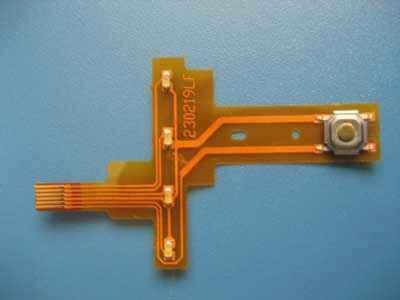
My job's "model shop" can cut single layer circuits out of Pyralux and Kapton made by Dupont, a thin and flexible circuit board option, in a few minutes.
What they do is simply to mill away all the copper that isn't part of the circuit. The copper layer is only a few millionths thick, so precise zeroing is key. I am planning to give this type of circuit printing a try.
If anyone else has worked with this before, let me know some tips and tricks.
Here is an example of this "Flex-Board".
Cabe