element14 Community
element14 Community
    Register Log In
  • Site
  • Search
  • Log In Register
  • Community Hub
    Community Hub
    • What's New on element14
    • Feedback and Support
    • Benefits of Membership
    • Personal Blogs
    • Members Area
    • Achievement Levels
  • Learn
    Learn
    • Ask an Expert
    • eBooks
    • element14 presents
    • Learning Center
    • Tech Spotlight
    • STEM Academy
    • Webinars, Training and Events
    • Learning Groups
  • Technologies
    Technologies
    • 3D Printing
    • FPGA
    • Industrial Automation
    • Internet of Things
    • Power & Energy
    • Sensors
    • Technology Groups
  • Challenges & Projects
    Challenges & Projects
    • Design Challenges
    • element14 presents Projects
    • Project14
    • Arduino Projects
    • Raspberry Pi Projects
    • Project Groups
  • Products
    Products
    • Arduino
    • Avnet & Tria Boards Community
    • Dev Tools
    • Manufacturers
    • Multicomp Pro
    • Product Groups
    • Raspberry Pi
    • RoadTests & Reviews
  • About Us
  • Store
    Store
    • Visit Your Store
    • Choose another store...
      • Europe
      •  Austria (German)
      •  Belgium (Dutch, French)
      •  Bulgaria (Bulgarian)
      •  Czech Republic (Czech)
      •  Denmark (Danish)
      •  Estonia (Estonian)
      •  Finland (Finnish)
      •  France (French)
      •  Germany (German)
      •  Hungary (Hungarian)
      •  Ireland
      •  Israel
      •  Italy (Italian)
      •  Latvia (Latvian)
      •  
      •  Lithuania (Lithuanian)
      •  Netherlands (Dutch)
      •  Norway (Norwegian)
      •  Poland (Polish)
      •  Portugal (Portuguese)
      •  Romania (Romanian)
      •  Russia (Russian)
      •  Slovakia (Slovak)
      •  Slovenia (Slovenian)
      •  Spain (Spanish)
      •  Sweden (Swedish)
      •  Switzerland(German, French)
      •  Turkey (Turkish)
      •  United Kingdom
      • Asia Pacific
      •  Australia
      •  China
      •  Hong Kong
      •  India
      • Japan
      •  Korea (Korean)
      •  Malaysia
      •  New Zealand
      •  Philippines
      •  Singapore
      •  Taiwan
      •  Thailand (Thai)
      • Vietnam
      • Americas
      •  Brazil (Portuguese)
      •  Canada
      •  Mexico (Spanish)
      •  United States
      Can't find the country/region you're looking for? Visit our export site or find a local distributor.
  • Translate
  • Profile
  • Settings
Embedded and Microcontrollers
  • Technologies
  • More
Embedded and Microcontrollers
Embedded Forum How to organize multiple toolchains, debuggers, etc. on your development computer?
  • Blog
  • Forum
  • Documents
  • Quiz
  • Polls
  • Files
  • Members
  • Mentions
  • Sub-Groups
  • Tags
  • More
  • Cancel
  • New
Join Embedded and Microcontrollers to participate - click to join for free!
Actions
  • Share
  • More
  • Cancel
Forum Thread Details
  • State Suggested Answer
  • Replies 8 replies
  • Answers 4 answers
  • Subscribers 474 subscribers
  • Views 837 views
  • Users 0 members are here
Related

How to organize multiple toolchains, debuggers, etc. on your development computer?

bitbanger
bitbanger over 9 years ago

Hello,


I'd like to learn a bit on programming with embedded platforms (at hobbyist level), mostly ARM Cortex type, but also e.g. test some FPGA dev-board.

So inevitably, I would need to install several development tools on my Linux desktop.

My question is, how to organize all these toolchains, etc. while keeping everything possibly well sorted, without 'cross-contaminate' the environments?


Should I use VMs and for instance create as many virtual machines as different platforms I'm going to play with?

Although a little expensive on the hard disk usage I think it should be a generally suitable way to proceed, except perhaps for tools that require e.g. a direct control on the USB communication between desktop and dev-board.


How do you organize your computer?

  • Sign in to reply
  • Cancel

Top Replies

  • mudz
    mudz over 9 years ago +1 suggested
    Hi Well I never install any software(let it be toolchain, debugger,...) on my main OS i.e. Win 10, I have install them on VMware running XP (sp2). I have android sdk installed on my main OS but it is giving…
  • michaelkellett
    michaelkellett over 9 years ago +1 suggested
    I don't use Linux but Windows 7 on my main development computers. I don't have any issues with mixing Keil ARM Cortex dev tools, Lattice FPGA Tools, Aldec VHDL tools, a host of FTDI based USB things as…
  • bitbanger
    bitbanger over 9 years ago in reply to mudz +1
    Thank you again, mudz. One more question: as you say that you use a Win XP VM for most of your toolchains/compilers, I gather that generally those tools are still supported (or at least, they are installable…
Parents
  • mudz
    0 mudz over 9 years ago

    Hi
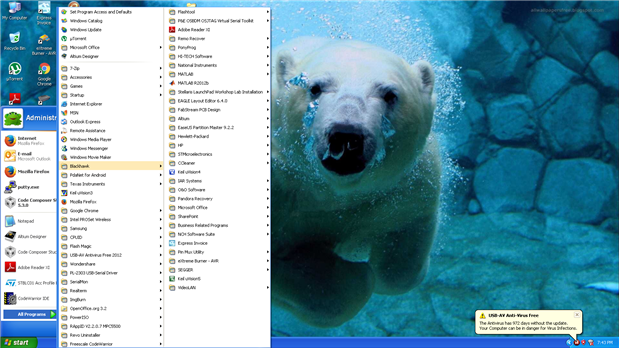
    Well I never install any software(let it be toolchain, debugger,...) on my main OS i.e. Win 10, I have install them on VMware running XP (sp2). image


    I have android sdk installed on my main OS but it is giving me problems with java.
    I started writing this comment to give you much more info but I'm feeling lazy to describe it now.
    If you ask me I'll tell you more image image


    Lazy_mudz

    • Cancel
    • Vote Up +1 Vote Down
    • Sign in to reply
    • Verify Answer
    • Reject Answer
    • Cancel
  • bitbanger
    0 bitbanger over 9 years ago in reply to mudz

    So you have everything on one VM ?

    • Cancel
    • Vote Up 0 Vote Down
    • Sign in to reply
    • Verify Answer
    • Cancel
  • mudz
    0 mudz over 9 years ago in reply to bitbanger

    Hi bitbanger
    Actually, I have one - Win 7, two - Win XP & one- Kali Linux currently running on my VMware(previously I also had installed few more OS like puppy Linux, Ubuntu).
    I have installed most of my technical software/toolchains/compilers etc on one XP with over 70GB space, then few on win 7 like code composer's(different version than in XP), smartdraw's, few recovery software etc.
    Installing these so many software on my main windows does not seem to be a good idea to me, as if anything goes cranky(which usually does) I'm gonna left up with a messy window which I don't like. VM's are best as they give me freedom, I can freely do any kind of mess up thing with such software, if anything goes wrong I always have an option to clean that win and reinstall new one which does not takes much time.
    There is one mode in VMware which I like the most i.e. Unity mode in which programs running on VMware (say xp) are directly shown on my main OS(win 10) like I am directly running it on my win 10. It helps me because my Research work is usually opened on win 10 browser(firefox: 40+ tabs atleast three pages, chrome: 30+ atleast 2 pages, edge: 40+ tabs atleast 3 pages) so I can work on my main win with the software(nowadays altium) which are basically running on VM. It's like research work on win 10 and development work on XP running on VMware.
    I usually connect second monitor with my laptop. Win 10 has a feature to create a separate desktop so that I can work on one(on my laptop display) and watch video tuts on other(second screen).

    Also, If you want to run that VM OS on other PC you just need to copy and paste it on the other machine. So you can work on other machine without any problem.

    I also have installed many software on my main os i.e. XMOS xTime composer, Visual studio 2013 & 2015 both, Steam(taking 17+GB), in addition to general softwares.
    So, If you think your pc can handle VM easily I suggest you to try VM. It's really most useful thing to have on PC.


    My laptop's specs: Intel I7 3630QM, 8GB RAM, 1TB HDD, 120GB SSD(WIndow 10).


    mudz (not lazy this time image)

    • Cancel
    • Vote Up 0 Vote Down
    • Sign in to reply
    • Verify Answer
    • Reject Answer
    • Cancel
  • bitbanger
    0 bitbanger over 9 years ago in reply to mudz

    Thank you again, mudz.


    One more question: as you say that you use a Win XP VM for most of your toolchains/compilers, I gather that generally those tools are still supported (or at least, they are installable) on that OS version, i.e. there is no need to use Win 7 or newer.

    • Cancel
    • Vote Up +1 Vote Down
    • Sign in to reply
    • Verify Answer
    • Cancel
Reply
  • bitbanger
    0 bitbanger over 9 years ago in reply to mudz

    Thank you again, mudz.


    One more question: as you say that you use a Win XP VM for most of your toolchains/compilers, I gather that generally those tools are still supported (or at least, they are installable) on that OS version, i.e. there is no need to use Win 7 or newer.

    • Cancel
    • Vote Up +1 Vote Down
    • Sign in to reply
    • Verify Answer
    • Cancel
Children
  • mudz
    0 mudz over 9 years ago in reply to bitbanger

    I'm glad that helped you !
    Yes, XP is the best OS I have ever seen (in all windows), It's extremely fast and stable. That's why I like it for most of my programs. Some of my programs were giving me trouble with win xp I don't remember which are but now they are not installed on either of them. Also I am in habit of not updating the software like TI code composer(for example) so I have different versions installed on different OS, I like it that way.
    Also some programs like recovery were not working well on XP so I use Win 7 for them. Not only this, XP is good with external devices or software as good as drivers for them are installed on it, but if there is no driver you are not gonna end up well. Win 7 is better takes an edge in this case.


    mudz

    • Cancel
    • Vote Up 0 Vote Down
    • Sign in to reply
    • Verify Answer
    • Cancel
element14 Community

element14 is the first online community specifically for engineers. Connect with your peers and get expert answers to your questions.

  • Members
  • Learn
  • Technologies
  • Challenges & Projects
  • Products
  • Store
  • About Us
  • Feedback & Support
  • FAQs
  • Terms of Use
  • Privacy Policy
  • Legal and Copyright Notices
  • Sitemap
  • Cookies

An Avnet Company © 2025 Premier Farnell Limited. All Rights Reserved.

Premier Farnell Ltd, registered in England and Wales (no 00876412), registered office: Farnell House, Forge Lane, Leeds LS12 2NE.

ICP 备案号 10220084.

Follow element14

  • X
  • Facebook
  • linkedin
  • YouTube