element14 Community
element14 Community
    Register Log In
  • Site
  • Search
  • Log In Register
  • Community Hub
    Community Hub
    • What's New on element14
    • Feedback and Support
    • Benefits of Membership
    • Personal Blogs
    • Members Area
    • Achievement Levels
  • Learn
    Learn
    • Ask an Expert
    • eBooks
    • element14 presents
    • Learning Center
    • Tech Spotlight
    • STEM Academy
    • Webinars, Training and Events
    • Learning Groups
  • Technologies
    Technologies
    • 3D Printing
    • FPGA
    • Industrial Automation
    • Internet of Things
    • Power & Energy
    • Sensors
    • Technology Groups
  • Challenges & Projects
    Challenges & Projects
    • Design Challenges
    • element14 presents Projects
    • Project14
    • Arduino Projects
    • Raspberry Pi Projects
    • Project Groups
  • Products
    Products
    • Arduino
    • Avnet & Tria Boards Community
    • Dev Tools
    • Manufacturers
    • Multicomp Pro
    • Product Groups
    • Raspberry Pi
    • RoadTests & Reviews
  • About Us
    About the element14 Community
  • Store
    Store
    • Visit Your Store
    • Choose another store...
      • Europe
      •  Austria (German)
      •  Belgium (Dutch, French)
      •  Bulgaria (Bulgarian)
      •  Czech Republic (Czech)
      •  Denmark (Danish)
      •  Estonia (Estonian)
      •  Finland (Finnish)
      •  France (French)
      •  Germany (German)
      •  Hungary (Hungarian)
      •  Ireland
      •  Israel
      •  Italy (Italian)
      •  Latvia (Latvian)
      •  
      •  Lithuania (Lithuanian)
      •  Netherlands (Dutch)
      •  Norway (Norwegian)
      •  Poland (Polish)
      •  Portugal (Portuguese)
      •  Romania (Romanian)
      •  Russia (Russian)
      •  Slovakia (Slovak)
      •  Slovenia (Slovenian)
      •  Spain (Spanish)
      •  Sweden (Swedish)
      •  Switzerland(German, French)
      •  Turkey (Turkish)
      •  United Kingdom
      • Asia Pacific
      •  Australia
      •  China
      •  Hong Kong
      •  India
      •  Japan
      •  Korea (Korean)
      •  Malaysia
      •  New Zealand
      •  Philippines
      •  Singapore
      •  Taiwan
      •  Thailand (Thai)
      •  Vietnam
      • Americas
      •  Brazil (Portuguese)
      •  Canada
      •  Mexico (Spanish)
      •  United States
      Can't find the country/region you're looking for? Visit our export site or find a local distributor.
  • Translate
  • Profile
  • Settings
Embedded and Microcontrollers
  • Technologies
  • More
Embedded and Microcontrollers
Embedded Forum coding FRDM-KL25Z
  • Blog
  • Forum
  • Documents
  • Quiz
  • Polls
  • Files
  • Members
  • Mentions
  • Sub-Groups
  • Tags
  • More
  • Cancel
  • New
Join Embedded and Microcontrollers to participate - click to join for free!
Actions
  • Share
  • More
  • Cancel
Forum Thread Details
  • State Not Answered
  • Replies 11 replies
  • Subscribers 482 subscribers
  • Views 1537 views
  • Users 0 members are here
Related

coding FRDM-KL25Z

Former Member
Former Member over 12 years ago

Hi I am new to embedded and new to programming FRDM-Kl25z and I have to do a simple project using FRDM-Kl25z. Can anyone please let me know which textbook can i refer to gain knowledge about basics for programming this device quickly and start trying out sample programs. Thanks.

  • Sign in to reply
  • Cancel
Parents
  • vsluiter
    0 vsluiter over 12 years ago

    Hello B P,


    If you have no problem with using an online compiler, I can heartily recommend using the mbed environment to program the board. Features like analog I/O, digital I/O, serial communication etc. have all been documented well, and are easily available. You'll have to 'convert' the firmware to be mbed compatible, below are the steps to do that, and get some example code going:


    • Go to http://mbed.org/handbook/mbed-FRDM-KL25Z-Getting-Started and follow instructions to get new firmware on your board
    • Register on the website to get an account.
    • Go to https://mbed.org/handbook/mbed-FRDM-KL25Z to read a bit about which interfaces you can use.
    • I've made this demo application: http://mbed.org/users/vsluiter/code/AccelerometerLedTsiDemo/ . If you've completed the steps above you'll have a demo running with an RGB led, accelerometer, USB mouse and touch fader. You'll have to plug in the USB cable in the 'KL25Z' port to use this demo program.
    • Other, simpler examples can be found here: http://mbed.org/handbook/mbed-FRDM-KL25Z-Examples
    • The only driver you'll need to install is this one, for serial port communication: http://mbed.org/handbook/Windows-serial-configuration
    • If you'd like to know more, browse around in the Handbook, or look at this presentation: http://mbed.org/cookbook/Course-Notes. It was made using the more powerful mbed board, but code syntax and functionality is the same.


    Greetings,

    Victor

    • Cancel
    • Vote Up 0 Vote Down
    • Sign in to reply
    • Verify Answer
    • Cancel
  • Former Member
    0 Former Member over 12 years ago in reply to vsluiter

    Hi Victor-


    Thanks a lot for your reply and for the useful links!.


    I started with a simple program ..


    <<code>>

    #include "mbed.h"

    int main() {
      
        DigitalOut rled(PTB18);
        DigitalOut bled(PTD1);
        DigitalOut gled(PTB19);  

        while (1) {   
        rled = 0;
        gled = 1;
        bled = 1;
        wait(0.2);
        rled = 1;
        gled = 0;
        bled = 1;
        wait(0.2);
        rled = 1;
        gled = 1;
        bled = 0;
        wait(0.2); 
        }
    }

    <</code>>


    I wanted my output should be, the tricolor led flashing red blue green continously.. but it is only flashing red.


    what i did is..


    I connected the FRDM -KL25Z successfuly ( added the device while compiling and it created the mbed folder).


    I typed the pgm in mbed compiler and clicked the compile button after that it is creating .bin file so I saved it using 'save as'  in my mbed folder.


    Immediately the output is reflected in my evaluvation board and only with red light flash. the output is not continously flashing red blue green...


    I don't know where i am making the mistake... if possible can you please help me with this issue...


    Thanks & Regards

    B P

    • Cancel
    • Vote Up 0 Vote Down
    • Sign in to reply
    • Verify Answer
    • Cancel
  • vsluiter
    0 vsluiter over 12 years ago in reply to Former Member

    Hello B P,


    I'm delighted, and sorry, to tell you that your program runs like a dream on my mbed; R-G-B are flashing in row....

    To be sure we're doing the same thing: I've posted my code here, you can import it if you like: http://mbed.org/users/vsluiter/code/blaat/

    • Cancel
    • Vote Up 0 Vote Down
    • Sign in to reply
    • Verify Answer
    • Cancel
  • Former Member
    0 Former Member over 12 years ago in reply to vsluiter

    Hi Victor-


    Thanks for your reply.


    It is working for me too ... I didn't unplug the KL25Z board after saving .bin file on the mbed folder. After sometime when I accidently plugged it to test it again, it started flashing!!


    Next,I would like to control the LED through switch...like if I press a button it should be on with some color and when I don't press the button, it should be off. the only button I have in KL25Z is reset(rt?), can I use the reset button to do the operation... how the system will recognize that I am not pressing it for reset...


    Since I am new to this board I am really worried that I can do this program this way or can I try it in some other way.. because I don't wanted to fail the device..


    If possible can you please help me with this issue..


    Thanks for your time..


    Regards

    B P.

    • Cancel
    • Vote Up 0 Vote Down
    • Sign in to reply
    • Verify Answer
    • Cancel
  • vsluiter
    0 vsluiter over 12 years ago in reply to Former Member

    Ah, yes, you can also press the reset button after downloading the file to restart the mbed.


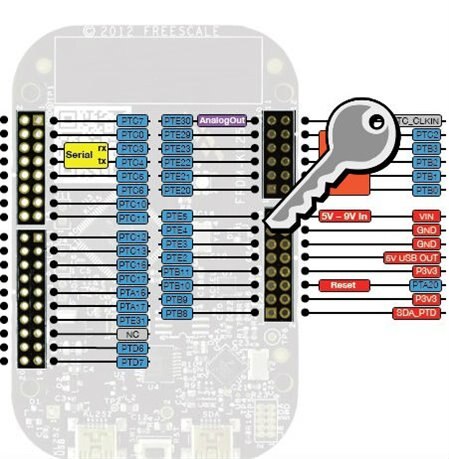
    You'll have to solder a switch between one of the inputs (here PTE4, across GND) and GND.


    #include "mbed.h"


    int main() {

        DigitalIn button(PTE4);

        DigitalOut rled(PTB18);

        button.mode(PullUp); 

        while (1)

        {   

            if(button)

                rled = 1;

            else

                rled = 0;

        }

    }

    • Cancel
    • Vote Up 0 Vote Down
    • Sign in to reply
    • Verify Answer
    • Cancel
  • Former Member
    0 Former Member over 12 years ago in reply to vsluiter

    Hi Victor-


    Thanks for the reply. I will try the above example after buying a switch... I thought i could use the reset button itself for this program. I tried a serial pc program in my KL25Z.. i am having a doubt in that....

    I downloaded the device driver for serial pc it is successfully installed. but if I run a simple hello world program i am not getting the output display in my PC. I am running on a windows vista computer, I checked the control panel and the port is COM5. Is there anything I need to do before executing the program?..I even reconnected the evaluation board... If possible please help me with this issue...

    Thanks & Regards B P.

    • Cancel
    • Vote Up 0 Vote Down
    • Sign in to reply
    • Verify Answer
    • Cancel
  • vsluiter
    0 vsluiter over 12 years ago in reply to Former Member

    Hello B P,


    In all honesty, I just used my house key to short between PTE4 and GND to test my program.


    The serial connection should work, I've made programs with it. Please browse through other examples on the website, or post your own code so I can test it out. What serial terminal program are you using? Have you set the baudrate correctly?


    Greetings,


    Victor

    • Cancel
    • Vote Up 0 Vote Down
    • Sign in to reply
    • Verify Answer
    • Cancel
  • Former Member
    0 Former Member over 12 years ago in reply to vsluiter

    Hi Victor-


    Thanks for your reply and sorry for my late response.


    regarding the switch program did you use FRDM-KL25Z if so can you please send a picture of it so that can also try to connect the same way instead of buying a switch..I tried with reset button itself it doesn't work..it is not working for else if condition .. I think it is considering as reset. I think I have to try it with seperate switch...


    my program..

    <<code>>

    #include "mbed.h"

    DigitalOut redLed (LED_RED);
    DigitalOut blueLed (LED_RED);
    DigitalOut greenLed (LED_RED);
    DigitalIn  switchInput(PTA20);

    int main() {
        while(1) {
        if (switchInput ==0){
        redLed =0;
        wait(0.2);
        redLed =1;
        wait(0.2);   
        blueLed=0;
        greenLed=1;      
        }
        else if (switchInput ==1) {
        redLed=1;
        blueLed=1;
        greenLed=0;
        wait(0.2);
        greenLed=1;
        wait(0.2);   
        }  
        }
    }

    <</code>>


    or if the serial pc works I can control it through keys rt?


    Regarding the serial pc program I checked the baudrate it is 9600 N1 ... and i tried to run a simple program to display Hello word in my pc...


    <<code>>

    include "mbed.h"             


    Serial pc(USBTX, USBRX); // tx, rx


    int main() {

        pc.printf("Hello World!\n");

    }


    <</code>>

    but it is not displaying the output in my mbed compiler output section. I tried after restarting my computer and I checked the hardware device manager in control panel it is connected to part COM5...It is a simple program to serial pc and  i checked the forum some of them mentioned that they got the output for this program...


    I don't know what else I am missing.. if possible can you please help me with this issue.. Thanks for your time.


    Regards

    B P

    • Cancel
    • Vote Up 0 Vote Down
    • Sign in to reply
    • Verify Answer
    • Cancel
Reply
  • Former Member
    0 Former Member over 12 years ago in reply to vsluiter

    Hi Victor-


    Thanks for your reply and sorry for my late response.


    regarding the switch program did you use FRDM-KL25Z if so can you please send a picture of it so that can also try to connect the same way instead of buying a switch..I tried with reset button itself it doesn't work..it is not working for else if condition .. I think it is considering as reset. I think I have to try it with seperate switch...


    my program..

    <<code>>

    #include "mbed.h"

    DigitalOut redLed (LED_RED);
    DigitalOut blueLed (LED_RED);
    DigitalOut greenLed (LED_RED);
    DigitalIn  switchInput(PTA20);

    int main() {
        while(1) {
        if (switchInput ==0){
        redLed =0;
        wait(0.2);
        redLed =1;
        wait(0.2);   
        blueLed=0;
        greenLed=1;      
        }
        else if (switchInput ==1) {
        redLed=1;
        blueLed=1;
        greenLed=0;
        wait(0.2);
        greenLed=1;
        wait(0.2);   
        }  
        }
    }

    <</code>>


    or if the serial pc works I can control it through keys rt?


    Regarding the serial pc program I checked the baudrate it is 9600 N1 ... and i tried to run a simple program to display Hello word in my pc...


    <<code>>

    include "mbed.h"             


    Serial pc(USBTX, USBRX); // tx, rx


    int main() {

        pc.printf("Hello World!\n");

    }


    <</code>>

    but it is not displaying the output in my mbed compiler output section. I tried after restarting my computer and I checked the hardware device manager in control panel it is connected to part COM5...It is a simple program to serial pc and  i checked the forum some of them mentioned that they got the output for this program...


    I don't know what else I am missing.. if possible can you please help me with this issue.. Thanks for your time.


    Regards

    B P

    • Cancel
    • Vote Up 0 Vote Down
    • Sign in to reply
    • Verify Answer
    • Cancel
Children
  • vsluiter
    0 vsluiter over 12 years ago in reply to Former Member

    Hello B P,


    Please read the basics; on this page the first sheets are on digital inputs. http://mbed.org/cookbook/Course-Note .


    I used PTE4 because GND is across, so it is easy to solder a switch between these points(see picture on this page: http://mbed.org/handbook/mbed-FRDM-KL25Z). In my program I used a pullup on PTE4, so it is high if nothing is connected, and if it is shorted to GND, the input is low.


    Regarding your program: it is only sending "Hello World" once, probably faster than your computer can detect a serial port. Try looping it, with a delay of a second between all transmissions. Letting a program run to the end of main() is bad practice anyway, as your program has nothing to return to. 

    Please, please, please read some documentation (sheets I mentioned), and try the examples mentioned here: http://mbed.org/handbook/mbed-FRDM-KL25Z-Examples , also for the serial port (where they send data, wait a bit, send again, etc.... ). It'll help you further than copying code from me....

    • Cancel
    • Vote Up 0 Vote Down
    • Sign in to reply
    • Verify Answer
    • Cancel
  • Former Member
    0 Former Member over 12 years ago in reply to vsluiter

    Hi Victor-


    I think you have misunderstood what I have asked you.. I didn't ask your code. you only mentioned to me that you used your house key to short between PTE4 and GND. Since I am new to this device and don't have much knowlegde in electrical area I asked you to send the image of the connections not your code and not even for Serial PC.I installed the driver and executed a program it is not displaying the output so I thought there may be some driver issue that you might know of and could help me to fix it..I am not interested in copying others code.  Thanks for your help and sorry for bothering you.

    Regards

    Bargavi.

    • Cancel
    • Vote Up 0 Vote Down
    • Sign in to reply
    • Verify Answer
    • Cancel
  • vsluiter
    0 vsluiter over 12 years ago in reply to Former Member

    Okay B P,

    Maybe I'm not the most patient of all teachers around. And I do not mind 'stealing' code, it's just that I think that you could find out a lot by reading the documentation and trial and error before asking; I don't want to 'steal' your learning experience.

    • As for the key: you can look up the pinning of the mbed on this page:https://mbed.org/handbook/mbed-FRDM-KL25Z
    • Here you can see that PTE4 is across GND.
    • This is how I made contactimage
    • I reccommend you to solder a switch and NOT be as ignorant as I was to use a home key. It was a simple trick, but very prone to shorting other pins.


    Regarding serial: please look at the example I sent you in the previous post.


    No hard feelings from my side.

    • Cancel
    • Vote Up 0 Vote Down
    • Sign in to reply
    • Verify Answer
    • Cancel
element14 Community

element14 is the first online community specifically for engineers. Connect with your peers and get expert answers to your questions.

  • Members
  • Learn
  • Technologies
  • Challenges & Projects
  • Products
  • Store
  • About Us
  • Feedback & Support
  • FAQs
  • Terms of Use
  • Privacy Policy
  • Legal and Copyright Notices
  • Sitemap
  • Cookies

An Avnet Company © 2026 Premier Farnell Limited. All Rights Reserved.

Premier Farnell Ltd, registered in England and Wales (no 00876412), registered office: Farnell House, Forge Lane, Leeds LS12 2NE.

ICP 备案号 10220084.

Follow element14

  • X
  • Facebook
  • linkedin
  • YouTube