element14 Community
element14 Community
    Register Log In
  • Site
  • Search
  • Log In Register
  • Community Hub
    Community Hub
    • What's New on element14
    • Feedback and Support
    • Benefits of Membership
    • Personal Blogs
    • Members Area
    • Achievement Levels
  • Learn
    Learn
    • Ask an Expert
    • eBooks
    • element14 presents
    • Learning Center
    • Tech Spotlight
    • STEM Academy
    • Webinars, Training and Events
    • Learning Groups
  • Technologies
    Technologies
    • 3D Printing
    • FPGA
    • Industrial Automation
    • Internet of Things
    • Power & Energy
    • Sensors
    • Technology Groups
  • Challenges & Projects
    Challenges & Projects
    • Design Challenges
    • element14 presents Projects
    • Project14
    • Arduino Projects
    • Raspberry Pi Projects
    • Project Groups
  • Products
    Products
    • Arduino
    • Avnet & Tria Boards Community
    • Dev Tools
    • Manufacturers
    • Multicomp Pro
    • Product Groups
    • Raspberry Pi
    • RoadTests & Reviews
  • About Us
  • Store
    Store
    • Visit Your Store
    • Choose another store...
      • Europe
      •  Austria (German)
      •  Belgium (Dutch, French)
      •  Bulgaria (Bulgarian)
      •  Czech Republic (Czech)
      •  Denmark (Danish)
      •  Estonia (Estonian)
      •  Finland (Finnish)
      •  France (French)
      •  Germany (German)
      •  Hungary (Hungarian)
      •  Ireland
      •  Israel
      •  Italy (Italian)
      •  Latvia (Latvian)
      •  
      •  Lithuania (Lithuanian)
      •  Netherlands (Dutch)
      •  Norway (Norwegian)
      •  Poland (Polish)
      •  Portugal (Portuguese)
      •  Romania (Romanian)
      •  Russia (Russian)
      •  Slovakia (Slovak)
      •  Slovenia (Slovenian)
      •  Spain (Spanish)
      •  Sweden (Swedish)
      •  Switzerland(German, French)
      •  Turkey (Turkish)
      •  United Kingdom
      • Asia Pacific
      •  Australia
      •  China
      •  Hong Kong
      •  India
      • Japan
      •  Korea (Korean)
      •  Malaysia
      •  New Zealand
      •  Philippines
      •  Singapore
      •  Taiwan
      •  Thailand (Thai)
      • Vietnam
      • Americas
      •  Brazil (Portuguese)
      •  Canada
      •  Mexico (Spanish)
      •  United States
      Can't find the country/region you're looking for? Visit our export site or find a local distributor.
  • Translate
  • Profile
  • Settings
Embedded and Microcontrollers
  • Technologies
  • More
Embedded and Microcontrollers
Embedded Forum LPC4357-EVB: unable to program
  • Blog
  • Forum
  • Documents
  • Quiz
  • Polls
  • Files
  • Members
  • Mentions
  • Sub-Groups
  • Tags
  • More
  • Cancel
  • New
Join Embedded and Microcontrollers to participate - click to join for free!
Actions
  • Share
  • More
  • Cancel
Forum Thread Details
  • State Not Answered
  • Replies 17 replies
  • Subscribers 474 subscribers
  • Views 1727 views
  • Users 0 members are here
  • lpc43
  • lpc4357-evb
Related

LPC4357-EVB: unable to program

Former Member
Former Member over 11 years ago

I have programmed my software into LPC4357-EVB board and it became totally unusable - can't use JTAG at all.

I suspect that PLL1 initialisation was incorrect so the micro simply locks up.


The question is: How can I reprogram the board?

According to NXP spec, in order to get access to ISP I need to use USART0 or USART3.


However, on this board USART0 is hardwired to RAM and USART3 is connected to USB power protection chip.


Is it possible to reprogram the board without hardware modifications apart from soldering UART TX/RX pins?


  • Sign in to reply
  • Cancel
Parents
  • Former Member
    0 Former Member over 11 years ago

    Yes we are.

    The problem is that they wired the wrong pins to J12.


    Let me explain.


    According to NXP LPC4357 User Manual (document UM10503) the following pins shall be configured for processor to enter ISP mode (to erase internal flash):

    For USART0 ISP access:

    P2_9 - LOW

    P2_8 - LOW

    P1_2 - LOW

    P1_1 - LOW

    P2_7 - LOW

    P2_0 - USART0

    P2_1 - USART1


    For USART3 ISP access:

    P2_9 - HIGH

    P2_8 - LOW

    P1_2 - LOW

    P1_1 - LOW

    P2_7 - LOW

    P2_3 - USART0

    P2_4 - USART1


    The whole process is described in sections 5.3 (Table 18) and 47.4 (Table 1065).


    Let's map these pins to the actual ball grid array outputs (see LPC4357FET256 datasheet for this):

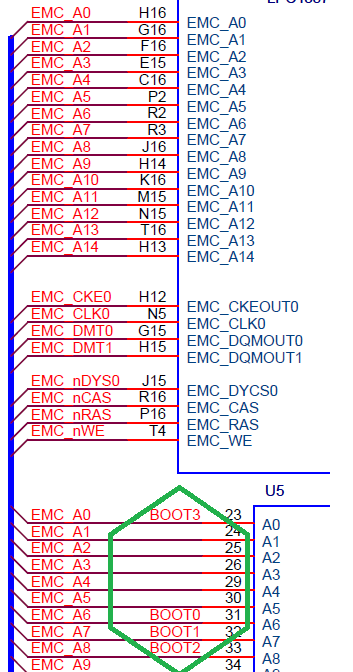
    P2_9 - H16, connected to BOOT3 and EMC_A0.

    P2_8 - J16, connected to BOOT2 and EMC_A8

    P1_2 - R3, connected to BOOT1 and EMC_A7

    P1_1 - R1, connected to BOOT0 and EMC_A6

    P2_7 - H14, connected to EMC_A9

    P2_0 - T16, connected to EMC_A13

    P2_1 - N15, connected to EMC_A12,

    P2_3 - J12, connected to USB0_PPWR

    P2_4 - K11, connected to USB0_PWR_FAULT


    As you can see, none of the required pins go to the connector you mentioned.

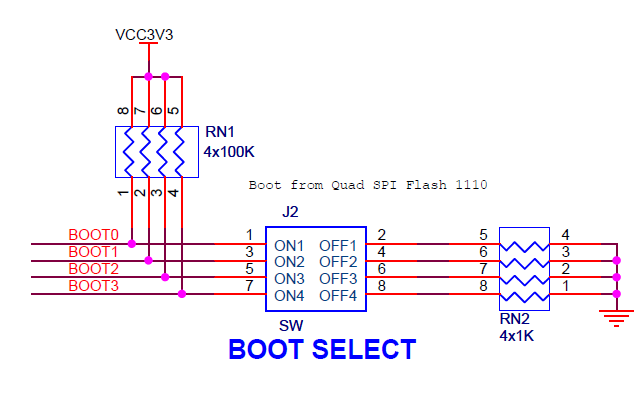
    The BOOTx pins are wired correctly and can be configured by the DIP switches. The P2_7 can be simply tied to ground or left as it is.

    It is the USART pins I have problem with.


    So far I can only think of two possibilities of how to use USART0/USART3 for ISP mode on these boards:

    1. Lift RAM address pins A12 and A13 for USART0 and lose external RAM in the process. OR

    2. Remove resistors R58 and R59 and also U18 for USART3 access.


    Please tell me I am wrong and there is a better way. Please.

    • Cancel
    • Vote Up 0 Vote Down
    • Sign in to reply
    • Verify Answer
    • Cancel
  • Former Member
    0 Former Member over 11 years ago in reply to Former Member

    So setting the Boot dip switch before power up doesn't do what you need?


    http://www.farnell.com/datasheets/1682114.pdf


    image


    image

    image

    • Cancel
    • Vote Up 0 Vote Down
    • Sign in to reply
    • Verify Answer
    • Cancel
  • Former Member
    0 Former Member over 11 years ago in reply to Former Member

    Sorry,  I see what you mean about T16, N15, J12, & K11.

    • Cancel
    • Vote Up 0 Vote Down
    • Sign in to reply
    • Verify Answer
    • Cancel
Reply
  • Former Member
    0 Former Member over 11 years ago in reply to Former Member

    Sorry,  I see what you mean about T16, N15, J12, & K11.

    • Cancel
    • Vote Up 0 Vote Down
    • Sign in to reply
    • Verify Answer
    • Cancel
Children
  • Former Member
    0 Former Member over 11 years ago in reply to Former Member

    Exactly!  image


    This is my problem. As these pins can not be accessed easily, I am unable to erase flash using USART0/USART3 ISP mode.

    • Cancel
    • Vote Up 0 Vote Down
    • Sign in to reply
    • Verify Answer
    • Cancel
  • Former Member
    0 Former Member over 11 years ago in reply to Former Member

    Still checking to see if alternate USART pin mapping will work with ISP function.


    Did you do any code security in your original code?


    From the chip data sheet 7.23.11


    " In level CRP3, any access to the chip via the JTAG pins or the ISP is disabled. This

    mode also disables the ISP override using P2_7 pin. If necessary, the application

    code must provide a flash update mechanism using the IAP calls or using the

    reinvoke ISP command to enable flash update via USART0. See Table 5"

    • Cancel
    • Vote Up 0 Vote Down
    • Sign in to reply
    • Verify Answer
    • Cancel
  • Former Member
    0 Former Member over 11 years ago in reply to Former Member

    My code doesn't have any security. In fact, this is very simple code, just initialise SGU (and PLL1) and CCU.

    I believe that the problem lies in PLL1 initialisation as there is a known issue of PLL1 lockup if something goes wrong after powerup.

    • Cancel
    • Vote Up 0 Vote Down
    • Sign in to reply
    • Verify Answer
    • Cancel
  • Former Member
    0 Former Member over 11 years ago in reply to Former Member

    Any progress on this?

    • Cancel
    • Vote Up 0 Vote Down
    • Sign in to reply
    • Verify Answer
    • Cancel
  • aghogho
    0 aghogho over 11 years ago in reply to Former Member

    Just wondering if you ever had this issue resolved. I am having the same issue with the lpc4357-evb board. In my case, I was trying to port over the MDK example projects into LPCopen+LPCxpresso. I was trying to configure the emc using LPCopen, but used the wrong PLL. Now my board is unable to be placed in debug mode.


    I will really appreciate any technical help to aid in resolving this issue.


    -Obi

    • Cancel
    • Vote Up 0 Vote Down
    • Sign in to reply
    • Verify Answer
    • Cancel
  • michaelkellett
    0 michaelkellett over 11 years ago in reply to aghogho

    Which debugging tool are you using ?

    If you use  ULINK or similar you can get control of the processor even if your code is killing the clock by "connecting under reset" in the ULINK debugger setup (Keil MDK tools).

    If you don't have a Ulink there may be similar options on the EVB tools (I don't have one so I don't know).

    Real ULINKs are a silly price (£267 from Farnell), fakes are <$20. ARM released a CMSIS_DAP spec and you might be able to find something you can use  - it's an open source design for a debugging tool.


    Is there  a complete schematic for this board - the User Manual is just fragments?


    MK

    • Cancel
    • Vote Up 0 Vote Down
    • Sign in to reply
    • Verify Answer
    • Cancel
  • aghogho
    0 aghogho over 11 years ago in reply to michaelkellett

    I am using an LPC-LINK2 and a J-LINK. Both of these cannot connect to the processor core and enable jtag debugging. I don't know if ULINK will work as well as a number of people have asserted that the only solution will be to put the processor core in ISP mode.


    There is a complete schematic available from element14 at http://www.element14.com/community/docs/DOC-51065/l/multimedia-evaluation-board-with-lpc4357?isRedirect=true#documents

    • Cancel
    • Vote Up 0 Vote Down
    • Sign in to reply
    • Verify Answer
    • Cancel
  • michaelkellett
    0 michaelkellett over 11 years ago in reply to aghogho

    I've never used the LPC processor but with an STM32 and a ULINK I would be able to recover by setting the ULINK to use serial wire mode debugging (not JTAG ) and to connect under reset. Just go though all the options in the Keil MDK debug setup for how the JLINK connects and see if any work. It may be that with this processor you really are stuck but it's worth  a try.


    MK

    • Cancel
    • Vote Up 0 Vote Down
    • Sign in to reply
    • Verify Answer
    • Cancel
  • aghogho
    0 aghogho over 11 years ago in reply to michaelkellett

    Unfortunately, the LPC4357-EVB only exposes a JTAG interface. Just as you mentioned, I never had any troubles using the STM32, or the KINETIS M4s. I was only attracted to the LPC4357 because it is a dual core Cortex-M4 and M0. At this point, I will tryout the suggestions from "The Rookie" above.


    Thanks,

    -Obi

    • Cancel
    • Vote Up 0 Vote Down
    • Sign in to reply
    • Verify Answer
    • Cancel
  • michaelkellett
    0 michaelkellett over 11 years ago in reply to aghogho

    Had a bit of  a look at the data sheet - they seem to have totally stuffed the use of the SW debug in the way they have arranged the debug access to the two cores. I think you'll need to hack your way in to a USART. It's  a pity the board designers didn't make this a bit easier  - a couple of jumpers would do it.


    MK

    • Cancel
    • Vote Up 0 Vote Down
    • Sign in to reply
    • Verify Answer
    • Cancel
element14 Community

element14 is the first online community specifically for engineers. Connect with your peers and get expert answers to your questions.

  • Members
  • Learn
  • Technologies
  • Challenges & Projects
  • Products
  • Store
  • About Us
  • Feedback & Support
  • FAQs
  • Terms of Use
  • Privacy Policy
  • Legal and Copyright Notices
  • Sitemap
  • Cookies

An Avnet Company © 2025 Premier Farnell Limited. All Rights Reserved.

Premier Farnell Ltd, registered in England and Wales (no 00876412), registered office: Farnell House, Forge Lane, Leeds LS12 2NE.

ICP 备案号 10220084.

Follow element14

  • X
  • Facebook
  • linkedin
  • YouTube