element14 Community
element14 Community
    Register Log In
  • Site
  • Search
  • Log In Register
  • Community Hub
    Community Hub
    • What's New on element14
    • Feedback and Support
    • Benefits of Membership
    • Personal Blogs
    • Members Area
    • Achievement Levels
  • Learn
    Learn
    • Ask an Expert
    • eBooks
    • element14 presents
    • Learning Center
    • Tech Spotlight
    • STEM Academy
    • Webinars, Training and Events
    • Learning Groups
  • Technologies
    Technologies
    • 3D Printing
    • FPGA
    • Industrial Automation
    • Internet of Things
    • Power & Energy
    • Sensors
    • Technology Groups
  • Challenges & Projects
    Challenges & Projects
    • Design Challenges
    • element14 presents Projects
    • Project14
    • Arduino Projects
    • Raspberry Pi Projects
    • Project Groups
  • Products
    Products
    • Arduino
    • Avnet & Tria Boards Community
    • Dev Tools
    • Manufacturers
    • Multicomp Pro
    • Product Groups
    • Raspberry Pi
    • RoadTests & Reviews
  • About Us
  • Store
    Store
    • Visit Your Store
    • Choose another store...
      • Europe
      •  Austria (German)
      •  Belgium (Dutch, French)
      •  Bulgaria (Bulgarian)
      •  Czech Republic (Czech)
      •  Denmark (Danish)
      •  Estonia (Estonian)
      •  Finland (Finnish)
      •  France (French)
      •  Germany (German)
      •  Hungary (Hungarian)
      •  Ireland
      •  Israel
      •  Italy (Italian)
      •  Latvia (Latvian)
      •  
      •  Lithuania (Lithuanian)
      •  Netherlands (Dutch)
      •  Norway (Norwegian)
      •  Poland (Polish)
      •  Portugal (Portuguese)
      •  Romania (Romanian)
      •  Russia (Russian)
      •  Slovakia (Slovak)
      •  Slovenia (Slovenian)
      •  Spain (Spanish)
      •  Sweden (Swedish)
      •  Switzerland(German, French)
      •  Turkey (Turkish)
      •  United Kingdom
      • Asia Pacific
      •  Australia
      •  China
      •  Hong Kong
      •  India
      • Japan
      •  Korea (Korean)
      •  Malaysia
      •  New Zealand
      •  Philippines
      •  Singapore
      •  Taiwan
      •  Thailand (Thai)
      • Vietnam
      • Americas
      •  Brazil (Portuguese)
      •  Canada
      •  Mexico (Spanish)
      •  United States
      Can't find the country/region you're looking for? Visit our export site or find a local distributor.
  • Translate
  • Profile
  • Settings
Experts, Learning and Guidance
  • Technologies
  • More
Experts, Learning and Guidance
Ask an Expert Forum How Would You Probe Challenge:  Monitor Dead
  • Blog
  • Forum
  • Documents
  • Leaderboard
  • Files
  • Members
  • Mentions
  • Sub-Groups
  • Tags
  • More
  • Cancel
  • New
Join Experts, Learning and Guidance to participate - click to join for free!
Actions
  • Share
  • More
  • Cancel
Forum Thread Details
  • Replies 9 replies
  • Subscribers 304 subscribers
  • Views 1559 views
  • Users 0 members are here
  • electronical repair
Related
See a helpful answer?

Be sure to click 'more' and select 'suggest as answer'!

If you're the thread creator, be sure to click 'more' then 'Verify as Answer'!

How Would You Probe Challenge:  Monitor Dead

Sean_Miller
Sean_Miller over 5 years ago

"How Would you Probe?" Challenge:


I had a mains 120V hot wire for a light fixture arc to the house ground wire.  Just a quick pop - nothing hurt but my pride.  It threw the breaker.  Perhaps coincidentally, a monitor on the same breaker circuit no longer worked.  It wasn't on at the time, but it was working before, then it was dead.


By dead, I mean when you press the power button on the front, nothing happens.  It has no lights when in the off state to let you see that there was at least power to an LED. 


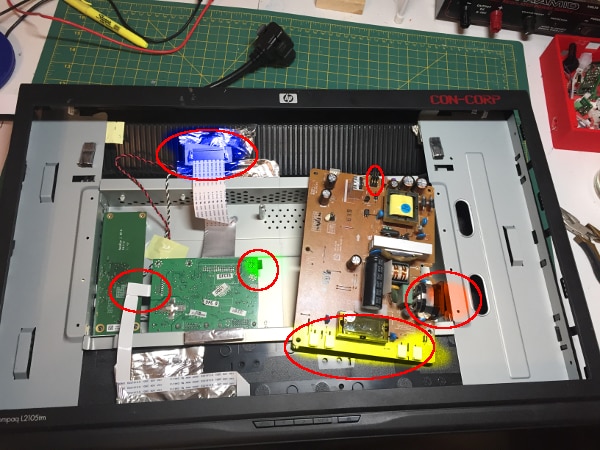
I pulled it all apart and did some probing.  I "spray painted" key parts in a picture below for reference. 


The brown board on the right is the DC power converter and screen back light power.  It has a crapload of SMD parts on the back.

The green board in the middle is the monitor pixel data business end.  It takes input DVI or VGI and processes it out the top to the monitor.

The green board on the left is independent of the problem I believe - it is USB and amp for speakers.


Here's what I found probing:


Yellow - there are four two pin wire-to-board connectors here .  They connect to four cables on the monitor.  I suspect they are backlight connectors.  I read essentially 0 VDC on these.  AC gave 1.8V.  Is there such thing as a 1.8VAC backlight?


Red-on the very right is the cable for AC in (plug to the wall).  I probe for ohms at the fuse immediately off of it and it showed good with a closed circuit (0 ohms).  I didn't lift either leg on the fuse, though.  Its a through-hole packaged fuse.


Red Circle At Top of Brown Board - this is a 6 pin connector labeled 5V, 5V, Gnd, Gnd, O/F, BK.  Probing DC, the 5V's both showed about 5.2Vs.  The BK showed a -0.6V to ground.  I find that weird.  O/F showed no DC voltage.  This one plugs into the middle green board.  Don't know what O/F or BK mean.


Blue connector - this goes to the monitor screen.  It must be what tells it pixels info and to "turn on".


The ribbon cable on the left goes to the power and menu buttons.


At this point, I am uncertain as to which board would be the one to focus on.  However, since I have 5V's coming out of the brown board, I feel I should next be probing on the middle green board.


Thoughts?


Thanks,

Sean


image

  • Sign in to reply
  • Cancel

Top Replies

  • Fred27
    Fred27 over 5 years ago +5
    Maybe it's just me (and the recent Halloween animatronics projects), but I read the title and thought you were trying to monitor to see if someone was dead. It could be worse I suppose - you could be checking…
  • dougw
    dougw over 5 years ago +3
    Stay on the power card for a bit....see if you can see why the power switch doesn't do anything... What is the power switch connected to? Does the power switch voltage change when it is pushed? Does the…
  • aspork42
    aspork42 over 5 years ago +2
    It is super common for the caps to go bad on the power supply. Look for any of them to have slightly buldged tops.
  • dougw
    dougw over 5 years ago

    Stay on the power card for a bit....see if you can see why the power switch doesn't do anything...

    What is the power switch connected to?

    Does the power switch voltage change when it is pushed?

    Does the power switch cause any other voltages to change?

    If the power switch has a reasonable voltage swing, does the device it is connected to do anything in response to that input?

    Keep tracing where power is going active but what it connects to does not respond.

    Look for components that are unusually hot.

    A close visual inspection may reveal bad solder joints, burnt components or cracked components.

    ..

    ...

    ...

    • Cancel
    • Vote Up +3 Vote Down
    • Sign in to reply
    • Cancel
  • Fred27
    Fred27 over 5 years ago

    Maybe it's just me (and the recent Halloween animatronics projects), but I read the title and thought you were trying to monitor to see if someone was dead.


    It could be worse I suppose - you could be checking to make sure they were still dead.

    • Cancel
    • Vote Up +5 Vote Down
    • Sign in to reply
    • Cancel
  • aspork42
    aspork42 over 5 years ago

    It is super common for the caps to go bad on the power supply. Look for any of them to have slightly buldged tops.

    • Cancel
    • Vote Up +2 Vote Down
    • Sign in to reply
    • Cancel
  • Sean_Miller
    Sean_Miller over 5 years ago in reply to Fred27

    That's funny - I'm going to keep it that way so it can be click bait!


    Doctor's are frantic when they saw what he did next.

    • Cancel
    • Vote Up 0 Vote Down
    • Sign in to reply
    • Cancel
  • Sean_Miller
    Sean_Miller over 5 years ago in reply to dougw

    Ok...embarrassed about the timeline here and the fix:

    • 18 months ago, the monitor died
    • Within 2 hours, I started probing with little confidence as to what I was doing, but it was definitely dead.  Stored it in basement for a rainy day
    • Since, bought a book on how to fix anything electronic and got more confidence
    • Probe the power supply board and posted here - got even more confidence
    • When I reconnected the Power Supply back to the green board and hit the power button to begin probing as Doug suggested, the LED came on.  Didn't remember that.
    • Plugged back in the backlight cables, suddenly had a white screen.
    • Plugged the monitor ribbon cable back in and hooked it to a computer, looked like nothing ever was wrong with it to begin with.


    So, it works!  I believe that fuse might have some sort of thermal switch.  It didn't reset within the two hours of my initial check, but after 18 months, it finally cooled down and reset.  image


    The moral of the story is, never throw out anything.  You'll be able to fix it someday.  You'll just have to get some HDMI to DVI adapters so your new cords will work with it.


    Thanks for the tips!

    Sean

    • Cancel
    • Vote Up +2 Vote Down
    • Sign in to reply
    • Cancel
  • Sean_Miller
    Sean_Miller over 5 years ago in reply to aspork42

    Yep.  Know what you mean on the capacitors.  I had a 91 Mitsubishi Mirage that use to go through ECUs (brain boxes) every couple of years.  I'd buy them from junk yards to replace them.  By the fourth module, I finally opened up the case and there it was - sticky brown electrolyte dumped out its base.  Put in a good set of caps and never had the problem again.


    I later read that there was a spin-off manufacturer of capacitors in Asia undercut the competition and unfortunately saturated the market with poor quality capacitors in that time frame.  There were lawsuits that drove them out of business - but all those ECUs were still out there in the junk yards.


    More recently, I had a Samsung monitor of 14 years lose its caps.  The monitor would come on, but it took about 2 minutes to "warm up" from black to light.  I bought this little diddy (Excelvan M6013) and confirmed the caps were bad.  For $5 bucks, it truly looks like a brand new monitor.  In hind sight, after this more recent experience, it had to be on the back light circuit that was impacted.


    Thanks for the post!

    Sean

    • Cancel
    • Vote Up +1 Vote Down
    • Sign in to reply
    • Cancel
  • dougw
    dougw over 5 years ago in reply to Sean_Miller

    That's a happy ending. Also known as the magic touch.

    It could have been worse - buying replacement cards only to discover the original ones still work.

    • Cancel
    • Vote Up +1 Vote Down
    • Sign in to reply
    • Cancel
  • colporteur
    colporteur over 5 years ago

    Your tail adds credence to my hoarder tendency to not throw out stuff.

    Maybe I can use that one inch piece, of 1/2 copper pipe I cut off when I was doing the bathroom plumbing.

    • Cancel
    • Vote Up +2 Vote Down
    • Sign in to reply
    • Cancel
  • 14rhb
    14rhb over 5 years ago in reply to Sean_Miller
    I believe that fuse might have some sort of thermal switch.

    Sounds very possible, although they are meant to reset within seconds I believe their resistance and reset time increases as they are successively activated e.g. like most things they get worn out even though not mechanical in nature. Your fault could have given it a very large jolt !

    • Cancel
    • Vote Up 0 Vote Down
    • Sign in to reply
    • Cancel
element14 Community

element14 is the first online community specifically for engineers. Connect with your peers and get expert answers to your questions.

  • Members
  • Learn
  • Technologies
  • Challenges & Projects
  • Products
  • Store
  • About Us
  • Feedback & Support
  • FAQs
  • Terms of Use
  • Privacy Policy
  • Legal and Copyright Notices
  • Sitemap
  • Cookies

An Avnet Company © 2025 Premier Farnell Limited. All Rights Reserved.

Premier Farnell Ltd, registered in England and Wales (no 00876412), registered office: Farnell House, Forge Lane, Leeds LS12 2NE.

ICP 备案号 10220084.

Follow element14

  • X
  • Facebook
  • linkedin
  • YouTube