element14 Community
element14 Community
    Register Log In
  • Site
  • Search
  • Log In Register
  • Community Hub
    Community Hub
    • What's New on element14
    • Feedback and Support
    • Benefits of Membership
    • Personal Blogs
    • Members Area
    • Achievement Levels
  • Learn
    Learn
    • Ask an Expert
    • eBooks
    • element14 presents
    • Learning Center
    • Tech Spotlight
    • STEM Academy
    • Webinars, Training and Events
    • Learning Groups
  • Technologies
    Technologies
    • 3D Printing
    • FPGA
    • Industrial Automation
    • Internet of Things
    • Power & Energy
    • Sensors
    • Technology Groups
  • Challenges & Projects
    Challenges & Projects
    • Design Challenges
    • element14 presents Projects
    • Project14
    • Arduino Projects
    • Raspberry Pi Projects
    • Project Groups
  • Products
    Products
    • Arduino
    • Avnet & Tria Boards Community
    • Dev Tools
    • Manufacturers
    • Multicomp Pro
    • Product Groups
    • Raspberry Pi
    • RoadTests & Reviews
  • About Us
  • Store
    Store
    • Visit Your Store
    • Choose another store...
      • Europe
      •  Austria (German)
      •  Belgium (Dutch, French)
      •  Bulgaria (Bulgarian)
      •  Czech Republic (Czech)
      •  Denmark (Danish)
      •  Estonia (Estonian)
      •  Finland (Finnish)
      •  France (French)
      •  Germany (German)
      •  Hungary (Hungarian)
      •  Ireland
      •  Israel
      •  Italy (Italian)
      •  Latvia (Latvian)
      •  
      •  Lithuania (Lithuanian)
      •  Netherlands (Dutch)
      •  Norway (Norwegian)
      •  Poland (Polish)
      •  Portugal (Portuguese)
      •  Romania (Romanian)
      •  Russia (Russian)
      •  Slovakia (Slovak)
      •  Slovenia (Slovenian)
      •  Spain (Spanish)
      •  Sweden (Swedish)
      •  Switzerland(German, French)
      •  Turkey (Turkish)
      •  United Kingdom
      • Asia Pacific
      •  Australia
      •  China
      •  Hong Kong
      •  India
      • Japan
      •  Korea (Korean)
      •  Malaysia
      •  New Zealand
      •  Philippines
      •  Singapore
      •  Taiwan
      •  Thailand (Thai)
      • Vietnam
      • Americas
      •  Brazil (Portuguese)
      •  Canada
      •  Mexico (Spanish)
      •  United States
      Can't find the country/region you're looking for? Visit our export site or find a local distributor.
  • Translate
  • Profile
  • Settings
Experts, Learning and Guidance
  • Technologies
  • More
Experts, Learning and Guidance
Ask an Expert Forum Custom Vivado Parts/Board Creation
  • Blog
  • Forum
  • Documents
  • Leaderboard
  • Files
  • Members
  • Mentions
  • Sub-Groups
  • Tags
  • More
  • Cancel
  • New
Join Experts, Learning and Guidance to participate - click to join for free!
Actions
  • Share
  • More
  • Cancel
Forum Thread Details
  • State Verified Answer
  • Replies 8 replies
  • Answers 4 answers
  • Subscribers 303 subscribers
  • Views 2243 views
  • Users 0 members are here
  • artix-7
  • fpga
  • vivado
  • edge dev board
  • verilog
Related
See a helpful answer?

Be sure to click 'more' and select 'suggest as answer'!

If you're the thread creator, be sure to click 'more' then 'Verify as Answer'!

Custom Vivado Parts/Board Creation

muddpup64
muddpup64 over 7 years ago

Hello all!


I am starting down the path of designing circuits utilizing the FPGA! So far my experience with every piece of documentation on how to use Vivado has been an absolute nightmare. (I am having a horrible time! image)

Well, I needed a cheap board w/ HDMI in order to complete a project  of mine. This one right here: https://allaboutfpga.com/product/edge-artix-7-fpga-development-board/

It even comes with this beautiful set of well put together documentation: https://www.dropbox.com/sh/tswx9k0ji9l5isn/AACQUIi-R-VHQyKrbYxgAbjIa?dl=0


However, the Artix 7 chip it comes with is not listed in Vivado, like at all. I even tried to just find one that fits this chips specs but there are none listed in Vivado. I don't even know if that would have worked anyway. (Everything about  this is terrible! image)

So my questions;
Here is the Artix 7 chip I am using: https://www.digikey.com/product-detail/en/xilinx-inc/XC7A35T-1FTG256C/122-1910-ND/5039074
Is there a way to create my own part number in Vivado with these^^^ specifications?
And then, using the provided dev board documentation, set all the I/O for my newly created part?

In essence, creating my own board to use for each of my projects?

Other questions relevant to my end project;

What are some good sources to learn Verilog that are not suicide inducing 500+ page documents?
What are some good sources for learning how to use Vivado that do not make one want to change professions to that of a party clown?

Regards,

  -Matt G.

  • Sign in to reply
  • Cancel

Top Replies

  • genebren
    genebren over 7 years ago +3 suggested
    Tough questions. I have not used Vivado software at all, but I have used the ISE WebPACK software (which does cover the XC7A100T and XC7A200T parts of the Artix 7 family). Is it an easier to use environment…
  • michaelkellett
    michaelkellett over 7 years ago +3 verified
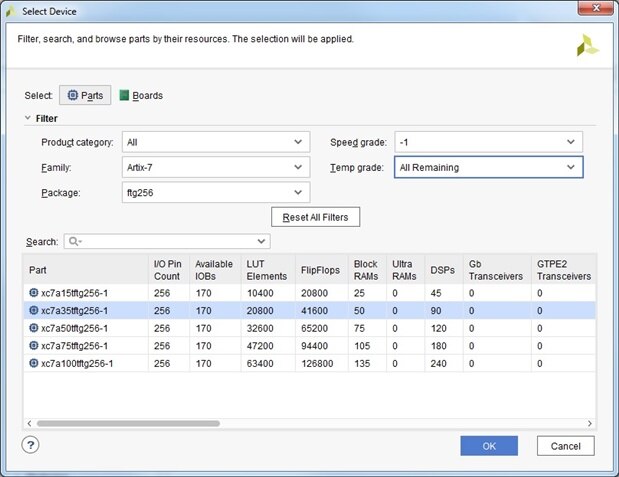
    Are you using the latest version of Vivado ? I had a quick look at the latest I'm running (2017-4) and got this: The lack of a precise match would worry me for a production job but this gets you a good…
  • gecoz
    gecoz over 7 years ago +2 suggested
    Hi Matthew, I believe the Artix7 you have is supported in Vivado. The part number for it should be xc7a35tftg256. Performing a seach against the part list in Vivado (I have the 2018.1 version installed…
Parents
  • michaelkellett
    0 michaelkellett over 7 years ago

    Are you using the latest version of Vivado ?


    I had a quick look at the latest I'm running (2017-4) and got this:


    image


    The lack of a precise match would worry me for a production job but this gets you a good start up option.


    What do the demo projects look like - the device shows up on the front page project summary. (Make sure you use the same version of Vivado as the demo projects if you want them to work without pain.)


    You can't create your own part - you wouldn't be able to make all the files that describes its characteristics.


    The best way to start to make your own projects is to copy and modify a working project.


    Once you can do that (ie blink a different LED or whatever) try and create one of the examples from scratch yourself. There is a step by step guide (actually lots of them) on the web.


    I don't know your background but if you are new to HDL and FPGA there is no quick route - 500 pages it not enough - you need to learn about logic, FPGA and an HDL (Verilog or VHDL).


    Then you need to learn the tool.


    I did not (and would not) start with Vivado. (Vivado is a great tool - but an overwhelming place to start on your own.)


    If you have to stick with it and the Artix FPGA and can afford to go on a course (which usually means its part of your job and someone else is paying the £2k+ its going to cost.) then do that.


    If you have no option but self teach (and intend to do more than tweak pre-baked examples) then expect it to take a LOT of effort.  You can see from reviews in Road Tests on E14 just how big a job it is.


    From your post I think that you are at this last option - if so then explain what your required end result is (eg learn FPGA, make and HDMI to XXX converter for paid work, etc etc) and we'll try and help.


    @Gene, Vivado is the current tool for series 7 FPGAs - ISE is not an option.


    MK

    • Cancel
    • Vote Up +3 Vote Down
    • Sign in to reply
    • Verify Answer
    • Reject Answer
    • Cancel
  • michaelkellett
    0 michaelkellett over 7 years ago in reply to michaelkellett

    You can find the version of Vivado used to make a project by opening the project file ( .xpr) in a text editor, the second line tells you the Vivado version used to create it.  In the case of the LED project for the Edge board is was Vivado 2018.1.


    MK

    • Cancel
    • Vote Up +1 Vote Down
    • Sign in to reply
    • Verify Answer
    • Cancel
Reply
  • michaelkellett
    0 michaelkellett over 7 years ago in reply to michaelkellett

    You can find the version of Vivado used to make a project by opening the project file ( .xpr) in a text editor, the second line tells you the Vivado version used to create it.  In the case of the LED project for the Edge board is was Vivado 2018.1.


    MK

    • Cancel
    • Vote Up +1 Vote Down
    • Sign in to reply
    • Verify Answer
    • Cancel
Children
  • michaelkellett
    0 michaelkellett over 7 years ago in reply to michaelkellett

    I downloaded Vivado 2018.2 and ran the LED and seven segment counter projects from your board. They are written in VHDL so not ideal if you really want to do Verilog. The basic projects would certainly do to get you going.


    (If not hooked on Verilog you might consider using VHDL if all the Edge examples are written in it.)


    MK

    • Cancel
    • Vote Up +1 Vote Down
    • Sign in to reply
    • Verify Answer
    • Cancel
element14 Community

element14 is the first online community specifically for engineers. Connect with your peers and get expert answers to your questions.

  • Members
  • Learn
  • Technologies
  • Challenges & Projects
  • Products
  • Store
  • About Us
  • Feedback & Support
  • FAQs
  • Terms of Use
  • Privacy Policy
  • Legal and Copyright Notices
  • Sitemap
  • Cookies

An Avnet Company © 2026 Premier Farnell Limited. All Rights Reserved.

Premier Farnell Ltd, registered in England and Wales (no 00876412), registered office: Farnell House, Forge Lane, Leeds LS12 2NE.

ICP 备案号 10220084.

Follow element14

  • X
  • Facebook
  • linkedin
  • YouTube