element14 Community
element14 Community
    Register Log In
  • Site
  • Search
  • Log In Register
  • Community Hub
    Community Hub
    • What's New on element14
    • Feedback and Support
    • Benefits of Membership
    • Personal Blogs
    • Members Area
    • Achievement Levels
  • Learn
    Learn
    • Ask an Expert
    • eBooks
    • element14 presents
    • Learning Center
    • Tech Spotlight
    • STEM Academy
    • Webinars, Training and Events
    • Learning Groups
  • Technologies
    Technologies
    • 3D Printing
    • FPGA
    • Industrial Automation
    • Internet of Things
    • Power & Energy
    • Sensors
    • Technology Groups
  • Challenges & Projects
    Challenges & Projects
    • Design Challenges
    • element14 presents Projects
    • Project14
    • Arduino Projects
    • Raspberry Pi Projects
    • Project Groups
  • Products
    Products
    • Arduino
    • Avnet & Tria Boards Community
    • Dev Tools
    • Manufacturers
    • Multicomp Pro
    • Product Groups
    • Raspberry Pi
    • RoadTests & Reviews
  • About Us
  • Store
    Store
    • Visit Your Store
    • Choose another store...
      • Europe
      •  Austria (German)
      •  Belgium (Dutch, French)
      •  Bulgaria (Bulgarian)
      •  Czech Republic (Czech)
      •  Denmark (Danish)
      •  Estonia (Estonian)
      •  Finland (Finnish)
      •  France (French)
      •  Germany (German)
      •  Hungary (Hungarian)
      •  Ireland
      •  Israel
      •  Italy (Italian)
      •  Latvia (Latvian)
      •  
      •  Lithuania (Lithuanian)
      •  Netherlands (Dutch)
      •  Norway (Norwegian)
      •  Poland (Polish)
      •  Portugal (Portuguese)
      •  Romania (Romanian)
      •  Russia (Russian)
      •  Slovakia (Slovak)
      •  Slovenia (Slovenian)
      •  Spain (Spanish)
      •  Sweden (Swedish)
      •  Switzerland(German, French)
      •  Turkey (Turkish)
      •  United Kingdom
      • Asia Pacific
      •  Australia
      •  China
      •  Hong Kong
      •  India
      • Japan
      •  Korea (Korean)
      •  Malaysia
      •  New Zealand
      •  Philippines
      •  Singapore
      •  Taiwan
      •  Thailand (Thai)
      • Vietnam
      • Americas
      •  Brazil (Portuguese)
      •  Canada
      •  Mexico (Spanish)
      •  United States
      Can't find the country/region you're looking for? Visit our export site or find a local distributor.
  • Translate
  • Profile
  • Settings
Experts, Learning and Guidance
  • Technologies
  • More
Experts, Learning and Guidance
Ask an Expert Forum Raspberry PI 5 OS version?
  • Blog
  • Forum
  • Documents
  • Leaderboard
  • Files
  • Members
  • Mentions
  • Sub-Groups
  • Tags
  • More
  • Cancel
  • New
Join Experts, Learning and Guidance to participate - click to join for free!
Actions
  • Share
  • More
  • Cancel
Forum Thread Details
  • State Suggested Answer
  • Replies 17 replies
  • Answers 1 answer
  • Subscribers 308 subscribers
  • Views 458 views
  • Users 0 members are here
Related
See a helpful answer?

Be sure to click 'more' and select 'suggest as answer'!

If you're the thread creator, be sure to click 'more' then 'Verify as Answer'!

Raspberry PI 5 OS version?

Rory_D
Rory_D 10 days ago

What is the version of raspberry pi OS that is shipped with the Raspberry Pi 5 starter kit RPI5-STARTERKIT-8GB-US?

  • Sign in to reply
  • Cancel

Top Replies

  • BigG
    BigG 10 days ago +3
    It's probably worth asking your question on the official raspberry pi forum https://forums.raspberrypi.com/ rather than here, then it's quite likely that an actual Raspberry Pi engineer will give you the…
  • beacon_dave
    beacon_dave 9 days ago +3
    There has been at least one Product Change Notice issued on that starter kit, which states that the bundled microSD card has been changed.
  • misaz
    misaz 10 days ago +2
    I am not an expert, but I guess that it even depends when you bought it. You can update to latest by running following command in terminal sudo apt update sudo apt full-upgrade
  • misaz
    0 misaz 10 days ago

    I am not an expert, but I guess that it even depends when you bought it. You can update to latest by running following command in terminal

    sudo apt update

    sudo apt full-upgrade

    • Cancel
    • Vote Up +2 Vote Down
    • Sign in to reply
    • Verify Answer
    • Cancel
  • shabaz
    0 shabaz 10 days ago

    Alternatively, you could also just get a new blank microSD card, and freshly install the latest, see https://www.raspberrypi.com/documentation/computers/os.html

    I'm not sure it really matters what version was delivered in the kit, since it's fairly likely to be older than what's available today. Also, usually kits come with a minimal-sized microSD card, which may eventually be limiting.

    • Cancel
    • Vote Up +1 Vote Down
    • Sign in to reply
    • Verify Answer
    • Cancel
  • Rory_D
    0 Rory_D 10 days ago

    Thanks, but I'm not asking for recommendations or opinions about which OS I *should* run. 

    I'm asking a factual question:

    **What OS version was actually flashed onto the microSD card included in this specific Multicomp Pro Raspberry Pi 5 starter kit sold by Element 14?**

    I'm looking for a stable, PI-optimized baseline - not the "latest". 

    If you have the kit, please share the version your card was shipped with. If you don't have the kit, that's okay but you're not actually answering my question. 

    • Cancel
    • Vote Up -2 Vote Down
    • Sign in to reply
    • Verify Answer
    • Cancel
  • shabaz
    0 shabaz 10 days ago in reply to Rory_D

    Regarding:

    "I'm looking for a stable, PI-optimized baseline - not the "latest". "

    It's an unrealistic assumption that the supplied release may be more stable. Here's how I know: If you're in any doubt, check the release notes, and you'll see that the current latest release (about six weeks old now) fixes a number of bugs, and was introduced less than two weeks before the prior version, so even without me digging deeper, I can see that if anything, the assumption is that it's indeed an important update compared to the one immediately prior to it.

    Since only you know your use case(s), you'd need to, at a minimum, review the release notes if you're considering running an older release. All releases will have bugs; you can only know if it may be stable for your use case by looking to see what issues have been reported and whether you can work around them.

    For what it's worth, I have a brand new Pi 5, and it will receive that latest release unless I read otherwise, i.e. if any adverse news comes to light concerning that release. 

    • Cancel
    • Vote Up +1 Vote Down
    • Sign in to reply
    • Verify Answer
    • Cancel
  • Rory_D
    0 Rory_D 10 days ago in reply to shabaz

    Thanks for taking the time to reply. My question is specifically about the stability of the pre‑installed Pi 5 image, so your answer doesn’t really address what I’m trying to find out. I’m looking for input from people who’ve actually used that baseline. 

    You have valid points but it's just not what I'm asking for. Again, thanks. 

    • Cancel
    • Vote Up 0 Vote Down
    • Sign in to reply
    • Verify Answer
    • Cancel
  • colporteur
    0 colporteur 10 days ago in reply to Rory_D

    Let's hope someone in the community can provide an answer, it sounds like it has some importance.

    What you are asking for on the surface appears simple but in actual fact it has a number of nuances that alter the answer.

    I'm going to assume (i.e. haven't worked a Pi production line) that the baseline release for a runs depends on when the run began. The Pi O/S is in steady state of change. The first Pi 5's of the production line would not have the release that is on new Pi 5's. It would have changed.

    Two of the terms come to mind as nuance changing. Stable and baseline. Define stable and define baseline? 

    Running a Pi out of the box without performing an apt update/apt upgrade would be fool hardy. The upgrade alters the O/S. What is baseline and what is stable. Is it before or after the upgrade.

    I've pulled an OS the day of its release and have a run apt upgrade. Some stuff changed. Hey wait, I thought the baseline was stable? 

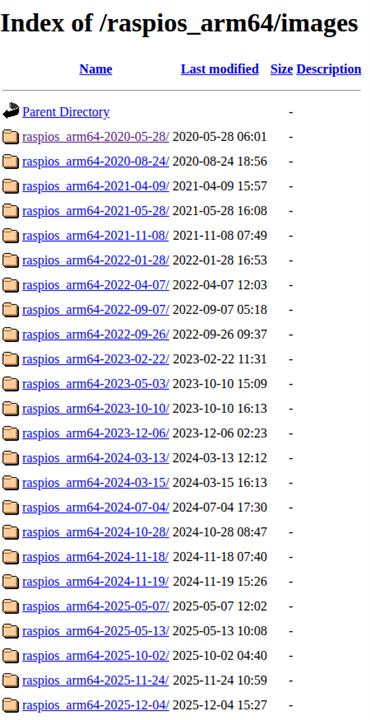
    image

    Can you help us understand why the fixation on the O/S out of the box? Is there a kernel you are looking for or a specific release of a software package tied to a release?

    • Cancel
    • Vote Up +1 Vote Down
    • Sign in to reply
    • Verify Answer
    • Cancel
  • Rory_D
    0 Rory_D 10 days ago in reply to colporteur

    Thanks for the thoughtful write‑up. I think we may be talking past each other a bit.

    I’m not trying to define “stable” in the abstract or debate whether apt‑upgrade is good practice. I’m trying to identify the specific Raspberry Pi OS image that Multicomp Pro pre‑flashed onto the SD card in this starter kit, because that’s the environment the Pi 5 hardware was validated against at packaging time.

    Different OS releases have shown different behaviors on Pi 5 hardware (kernel, firmware, Wayland/X11 defaults, etc.), so knowing the exact shipped version helps me establish a deterministic baseline before making changes.

    If anyone has this same kit and can check the pre‑installed image version—or has insight into which release Multicomp Pro was flashing during that production window—that’s the piece of information I’m trying to pin down.

    • Cancel
    • Vote Up 0 Vote Down
    • Sign in to reply
    • Verify Answer
    • Cancel
  • michaelkellett
    0 michaelkellett 10 days ago in reply to Rory_D

    I think you are perhaps expecting a bit more from the Pi than it is intended or priced to deliver. 

    If you want a known software release pinned down to the last byte and actually validated against the hardware at the time of shipping then you are not in low cost, off the shelf Linux territory. There are people who can offer this service but it will cost you a lot of money.

    Your only hope with the Pi is to ask the people you bought it from.

    MK

    • Cancel
    • Vote Up +1 Vote Down
    • Sign in to reply
    • Verify Answer
    • Cancel
  • BigG
    0 BigG 10 days ago

    It's probably worth asking your question on the official raspberry pi forum https://forums.raspberrypi.com/ rather than here, then it's quite likely that an actual Raspberry Pi engineer will give you the answer you're looking for. We're all end-users.

    • Cancel
    • Vote Up +3 Vote Down
    • Sign in to reply
    • Verify Answer
    • Cancel
  • Rory_D
    0 Rory_D 9 days ago

    Element14’s own subsidiary produced this kit, sourced the components, and packaged it. The box directs users to “Full Instructions at: element14.com/raspberrypi,” so it’s reasonable to expect that the OS image version would be documented somewhere. I couldn't find it anywhere on the website. 

    Even a small slip of paper placed in the box at the same time the microSD card was packed would have solved this. Instead, the only support path is a peer-to-peer forum where end-users can only guess at details Element14 already knows.


    Element14’s own subsidiary produced this kit, sourced the components, and packaged it.
    The box directs users to “Full Instructions at: element14.com/raspberrypi,” so it’s
    reasonable to expect that the baseline OS image would be documented somewhere.

    Even a small slip of paper placed in the box at the same time the microSD card was
    packed would have solved this. Instead, the only support path is a peer-to-peer forum
    where end-users can only guess at details Element14 already knows.Element14’s own subsidiary produced this kit, sourced the components, and packaged it. The box directs users to “Full Instructions at: element14.com/raspberrypi,” so it’s reasonable to expect that the baseline OS image would be documented somewhere. Even a small slip of paper placed in the box at the same time the microSD card was packed would have solved this. Instead, the only support path is a peer-to-peer forum where end-users can only guess at details Element14 already knows.
    Element14’s own subsidiary produced this kit, sourced the components, and packaged it. The box directs users to “Full Instructions at: element14.com/raspberrypi,” so it’s reasonable to expect that the baseline OS image would be documented somewhere. Even a small slip of paper placed in the box at the same time the microSD card was packed would have solved this. Instead, the only support path is a peer-to-peer forum where end-users can only guess at details Element14 already knows.
    • Cancel
    • Vote Up 0 Vote Down
    • Sign in to reply
    • Verify Answer
    • Cancel
>
element14 Community

element14 is the first online community specifically for engineers. Connect with your peers and get expert answers to your questions.

  • Members
  • Learn
  • Technologies
  • Challenges & Projects
  • Products
  • Store
  • About Us
  • Feedback & Support
  • FAQs
  • Terms of Use
  • Privacy Policy
  • Legal and Copyright Notices
  • Sitemap
  • Cookies

An Avnet Company © 2026 Premier Farnell Limited. All Rights Reserved.

Premier Farnell Ltd, registered in England and Wales (no 00876412), registered office: Farnell House, Forge Lane, Leeds LS12 2NE.

ICP 备案号 10220084.

Follow element14

  • X
  • Facebook
  • linkedin
  • YouTube