element14 Community
element14 Community
    Register Log In
  • Site
  • Search
  • Log In Register
  • Community Hub
    Community Hub
    • What's New on element14
    • Feedback and Support
    • Benefits of Membership
    • Personal Blogs
    • Members Area
    • Achievement Levels
  • Learn
    Learn
    • Ask an Expert
    • eBooks
    • element14 presents
    • Learning Center
    • Tech Spotlight
    • STEM Academy
    • Webinars, Training and Events
    • Learning Groups
  • Technologies
    Technologies
    • 3D Printing
    • FPGA
    • Industrial Automation
    • Internet of Things
    • Power & Energy
    • Sensors
    • Technology Groups
  • Challenges & Projects
    Challenges & Projects
    • Design Challenges
    • element14 presents Projects
    • Project14
    • Arduino Projects
    • Raspberry Pi Projects
    • Project Groups
  • Products
    Products
    • Arduino
    • Avnet & Tria Boards Community
    • Dev Tools
    • Manufacturers
    • Multicomp Pro
    • Product Groups
    • Raspberry Pi
    • RoadTests & Reviews
  • About Us
    About the element14 Community
  • Store
    Store
    • Visit Your Store
    • Choose another store...
      • Europe
      •  Austria (German)
      •  Belgium (Dutch, French)
      •  Bulgaria (Bulgarian)
      •  Czech Republic (Czech)
      •  Denmark (Danish)
      •  Estonia (Estonian)
      •  Finland (Finnish)
      •  France (French)
      •  Germany (German)
      •  Hungary (Hungarian)
      •  Ireland
      •  Israel
      •  Italy (Italian)
      •  Latvia (Latvian)
      •  
      •  Lithuania (Lithuanian)
      •  Netherlands (Dutch)
      •  Norway (Norwegian)
      •  Poland (Polish)
      •  Portugal (Portuguese)
      •  Romania (Romanian)
      •  Russia (Russian)
      •  Slovakia (Slovak)
      •  Slovenia (Slovenian)
      •  Spain (Spanish)
      •  Sweden (Swedish)
      •  Switzerland(German, French)
      •  Turkey (Turkish)
      •  United Kingdom
      • Asia Pacific
      •  Australia
      •  China
      •  Hong Kong
      •  India
      •  Japan
      •  Korea (Korean)
      •  Malaysia
      •  New Zealand
      •  Philippines
      •  Singapore
      •  Taiwan
      •  Thailand (Thai)
      •  Vietnam
      • Americas
      •  Brazil (Portuguese)
      •  Canada
      •  Mexico (Spanish)
      •  United States
      Can't find the country/region you're looking for? Visit our export site or find a local distributor.
  • Translate
  • Profile
  • Settings
Experts, Learning and Guidance
  • Technologies
  • More
Experts, Learning and Guidance
Ask an Expert Forum Summing amplifier using opAmp tutorial?
  • Blog
  • Forum
  • Documents
  • Leaderboard
  • Files
  • Members
  • Mentions
  • Sub-Groups
  • Tags
  • More
  • Cancel
  • New
Join Experts, Learning and Guidance to participate - click to join for free!
Actions
  • Share
  • More
  • Cancel
Forum Thread Details
  • State Suggested Answer
  • Replies 9 replies
  • Answers 2 answers
  • Subscribers 321 subscribers
  • Views 337 views
  • Users 0 members are here
Related
See a helpful answer?

Be sure to click 'more' and select 'suggest as answer'!

If you're the thread creator, be sure to click 'more' then 'Verify as Answer'!

Summing amplifier using opAmp tutorial?

ronyd
ronyd 6 days ago

Reviewed tutorial "Explore Working Applications of 8 Different Op-Amp Circuits"  (https://www.youtube.com/watch?v=aR9ILhbG4AE&t=317s)

@12:14 he  indicates turning on the Reference Voltage  which drives the opAmps input.  Is this Reference Voltage a voltage divider connected to Non-Inverting input (pin 3)?

  • Sign in to reply
  • Cancel

Top Replies

  • kmikemoo
    kmikemoo 6 days ago +2 suggested
    ronyd Derek is doing a demonstration of a summing opamp. He put DC on one of the input resistors going to the inverting input and he adds a sine wave - the reference voltage he mentions in the clip - to…
  • shabaz
    shabaz 6 days ago +2 suggested
    I had a bit of time, and decided to try to simulate that circuit. If you wish to run it, the steps are: (1) Install KiCad 10 (2) Unzip the summing_amp_demo zip file somewhere (3) Use File->Open…
  • shabaz
    shabaz 6 days ago in reply to kmikemoo +1
    Nice video! I'd not seen that before. Great for getting going with op amps.
Parents
  • shabaz
    0 shabaz 6 days ago

    I had a bit of time, and decided to try to simulate that circuit.

    If you wish to run it, the steps are: 

    (1) Install KiCad 10

    (2) Unzip the summing_amp_demo zip file somewhere

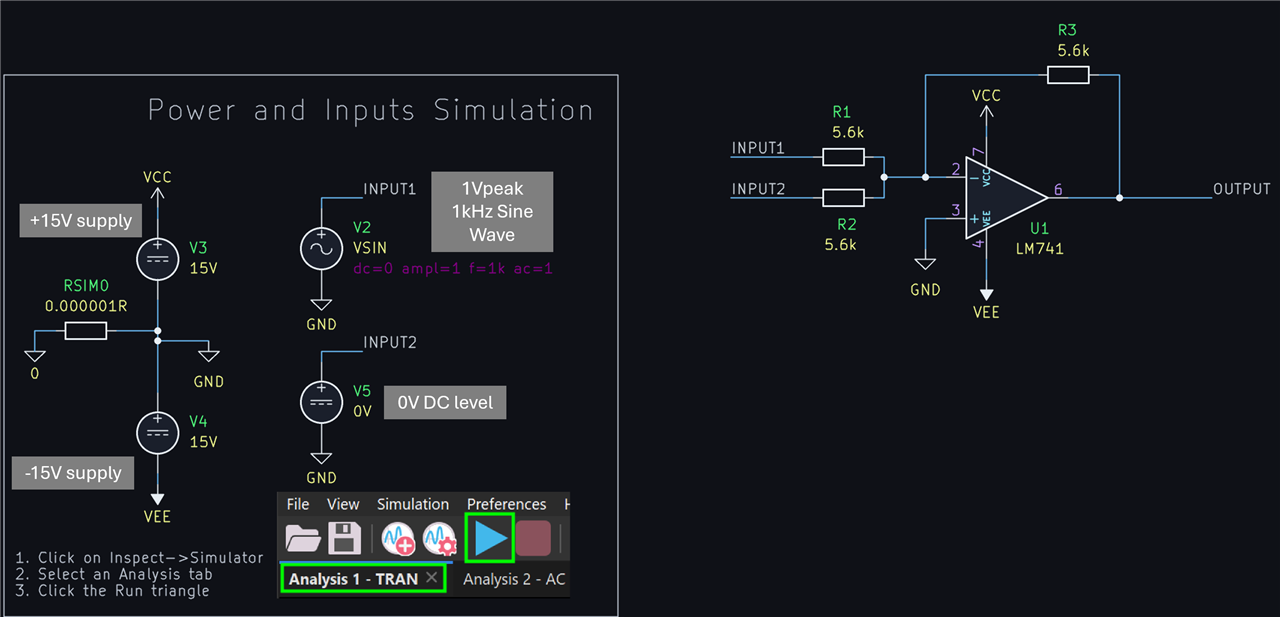
    (3) Use File->Open Project in KiCad, and then click on the Schematic Editor icon to see the circuit. In this screenshot, you can see on the left side that the op-amp is being powered from +-15V, and that one input is a sinewave, and the other is a 0V DC level. 

    image

    (4) Click on Inspect->Simulate, and then click on the blue triangle to run the simulation, and you'll see this chart. The colors are labeled on the right side.

    image

    (5) Now if you change the DC level from 0V to any other value (say) 1V, and re-click the blue triangle, you'll see the change in the output.

    6471.summing_amp_demo.zip

    • Cancel
    • Vote Up +2 Vote Down
    • Sign in to reply
    • Verify Answer
    • Reject Answer
    • Cancel
Reply
  • shabaz
    0 shabaz 6 days ago

    I had a bit of time, and decided to try to simulate that circuit.

    If you wish to run it, the steps are: 

    (1) Install KiCad 10

    (2) Unzip the summing_amp_demo zip file somewhere

    (3) Use File->Open Project in KiCad, and then click on the Schematic Editor icon to see the circuit. In this screenshot, you can see on the left side that the op-amp is being powered from +-15V, and that one input is a sinewave, and the other is a 0V DC level. 

    image

    (4) Click on Inspect->Simulate, and then click on the blue triangle to run the simulation, and you'll see this chart. The colors are labeled on the right side.

    image

    (5) Now if you change the DC level from 0V to any other value (say) 1V, and re-click the blue triangle, you'll see the change in the output.

    6471.summing_amp_demo.zip

    • Cancel
    • Vote Up +2 Vote Down
    • Sign in to reply
    • Verify Answer
    • Reject Answer
    • Cancel
Children
  • ronyd
    0 ronyd 5 days ago in reply to shabaz

    Hi @shabez, I guess I am still  confused how his circuit is constructed. Input 1 has a Pot, Input 2 is a since wave.  When he said in the video he turns on the reference voltage @12:15. There he adjusts the Pot to move the output up and down?  So the 2nd diagram I was assuming the voltage divider would be also connected to the inverting terminal.  Otherwise where is he connecting the reference voltage along with the Pot when he says turning it on ? 

    Yes I do use kiCad.  I had lots of issues finding the correct spice models for opamps.  That's why i was a little hesitant on trying the simulation.  But, that's great you have done this to make things easier to understand.  Works as expected.  I modified input2 to incorporate a sine wave and  Pot.  Please verify if this makes sense.  Thankx so much.   BTW, how do you add a zip file? Don't see any option under Insert pulldown other than image/video file.

    image

    • Cancel
    • Vote Up 0 Vote Down
    • Sign in to reply
    • Verify Answer
    • Cancel
  • shabaz
    0 shabaz 5 days ago in reply to ronyd

    "reference voltage" is just how he's describing it, it's not a technical term. 

    Long story short, if you look at the circuit, there are two inputs via resistors. You can apply voltages there however you choose. In his case, he may have used a potential divider to apply a voltage at one of those inputs.

    • Cancel
    • Vote Up 0 Vote Down
    • Sign in to reply
    • Verify Answer
    • Cancel
  • shabaz
    0 shabaz 5 days ago in reply to ronyd

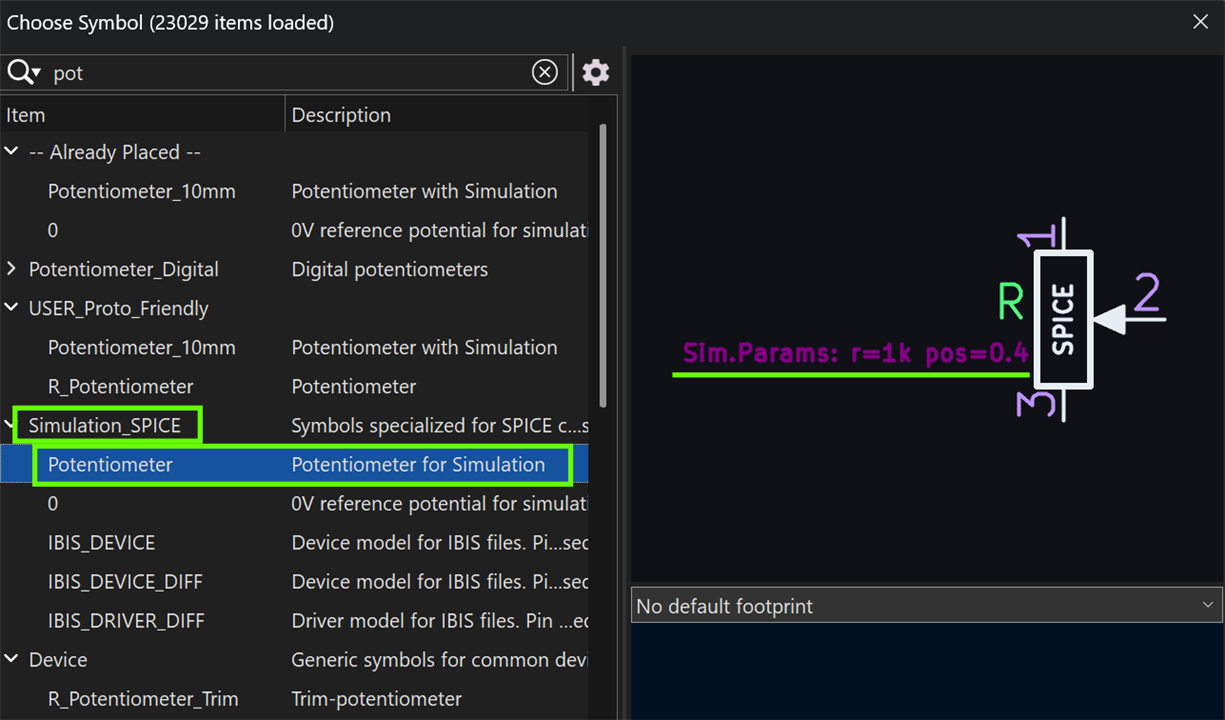
    Just noticed the potentiometer. You've connected it correctly in KiCad, however that symbol doesn't simulate, it may generate an error. You can replace it with a different symbol (see the screenshot below) called Potentiometer but it has to be the one which is in the Simulation_SPICE symbol library.

    When you do that, you'll be able to set the position of the control by double-clicking on it or the text, and changing the "pos=" value to anything between 0.0 and 1.0. I can't recall if 0.0 is leftmost or rightmost unfortunately, so you'll have to look out for that.

    image

    • Cancel
    • Vote Up 0 Vote Down
    • Sign in to reply
    • Verify Answer
    • Cancel
  • ronyd
    0 ronyd 5 days ago in reply to shabaz

    aaah thankx.  didn't realize there is a spice model for the Pot.

    • Cancel
    • Vote Up 0 Vote Down
    • Sign in to reply
    • Verify Answer
    • Cancel
element14 Community

element14 is the first online community specifically for engineers. Connect with your peers and get expert answers to your questions.

  • Members
  • Learn
  • Technologies
  • Challenges & Projects
  • Products
  • Store
  • About Us
  • Feedback & Support
  • FAQs
  • Terms of Use
  • Privacy Policy
  • Legal and Copyright Notices
  • Sitemap
  • Cookies

An Avnet Company © 2026 Premier Farnell Limited. All Rights Reserved.

Premier Farnell Ltd, registered in England and Wales (no 00876412), registered office: Farnell House, Forge Lane, Leeds LS12 2NE.

ICP 备案号 10220084.

Follow element14

  • X
  • Facebook
  • linkedin
  • YouTube