element14 Community
element14 Community
    Register Log In
  • Site
  • Search
  • Log In Register
  • Community Hub
    Community Hub
    • What's New on element14
    • Feedback and Support
    • Benefits of Membership
    • Personal Blogs
    • Members Area
    • Achievement Levels
  • Learn
    Learn
    • Ask an Expert
    • eBooks
    • element14 presents
    • Learning Center
    • Tech Spotlight
    • STEM Academy
    • Webinars, Training and Events
    • Learning Groups
  • Technologies
    Technologies
    • 3D Printing
    • FPGA
    • Industrial Automation
    • Internet of Things
    • Power & Energy
    • Sensors
    • Technology Groups
  • Challenges & Projects
    Challenges & Projects
    • Design Challenges
    • element14 presents Projects
    • Project14
    • Arduino Projects
    • Raspberry Pi Projects
    • Project Groups
  • Products
    Products
    • Arduino
    • Avnet & Tria Boards Community
    • Dev Tools
    • Manufacturers
    • Multicomp Pro
    • Product Groups
    • Raspberry Pi
    • RoadTests & Reviews
  • About Us
    About the element14 Community
  • Store
    Store
    • Visit Your Store
    • Choose another store...
      • Europe
      •  Austria (German)
      •  Belgium (Dutch, French)
      •  Bulgaria (Bulgarian)
      •  Czech Republic (Czech)
      •  Denmark (Danish)
      •  Estonia (Estonian)
      •  Finland (Finnish)
      •  France (French)
      •  Germany (German)
      •  Hungary (Hungarian)
      •  Ireland
      •  Israel
      •  Italy (Italian)
      •  Latvia (Latvian)
      •  
      •  Lithuania (Lithuanian)
      •  Netherlands (Dutch)
      •  Norway (Norwegian)
      •  Poland (Polish)
      •  Portugal (Portuguese)
      •  Romania (Romanian)
      •  Russia (Russian)
      •  Slovakia (Slovak)
      •  Slovenia (Slovenian)
      •  Spain (Spanish)
      •  Sweden (Swedish)
      •  Switzerland(German, French)
      •  Turkey (Turkish)
      •  United Kingdom
      • Asia Pacific
      •  Australia
      •  China
      •  Hong Kong
      •  India
      •  Japan
      •  Korea (Korean)
      •  Malaysia
      •  New Zealand
      •  Philippines
      •  Singapore
      •  Taiwan
      •  Thailand (Thai)
      •  Vietnam
      • Americas
      •  Brazil (Portuguese)
      •  Canada
      •  Mexico (Spanish)
      •  United States
      Can't find the country/region you're looking for? Visit our export site or find a local distributor.
  • Translate
  • Profile
  • Settings
Industrial Automation
  • Technologies
  • More
Industrial Automation
Forum E14 Community recommendation for ModBus TCP client
  • Blog
  • Forum
  • Documents
  • Quiz
  • Events
  • Polls
  • Files
  • Members
  • Mentions
  • Sub-Groups
  • Tags
  • More
  • Cancel
  • New
Join Industrial Automation to participate - click to join for free!
Actions
  • Share
  • More
  • Cancel
Forum Thread Details
  • Replies 29 replies
  • Subscribers 289 subscribers
  • Views 672 views
  • Users 0 members are here
  • modbus testing
  • modbus
  • client application
Related

E14 Community recommendation for ModBus TCP client

colporteur
colporteur 1 month ago

I am looking for an application to query a ModBus TCP interface on a scale head?
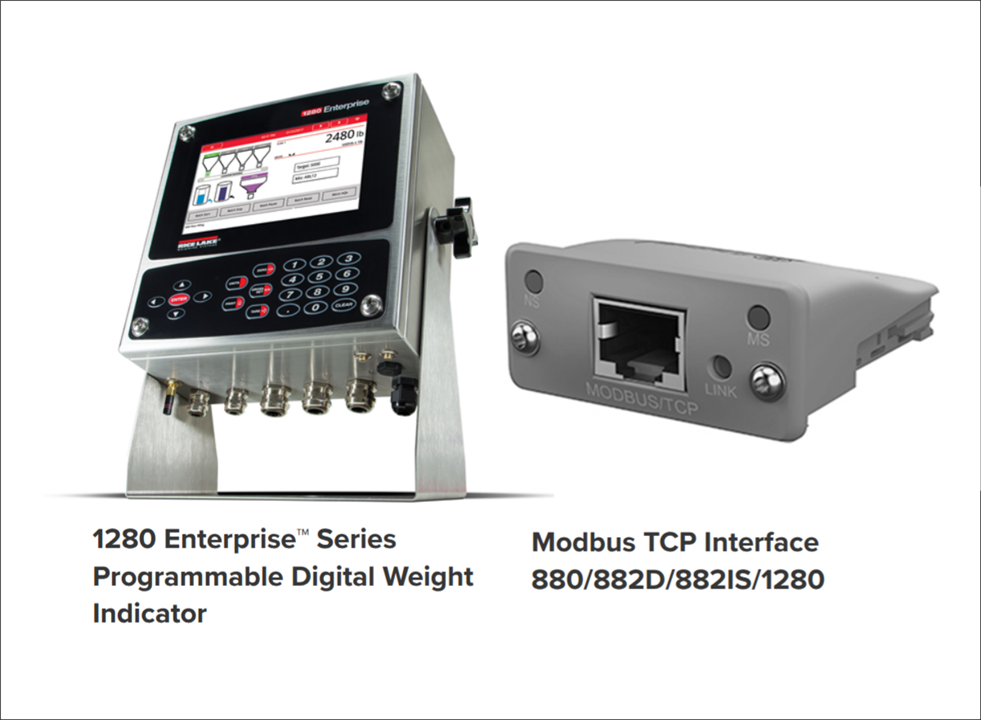
image

The company I am working for has recently installed a RiceLake 1280 scale indicator with a Modbus TCP interface. The scale indicator is IP capable and resides in a network DMZ. The goal is to have a cloud vendor pull scale data over the network from the Modbus interface. I'm looking for an application that can query the Modbus interface to confirm communication with the interface. 

The scale vendor recommended an application in order to set the Modbus TCP interface IP address. I managed to get that working, proving the interface IP answers an IP ping. DMZ rules have been set in place to isolate the indicator. I want to test that the cloud vendor can get to the Modbus interface and pull the data. I'm thinking maybe there is a software tool like minicom is for serial communication, except the tool is for Modbus.

E14 has some great Modbus resources but nothing to match my search. A Modbus client query tool. I'm hoping there is a community member that has experience with Modbus TCP and that they could recommend application software to perform the task.

  • Sign in to reply
  • Cancel
  • colporteur
    colporteur 27 days ago

    I will close this post by first saying thank you for your input. Sounding out the problem and getting suggestions was helpful in arriving at the solution.

    I culled a link for oceancontrol windows GUI client from the link  beacon_dave provided.   shabaz python client established a connection, I just didn't invest in generating a query. It did confirm it was working. BigG  input reminded me of net cat a network test tool I had used many moon ago. I confess net cat was the one I used the most.

    Since I was only looking to confirm a connection through the firewall, net cats ease of use made it ideal for quick testing. Supported on windows and linux was bonus. I had to learn the syntax for Windows:( It is not the same as linux.

    With a confirmed modbus tcp interface available it is off to configure and test a VPN end to end solution that will connect the company and vendor. Thanks again for you input. 

    • Cancel
    • Vote Up 0 Vote Down
    • Sign in to reply
    • Cancel
  • BigG
    BigG 1 month ago in reply to colporteur

    Ah fantastic. Not that I would know (noob here). Apparently with netcat, you can transmit the structured Modbus application bytes and see if the hardware replies. This completely validates both the firewall rules and the device's availability in one go.

    Searching online brought up this page: stackoverflow.com/.../send-modbus-rtu-request-via-tcp-with-netcat-and-catch-the-response

    • Cancel
    • Vote Up 0 Vote Down
    • Sign in to reply
    • Cancel
  • colporteur
    colporteur 1 month ago in reply to BigG

    I completely forgot about CLI netcat! I recall you can setup a transmit and receiving end on ports you are examining.

    Man I miss tech coffee breaks. All those minds in one place was a great technical pool of knowledge.

    • Cancel
    • Vote Up 0 Vote Down
    • Sign in to reply
    • Cancel
  • shabaz
    shabaz 1 month ago in reply to colporteur

    I cannot take the credit, AI wrote that code, I merely pointed it at the 1280 user manual, and it spit out Python code, I merely ran it and told it of any errors, so it could correct it. The screenshot below shows what I asked it originally. It's not perfect as you noticed, since it could have provided more helpful output or automatically abort a test rather than hang.

    Regarding the TCP connection etc., I'm very familiar with that part only because I ended up developing some products that heavily relied on network features/functions, I believe I would struggle with a lot of it if I had to learn it on my own.

    image

    • Cancel
    • Vote Up 0 Vote Down
    • Sign in to reply
    • Cancel
  • colporteur
    colporteur 1 month ago in reply to shabaz

    I'm humbled by your knowledge and thankful that you are willing to share.

    Many eons ago, when my skins had less wrinkles, I recall training with a senior aviation electronics technician in a course. He took the the time to share his experience. The stuff I learned in that short interaction I have never forgot. 

    I can't comprehend how you extracted the information from the manual that enabled you to write code and decode the output for the modbus tcp interface. I'm envious.

    I recall listening to a lecturer speaking Russian. I figured if I listened hard enough I would understand Russian. Never understood a word! I have combed the manual and reviewed your code thinking if I try hard enough I will gain the knowledge. It is not working.

    If I was forty years younger, I would invest the time. I accomplished the goal. Just have the test the firewall rules set and be done. Thanks again.

    I tried you trick of connecting to an IP that didn't support modbus tcp and noted the error. I suspected your code was working. Great work on a first attempt.

    • Cancel
    • Vote Up +1 Vote Down
    • Sign in to reply
    • Cancel
  • colporteur
    colporteur 1 month ago in reply to beacon_dave

    I believe the video is where I found the bread crumbs to the site.

    • Cancel
    • Vote Up 0 Vote Down
    • Sign in to reply
    • Cancel
  • shabaz
    shabaz 1 month ago in reply to colporteur

    Here is how the 1280 did in fact respond during the first test case:

    Your log file indicates the 1280 returned a status code 269 which in hex would be 0x010d or 0000 0001 0000 1101 in binary.

    According to the user guide, that means:

    No error,
    tare not entered, 
    center of zero,
    weight OK,
    standstill, primary units, tare not acquired, gross weight,
    first channel (I don't know if that means channel 0 or channel 1).

    Anyway, perhaps this is now too much detail, since it's already clear the TCP connection to the 1280 did successfully, and that's all you requested. However, the test case shows that the actual Modbus TCP protocol layer is successfully being received and sent by the 1280 (from experience/being burnt with various protocols, I wanted the simulation to include Modbus TCP; there are plenty of situations where a TCP connect alone is simply insufficient to be sure that the next layer will pass).

    image

    • Cancel
    • Vote Up 0 Vote Down
    • Sign in to reply
    • Cancel
  • beacon_dave
    beacon_dave 1 month ago in reply to colporteur

    FYI that Ocean Controls tool was one of the ones demonstrated in the video link I posted previously.

    https://youtu.be/RiYHcFqbxCo?t=1946

    • Cancel
    • Vote Up 0 Vote Down
    • Sign in to reply
    • Cancel
  • shabaz
    shabaz 1 month ago in reply to colporteur

    Hi Sean,

    Your output is successful. Here is what you'd see if there was no TCP connection at all:

    image

    And this is what would be seen if the TCP connect occurred, but there was no response data from the 1280 end; it would just hang on Step 1 of the first test case (which has three steps):

    image

    However in your client_output file, I see this, so it got past step 1 (and 2 and 3) and all of the first test case was successful.

    image

    Your log file stops on the second test case step 1. I'm guessing you've got the real 1280 device attached, and it simply doesn't like the second test case (which is fine, since the test cases were written based on the ambiguous user guide, so the second test case happens to attempt a register that the real 1280 doesn't like. The log file shows that second test case was using a read register # 40257, that's the only difference from the first test case. So, since it's now confirmed your real 1280 doesn't use 40257, that could be deleted from the list inside the cloud_app_simulator.py file if you wished. But it's already confirmed that the 1280 end did respond with TCP data during the first test case.

    • Cancel
    • Vote Up +2 Vote Down
    • Sign in to reply
    • Cancel
  • colporteur
    colporteur 1 month ago

    An update on the goal of finding a modbus TCP client.

    My attempt with Shabaz offering wasn't successful so I moved onto hits from a google search for modbus tcp client.

    oceancontrols has such a beast for Windows. https://oceancontrols.com.au/software-modbusview-tcp-ocs-011.html The free software timeout every 15 minutes. Once restarted you have to setup communication. I installed the software in a Windows sandbox to test.

    image

    I believe it is important to provide a return on investment. Your responses are valuable here is a return.

    I don't know Modbus protocol and I am not in the market to learn it. My goal was to find software that I could use to test the ability to connect to a modbus tcp interface through the firewall to the DMZ.

    The oceancontrol software is easy to install from their download.

    The Configure tab (Ellipse A) is where you set the IP address of the device you want to connect to. There is no ability to save this in the free software therefore every 15minutes you have to start over.

    Pressing the Start Polling button generates Status window messages and the poll window changes to Active.

    Under the Communication tab you bring up a log or monitor window. The top half of the monitor window transmit screen, shows polling numbers and the bottom half polling response numbers (Ellipse B) poll 36 gives a return of poll 36. There is a polling number receive for every transmit. 

    A quick cmd window netstat -an shows a connection established (Ellipse C) to the IP address and port of the interface. When polling is stopped this connection disappears. YES! We are connecting and communicating to the modbus tcp interface.

    I was unsuccessful when I tried using the registers to write and read. It would be nice to interact, request a read of the scale head and see some data but that is not necessary to reach my goal.  I have little programming knowledge so I abandoned that exercise. 

    For this test the modbus tcp interface was outside the DMZ. Next step is to reposition the interface inside and start testing communication into the DMZ.

    • Cancel
    • Vote Up 0 Vote Down
    • Sign in to reply
    • Cancel
>
element14 Community

element14 is the first online community specifically for engineers. Connect with your peers and get expert answers to your questions.

  • Members
  • Learn
  • Technologies
  • Challenges & Projects
  • Products
  • Store
  • About Us
  • Feedback & Support
  • FAQs
  • Terms of Use
  • Privacy Policy
  • Legal and Copyright Notices
  • Sitemap
  • Cookies

An Avnet Company © 2026 Premier Farnell Limited. All Rights Reserved.

Premier Farnell Ltd, registered in England and Wales (no 00876412), registered office: Farnell House, Forge Lane, Leeds LS12 2NE.

Follow element14

  • X
  • Facebook
  • linkedin
  • YouTube