element14 Community
element14 Community
    Register Log In
  • Site
  • Search
  • Log In Register
  • Community Hub
    Community Hub
    • What's New on element14
    • Feedback and Support
    • Benefits of Membership
    • Personal Blogs
    • Members Area
    • Achievement Levels
  • Learn
    Learn
    • Ask an Expert
    • eBooks
    • element14 presents
    • Learning Center
    • Tech Spotlight
    • STEM Academy
    • Webinars, Training and Events
    • Learning Groups
  • Technologies
    Technologies
    • 3D Printing
    • FPGA
    • Industrial Automation
    • Internet of Things
    • Power & Energy
    • Sensors
    • Technology Groups
  • Challenges & Projects
    Challenges & Projects
    • Design Challenges
    • element14 presents Projects
    • Project14
    • Arduino Projects
    • Raspberry Pi Projects
    • Project Groups
  • Products
    Products
    • Arduino
    • Avnet & Tria Boards Community
    • Dev Tools
    • Manufacturers
    • Multicomp Pro
    • Product Groups
    • Raspberry Pi
    • RoadTests & Reviews
  • About Us
  • Store
    Store
    • Visit Your Store
    • Choose another store...
      • Europe
      •  Austria (German)
      •  Belgium (Dutch, French)
      •  Bulgaria (Bulgarian)
      •  Czech Republic (Czech)
      •  Denmark (Danish)
      •  Estonia (Estonian)
      •  Finland (Finnish)
      •  France (French)
      •  Germany (German)
      •  Hungary (Hungarian)
      •  Ireland
      •  Israel
      •  Italy (Italian)
      •  Latvia (Latvian)
      •  
      •  Lithuania (Lithuanian)
      •  Netherlands (Dutch)
      •  Norway (Norwegian)
      •  Poland (Polish)
      •  Portugal (Portuguese)
      •  Romania (Romanian)
      •  Russia (Russian)
      •  Slovakia (Slovak)
      •  Slovenia (Slovenian)
      •  Spain (Spanish)
      •  Sweden (Swedish)
      •  Switzerland(German, French)
      •  Turkey (Turkish)
      •  United Kingdom
      • Asia Pacific
      •  Australia
      •  China
      •  Hong Kong
      •  India
      • Japan
      •  Korea (Korean)
      •  Malaysia
      •  New Zealand
      •  Philippines
      •  Singapore
      •  Taiwan
      •  Thailand (Thai)
      • Vietnam
      • Americas
      •  Brazil (Portuguese)
      •  Canada
      •  Mexico (Spanish)
      •  United States
      Can't find the country/region you're looking for? Visit our export site or find a local distributor.
  • Translate
  • Profile
  • Settings
Robotics
  • Technologies
  • More
Robotics
Blog Building a Robot! (Simulated)
  • Blog
  • Forum
  • Documents
  • Quiz
  • Events
  • Polls
  • Members
  • Mentions
  • Sub-Groups
  • Tags
  • More
  • Cancel
  • New
Join Robotics to participate - click to join for free!
  • Share
  • More
  • Cancel
Group Actions
  • Group RSS
  • More
  • Cancel
Engagement
  • Author Author: shabaz
  • Date Created: 12 Nov 2015 6:33 PM Date Created
  • Views 2143 views
  • Likes 9 likes
  • Comments 24 comments
  • simulation
  • robotics
  • gazebo
Related
Recommended

Building a Robot! (Simulated)

shabaz
shabaz
12 Nov 2015

After having built a couple of small wheeled platforms (a crude attempt called XMP-1 and a slightly better one called XMP-2) I was curious what simulation tools were out there specifically geared toward robotics design.

This is just a quick summary of one of the simulation tools that are available, called Gazebo.


Gazebo was incredibly easy to get going – a single command line will install it onto Linux, and when run it is easy to add bits and pieces from the toolbar and get going.

I’ve yet to work through the tutorials but I’m hoping to eventually simulate XMP-2 so I can write better code easily.


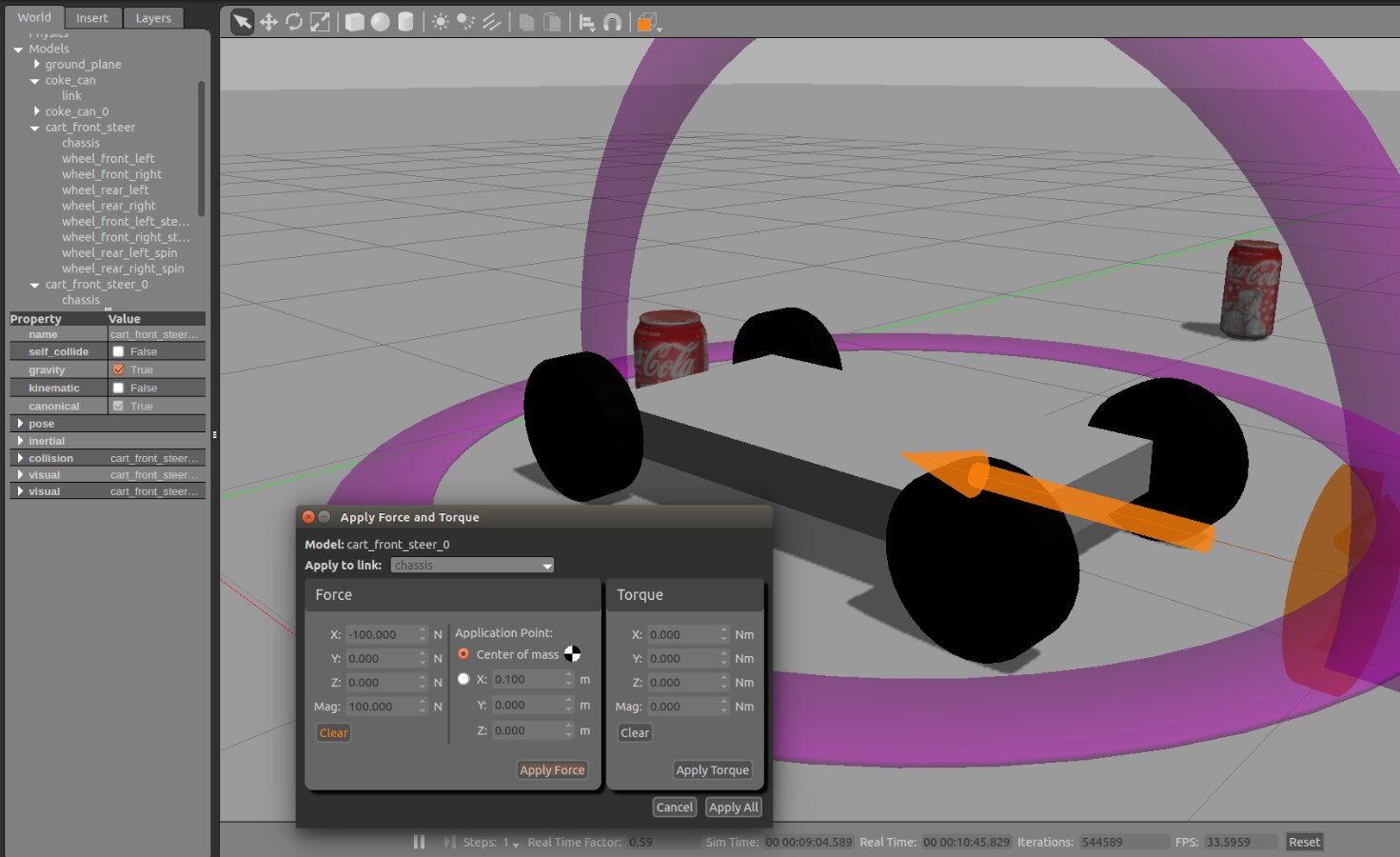
Here is a screenshot of Gazebo, and a quick video showing some basic physics, pushing the robot into coke cans.
image


Video:

You don't have permission to edit metadata of this video.
Edit media
x
image
Upload Preview
image


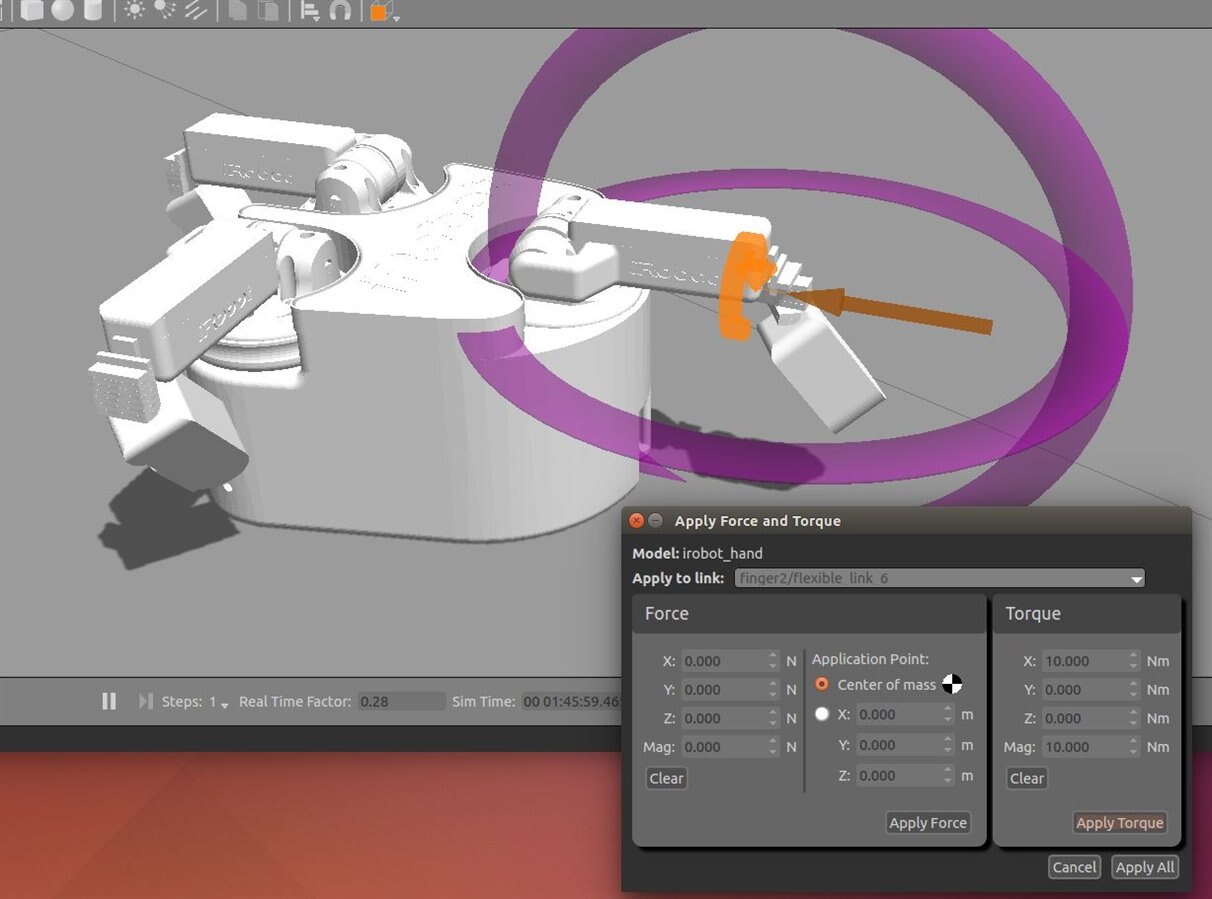
More complex movements are possible too. Here is a robot gripper with torque being applied to part of it:
image

Video:

You don't have permission to edit metadata of this video.
Edit media
x
image
Upload Preview
image


The simulation includes gravity and friction and many attributes are configurable.

The models can be created in XML files, and the tutorials look comprehensive.

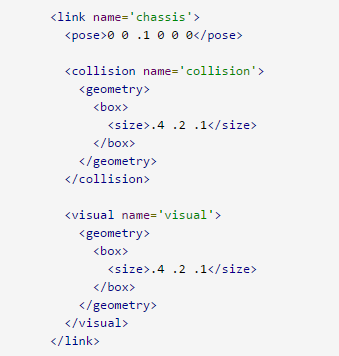
The example below from a tutorial shows a snippet of a robot, where a box-shaped chassis is needed. The <pose> element contains the position (xyz, and orientation in three dimensions). The <collision> and <geometry> elements contain a <box> element which defines a box of size 0.4x0.2x0.1m in this example.

Usually they are the same; one element is used for the graphics, and the other is for the collision-detection algorithm to use.
image


The simulation can be connected up to real hardware or software through the use of an application programming interface (API), so it is possible to test robotics software before you've built the hardware, or you can interface your sensors and start programming movements.

It all looks extremely interesting!

Check out the second part by clicking here, which goes into detail about how to construct a model (based on a real hardware robot called XMP-2) and how to control it using external stimulus.

  • Sign in to reply

Top Comments

  • DAB
    DAB over 10 years ago +1
    I agree. I was not aware that Gazebo existed, but it definitely looks interesting to look at mechanical designs. I will add it to my list of tools to check out. Thanks, DAB
  • shabaz
    shabaz over 10 years ago +1
    Hi Shabaz! Really, thank you to point on this. It seems very good. At the moment I am working on the following "robotizations" Camera slider with controller and horizontal programmable movement; camera…
  • balearicdynamics
    balearicdynamics over 10 years ago in reply to shabaz +1
    Hello Shabaz! Many thanks for the update. In the meantime I am installing the software that is really intriguing. I'm going to try and understand how to produce a simple single mechanical movement or linkage…
Parents
  • shabaz
    shabaz over 10 years ago

    Hi Shabaz! Really, thank you to point on this. It seems very good. At the moment I am working on the following "robotizations" Camera slider with controller and horizontal programmable movement; camera tilt-pan movement and a gimbal (motorised stabiliser). This is first for a specific client that uses a camera model I already have all the details, included the weight that make the difference on the steppers and brushless DC motors torque, speed and other parameters. This simulation software sounds to be the solution. What I have not yet clear (but I should download it soon and test it) is if it is possible to define a full physical model (inertial forces, nodes speed force and torque etc.) The other question (maybe you already have the answer) is if it is possible to "assemble" in the simulation a model - also simplified - respecting the physical model and the structural design. In this case this application will be really useful to save a lot of experimentation time.


    Enrico


    Hi balearicdynamics


    The objects do have mass, center of gravity and a 'rotational inertia matrix' that can be specified, and it is possible to apply force and torque with any vector from the GUI or from the API.

    An XML called SDF is used (see the 'Link' tab for the inertial properties). The settings for the coke can for example in the GUI specify a mass and all other values set to zero:

    image

    It does appear that very complex assemblies can be created and can interact with their environment. From the included models, here is a robot and its field of view:

    image

    This is a more simple arm type robot:

    image


    There are miscellaneous bits and pieces including walls and ramps:

    image


    I'm going to try and understand how to produce a simple single mechanical movement or linkage, and then see how to use the API to apply a force or torque.

    • Cancel
    • Vote Up +1 Vote Down
    • Sign in to reply
    • More
    • Cancel
  • balearicdynamics
    balearicdynamics over 10 years ago in reply to shabaz

    Hello Shabaz! Many thanks for the update. In the meantime I am installing the software that is really intriguing.


    I'm going to try and understand how to produce a simple single mechanical movement or linkage, and then see how to use the API to apply a force or torque.


    I suppose (but I can be more precise later - or tomorrow) that the mechanism of linkage, as expected in any CAD supporting the gravity and mass and movements of parts (e.g. Blender, 3DS Max and similar) they will apply the inverse kinematic that is the most reliable and simple way to create motion-related objects with specific dependence trees.


    Enrico

    • Cancel
    • Vote Up +1 Vote Down
    • Sign in to reply
    • More
    • Cancel
Comment
  • balearicdynamics
    balearicdynamics over 10 years ago in reply to shabaz

    Hello Shabaz! Many thanks for the update. In the meantime I am installing the software that is really intriguing.


    I'm going to try and understand how to produce a simple single mechanical movement or linkage, and then see how to use the API to apply a force or torque.


    I suppose (but I can be more precise later - or tomorrow) that the mechanism of linkage, as expected in any CAD supporting the gravity and mass and movements of parts (e.g. Blender, 3DS Max and similar) they will apply the inverse kinematic that is the most reliable and simple way to create motion-related objects with specific dependence trees.


    Enrico

    • Cancel
    • Vote Up +1 Vote Down
    • Sign in to reply
    • More
    • Cancel
Children
No Data
element14 Community

element14 is the first online community specifically for engineers. Connect with your peers and get expert answers to your questions.

  • Members
  • Learn
  • Technologies
  • Challenges & Projects
  • Products
  • Store
  • About Us
  • Feedback & Support
  • FAQs
  • Terms of Use
  • Privacy Policy
  • Legal and Copyright Notices
  • Sitemap
  • Cookies

An Avnet Company © 2025 Premier Farnell Limited. All Rights Reserved.

Premier Farnell Ltd, registered in England and Wales (no 00876412), registered office: Farnell House, Forge Lane, Leeds LS12 2NE.

ICP 备案号 10220084.

Follow element14

  • X
  • Facebook
  • linkedin
  • YouTube