element14 Community
element14 Community
    Register Log In
  • Site
  • Search
  • Log In Register
  • Community Hub
    Community Hub
    • What's New on element14
    • Feedback and Support
    • Benefits of Membership
    • Personal Blogs
    • Members Area
    • Achievement Levels
  • Learn
    Learn
    • Ask an Expert
    • eBooks
    • element14 presents
    • Learning Center
    • Tech Spotlight
    • STEM Academy
    • Webinars, Training and Events
    • Learning Groups
  • Technologies
    Technologies
    • 3D Printing
    • FPGA
    • Industrial Automation
    • Internet of Things
    • Power & Energy
    • Sensors
    • Technology Groups
  • Challenges & Projects
    Challenges & Projects
    • Design Challenges
    • element14 presents Projects
    • Project14
    • Arduino Projects
    • Raspberry Pi Projects
    • Project Groups
  • Products
    Products
    • Arduino
    • Avnet & Tria Boards Community
    • Dev Tools
    • Manufacturers
    • Multicomp Pro
    • Product Groups
    • Raspberry Pi
    • RoadTests & Reviews
  • About Us
    About the element14 Community
  • Store
    Store
    • Visit Your Store
    • Choose another store...
      • Europe
      •  Austria (German)
      •  Belgium (Dutch, French)
      •  Bulgaria (Bulgarian)
      •  Czech Republic (Czech)
      •  Denmark (Danish)
      •  Estonia (Estonian)
      •  Finland (Finnish)
      •  France (French)
      •  Germany (German)
      •  Hungary (Hungarian)
      •  Ireland
      •  Israel
      •  Italy (Italian)
      •  Latvia (Latvian)
      •  
      •  Lithuania (Lithuanian)
      •  Netherlands (Dutch)
      •  Norway (Norwegian)
      •  Poland (Polish)
      •  Portugal (Portuguese)
      •  Romania (Romanian)
      •  Russia (Russian)
      •  Slovakia (Slovak)
      •  Slovenia (Slovenian)
      •  Spain (Spanish)
      •  Sweden (Swedish)
      •  Switzerland(German, French)
      •  Turkey (Turkish)
      •  United Kingdom
      • Asia Pacific
      •  Australia
      •  China
      •  Hong Kong
      •  India
      •  Japan
      •  Korea (Korean)
      •  Malaysia
      •  New Zealand
      •  Philippines
      •  Singapore
      •  Taiwan
      •  Thailand (Thai)
      •  Vietnam
      • Americas
      •  Brazil (Portuguese)
      •  Canada
      •  Mexico (Spanish)
      •  United States
      Can't find the country/region you're looking for? Visit our export site or find a local distributor.
  • Translate
  • Profile
  • Settings
Robotics
  • Technologies
  • More
Robotics
Blog Building a Robot! (Simulated)
  • Blog
  • Forum
  • Documents
  • Quiz
  • Events
  • Polls
  • Members
  • Mentions
  • Sub-Groups
  • Tags
  • More
  • Cancel
  • New
Join Robotics to participate - click to join for free!
  • Share
  • More
  • Cancel
Group Actions
  • Group RSS
  • More
  • Cancel
Engagement
  • Author Author: shabaz
  • Date Created: 12 Nov 2015 6:33 PM Date Created
  • Views 2722 views
  • Likes 9 likes
  • Comments 24 comments
  • simulation
  • robotics
  • gazebo
Related
Recommended

Building a Robot! (Simulated)

shabaz
shabaz
12 Nov 2015

After having built a couple of small wheeled platforms (a crude attempt called XMP-1 and a slightly better one called XMP-2) I was curious what simulation tools were out there specifically geared toward robotics design.

This is just a quick summary of one of the simulation tools that are available, called Gazebo.


Gazebo was incredibly easy to get going – a single command line will install it onto Linux, and when run it is easy to add bits and pieces from the toolbar and get going.

I’ve yet to work through the tutorials but I’m hoping to eventually simulate XMP-2 so I can write better code easily.


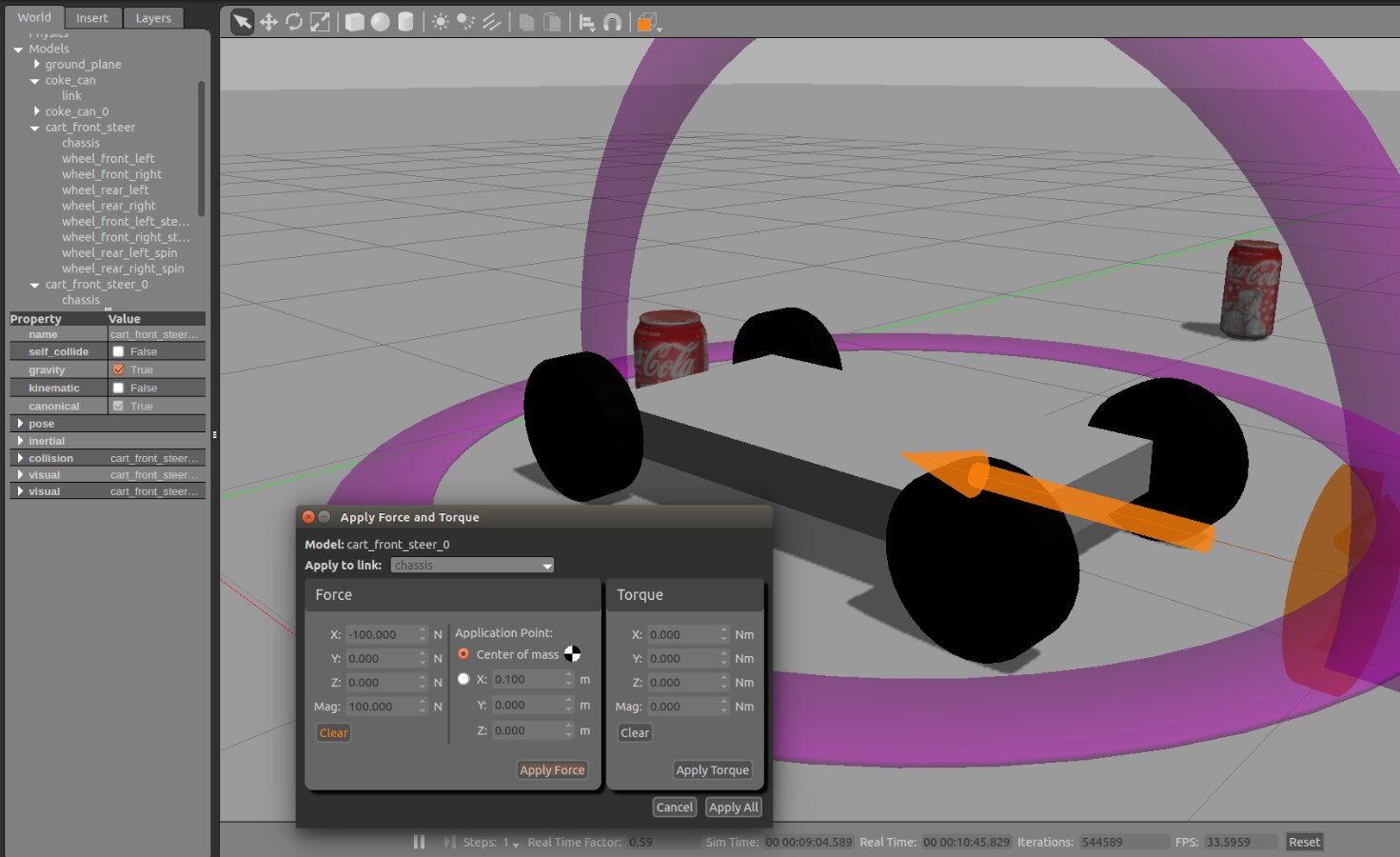
Here is a screenshot of Gazebo, and a quick video showing some basic physics, pushing the robot into coke cans.
image


Video:

You don't have permission to edit metadata of this video.
Edit media
x
image
Upload Preview
image


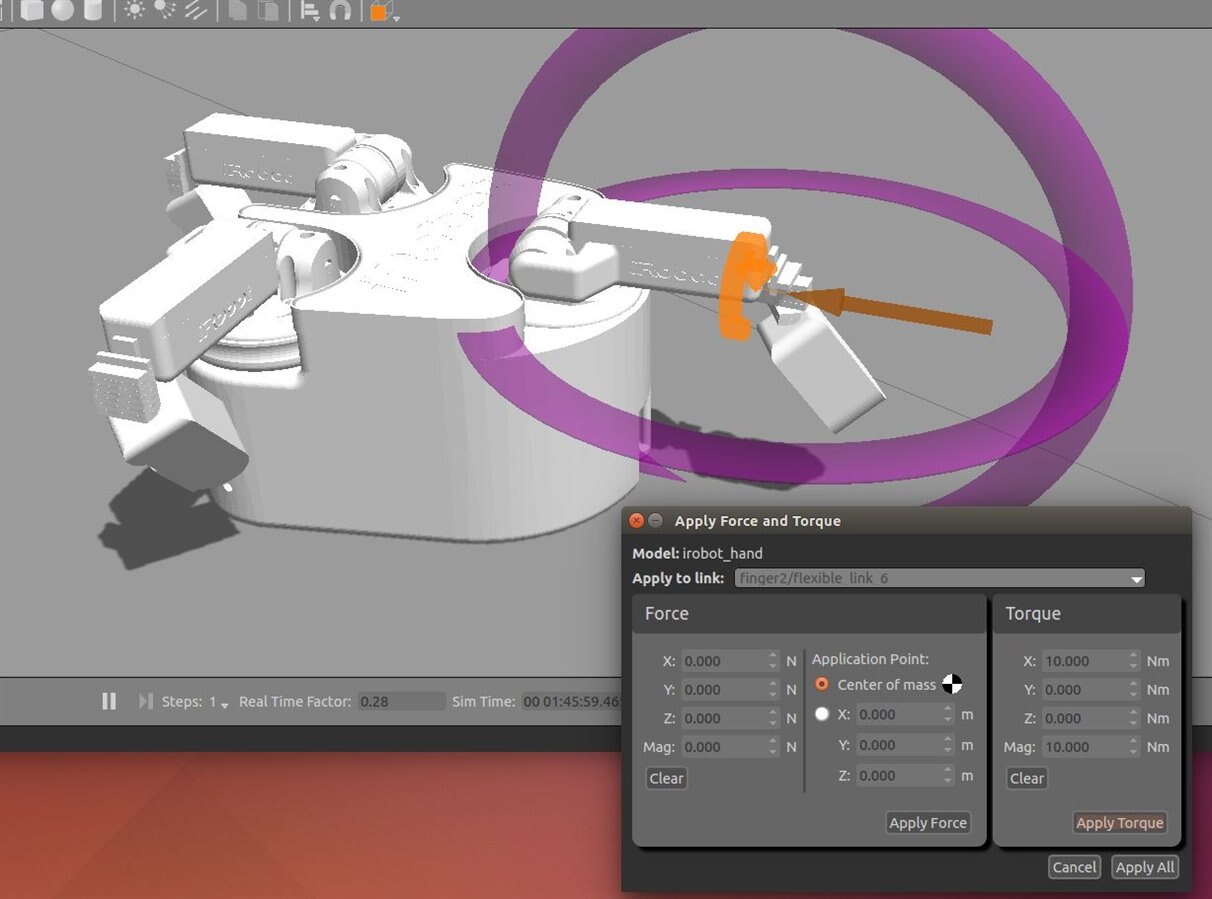
More complex movements are possible too. Here is a robot gripper with torque being applied to part of it:
image

Video:

You don't have permission to edit metadata of this video.
Edit media
x
image
Upload Preview
image


The simulation includes gravity and friction and many attributes are configurable.

The models can be created in XML files, and the tutorials look comprehensive.

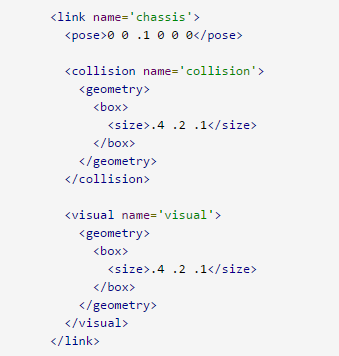
The example below from a tutorial shows a snippet of a robot, where a box-shaped chassis is needed. The <pose> element contains the position (xyz, and orientation in three dimensions). The <collision> and <geometry> elements contain a <box> element which defines a box of size 0.4x0.2x0.1m in this example.

Usually they are the same; one element is used for the graphics, and the other is for the collision-detection algorithm to use.
image


The simulation can be connected up to real hardware or software through the use of an application programming interface (API), so it is possible to test robotics software before you've built the hardware, or you can interface your sensors and start programming movements.

It all looks extremely interesting!

Check out the second part by clicking here, which goes into detail about how to construct a model (based on a real hardware robot called XMP-2) and how to control it using external stimulus.

  • Sign in to reply

Top Comments

  • DAB
    DAB over 10 years ago +1
    I agree. I was not aware that Gazebo existed, but it definitely looks interesting to look at mechanical designs. I will add it to my list of tools to check out. Thanks, DAB
  • shabaz
    shabaz over 10 years ago +1
    Hi Shabaz! Really, thank you to point on this. It seems very good. At the moment I am working on the following "robotizations" Camera slider with controller and horizontal programmable movement; camera…
  • balearicdynamics
    balearicdynamics over 10 years ago in reply to shabaz +1
    Hello Shabaz! Many thanks for the update. In the meantime I am installing the software that is really intriguing. I'm going to try and understand how to produce a simple single mechanical movement or linkage…
  • shabaz
    shabaz over 10 years ago in reply to balearicdynamics

    Hi Enrico,


    Very weird. I can't see what thing we're doing different : (

    I can still see the install output on my command line, but it scrolls beyond the scroll buffer so I can only capture the last 500 lines:


    Selecting previously unselected package libplayertcp3.0.
    Preparing to unpack .../libplayertcp3.0_3.0.2+dfsg-4.1ubuntu3_amd64.deb ...
    Unpacking libplayertcp3.0 (3.0.2+dfsg-4.1ubuntu3) ...
    Selecting previously unselected package libplayercommon3.0-dev.
    Preparing to unpack .../libplayercommon3.0-dev_3.0.2+dfsg-4.1ubuntu3_amd64.deb ...
    Unpacking libplayercommon3.0-dev (3.0.2+dfsg-4.1ubuntu3) ...
    Selecting previously unselected package libplayerinterface3.0-dev.
    Preparing to unpack .../libplayerinterface3.0-dev_3.0.2+dfsg-4.1ubuntu3_amd64.deb ...
    Unpacking libplayerinterface3.0-dev (3.0.2+dfsg-4.1ubuntu3) ...
    Selecting previously unselected package libplayercore3.0-dev.
    Preparing to unpack .../libplayercore3.0-dev_3.0.2+dfsg-4.1ubuntu3_amd64.deb ...
    Unpacking libplayercore3.0-dev (3.0.2+dfsg-4.1ubuntu3) ...
    Selecting previously unselected package libplayertcp3.0-dev.
    Preparing to unpack .../libplayertcp3.0-dev_3.0.2+dfsg-4.1ubuntu3_amd64.deb ...
    Unpacking libplayertcp3.0-dev (3.0.2+dfsg-4.1ubuntu3) ...
    Selecting previously unselected package libplayerjpeg3.0.
    Preparing to unpack .../libplayerjpeg3.0_3.0.2+dfsg-4.1ubuntu3_amd64.deb ...
    Unpacking libplayerjpeg3.0 (3.0.2+dfsg-4.1ubuntu3) ...
    Selecting previously unselected package libplayerwkb3.0.
    Preparing to unpack .../libplayerwkb3.0_3.0.2+dfsg-4.1ubuntu3_amd64.deb ...
    Unpacking libplayerwkb3.0 (3.0.2+dfsg-4.1ubuntu3) ...
    Selecting previously unselected package libplayerc3.0.
    Preparing to unpack .../libplayerc3.0_3.0.2+dfsg-4.1ubuntu3_amd64.deb ...
    Unpacking libplayerc3.0 (3.0.2+dfsg-4.1ubuntu3) ...
    Selecting previously unselected package libplayerc++3.0.
    Preparing to unpack .../libplayerc++3.0_3.0.2+dfsg-4.1ubuntu3_amd64.deb ...
    Unpacking libplayerc++3.0 (3.0.2+dfsg-4.1ubuntu3) ...
    Selecting previously unselected package libplayerc3.0-dev.
    Preparing to unpack .../libplayerc3.0-dev_3.0.2+dfsg-4.1ubuntu3_amd64.deb ...
    Unpacking libplayerc3.0-dev (3.0.2+dfsg-4.1ubuntu3) ...
    Selecting previously unselected package libplayerc++3.0-dev.
    Preparing to unpack .../libplayerc++3.0-dev_3.0.2+dfsg-4.1ubuntu3_amd64.deb ...
    Unpacking libplayerc++3.0-dev (3.0.2+dfsg-4.1ubuntu3) ...
    Selecting previously unselected package libplayerdrivers3.0.
    Preparing to unpack .../libplayerdrivers3.0_3.0.2+dfsg-4.1ubuntu3_amd64.deb ...
    Unpacking libplayerdrivers3.0 (3.0.2+dfsg-4.1ubuntu3) ...
    Selecting previously unselected package libplayerjpeg3.0-dev.
    Preparing to unpack .../libplayerjpeg3.0-dev_3.0.2+dfsg-4.1ubuntu3_amd64.deb ...
    Unpacking libplayerjpeg3.0-dev (3.0.2+dfsg-4.1ubuntu3) ...
    Selecting previously unselected package libplayerwkb3.0-dev.
    Preparing to unpack .../libplayerwkb3.0-dev_3.0.2+dfsg-4.1ubuntu3_amd64.deb ...
    Unpacking libplayerwkb3.0-dev (3.0.2+dfsg-4.1ubuntu3) ...
    Selecting previously unselected package libplayerdrivers3.0-dev.
    Preparing to unpack .../libplayerdrivers3.0-dev_3.0.2+dfsg-4.1ubuntu3_amd64.deb ...
    Unpacking libplayerdrivers3.0-dev (3.0.2+dfsg-4.1ubuntu3) ...
    Selecting previously unselected package robot-player-dev.
    Preparing to unpack .../robot-player-dev_3.0.2+dfsg-4.1ubuntu3_all.deb ...
    Unpacking robot-player-dev (3.0.2+dfsg-4.1ubuntu3) ...
    Selecting previously unselected package libsimbody-dev:amd64.
    Preparing to unpack .../libsimbody-dev_3.5.1-1~trusty_amd64.deb ...
    Unpacking libsimbody-dev:amd64 (3.5.1-1~trusty) ...
    Selecting previously unselected package libgazebo6-dev:amd64.
    Preparing to unpack .../libgazebo6-dev_6.5.1-1~trusty_amd64.deb ...
    Unpacking libgazebo6-dev:amd64 (6.5.1-1~trusty) ...
    Selecting previously unselected package libhwloc-plugins.
    Preparing to unpack .../libhwloc-plugins_1.8-1ubuntu1.14.04.1_amd64.deb ...
    Unpacking libhwloc-plugins (1.8-1ubuntu1.14.04.1) ...
    Selecting previously unselected package proj-bin.
    Preparing to unpack .../proj-bin_4.8.0-2ubuntu2_amd64.deb ...
    Unpacking proj-bin (4.8.0-2ubuntu2) ...
    Processing triggers for man-db (2.6.7.1-1ubuntu1) ...
    Processing triggers for doc-base (0.10.5) ...
    Processing 32 changed doc-base files, 9 added doc-base files...
    Processing triggers for install-info (5.2.0.dfsg.1-2) ...
    Processing triggers for libglib2.0-0:amd64 (2.40.2-0ubuntu1) ...
    Processing triggers for fontconfig (2.11.0-0ubuntu4.1) ...
    Processing triggers for gnome-menus (3.10.1-0ubuntu2) ...
    Processing triggers for desktop-file-utils (0.22-1ubuntu1) ...
    Processing triggers for bamfdaemon (0.5.1+14.04.20140409-0ubuntu1) ...
    Rebuilding /usr/share/applications/bamf-2.index...
    Processing triggers for mime-support (3.54ubuntu1.1) ...
    Processing triggers for hicolor-icon-theme (0.13-1) ...
    
    
    (gtk-update-icon-cache-3.0:24477): GdkPixbuf-WARNING **: Cannot open pixbuf loader module file '/usr/lib/x86_64-linux-gnu/gdk-pixbuf-2.0/2.10.0/loaders.cache': No such file or directory
    
    
    This likely means that your installation is broken.
    Try running the command
      gdk-pixbuf-query-loaders > /usr/lib/x86_64-linux-gnu/gdk-pixbuf-2.0/2.10.0/loaders.cache
    to make things work again for the time being.
    Setting up libexpat1:amd64 (2.1.0-4ubuntu1.1) ...
    Setting up libkrb5support0:amd64 (1.12+dfsg-2ubuntu5.2) ...
    Setting up libk5crypto3:amd64 (1.12+dfsg-2ubuntu5.2) ...
    Setting up libkrb5-3:amd64 (1.12+dfsg-2ubuntu5.2) ...
    Setting up libgssapi-krb5-2:amd64 (1.12+dfsg-2ubuntu5.2) ...
    Setting up libldap-2.4-2:amd64 (2.4.31-1+nmu2ubuntu8.2) ...
    Setting up freeglut3:amd64 (2.8.1-1) ...
    Setting up libavutil52:amd64 (6:9.18-0ubuntu0.14.04.1) ...
    Setting up libgsm1:amd64 (1.0.13-4) ...
    Setting up libmp3lame0:amd64 (3.99.5+repack1-3ubuntu1) ...
    Setting up libopenjpeg2:amd64 (1.3+dfsg-4.7ubuntu1) ...
    Setting up libopus0 (1.1-0ubuntu1) ...
    Setting up libschroedinger-1.0-0:amd64 (1.0.11-2ubuntu1) ...
    Setting up libva1:amd64 (1.3.0-2) ...
    Setting up libx264-142:amd64 (2:0.142.2389+git956c8d8-2) ...
    Setting up libxvidcore4:amd64 (2:1.3.2-9ubuntu1) ...
    Setting up libavcodec54:amd64 (6:9.18-0ubuntu0.14.04.1) ...
    Setting up libavformat54:amd64 (6:9.18-0ubuntu0.14.04.1) ...
    Setting up libboost-atomic1.54.0:amd64 (1.54.0-4ubuntu3.1) ...
    Setting up libboost-chrono1.54.0:amd64 (1.54.0-4ubuntu3.1) ...
    Setting up libboost-context1.54.0:amd64 (1.54.0-4ubuntu3.1) ...
    Setting up libboost-filesystem1.54.0:amd64 (1.54.0-4ubuntu3.1) ...
    Setting up libboost-serialization1.54.0:amd64 (1.54.0-4ubuntu3.1) ...
    Setting up libcr0 (0.8.5-2.1) ...
    Setting up libhwloc5:amd64 (1.8-1ubuntu1.14.04.1) ...
    Setting up libibverbs1 (1.1.7-1ubuntu1.1) ...
    Setting up libtorque2 (2.4.16+dfsg-1.3ubuntu1) ...
    Setting up libopenmpi1.6 (1.6.5-8) ...
    Setting up libboost-mpi1.54.0 (1.54.0-4ubuntu3.1) ...
    Setting up libboost-graph-parallel1.54.0 (1.54.0-4ubuntu3.1) ...
    Setting up libicu52:amd64 (52.1-3ubuntu0.4) ...
    Setting up libboost-regex1.54.0:amd64 (1.54.0-4ubuntu3.1) ...
    Setting up libboost-graph1.54.0:amd64 (1.54.0-4ubuntu3.1) ...
    Setting up libboost-iostreams1.54.0:amd64 (1.54.0-4ubuntu3.1) ...
    Setting up libboost-thread1.54.0:amd64 (1.54.0-4ubuntu3.1) ...
    Setting up libboost-locale1.54.0:amd64 (1.54.0-4ubuntu3.1) ...
    Setting up libboost-math1.54.0:amd64 (1.54.0-4ubuntu3.1) ...
    Setting up libboost-python1.54.0:amd64 (1.54.0-4ubuntu3.1) ...
    Setting up openmpi-common (1.6.5-8) ...
    Setting up openmpi-bin (1.6.5-8) ...
    update-alternatives: using /usr/bin/mpirun.openmpi to provide /usr/bin/mpirun (mpirun) in auto mode
    Setting up mpi-default-bin (1.0.2ubuntu1) ...
    Setting up libboost-mpi-python1.54.0 (1.54.0-4ubuntu3.1) ...
    Setting up libboost-program-options1.54.0:amd64 (1.54.0-4ubuntu3.1) ...
    Setting up libboost-random1.54.0:amd64 (1.54.0-4ubuntu3.1) ...
    Setting up libboost-signals1.54.0:amd64 (1.54.0-4ubuntu3.1) ...
    Setting up libboost-test1.54.0:amd64 (1.54.0-4ubuntu3.1) ...
    Setting up libboost-timer1.54.0:amd64 (1.54.0-4ubuntu3.1) ...
    Setting up libboost-wave1.54.0:amd64 (1.54.0-4ubuntu3.1) ...
    Setting up libfreetype6:amd64 (2.5.2-1ubuntu2.5) ...
    Setting up libcairo-script-interpreter2:amd64 (1.13.0~20140204-0ubuntu1.1) ...
    Setting up libdap11:amd64 (3.12.0-1) ...
    Setting up libdapclient3:amd64 (3.12.0-1) ...
    Setting up libdapserver7:amd64 (3.12.0-1) ...
    Setting up libepsilon1:amd64 (0.9.2-2) ...
    Setting up libgdk-pixbuf2.0-common (2.30.7-0ubuntu1.2) ...
    Setting up libgdk-pixbuf2.0-0:amd64 (2.30.7-0ubuntu1.2) ...
    Setting up libgtk2.0-0:amd64 (2.24.23-0ubuntu1.3) ...
    Setting up libgail18:amd64 (2.24.23-0ubuntu1.3) ...
    Setting up libgail-common:amd64 (2.24.23-0ubuntu1.3) ...
    Setting up libgtk2.0-bin (2.24.23-0ubuntu1.3) ...
    Setting up libgfortran3:amd64 (4.8.4-2ubuntu1~14.04) ...
    Setting up libgif4:amd64 (4.1.6-11) ...
    Setting up libgssrpc4:amd64 (1.12+dfsg-2ubuntu5.2) ...
    Setting up libharfbuzz-gobject0:amd64 (0.9.27-1ubuntu1) ...
    Setting up libhdf5-7:amd64 (1.8.11-5ubuntu7) ...
    Setting up libilmbase6:amd64 (1.0.1-6ubuntu1) ...
    Setting up libkadm5clnt-mit9:amd64 (1.12+dfsg-2ubuntu5.2) ...
    Setting up libkdb5-7:amd64 (1.12+dfsg-2ubuntu5.2) ...
    Setting up libkadm5srv-mit9:amd64 (1.12+dfsg-2ubuntu5.2) ...
    Setting up mysql-common (5.5.46-0ubuntu0.14.04.2) ...
    Setting up libmysqlclient18:amd64 (5.5.46-0ubuntu0.14.04.2) ...
    Setting up libodbc1:amd64 (2.2.14p2-5ubuntu5) ...
    Setting up libopenexr6:amd64 (1.6.1-7ubuntu1) ...
    Setting up libfreeimage3 (3.15.4-3) ...
    Setting up libzzip-0-13:amd64 (0.13.62-2) ...
    Setting up libogre-1.8.0:amd64 (1.8.1+dfsg-0ubuntu3) ...
    Setting up libtbb2 (4.2~20130725-1.1ubuntu1) ...
    Setting up libopencv-core2.4:amd64 (2.4.8+dfsg1-2ubuntu1) ...
    Setting up libopencv-flann2.4:amd64 (2.4.8+dfsg1-2ubuntu1) ...
    Setting up libopencv-imgproc2.4:amd64 (2.4.8+dfsg1-2ubuntu1) ...
    Setting up libopencv-features2d2.4:amd64 (2.4.8+dfsg1-2ubuntu1) ...
    Setting up libopencv-calib3d2.4:amd64 (2.4.8+dfsg1-2ubuntu1) ...
    Setting up libdc1394-22:amd64 (2.2.1-2ubuntu2) ...
    Setting up libgtkglext1 (1.2.0-3.1fakesync3) ...
    Setting up libswscale2:amd64 (6:9.18-0ubuntu0.14.04.1) ...
    Setting up libopencv-highgui2.4:amd64 (2.4.8+dfsg1-2ubuntu1) ...
    Setting up libopencv-ml2.4:amd64 (2.4.8+dfsg1-2ubuntu1) ...
    Setting up libopencv-objdetect2.4:amd64 (2.4.8+dfsg1-2ubuntu1) ...
    Setting up libopencv-video2.4:amd64 (2.4.8+dfsg1-2ubuntu1) ...
    Setting up libopencv-contrib2.4:amd64 (2.4.8+dfsg1-2ubuntu1) ...
    Setting up libopencv-legacy2.4:amd64 (2.4.8+dfsg1-2ubuntu1) ...
    Setting up libopencv-ocl2.4:amd64 (2.4.8+dfsg1-2ubuntu1) ...
    Setting up libpcrecpp0:amd64 (1:8.31-2ubuntu2.1) ...
    Setting up libexpat1-dev:amd64 (2.1.0-4ubuntu1.1) ...
    Setting up libpython2.7-dev:amd64 (2.7.6-8ubuntu0.2) ...
    Setting up libqt4-qt3support:amd64 (4:4.8.5+git192-g085f851+dfsg-2ubuntu4.1) ...
    Setting up sdformat-sdf (3.6.0-1~trusty) ...
    Setting up libignition-math2:amd64 (2.2.3-1~trusty) ...
    Setting up libtinyxml2.6.2:amd64 (2.6.2-2) ...
    Setting up libsdformat3:amd64 (3.6.0-1~trusty) ...
    Setting up libfreexl1:amd64 (1.0.0g-1ubuntu0.14.04.1) ...
    Setting up libgeos-3.4.2 (3.4.2-4ubuntu1) ...
    Setting up libgeos-c1 (3.4.2-4ubuntu1) ...
    Setting up proj-data (4.8.0-2ubuntu2) ...
    Setting up libproj0 (4.8.0-2ubuntu2) ...
    Setting up libspatialite5:amd64 (4.1.1-5ubuntu1) ...
    Setting up libtiffxx5:amd64 (4.0.3-7ubuntu0.3) ...
    Setting up libxerces-c3.1:amd64 (3.1.1-5.1~build0.14.04.1) ...
    Setting up libbullet2.82 (2.82-0osrf1~trusty1) ...
    Setting up libblas3 (1.2.20110419-7) ...
    update-alternatives: using /usr/lib/libblas/libblas.so.3 to provide /usr/lib/libblas.so.3 (libblas.so.3) in auto mode
    Setting up liblapack3 (3.5.0-2ubuntu1) ...
    update-alternatives: using /usr/lib/lapack/liblapack.so.3 to provide /usr/lib/liblapack.so.3 (liblapack.so.3) in auto mode
    Setting up libarpack2 (3.1.5-2) ...
    Setting up libarmadillo4 (1:4.200.0+dfsg-1) ...
    Setting up libhdf4-0-alt (4.2r10-0ubuntu1) ...
    Setting up liburiparser1 (0.7.5-1ubuntu2) ...
    Setting up libkml0:amd64 (1.3.0~r864-2) ...
    Setting up libnetcdfc7 (1:4.1.3-7ubuntu2) ...
    Setting up libogdi3.2 (3.2.0~beta2-7ubuntu1) ...
    Setting up libpq5 (9.3.10-0ubuntu0.14.04) ...
    Setting up libplayercommon3.0 (3.0.2+dfsg-4.1ubuntu3) ...
    Setting up libplayerinterface3.0 (3.0.2+dfsg-4.1ubuntu3) ...
    Setting up libplayercore3.0 (3.0.2+dfsg-4.1ubuntu3) ...
    Setting up libsimbody3.5:amd64 (3.5.1-1~trusty) ...
    Setting up libspnav0 (0.2.2-1ubuntu1) ...
    Setting up libtar0 (1.2.20-4~osrf1) ...
    Setting up libgnutlsxx27:amd64 (2.12.23-12ubuntu2.2) ...
    Setting up libjbig-dev:amd64 (2.0-2ubuntu4.1) ...
    Setting up libwebpdemux1:amd64 (0.4.0-4) ...
    Setting up ocl-icd-libopencl1:amd64 (2.1.3-4) ...
    Setting up autotools-dev (20130810.1) ...
    Setting up libstdc++-4.8-dev:amd64 (4.8.4-2ubuntu1~14.04) ...
    Setting up g++-4.8 (4.8.4-2ubuntu1~14.04) ...
    Setting up g++ (4:4.8.2-1ubuntu6) ...
    update-alternatives: using /usr/bin/g++ to provide /usr/bin/c++ (c++) in auto mode
    Setting up dpkg-dev (1.17.5ubuntu5.4) ...
    Setting up build-essential (11.6ubuntu6) ...
    Setting up po-debconf (1.0.16+nmu2ubuntu1) ...
    Setting up dh-apparmor (2.8.95~2430-0ubuntu5.3) ...
    Setting up debhelper (9.20131227ubuntu1) ...
    Setting up libfakeroot:amd64 (1.20-3ubuntu2) ...
    Setting up fakeroot (1.20-3ubuntu2) ...
    update-alternatives: using /usr/bin/fakeroot-sysv to provide /usr/bin/fakeroot (fakeroot) in auto mode
    Setting up xorg-sgml-doctools (1:1.11-1) ...
    Setting up x11proto-core-dev (7.0.26-1~ubuntu2) ...
    Setting up libxau-dev:amd64 (1:1.0.8-1) ...
    Setting up libxdmcp-dev:amd64 (1:1.1.1-1) ...
    Setting up x11proto-input-dev (2.3-1) ...
    Setting up x11proto-kb-dev (1.0.6-2) ...
    Setting up xtrans-dev (1.3.5-1~ubuntu14.04.1) ...
    Setting up libpthread-stubs0-dev:amd64 (0.3-4) ...
    Setting up libxcb1-dev:amd64 (1.10-2ubuntu1) ...
    Setting up libx11-dev:amd64 (2:1.6.2-1ubuntu2) ...
    Setting up libdrm-dev:amd64 (2.4.60-2~ubuntu14.04.1) ...
    Setting up mesa-common-dev (10.1.3-0ubuntu0.5) ...
    Setting up libx11-xcb-dev:amd64 (2:1.6.2-1ubuntu2) ...
    Setting up libxcb-dri3-dev:amd64 (1.10-2ubuntu1) ...
    Setting up libxcb-render0-dev:amd64 (1.10-2ubuntu1) ...
    Setting up libxcb-randr0-dev:amd64 (1.10-2ubuntu1) ...
    Setting up libxcb-shape0-dev:amd64 (1.10-2ubuntu1) ...
    Setting up libxcb-xfixes0-dev:amd64 (1.10-2ubuntu1) ...
    Setting up libxcb-sync-dev:amd64 (1.10-2ubuntu1) ...
    Setting up libxcb-present-dev:amd64 (1.10-2ubuntu1) ...
    Setting up libxshmfence-dev:amd64 (1.1-2) ...
    Setting up libxcb-dri2-0-dev:amd64 (1.10-2ubuntu1) ...
    Setting up libxcb-glx0-dev:amd64 (1.10-2ubuntu1) ...
    Setting up x11proto-xext-dev (7.3.0-1) ...
    Setting up x11proto-fixes-dev (1:5.0-2ubuntu2) ...
    Setting up libxfixes-dev:amd64 (1:5.0.1-1ubuntu1.1) ...
    Setting up x11proto-damage-dev (1:1.2.1-2) ...
    Setting up libxdamage-dev:amd64 (1:1.1.4-1ubuntu1) ...
    Setting up libxext-dev:amd64 (2:1.3.2-1ubuntu0.0.14.04.1) ...
    Setting up x11proto-xf86vidmode-dev (2.3.1-2) ...
    Setting up libxxf86vm-dev:amd64 (1:1.1.3-1) ...
    Setting up x11proto-dri2-dev (2.8-2) ...
    Setting up x11proto-gl-dev (1.4.17-1) ...
    Setting up libgl1-mesa-dev (10.1.3-0ubuntu0.5) ...
    Setting up libglu1-mesa-dev (9.0.0-2) ...
    Setting up libice-dev:amd64 (2:1.0.8-2) ...
    Setting up libsm-dev:amd64 (2:1.2.1-2) ...
    Setting up libxt-dev:amd64 (1:1.1.4-1) ...
    Setting up freeglut3-dev:amd64 (2.8.1-1) ...
    Setting up gir1.2-gdkpixbuf-2.0 (2.30.7-0ubuntu1.2) ...
    Setting up gir1.2-gtk-2.0 (2.24.23-0ubuntu1.3) ...
    Setting up hdf5-helpers (1.8.11-5ubuntu7) ...
    Setting up icu-devtools (52.1-3ubuntu0.4) ...
    Setting up comerr-dev (2.1-1.42.9-3ubuntu1.3) ...
    Setting up krb5-multidev (1.12+dfsg-2ubuntu5.2) ...
    Setting up libalgorithm-diff-perl (1.19.02-3) ...
    Setting up libalgorithm-diff-xs-perl (0.04-2build4) ...
    Setting up libalgorithm-merge-perl (0.08-2) ...
    Setting up libpcre3-dev:amd64 (1:8.31-2ubuntu2.1) ...
    Setting up zlib1g-dev:amd64 (1:1.2.8.dfsg-1ubuntu1) ...
    Setting up libglib2.0-dev (2.40.2-0ubuntu1) ...
    Setting up libatk1.0-dev (2.10.0-2ubuntu2) ...
    Setting up libavutil-dev (6:9.18-0ubuntu0.14.04.1) ...
    Setting up libavcodec-dev (6:9.18-0ubuntu0.14.04.1) ...
    Setting up libavformat-dev (6:9.18-0ubuntu0.14.04.1) ...
    Setting up libblas-dev (1.2.20110419-7) ...
    update-alternatives: using /usr/lib/libblas/libblas.so to provide /usr/lib/libblas.so (libblas.so) in auto mode
    Setting up libboost1.54-dev (1.54.0-4ubuntu3.1) ...
    Setting up libboost-dev (1.54.0.1ubuntu1) ...
    Setting up libboost1.54-tools-dev (1.54.0-4ubuntu3.1) ...
    Setting up libboost-tools-dev (1.54.0.1ubuntu1) ...
    Setting up libboost-atomic1.54-dev:amd64 (1.54.0-4ubuntu3.1) ...
    Setting up libboost-atomic-dev:amd64 (1.54.0.1ubuntu1) ...
    Setting up libboost-chrono1.54-dev:amd64 (1.54.0-4ubuntu3.1) ...
    Setting up libboost-chrono-dev:amd64 (1.54.0.1ubuntu1) ...
    Setting up libboost-context1.54-dev:amd64 (1.54.0-4ubuntu3.1) ...
    Setting up libboost-context-dev:amd64 (1.54.0.1ubuntu1) ...
    Setting up libboost-coroutine1.54-dev (1.54.0-4ubuntu3.1) ...
    Setting up libboost-coroutine-dev (1.54.0.1ubuntu1) ...
    Setting up libboost-serialization1.54-dev:amd64 (1.54.0-4ubuntu3.1) ...
    Setting up libboost-date-time1.54-dev:amd64 (1.54.0-4ubuntu3.1) ...
    Setting up libboost-date-time-dev:amd64 (1.54.0.1ubuntu1) ...
    Setting up libboost-exception1.54-dev:amd64 (1.54.0-4ubuntu3.1) ...
    Setting up libboost-exception-dev:amd64 (1.54.0.1ubuntu1) ...
    Setting up libboost-system1.54-dev:amd64 (1.54.0-4ubuntu3.1) ...
    Setting up libboost-filesystem1.54-dev:amd64 (1.54.0-4ubuntu3.1) ...
    Setting up libboost-filesystem-dev:amd64 (1.54.0.1ubuntu1) ...
    Setting up libboost-test1.54-dev:amd64 (1.54.0-4ubuntu3.1) ...
    Setting up libboost-graph1.54-dev:amd64 (1.54.0-4ubuntu3.1) ...
    Setting up libboost-graph-dev:amd64 (1.54.0.1ubuntu1) ...
    Setting up libboost-graph-parallel1.54-dev (1.54.0-4ubuntu3.1) ...
    Setting up libboost-graph-parallel-dev (1.54.0.1ubuntu1) ...
    Setting up libicu-dev:amd64 (52.1-3ubuntu0.4) ...
    Setting up libboost-regex1.54-dev:amd64 (1.54.0-4ubuntu3.1) ...
    Setting up libboost-iostreams1.54-dev:amd64 (1.54.0-4ubuntu3.1) ...
    Setting up libboost-iostreams-dev:amd64 (1.54.0.1ubuntu1) ...
    Setting up libboost-locale1.54-dev:amd64 (1.54.0-4ubuntu3.1) ...
    Setting up libboost-locale-dev:amd64 (1.54.0.1ubuntu1) ...
    Setting up libboost-log1.54.0 (1.54.0-4ubuntu3.1) ...
    Setting up libboost-thread1.54-dev:amd64 (1.54.0-4ubuntu3.1) ...
    Setting up libboost-log1.54-dev (1.54.0-4ubuntu3.1) ...
    Setting up libboost-log-dev (1.54.0.1ubuntu1) ...
    Setting up libboost-math1.54-dev:amd64 (1.54.0-4ubuntu3.1) ...
    Setting up libboost-math-dev:amd64 (1.54.0.1ubuntu1) ...
    Setting up libibverbs-dev (1.1.7-1ubuntu1.1) ...
    Setting up libxml2-dev:amd64 (2.9.1+dfsg1-3ubuntu4.4) ...
    Setting up libpci-dev (1:3.2.1-1ubuntu5) ...
    Setting up libhwloc-dev:amd64 (1.8-1ubuntu1.14.04.1) ...
    Setting up libopenmpi-dev (1.6.5-8) ...
    update-alternatives: using /usr/lib/openmpi/include to provide /usr/include/mpi (mpi) in auto mode
    Setting up mpi-default-dev (1.0.2ubuntu1) ...
    Setting up libboost-mpi1.54-dev (1.54.0-4ubuntu3.1) ...
    Setting up libboost-mpi-dev (1.54.0.1ubuntu1) ...
    Setting up libboost-mpi-python1.54-dev (1.54.0-4ubuntu3.1) ...
    Setting up libboost-mpi-python-dev (1.54.0.1ubuntu1) ...
    Setting up libboost-program-options1.54-dev:amd64 (1.54.0-4ubuntu3.1) ...
    Setting up libboost-program-options-dev:amd64 (1.54.0.1ubuntu1) ...
    Setting up libpython-dev:amd64 (2.7.5-5ubuntu3) ...
    Setting up libboost-python1.54-dev:amd64 (1.54.0-4ubuntu3.1) ...
    Setting up libboost-python-dev (1.54.0.1ubuntu1) ...
    Setting up libboost-random1.54-dev:amd64 (1.54.0-4ubuntu3.1) ...
    Setting up libboost-random-dev:amd64 (1.54.0.1ubuntu1) ...
    Setting up libboost-regex-dev:amd64 (1.54.0.1ubuntu1) ...
    Setting up libboost-serialization-dev:amd64 (1.54.0.1ubuntu1) ...
    Setting up libboost-signals1.54-dev:amd64 (1.54.0-4ubuntu3.1) ...
    Setting up libboost-signals-dev:amd64 (1.54.0.1ubuntu1) ...
    Setting up libboost-system-dev:amd64 (1.54.0.1ubuntu1) ...
    Setting up libboost-test-dev:amd64 (1.54.0.1ubuntu1) ...
    Setting up libboost-thread-dev:amd64 (1.54.0.1ubuntu1) ...
    Setting up libboost-timer1.54-dev:amd64 (1.54.0-4ubuntu3.1) ...
    Setting up libboost-timer-dev:amd64 (1.54.0.1ubuntu1) ...
    Setting up libboost-wave1.54-dev:amd64 (1.54.0-4ubuntu3.1) ...
    Setting up libboost-wave-dev:amd64 (1.54.0.1ubuntu1) ...
    Setting up libboost-all-dev (1.54.0.1ubuntu1) ...
    Setting up libpng12-dev (1.2.50-1ubuntu2) ...
    Setting up libfreetype6-dev (2.5.2-1ubuntu2.5) ...
    Setting up libfontconfig1-dev (2.11.0-0ubuntu4.1) ...
    Setting up x11proto-render-dev (2:0.11.1-2) ...
    Setting up libxrender-dev:amd64 (1:0.9.8-1build0.14.04.1) ...
    Setting up libpixman-1-dev (0.30.2-2ubuntu1) ...
    Setting up libxcb-shm0-dev:amd64 (1.10-2ubuntu1) ...
    Setting up libcairo2-dev (1.13.0~20140204-0ubuntu1.1) ...
    Setting up libcf0 (1:4.1.3-7ubuntu2) ...
    Setting up libidn11-dev (1.28-1ubuntu2) ...
    Setting up libkrb5-dev (1.12+dfsg-2ubuntu5.2) ...
    Setting up libldap2-dev:amd64 (2.4.31-1+nmu2ubuntu8.2) ...
    Setting up libgpg-error-dev (1.12-0.2ubuntu1) ...
    Setting up libgcrypt11-dev (1.5.3-2ubuntu4.2) ...
    Setting up libtasn1-6-dev (3.4-3ubuntu0.3) ...
    Setting up libp11-kit-dev (0.20.2-2ubuntu2) ...
    Setting up libgnutls-dev (2.12.23-12ubuntu2.2) ...
    Setting up librtmp-dev (2.4+20121230.gitdf6c518-1) ...
    Setting up libssl-dev:amd64 (1.0.1f-1ubuntu2.15) ...
    Setting up libcurl4-openssl-dev:amd64 (7.35.0-1ubuntu2.5) ...
    Setting up libopencv-core-dev:amd64 (2.4.8+dfsg1-2ubuntu1) ...
    Setting up libopencv-imgproc-dev:amd64 (2.4.8+dfsg1-2ubuntu1) ...
    Setting up libopencv-flann-dev:amd64 (2.4.8+dfsg1-2ubuntu1) ...
    Setting up libopencv-features2d-dev:amd64 (2.4.8+dfsg1-2ubuntu1) ...
    Setting up libopencv-calib3d-dev:amd64 (2.4.8+dfsg1-2ubuntu1) ...
    Setting up libswscale-dev (6:9.18-0ubuntu0.14.04.1) ...
    Setting up libgdk-pixbuf2.0-dev (2.30.7-0ubuntu1.2) ...
    Setting up libxft-dev (2.3.1-2) ...
    Setting up libharfbuzz-dev (0.9.27-1ubuntu1) ...
    Setting up libpango1.0-dev (1.36.3-1ubuntu1.1) ...
    Setting up x11proto-xinerama-dev (1.2.1-2) ...
    Setting up libxinerama-dev:amd64 (2:1.1.3-1) ...
    Setting up libxi-dev (2:1.7.1.901-1ubuntu1.1) ...
    Setting up x11proto-randr-dev (1.4.0+git20120101.is.really.1.4.0-0ubuntu1) ...
    Setting up libxrandr-dev:amd64 (2:1.4.2-1) ...
    Setting up libxcursor-dev:amd64 (1:1.1.14-1) ...
    Setting up x11proto-composite-dev (1:0.4.2-2) ...
    Setting up libxcomposite-dev (1:0.4.4-1) ...
    Setting up libxml2-utils (2.9.1+dfsg1-3ubuntu4.4) ...
    Setting up libgtk2.0-dev (2.24.23-0ubuntu1.3) ...
    Setting up libjasper-dev (1.900.1-14ubuntu3.2) ...
    Setting up libjpeg-turbo8-dev:amd64 (1.3.0-0ubuntu2) ...
    Setting up libjpeg8-dev:amd64 (8c-2ubuntu8) ...
    Setting up libjpeg-dev:amd64 (8c-2ubuntu8) ...
    Setting up liblzma-dev:amd64 (5.1.1alpha+20120614-2ubuntu2) ...
    Setting up libtiff5-dev:amd64 (4.0.3-7ubuntu0.3) ...
    Setting up libilmbase-dev (1.0.1-6ubuntu1) ...
    Setting up libopenexr-dev (1.6.1-7ubuntu1) ...
    Setting up libraw1394-dev:amd64 (2.1.0-1ubuntu1) ...
    Setting up libdc1394-22-dev:amd64 (2.2.1-2ubuntu2) ...
    Setting up libopencv-highgui-dev:amd64 (2.4.8+dfsg1-2ubuntu1) ...
    Setting up libopencv-objdetect-dev:amd64 (2.4.8+dfsg1-2ubuntu1) ...
    Setting up libopencv-video-dev:amd64 (2.4.8+dfsg1-2ubuntu1) ...
    Setting up libopencv-ml-dev:amd64 (2.4.8+dfsg1-2ubuntu1) ...
    Setting up libopencv-legacy-dev:amd64 (2.4.8+dfsg1-2ubuntu1) ...
    Setting up libopencv-ocl-dev:amd64 (2.4.8+dfsg1-2ubuntu1) ...
    Setting up libcv-dev:amd64 (2.4.8+dfsg1-2ubuntu1) ...
    Setting up libopencv-contrib-dev:amd64 (2.4.8+dfsg1-2ubuntu1) ...
    Setting up libcvaux-dev:amd64 (2.4.8+dfsg1-2ubuntu1) ...
    Setting up uuid-dev (2.20.1-5.1ubuntu20.7) ...
    Setting up libdap-dev:amd64 (3.12.0-1) ...
    Setting up libgeos-dev (3.4.2-4ubuntu1) ...
    Setting up libgif-dev (4.1.6-11) ...
    Setting up libgsl0ldbl (1.16+dfsg-1ubuntu1) ...
    Setting up libgsl0-dev (1.16+dfsg-1ubuntu1) ...
    Setting up libgts-0.7-5 (0.7.6+darcs110121-1.1build1) ...
    Setting up libgts-bin (0.7.6+darcs110121-1.1build1) ...
    Setting up libgts-dev (0.7.6+darcs110121-1.1build1) ...
    Setting up libhdf5-dev (1.8.11-5ubuntu7) ...
    Setting up libhighgui-dev:amd64 (2.4.8+dfsg1-2ubuntu1) ...
    Setting up liblapack-dev (3.5.0-2ubuntu1) ...
    update-alternatives: using /usr/lib/lapack/liblapack.so to provide /usr/lib/liblapack.so (liblapack.so) in auto mode
    Setting up libltdl-dev:amd64 (2.4.2-1.7ubuntu1) ...
    Setting up libsys-hostname-long-perl (1.4-3) ...
    Setting up libmail-sendmail-perl (0.79.16-1) ...
    Setting up libmysqlclient-dev (5.5.46-0ubuntu0.14.04.2) ...
    Setting up libnetcdff5 (1:4.1.3-7ubuntu2) ...
    Setting up libnetcdfc++4 (1:4.1.3-7ubuntu2) ...
    Setting up libnetcdf-dev (1:4.1.3-7ubuntu2) ...
    Setting up libfreeimage-dev (3.15.4-3) ...
    Setting up libzzip-dev (0.13.62-2) ...
    Setting up libxmu-headers (2:1.1.1-1) ...
    Setting up libxmu-dev:amd64 (2:1.1.1-1) ...
    Setting up libxpm-dev:amd64 (1:3.5.10-1) ...
    Setting up libxaw7-dev:amd64 (2:1.0.12-1) ...
    Setting up libogre-1.8-dev (1.8.1+dfsg-0ubuntu3) ...
    Setting up libpq-dev (9.3.10-0ubuntu0.14.04) ...
    Setting up libprotobuf-lite8:amd64 (2.5.0-9ubuntu1) ...
    Setting up libprotoc8:amd64 (2.5.0-9ubuntu1) ...
    Setting up libqt4-dev-bin (4:4.8.5+git192-g085f851+dfsg-2ubuntu4.1) ...
    Setting up qt4-linguist-tools (4:4.8.5+git192-g085f851+dfsg-2ubuntu4.1) ...
    Setting up qt4-qmake (4:4.8.5+git192-g085f851+dfsg-2ubuntu4.1) ...
    Setting up libqt4-dev (4:4.8.5+git192-g085f851+dfsg-2ubuntu4.1) ...
    Setting up libqt4-opengl-dev (4:4.8.5+git192-g085f851+dfsg-2ubuntu4.1) ...
    Setting up libqtwebkit-dev (2.3.2-0ubuntu7) ...
    Setting up libraw1394-tools (2.1.0-1ubuntu1) ...
    Setting up libtinyxml-dev:amd64 (2.6.2-2) ...
    Setting up libignition-math2-dev:amd64 (2.2.3-1~trusty) ...
    Setting up libsdformat3-dev:amd64 (3.6.0-1~trusty) ...
    Setting up libsqlite3-dev:amd64 (3.8.2-1ubuntu2.1) ...
    Setting up libssl-doc (1.0.1f-1ubuntu2.15) ...
    Setting up libstatgrab9 (0.90-1.1ubuntu1) ...
    Setting up libtar-dev (1.2.20-4~osrf1) ...
    Setting up libtool (2.4.2-1.7ubuntu1) ...
    Setting up libusb-1.0-0-dev:amd64 (2:1.0.17-1ubuntu2) ...
    Setting up libusb-1.0-doc (2:1.0.17-1ubuntu2) ...
    Setting up libx11-doc (2:1.6.2-1ubuntu2) ...
    Setting up libxerces-c-dev (3.1.1-5.1~build0.14.04.1) ...
    Setting up ttf-dejavu-core (2.34-1ubuntu1) ...
    Setting up gazebo6-common (6.5.1-1~trusty) ...
    Setting up libbullet2.82-dev (2.82-0osrf1~trusty1) ...
    Setting up libtbb-dev (4.2~20130725-1.1ubuntu1) ...
    Setting up libprotobuf-dev:amd64 (2.5.0-9ubuntu1) ...
    Setting up libprotoc-dev:amd64 (2.5.0-9ubuntu1) ...
    Setting up libwebp-dev:amd64 (0.4.0-4) ...
    Setting up libhdf4-alt-dev (4.2r10-0ubuntu1) ...
    Setting up libspatialite-dev:amd64 (4.1.1-5ubuntu1) ...
    Setting up libplayertcp3.0 (3.0.2+dfsg-4.1ubuntu3) ...
    Setting up libplayercommon3.0-dev (3.0.2+dfsg-4.1ubuntu3) ...
    Setting up libplayerinterface3.0-dev (3.0.2+dfsg-4.1ubuntu3) ...
    Setting up libplayercore3.0-dev (3.0.2+dfsg-4.1ubuntu3) ...
    Setting up libplayertcp3.0-dev (3.0.2+dfsg-4.1ubuntu3) ...
    Setting up libplayerjpeg3.0 (3.0.2+dfsg-4.1ubuntu3) ...
    Setting up libplayerwkb3.0 (3.0.2+dfsg-4.1ubuntu3) ...
    Setting up libplayerc3.0 (3.0.2+dfsg-4.1ubuntu3) ...
    Setting up libplayerc++3.0 (3.0.2+dfsg-4.1ubuntu3) ...
    Setting up libplayerc3.0-dev (3.0.2+dfsg-4.1ubuntu3) ...
    Setting up libplayerc++3.0-dev (3.0.2+dfsg-4.1ubuntu3) ...
    Setting up libplayerdrivers3.0 (3.0.2+dfsg-4.1ubuntu3) ...
    Setting up libplayerjpeg3.0-dev (3.0.2+dfsg-4.1ubuntu3) ...
    Setting up libplayerwkb3.0-dev (3.0.2+dfsg-4.1ubuntu3) ...
    Setting up libplayerdrivers3.0-dev (3.0.2+dfsg-4.1ubuntu3) ...
    Setting up robot-player-dev (3.0.2+dfsg-4.1ubuntu3) ...
    Setting up libsimbody-dev:amd64 (3.5.1-1~trusty) ...
    Setting up libhwloc-plugins (1.8-1ubuntu1.14.04.1) ...
    Setting up proj-bin (4.8.0-2ubuntu2) ...
    Setting up odbcinst1debian2:amd64 (2.2.14p2-5ubuntu5) ...
    Setting up unixodbc (2.2.14p2-5ubuntu5) ...
    Setting up libgdal1h (1.10.1+dfsg-5ubuntu1) ...
    Setting up libgazebo6:amd64 (6.5.1-1~trusty) ...
    Setting up gazebo6 (6.5.1-1~trusty) ...
    Setting up gazebo6-plugin-base (6.5.1-1~trusty) ...
    Setting up unixodbc-dev (2.2.14p2-5ubuntu5) ...
    Setting up libgdal-dev (1.10.1+dfsg-5ubuntu1) ...
    Setting up libgazebo6-dev:amd64 (6.5.1-1~trusty) ...
    Setting up odbcinst (2.2.14p2-5ubuntu5) ...
    Processing triggers for libc-bin (2.19-0ubuntu6.6) ...
    Complete.
    Type gazebo to start the simulator.
    shabaz@ubuntu:~$


    My install of ubuntu-14.04.3-desktop-amd64.iso was normal, I didn't enter anything except display name/username/password, which is probably exactly all you did too.

    And then opened up a terminal, and did my 'sudo ls' command so that it would accept my user password, and then issued that single command line.

    By the way, I had a network connection during the install of ubuntu, so that it could download whatever it needed to. I'm guessing you had that too, right?

    If not, that is all I can see that could be different : (

    • Cancel
    • Vote Up 0 Vote Down
    • Sign in to reply
    • More
    • Cancel
  • balearicdynamics
    balearicdynamics over 10 years ago in reply to shabaz

    Hello Shabaz,


    just tried now (but this method I had already tried before). Take a look to the next image image


    Enrico


    The following is what I get from the installation:


    image

    • Cancel
    • Vote Up 0 Vote Down
    • Sign in to reply
    • More
    • Cancel
  • balearicdynamics
    balearicdynamics over 10 years ago in reply to shabaz

    Hi Shabaz,


    don't worry that the result with the fresh installation is almost the same you are describing.


    First I have tried with a VM with Ubuntu 12.x and I got bad responses, only the latest versions of Ubuntu was supported. So I have updated the version to 14.04.3 LT and after some hours, kernel recompiling etc I have relaunched the installation and all was wrong. Always the same problem, the gazebo6-common package can't be installed due a problem. So first of all I decided to move to a new VM with a just downloaded fresh installation of Ubutu 14.04.3 LT. The next information refers to this Linux version updated and upgraded.


    Checking the installed packages instead the Gazebo6-commons libraries was already present and normally installed. The issue is generated by the gazebo6-standard-plugin-base that can't install in a circular problem:


    • gazebo6 depends on the gazebo6-plugin-base and the plugins package depends on gazebo6
    • The unresolved dependency comes from gazebo6-commons
    • The gazebo6-common package is already installed

    And so on...


    The next try was to investigate on the added repository. The issue (maybe an issue of the mentioned one-comman setup) is that the automatically added repository is not he osrfoundation.org stable version but a similar one including pre-release and bet versions. The next image shows the two packages where the first is actually disabled in my machine

    image

    The enabled package instead is the stable version mentioned in the Ubuntu step-by-step installation tutorial in the gazebo page. After this change a lot of troubled packages installed correctly without great problems, but remained the issue of the gazebo6-commong. That remain unsolved. To investigate in a more comfortable way and accessing to many parameters at the same time and fast I have installed Synaptics Getting a more explicit message I discovered that the installed package gazebo6-common is the immediately next subversion than the one expected by the gazebo6 application dependencies. AFAIK this is an issue of the setup system that I hope they will update soon. Alternatively it is a general issue of Ubuntu: it is not rare that Canonical remove the  old versions packages creating these problems.


    At this point, as my goal was to launch the Gazebo application, I saw that there are not so great differences between the version 5 (the last real stable) and the most recent 6 that seems almost young.


    With the osrfoundation.org repository added to the aps-get system from synaptics the various versions of gazebo are all visibile. The procedure that I followed is the following:


    • Removed all the installed components of gazebo6
    • Selected only the gazebo5 package. All the other gazebo5 components are selected and proposed automatically, and I have confirmed
    • Launched the Installation.


    All worked fine and the program started.


    I suggest that if you make a fresh installation of Ubuntu14.04.3 LT, install sudo apt-get install synaptic then add the osrd foundation.org repository (the one checked in the image above) and try the procedure I have followed for gazebo5 with gazebo6.


    I hope this will help. Enrico

    • Cancel
    • Vote Up 0 Vote Down
    • Sign in to reply
    • More
    • Cancel
  • shabaz
    shabaz over 10 years ago in reply to balearicdynamics

    Hi Enrico,


    I Installed ubuntu-14.04.3-desktop-amd64.iso and then in a terminal as normal user did 'sudo ls' (just so that it wouldn't

    prompt for a password during the single install line below, which includes sudo in there; probably I didn't need to

    do this, but just in case) and then did this command line:

    wget -O /tmp/gazebo6_install.sh http://osrf-distributions.s3.amazonaws.com/gazebo/gazebo6_install.sh; sudo sh /tmp/gazebo6_install.sh


    and then it was able to run (by typing gazebo).

    • Cancel
    • Vote Up 0 Vote Down
    • Sign in to reply
    • More
    • Cancel
  • shabaz
    shabaz over 10 years ago in reply to balearicdynamics

    Hi Enrico,


    Oh, that's odd. I'm running 14.04.3 LTS too (64-bit), when I used the one-liner, it did hang for ages (I wondered if it was working) but eventually it successfully exited.


    $ lsb_release -a

    No LSB modules are available.

    Distributor ID: Ubuntu

    Description: Ubuntu 14.04.3 LTS

    Release: 14.04

    Codename: trusty


    But, mine was initially a 14.04.1 install, and later updated. For an unrelated project I had issues with 14.04.2 at the time I installed that version of Linux, so I had specifically install 14.04.1 and then update. 14.04.2 fresh install was bad. I can't remember why.


    I'll try on a freshly downloaded install of 14.04.3 and get back to you shortly.

    • Cancel
    • Vote Up 0 Vote Down
    • Sign in to reply
    • More
    • Cancel
<>
element14 Community

element14 is the first online community specifically for engineers. Connect with your peers and get expert answers to your questions.

  • Members
  • Learn
  • Technologies
  • Challenges & Projects
  • Products
  • Store
  • About Us
  • Feedback & Support
  • FAQs
  • Terms of Use
  • Privacy Policy
  • Legal and Copyright Notices
  • Sitemap
  • Cookies

An Avnet Company © 2026 Premier Farnell Limited. All Rights Reserved.

Premier Farnell Ltd, registered in England and Wales (no 00876412), registered office: Farnell House, Forge Lane, Leeds LS12 2NE.

Follow element14

  • X
  • Facebook
  • linkedin
  • YouTube