element14 Community
element14 Community
    Register Log In
  • Site
  • Search
  • Log In Register
  • Community Hub
    Community Hub
    • What's New on element14
    • Feedback and Support
    • Benefits of Membership
    • Personal Blogs
    • Members Area
    • Achievement Levels
  • Learn
    Learn
    • Ask an Expert
    • eBooks
    • element14 presents
    • Learning Center
    • Tech Spotlight
    • STEM Academy
    • Webinars, Training and Events
    • Learning Groups
  • Technologies
    Technologies
    • 3D Printing
    • FPGA
    • Industrial Automation
    • Internet of Things
    • Power & Energy
    • Sensors
    • Technology Groups
  • Challenges & Projects
    Challenges & Projects
    • Design Challenges
    • element14 presents Projects
    • Project14
    • Arduino Projects
    • Raspberry Pi Projects
    • Project Groups
  • Products
    Products
    • Arduino
    • Avnet & Tria Boards Community
    • Dev Tools
    • Manufacturers
    • Multicomp Pro
    • Product Groups
    • Raspberry Pi
    • RoadTests & Reviews
  • About Us
    About the element14 Community
  • Store
    Store
    • Visit Your Store
    • Choose another store...
      • Europe
      •  Austria (German)
      •  Belgium (Dutch, French)
      •  Bulgaria (Bulgarian)
      •  Czech Republic (Czech)
      •  Denmark (Danish)
      •  Estonia (Estonian)
      •  Finland (Finnish)
      •  France (French)
      •  Germany (German)
      •  Hungary (Hungarian)
      •  Ireland
      •  Israel
      •  Italy (Italian)
      •  Latvia (Latvian)
      •  
      •  Lithuania (Lithuanian)
      •  Netherlands (Dutch)
      •  Norway (Norwegian)
      •  Poland (Polish)
      •  Portugal (Portuguese)
      •  Romania (Romanian)
      •  Russia (Russian)
      •  Slovakia (Slovak)
      •  Slovenia (Slovenian)
      •  Spain (Spanish)
      •  Sweden (Swedish)
      •  Switzerland(German, French)
      •  Turkey (Turkish)
      •  United Kingdom
      • Asia Pacific
      •  Australia
      •  China
      •  Hong Kong
      •  India
      •  Japan
      •  Korea (Korean)
      •  Malaysia
      •  New Zealand
      •  Philippines
      •  Singapore
      •  Taiwan
      •  Thailand (Thai)
      •  Vietnam
      • Americas
      •  Brazil (Portuguese)
      •  Canada
      •  Mexico (Spanish)
      •  United States
      Can't find the country/region you're looking for? Visit our export site or find a local distributor.
  • Translate
  • Profile
  • Settings
Test & Tools
  • Technologies
  • More
Test & Tools
Documents Organize Your Workbench Wishlist
  • Blog
  • Forum
  • Documents
  • Files
  • Members
  • Mentions
  • Sub-Groups
  • Tags
  • More
  • Cancel
  • New
Join Test & Tools to participate - click to join for free!
Actions
  • Share
  • More
  • Cancel
Engagement
  • Author Author: dychen
  • Date Created: 10 Feb 2022 4:20 PM Date Created
  • Last Updated Last Updated: 1 Apr 2023 2:10 PM
  • Views 16448 views
  • Likes 13 likes
  • Comments 52 comments
Related
Recommended

Organize Your Workbench Wishlist

Cable Bundle with Toilet Paper Roll

After a while, everyone's workbench starts to get cluttered with nests of cables, tools, tiny components and more. Thankfully, there are a lot of products designed specifically for engineers and makers that help organize the loose parts and cables, and give your bench a tidy and professional appearance. Time spent searching for things will be cut down dramatically once everything has its own little compartment.

Cable Management

Over the years, engineers and makers typically build large nests of cables. Without proper organization, this can make any kind of troubleshooting a nightmare. Walking barefoot or on your knees on cables gets a little annoying after a while.

Label Maker

The first step in organizing cables is labeling. It can be a pain to print a label when you just want to plug in and go, but it eliminates the time wasted later when you need to trace each cable to figure where it goes.
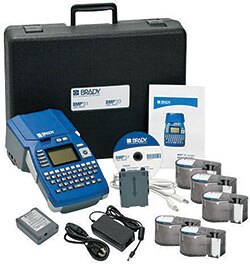
Brady Label Maker

Label Maker

Barcode Scanner

Many label makers can print barcodes. If you've got a lot of cables, a barcode scanner makes it one step easier to figure out what they are.

Barcode Scanner

Barcode Scanner

Wire Marker

If you have a bundle or a snake connecting instruments with multiple channels, wire markers are a great way to go.
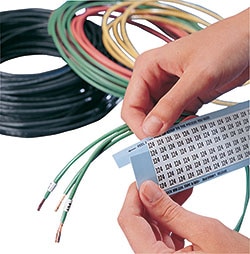
Wire Marker

Wire Markers

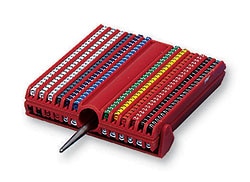
Clip-in Cable Marker

Cable marker

Cable Marker

Heat Shrinkable Wire Marker Sleeves
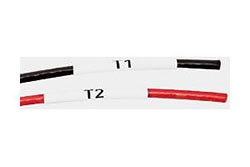
Heat Shrinkable Wire Marker Sleeves

Heat Shrinkable Wire Marker Sleeves

Cable Tie

Cable ties or zip ties are very handy; an inexpensive way to quickly bundle up unruly cables.
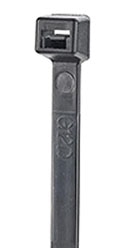
Cable Tie

Cable Tie

Cable Tie Tension Tool

Rather than doing it with your fingers, you can grab a cable tie tension tool. They cut and tighten in one press of the lever.
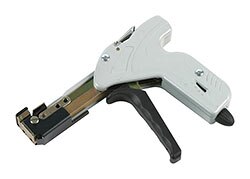
Cable Tie Tension Tool

Cable Tie Gun

Twist Lock Cable Tie

Twist lock cable ties bundle your cables with a convenient twist. They're also reusable, though I guess zip ties are also technically reusable (as long as the new bundle is smaller than the last).
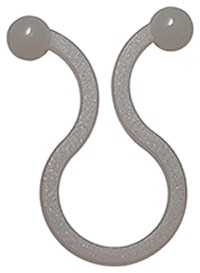
Twist Lock Cable Tie

Twist Lock Cable Tie

Spiral Wrap

Spiral wraps make it easy to make a bundle out of a group of cables. This is something I've previously done using duct tape, which, of course, only sounds like a good idea.
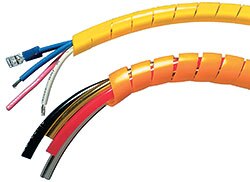
Spiral Wrap

 Spiral Wrap

Cable Reel Holder

Cable reels are easier to store and manage than coils lying on the floor. If you deal with a huge amount of cables, cable reels make organization easier.
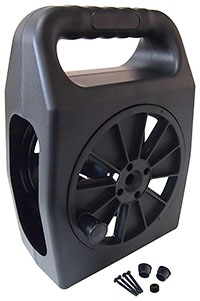
Cable Reel Holder

Cable Reel Holder

Cable Spool Rack

Most engineers and makers have to dig in their drawers to find the right cable spool; make things easy, and put them on a rack!
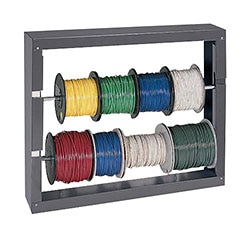
Cable Spool Rack

Cable Spool Rack

Jumper Assortment

Having a box that is divided into sections is much easier than having all your jumpers in the same shoebox (along with loose resistors and capacitors).

Jumper Assortment

Jumper Assortment

Component and Tool Storage

Speaking of resistors and capacitors, another source of of clutter is the large amount of tiny components lying around on every bench. Add surface mount components to that and we've got ourselves a serious problem!

Storage Cabinet

Every engineer or maker absolutely needs one (or twenty) cabinet with several small compartments. This saves untold hours in reading resistors.
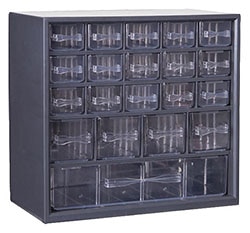
Storage Cabinet

Storage Cabinet

ESD Cabinet

For ESD sensitive components, an antistatic cabinet is required.

ESD Cabinet

ESD Cabinet

ESD Bags

With some of the more sensitive components, it might be worthwhile to have some ESD bags on hand.

ESD Bags

Antistatic Bag

Portable Tool Case

Now onto our tools, because I've stepped on my pliers barefoot for the very last time! You've probably already got a cabinet for your tools, but a portable tool case is very handy for tools that you might need to carry around.
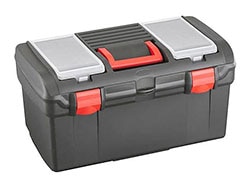
Tool Case

Portable Tool Case

  • clean
  • organize
  • giveaway
  • cabinet
  • wishlist
  • cables
  • workbench
  • Share
  • History
  • More
  • Cancel
  • Sign in to reply

Top Comments

  • wolfgangfriedrich
    wolfgangfriedrich over 4 years ago +2
    Cables don't like to be folded, so coiling them up would be the natural way to store them, but they tend to not stay in that form on their own. Adding one or more "bread bag plastic clip" (I am sure there…
  • dougw
    dougw over 4 years ago +1
    I'm not really proud of my work spaces - less than 6 people in the world have ever seen this one in person, but hundreds of projects have been built here. This is where I solder PCBs and cables. If you…
  • ralphjy
    ralphjy over 4 years ago +1
    Although my work areas and computer desks are normally quite a mess, I do try to organize between projects - although there almost never seems to be any time in between . For components like resistors…
  • kmikemoo
    kmikemoo over 4 years ago

    I guess I'm still focused on organizing the cables.  Someone in the Community mentioned using cable duct to store cables.

    It starts as this - recovered from replaced switchgear.

    image

    Split it down the middle and add some 3M double sided foam tape and...

    image

    The other half is at work doing the same thing - only that one is held on by screws.

    • Cancel
    • Vote Up 0 Vote Down
    • Sign in to reply
    • More
    • Cancel
  • ralphjy
    ralphjy over 4 years ago

    Although my work areas and computer desks are normally quite a mess, I do try to organize between projects - although there almost never seems to be any time in between Smirk.

    For components like resistors and ICs, I use the standard storage cabinets similar to the Duratool cabinet.  I even have a few Akro-Mils cabinets that are 40 years old...

    imageimage

    For project storage, I have a tower of plastic drawers.  I probably should label the drawers, but since the plastic is transparent - there really isn't a need to.

    image

    For projects that I am actively working on- I found some flat plastic bins at CostCo that are the perfect size (14'x14'x3') and have attached lids.  These allow me to quickly switch from one project to another in the same workspace (I tend to work on a few simultaneously).  I just need to get myself some anti-static foam inserts.

    image.

    And for managing test cables and probes, I use fabric tool pouches.

    image

    • Cancel
    • Vote Up +1 Vote Down
    • Sign in to reply
    • More
    • Cancel
  • dougw
    dougw over 4 years ago

    I'm not really proud of my work spaces - less than 6 people in the world have ever seen this one in person, but hundreds of projects have been built here. This is where I solder PCBs and cables. If you look closely behind this mess you can see the bench where I do much of my video work. 

    image

    I will attempt to point out some of what is shown - starting on the right there are some water bottles, test leads, a vise, a couple of soldering stations. a hot air wand a solder sucker and an eraser. Note the wet sponges in the flower pot - it won't melt if the iron touches it. Then we have a stereo microscope, PCB holder. fume extractor and some arm rests. Behind that are a couple of power supplies, then it is over to a couple of solder dispenser and a hook-up wire dispenser. There is a DVM and an oscilloscope and in the foreground some tweezers an knives. There is a container of miscellaneous resistors on a power supply. Beside that is a tray of SMT capacitors and beside that a tray of all sorts of odds and ends. On the left is a highly organized jumble of SMT resistors and another vise. The resistors don't look organized in this view, but I will do a separate blog about that system. There is a flux syringe and a whole mess of other stuff within easy reach at the side, emphasis on mess.

    For some easy bonus points you can explain what the eraser is used for.

    To answer the 3 questions:

    1: What is creative about this setup? I could point out the cute solder and wire dispensers, or the resistor organization, but the thing about this setup that I like the most is the highly productive stereo microscope and PCB holder system. The microscope is mounted to the overhead shelf at an angle so it doesn't interfere with anything on the bench. The PCB holder is very stable and holds the PCB horizontally, so it can be easily slid to any position for viewing a component with the microscope. There is lots of room for hands and soldering irons to access the card and the fume extractor prevents any fumes from drifting up to my face. With this setup, I never have to adjust the microscope, I just slide a PCB in and start working. There is an LED illuminator I built on a custom PCB around the microscope. It seems simple, but having a setup where I can sit with my head at a comfortable position without breathing solder fumes makes a big difference when doing extensive amounts of work, or even small jobs.

    2: The list above by element14 has some really nice ideas in it. It could use a test lead cable rack. I have recently designed and 3D printed some, but they are not in this picture.

    3: bench picture - see the picture above

    • Cancel
    • Vote Up +1 Vote Down
    • Sign in to reply
    • More
    • Cancel
  • mp2100
    mp2100 over 4 years ago

    So many different ways to organize. Power cables, somehow it’s magic, 6 times wrapped around my hand plus a loop thru the middle and it’s tidy. I’ll have to add pictures later

    • Cancel
    • Vote Up 0 Vote Down
    • Sign in to reply
    • More
    • Cancel
  • wolfgangfriedrich
    wolfgangfriedrich over 4 years ago in reply to kmikemoo

    Love it. Funny thing is, I learnt this trick on the weather network channel.

    • Cancel
    • Vote Up 0 Vote Down
    • Sign in to reply
    • More
    • Cancel
  • kmikemoo
    kmikemoo over 4 years ago

    Let's keep this theme going.  wolfgangfriedrich was first.  Someone once mentioned bread tie labels and I ran with it.

    image    image     I did do a little trimming with the nips.

    • Cancel
    • Vote Up 0 Vote Down
    • Sign in to reply
    • More
    • Cancel
  • wolfgangfriedrich
    wolfgangfriedrich over 4 years ago

    Cables don't like to be folded, so coiling them up would be the natural way to store them, but they tend to not stay in that form on their own. Adding one or more "bread bag plastic clip" (I am sure there is a more scientific name for them) keeps them in shape.

    image

    And yes, most cables do have an expiry date, depending on how often they are used, plugged in/out, bent... Confused

    • Cancel
    • Vote Up +2 Vote Down
    • Sign in to reply
    • More
    • Cancel
  • shabaz
    shabaz over 4 years ago in reply to beacon_dave

    I wish the manufacturers could come up with 10:1 shrink ratio, that would be really handy!

    For prototypes I use permanent fine markers a lot, just to indicate power connections against connector pins etc., and try to just write a Word document for each project, with any notes on pin labelling and so on, since I have no convenient way to label wires either. I try to keep 10 or so colours of cable, which helps.

    At work, there can be hundreds of network cables in racks, and for that use-case, in the past we used colours in an unorganized mess, and lots of labels. but later moved to approx 4-5 colours only... two colours for primary and secondary connections, blue cables for configuration type connections (out-of-band), and I think one colour for anything else, and then rely on diagrams and Excel spreadsheets with all the labellings. And discourage disconnecting/moving cables, except at proper patching panels. The label printer was still used, but not very often after that.

    • Cancel
    • Vote Up 0 Vote Down
    • Sign in to reply
    • More
    • Cancel
  • ralphjy
    ralphjy over 4 years ago in reply to dubbie

    And I thought I was chaotic Smile !!!   I don't prefer chaos - it just seems that things get that way when working on multiple projects simultaneously....

    • Cancel
    • Vote Up 0 Vote Down
    • Sign in to reply
    • More
    • Cancel
  • beacon_dave
    beacon_dave over 4 years ago

    Marking cables is often still problematic despite all the methods available, especially if you are using pre-terminated ones as the heat shrink ratio is seldom large enough to slip over the connector and small enough to fit snug onto the cable.

    Stick-on labels tend to either come unstuck or worse still, disintegrate into a sticky flaky mess over time.

    Write-on labels with the clear tape wrap to protect the ink tend to cause the ink to bleed over time making them illegible.

    Tie-on labels/flags can be problematic if you have to pull cables out of a bundle as they tend to snag.

    I recall a long time ago there was a handheld dot matrix type printer being marketed that could print directly onto a variety of surfaces, including cables, but I've never seen one since.

    • Cancel
    • Vote Up 0 Vote Down
    • Sign in to reply
    • More
    • Cancel
<>
element14 Community

element14 is the first online community specifically for engineers. Connect with your peers and get expert answers to your questions.

  • Members
  • Learn
  • Technologies
  • Challenges & Projects
  • Products
  • Store
  • About Us
  • Feedback & Support
  • FAQs
  • Terms of Use
  • Privacy Policy
  • Legal and Copyright Notices
  • Sitemap
  • Cookies

An Avnet Company © 2026 Premier Farnell Limited. All Rights Reserved.

Premier Farnell Ltd, registered in England and Wales (no 00876412), registered office: Farnell House, Forge Lane, Leeds LS12 2NE.

ICP 备案号 10220084.

Follow element14

  • X
  • Facebook
  • linkedin
  • YouTube