element14 Community
element14 Community
    Register Log In
  • Site
  • Search
  • Log In Register
  • Community Hub
    Community Hub
    • What's New on element14
    • Feedback and Support
    • Benefits of Membership
    • Personal Blogs
    • Members Area
    • Achievement Levels
  • Learn
    Learn
    • Ask an Expert
    • eBooks
    • element14 presents
    • Learning Center
    • Tech Spotlight
    • STEM Academy
    • Webinars, Training and Events
    • Learning Groups
  • Technologies
    Technologies
    • 3D Printing
    • FPGA
    • Industrial Automation
    • Internet of Things
    • Power & Energy
    • Sensors
    • Technology Groups
  • Challenges & Projects
    Challenges & Projects
    • Design Challenges
    • element14 presents Projects
    • Project14
    • Arduino Projects
    • Raspberry Pi Projects
    • Project Groups
  • Products
    Products
    • Arduino
    • Avnet & Tria Boards Community
    • Dev Tools
    • Manufacturers
    • Multicomp Pro
    • Product Groups
    • Raspberry Pi
    • RoadTests & Reviews
  • About Us
  • Store
    Store
    • Visit Your Store
    • Choose another store...
      • Europe
      •  Austria (German)
      •  Belgium (Dutch, French)
      •  Bulgaria (Bulgarian)
      •  Czech Republic (Czech)
      •  Denmark (Danish)
      •  Estonia (Estonian)
      •  Finland (Finnish)
      •  France (French)
      •  Germany (German)
      •  Hungary (Hungarian)
      •  Ireland
      •  Israel
      •  Italy (Italian)
      •  Latvia (Latvian)
      •  
      •  Lithuania (Lithuanian)
      •  Netherlands (Dutch)
      •  Norway (Norwegian)
      •  Poland (Polish)
      •  Portugal (Portuguese)
      •  Romania (Romanian)
      •  Russia (Russian)
      •  Slovakia (Slovak)
      •  Slovenia (Slovenian)
      •  Spain (Spanish)
      •  Sweden (Swedish)
      •  Switzerland(German, French)
      •  Turkey (Turkish)
      •  United Kingdom
      • Asia Pacific
      •  Australia
      •  China
      •  Hong Kong
      •  India
      • Japan
      •  Korea (Korean)
      •  Malaysia
      •  New Zealand
      •  Philippines
      •  Singapore
      •  Taiwan
      •  Thailand (Thai)
      • Vietnam
      • Americas
      •  Brazil (Portuguese)
      •  Canada
      •  Mexico (Spanish)
      •  United States
      Can't find the country/region you're looking for? Visit our export site or find a local distributor.
  • Translate
  • Profile
  • Settings
1 Meter of Pi
  • Challenges & Projects
  • Design Challenges
  • 1 Meter of Pi
  • More
  • Cancel
1 Meter of Pi
Blog Blog-1- Interfacing Enviro-HaT with RaspberryPi
  • Blog
  • Forum
  • Documents
  • Polls
  • Files
  • Events
  • Mentions
  • Sub-Groups
  • Tags
  • More
  • Cancel
  • New
  • Share
  • More
  • Cancel
Group Actions
  • Group RSS
  • More
  • Cancel
Engagement
  • Author Author: embeddedguy
  • Date Created: 14 Nov 2020 6:12 AM Date Created
  • Views 783 views
  • Likes 4 likes
  • Comments 1 comment
  • pimoroni
  • weather
Related
Recommended

Blog-1- Interfacing Enviro-HaT with RaspberryPi

embeddedguy
embeddedguy
14 Nov 2020

I received the Kit for 1m Pi challenge. The Kit has in-total 4 things

  • RaspberryPi 4B- 2GB version
  • Pimoroni Automation-HaT
  • Pimoroni Enviro-HaT
  • Pimoroni Pico-HaT hacker


image

The first part for me was to get familiar with Enviro HaT. It contains sensors such as BME280 to measure Temperature, Pressure, and Humidity. There are also other sensors for light density and proximity measurement also there is a sensor for noise measurement. The following url will take you to the official page of the product and the git repo which contains a Python-based library and examples to access the sensor values.


https://shop.pimoroni.com/products/enviro?variant=31155658489939

https://github.com/pimoroni/enviroplus-python


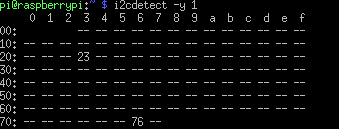
The first step is to plug the HaT into the RaspberryPi 40-pin headers. After that power up the RaspberryPi with a power source. The sensors on the HaT are I2C interfaced. The following line of code will give you the address of the I2C bus where the sensors are connected.


i2cdetect -y 1
image

Once, it is connected the next step is to install the required software.

  • git clone https://github.com/pimoroni/enviroplus-python
  • cd enviroplus-python
  • sudo ./install.sh

image

The next step is to try some example projects in the /example directory

cd envoplus-python/examples

python3 weather-and-light.py

The above cmd commands will run an example to show Temperature, Humidity, Pressure, and Light density on the small colored LCD screen. It will also show you the current date and time. There are many examples. One is for plotting the noise profile on the LCD screen.

image

  • Sign in to reply

Top Comments

  • skruglewicz
    skruglewicz over 5 years ago +1
    Nice work
  • skruglewicz
    skruglewicz over 5 years ago

    Nice work

    • Cancel
    • Vote Up +1 Vote Down
    • Sign in to reply
    • More
    • Cancel
element14 Community

element14 is the first online community specifically for engineers. Connect with your peers and get expert answers to your questions.

  • Members
  • Learn
  • Technologies
  • Challenges & Projects
  • Products
  • Store
  • About Us
  • Feedback & Support
  • FAQs
  • Terms of Use
  • Privacy Policy
  • Legal and Copyright Notices
  • Sitemap
  • Cookies

An Avnet Company © 2025 Premier Farnell Limited. All Rights Reserved.

Premier Farnell Ltd, registered in England and Wales (no 00876412), registered office: Farnell House, Forge Lane, Leeds LS12 2NE.

ICP 备案号 10220084.

Follow element14

  • X
  • Facebook
  • linkedin
  • YouTube