


I received the Kit for 1m Pi challenge. The Kit has in-total 4 things
- RaspberryPi 4B- 2GB version
- Pimoroni Automation-HaT
- Pimoroni Enviro-HaT
- Pimoroni Pico-HaT hacker

The first part for me was to get familiar with Enviro HaT. It contains sensors such as BME280 to measure Temperature, Pressure, and Humidity. There are also other sensors for light density and proximity measurement also there is a sensor for noise measurement. The following url will take you to the official page of the product and the git repo which contains a Python-based library and examples to access the sensor values.
https://shop.pimoroni.com/products/enviro?variant=31155658489939
https://github.com/pimoroni/enviroplus-python
The first step is to plug the HaT into the RaspberryPi 40-pin headers. After that power up the RaspberryPi with a power source. The sensors on the HaT are I2C interfaced. The following line of code will give you the address of the I2C bus where the sensors are connected.
i2cdetect -y 1
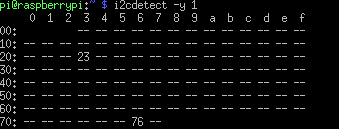
Once, it is connected the next step is to install the required software.
cd enviroplus-pythonsudo ./install.sh

The next step is to try some example projects in the /example directory
cd envoplus-python/examples
python3 weather-and-light.py
The above cmd commands will run an example to show Temperature, Humidity, Pressure, and Light density on the small colored LCD screen. It will also show you the current date and time. There are many examples. One is for plotting the noise profile on the LCD screen.

Top Comments
-

skruglewicz
-
Cancel
-
Vote Up
+1
Vote Down
-
-
Sign in to reply
-
More
-
Cancel
Comment-

skruglewicz
-
Cancel
-
Vote Up
+1
Vote Down
-
-
Sign in to reply
-
More
-
Cancel
Children