


I have worked with the examples provided with ModusToolbox and everything works perfectly. I immediately have seen the use of
cy_retarget_io.h
that is used also for targeting the standard IO "printf" function to the serial port. So, as my "best wishes" for you all with the "At the Core Design Challenge", I have written a handful header file that contains the ANSI Escape sequences to use with the serial port and a serial terminal like Tera Term.
I am sharing this file with you.
/**
  ******************************************************************************
  * At The Core Design Challenge, 2023
  *
  ******************************************************************************
  * File Name          : ansi_escape.h
  * Description        : This file of definitions
  * Created on         : Feb 28, 2023
  * Author             : Francesco De Simone, Digimorf
  ******************************************************************************
*/

#ifndef ANSI_ESCAPE_H_
#define ANSI_ESCAPE_H_

#ifdef __cplusplus
 extern "C" {
#endif

// /////////////////////////////////////////////////////////////////////////////
// Definitions.
// /////////////////////////////////////////////////////////////////////////////

 // ASCII CHARACTERS
 #define ASCII_NULL          0x00 // Null Character
 #define ASCII_BS            0x08 // Backspace
 #define ASCII_TAB           0x09 // Tab
 #define ASCII_LF            0x0A // Line Feed
 #define ASCII_CR            0x0D // Carriage Return
 #define ASCII_ESC           0x1B // Escape
 #define ASCII_SPACE         0x20 // Space
 #define ASCII_A             ('A')
 #define ASCII_L             ('L')
 #define ASCII_Z             ('Z')
 #define ASCII_a             ('a')
 #define ASCII_z             ('z')
 #define ASCII_0             ('0')
 #define ASCII_9             ('9')
 #define ASCII_Q             ('Q')
 #define ASCII_AT            ('@')
 #define ASCII_SLASH         ('/')
 #define ASCII_COLON         (':')
 #define ASCII_DASH          ('-')
 #define ASCII_HASH          ('#')
 #define ASCII_DELETE        0x7F // Tab

 #define CURSOR_NEWLINE      "\r\n"

 // VT100 ESCAPE SEQUENCES //////////////////////////////////////////////////////
 // Device Status
 // -------------
 // The following codes are used for reporting terminal/display settings, and vary depending on the implementation:
 // Requests a Report Device Code response from the device.
 #define QUERY_DEVICE_CODE                "\x1b[c"
 // Generated by the device in response to Query Device Code request.
 #define REPORT_DEVICE_CODE               "\x1b[{code}0c"
 // Requests a Report Device Status response from the device.
 #define QUERY_DEVICE_STATUS              "\x1b[5n"
 // Generated by the device in response to a Query Device Status request; indicates that device is functioning correctly.
 #define REPORT_DEVICE_OK                 "\x1b[0n"
 // Generated by the device in response to a Query Device Status request; indicates that device is functioning improperly.
 #define REPORT_DEVICE_FAILURE            "\x1b[3n"
 // Requests a Report Cursor Position response from the device.
 #define QUERY_CURSOR_POSITION            "\x1b[6n"
 // Generated by the device in response to a Query Cursor Position request; reports current cursor position.
 #define REPORT_CURSOR_POSITION           "\x1b[%d;%dR"

 // Terminal Setup
 // --------------
 // The h and l codes are used for setting terminal/display mode, and vary depending on the implementation. Line Wrap is one of the few setup codes that tend to be used consistently:
 // Reset all terminal settings to default.
 #define RESET_DEVICE                     "\x1b\x63"
 // Text wraps to next line if longer than the length of the display area.
 #define ENABLE_LINE_WRAP                 "\x1b[7h"
 // Disables line wrapping.
 #define DISABLE_LINE_WRAP                "\x1b[7l"

 // Fonts
 // -----
 // Some terminals support multiple fonts: normal/bold, swiss/italic, etc. There are a variety of special codes for certain terminals; the following are fairly standard:
 // Set default font.
 #define FONT_SET_G0                      "\x1b("
 // Set alternate font.
 #define FONT_SET_G1                      "\x1b)"
 // Gfx mode on.
 #define FONT_GFX_ON                      "\x1b(0" // DEC special graphics table as G0
 // Gfx mode off.
 #define FONT_GFX_OFF                     "\x1b(B" // ASCII table as G0

 // Cursor Control
 // --------------
 // Sets the cursor position where subsequent text will begin.
 // If no row/column parameters are provided (ie. "\x1b[H), the cursor will move
 // to the home position, at the upper left of the screen.
 #define CURSOR_HOME                      "\x1b[\x48"
 #define CURSOR_SET                       "\x1b[%d;%d\x48"
 // Moves the cursor up by COUNT rows; the default count is 1.
 #define CURSOR_UP                        "\x1b[%dA"
 // Moves the cursor down by COUNT rows; the default count is 1.
 #define CURSOR_DOWN                      "\x1b[%dB"
 //Moves the cursor forward by COUNT columns; the default count is 1.
 #define CURSOR_FORWARD                   "\x1b[%dC"
 // Moves the cursor backward by COUNT columns; the default count is 1.
 #define CURSOR_BACKWARD                  "\x1b[%luD"
 // Identical to Cursor Home.
 #define FORCE_CURSOR_POSITION            "\x1b[%d;%d\x66"
 // Save current cursor position.
 #define SAVE_CURSOR                      "\x1b[s"
 // Restores cursor position after a Save Cursor.
 #define UNSAVE_CURSOR                    "\x1b[u"
 // Save current cursor position.
 #define SAVE_CURSOR_AND_ATTRS            "\x1b\x37"
 // Restores cursor position after a Save Cursor.
 #define RESTORE_CURSOR_AND_ATTRS         "\x1b\x38"
 // Hide the cursor.
 #define CURSOR_OFF                       "\x1b[?25l"
 // Show the cursor.
 #define CURSOR_ON                        "\x1b[?25h"

 // Scrolling
 // ---------
 // Enable scrolling for entire display.
 #define SCROLL_SCREEN                    "\x1b[r"
 // Enable scrolling from row {start} to row {end}.
 #define SCROLL_SCREEN_AREA               "\x1b[%d;%d\x72"
 // Scroll display down one line.
 #define SCROLL_DOWN                      "\x1bD"
 // Scroll display up one line.
 #define SCROLL_UP                        "\x1bM"

 // Tab Control
 // -----------
 // Sets a tab at the current position.
 #define SET_TAB                          "\x1b\x48"
 //Clears tab at the current position.
 #define CLEAR_TAB                        "\x1b[g"
 // Clears all tabs.
 #define CLEAR_ALL_TABS                   "\x1b[3g"

 // Erasing Text
 // ------------
 // Erases from the current cursor position to the end of the current line.
 #define ERASE_END_OF_LINE                "\x1b[K"
 // Erases from the current cursor position to the start of the current line.
 #define ERASE_START_OF_LINE              "\x1b[1K"
 // Erases the entire current line.
 #define ERASE_LINE                       "\x1b[2K"
 // Erases the screen from the current line down to the bottom of the screen.
 #define ERASE_DOWN                       "\x1b[J"
 // Erases the screen from the current line up to the top of the screen.
 #define ERASE_UP                         "\x1b[1J"
 // Erases the screen with the background colour and moves the cursor to home.
 #define ERASE_SCREEN                     "\x1b[2J"

 // Printing
 // --------
 // Some terminals support local printing:
 // Print the current screen.
 #define PRINT_SCREEN                     "\x1b[i"
 // Print the current line.
 #define PRINT_LINE                       "\x1b[1i"
 // Disable log.
 #define STOP_PRINT_LOG                   "\x1b[4i"
 // Start log; all received text is echoed to a printer.
 #define START_PRINT_LOG                  "\x1b[5i"

 //Define Key
 //----------
 // Associates a string of text to a keyboard key. {key} indicates the key by its ASCII value in decimal.
 #define SET_KEY_DEFINITION               "\x1b[%d;\"%s\"p"

 // Set Display Attributes
 // ----------------------
 // Set Attribute Mode   "\x1b[{attr1};...;{attrn}m
 // Sets multiple display attribute settings. The following lists standard attributes:
 #define ATTR_RESET_ALL_ATTRIBUTES          0
 #define ATTR_BRIGHT                        1
 #define ATTR_DIM                           2
 #define ATTR_UNDERSCORE                    4
 #define ATTR_BLINK                         5
 #define ATTR_HIDDEN                        8
 #define ATTR_REVERSE                       7
 // Foreground Colors.
 #define ATTR_COLOR_FG_Red                 31
 #define ATTR_COLOR_FG_Green               32
 #define ATTR_COLOR_FG_Black               30
 #define ATTR_COLOR_FG_Yellow              33
 #define ATTR_COLOR_FG_Blue                34
 #define ATTR_COLOR_FG_Magenta             35
 #define ATTR_COLOR_FG_Cyan                36
 #define ATTR_COLOR_FG_White               37
 // Background Colors.
 #define ATTR_COLOR_BG_Black               40
 #define ATTR_COLOR_BG_Red                 41
 #define ATTR_COLOR_BG_Green               42
 #define ATTR_COLOR_BG_Yellow
 #define ATTR_COLOR_BG_Blue                44
 #define ATTR_COLOR_BG_Magenta             45
 #define ATTR_COLOR_BG_Cyan                46
 #define ATTR_COLOR_BG_White               47

 // 256 indexed colors.
 // https://robotmoon.com/256-colors/
 #define ATTR_COLOR_256_BG                 "\x1B[48;5;%d\x6d"
 #define ATTR_COLOR_256_FG                 "\x1B[38;5;%d\x6d"
 #define ANSI_COLOR_256_FGBG               "\x1B[38;5;%d\x6d\x1B[48;5;%d\x6d"
 #define ANSI_PIXEL_256_FGBG               ANSI_COLOR_256_FGBG

 // RGB colors.
 #define ATTR_COLOR_RGB_BG                 "\x1B[48;2;%d;%d;%x6d"
 #define ATTR_COLOR_RGB_FG                 "\x1B[38;2;%d;%d;%x6d"

// /////////////////////////////////////////////////////////////////////////////
// Functions.
// /////////////////////////////////////////////////////////////////////////////

// /////////////////////////////////////////////////////////////////////////////
#ifdef __cplusplus
}
#endif

#endif // ANSI_ESCAPE_H_
Its use is very simple and as an example, you can include it in your "Hello world" code like the following:
    #include "ansi_escape.h"

    ...


    printf(ANSI_COLOR_256_FGBG, 195, 17);
    printf(ERASE_SCREEN CURSOR_HOME);
    printf(ANSI_COLOR_256_FGBG, 195, 19);
    printf(" ************************* " CURSOR_NEWLINE
           " HAL: Hello World! Example " CURSOR_NEWLINE
           " ************************* " CURSOR_NEWLINE CURSOR_NEWLINE);
    printf(ANSI_COLOR_256_FGBG, 15, 17);
    printf("Hello World!!!" CURSOR_NEWLINE CURSOR_NEWLINE);

    printf(ANSI_COLOR_256_FGBG, 7, 17);
    printf("For more projects, "
           "visit our code examples repositories:" CURSOR_NEWLINE CURSOR_NEWLINE);
    printf(ANSI_COLOR_256_FGBG, 208, 17);
    printf("https://github.com/Infineon/"
           "Code-Examples-for-ModusToolbox-Software" CURSOR_NEWLINE CURSOR_NEWLINE);

    /* Initialize timer to toggle the LED */
    timer_init();

    printf(ANSI_COLOR_256_FGBG, 7, 17);
    printf("Press ");
    printf(ATTR_COLOR_256_FG, 50);
    printf("'Enter'");
    printf(ATTR_COLOR_256_FG, 7);
    printf(" key to pause or "
           "resume blinking the user LED"  CURSOR_NEWLINE CURSOR_NEWLINE);
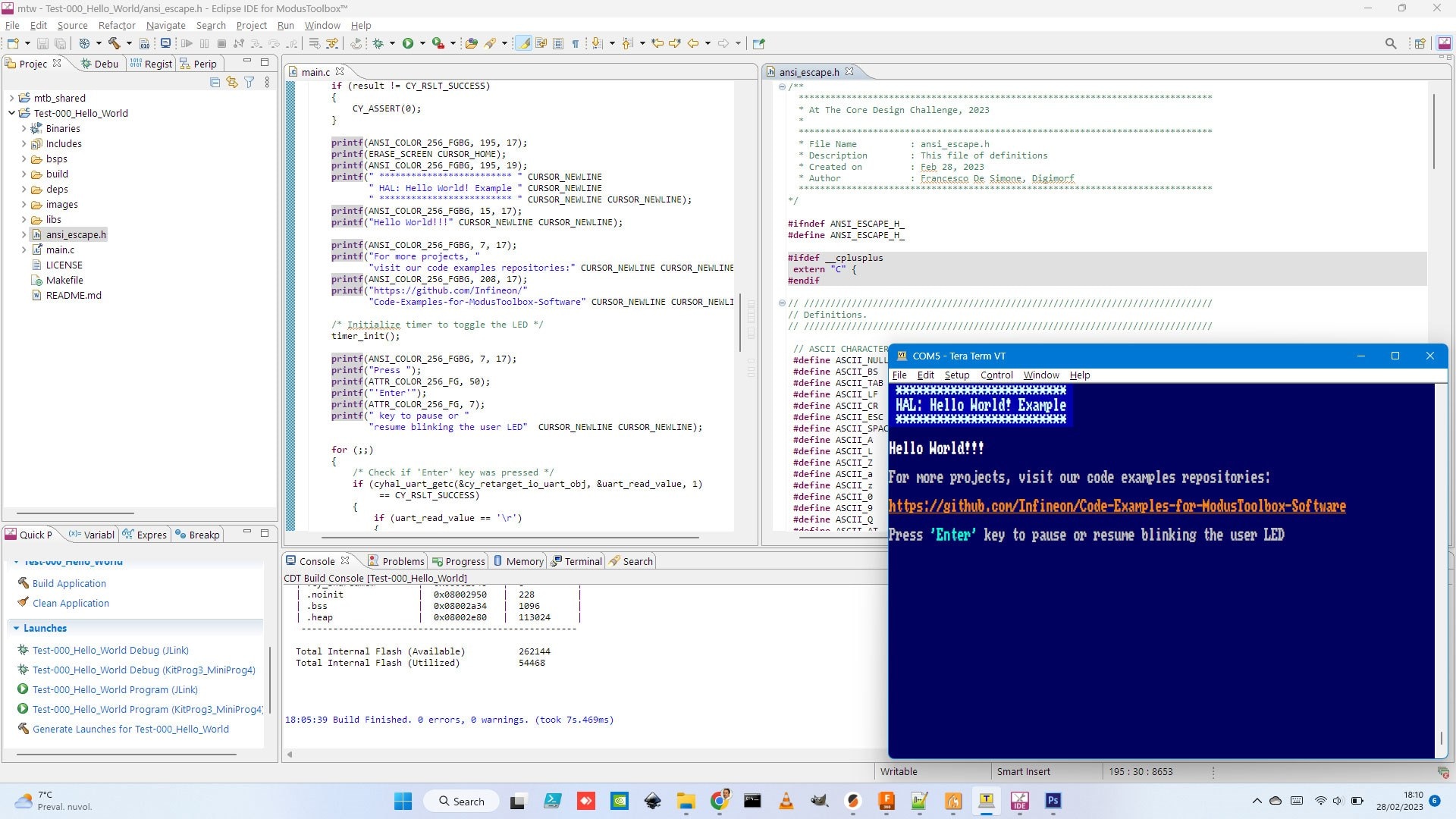
Keep up the good work!
Francesco.
Top Comments