element14 Community
element14 Community
    Register Log In
  • Site
  • Search
  • Log In Register
  • Community Hub
    Community Hub
    • What's New on element14
    • Feedback and Support
    • Benefits of Membership
    • Personal Blogs
    • Members Area
    • Achievement Levels
  • Learn
    Learn
    • Ask an Expert
    • eBooks
    • element14 presents
    • Learning Center
    • Tech Spotlight
    • STEM Academy
    • Webinars, Training and Events
    • Learning Groups
  • Technologies
    Technologies
    • 3D Printing
    • FPGA
    • Industrial Automation
    • Internet of Things
    • Power & Energy
    • Sensors
    • Technology Groups
  • Challenges & Projects
    Challenges & Projects
    • Design Challenges
    • element14 presents Projects
    • Project14
    • Arduino Projects
    • Raspberry Pi Projects
    • Project Groups
  • Products
    Products
    • Arduino
    • Avnet & Tria Boards Community
    • Dev Tools
    • Manufacturers
    • Multicomp Pro
    • Product Groups
    • Raspberry Pi
    • RoadTests & Reviews
  • About Us
  • Store
    Store
    • Visit Your Store
    • Choose another store...
      • Europe
      •  Austria (German)
      •  Belgium (Dutch, French)
      •  Bulgaria (Bulgarian)
      •  Czech Republic (Czech)
      •  Denmark (Danish)
      •  Estonia (Estonian)
      •  Finland (Finnish)
      •  France (French)
      •  Germany (German)
      •  Hungary (Hungarian)
      •  Ireland
      •  Israel
      •  Italy (Italian)
      •  Latvia (Latvian)
      •  
      •  Lithuania (Lithuanian)
      •  Netherlands (Dutch)
      •  Norway (Norwegian)
      •  Poland (Polish)
      •  Portugal (Portuguese)
      •  Romania (Romanian)
      •  Russia (Russian)
      •  Slovakia (Slovak)
      •  Slovenia (Slovenian)
      •  Spain (Spanish)
      •  Sweden (Swedish)
      •  Switzerland(German, French)
      •  Turkey (Turkish)
      •  United Kingdom
      • Asia Pacific
      •  Australia
      •  China
      •  Hong Kong
      •  India
      •  Korea (Korean)
      •  Malaysia
      •  New Zealand
      •  Philippines
      •  Singapore
      •  Taiwan
      •  Thailand (Thai)
      • Americas
      •  Brazil (Portuguese)
      •  Canada
      •  Mexico (Spanish)
      •  United States
      Can't find the country/region you're looking for? Visit our export site or find a local distributor.
  • Translate
  • Profile
  • Settings
At The Core Design Challenge
  • Challenges & Projects
  • Design Challenges
  • At The Core Design Challenge
  • More
  • Cancel
At The Core Design Challenge
Blog ATCDC: Digimorf, Day 30, The project SEGA SG-1000 Emulator on PSoC62S4 Pioneer kit - part 7
  • Blog
  • Forum
  • Documents
  • Leaderboard
  • Polls
  • Files
  • Members
  • Mentions
  • Sub-Groups
  • Tags
  • More
  • Cancel
  • New
Join At The Core Design Challenge to participate - click to join for free!
  • Share
  • More
  • Cancel
Group Actions
  • Group RSS
  • More
  • Cancel
Engagement
  • Author Author: Digimorf
  • Date Created: 29 Mar 2023 9:21 PM Date Created
  • Views 534 views
  • Likes 7 likes
  • Comments 3 comments
  • modustoolbox
Related
Recommended

ATCDC: Digimorf, Day 30, The project SEGA SG-1000 Emulator on PSoC62S4 Pioneer kit - part 7

Digimorf
Digimorf
29 Mar 2023
ATCDC: Digimorf, Day 30, The project SEGA SG-1000 Emulator on PSoC62S4 Pioneer kit - part 7

WOW, almost one month passed since this challenge started and I must say that I like this PSoC62. But, like any other new adventure, there are many new things to learn, and the road to the "FINISH" line fills up with traffic lights. 

Now, it's about time to tidy up a bit the source code. Both cores need to access some common structures since I reserved a portion of SRAM as shared. The need is to create a common include folder for all those functions, macros, and definitions used by both cores.

As soon as the dual-core project is created the properties of the project and the make files are generated by the project creator, and in the project properties/build options, I see that the make file is not auto-generated. That makes sense, but what if I want to include my own external library? Usually, in Eclipse I have to add the folders/files to be included in the project within the "Tool settings":
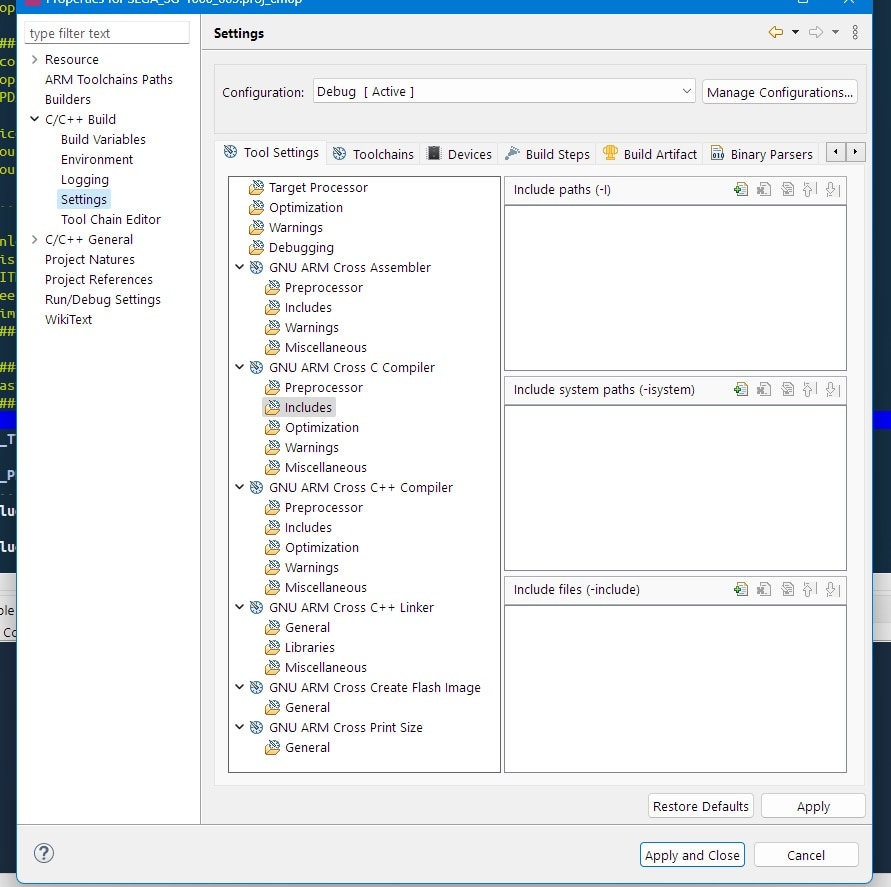
image

But this tab only appears when the make file is auto-generated. OK, but if I enable the auto-generation the make files generated by the project creator are overwritten, and the compilation fails.

That said, I have to add includes and sources inside the make files, one by one, and add more when I write new ones inside my library. My question is if there is a smart way to include a folder with includes and sources in a dual-core project.

So now, I am stuck with creating my own library and adding it to my project somehow. Plan "B" is to replicate the same library in both projects, but of course, it's not elegant, moreover every time I modify something in the source code I have to update it in both projects.

I have the feeling that actually Eclipse is not really supported as it should be (like the problem of the cm0+ interrupts multiplexing in a dual-core project). Maybe is this a transition time from PSoC creator and Modustoolbox? I Don't know, but I think that the library manager should include an option for including a personal library in the mtb-shared project, and make it available for both cores.        

Anyway, there's always a way out.

  • Sign in to reply

Top Comments

  • ClarkJarvis-Infineon
    ClarkJarvis-Infineon over 2 years ago +1
    Digimorf, Regarding the additional include folders and shared folders across applications. ModusToolbox is designed to work with various IDEs or using just the command-line. To ensure as much consistency…
  • ljking
    ljking over 2 years ago +1
    Hi Digimorf I have been using Make and makefiles for a very long time. As you mentioned you have to add includes and sources inside the makefile. However here is an automated way to do this: the compiler…
  • Digimorf
    Digimorf over 2 years ago

    ClarkJarvis-Infineon and jking,

    thank you for the precious help. I am sure this will be useful to all challengers!

    • Cancel
    • Vote Up 0 Vote Down
    • Sign in to reply
    • More
    • Cancel
  • ljking
    ljking over 2 years ago

    Hi Digimorf 

    I have been using Make and makefiles for a very long time. As you mentioned you have to add includes and sources inside the makefile. However here is an automated way to do this: the compiler will spit out the dependencies and you can then include these in your makefile, hence (once this is set up) you don't have to manually add dependencies every time you add a new .h file. Take a look here: https://www.gnu.org/software/make/manual/html_node/Automatic-Prerequisites.html 

    Hope this helps.

    • Cancel
    • Vote Up +1 Vote Down
    • Sign in to reply
    • More
    • Cancel
  • ClarkJarvis-Infineon
    ClarkJarvis-Infineon over 2 years ago

    Digimorf,

    Regarding the additional include folders and shared folders across applications.

    ModusToolbox is designed to work with various IDEs or using just the command-line.  To ensure as much consistency and compatibility across these different development flows, ModusToolbox uses make files to inplement the build system.  It does not leverage (or sync with) the Eclipse IDE project settings panel.

    The Makefile that is included in your respective project folders is the location to specify additional source and/or include directories.

    You can refer specifically to section 4.6 and the table in section 4.9.2 of the ModusToolbox User Guide for specifics.

    A typically use case is for header files to be shared and source files to be unique to a particular core.  Are you needing to share source files as well?

    The Makefile SOURCE variable is setup to include individual source files, while the INCLUDES variable will accept folders.

    image

    image

    • Cancel
    • Vote Up +1 Vote Down
    • Sign in to reply
    • More
    • Cancel
element14 Community

element14 is the first online community specifically for engineers. Connect with your peers and get expert answers to your questions.

  • Members
  • Learn
  • Technologies
  • Challenges & Projects
  • Products
  • Store
  • About Us
  • Feedback & Support
  • FAQs
  • Terms of Use
  • Privacy Policy
  • Legal and Copyright Notices
  • Sitemap
  • Cookies

An Avnet Company © 2025 Premier Farnell Limited. All Rights Reserved.

Premier Farnell Ltd, registered in England and Wales (no 00876412), registered office: Farnell House, Forge Lane, Leeds LS12 2NE.

ICP 备案号 10220084.

Follow element14

  • X
  • Facebook
  • linkedin
  • YouTube