


Arduino Nano 33 IoT is advanced Arduino dev kit designed for IoT implementation. It has a network module such as WiFi and BLE, allowing us to send the data to Arduino cloud over MQTT and HTTP by using internet connectivity. This project is to aim to how we could integrate LSM6DS3 (accelerometer and gyroscope) module sensor embedded on Arduino nano 33 IoT, so this dev kit is very easy to do an experiment. We will implement it to connect with the cloud. so then data sent to cloud, accelerometer, and gyroscope data will be visualized on the thingsboard dashboard https://thingsboard.io.
We will do deployment this project which nano 33 IoT is used to collect accelerometer data (x, y, z) by LSM6DS3 IMU sensor module embedded on dev kit. MQTT is the standard messaging protocol for Internet of Things (IoT). It is designed as an extremely lightweight publish/subscribe messaging transport that is ideal for connecting remote devices with a small code footprint and minimal network bandwidth. MQTT today is used in a wide variety of industries, such as automotive, manufacturing, telecommunications, oil and gas, etc. https://mqtt.org/
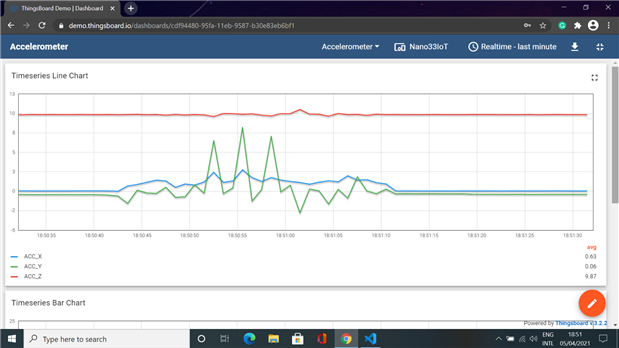

This project is aimed to use MQTT protocol IoT with an Arduino Nano 33 IoT. It was made by programming with Arduino IDE, PubSubClient and WiFiNINA library. We can send the data to the ThingsBoard cloud in real-time. The data can be visualized in ThingsBoard.
A network sensor system consisting of an Arduino Nano 33 IoT module as internet connectivity and used to collect accelerometer and gyroscope data. Data transmission used in a communication protocol is Message Queuing Telemetry Transport (MQTT) using PubSubClient library in which sensors are connected to the ThingsBoard cloud.
#include <Arduino.h>
#include <SPI.h>
#include <Wire.h>
#include <Arduino_LSM6DS3.h>
#include <ArduinoJson.h>
#include <PubSubClient.h>
#include <WiFiNINA.h>
#define CONVERT_G_TO_MS2 9.80665f
#define FREQUENCY_HZ 104
#define INTERVAL_MS (1000 / (FREQUENCY_HZ + 1))
struct Acc_senseData{
float acc_x = 0.0F;
float acc_y = 0.0F;
float acc_z = 0.0F;
};
struct Gyr_senseData
{
float gyr_x = 0.0F;
float gyr_y = 0.0F;
float gyr_z = 0.0F;
};
void setup_wifi();
void reconnect();
static char payload[256];
static Acc_senseData acc_data;
static Gyr_senseData gyr_data;
StaticJsonDocument<256> doc;
#define TOKEN ""
#define DEVICEID ""
const char* ssid = "";
const char* password = "";
const char mqtt_server[] = "demo.thingsboard.io";
const char publishTopic[] = "v1/devices/me/telemetry";
WiFiClient wifiClient;
PubSubClient mqtt(wifiClient);
void setup_wifi(){
delay(10);
Serial.println();
Serial.print("Connecting to ");
Serial.println(ssid);
WiFi.begin(ssid, password);
while( WiFi.status() != WL_CONNECTED){
delay(500);
Serial.print(".");
}
randomSeed(micros());
Serial.println("");
Serial.println("WiFi connected");
Serial.println("IP address: ");
Serial.println(WiFi.localIP());
}
void reconnect(){
while(!mqtt.connected()){
//Serial.print("Attempting MQTT connection ....");
//String clientID = "nano33_accelerometer-";
//clientID += String(random(0xffff), HEX);
if (mqtt.connect(DEVICEID, TOKEN, NULL)) {
Serial.println("Connected to MQTT Broker");
digitalWrite(LED_BUILTIN, HIGH);
}
else
{
Serial.print("failed, rc=");
Serial.print(mqtt.state());
Serial.println("try again in 5 second");
digitalWrite(LED_BUILTIN, LOW);
delay(5000);
}
}
}
void setup() {
pinMode(LED_BUILTIN, OUTPUT);
Serial.begin(9600);
while (!Serial);
if (!IMU.begin())
{
Serial.println("Failed to initialize IMU!");
while(1);
}
setup_wifi();
mqtt.setServer(mqtt_server, 1883);
}
void loop() {
if (!mqtt.connected())
{
reconnect();
}
mqtt.loop();
static unsigned long last_interval_ms = 0;
float a_x, a_y, a_z;
float g_x, g_y, g_z;
if (millis() > last_interval_ms + INTERVAL_MS)
{
last_interval_ms = millis();
IMU.readAcceleration(a_x, a_y, a_z);
acc_data.acc_x = a_x;
acc_data.acc_y = a_y;
acc_data.acc_z = a_z;
IMU.readGyroscope(g_x, g_y, g_z);
gyr_data.gyr_x = g_x;
gyr_data.gyr_y = g_y;
gyr_data.gyr_z = g_z;
doc["ACC_X"] = acc_data.acc_x * CONVERT_G_TO_MS2;
doc["ACC_Y"] = acc_data.acc_y * CONVERT_G_TO_MS2;
doc["ACC_Z"] = acc_data.acc_z * CONVERT_G_TO_MS2;
doc["GYR_X"] = gyr_data.gyr_x;
doc["GYR_Y"] = gyr_data.gyr_y;
doc["GYR_Z"] = gyr_data.gyr_z;
serializeJsonPretty(doc, payload);
mqtt.publish(publishTopic, payload);
Serial.println(payload);
}
}