


Edge impulse is a powerful tool with which we can make edge ai as easy as possible. It helps anyone without prior experience in software
and machine learning to create a tinyML model and deploy them right away. tinyML is revolutionizing the edge AI industry.
There are a number of development boards supported on the edge impulse but unfortunately, Arduino nano 33 IoT is not supported yet.
So we will be using the data forwarder method to record the data and train the model. The installation of the CLI tool is straightforward.
Here's the example code for sending the IMU data over the serial port and I have also attached a screenshot of the serial plotter for your reference.
#include <Arduino_LSM6DS3.h>


#define CONVERT_G_TO_MS2    9.80665f
#define FREQUENCY_HZ        50
#define INTERVAL_MS         (1000 / (FREQUENCY_HZ + 1))


void setup() {
    Serial.begin(115200);
    Serial.println("Started");


    if (!IMU.begin()) {
        Serial.println("Failed to initialize IMU!");
        while (1);
    }
}


void loop() {
    static unsigned long last_interval_ms = 0;
    float x, y, z;


    if (millis() > last_interval_ms + INTERVAL_MS) {
        last_interval_ms = millis();


        IMU.readAcceleration(x, y, z);


        Serial.print(x * CONVERT_G_TO_MS2);
        Serial.print('\t');
        Serial.print(y * CONVERT_G_TO_MS2);
        Serial.print('\t');
        Serial.println(z * CONVERT_G_TO_MS2);
    }
}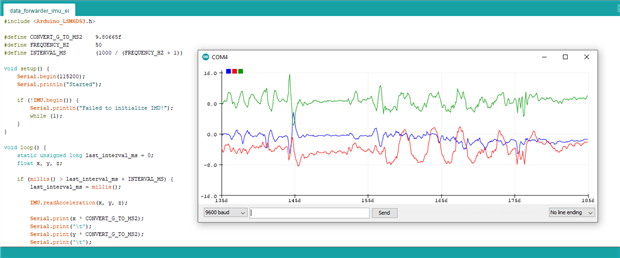
Arduino Nano's IMU data shown on the serial plotter