


Project Introduction
The overall goal of this project is to build an always on monitoring and dashcam system for a car.
The primary functionality is to stream the camera feed in real-time to a remote server, even when the car is parked. This immediately resolves two of the biggest problems with regular dashcams:
- If an accident happens, a regular dashcam only stores video locally, and the storage media may get destroyed in the accident.
- If the vehicle or dashcam gets stolen, the storage media gets stolen along with it.
Not relying on local storage at all fixes these two issues, but brings a mountain of challenges with it. To mention just a few:
- Stream latency is critical: an accident can happen in less than a second in the worst cases. Imagine an oncoming car experiencing a tire blowout just meters in front, and colliding with our vehicle, destroying the dashcam. If the video stream was not encoded and transmitted within less than a second, zero footage of the accident will have been recorded.
- Handling network connection dropouts: It is almost certain that the network connection’s quality will degrade or completely drop out at certain times. This makes the previous latency goal impossible to achieve in certain scenarios, and very difficult in others.
- WWAN hardware consumes a lot of power. Running it for an extended period of time requires a massive battery.
A battery in the trunk is charged from the vehicle’s generator when driving, and the stored energy is used to power the entire system 24/7, without draining the main 12V battery.
Various other monitoring systems are also provided, including GPS tracking and vehicle CAN bus sniffing.
The Linux system located in the front of the car needs to have control over the battery system in the rear. This is where Single Pair Ethernet comes in.
For such applications, there are a few important features needed in the communication link:
- Isolation – while the entire setup will be sharing a common ground, it is still a good idea to have an isolated interface. Stray currents in sensitive, low noise data connections can mess things up and cause headaches. Pulling significant amps would also result in a ground offset, potentially destroying the signal. Isolation is technically overkill, but it is cheap insurance to make sure everything works perfectly.
- Resiliency – the cable run between the Linux system and the power management module could be as long as 4 meters depending on where I end up positioning things, and the cables will be running alongside super noisy, high current wires. It is crucial that the link is robust, tolerates noise, and supports (relatively) long cable runs.
- Simplicity – running gigabit ethernet over a fiber link would certainly meet both of the requirements above, but it’s not exactly simple, cheap, or designed for this purpose.
There are 3 reasonable options in my opinion, that fit the bill:
- RS485: a full-duplex RS485 link would need two twisted pairs, and could be hooked up to a regular UART interface on a microcontroller. This option can essentially be thought of as making a regular UART/Serial interface reliable for long ranges and in high noise environments.
- CAN bus: ubiquitous for exactly this sort of application. Requires only a single pair, fixes the downsides mentioned for RS485. The protocol itself is higher level, instead of sending individual bits, data is sent in messages, with a priority system, error detection, automatic retransmission, etc.
- Single Pair Ethernet: even more advanced and faster than CAN bus. Still requires a single pair only, and can be used with an entire Ethernet stack. That means things like IP addressing, QoS, VLANs, flow control, etc.
SPE has the following upsides compared to CAN bus for my project:
- Way more bandwidth available: 10x faster than classic CAN.
- Competitive price: while a regular, non-isolated CAN PHY is cheaper, once isolation is required, a Single Pair Ethernet PHY and magnetics end up being roughly in the same price range as an isolated CAN transceiver and controller.
- Much more features and options for high level protocols.
One disadvantage that could be a dealbreaker in some use cases: SPE (or, to be more precise, 10BASE-T1L, the version used in this challenge) is NOT a multi-drop bus. This means that a single physical bus can only connect two devices together, much like ‘regular’ Ethernet, and a switch is required to connect more than 2 devices together.
However, there is another SPE standard, 10BASE-T1S, which solves this exact problem, making SPE work just like CAN bus in this regard: multiple devices can be connected to a single, one pair bus, without any switches or other active devices.
Cameras
The current setup uses four cameras.
- The front camera is an ISX031 based, USB3.2 Gen 1 camera module
- The left, right, and rear cameras are IMX662 based, USB2.0 camera modules
This setup provides a near 360 degree view of the vehicle.
The ISX031 sensor was chosen for the front camera for its extremely high dynamic range and low light sensitivity, along with the Sony tuned built-in ISP.
The IMX662 sensors are a clear downgrade from the ISX031, but the modules cost around 6 times less. They still have extreme low light sensitivity, but lack the subpixel HDR capability of the ISX031.
The Compute Unit
The heart of the system is the Compute Unit, located in the glovebox. At its core, it contains a Linux SBC and 4G modem, to ingest and process the video from the cameras, do H264/H265 compression, and send the resulting stream to the remote server over 4G.
The SoC choice was narrowed down to the Rockchip RK3588, for the following reasons:
- It has 4x Cortex-A76 cores and 4x Cortex-A55 cores, powerful yet low power
- An integrated hardware video encoder supports both H264 and H265
- There is an NPU available for neural network acceleration
My final choice ended up being the Orange Pi 5 Plus, instead of using a SoM/Compute Module. The GPIO provides almost all interfaces required, and vastly simplifies PCB design.
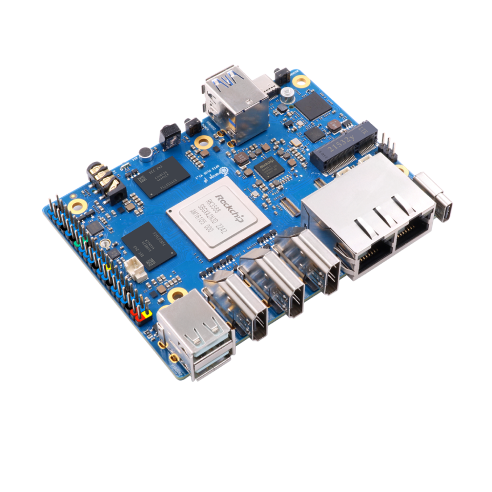
The custom HAT
The main responsibilities of the custom PCB on top of the Orange Pi 5 Plus are the following:
- Accept a 12-15V input source
- Generate voltage rails to power the Orange Pi 5 Plus, 4G modem, and various electronics on the HAT itself
- Include a microcontroller to manage power and handle low level communication
- Integrate the 4G modem
Four TPS566231 buck converter ICs are used to provide the voltage rails:

An EM7455 4G modem is used for network connectivity, as there are no reasonably priced better alternatives for the moment. The next meaningful step-up would be a 5G modem, but they are around 200USD, need PCIe, and 4 well matched antennas. The modem itself uses an M.2 B-key connector, but a SIM card slot is also needed. The modem supports USB3, but USB2 is sufficient for this use case, and avoids the USB3 routing and interference issues.
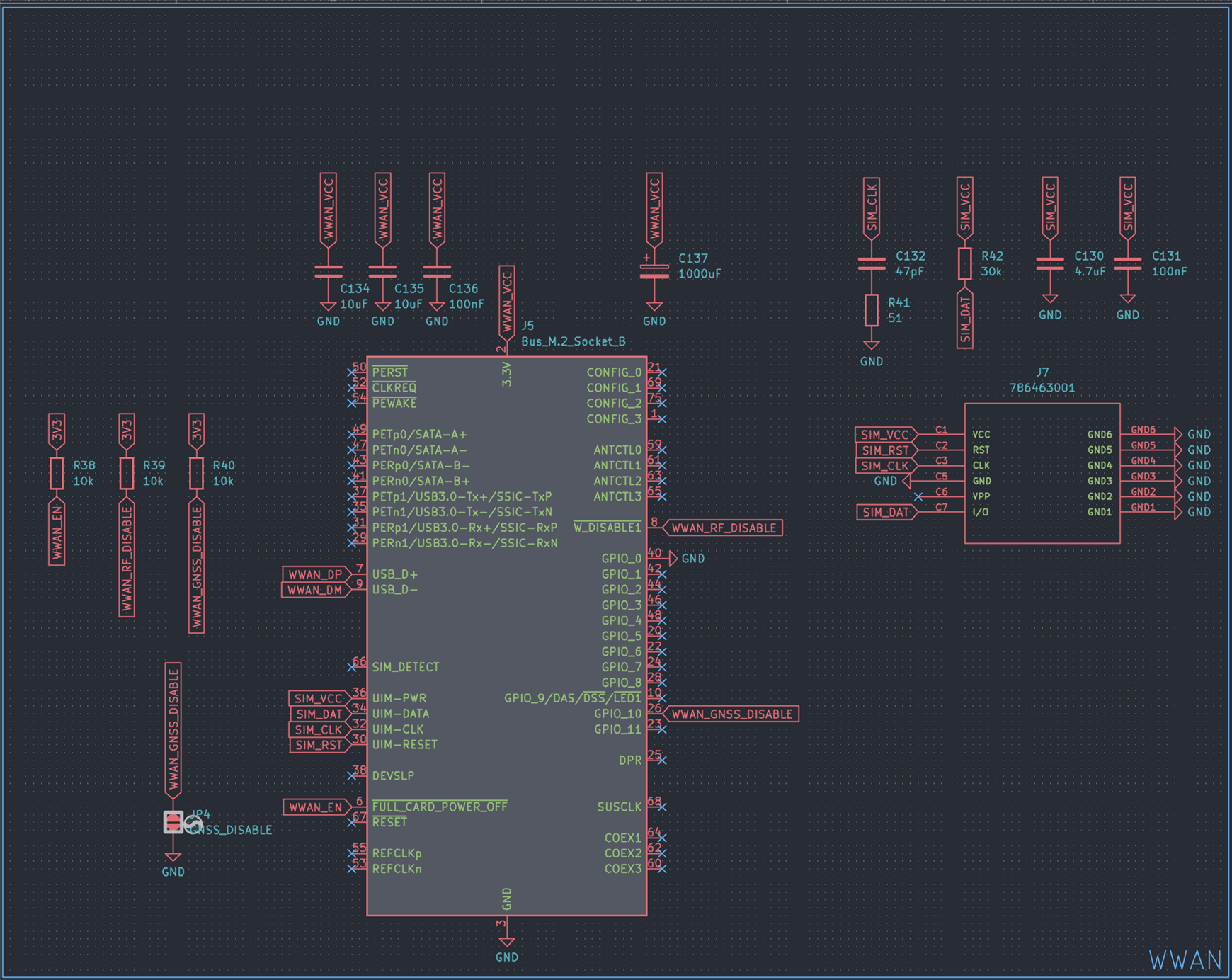
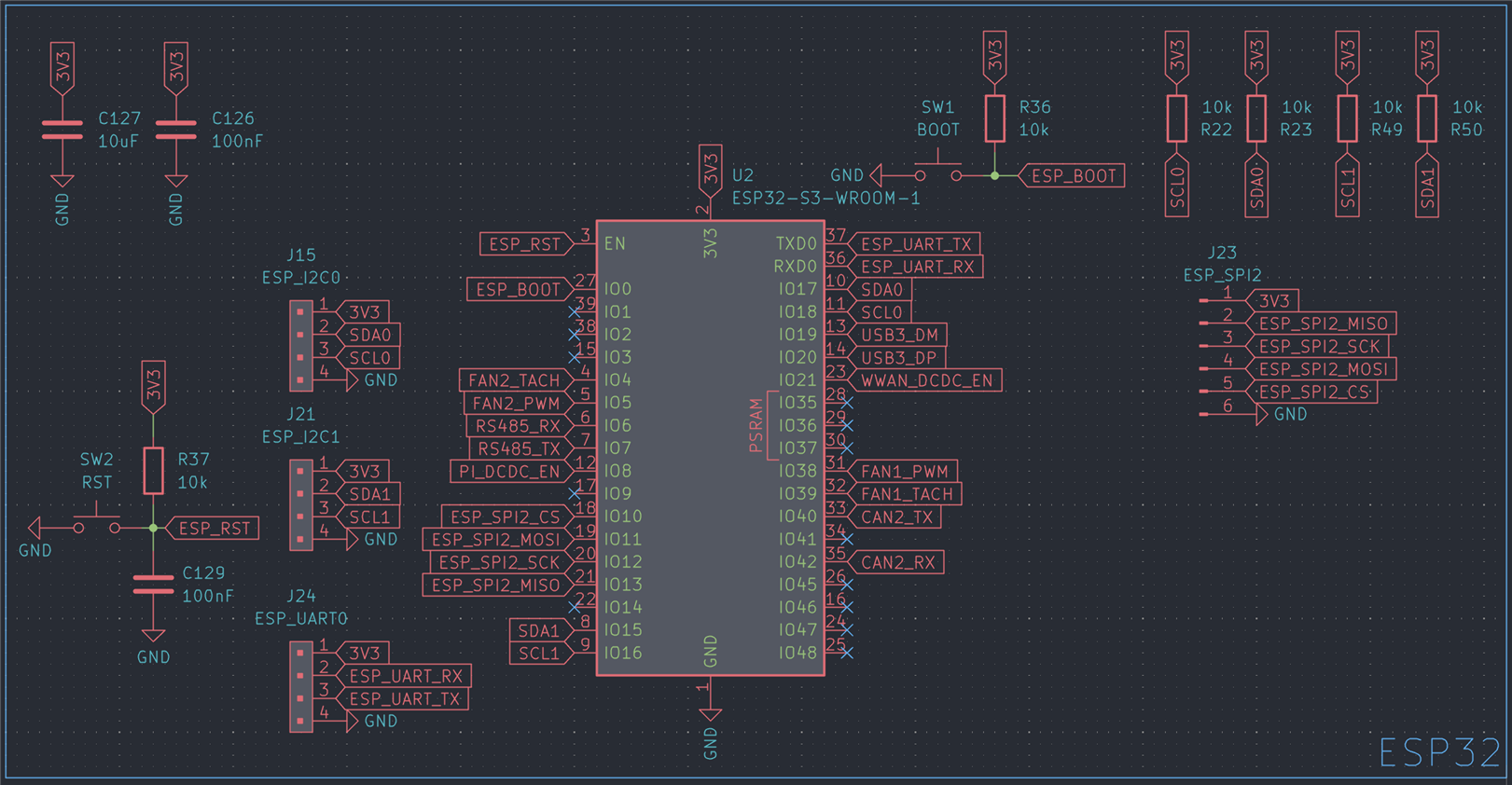
An ESP32-S3 was chosen to control power management and handle communication with various subsystems.
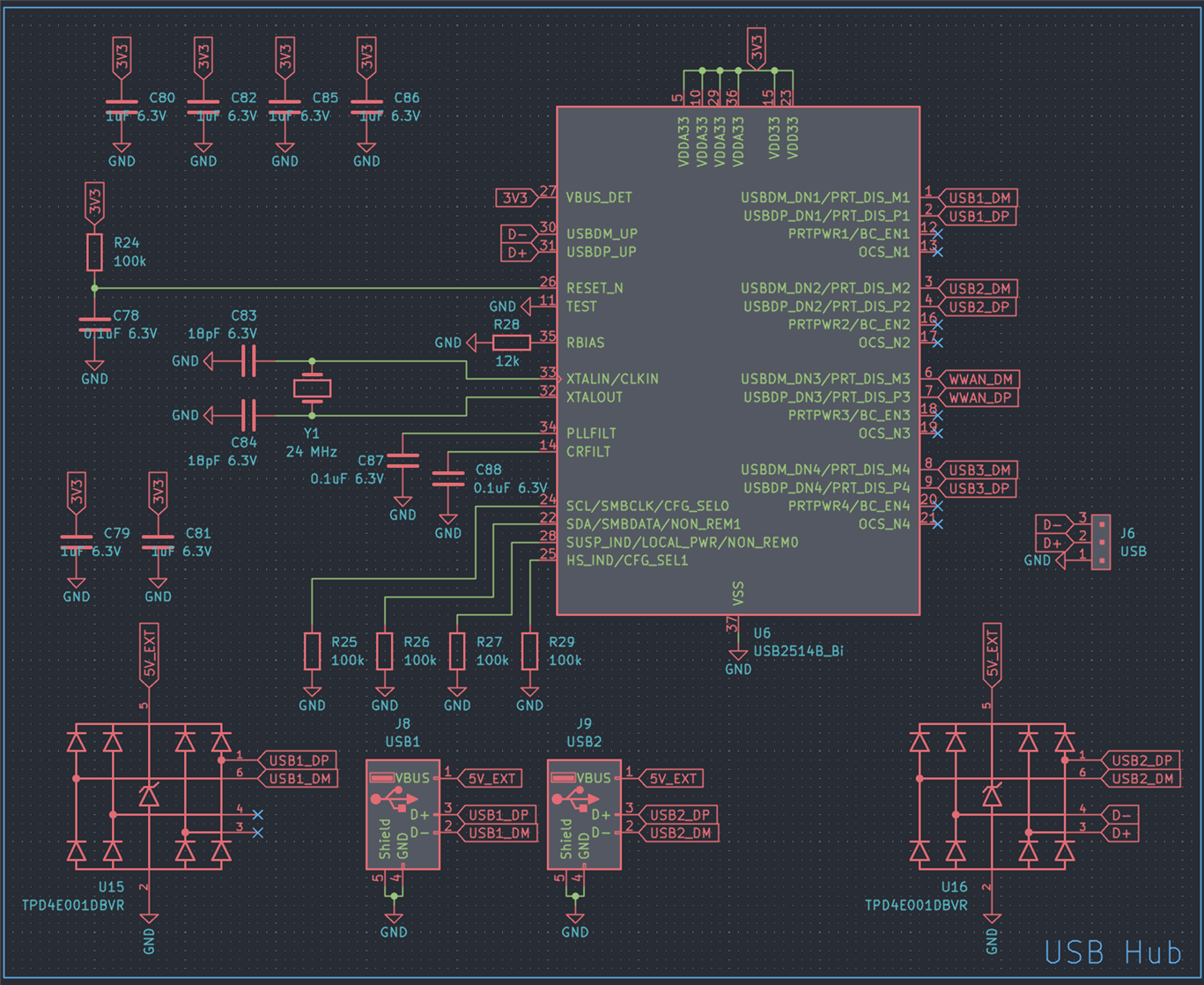
An onboard USB hub, specifically a USB2514B was added, so the entire HAT only needs a single USB2 uplink to the Orange Pi 5 Plus.
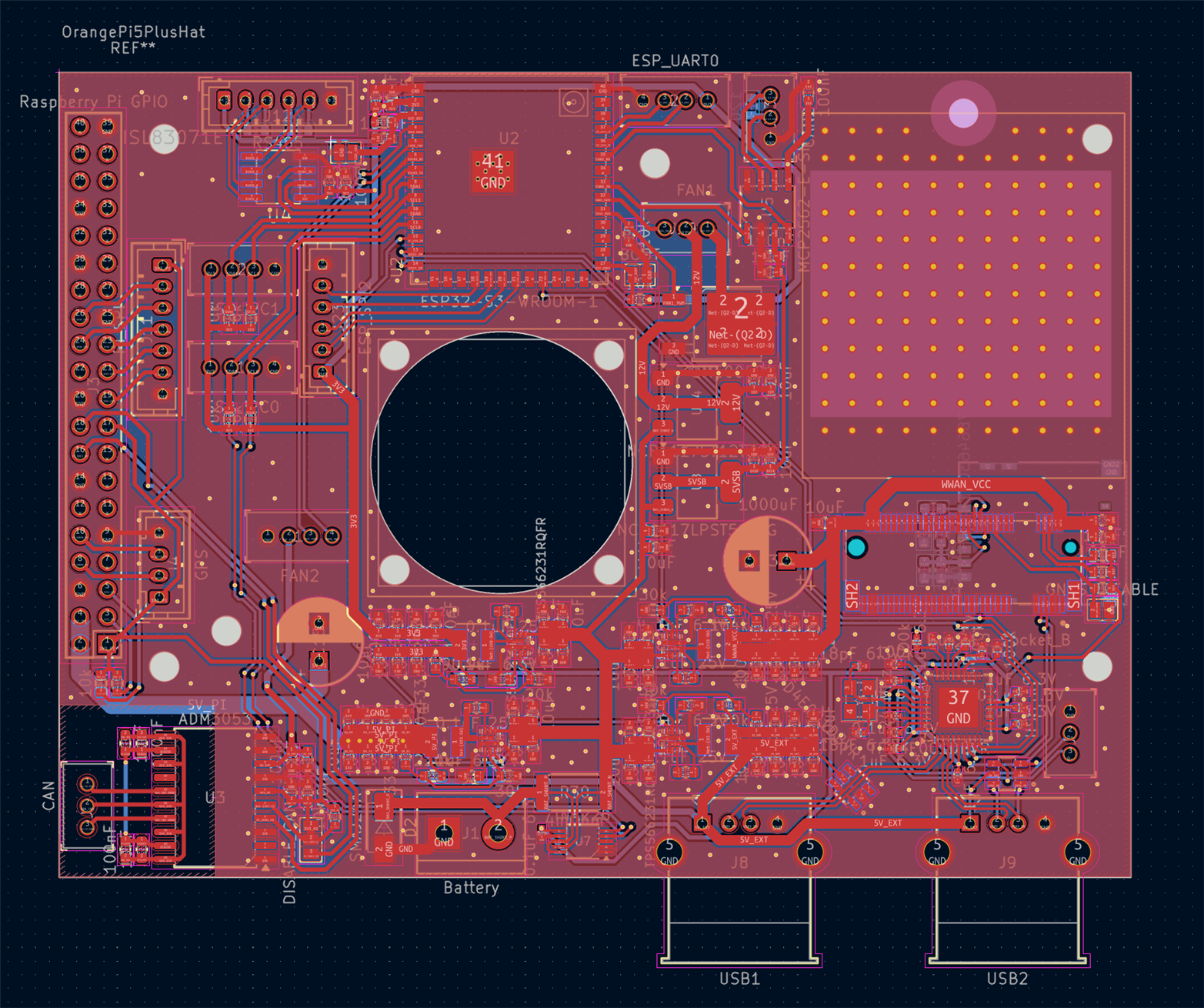
Various interfacing options were added, including RS485, dual CAN transceivers, and a header to connect an ADIN1110 Single Pair Ethernet MAC + transceiver.
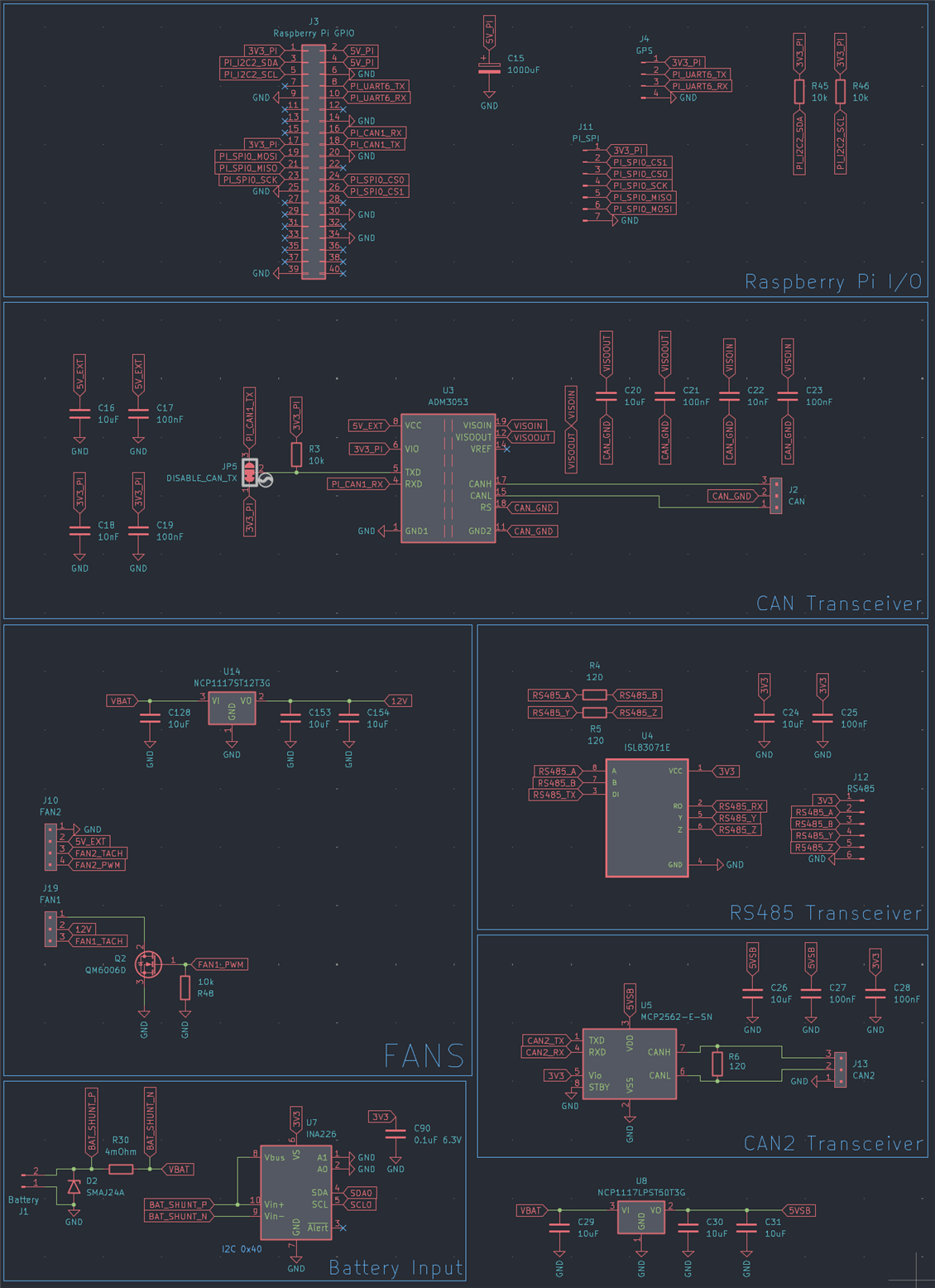
The whole setup was squeezed into a rectangle matching the dimensions of the Orange Pi 5 Plus.

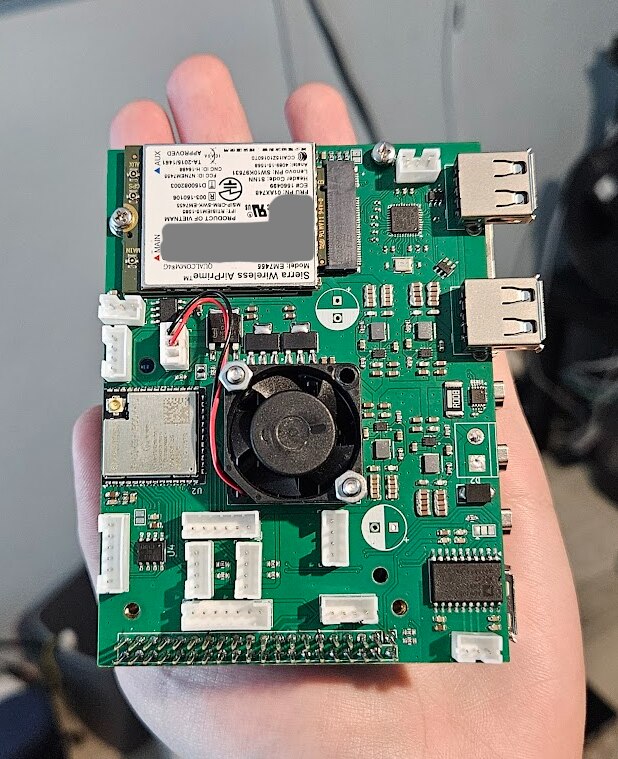
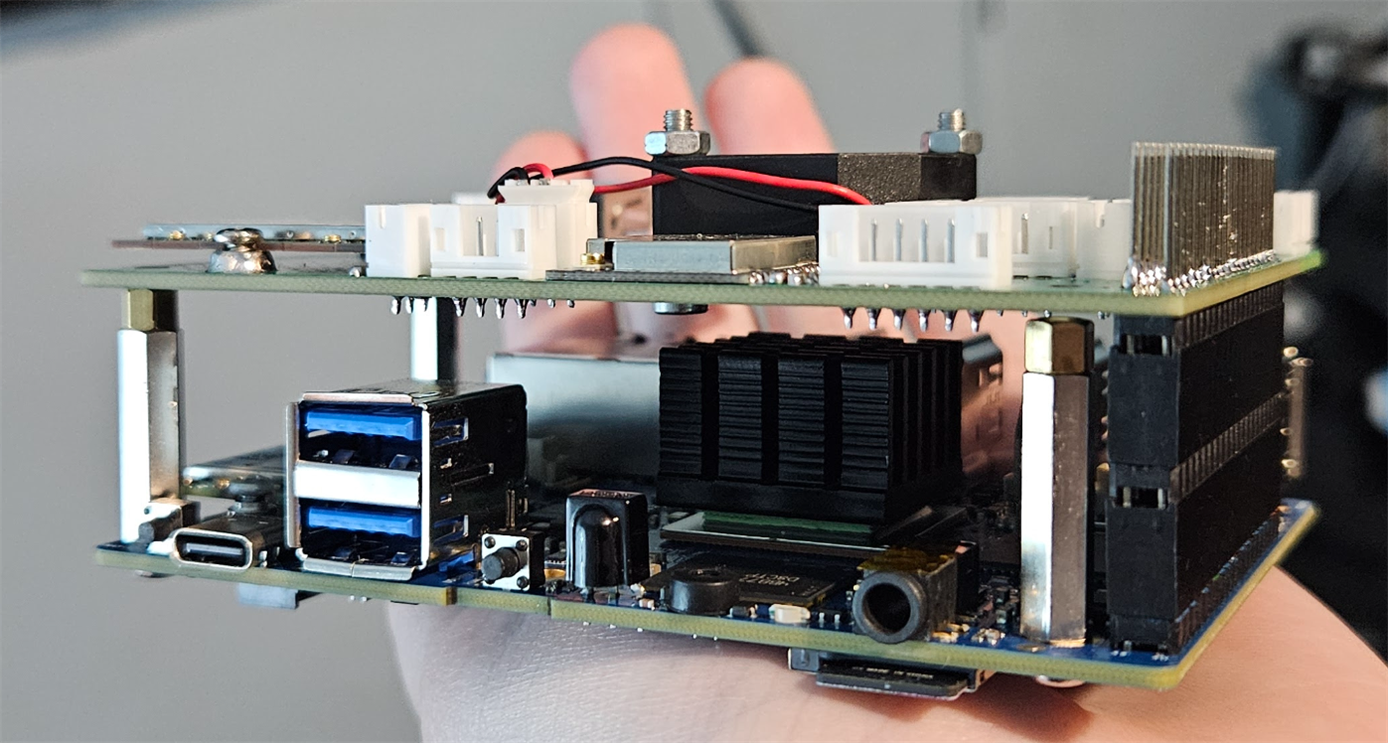
An Intel AX200 WiFi + Bluetooth card was added to the Orange Pi 5 Plus, along with a u-blox Neo M8N GNSS module.
Then I made a custom, minimal ADIN1110 module.
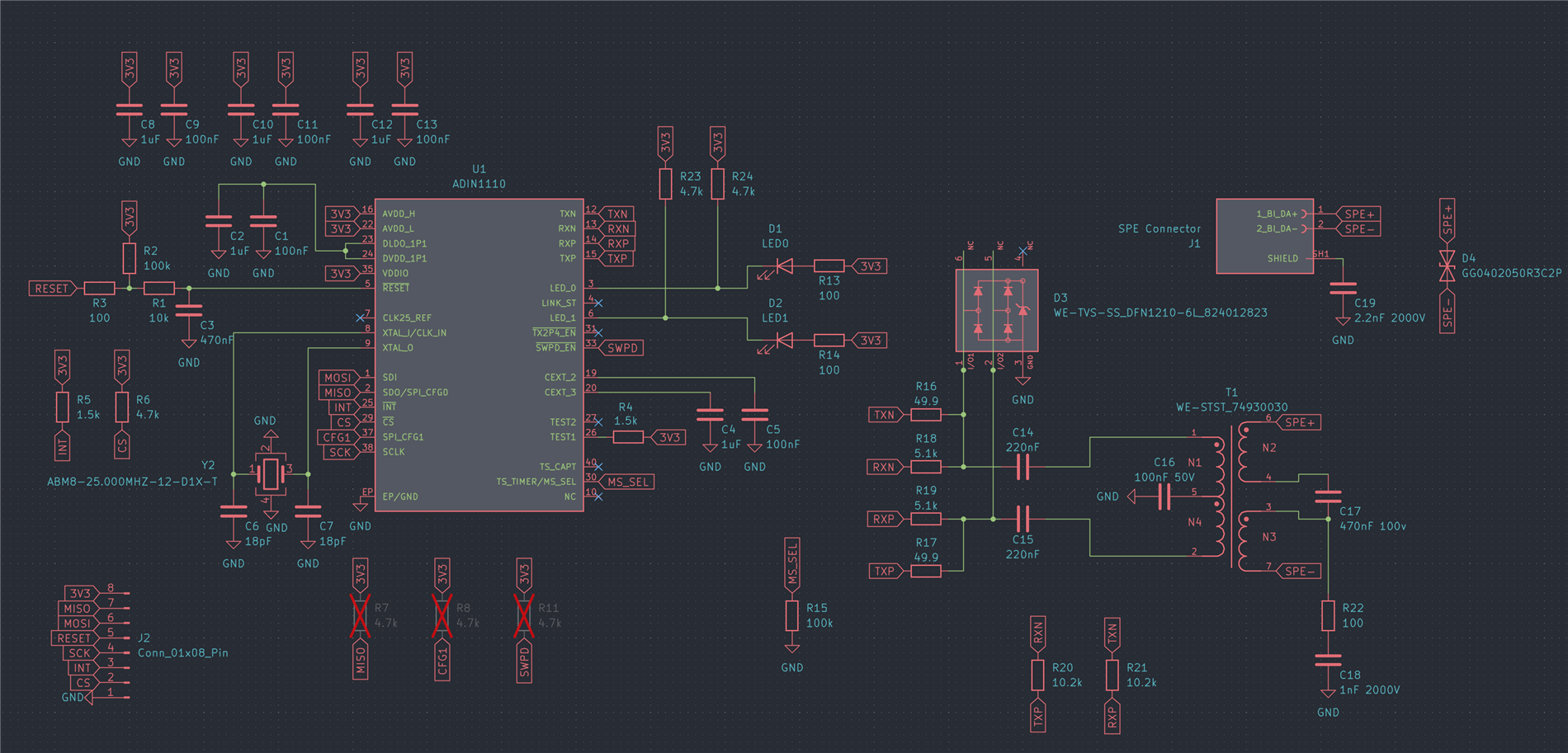
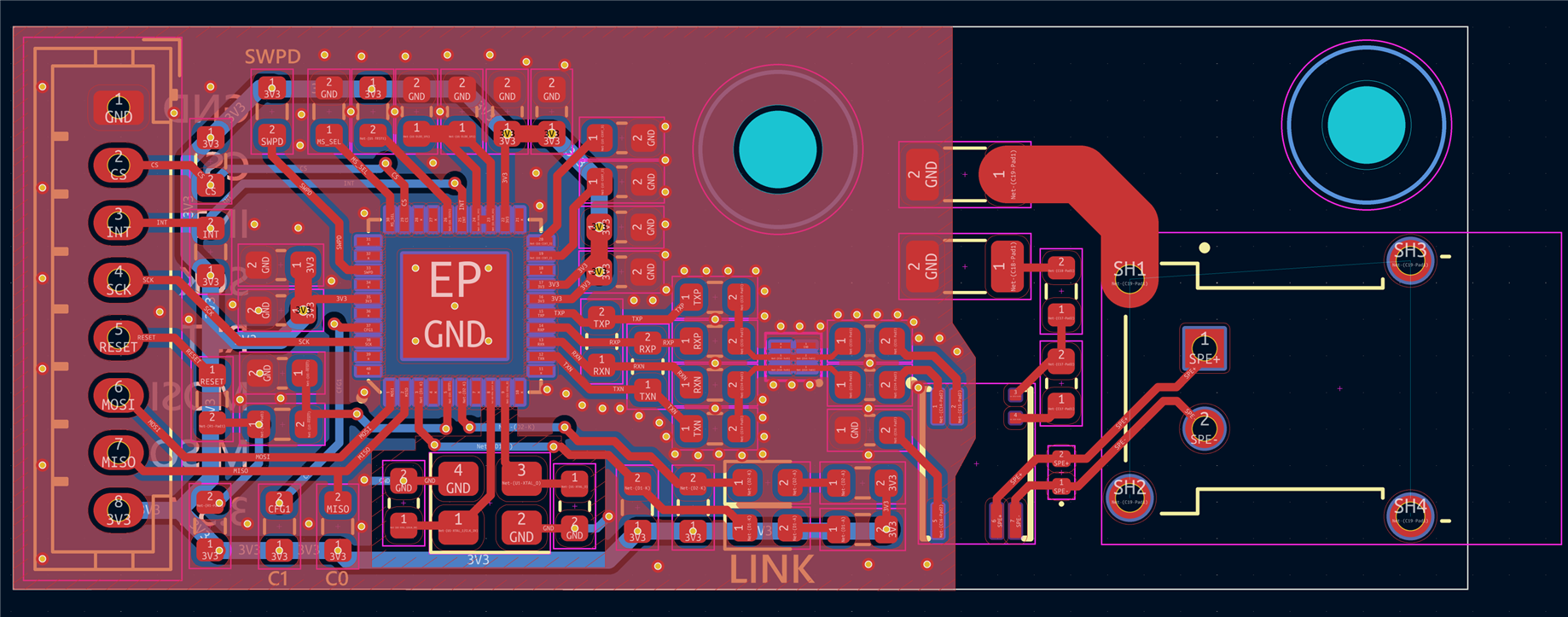
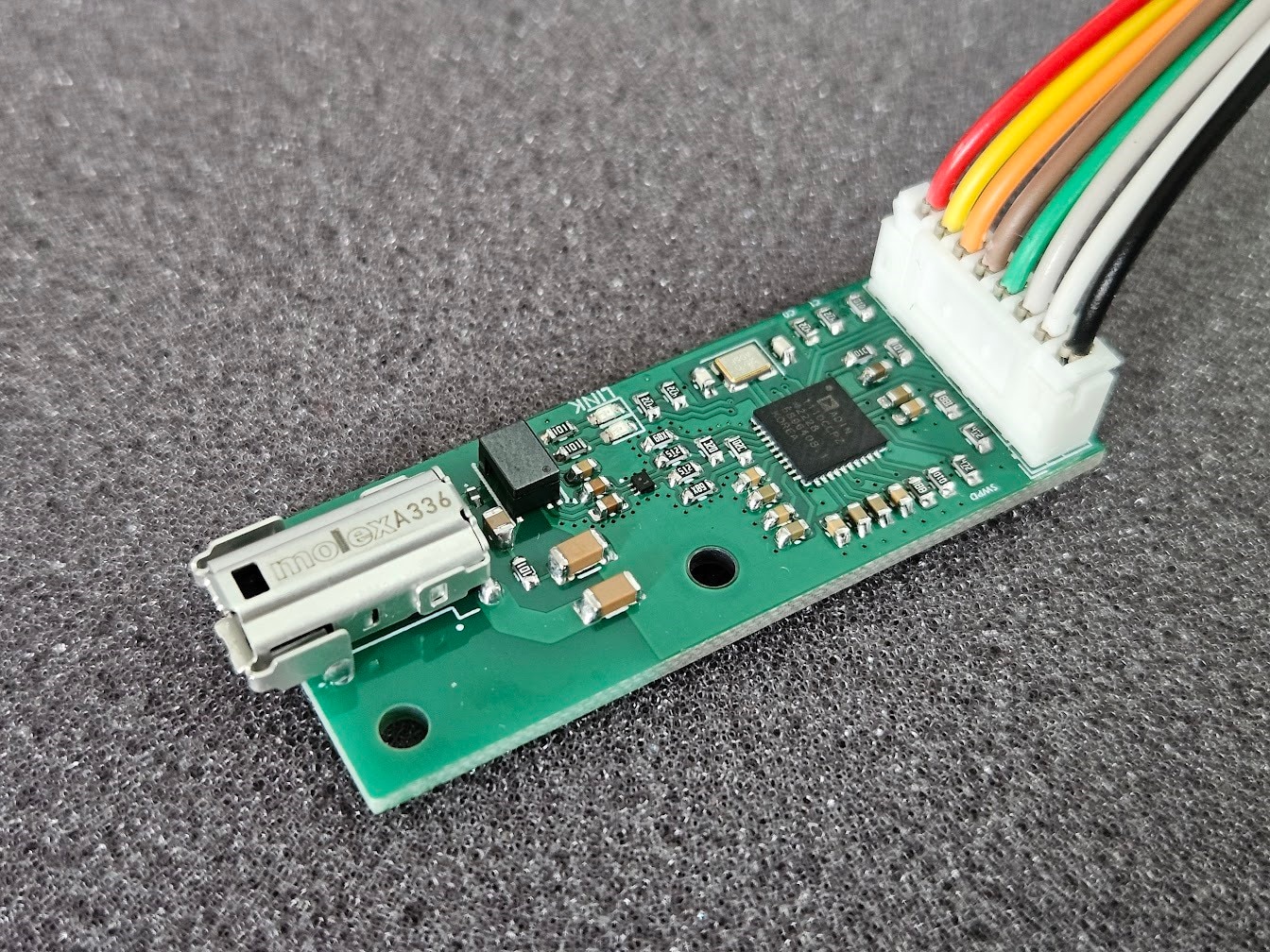
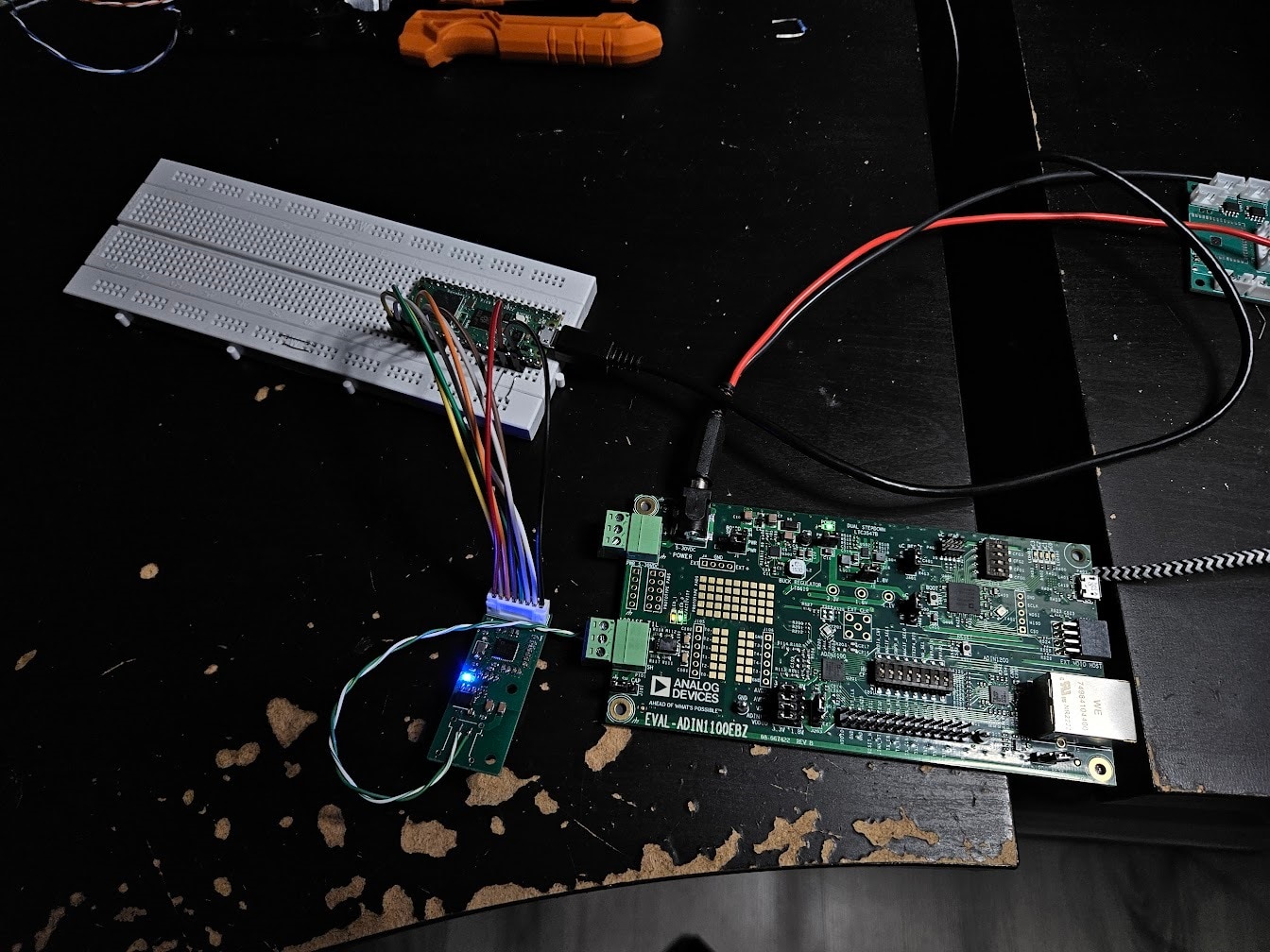
After confirming my board works, by using the EVAL-ADIN1100 development kit and Wireshark, I designed and 3D printed an enclosure for the Compute Unit.
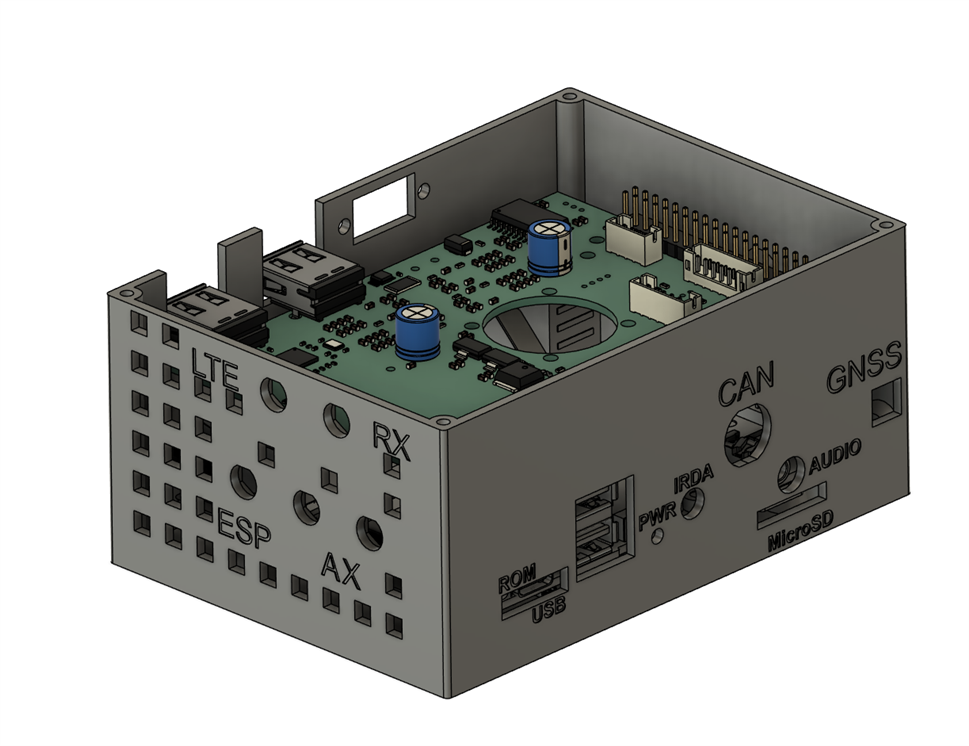

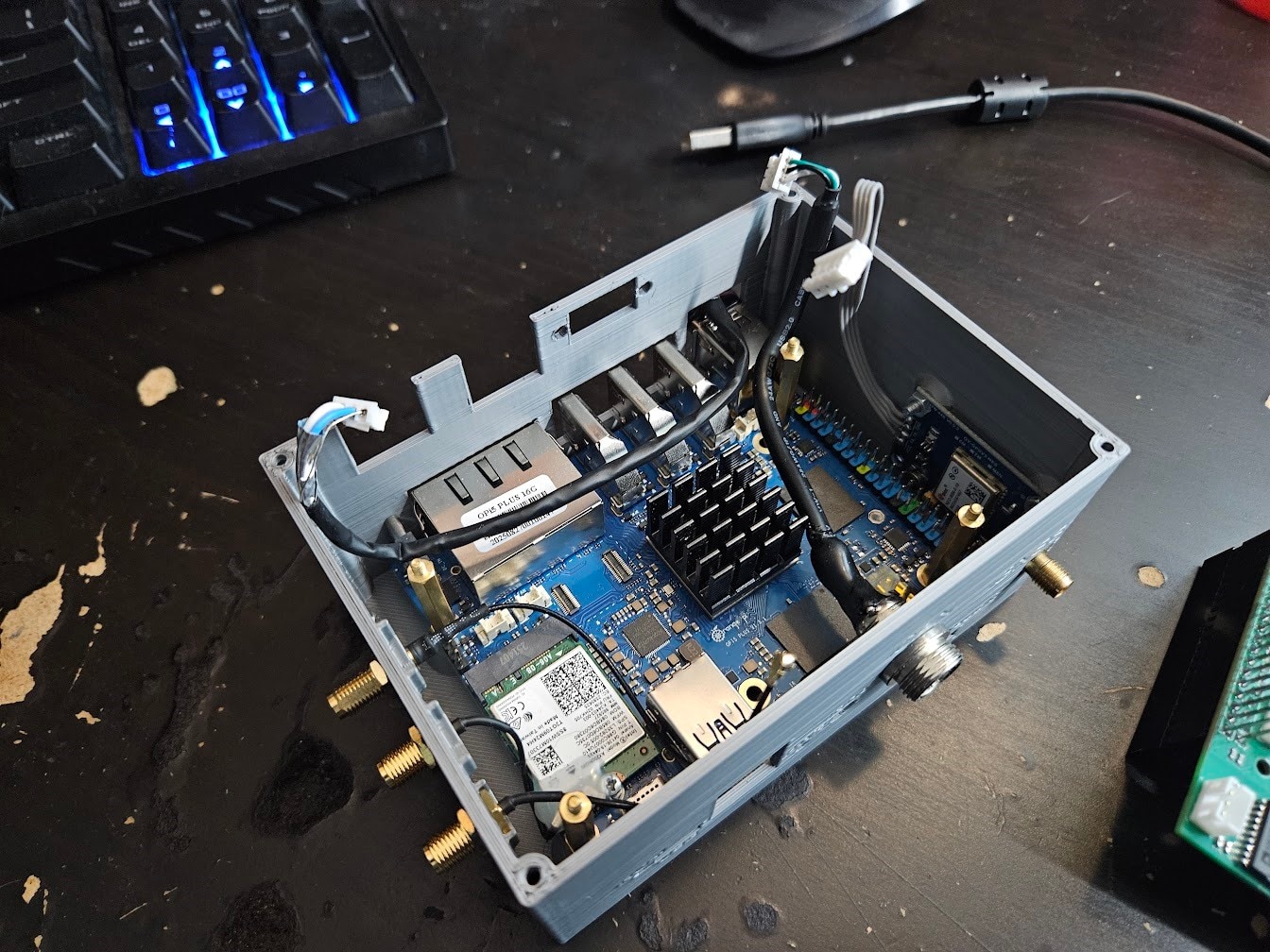
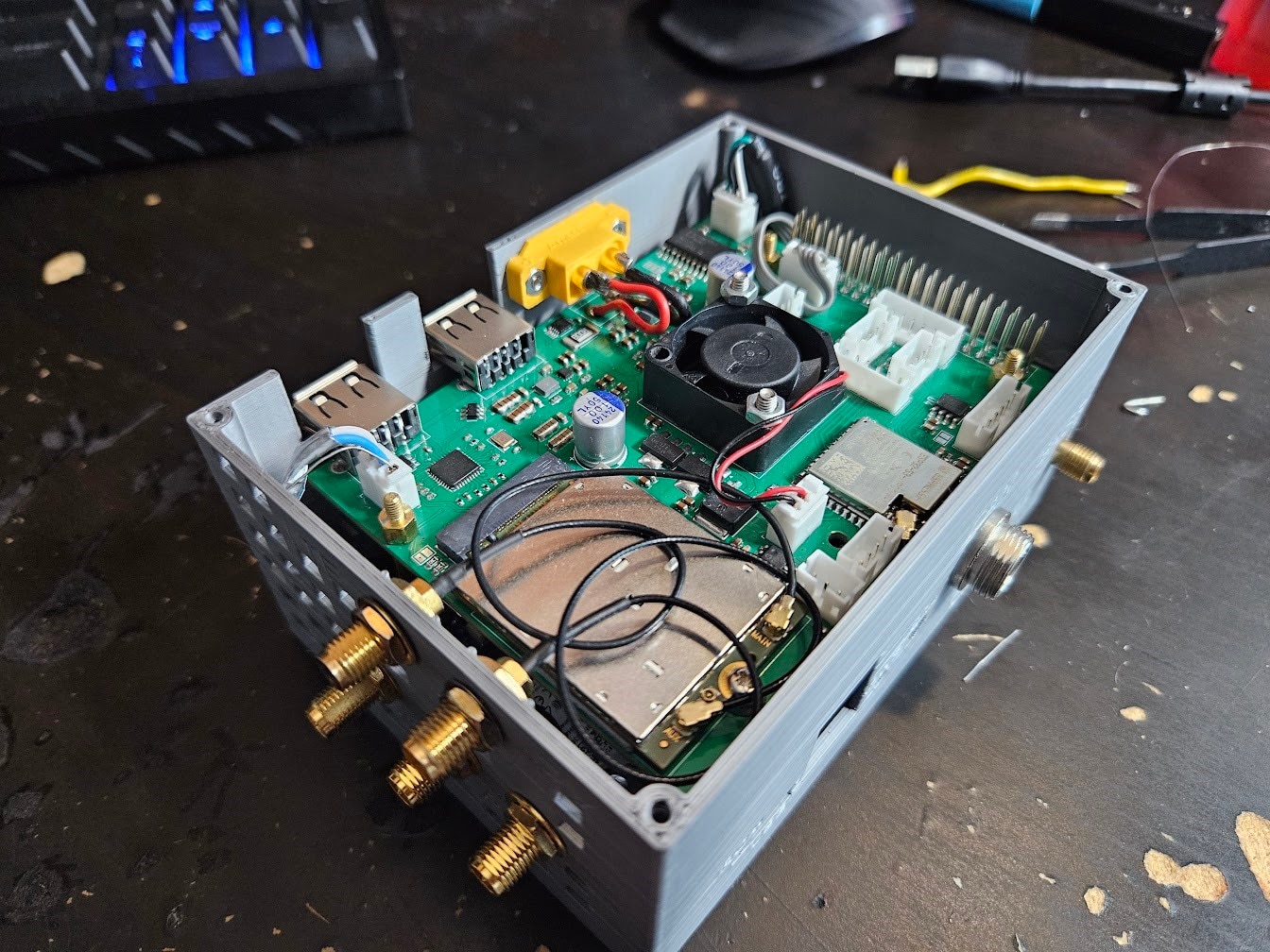
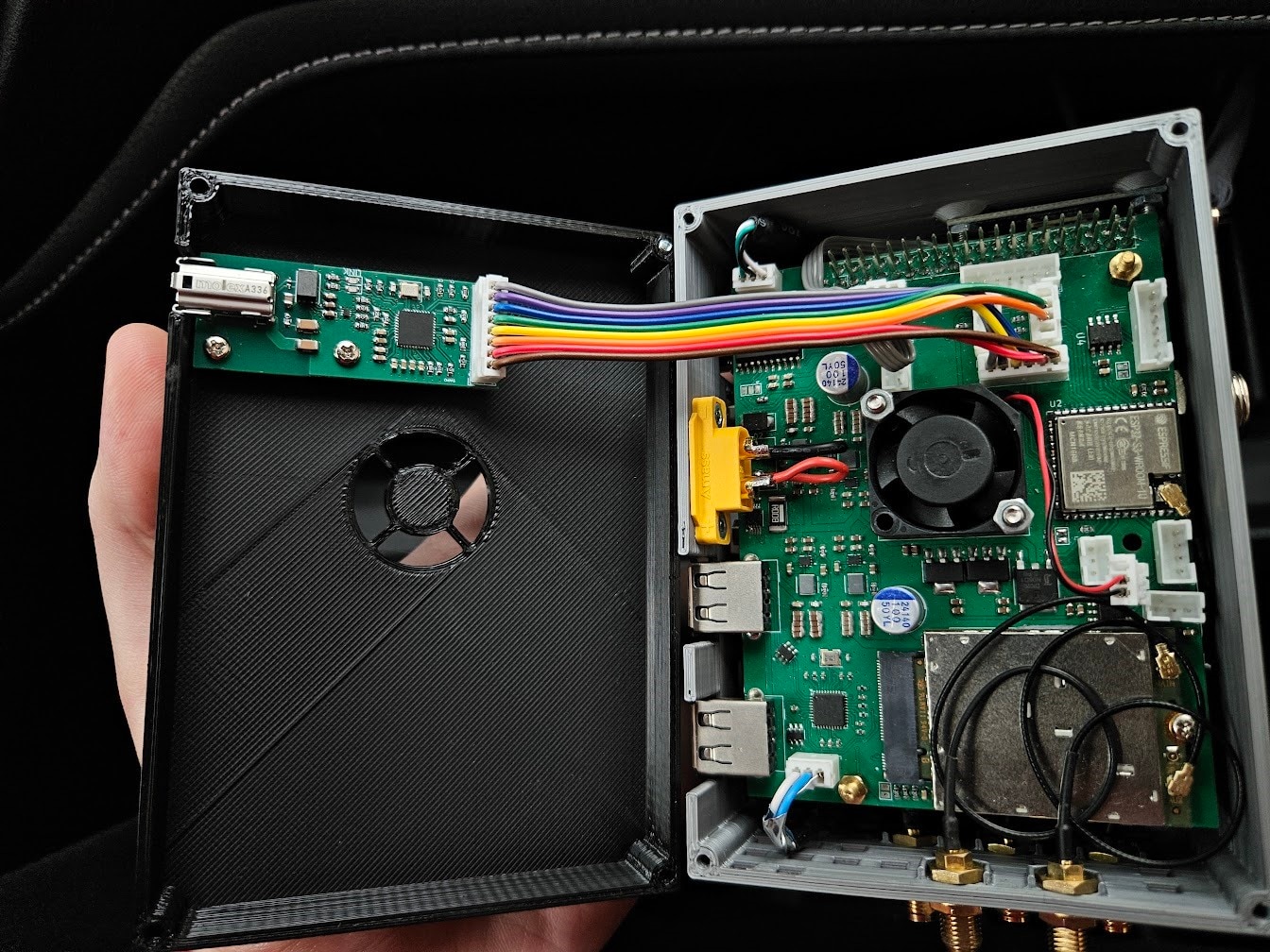
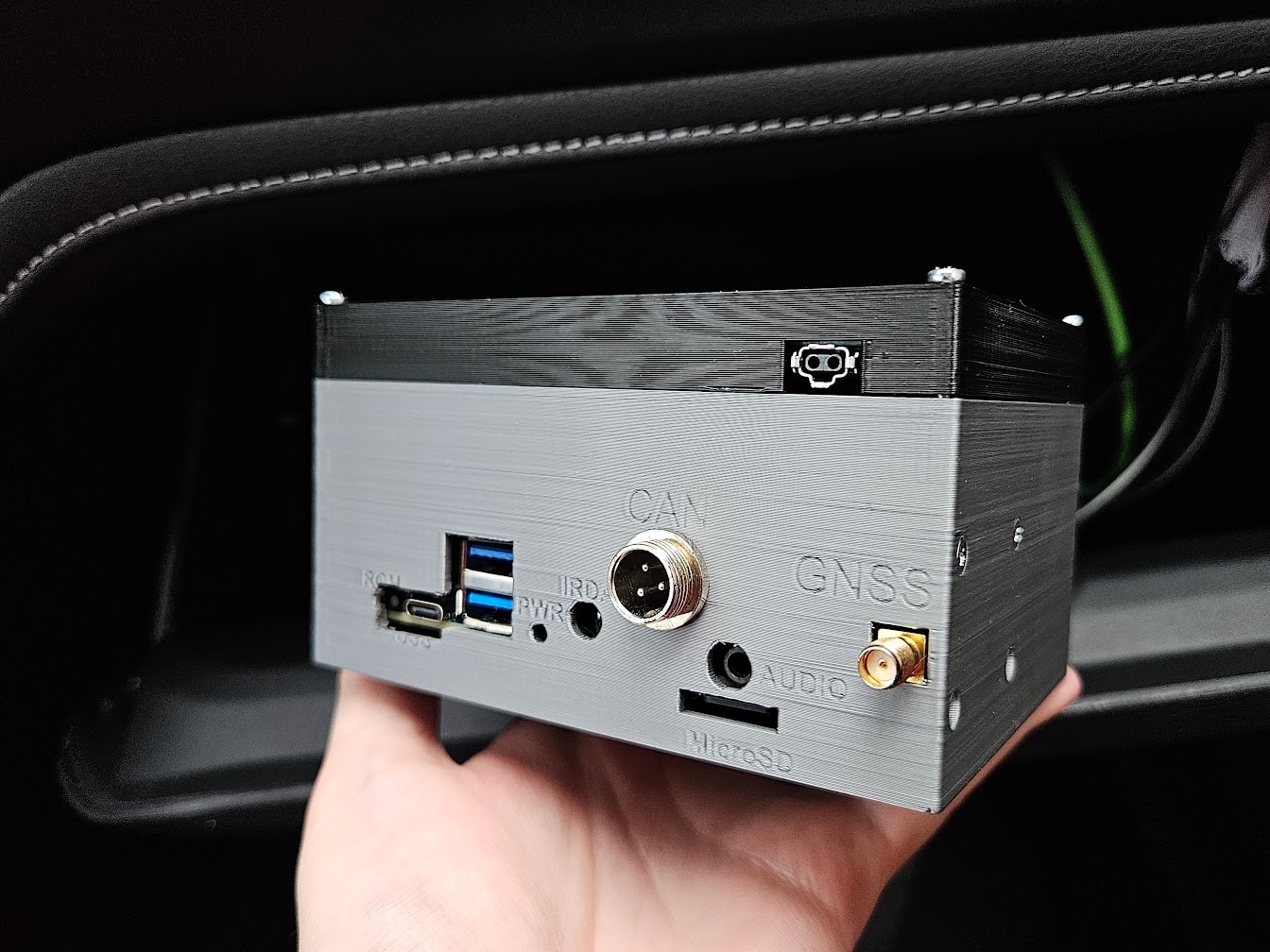
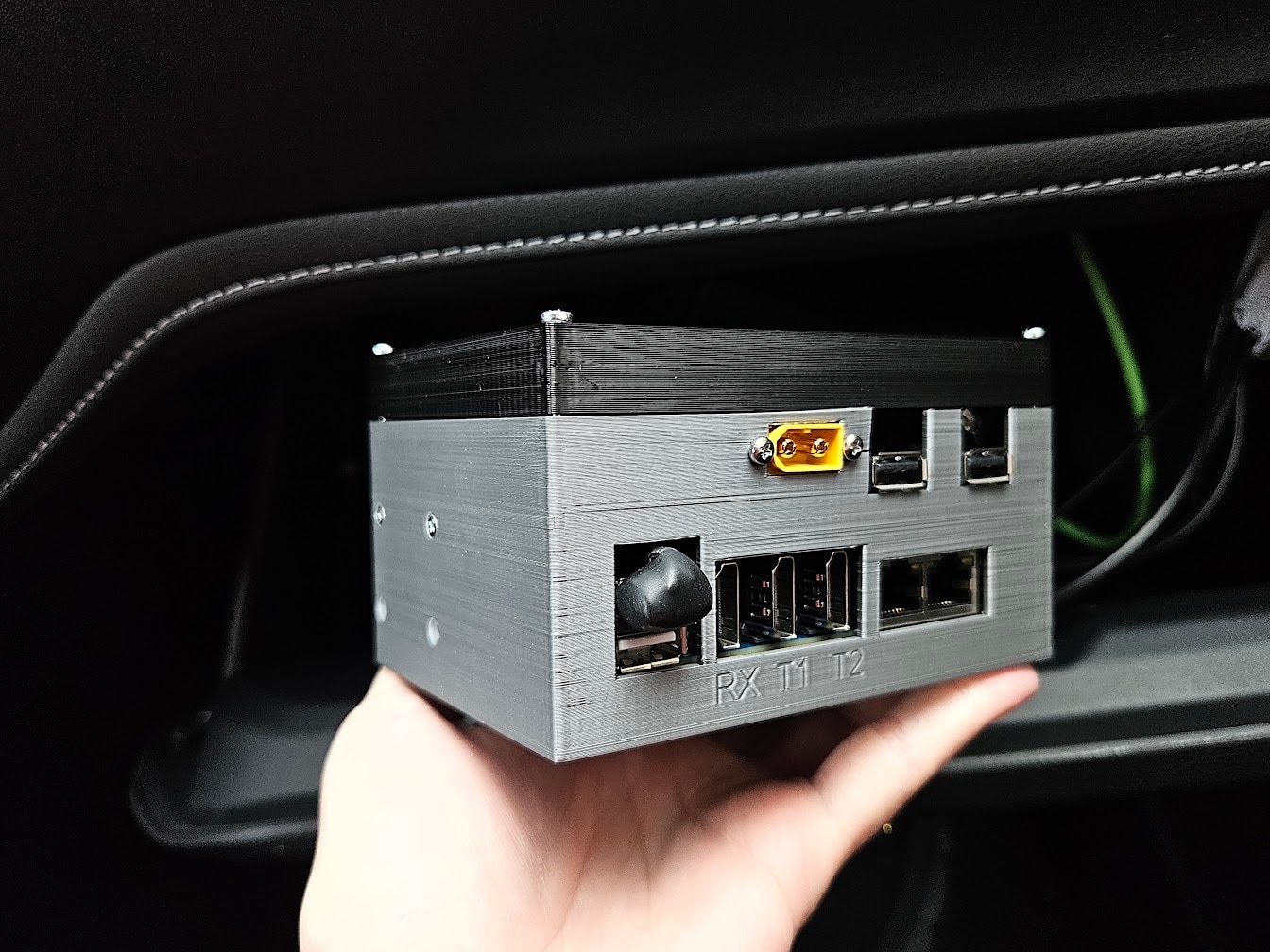
The ugly blob above the USB connector is a custom short USB2 cable, going into the USB2514 hub IC on the HAT, since the GPIO connector lacks any USB interfaces.
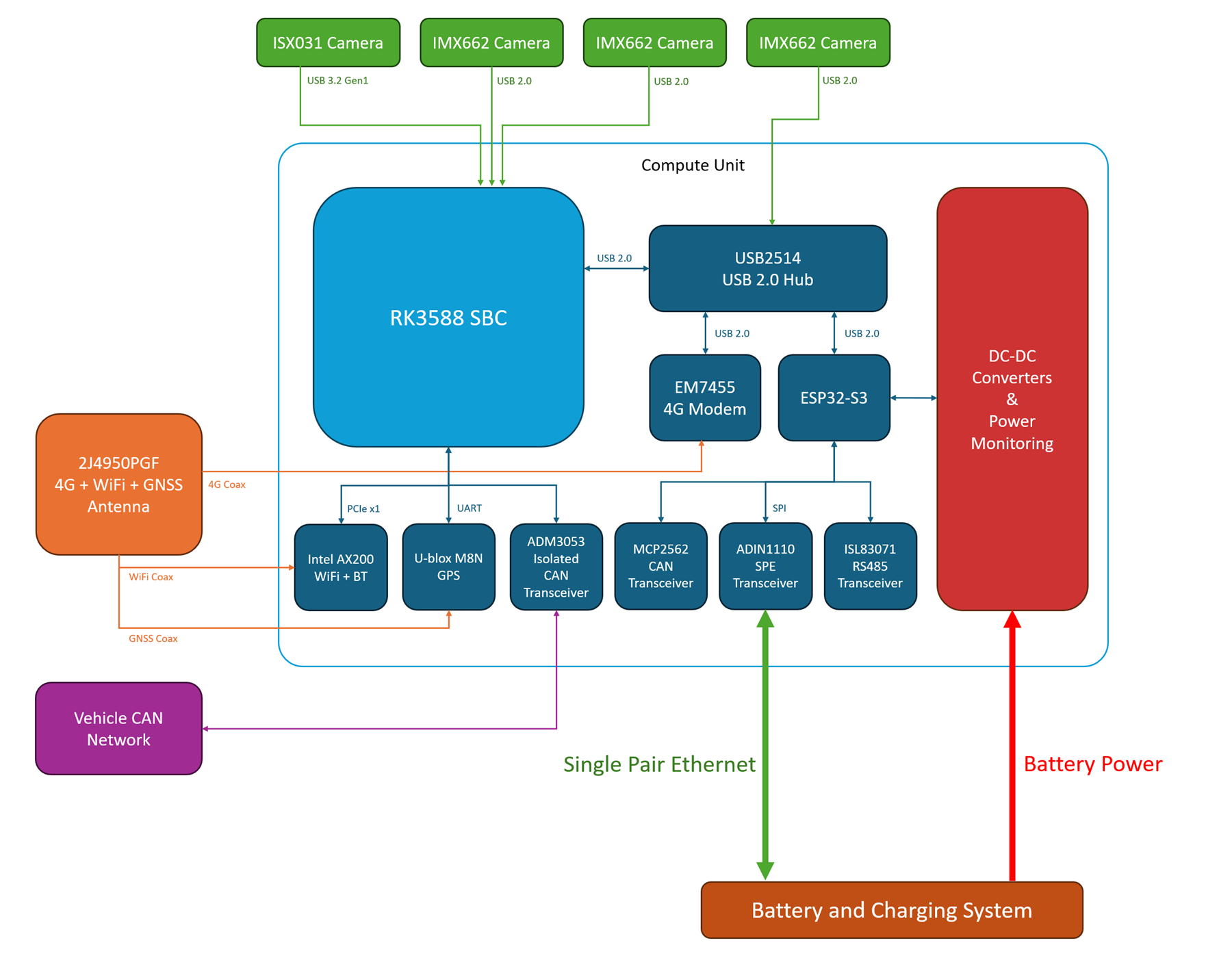
With that, the Compute Unit hardware is ready. Here’s the block diagram of the finished setup:
The Battery
After some research, I got a 1.28kWh, 100Ah LiFePO4 battery. There is one major issue with this chemistry:
LiFePO4 batteries cannot be charged in cold temperatures. Some more expensive battery models include a built-in heater, and in cold weather, the BMS disables charging, and uses the input energy to run the heaters instead.
This seems like a decent solution at first, but it’s a black box system. The BMS controls the heater somehow, with no explicit ability to turn it on, and the temperature sensor is almost certainly just glued to the outside of the cells. When the heater gets the outer shell of the batteries to a few degrees above freezing, I assume the BMS just enables charging immediately, and the battery gets damaged. The LiFePO4 cells are massive, and heating their outer shells to even 10+ degrees means nothing, if their centers are still below freezing. Instead, some logic is needed in the heater control system to account for the heat having to reach the center of the cells, but purely based on temperature readings from the outer shell.
My solution was to add my own external heating. This is significantly worse in the sense that the outer plastic is being heated, which needs to heat the inside air, which needs to heat the cells, instead of just directly heating the cells. However, I get direct control over everything.
Flexible heating films with glue on one side were used, that consist of a long, snaking trace covering the surface. I put two of these on the battery’s outer casing.
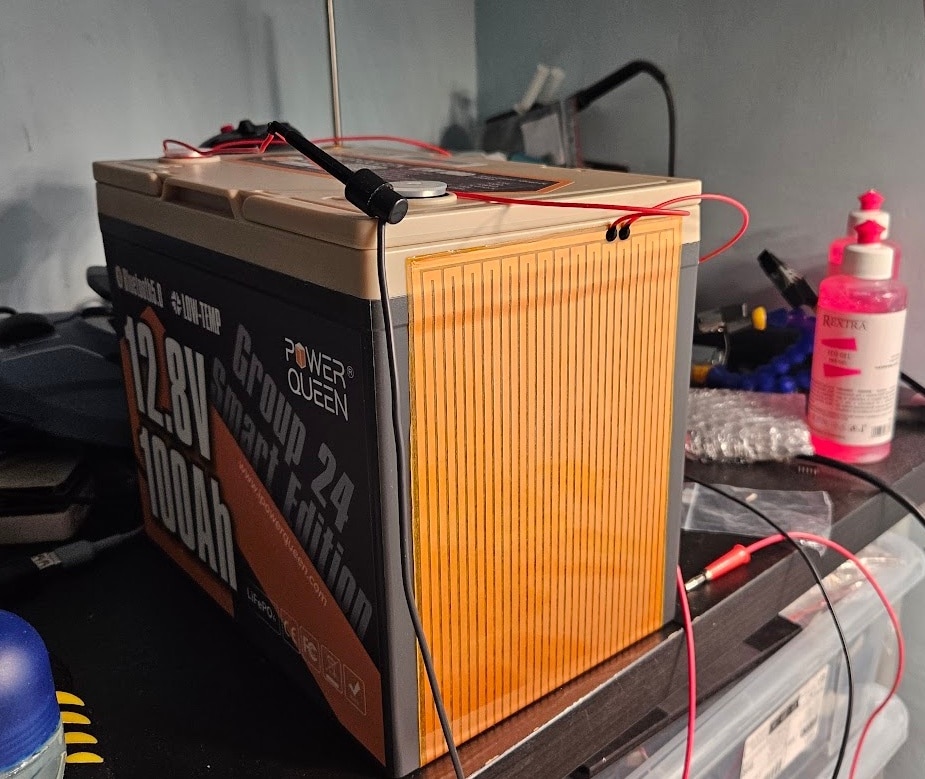
For safety, two bimetallic thermal fuses and two DS18B20 temperature sensors were also added.
The next step was to thermally insulate the battery, to minimize energy needed for heating. A relative of mine made a lovely wooden box, that I proceeded to pad with XPS foam.

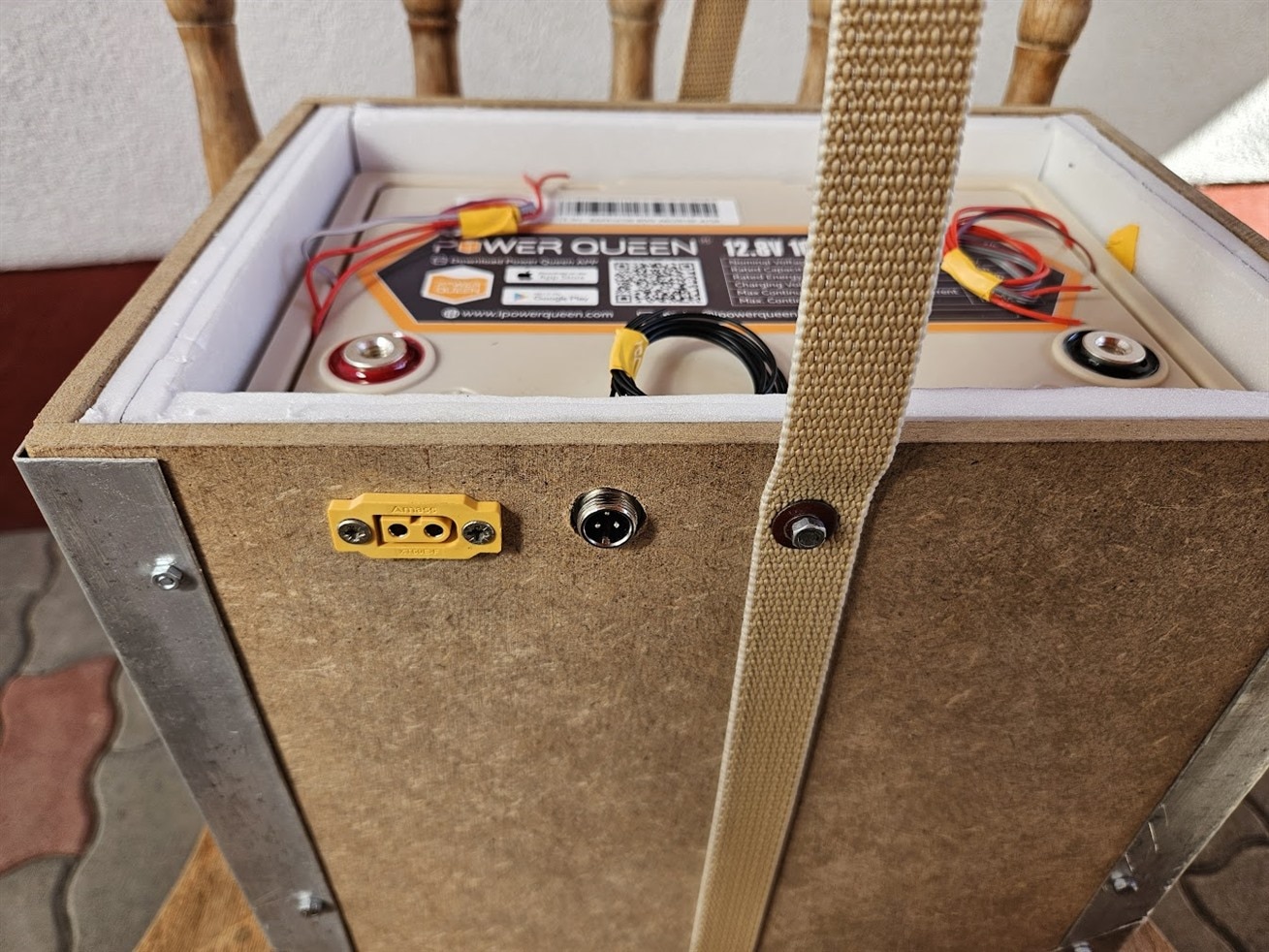
Charging System
After some quick calculations, I came to the conclusion that a 20A+ charger was needed to keep the battery at a sufficient State of Charge, for indefinite periods of time. I had several attempts at designing a 20A buck-boost charger module, but ultimately decided to pivot.
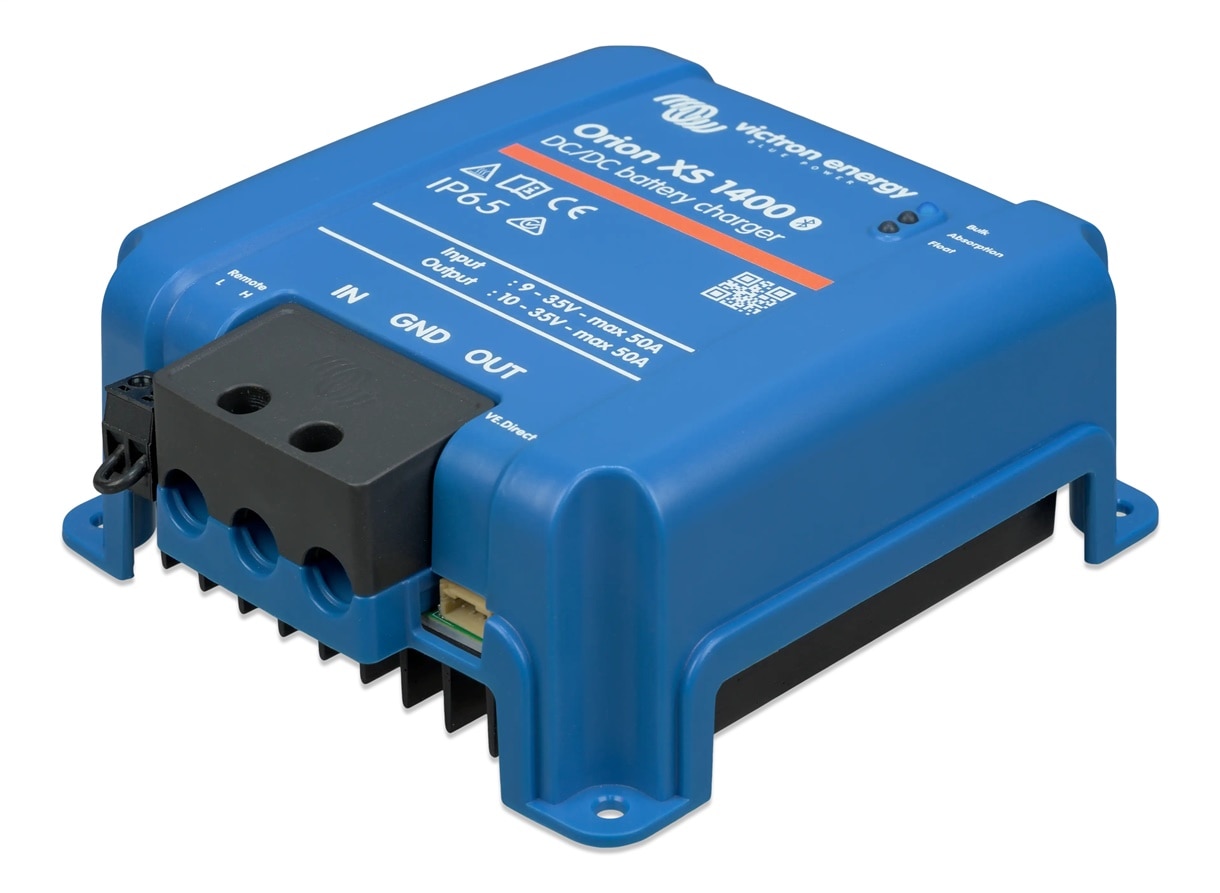
Instead of a custom module, I went with the Victron Energy Orion XS 1400.
Orion XS is a DC/DC battery charger, designed for the exact purpose I need it for: charging a secondary battery in campers, from a car’s generator or main battery. It is also insanely efficient, and can do up to 50A. It uses Bluetooth and a smartphone app for management and control, but it also includes a “VE.Direct” port, for more manual control. This interface is essentially just a UART, with a custom command set over it.
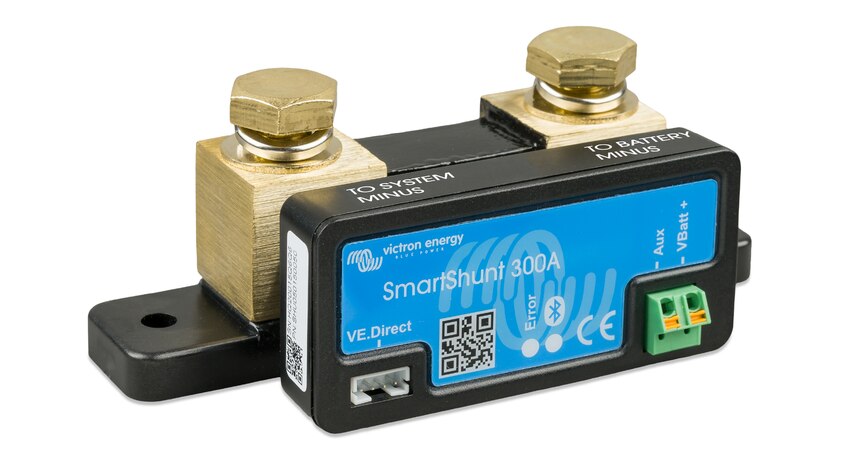
I also used a Victron Energy SmartShunt, to not have to deal with State of Charge calculation and designing another custom PCB. This device also has a VE.Direct port.
I got a large waterproof box to put the entire charging system inside, and 3D printed some mounting hardware. Then I wired up all the charging hardware.
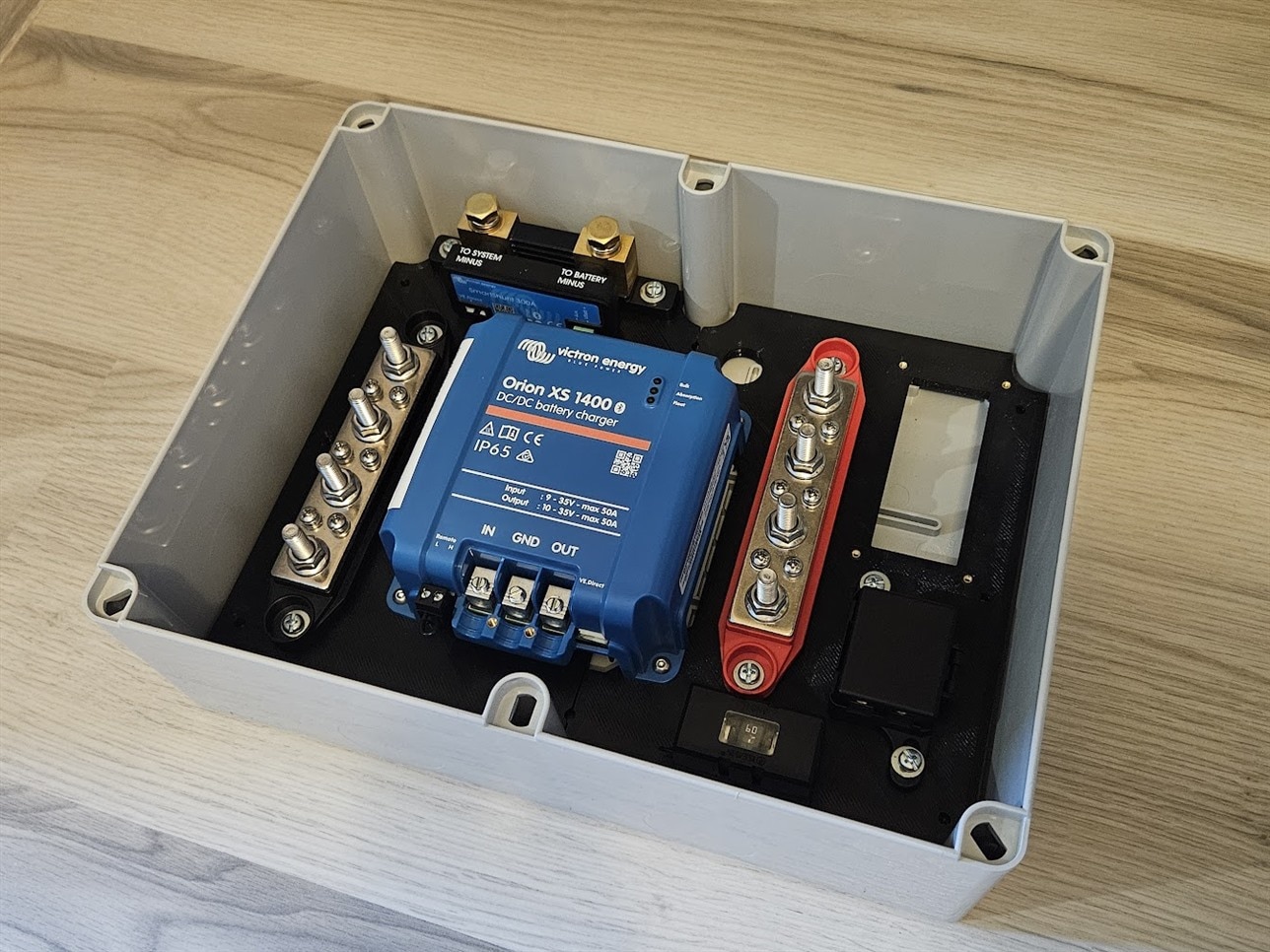

To control everything, I started designing another PCB. Its responsibilities are the following:
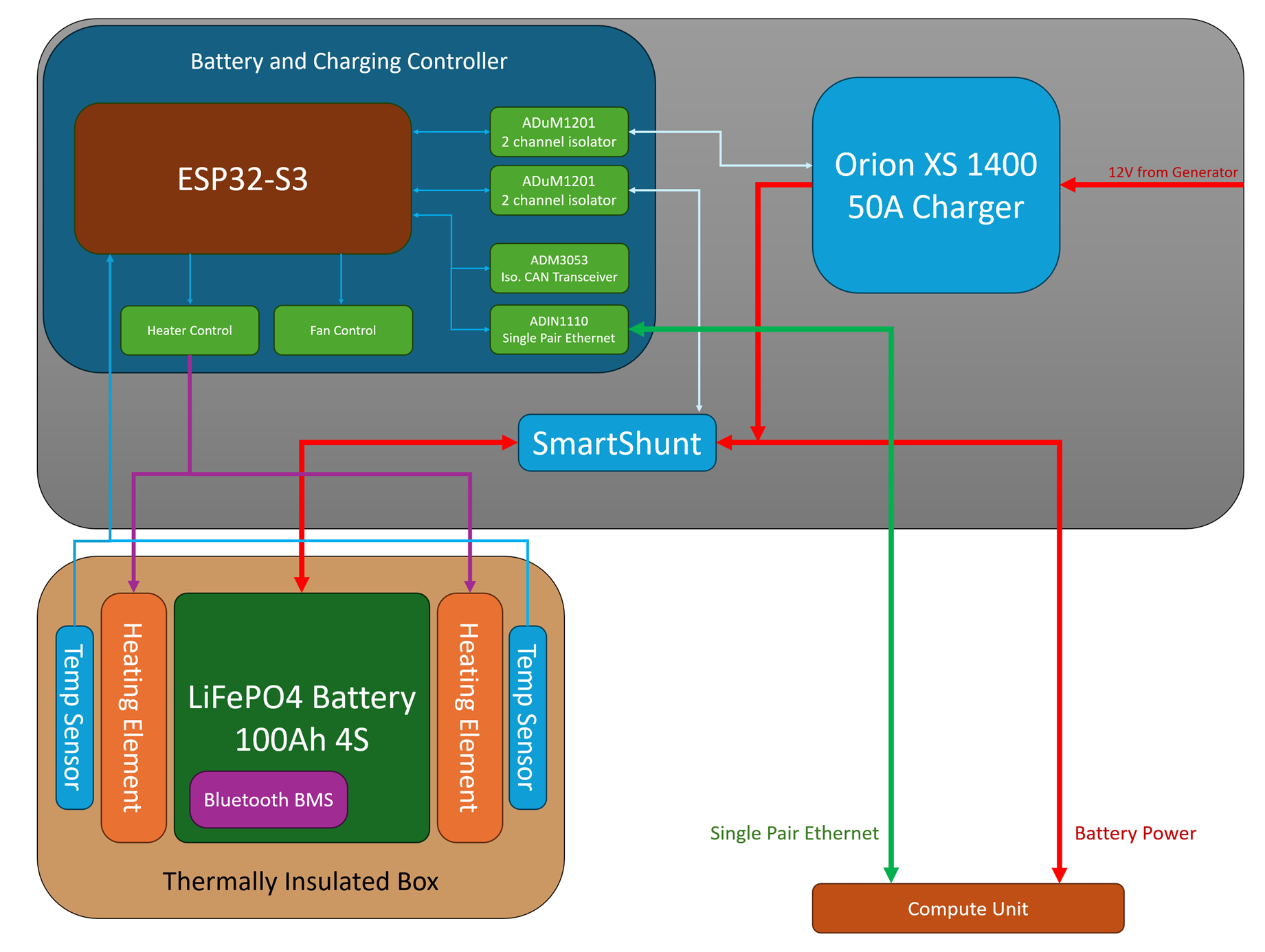
- Communicate over VE.Direct with the Orion XS (50A charger) and SmartShunt
- Control the heating elements in the battery
- Control and monitor fans based on temperature of various components
- Communicate with the Compute Unit over Single Pair Ethernet
- Communicate with the Bluetooth BMS inside the LiFePO4 battery
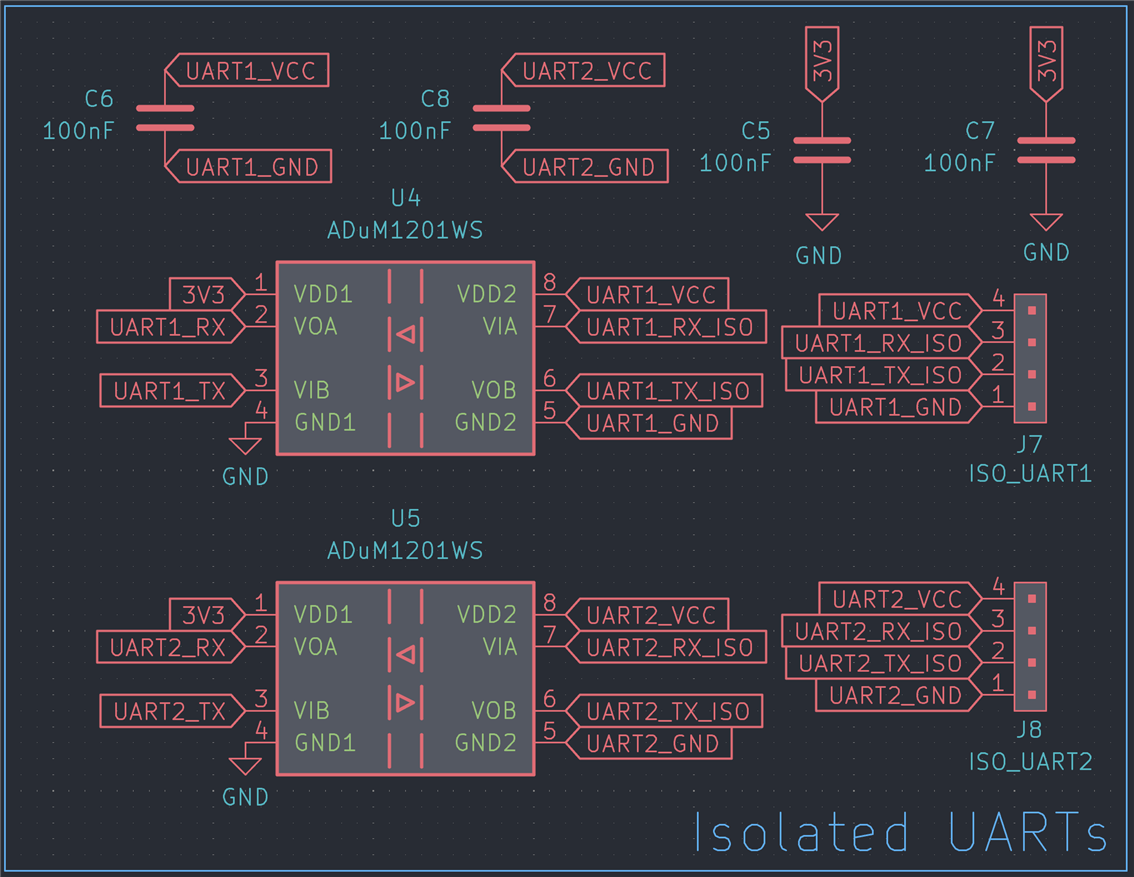
For VE.Direct interfacing, I went with two ADuM1201 dual channel isolator ICs.
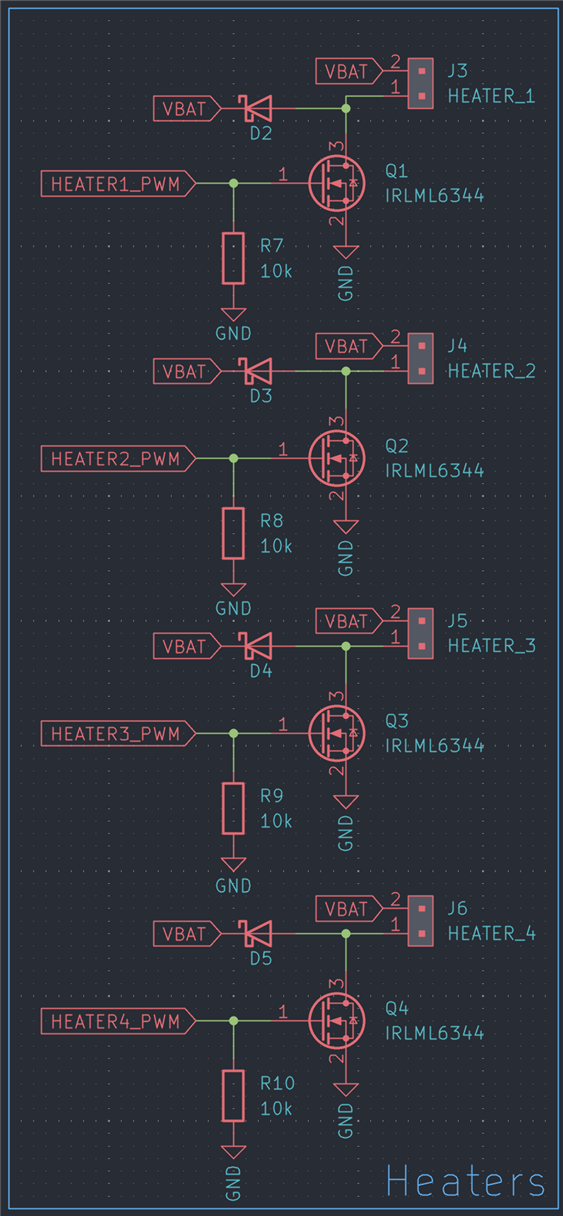
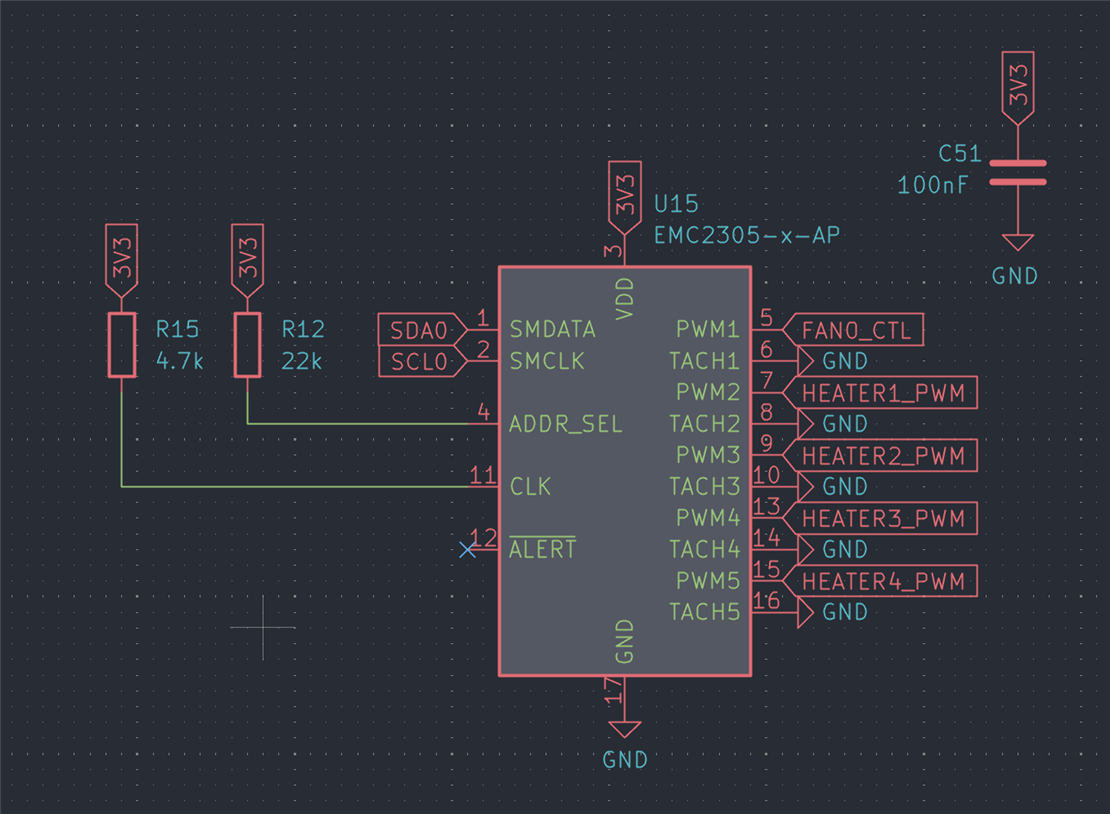
To control the heating elements, an EMC2305 fan controller IC was used, which can provide 5 PWM signals, controlled through I2C. Only four heating elements are supported, with the remaining channel used to low-side switch a 2 pin fan.
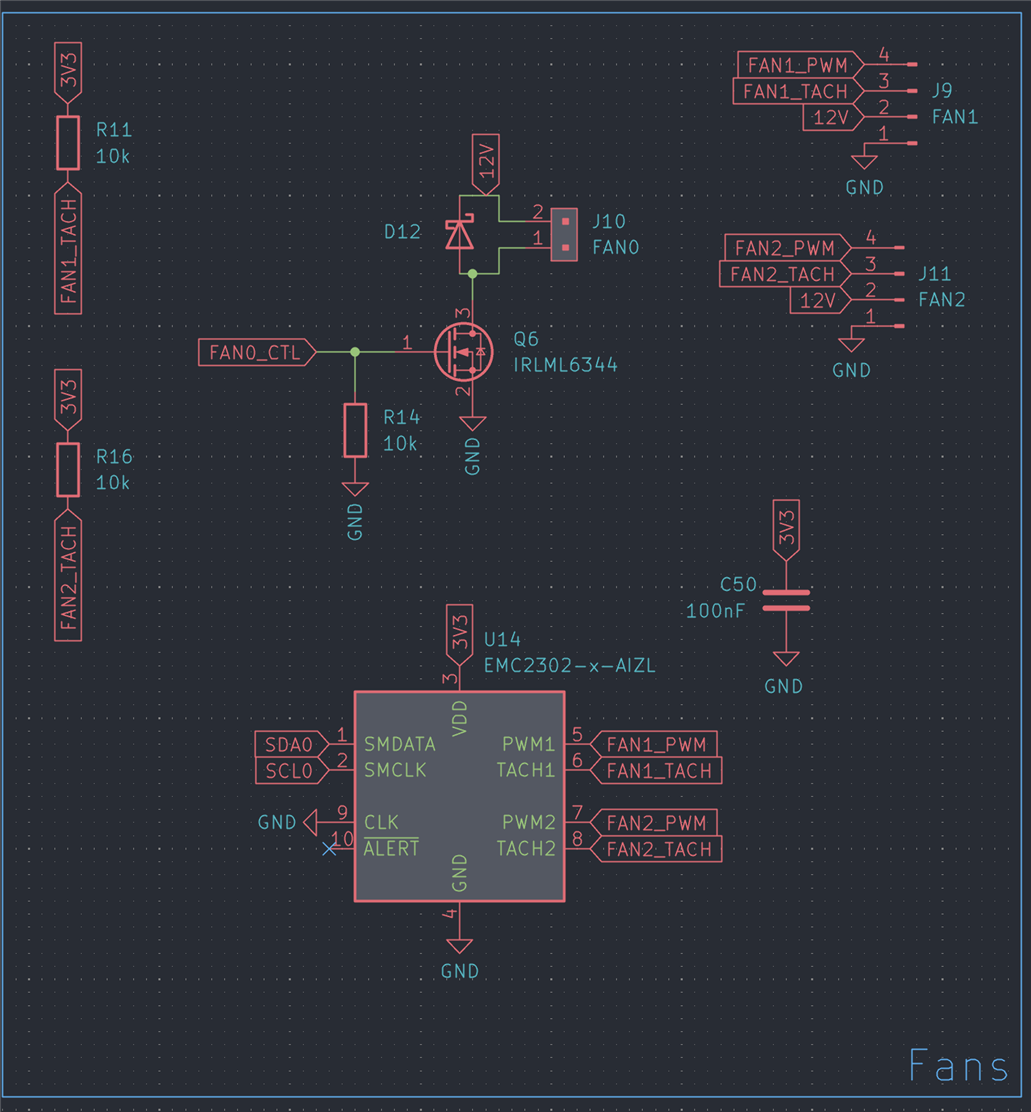
The board also supports two 12V, 4-pin fans, using an EMC2302 for control and monitoring. This chip is essentially identical to the EMC2305, except for channel count.
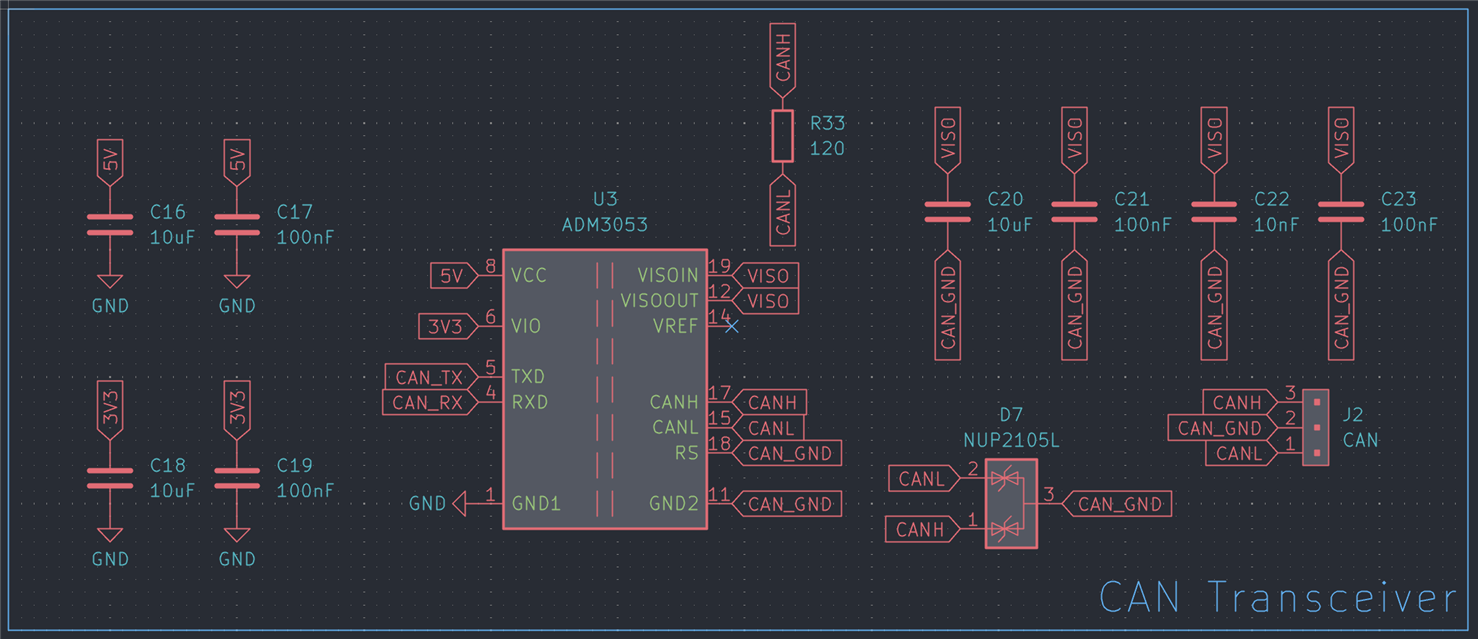
Having a CAN bus interface is always useful, so I added an isolated one for good measure. The choice for this was the ADM3053, which I also used on the Compute Unit, to later hook up to the car’s CAN network.
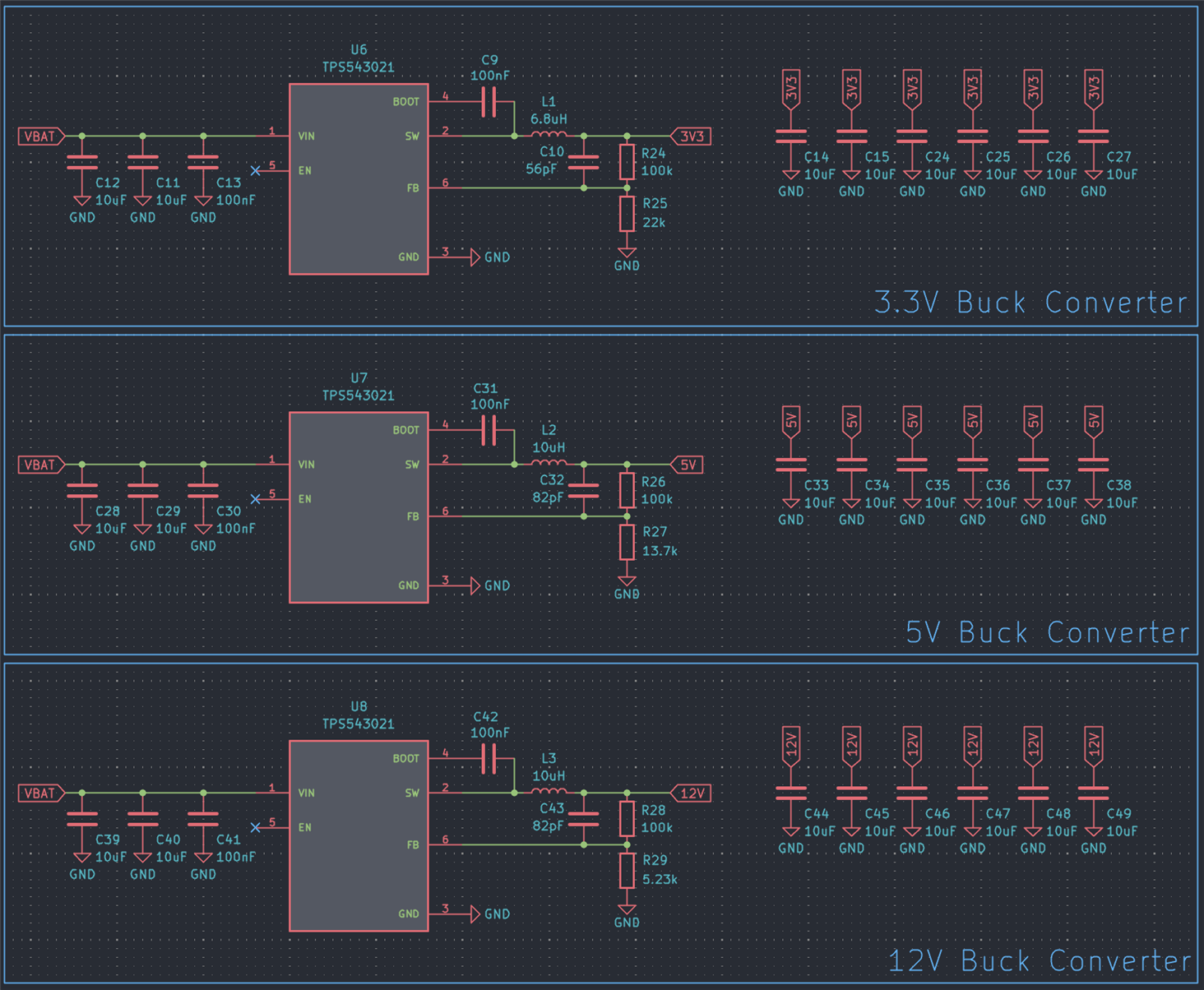
The power rails are created using three TPS543021 buck converter ICs.
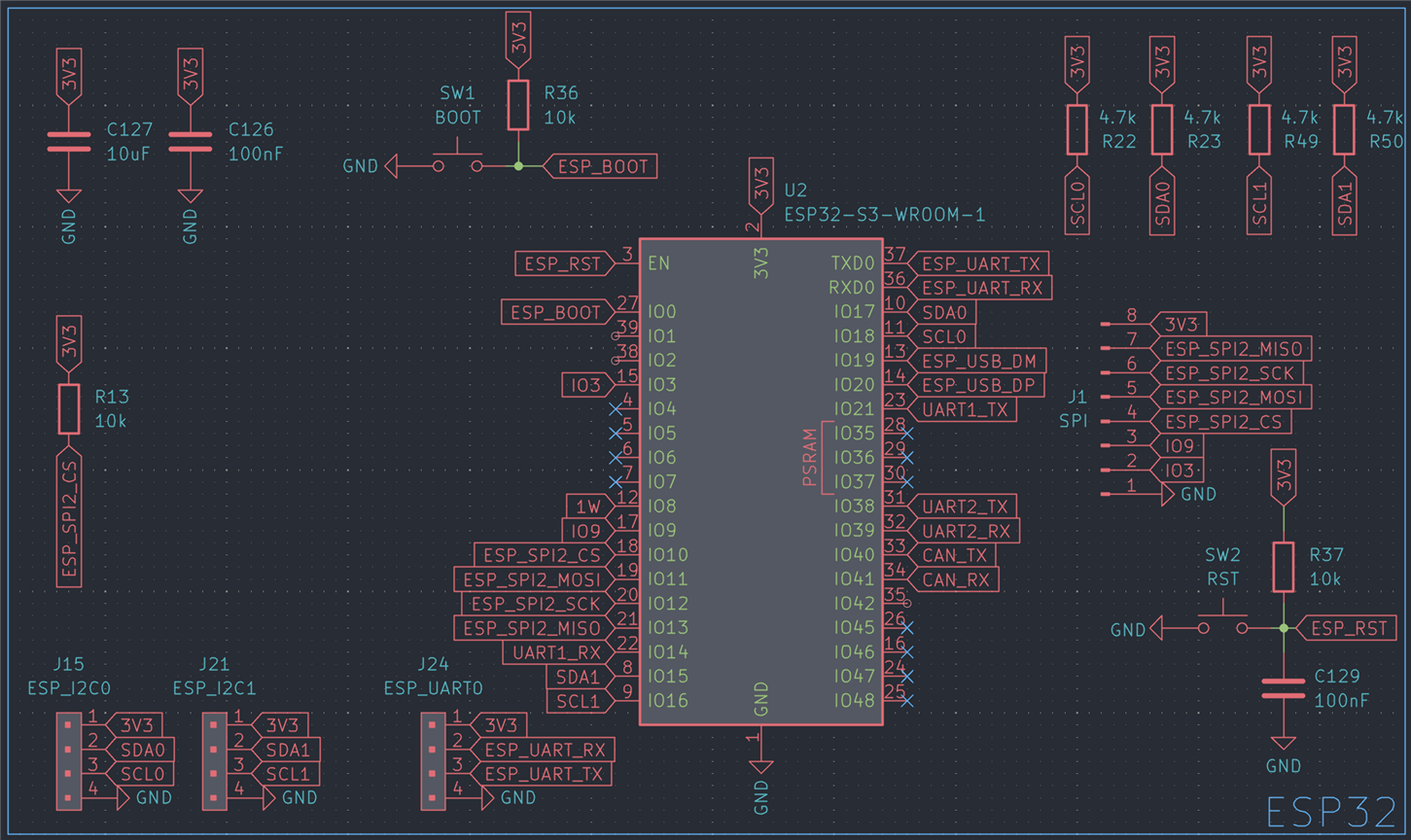
I went with an ESP32-S3 here too. I needed Bluetooth capability to communicate with the BMS inside the LiFePO4 battery, and it makes sense to use the same MCU as in the Compute Unit, to make code reuse easier, and be able to focus on mastering a single device.
For debugging, I added an isolated USB interface to the ESP32-S3’s native USB port, using an ADUM3160, which is a USB1.1 isolator IC.

This is what the layout ended up looking like:
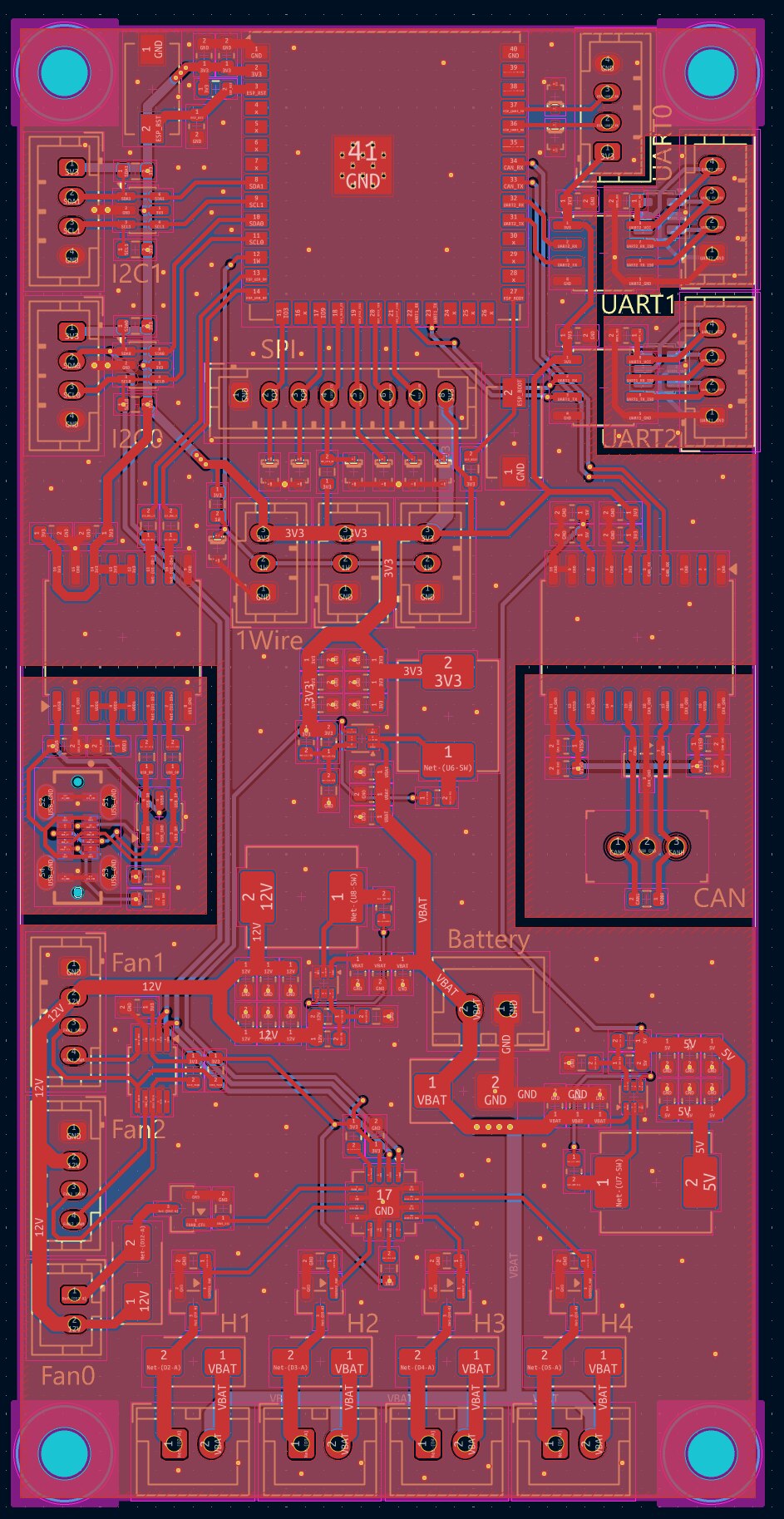
The fan and heater control is in the bottom, power supplies in the middle, MCU at the top. The Single Pair Ethernet transceiver is not on this board, as I didn’t have enough space for it, so I just added an 8 pin JST-PH connector, and a separate PCB will have the ADIN1110 and various other SPE related components, just like with the Compute Unit.

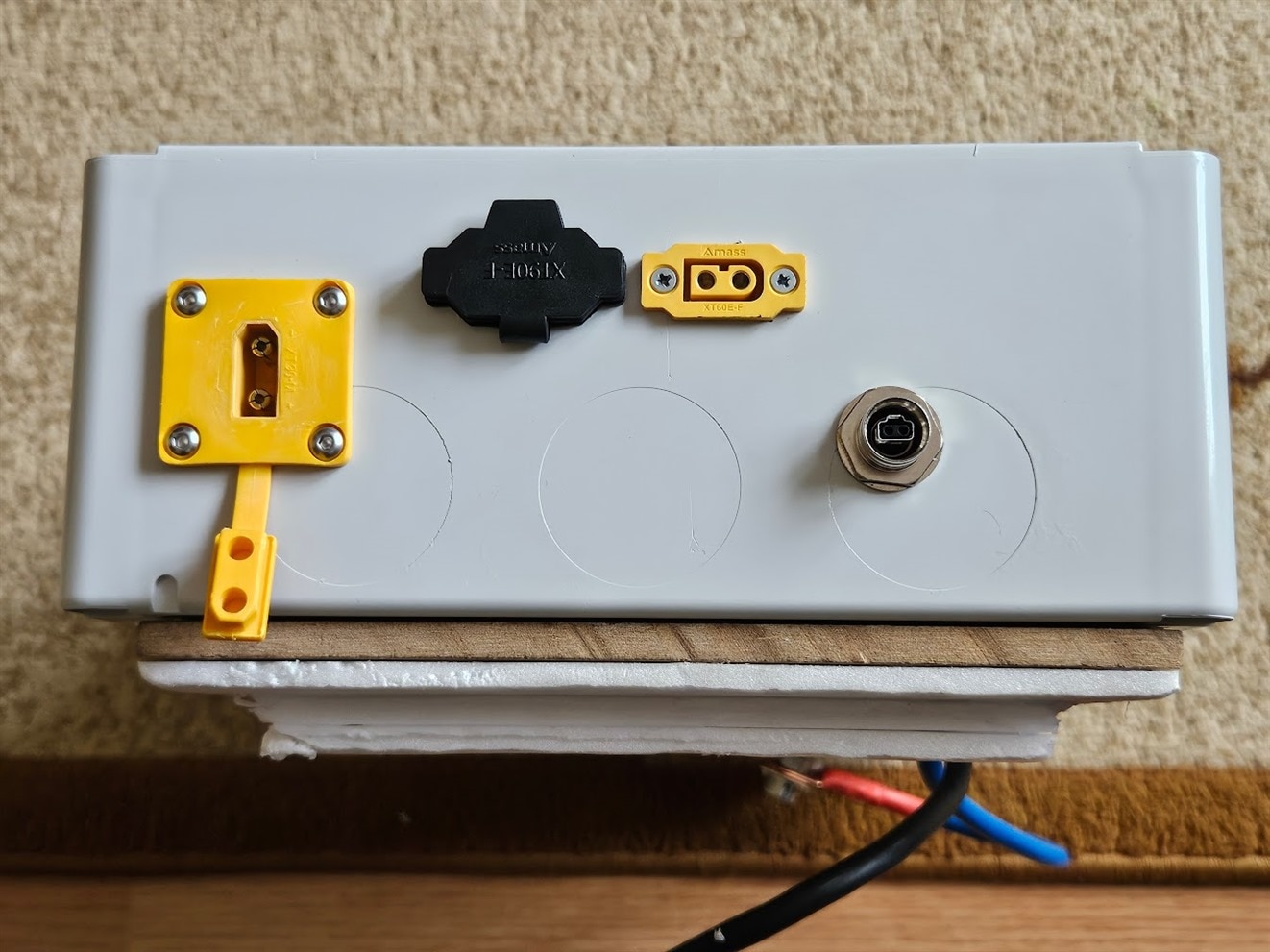
I added the new controller board to the charger box, and also drilled a hole for the Single Pair Ethernet connector.

Here's the block diagram:
Car Wiring
The next step was wiring up everything in the car for the charger. This involved routing the Single Pair Ethernet cable from the trunk to the glovebox in the front, and also installing a robust, 40A capable 12V source for the charger.
To do this properly, another grey box was added, housing a relay and some fuses. The purpose of the relay is to only supply 12V to the charger when the engine is running. Technically, this is not required, as the Orion XS and the Charging Controller board both implement a low voltage cutoff, but better safe than sorry. This also provides a simple way to hook up other loads later, like a high power laptop charger or cabin heater in the winter, if I ever decide to add one.
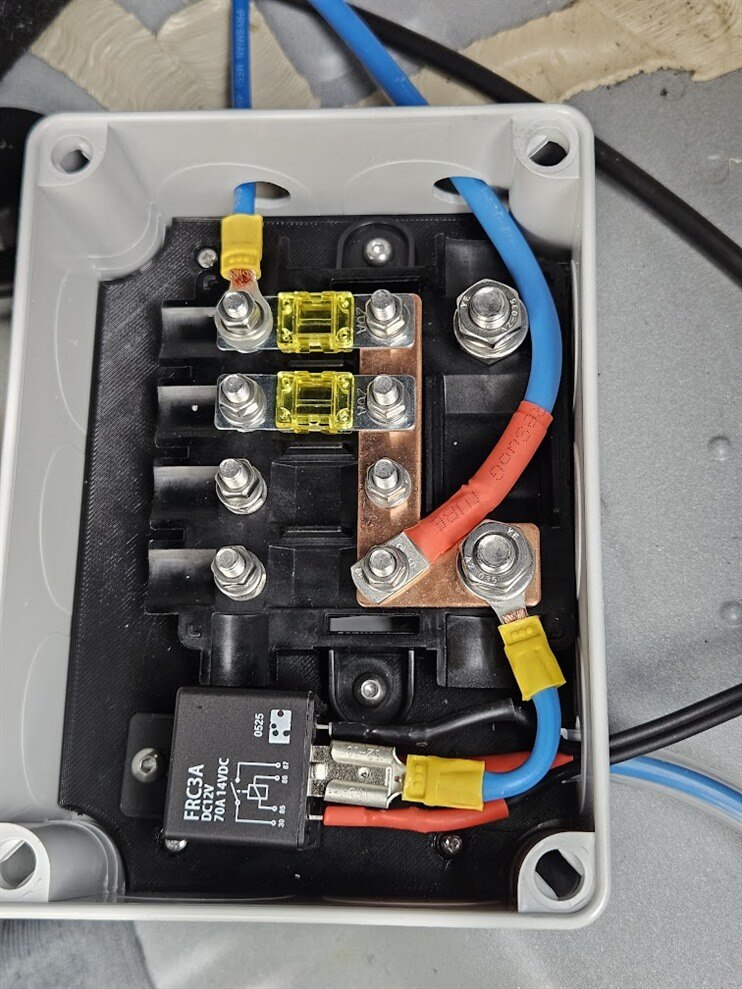
The thick blue cable exiting at the top is the 12V input to the Orion XS. It is not fused in this box, to prevent unnecessary voltage drop. This is safe, because the entire setup got a 40A fuse, right at the battery terminals.
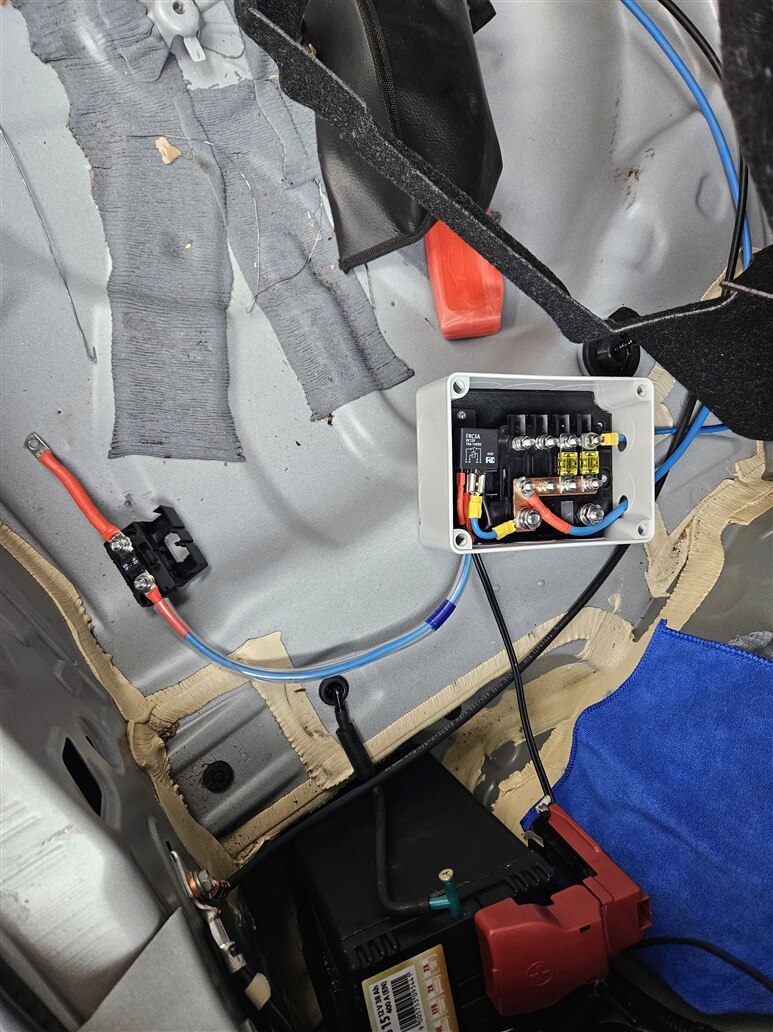
The smaller blue cable exiting at the top is for a subwoofer, which got a second, 20A fuse.
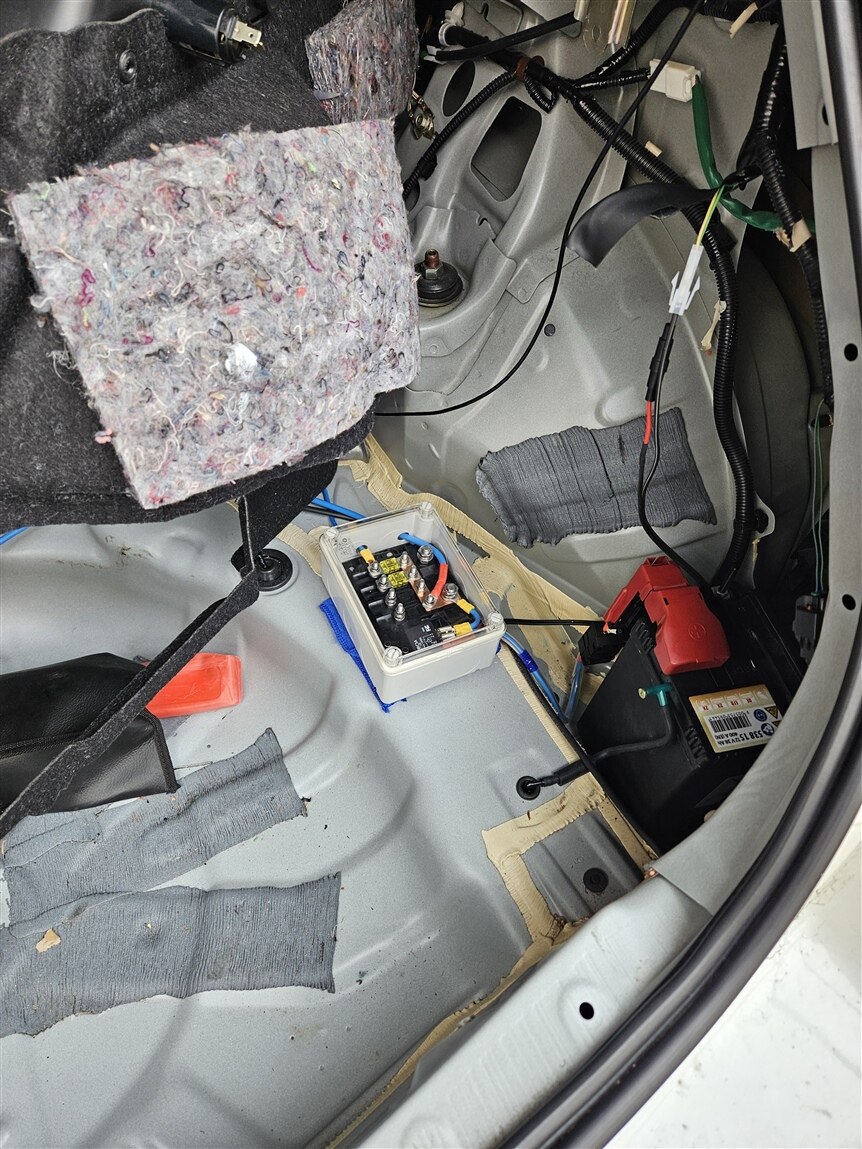
Then, I mounted the cameras. I had quite a lot of trouble with USB3 interference for the front camera, mainly regarding the GPS setup. The solution ended up being a very fancy, USB3.2 Gen2 cable, with USB-C connectors on both ends.
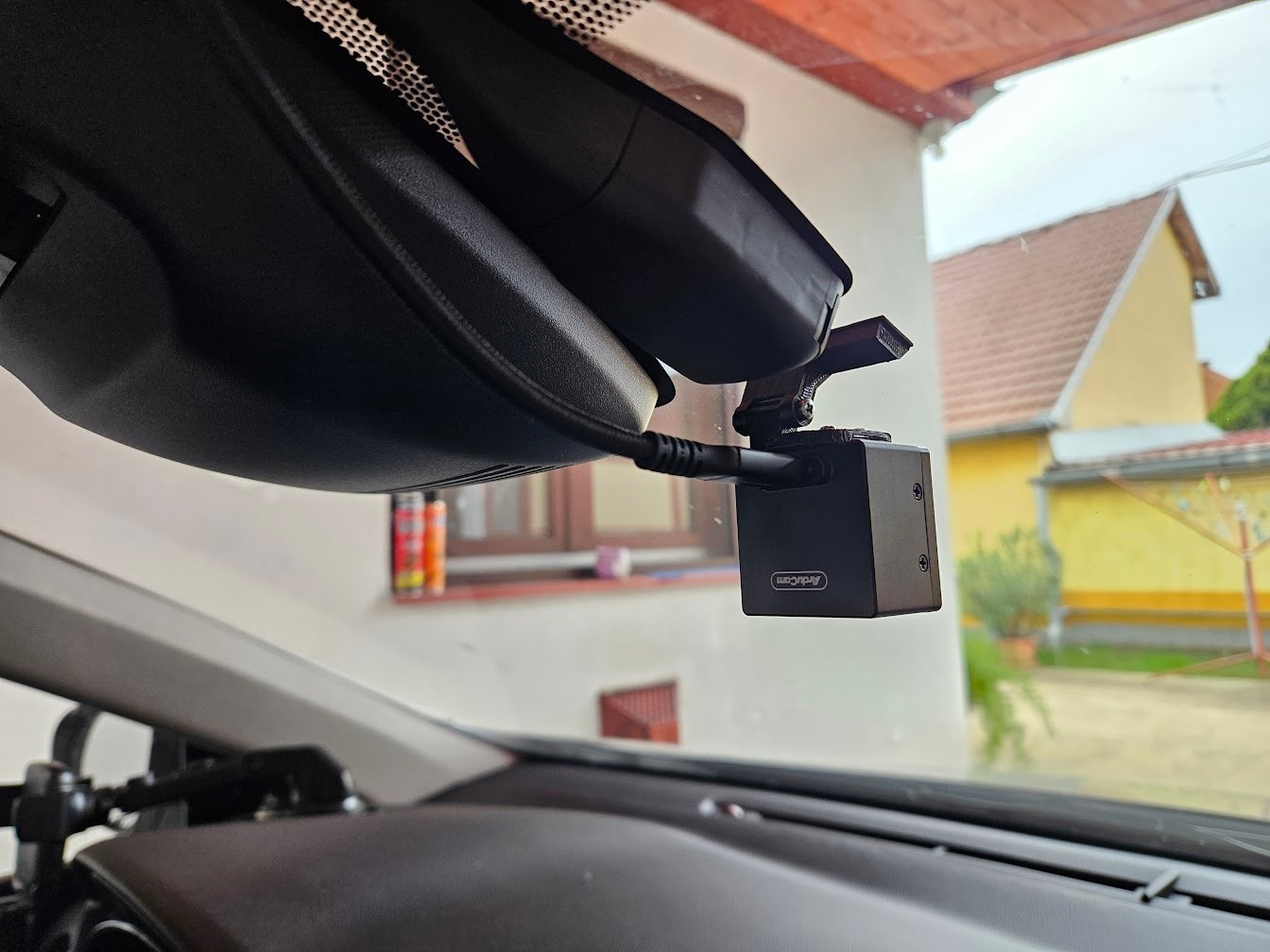
The rear and side cameras are only USB2, so I didn’t have any issues regarding those.

I added a 2J Antennas 2J4950PGF antenna to the windshield, which includes one 4G antenna, one 2.4/5GHz antenna, and an active GNSS antenna.
The cabling for the antennas and front camera were routed down the A pillar, to the glovebox.

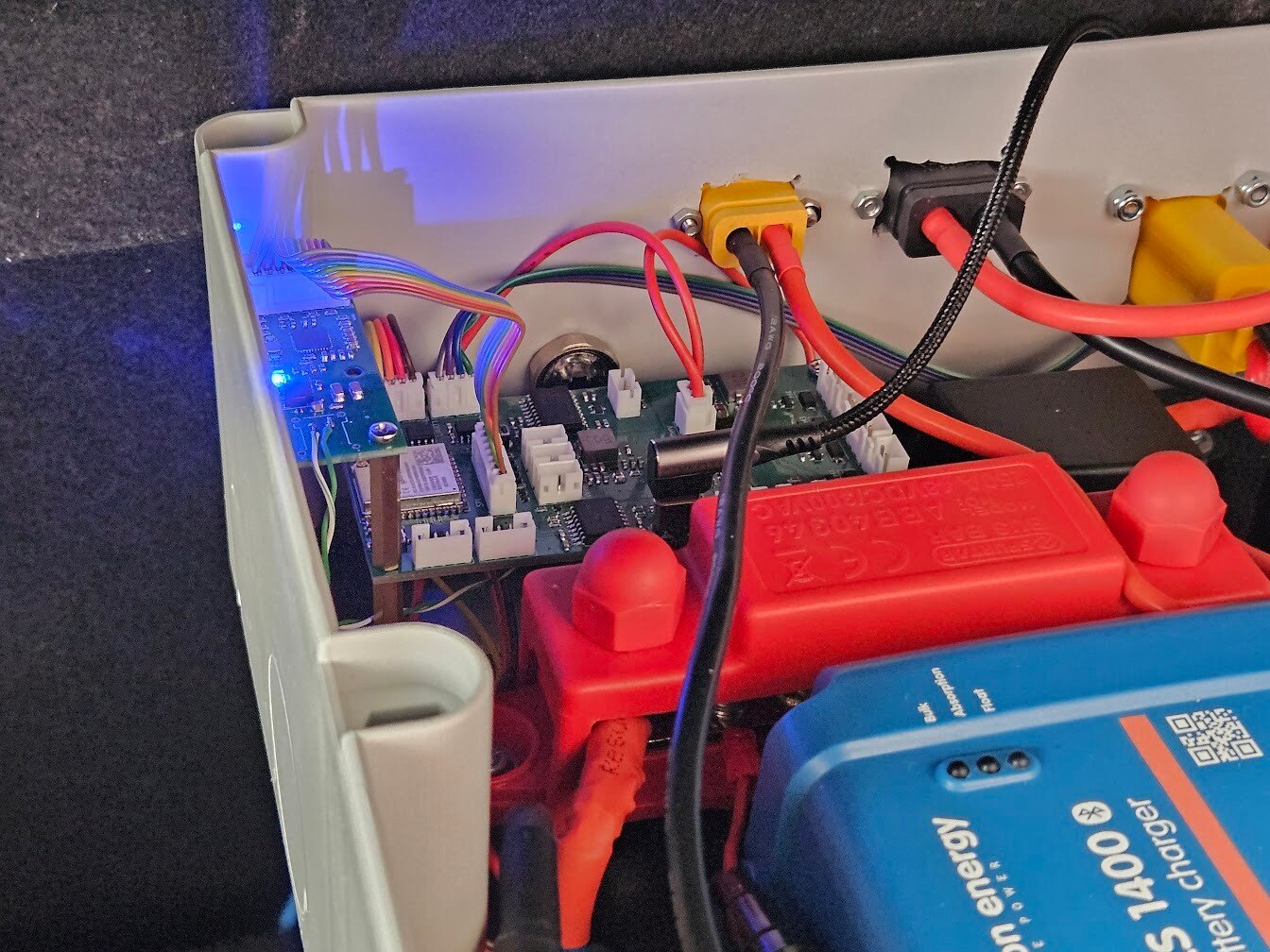
With everything wired, this is what the glovebox looked like.
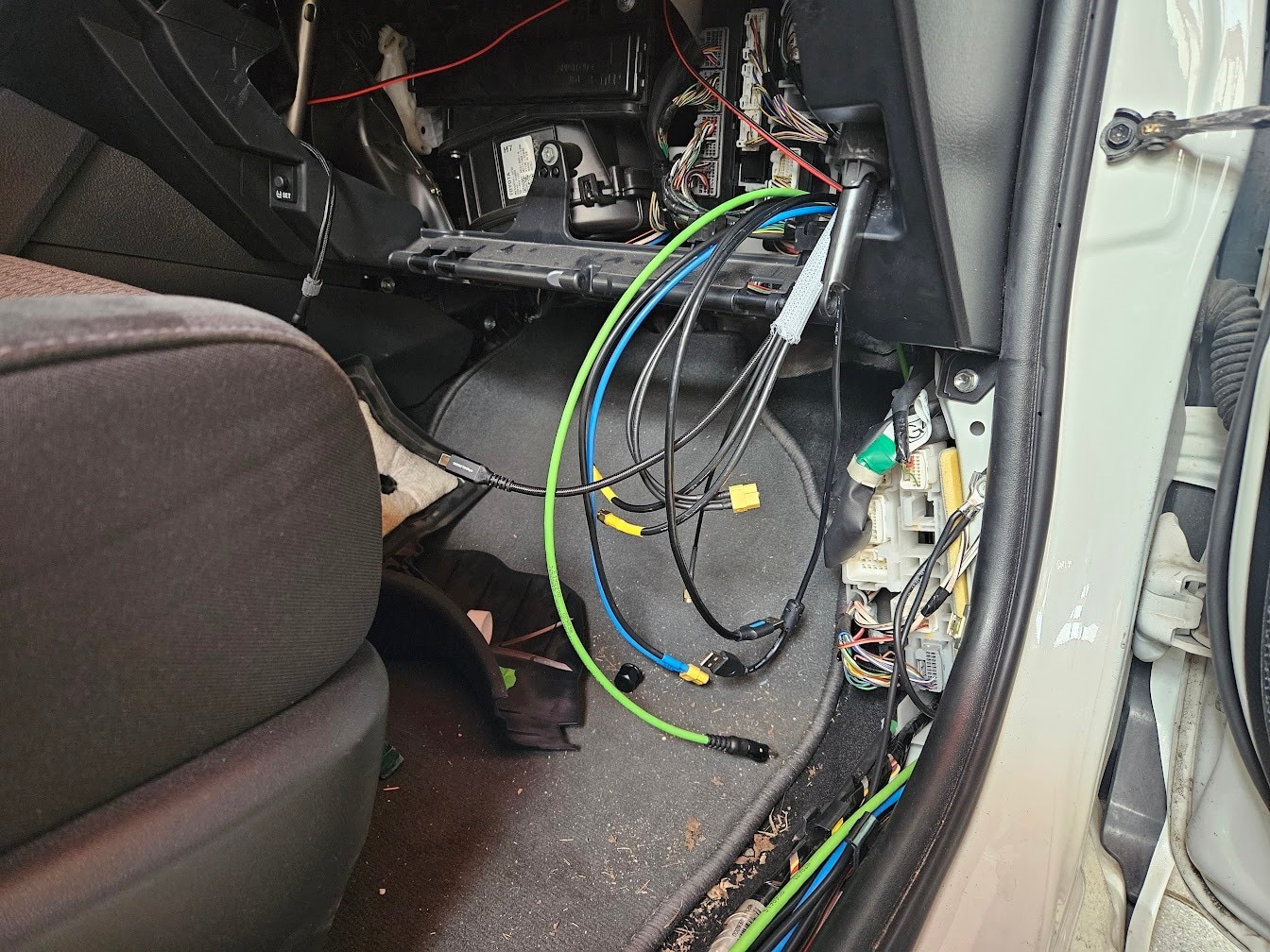
I temporarily added a USB connection to the Charger Control PCB, so I can debug the ESP32. This will be removed once the firmware is up and running, and all communication will happen over SPE.
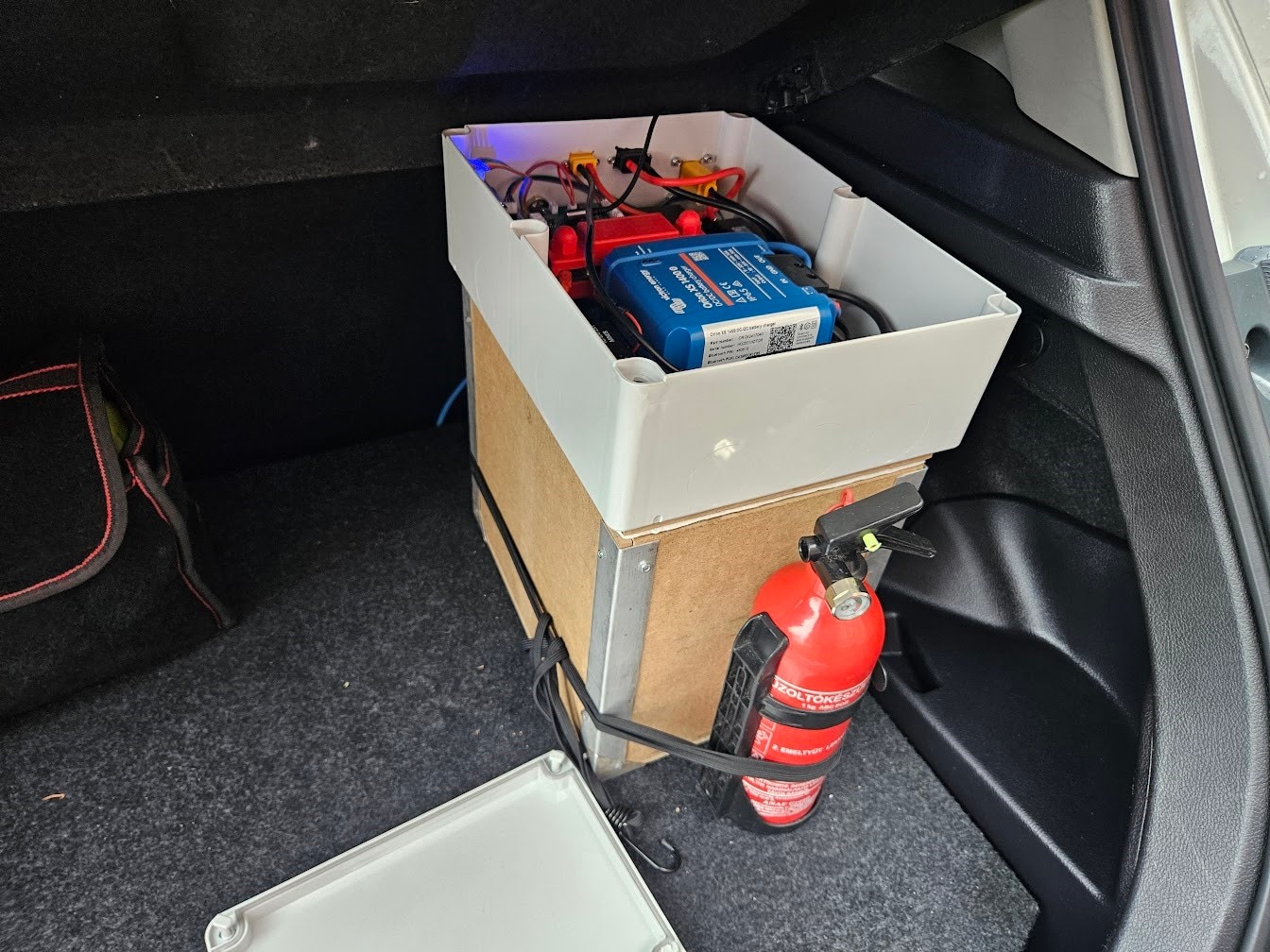
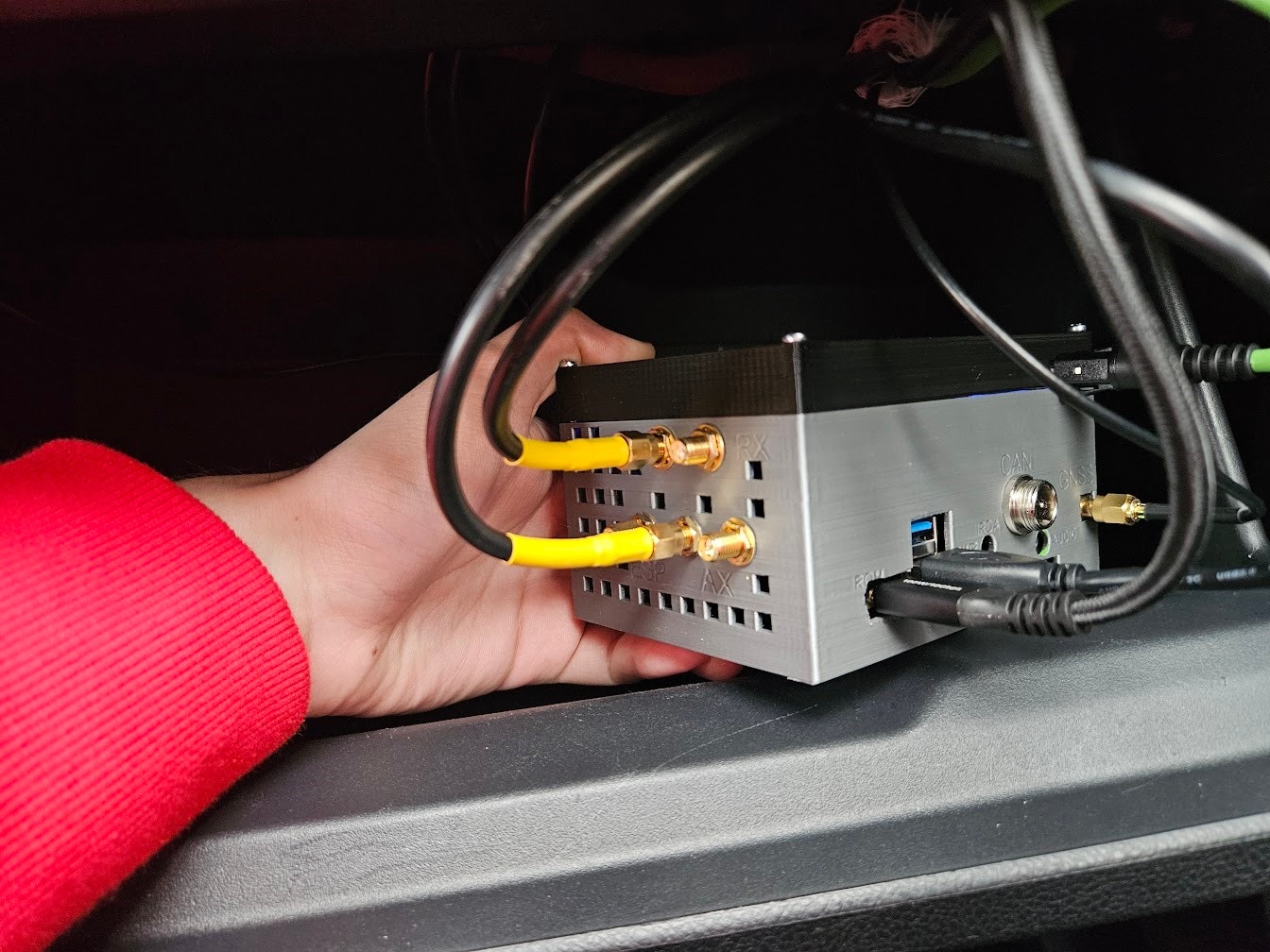
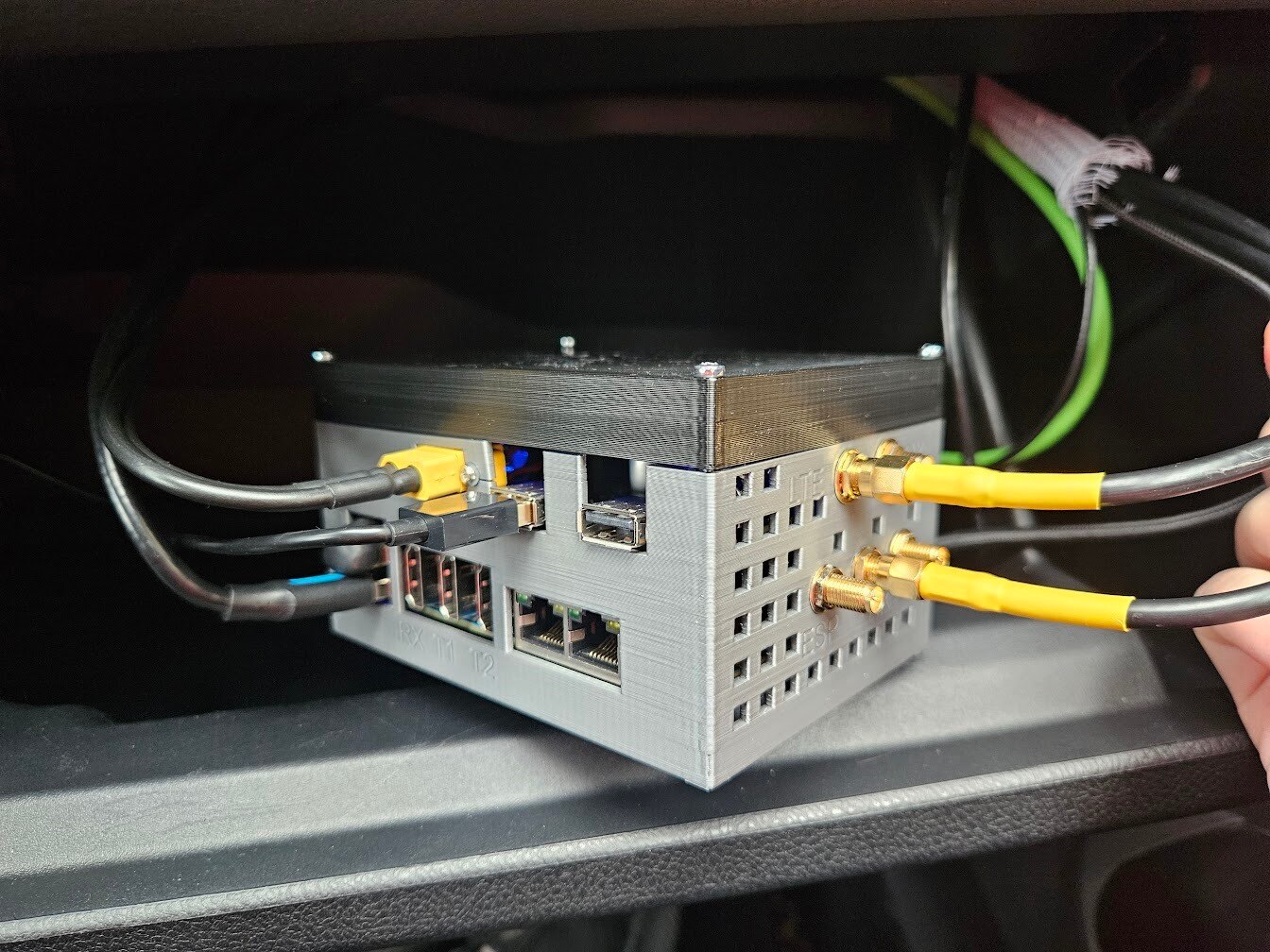
Then I wired up the Compute Unit in the glovebox, to finish the hardware.
Software
This part was a massive undertaking, and I'd need several blog posts to cover everything in sufficient detail, so I'll skip to the more interesting portions.
Video Streaming
This is the most crucial part of this entire project, so let's talk about the implementation.
I ended up using GStreamer and Python for the video streaming code. I managed to piece together a working GStreamer RKMPP and RKRGA plugin, which are the hardware video encoder and video processing blocks in the RK3588.
I also ported the HQDN3D denoising algorithm from avisynth/ffmpeg to GStreamer, because noisy video and compression don't go well together.
The hardware accelerated H265 encoding was temporarily put aside, because I still need to tune denoising and other preprocessing steps, and software H264 handles experimentation way better.
This is what the current pipeline looks like:
- Ingest video from camera
- Crop the bottom 184 pixels
- Flip the video
- Drop every second frame to get 15FPS
- Convert into I420
- Run HQDN3D noise filtering
- Encode with H264
- Send stream to server
The exact GStreamer pipeline:
pipeline_str = (
            f"v4l2src device={DEVICE_PATH} name=src ! "
            "video/x-raw,format=YUY2,width=1920,height=1080,framerate=30/1 ! "
            "videocrop top=184 ! "
            "videoflip video-direction=2 ! "
            "queue ! "
            "videorate ! video/x-raw,framerate=15/1 ! "
            "videoconvert ! video/x-raw,format=I420 ! "
            "tee name=t "

            # --- Branch 1: ML stream to python Syncbuf ---
            "t. ! queue max-size-bytes=0 max-size-buffers=100 max-size-time=0 ! "
            "hqdn3d luma-spatial=4 chroma-spatial=8 luma-temporal=6 chroma-temporal=8 ! "
            "x264enc name=enc speed-preset=veryfast key-int-max=30 pass=qual quantizer=24 bitrate=12000 vbv-buf-capacity=4000 noise-reduction=0 aud=true ! "
            "h264parse config-interval=-1 ! "
            "mpegtsmux name=mux alignment=7 pat-interval=2000 pmt-interval=2000 ! "
            "appsink name=sink_stream emit-signals=True sync=False "

            # --- Branch 2: Lossless Dataset Tap ---
            "t. ! queue max-size-bytes=0 max-size-buffers=30 max-size-time=0 leaky=downstream ! "
            "appsink name=raw_sink emit-signals=True sync=False"
)
There is also a second output stream, which does not have noise filtering or H264 encoding. I use this to gather high quality footage to an external 1TB SSD in the car, with hopes to later train an AI model to restore some details and de-artifact the H264 streams.
There's also some statistics logging to InfluxDB. Here's the entire front camera code:
import sys
import time
import signal
import threading
import os
from datetime import datetime
from typing import Dict, Optional
import gi
gi.require_version('Gst', '1.0')
from gi.repository import Gst, GLib
import influxdb_client
from influxdb_client.client.write_api import SYNCHRONOUS
from SyncbufSourceV2 import SyncbufSourceV2

# --- Configuration ---
DEVICE_PATH = "/dev/v4l/by-id/usb-Arducam_Arducam_B0624_3MP_HDR_Arducam_20260227_0001-video-index0"
SERVER_URL = "tcp://10.255.3.2:5555"

# --- SSD Config ---
DATASET_MOUNT_POINT = "/mnt/ssd"
SSD_UUID = "bb8a9aab-ac7b-4a1f-b8d8-884b0e652803"
SSD_DEV_PATH = f"/dev/disk/by-uuid/{SSD_UUID}"

# Resiliency
WATCHDOG_TIMEOUT = 5.0
STATUS_PRINT_INTERVAL = 3

# InfluxDB Config
INFLUXDB_URL = "10.253.0.5:8086"
INFLUXDB_TOKEN = "x"
INFLUXDB_ORG = "org"
INFLUXDB_BUCKET = "ascs"
INFLUXDB_TIMEOUT = 2000

Gst.init(None)

class StatsCollector:
    """Thread-safe shared state for tracking bandwidth and framerate."""
    def __init__(self):
        self.lock = threading.Lock()
        self.total_bytes = 0
        self.frame_count = 0
        self.last_buffer_ts = 0

    def update(self, byte_size: int):
        with self.lock:
            self.total_bytes += byte_size
            self.frame_count += 1
            self.last_buffer_ts = time.time()

    def get_last_ts(self):
        with self.lock:
            return self.last_buffer_ts

    def get_snapshot(self) -> Dict[str, int]:
        with self.lock:
            return {
                "total_bytes": self.total_bytes,
                "frame_count": self.frame_count,
            }

class GStreamerStreamer:
    def __init__(self):
        self.syncbuf = SyncbufSourceV2(SERVER_URL, write_callback=self._write_callback)
        self.stats = StatsCollector()

        # Main Loop for GStreamer Bus handling
        self.loop = GLib.MainLoop()

        # Two entirely decoupled pipelines
        self.pipeline: Optional[Gst.Pipeline] = None
        self.dataset_pipeline: Optional[Gst.Pipeline] = None

        self.running = True
        self.recording = False

        # InfluxDB Init
        self.influx_client = None
        self.write_api = None
        self._init_influx()

        # Start background threads
        self.influx_thread = threading.Thread(target=self._influx_worker, daemon=True)
        self.influx_thread.start()

        self.watchdog_thread = threading.Thread(target=self._watchdog_worker, daemon=True)
        self.watchdog_thread.start()

        self.ssd_thread = threading.Thread(target=self._ssd_worker, daemon=True)
        self.ssd_thread.start()

    def _init_influx(self):
        try:
            self.influx_client = influxdb_client.InfluxDBClient(
                url=INFLUXDB_URL,
                token=INFLUXDB_TOKEN,
                org=INFLUXDB_ORG,
                timeout=INFLUXDB_TIMEOUT
            )
            self.write_api = self.influx_client.write_api(write_options=SYNCHRONOUS)
            print("InfluxDB Client initialized.")
        except Exception as e:
            print(f"Failed to init InfluxDB: {e}")

    def _write_callback(self, size):
        pass

    def build_main_pipeline(self):
        """Builds the primary ML stream pipeline running 24/7."""
        pipeline_str = (
            f"v4l2src device={DEVICE_PATH} name=src ! "
            "video/x-raw,format=YUY2,width=1920,height=1080,framerate=30/1 ! "
            "videocrop top=184 ! "
            "videoflip video-direction=2 ! "
            "queue ! "
            "videorate ! video/x-raw,framerate=15/1 ! "
            "videoconvert ! video/x-raw,format=I420 ! "
            "tee name=t "

            # --- Branch 1: ML stream to python Syncbuf ---
            "t. ! queue max-size-bytes=0 max-size-buffers=100 max-size-time=0 ! "
            "hqdn3d luma-spatial=4 chroma-spatial=8 luma-temporal=6 chroma-temporal=8 ! "
            "x264enc name=enc speed-preset=veryfast key-int-max=30 pass=qual quantizer=24 bitrate=12000 vbv-buf-capacity=4000 noise-reduction=0 aud=true ! "
            "h264parse config-interval=-1 ! "
            "mpegtsmux name=mux alignment=7 pat-interval=2000 pmt-interval=2000 ! "
            "appsink name=sink_stream emit-signals=True sync=False "

            # --- Branch 2: Lossless Dataset Tap ---
            # Leaky queue ensures if RK3588 struggles to encode FFV1, this queue drops frames here, keeping the ML stream perfectly smooth.
            "t. ! queue max-size-bytes=0 max-size-buffers=30 max-size-time=0 leaky=downstream ! "
            "appsink name=raw_sink emit-signals=True sync=False"
        )

        print("Building Main Pipeline...")
        try:
            self.pipeline = Gst.parse_launch(pipeline_str)
        except Exception as e:
            print(f"Error building pipeline: {e}")
            sys.exit(1)

        # Connect Sinks
        sink_stream = self.pipeline.get_by_name("sink_stream")
        sink_stream.connect("new-sample", self._on_stream_sample)

        raw_sink = self.pipeline.get_by_name("raw_sink")
        raw_sink.connect("new-sample", self._on_raw_sample)

        # Connect Bus
        bus = self.pipeline.get_bus()
        bus.add_signal_watch()
        bus.connect("message", self._on_bus_message)

    def _start_dataset_pipeline(self):
        """Dynamically spins up the dataset pipeline when SSD is detected."""
        splitmux_time_ns = 60000000000
        dataset_str = (
            "appsrc name=dataset_src is-live=true format=time ! "
            "videoconvert ! " # Safety net for caps negotiation
            "avenc_ffv1 ! "
            f"splitmuxsink name=splitmux muxer-factory=matroskamux max-size-time={splitmux_time_ns}"
        )
        try:
            self.dataset_pipeline = Gst.parse_launch(dataset_str)

            splitmux = self.dataset_pipeline.get_by_name("splitmux")
            splitmux.connect("format-location", self._on_format_location)

            bus = self.dataset_pipeline.get_bus()
            bus.add_signal_watch()
            bus.connect("message", self._on_dataset_bus_message)

            self.dataset_pipeline.set_state(Gst.State.PLAYING)
            self.recording = True
        except Exception as e:
            print(f"Failed to start dataset pipeline: {e}")

    def _stop_dataset_pipeline(self):
        """Gracefully destroys the dataset pipeline."""
        self.recording = False
        if self.dataset_pipeline:
            self.dataset_pipeline.set_state(Gst.State.NULL)
            self.dataset_pipeline = None

    def _on_format_location(self, splitmux, fragment_id):
        """Called by splitmuxsink every 60 seconds to name the new file."""
        timestamp = datetime.now().strftime("%Y-%m-%d_%H-%M-%S")
        filepath = os.path.join(DATASET_MOUNT_POINT, f"dataset_{timestamp}_{fragment_id:04d}.mkv")
        print(f"SSD Write: Starting new dataset chunk -> {filepath}")
        return filepath

    def _on_stream_sample(self, sink):
        """Callback for the MAIN video stream (H264)."""
        sample = sink.emit("pull-sample")
        if not sample: return Gst.FlowReturn.ERROR

        buf = sample.get_buffer()
        success, map_info = buf.map(Gst.MapFlags.READ)
        if not success: return Gst.FlowReturn.ERROR

        try:
            data_copy = bytes(map_info.data)
            self.syncbuf.write(data_copy)
            self.stats.update(len(data_copy))
        except Exception as e:
            print(f"Stream write error: {e}")
            return Gst.FlowReturn.ERROR
        finally:
            buf.unmap(map_info)

        return Gst.FlowReturn.OK

    def _on_raw_sample(self, sink):
        """Callback for the dataset branch. Forwards pointers zero-copy."""
        sample = sink.emit("pull-sample")
        if not sample: return Gst.FlowReturn.ERROR

        # If SSD is mounted, instantly push the pointer across the bridge
        if self.recording and self.dataset_pipeline:
            appsrc = self.dataset_pipeline.get_by_name("dataset_src")
            if appsrc:
                try:
                    appsrc.emit("push-sample", sample)
                except Exception:
                    pass

        return Gst.FlowReturn.OK

    def _on_bus_message(self, bus, message):
        t = message.type
        if t == Gst.MessageType.EOS:
            print("End of Stream received.")
            self.quit()
        elif t == Gst.MessageType.ERROR:
            err, debug = message.parse_error()
            print(f"GStreamer Main Pipeline Error: {err}")
            self.quit()

    def _on_dataset_bus_message(self, bus, message):
        t = message.type
        if t == Gst.MessageType.ERROR:
            err, debug = message.parse_error()
            print(f"Dataset Branch Error (SSD Yanked or Full?): {err}")
            # Do NOT crash the script. Just stop the isolated dataset pipeline!
            self._stop_dataset_pipeline()

    def _ssd_worker(self):
        """Monitors the physical presence of the external SSD bypassing VFS mount cache."""
        print("SSD Monitor started.")
        was_recording = False

        while self.running:
            # 1. Is the hardware physically plugged in? (Bypasses ghost mounts)
            physical_present = os.path.exists(SSD_DEV_PATH)

            # 2. Is the file system mounted?
            is_mounted = os.path.ismount(DATASET_MOUNT_POINT)

            # Start logic: Must be physically present AND mounted
            if physical_present and is_mounted and not was_recording:
                print("SSD DETECTED & MOUNTED. Booting isolated lossless dataset pipeline.")
                self._start_dataset_pipeline()
                was_recording = True

            # Stop logic: Hardware physically vanished!
            elif not physical_present and was_recording:
                print("SSD PHYSICALLY DISCONNECTED. Destroying pipeline and releasing file handles...")
                self._stop_dataset_pipeline() # Closes the file, allowing Linux to kill the zombie mount
                was_recording = False

            time.sleep(1)

    def _watchdog_worker(self):
        print("Watchdog started.")
        while self.running:
            time.sleep(1)
            last_ts = self.stats.get_last_ts()
            if last_ts == 0:
                if time.time() - self.start_time > 10:
                     print("Watchdog: Startup timeout.")
                     self.quit()
                continue
            if time.time() - last_ts > WATCHDOG_TIMEOUT:
                print(f"Watchdog: No data for {WATCHDOG_TIMEOUT}s. Exiting.")
                self.quit()

    def _influx_worker(self):
        prev_bytes = 0
        prev_time = time.time()
        while self.running:
            time.sleep(STATUS_PRINT_INTERVAL)
            now = time.time()
            dt = now - prev_time
            if dt <= 0: dt = 0.001

            stats = self.stats.get_snapshot()
            curr_bytes = stats['total_bytes']

            if curr_bytes < prev_bytes: delta_bytes = curr_bytes
            else: delta_bytes = curr_bytes - prev_bytes

            instant_bitrate_kbps = (delta_bytes * 8) / dt / 1000.0
            prev_bytes = curr_bytes
            prev_time = now

            current_buffer_size = self.syncbuf.buffer_size()

            if self.write_api:
                try:
                    p = influxdb_client.Point("streaming") \
                        .field("front_bitrate", float(instant_bitrate_kbps)) \
                        .field("front_buffer", int(current_buffer_size))
                    self.write_api.write(bucket=INFLUXDB_BUCKET, org=INFLUXDB_ORG, record=p)
                except Exception:
                    pass

    def run(self):
        self.start_time = time.time()
        print(f"Starting GStreamer -> {SERVER_URL}")
        self.build_main_pipeline()

        ret = self.pipeline.set_state(Gst.State.PLAYING)
        if ret == Gst.StateChangeReturn.FAILURE:
            print("Unable to set main pipeline to playing state.")
            sys.exit(1)

        try:
            self.loop.run()
        except KeyboardInterrupt:
            pass
        finally:
            self.cleanup()

    def quit(self):
        self.running = False
        self.loop.quit()

    def cleanup(self):
        print("Cleaning up...")
        if self.dataset_pipeline:
            self.dataset_pipeline.set_state(Gst.State.NULL)
        if self.pipeline:
            self.pipeline.set_state(Gst.State.NULL)
        if self.influx_client:
            self.influx_client.close()

if __name__ == "__main__":
    streamer = GStreamerStreamer()
    def signal_handler(sig, frame):
        print("\nShutdown signal received.")
        streamer.quit()
    signal.signal(signal.SIGINT, signal_handler)
    signal.signal(signal.SIGTERM, signal_handler)
    streamer.run()
The video streaming protocol is quite barebones for now, but it has been working reliably so far. This is the sender side:
import io, time, zmq, collections, hashlib, threading, struct, random
from typing import Deque

MAX_BUF_SIZE = 512_000_000 # 512MB
ACK_NACK = b'\xFF\xFF\xFF\xFF'
HEADER_FORMAT = '<QI'  # stream_id(uint64), seq(uint32)
HEADER_SIZE = struct.calcsize(HEADER_FORMAT)
SEQ_MASK = 0xFFFFFFFF


class SyncbufSourceV2(io.BufferedIOBase):
    def __init__(self, server_address, write_callback = None, sync_callback = None):
        self.bytes_buffer = collections.deque()
        self.buffer_lock = threading.Lock()
        self.server_address = server_address
        self.write_callback = write_callback
        self.sync_callback = sync_callback
        self.stream_id = random.getrandbits(64)
        self.transmit_seq = 0
        self.sync_thread_run = True

        # Socket initialization
        self.zmq_context = zmq.Context()
        self.zmq_socket = None

        # Sync thread initialization
        self.sync_thread = threading.Thread(target=self.sync_loop)
        self.sync_thread.setDaemon(True)
        self.sync_thread.start()

    def buffer_size(self):
        with self.buffer_lock:
            return sum(len(chunk) for chunk in self.bytes_buffer)

    def stop_sync(self):
        self.sync_thread_run = False
        self.sync_thread.join()

    def start_sync(self):
        self.sync_thread_run = True
        # Treat a restarted sync thread as a new stream session.
        self.stream_id = random.getrandbits(64)
        self.transmit_seq = 0
        self.sync_thread = threading.Thread(target=self.sync_loop)
        self.sync_thread.setDaemon(True)
        self.sync_thread.start()

    def write(self, buf: bytes):
        with self.buffer_lock:
            self.bytes_buffer.append(buf)
        if self.write_callback:
            self.write_callback(len(buf))

    def trim_buffer(self):
        with self.buffer_lock:
            total_size = sum(len(chunk) for chunk in self.bytes_buffer)
            while total_size > MAX_BUF_SIZE and self.bytes_buffer:
                trimmed_chunk = self.bytes_buffer.popleft()
                trimmed_size = len(trimmed_chunk)
                total_size -= trimmed_size
                # print(f"Trimmed {trimmed_size} bytes from buffer")

    def init_zmq(self):
        self.zmq_socket = self.zmq_context.socket(zmq.REQ)
        self.zmq_socket.connect(self.server_address)
        self.zmq_socket.setsockopt(zmq.SNDTIMEO, 0)
        self.zmq_socket.setsockopt(zmq.LINGER, 0)

    def get_buffer_stats(self):
        with self.buffer_lock:
            return {
                "buffer_size": sum(len(chunk) for chunk in self.bytes_buffer),
                "buffer_len": len(self.bytes_buffer)
            }

    def zmq_socket_reset(self):
        if self.zmq_socket:
            self.zmq_socket.setsockopt(zmq.LINGER, 0)
            self.zmq_socket.close()
        self.init_zmq()

    def zmq_reliable_communicate(self, message):
        if not self.zmq_socket:
            self.init_zmq()

        try:
            self.zmq_socket.send(message)
        except zmq.ZMQError as e:
            print(f"ZMQ send error: {e}, resetting socket")
            self.zmq_socket_reset()
            # Try one more time after reset
            try:
                self.zmq_socket.send(message)
            except zmq.ZMQError as e:
                print(f"ZMQ send error after reset: {e}")
                return None

        start_time = time.time()

        while True:
            try:
                if self.zmq_socket.poll(1000) & zmq.POLLIN != 0:
                    return self.zmq_socket.recv()
            except zmq.ZMQError as e:
                print(f"ZMQ poll/recv error: {e}, resetting socket")
                self.zmq_socket_reset()
                return None

            if time.time() - start_time > 10:
                # We call the *now-threadsafe* trim_buffer
                self.trim_buffer()
                print("No ZMQ response received after 10 seconds, resetting socket")
                self.zmq_socket_reset()

                return None


    def sync_loop(self, target_size: int = 128_000, min_size: int = 16_000):
        while self.sync_thread_run:
            current_size = self.buffer_size()

            if current_size < min_size:
                time.sleep(0.05)
                continue

            if current_size > MAX_BUF_SIZE:
                 self.trim_buffer()

            header_bytes = struct.pack(HEADER_FORMAT, self.stream_id, self.transmit_seq)
            chunks = bytearray(header_bytes)

            with self.buffer_lock:
                while self.bytes_buffer and len(chunks) < target_size:
                    new_chunk = self.bytes_buffer.popleft()
                    chunks.extend(new_chunk)

            if len(chunks) <= HEADER_SIZE:
                time.sleep(0.05)
                continue

            # Append sha256 hash
            sha = hashlib.sha256()
            sha.update(chunks)
            digest = sha.digest()
            chunks.extend(digest[:4])

            while self.sync_thread_run:
                resp = self.zmq_reliable_communicate(bytes(chunks))

                if resp is None:
                    time.sleep(1)
                    continue

                if len(resp) != 4:
                    print(f"Invalid response length: {len(resp)}")
                    time.sleep(0.1)
                    continue

                if resp == ACK_NACK:
                    print("Server received mismatching hash")
                    time.sleep(0.1)
                    continue

                receive_seq = struct.unpack('<I', resp[:4])[0]
                if receive_seq != self.transmit_seq:
                    print(f"Transmit sequence and ACK mismatch. Transmit: {self.transmit_seq}, ACK: {receive_seq}")
                    time.sleep(0.1)
                    continue

                break

            self.transmit_seq = (self.transmit_seq + 1) & SEQ_MASK

            if self.sync_callback:
                self.sync_callback(len(chunks) - (HEADER_SIZE + 4))

    def detect_nal_units(self, buf: bytes):
        start_code_1 = b'\x00\x00\x01'
        start_code_2 = b'\x00\x00\x00\x01'
        start_codes = [start_code_1, start_code_2]

        start = 0
        while start < len(buf):
            for start_code in start_codes:
                start_pos = buf.find(start_code, start)
                if start_pos != -1:
                    next_start_pos = len(buf)
                    for next_start_code in start_codes:
                        next_start_pos = buf.find(next_start_code, start_pos + len(start_code))
                        if next_start_pos != -1:
                            break

                    if next_start_pos == -1:
                        nal_unit_size = len(buf) - start_pos - len(start_code)
                    else:
                        nal_unit_size = next_start_pos - start_pos - len(start_code)

                    nal_unit_type = buf[start_pos + len(start_code)] & 0x1F
                    print(f"Found NAL unit type: {nal_unit_type}, Size: {nal_unit_size} bytes")

                    start = start_pos + len(start_code)
                    break
            else:
                break
The receiver side neatly packages the stream into 10 minute .mkv segments, and writes them to disk.
import sys
import os
import time
import struct
import hashlib
import argparse
import threading
import subprocess
import signal
import zmq
from datetime import datetime, timedelta

# --- Configuration ---
SEGMENT_TIME = 600  # Split files every 10 minutes
ACK_NACK = b'\xFF\xFF\xFF\xFF'
HEADER_FORMAT = '<QI'  # stream_id(uint64), seq(uint32)
HEADER_SIZE = struct.calcsize(HEADER_FORMAT)
SEQ_MASK = 0xFFFFFFFF

class VideoReceiver:
    def __init__(self, port, dest_dir, prefix, fps):
        self.port = port
        self.dest_dir = os.path.abspath(dest_dir)
        self.prefix = prefix
        self.fps = fps

        self.running = True
        self.zmq_context = None
        self.socket = None

        # FFmpeg process handle
        self.ffmpeg_process = None

        # Protocol State
        self.current_stream_id = None
        self.expected_seq = None

        # Ensure the base destination exists immediately
        if not os.path.exists(self.dest_dir):
            try:
                os.makedirs(self.dest_dir, exist_ok=True)
            except OSError as e:
                print(f"[SYS] Fatal: Could not create destination directory {self.dest_dir}: {e}")
                sys.exit(1)

    def init_zmq(self):
        """Initializes (or re-initializes) the ZeroMQ Reply socket."""
        if self.socket:
            try:
                self.socket.close()
            except:
                pass

        if not self.zmq_context:
            self.zmq_context = zmq.Context()

        self.socket = self.zmq_context.socket(zmq.REP)
        # Bind to all interfaces on the specified port
        self.socket.bind(f"tcp://*:{self.port}")
        print(f"[ZMQ] Listening on port {self.port}")

    def directory_maintainer(self):
        """
        Background thread: Ensures 'YYYY_MM_DD' folders exist for today and tomorrow.
        FFmpeg requires the directory to exist BEFORE it attempts to write the next segment.
        """
        while self.running:
            try:
                now = datetime.now()
                # Check Today + Tomorrow to handle midnight rollover safely
                for dt in [now, now + timedelta(days=1)]:
                    folder_name = dt.strftime("%Y-%m-%d")
                    full_path = os.path.join(self.dest_dir, folder_name)
                    os.makedirs(full_path, exist_ok=True)
            except Exception as e:
                print(f"[DIR] Error ensuring directories: {e}")

            # Check every 60 seconds
            time.sleep(60)

    def get_ffmpeg_cmd(self):
        output_pattern = os.path.join(
            self.dest_dir,
            "%Y-%m-%d",
            f"{self.prefix}_%Y-%m-%d_%H-%M-%S.mkv"
        )

        return [
            "/home/mate/ffmpeg/ffmpeg-master-latest-linux64-gpl/bin/ffmpeg",
            "-y",
            #"-stats",
            #"-stats_period", "10",
            "-f", "mpegts",
            "-fflags", "+discardcorrupt",
            "-analyzeduration", "5000000",
            "-probesize", "5000000",
            "-i", "-",
            "-c:v", "copy",
            "-f", "segment",
            "-segment_time", str(SEGMENT_TIME),
            "-strftime", "1",
            "-reset_timestamps", "1",
            output_pattern
        ]


    def start_ffmpeg(self):
        """Starts or restarts the FFmpeg subprocess."""
        # Cleanup if already exists
        self.stop_ffmpeg()

        cmd = self.get_ffmpeg_cmd()
        cmd_str = " ".join(cmd)
        print(f"[FFMPEG] Starting: {cmd_str}")

        try:
            self.ffmpeg_process = subprocess.Popen(
                cmd,
                stdin=subprocess.PIPE,
                stderr=sys.stderr, # Pass stderr directly to parent's stderr (Journald)
                bufsize=10*1024*1024 # 10MB buffer for stdin pipe
            )
        except OSError as e:
            print(f"[FFMPEG] Failed to spawn process: {e}")

    def stop_ffmpeg(self):
        """Safely terminates the FFmpeg process."""
        if self.ffmpeg_process:
            if self.ffmpeg_process.stdin:
                try:
                    self.ffmpeg_process.stdin.close()
                except:
                    pass

            if self.ffmpeg_process.poll() is None:
                self.ffmpeg_process.terminate()
                try:
                    self.ffmpeg_process.wait(timeout=2)
                except subprocess.TimeoutExpired:
                    self.ffmpeg_process.kill()

            self.ffmpeg_process = None

    def write_to_ffmpeg(self, data):
        """
        Writes data to FFmpeg's stdin.
        Detects crashes and restarts automatically.
        """
        # 1. Check if process is alive
        if self.ffmpeg_process is None or self.ffmpeg_process.poll() is not None:
            print("[FFMPEG] Process is dead. Restarting...")
            self.start_ffmpeg()

        # 2. Try to write
        try:
            self.ffmpeg_process.stdin.write(data)
            self.ffmpeg_process.stdin.flush()
        except (BrokenPipeError, IOError):
            print("[FFMPEG] Pipe broken during write. Restarting...")
            self.start_ffmpeg()

            # Retry the write immediately so we don't lose this chunk
            try:
                if self.ffmpeg_process:
                    self.ffmpeg_process.stdin.write(data)
                    self.ffmpeg_process.stdin.flush()
            except Exception as e:
                # If it fails twice, we drop the chunk and wait for next loop
                print(f"[FFMPEG] Retry failed: {e}")

    def process_message(self, message):
        """
        Parses the custom protocol packet.
        Protocol: [StreamID (8 bytes)] + [Seq (4 bytes)] + [Video Data] + [Hash (4 bytes)]
        """
        if len(message) < HEADER_SIZE + 4:
            print(f"[PROTO] Error: Packet too short (<{HEADER_SIZE + 4} bytes).")
            return ACK_NACK

        # Slice the packet
        header_bytes = message[:HEADER_SIZE]
        video_data = message[HEADER_SIZE:-4]
        rec_hash = message[-4:]

        # Verify Hash
        sha = hashlib.sha256()
        sha.update(header_bytes)
        sha.update(video_data)
        calculated_hash = sha.digest()[:4]

        if rec_hash != calculated_hash:
            stream_id, seq = struct.unpack(HEADER_FORMAT, header_bytes)
            print(f"[PROTO] Hash Mismatch for stream={stream_id}, seq={seq}. Sending NACK.")
            return ACK_NACK

        # Parse header
        received_stream_id, received_seq = struct.unpack(HEADER_FORMAT, header_bytes)

        # Sender instance changed => deterministic stream restart.
        if self.current_stream_id is None:
            self.current_stream_id = received_stream_id
            self.expected_seq = received_seq
            print(f"[PROTO] New stream attached. stream={received_stream_id}, seq={received_seq}")
        elif received_stream_id != self.current_stream_id:
            print(
                f"[PROTO] Stream restart detected. "
                f"old_stream={self.current_stream_id}, new_stream={received_stream_id}. Restarting FFmpeg."
            )
            self.current_stream_id = received_stream_id
            self.expected_seq = received_seq
            self.stop_ffmpeg()
            self.start_ffmpeg()
            time.sleep(0.2)

        # Safety net in case protocol state was reset unexpectedly.
        if self.expected_seq is None:
            self.expected_seq = received_seq

        def u32_delta(start, end):
            return (end - start) & SEQ_MASK

        # Stop-and-Wait + loss-tolerant resync logic (modulo uint32 sequence numbers)
        if received_seq == self.expected_seq:
            # Good packet
            self.write_to_ffmpeg(video_data)
            self.expected_seq = (self.expected_seq + 1) & SEQ_MASK
            return struct.pack('<I', received_seq)  # ACK

        forward_gap = u32_delta(self.expected_seq, received_seq)
        backward_gap = u32_delta(received_seq, self.expected_seq)

        # Treat "ahead" as packet loss; consume and move on.
        if forward_gap < backward_gap:
            print(f"[PROTO] Seq jump. Expected {self.expected_seq}, Got {received_seq}. Resyncing.")
            self.write_to_ffmpeg(video_data)
            self.expected_seq = (received_seq + 1) & SEQ_MASK
            return struct.pack('<I', received_seq)  # ACK

        # Otherwise packet is old/duplicate/out-of-order. ACK current packet ID but do not write.
        return struct.pack('<I', received_seq)

    def run(self):
        # 1. Setup ZMQ
        self.init_zmq()

        # 2. Start Directory Thread
        dir_thread = threading.Thread(target=self.directory_maintainer, daemon=True)
        dir_thread.start()

        # 3. Start FFmpeg
        self.start_ffmpeg()

        print(f"[SYS] Service Started. Saving to {self.dest_dir}/{self.prefix}...")

        try:
            while self.running:
                try:
                    # Block until message received
                    message = self.socket.recv()

                    # Process and get response
                    response = self.process_message(message)

                    # Send response
                    self.socket.send(response)

                except zmq.ZMQError as e:
                    print(f"[ZMQ] Socket Error: {e}. Resetting...")
                    self.init_zmq()
                    time.sleep(1)

        except KeyboardInterrupt:
            print("\n[SYS] Stopping...")
        finally:
            self.running = False
            self.stop_ffmpeg()
            if self.socket:
                self.socket.close()
            if self.zmq_context:
                self.zmq_context.term()

if __name__ == "__main__":
    parser = argparse.ArgumentParser(description="Modular ZMQ Video Receiver with FFmpeg Splitting")

    parser.add_argument("--port", type=int, required=True,
                        help="TCP Port to listen on (e.g., 5555)")
    parser.add_argument("--dest", type=str, required=True,
                        help="Root destination directory for video files")
    parser.add_argument("--prefix", type=str, required=True,
                        help="Filename prefix (e.g., 'front', 'back')")
    parser.add_argument("--fps", type=int, required=True,
                        help="Framerate of the incoming stream (e.g., 15 or 30)")

    args = parser.parse_args()

    # Handle Ctrl+C cleanly in Docker/Systemd
    def signal_handler(sig, frame):
        sys.exit(0)
    signal.signal(signal.SIGTERM, signal_handler)

    receiver = VideoReceiver(
        port=args.port,
        dest_dir=args.dest,
        prefix=args.prefix,
        fps=args.fps
    )

    receiver.run()
Modem Monitoring and Watchdog
Sometimes the modem randomly decides to lock up, so I wrote a script that resets it when that happens, and also logs a bunch of metrics to InfluxDB.
#!/usr/bin/env python3
"""
A monitoring script for a Sierra Wireless modem that checks its
connection status via AT commands, logs metrics to InfluxDB, and performs
a USB port reset upon persistent failures.
"""
import logging
import re
import subprocess
import sys
import time
import signal
from typing import Optional, Dict, Any

import influxdb_client
from influxdb_client.client.write_api import SYNCHRONOUS

# --- Configuration ---
USB_DEVICE_PATH = "1-2"      # The stable physical port path of the modem
CHECK_INTERVAL_SEC = 10      # How often to check the modem status
FAILURE_THRESHOLD = 5        # Reset after this many consecutive failures
RESET_COOLDOWN_SEC = 240     # Wait 4 minutes between resets
COMMAND_TIMEOUT_SEC = 20     # Max time to wait for mmcli commands
RESET_PAUSE_SEC = 5          # Seconds to wait between "unplug" and "replug"

# InfluxDB Configuration
INFLUXDB_URL = "10.253.0.5:8086"
INFLUXDB_TOKEN = "x"
INFLUXDB_ORG = "org"
INFLUXDB_BUCKET = "ascs"


class ModemMonitor:
    """Monitors a Sierra modem, logs to InfluxDB, and performs resets on failure."""

    _NUMERIC_PATTERN = r'(-?\d+\.?\d*)'
    _VALID_RANGES = {
        "rsrp": (-140.0, -40.0),
        "rssi": (-120.0, -25.0),
        "rsrq_db": (-35.0, 0.0),
        "sinr_db": (-20.0, 40.0),
        "temperature_c": (-40.0, 110.0),
        "tx_power": (-50.0, 30.0),
    }

    def __init__(self):
        self.failure_count = 0
        self.last_reset_time: float = -RESET_COOLDOWN_SEC
        self.command_timeout = COMMAND_TIMEOUT_SEC
        self.logger = logging.getLogger(self.__class__.__name__)
        self.shutdown_requested = False

        # Initialize InfluxDB client
        try:
            self.influx_client = influxdb_client.InfluxDBClient(
                url=INFLUXDB_URL, token=INFLUXDB_TOKEN, org=INFLUXDB_ORG
            )
            self.write_api = self.influx_client.write_api(write_options=SYNCHRONOUS)
            self.logger.info("Successfully connected to InfluxDB.")
        except Exception as e:
            self.logger.error(f"Error connecting to InfluxDB: {e}")
            self.write_api = None

        signal.signal(signal.SIGTERM, self._signal_handler)
        signal.signal(signal.SIGINT, self._signal_handler)

    def _signal_handler(self, signum, frame):
        """Handle shutdown signals gracefully."""
        self.logger.info(f"Received signal {signum}, shutting down...")
        self.shutdown_requested = True

    def _run_command(self, command: str) -> Optional[str]:
        """Executes an mmcli command and returns its stdout."""
        try:
            full_command = ["sudo", "mmcli", "-m", "any", f"--command={command}"]
            result = subprocess.run(
                full_command, capture_output=True, text=True, check=True, timeout=self.command_timeout
            )
            return result.stdout.split('response: ', 1)[1] if 'response: ' in result.stdout else result.stdout
        except Exception as e:
            self.logger.error(f"Command '{command}' failed: {e}")
            return None

    def _safe_int(self, value: str) -> Optional[int]:
        """Safely convert string to int, return None if conversion fails or value is '--'."""
        if not value or value.strip() == '--':
            return None
        try:
            return int(value.strip())
        except (ValueError, AttributeError):
            return None

    def _safe_float(self, value: str) -> Optional[float]:
        """Safely convert string to float, return None if conversion fails or value is '--'."""
        if not value or value.strip() == '--':
            return None
        try:
            return float(value.strip())
        except (ValueError, AttributeError):
            return None

    def _validate_metric(self, name: str, value: Optional[float]) -> Optional[float]:
        """
        Checks if a metric's value is within its predefined sane range.
        Returns the value if valid, otherwise logs a warning and returns None.
        """
        if value is None:
            return None  # Pass through None values without checking

        for key, (min_val, max_val) in self._VALID_RANGES.items():
            if key in name:  # e.g., 'rsrp' is in 'pcc_rxm_rsrp'
                if not (min_val <= value <= max_val):
                    self.logger.warning(
                        f"Metric '{name}' with value {value} is outside sane range "
                        f"for '{key}' ({min_val}, {max_val}). Discarding."
                    )
                    return None

        return value # Return value if it passed or if no range was defined for it

    def _extract_decimal_from_parens(self, text: str) -> Optional[int]:
        """Extract decimal value from parentheses, e.g., '2EE5 (12005)' -> 12005."""
        match = re.search(r'\((\d+)\)', text)
        if match:
            return self._safe_int(match.group(1))
        # Fallback: try to convert the hex value before the parens
        hex_match = re.search(r'^([0-9A-Fa-f]+)', text.strip())
        if hex_match:
            try:
                return int(hex_match.group(1), 16)
            except ValueError:
                return None
        return None

    def _parse_gstatus(self, output: str) -> Dict[str, Any]:
        """Parse AT!GSTATUS? output and return a dict of metrics."""
        metrics = {}

        def parse_and_validate(metric_name, regex):
            match = re.search(regex, output)
            if match:
                val = self._safe_float(match.group(1))
                return self._validate_metric(metric_name, val)
            return None

        metrics['temperature_c'] = parse_and_validate('temperature_c', r'Temperature:\s*' + self._NUMERIC_PATTERN)

        mode_match = re.search(r'Mode:\s*(\w+)', output)
        if mode_match:
            mode = mode_match.group(1).strip().upper()
            metrics['mode_online'] = 1 if mode == 'ONLINE' else 0

        # Carrier Aggregation State
        ca_state_match = re.search(r'LTE CA state:\s*(\w+)', output)
        if ca_state_match:
            # Strip whitespace and check for the exact string "ACTIVE"
            state = ca_state_match.group(1).strip().upper()
            metrics['lte_ca_active'] = 1 if state == 'ACTIVE' else 0

        # Primary cell band
        band_match = re.search(r'LTE band:\s*B?(\d+)', output)
        if band_match:
            metrics['lte_band'] = self._safe_int(band_match.group(1))

        # Secondary cell band (often present even if CA is inactive)
        scc_band_match = re.search(r'LTE Scell band:\s*B?(\d+)', output)
        if scc_band_match:
            metrics['lte_band_sec'] = self._safe_int(scc_band_match.group(1))

        # PCC/SCC Metrics
        metrics['pcc_rxm_rssi'] = parse_and_validate('pcc_rxm_rssi', r'PCC RxM RSSI:\s*' + self._NUMERIC_PATTERN)
        metrics['pcc_rxm_rsrp'] = parse_and_validate('pcc_rxm_rsrp', r'PCC RxM RSSI:.*RSRP \(dBm\):\s*' + self._NUMERIC_PATTERN)
        metrics['pcc_rxd_rssi'] = parse_and_validate('pcc_rxd_rssi', r'PCC RxD RSSI:\s*' + self._NUMERIC_PATTERN)
        metrics['pcc_rxd_rsrp'] = parse_and_validate('pcc_rxd_rsrp', r'PCC RxD RSSI:.*RSRP \(dBm\):\s*' + self._NUMERIC_PATTERN)
        metrics['scc_rxm_rssi'] = parse_and_validate('scc_rxm_rssi', r'SCC RxM RSSI:\s*' + self._NUMERIC_PATTERN)
        metrics['scc_rxm_rsrp'] = parse_and_validate('scc_rxm_rsrp', r'SCC RxM RSSI:.*RSRP \(dBm\):\s*' + self._NUMERIC_PATTERN)
        metrics['scc_rxd_rssi'] = parse_and_validate('scc_rxd_rssi', r'SCC RxD RSSI:\s*' + self._NUMERIC_PATTERN)
        metrics['scc_rxd_rsrp'] = parse_and_validate('scc_rxd_rsrp', r'SCC RxD RSSI:.*RSRP \(dBm\):\s*' + self._NUMERIC_PATTERN)

        # Other metrics
        metrics['tx_power'] = parse_and_validate('tx_power', r'Tx Power:\s*' + self._NUMERIC_PATTERN)
        metrics['rsrq_db'] = parse_and_validate('rsrq_db', r'RSRQ \(dB\):\s*' + self._NUMERIC_PATTERN)
        metrics['sinr_db'] = parse_and_validate('sinr_db', r'SINR \(dB\):\s*' + self._NUMERIC_PATTERN)

        tac_match = re.search(r'TAC:\s*(\S+(?:\s*\(\d+\))?)', output)
        if tac_match:
            metrics['tac'] = self._extract_decimal_from_parens(tac_match.group(1))

        cellid_match = re.search(r'Cell ID:\s*(\S+(?:\s*\(\d+\))?)', output)
        if cellid_match:
            metrics['cell_id'] = self._extract_decimal_from_parens(cellid_match.group(1))

        return metrics

    def _write_to_influxdb(self, metrics: Dict[str, Any]):
        """Write metrics to InfluxDB."""
        if not self.write_api:
            return

        try:
            point = influxdb_client.Point("modem")

            has_data = False
            for key, value in metrics.items():
                if value is not None:
                    # InfluxDB client is type-sensitive, ensure proper casting
                    if isinstance(value, float):
                        point.field(key, float(value))
                    elif isinstance(value, int):
                        point.field(key, int(value))
                    else: # Handle strings or other types if necessary
                        point.field(key, value)
                    has_data = True

            # Only write the point if it contains at least one valid field
            if has_data:
                self.write_api.write(bucket=INFLUXDB_BUCKET, org=INFLUXDB_ORG, record=[point])

        except Exception as e:
            self.logger.error(f"Error writing to InfluxDB: {e}")

    def _reset_modem(self):
        """Performs a sysfs authorization reset on the USB device."""
        self.logger.critical(f"--- TRIGGERING MODEM RESET ON PORT {USB_DEVICE_PATH} ---")
        auth_path = f"/sys/bus/usb/devices/{USB_DEVICE_PATH}/authorized"
        try:
            # Software Unplug
            self.logger.info(f"De-authorizing {auth_path}...")
            subprocess.run(["sudo", "tee", auth_path], input="0", text=True, check=True, capture_output=True)

            time.sleep(RESET_PAUSE_SEC)

            # Software Replug
            self.logger.info(f"Re-authorizing {auth_path}...")
            subprocess.run(["sudo", "tee", auth_path], input="1", text=True, check=True, capture_output=True)

            self.logger.info("Modem reset sequence completed.")
        except Exception as e:
            self.logger.critical(f"MODEM RESET FAILED: {e}")

    def is_healthy(self, metrics: Dict[str, Any]) -> bool:
        """Determine if the modem connection is healthy based on mode."""
        mode_online = metrics.get('mode_online')
        if mode_online is None:
            return False
        return mode_online == 1

    def run(self) -> None:
        """The main monitoring loop that runs until killed."""
        self.logger.info("Starting modem monitor...")

        while not self.shutdown_requested:
            try:
                # Get modem status
                gstatus_output = self._run_command('AT!GSTATUS?')

                if not gstatus_output:
                    self.logger.warning("Modem is unresponsive.")
                    self.failure_count += 1
                else:
                    # Parse metrics
                    metrics = self._parse_gstatus(gstatus_output)

                    # Write to InfluxDB
                    self._write_to_influxdb(metrics)

                    # Check health
                    if self.is_healthy(metrics):
                        if self.failure_count > 0:
                            self.logger.info(f"Connection restored. Resetting failure count from {self.failure_count} to 0.")
                            self.failure_count = 0
                    else:
                        self.failure_count += 1
                        self.logger.warning(f"Health check failed (failure #{self.failure_count}). Mode online: {metrics.get('mode_online')}")

                # Check if reset is needed
                if self.failure_count >= FAILURE_THRESHOLD:
                    elapsed_since_reset = time.monotonic() - self.last_reset_time
                    if elapsed_since_reset > RESET_COOLDOWN_SEC:
                        self._reset_modem()
                        self.last_reset_time = time.monotonic()
                        self.failure_count = 0
                        # Wait longer after reset for modem to recover
                        self.logger.info("Waiting for 60 seconds post-reset for modem to stabilize...")
                        time.sleep(60)
                        continue # Skip the normal sleep and re-check immediately
                    else:
                        time_remaining = RESET_COOLDOWN_SEC - elapsed_since_reset
                        self.logger.info(f"Reset condition met but in cooldown period ({time_remaining:.0f}s remaining).")

            except Exception as e:
                self.logger.error(f"Error in main loop: {e}")

            # Sleep before next check
            if not self.shutdown_requested:
                time.sleep(CHECK_INTERVAL_SEC)

        # Cleanup
        self.logger.info("Shutting down gracefully...")
        if self.influx_client:
            self.influx_client.close()


if __name__ == "__main__":
    logging.basicConfig(
        level=logging.INFO,
        format='%(levelname)s: %(message)s',
        stream=sys.stdout
    )

    monitor = ModemMonitor()
    monitor.run()
Compute Unit MCU Communication
The serial port to the ESP32-S3 controlling the Compute Unit is multiplexed using a ZeroMQ pub/sub server.
import zmq
import json
import serial
import serial.serialutil
import threading
import subprocess
import queue
import time

# --- Configuration ---
SERIAL_PORT = '/dev/serial/by-id/usb-Espressif_USB_JTAG_serial_debug_unit_FC:01:2C:DC:5D:9C-if00'
BAUD_RATE = 115200
SERIAL_RETRY_DELAY = 3  # seconds between reconnect attempts

# Commands the MCU can send over serial to trigger system actions.
# These are intercepted and never forwarded to ZMQ subscribers.
MAGIC_COMMANDS = {
    "!REBOOT":    "sudo reboot",
    "!SHUTDOWN":  "sudo poweroff",
}

_stop_event = threading.Event()


def _run_command(command_string):
    """Runs a shell command in a subprocess, non-blocking."""
    def _target():
        try:
            subprocess.run(command_string, shell=True, check=True)
        except subprocess.CalledProcessError as e:
            print(f"Command '{command_string}' failed with exit code {e.returncode}")
    threading.Thread(target=_target, daemon=True).start()


def serial_broker(outgoing_q, incoming_q):
    """
    The only thread that touches the serial port. Handles all reconnection
    logic internally so a lost serial link doesn't cascade into a broken process.

    - Lines starting with '!' are checked against MAGIC_COMMANDS and executed
      locally. Unknown magic commands are logged and dropped.
    - Valid JSON lines are parsed and forwarded to incoming_q for ZMQ publishing.
    - Messages in outgoing_q are written to the serial port.
    """
    while not _stop_event.is_set():
        ser = None
        try:
            print(f"Connecting to serial port {SERIAL_PORT}...")
            ser = serial.Serial(SERIAL_PORT, BAUD_RATE, timeout=1)
            print("Serial port connected.")

            while not _stop_event.is_set():
                # --- Read from serial ---
                try:
                    line = ser.readline()
                    if line:
                        decoded = line.decode('utf-8').strip()

                        if decoded.startswith('!'):
                            command = MAGIC_COMMANDS.get(decoded)
                            if command:
                                print(f"Magic command received: {decoded} -> '{command}'")
                                _run_command(command)
                            else:
                                print(f"Unknown magic command from MCU, ignoring: {decoded}")

                        else:
                            try:
                                data = json.loads(decoded)
                                incoming_q.put(data)
                            except json.JSONDecodeError:
                                print(f"Received non-JSON, non-command line: {decoded}")

                except UnicodeDecodeError as e:
                    print(f"Decode error on serial data: {e}")

                # --- Write to serial (drain all pending) ---
                while True:
                    try:
                        message = outgoing_q.get_nowait()
                        ser.write((message + '\n').encode('utf-8'))
                        print(f"Forwarded to serial: {message}")
                    except queue.Empty:
                        break

        except serial.SerialException as e:
            print(f"Serial error: {e}. Retrying in {SERIAL_RETRY_DELAY}s...")
        finally:
            if ser and ser.is_open:
                ser.close()

        # Use event wait instead of sleep so shutdown can interrupt the delay
        _stop_event.wait(SERIAL_RETRY_DELAY)


def zmq_to_serial(outgoing_q):
    """
    Receives command strings from ZMQ REQ clients and queues them
    for the serial broker to forward to the MCU.
    """
    context = zmq.Context.instance()
    socket = context.socket(zmq.REP)
    socket.setsockopt(zmq.LINGER, 0)
    socket.bind("tcp://*:5557")

    while not _stop_event.is_set():
        # Poll with a timeout so we can check the stop event periodically
        if socket.poll(1000):
            message = socket.recv_string().strip()
            outgoing_q.put(message)
            socket.send_string("OK")

    socket.close()


def serial_to_zmq(incoming_q):
    """
    Publishes parsed MCU data to all ZMQ subscribers.

    CONFLATE ensures slow subscribers only ever receive the latest message
    rather than building up a backlog. Appropriate here since the MCU only
    sends periodic readings where only the freshest value matters.
    """
    context = zmq.Context.instance()
    socket = context.socket(zmq.PUB)
    socket.setsockopt(zmq.CONFLATE, 1)
    socket.setsockopt(zmq.LINGER, 0)
    socket.bind("tcp://*:5556")

    while not _stop_event.is_set():
        try:
            data = incoming_q.get(timeout=1)
            socket.send_json(data)
        except queue.Empty:
            pass

    socket.close()


if __name__ == "__main__":
    to_serial_queue = queue.Queue()
    from_serial_queue = queue.Queue()

    threads = [
        threading.Thread(target=serial_broker,  args=(to_serial_queue, from_serial_queue), daemon=True),
        threading.Thread(target=zmq_to_serial,   args=(to_serial_queue,),                  daemon=True),
        threading.Thread(target=serial_to_zmq,   args=(from_serial_queue,),                daemon=True),
    ]

    for t in threads:
        t.start()

    print("Serial multiplexer started.")

    try:
        while True:
            time.sleep(0.2)
    except KeyboardInterrupt:
        print("\nShutting down...")

    _stop_event.set()
    # Terminate the ZMQ context immediately so sockets don't linger
    zmq.Context.instance().term()
    for t in threads:
        t.join(timeout=5)
In plain terms, any script can connect to this ZeroMQ socket, and receive all the data the ESP32 has sent, and also send data to the ZeroMQ socket, and have it forwarded to the ESP.
One of the scripts that use this socket is the MCU Logger code, which just logs metrics from the ESP32-S3 to InfluxDB. Since the Single Pair Ethernet link from the Battery and Charging Unit terminates at the ESP32-S3, this includes all battery metrics as well.
import influxdb_client
from influxdb_client.client.write_api import SYNCHRONOUS
import zmq

# ── InfluxDB ──────────────────────────────────────────────────────────
INFLUXDB_URL    = "10.253.0.5:8086"
INFLUXDB_TOKEN  = "x"
INFLUXDB_ORG    = "org"
INFLUXDB_BUCKET = "ascs"

_influx_client = influxdb_client.InfluxDBClient(
    url=INFLUXDB_URL, token=INFLUXDB_TOKEN, org=INFLUXDB_ORG
)
_write_api = _influx_client.write_api(write_options=SYNCHRONOUS)

# ── ZMQ ───────────────────────────────────────────────────────────────
context = zmq.Context()
socket = context.socket(zmq.SUB)
socket.setsockopt(zmq.LINGER, 0)
socket.setsockopt_string(zmq.SUBSCRIBE, "")  # subscribe to all messages
socket.connect("tcp://127.0.0.1:5556")

try:
    while True:
        data = socket.recv_json()
        msg_type = data.get("type")

        if msg_type == "cu_power":
            point = (
                influxdb_client.Point("power")
                .field("cu_voltage", float(data["voltage"]))
                .field("cu_current", float(data["current"]))
            )
            _write_api.write(bucket=INFLUXDB_BUCKET, org=INFLUXDB_ORG, record=point)
        elif msg_type == "charger_smartshunt":
            point = (
                influxdb_client.Point("smartshunt")
                .field("voltage", float(data["battery_v"]))
                .field("current", float(data["current_a"]))
                .field("soc", float(data["soc_percent"]))
            )
            _write_api.write(bucket=INFLUXDB_BUCKET, org=INFLUXDB_ORG, record=point)
        elif msg_type == "charger_orion":
            off_reason_hex = data.get("off_reason_hex", "0")
            off_reason = int(off_reason_hex, 16)

            point = (
                influxdb_client.Point("orion")
                .field("output_voltage", float(data["output_v"]))
                .field("output_current", float(data["output_a"]))
                .field("input_voltage", float(data["input_v"]))
                .field("input_current", float(data["input_a"]))
                .field("off_reason", off_reason)
                .field("charge_state", int(data["charge_state"]))
            )
            _write_api.write(bucket=INFLUXDB_BUCKET, org=INFLUXDB_ORG, record=point)
except KeyboardInterrupt:
    pass
finally:
    socket.close()
    context.term()
    _influx_client.close()
There's about a dozen other Python scripts that perform various logging and control, but I'm going to cut this short here, and move on to ESP32-S3 code.
ESP32 Firmware
Some time ago, I started working on a framework on top of ESP-IDF, to be able to use super nice and modern abstractions in ESP-IDF code. I could make a separate blog post and talk forever about this, so I'll just put my README here, for anyone interested.
# Corestone

**Corestone** is a foundation library for ESP-IDF projects. It replaces unsafe C patterns with robust C++ objects, focusing on safety, ergonomics, and clean resource management.

## Installation

1.  Copy the `corestone` folder into your project's `components/` directory.
2.  Add it to your `CMakeLists.txt`:

```cmake
idf_component_register(
    ...
    REQUIRES "corestone"
)
````

-----

## 1\. TypeCore: Error Handling

**Header:** `#include "corestone/TypeCore.hpp"`

TypeCore replaces `esp_err_t` return codes with a distinct `Result<T>` type (based on C++23 `std::expected`). This forces you to handle errors and enables powerful functional programming patterns.

### The Paradigm Shift

#### Old Way (C-Style)

Returns an error code and uses a pointer to return data. It is easy to ignore errors or dereference uninitialized data.

```cpp
esp_err_t read_sensor(int* value) {
    if (!hardware_ready) return ESP_ERR_TIMEOUT;
    *value = 42;
    return ESP_OK;
}
```

#### New Way (Corestone)

Explicit success or failure. You cannot access the value without checking for success first.

```cpp
corestone::Result<int> read_sensor() {
    if (!hardware_ready) {
        // Return a rich error object
        return corestone::Error(ESP_ERR_TIMEOUT, "Sensor offline");
    }
    return 42; // Implicit conversion to success
}

// For void functions:
corestone::Result<void> init_gpio() {
    // ...
    return {}; // Success
}
```

### Usage Patterns

#### Pattern 1: Check and Use

The most explicit form. Useful when you need to handle the error locally.

```cpp
// 1. Capture the result
if (auto result = read_sensor()) {
    // 2. Access value with * or ->
    ESP_LOGI("APP", "Sensor: %d", *result);
} else {
    // 3. Log the error string safely
    ESP_LOGE("APP", "Error: %s", ERRSTR(result));
}
```

#### Pattern 2: The `TRY` Macro (Early Return)

This acts like the `UNWRAP` pattern or Rust's `?` operator.

1.  Calls the function.
2.  If it fails, **returns the error from the current function immediately**.
3.  If it succeeds, yields the value.

<!-- end list -->

```cpp
corestone::Result<void> process_data() {
    // If read_sensor fails, process_data returns the error NOW.
    // If it succeeds, 'val' holds the int.
    int val = TRY(read_sensor());

    process_value(val);
    return {};
}
```

#### Pattern 3: Default Values (`value_or`)

Use this when you have a safe fallback and don't care about the specific error.

```cpp
// If read_sensor() fails, we get -1. The error is discarded.
int safe_value = read_sensor().value_or(-1);
```

#### Pattern 4: Transform Chains (`and_then` / `or_else`)

Chain operations together without checking for errors at every step (Monadic style).

```cpp
auto final_result = read_sensor()
    // 1. If success: Transform int -> string
    .and_then([](int val) -> corestone::Result<std::string> {
        if (val < 0) return corestone::Error(ESP_FAIL, "Invalid negative");
        return std::to_string(val);
    })
    // 2. If failure (at any point): Recover or reformat error
    .or_else([](const corestone::Error& err) -> corestone::Result<std::string> {
        ESP_LOGW("APP", "Recovering from: %s", err.message.c_str());
        return std::string("Default");
    });
```

#### Pattern 5: Automatic Retries

Pass a configuration object to `TRY` to automatically retry the operation.

```cpp
corestone::Result<void> connect_cloud() {
    // Attempt 5 times. Wait 1000ms between attempts.
    // If all 5 fail, returns the error from the last attempt.
    TRY(network_connect(), {.attempts = 5, .delay_ms = 1000});
    return {};
}
```

### Advanced: Lightweight Results (`SimpleResult`)

`Result<T>` uses \~70 bytes of stack. For low-level drivers, ISR interactions, or deep recursion, this may be too heavy.

Use `SimpleResult<T>` (defaults to `void`), which uses only \~4-8 bytes overhead and holds a raw `esp_err_t`.

```cpp
// [Driver] Returns SimpleResult<uint8_t>
corestone::SimpleResult<uint8_t> read_reg(uint8_t reg) {
    uint8_t val;
    esp_err_t err = i2c_read(reg, &val);

    if (err != ESP_OK) return std::unexpected(err);

    return val;
}

// [App] TRY automatically promotes SimpleResult -> Result<T>
corestone::Result<void> app_init() {
    // The TRY macro handles the conversion from 'esp_err_t' to 'Error'.
    uint8_t id = TRY(read_reg(0x01));
    return {};
}
```

> [\!CAUTION]
> **ERRSTR Lifetime:** The `ERRSTR(res)` macro returns a temporary C-string pointer.
>
>   * **Do:** Use it immediately in a function call (like `ESP_LOGE`).
>   * **Do Not:** Store the pointer (`const char* p = ERRSTR(res);`). It will be dangling immediately.

-----

## 2\. Task Management

**Header:** `#include "corestone/Task.hpp"`

Corestone provides a C++ wrapper for FreeRTOS tasks. It manages the boilerplate of `xTaskCreate`, stack allocation, and cleanup synchronization.

### The Standard Task (`Task`)

Inherit from `corestone::Task` for long-running services (e.g., WiFi handling, Data Processing).

#### Example: Continuous Operation

```cpp
#include "corestone/Task.hpp"
#include "esp_log.h"

class BlinkTask : public corestone::Task {
public:
    // Name="Blinker", Stack=2048, Priority=5, Core=1
    BlinkTask() : Task("Blinker", 2048, 5, 1) {}

protected:
    // The main loop implementation.
    // 'token' works like a boolean flag. Check it constantly.
    void run(corestone::StopToken token) override {
        ESP_LOGI(get_name(), "Task Started");

        while (token) {
            // Do work
            gpio_set_level(GPIO_NUM_2, 1);

            // Sleep. If stop() is called, this delay is naturally waited out,
            // then the 'while(token)' check fails.
            vTaskDelay(pdMS_TO_TICKS(500));

            gpio_set_level(GPIO_NUM_2, 0);
            vTaskDelay(pdMS_TO_TICKS(500));
        }

        ESP_LOGI(get_name(), "Task Stopping...");
    }
};
```

#### Lifecycle Management

```cpp
void app_main() {
    BlinkTask task;

    // 1. Start the task
    task.start();

    // 2. Wait
    vTaskDelay(pdMS_TO_TICKS(5000));

    // 3. Stop Gracefully
    // Signals the token to be false and waits up to 1000ms for run() to return.
    if (!task.stop(1000)) {
        ESP_LOGE("APP", "Task is stuck!");
    }
}
```

> [\!CAUTION]
> **The "Zombie" Task State:**
> If `stop(timeout)` returns `false`, the underlying FreeRTOS task is stuck (e.g., blocked on a semaphore or loop without checking token).
>
> If the `Task` object goes out of scope while the task is stuck, **the destructor will block forever** (deadlock) trying to clean it up.
>
>   * **Ensure:** Your `run()` loops check `token` frequently.
>   * **Ensure:** You use timeouts on blocking calls inside `run()`.

### The Periodic Task (`PeriodicTask`)

Use this for operations that execute at a fixed frequency (e.g., Control Loops). The framework handles the precise timing using `vTaskDelayUntil`.

```cpp
class SensorLoop : public corestone::PeriodicTask {
public:
    // Run every 10ms
    SensorLoop() : PeriodicTask("Sensors", 10) {}

protected:
    // This executes once per period.
    // DO NOT write a loop here. Just do the work and return.
    void periodic_run() override {
        read_accelerometer();
        update_filters();
    }
};
```

-----

## 3\. Safe Strings (`StackString`)

**Header:** `#include "corestone/StackString.hpp"`

`StackString<N>` is a comprehensive, heap-free string implementation. It is designed to be a drop-in replacement for `std::string` in embedded environments where dynamic allocation is forbidden.

It supports standard iterators, views, comparisons, and formatting.

### 1\. Construction & Implicit Truncation

Constructors are designed for convenience. They **truncate silently** if the input exceeds the capacity.

```cpp
// Capacity is 4. Input is 5.
// Result: "Hell" (Valid null-terminated string)
corestone::StackString<4> s("Hello");
```

> [\!NOTE]
> If you need to detect truncation during initialization, **do not** use the constructor. Use `assign()`.

### 2\. Modification: `append` vs `operator+=`

Corestone distinguishes between "convenient" and "checked" modification.

  * **`operator+=`**: Convenient. Ignores truncation.
  * **`append()`**: Explicit. Returns `false` if truncation occurred.

<!-- end list -->

```cpp
corestone::StackString<8> s("Start");

// Option A: Convenience (Result: "StartAdd")
// We don't know if it fit or not.
s += "Add";

// Option B: Safety
// We check if the operation succeeded.
if (!s.append("SuperLongAddition")) {
    ESP_LOGW("STR", "String was truncated!");
}
```

### 3\. Formatting

Standard `printf`-style formatting is built-in.

```cpp
corestone::StackString<64> msg;

// 1. Static Factory
auto s1 = corestone::StackString<32>::format("Val: %d", 42);

// 2. Assignment
msg.assign_format("Temp: %.2f", 25.5f);

// 3. Appending
msg.append_format(" Unit: %s", "Celsius");
```

### 4\. API Reference

#### Capacity & Size

Fully supports standard container checks.

  * `size()`, `length()`: Current number of characters.
  * `capacity()`: Maximum number of characters (N).
  * `empty()`: Returns true if size is 0.

#### Standard Operations

  * `clear()`: Resets size to 0.
  * `pop_back()`: Removes the last character.
  * `operator[]`: Mutable and const access to characters.
  * `c_str()`: Returns null-terminated `const char*`.
  * `data()`: Returns pointer to buffer.

#### Views & Interop

`StackString` plays nicely with the modern C++ ecosystem.

  * **`std::string_view`**: Implicit conversion allows you to pass a `StackString` to any function expecting a view.
  * **`operator==` / `<=>`**: Supports comparisons with:
      * Other `StackString` objects (even of different sizes).
      * `std::string_view`.
      * C-strings (`const char*`).

### 5\. Example: Full Capability

```cpp
void process_name(std::string_view input) {
    corestone::StackString<16> buffer;

    // 1. Assignment with check
    if (!buffer.assign(input)) {
        ESP_LOGW("APP", "Input truncated to: %s", buffer.c_str());
    }

    // 2. Manipulation
    if (!buffer.empty()) {
        buffer.pop_back(); // Remove last char
        buffer += '!';     // Add exclamation
    }

    // 3. Comparison (using operator== with string_view)
    if (buffer == "Admin!") {
        grant_access();
    }

    // 4. View passing
    // Implicitly converts to std::string_view
    some_std_function(buffer);
}
```
I wrote a minimal but modern driver for the ADIN1110, utilizing my framework.
#pragma once

#include <tuple>
#include <functional>
#include <cstdint>
#include <cstring>
#include "esp_log.h"
#include "esp_heap_caps.h"
#include "driver/spi_master.h"
#include "driver/gpio.h"

#include "corestone/TypeCore.hpp"
#include "corestone/Task.hpp"

struct __attribute__((packed)) BasePayload {
    const uint8_t id;
protected:
    BasePayload(uint8_t msg_id) : id(msg_id) {}
};

template<typename T> struct CbTraits;
template<typename Ret, typename Arg>
struct CbTraits<std::function<Ret(const Arg&)>> { using Type = Arg; };

template <typename RegistryTuple>
class ADIN1110;

template <typename... Ts>
class ADIN1110<std::tuple<Ts...>> : public corestone::PeriodicTask {
private:
    static constexpr const char* TAG = "ADIN1110";
    static constexpr uint8_t RX_FALLBACK_DIVIDER = 10;

    spi_device_handle_t spi_;
    gpio_num_t rst_pin_;
    gpio_num_t int_pin_;
    uint8_t poll_divider_ = 0;

    uint8_t src_mac_[6];
    uint8_t dest_mac_[6];

    std::tuple<std::function<void(const Ts&)>...> callbacks_;

    const uint16_t ETHER_TYPE = 0x1337;

    uint8_t* dma_tx_buf_;
    uint8_t* dma_rx_buf_;
    static constexpr size_t DMA_BUF_SIZE = 2048;

    static constexpr uint16_t REG_CONFIG0  = 0x04;
    static constexpr uint16_t REG_CONFIG2  = 0x06;
    static constexpr uint16_t REG_RESET    = 0x03;
    static constexpr uint16_t REG_STATUS0  = 0x08;
    static constexpr uint16_t REG_STATUS1  = 0x09;
    static constexpr uint16_t REG_TX_FSIZE = 0x30;
    static constexpr uint16_t REG_TX       = 0x31;
    static constexpr uint16_t REG_RX_FSIZE = 0x90;
    static constexpr uint16_t REG_RX       = 0x91;

    corestone::SimpleResult<uint32_t> readReg(uint16_t reg) {
        memset(dma_tx_buf_, 0, 7);
        memset(dma_rx_buf_, 0, 7);

        dma_tx_buf_[0] = 0x80 | ((reg >> 8) & 0x1F);
        dma_tx_buf_[1] = reg & 0xFF;

        spi_transaction_t t{};
        t.length = 7 * 8;
        t.tx_buffer = dma_tx_buf_;
        t.rx_buffer = dma_rx_buf_;

        esp_err_t err = spi_device_transmit(spi_, &t);
        if (err != ESP_OK) return std::unexpected(err);

        uint32_t val = (dma_rx_buf_[3] << 24) | (dma_rx_buf_[4] << 16) |
                       (dma_rx_buf_[5] << 8)  | dma_rx_buf_[6];
        return val;
    }

    corestone::SimpleResult<void> writeReg(uint16_t reg, uint32_t val) {
        dma_tx_buf_[0] = 0xA0 | ((reg >> 8) & 0x1F);
        dma_tx_buf_[1] = reg & 0xFF;
        dma_tx_buf_[2] = (val >> 24) & 0xFF;
        dma_tx_buf_[3] = (val >> 16) & 0xFF;
        dma_tx_buf_[4] = (val >> 8)  & 0xFF;
        dma_tx_buf_[5] = val & 0xFF;

        spi_transaction_t t{};
        t.length = 6 * 8;
        t.tx_buffer = dma_tx_buf_;

        esp_err_t err = spi_device_transmit(spi_, &t);
        if (err != ESP_OK) return std::unexpected(err);
        return {};
    }

    corestone::Result<void> process_rx() {
        uint32_t status1 = TRY(readReg(REG_STATUS1));
        if ((status1 & 0x00000010) == 0) return {};

        uint32_t fsize = TRY(readReg(REG_RX_FSIZE)) & 0x7FF;
        if (fsize < 16 || fsize > 1518) return {};

        uint32_t spi_padded_size = (fsize + 3) & ~3;
        size_t total_spi_bytes = spi_padded_size + 3;

        memset(dma_tx_buf_, 0, total_spi_bytes);
        memset(dma_rx_buf_, 0, total_spi_bytes);

        dma_tx_buf_[0] = 0x80 | ((REG_RX >> 8) & 0x1F);
        dma_tx_buf_[1] = REG_RX & 0xFF;

        spi_transaction_t t{};
        t.length = total_spi_bytes * 8;
        t.tx_buffer = dma_tx_buf_;
        t.rx_buffer = dma_rx_buf_;

        esp_err_t err = spi_device_transmit(spi_, &t);
        if (err != ESP_OK) return corestone::Error{err, "SPI RX transmit failed"};

        uint16_t ethType = (dma_rx_buf_[17] << 8) | dma_rx_buf_[18];
        if (ethType != ETHER_TYPE) return {};

        uint8_t received_id = dma_rx_buf_[19];
        const uint8_t* payload_ptr = &dma_rx_buf_[19];

        std::apply([&](auto&... cb) {
            ([&]() {
                using MsgType = typename CbTraits<std::remove_reference_t<decltype(cb)>>::Type;
                MsgType dummy;
                if (dummy.id == received_id && cb) {
                    const MsgType* msg = reinterpret_cast<const MsgType*>(payload_ptr);
                    cb(*msg);
                }
            }(), ...);
        }, callbacks_);

        return {};
    }

protected:
    void periodic_run() override {
        bool should_process = (gpio_get_level(int_pin_) == 0);
        if (!should_process) {
            ++poll_divider_;
            if (poll_divider_ >= RX_FALLBACK_DIVIDER) {
                poll_divider_ = 0;
                should_process = true;
            }
        } else {
            poll_divider_ = 0;
        }

        if (!should_process) {
            return;
        }

        auto res = process_rx();
        if (!res) {
            ESP_LOGE(TAG, "RX Processing failed: %s", ERRSTR(res));
        }
    }

public:
    ADIN1110(spi_device_handle_t spi, int rst_pin, int int_pin,
             const uint8_t* src_mac, const uint8_t* dest_mac)
                : PeriodicTask("ADIN1110", 10, 4096, 5),
          spi_(spi),
            rst_pin_(static_cast<gpio_num_t>(rst_pin)),
            int_pin_(static_cast<gpio_num_t>(int_pin))
    {
        memcpy(src_mac_, src_mac, 6);
        memcpy(dest_mac_, dest_mac, 6);

        dma_tx_buf_ = (uint8_t*)heap_caps_malloc(DMA_BUF_SIZE, MALLOC_CAP_DMA);
        dma_rx_buf_ = (uint8_t*)heap_caps_malloc(DMA_BUF_SIZE, MALLOC_CAP_DMA);
    }

    ~ADIN1110() {
        stop();
        if (dma_tx_buf_) heap_caps_free(dma_tx_buf_);
        if (dma_rx_buf_) heap_caps_free(dma_rx_buf_);
    }

    corestone::Result<void> init() {
        if (!dma_tx_buf_ || !dma_rx_buf_) {
            return corestone::Error{ESP_ERR_NO_MEM, "Failed to alloc DMA buffers"};
        }

        gpio_set_level(rst_pin_, 0);
        vTaskDelay(pdMS_TO_TICKS(1));
        gpio_set_level(rst_pin_, 1);
        vTaskDelay(pdMS_TO_TICKS(75));

        uint32_t status0 = TRY(readReg(REG_STATUS0));
        TRY(writeReg(REG_STATUS0, status0));

        uint32_t config2 = TRY(readReg(REG_CONFIG2));
        // P1_FWD_UNK2HOST (bit 2) + CRC_APPEND (bit 5)
        TRY(writeReg(REG_CONFIG2, config2 | 0x00000024));

        uint32_t config0 = TRY(readReg(REG_CONFIG0));
        TRY(writeReg(REG_CONFIG0, config0 | 0x00008000));

        ESP_LOGI(TAG, "ADIN1110 initialized");
        return {};
    }

    template <typename T>
    void onReceive(std::function<void(const T&)> cb) {
        std::get<std::function<void(const T&)>>(callbacks_) = cb;
    }

    template <typename T>
    corestone::Result<void> send(const T& payload) {
        uint32_t eth_size = 14 + sizeof(T);
        if (eth_size < 60) eth_size = 60;

        uint32_t spi_size = eth_size + 2;
        uint32_t spi_padded_size = (spi_size + 3) & ~3;
        size_t total_spi_bytes = spi_padded_size + 2;

        TRY(writeReg(REG_TX_FSIZE, spi_size));

        memset(dma_tx_buf_, 0, total_spi_bytes);
        dma_tx_buf_[0] = 0xA0 | ((REG_TX >> 8) & 0x1F);
        dma_tx_buf_[1] = REG_TX & 0xFF;

        dma_tx_buf_[2] = 0x00; dma_tx_buf_[3] = 0x00;

        memcpy(&dma_tx_buf_[4], dest_mac_, 6);
        memcpy(&dma_tx_buf_[10], src_mac_, 6);
        dma_tx_buf_[16] = (ETHER_TYPE >> 8) & 0xFF;
        dma_tx_buf_[17] = ETHER_TYPE & 0xFF;
        memcpy(&dma_tx_buf_[18], &payload, sizeof(T));

        spi_transaction_t t{};
        t.length = total_spi_bytes * 8;
        t.tx_buffer = dma_tx_buf_;

        esp_err_t err = spi_device_transmit(spi_, &t);
        if (err != ESP_OK) return corestone::Error{err, "SPI Transmit failed in send()"};

        return {};
    }
};
Sending and receiving data becomes super simple with this driver. Just define structs used for communication, register a few callbacks, and that's about it:
#include "esp_log.h"
#include "esp_system.h"
#include "freertos/FreeRTOS.h"
#include "freertos/task.h"
#include "esp_timer.h"

#include "corestone/TypeCore.hpp"
#include "Hardware.hpp"
#include "ADIN1110.hpp"

static const char* TAG = "app";

using namespace corestone;

// ---------------------------------------------------------
// Custom Payloads
// ---------------------------------------------------------
struct __attribute__((packed)) TelemetryMessage : public BasePayload {
    TelemetryMessage() : BasePayload(20) {}

    uint32_t uptime_ms;
    float temperature;
    float humidity;
};

struct __attribute__((packed)) CommandMessage : public BasePayload {
    CommandMessage() : BasePayload(21) {}

    bool turn_on_led;
    uint8_t target_pwm;
};

using MyProtocolRegistry = std::tuple<
    TelemetryMessage,
    CommandMessage
>;

// ---------------------------------------------------------
// Application Logic
// ---------------------------------------------------------
Result<void> run_app()
{
    // ---- Hardware Bring-up ----
    TRY(hardware::gpio_init());
    spi_device_handle_t spi_handle = TRY(hardware::spi_init());

    const uint8_t MY_MAC[6]     = {0x00, 0x11, 0x22, 0x33, 0x44, 0x55};
    const uint8_t TARGET_MAC[6] = {0xFF, 0xFF, 0xFF, 0xFF, 0xFF, 0xFF}; // Broadcast

    static ADIN1110<MyProtocolRegistry> adin(spi_handle, ADIN_RST, ADIN_INT, MY_MAC, TARGET_MAC);

    // ---- Register Callbacks ----
    adin.onReceive<TelemetryMessage>([](const TelemetryMessage& msg) {
        ESP_LOGI(TAG, "[RX] Telemetry | Uptime: %lu ms | Temp: %.1f | Hum: %.1f",
                 msg.uptime_ms, msg.temperature, msg.humidity);
    });

    adin.onReceive<CommandMessage>([](const CommandMessage& msg) {
        ESP_LOGI(TAG, "[RX] Command | LED: %s | PWM: %u",
                 msg.turn_on_led ? "ON" : "OFF", msg.target_pwm);
    });

    // ---- Initialize & Start ADIN1110 ----
    TRY(adin.init());

    if (!adin.start()) {
        return Error{ESP_FAIL, "Failed to start ADIN1110 polling task"};
    }
    ESP_LOGI(TAG, "ADIN1110 Background Task Started");

    // ---- Main Loop ----
    uint32_t loop_counter = 0;

    while (true) {
        vTaskDelay(pdMS_TO_TICKS(1000));
        loop_counter++;

        // Send a frame every second
        TelemetryMessage t;
        t.uptime_ms = esp_timer_get_time() / 1000;
        t.temperature = 24.5f;
        t.humidity = 40.0f;

        ESP_LOGI(TAG, "[TX] Sending TelemetryMessage...");
        auto res = adin.send(t);
        if (!res) {
            ESP_LOGE(TAG, "Failed to send packet: %s", ERRSTR(res));
        }

        // Dump MAC statistics every 10 seconds
        if (loop_counter % 10 == 0) {
            adin.dump_statistics();
        }
    }

    return {};
}

extern "C" void app_main(void)
{
    auto result = run_app();
    if (!result)
    {
        ESP_LOGE(TAG, "Fatal: %s", ERRSTR(result));
        vTaskDelay(pdMS_TO_TICKS(5000));
        esp_restart();
    }
}
Battery Controller Firmware
The job of this ESP32-S3 is relatively simple at this point, it receives metrics from the charger and SmartShunt, and sends them over Single Pair Ethernet, using the ADIN driver shown above.
I made a VE.Direct library that needs some cleaning up, so I won't show for now, but this is the top level code for this ESP:
#include "esp_log.h"
#include "esp_system.h"
#include "freertos/FreeRTOS.h"
#include "freertos/task.h"

#include "corestone/TypeCore.hpp"
#include "ADIN1110.hpp"
#include "Hardware.hpp"
#include "Pins.h"
#include "VeDirect.hpp"
#include "VeTypes.hpp"

using namespace vedirect;
using namespace corestone;

static const char *TAG = "app";

namespace {

using VeRegistry = std::tuple<OrionXsData, SmartShuntData>;
using VeAdin = ADIN1110<VeRegistry>;

VeAdin *g_adin = nullptr;

template <size_t N>
const char *text_or(const char (&value)[N], const char *fallback)
{
    return value[0] == '\0' ? fallback : value;
}

void on_orion_data(const OrionXsData &orion_data)
{
    ESP_LOGI(
        TAG,
        "[orion_xs] out=%.3fV %.3fA %.1fW in=%.2fV %.1fA %.1fW state=%s(%d) err=%d or=%s",
        orion_data.output_v,
        orion_data.output_a,
        orion_data.output_w,
        orion_data.input_v,
        orion_data.input_a,
        orion_data.input_w,
        charge_state_to_string(orion_data.charge_state),
        orion_data.charge_state,
        orion_data.error_code,
        text_or(orion_data.off_reason_hex, "-"));

    if (g_adin) {
        auto tx = g_adin->send(orion_data);
        if (!tx) {
            ESP_LOGW(TAG, "ADIN send Orion failed: %s", ERRSTR(tx));
        }
    }
}

void on_smartshunt_data(const SmartShuntData &shunt_data)
{
    ESP_LOGI(
        TAG,
        "[smartshunt] V=%.3fV I=%.3fA P=%.1fW SoC=%.1f%% CE=%.3fAh TTG=%.0fmin E_dis=%.1fWh E_chg=%.1fWh err=%d",
        shunt_data.battery_v,
        shunt_data.current_a,
        shunt_data.power_w,
        shunt_data.soc_percent,
        shunt_data.consumed_ah,
        shunt_data.time_to_go_min,
        shunt_data.energy_discharged_wh,
        shunt_data.energy_charged_wh,
        shunt_data.error_code);

    if (g_adin) {
        auto tx = g_adin->send(shunt_data);
        if (!tx) {
            ESP_LOGW(TAG, "ADIN send SmartShunt failed: %s", ERRSTR(tx));
        }
    }
}

Result<void> run_app()
{
    TRY(hardware::gpio_init());
    spi_device_handle_t spi_handle = TRY(hardware::spi_init());

    const uint8_t MY_MAC[6] = {0x00, 0x11, 0x22, 0x33, 0x44, 0x55};
    const uint8_t TARGET_MAC[6] = {0x00, 0x11, 0x22, 0x33, 0x44, 0x66};

    static VeAdin adin(spi_handle, ADIN_RST, ADIN_INT, MY_MAC, TARGET_MAC);
    TRY(adin.init());
    g_adin = &adin;
    if (!adin.start()) {
        return Error{ESP_FAIL, "Failed to start ADIN1110 task"};
    }

    static VeDirect<DeviceKind::OrionXs> orion(
        {
            .name = "OrionVE",
            .uart = UART_NUM_1,
            .tx_pin = VE_ORION_TX,
            .rx_pin = VE_ORION_RX,
            .stack_size = 6144,
        },
        on_orion_data);

    static VeDirect<DeviceKind::SmartShunt> smartshunt(
        {
            .name = "SmartShuntVE",
            .uart = UART_NUM_2,
            .tx_pin = VE_SMARTSHUNT_TX,
            .rx_pin = VE_SMARTSHUNT_RX,
            .stack_size = 6144,
        },
        on_smartshunt_data);

    TRY(orion.init());
    TRY(smartshunt.init());

    if (!orion.start()) {
        return Error{ESP_FAIL, "Failed to start Orion VE.Direct task"};
    }

    if (!smartshunt.start()) {
        return Error{ESP_FAIL, "Failed to start SmartShunt VE.Direct task"};
    }

    while (true) {
        vTaskDelay(pdMS_TO_TICKS(1000));
    }

    return {};
}

} // namespace

extern "C" void app_main(void)
{
    auto result = run_app();
    if (!result) {
        ESP_LOGE(TAG, "Fatal: %s", ERRSTR(result));
        vTaskDelay(pdMS_TO_TICKS(5000));
        esp_restart();
    }
}
In short, all of the battery related data is packaged into these two structs, and sent over SPE:
struct __attribute__((packed)) OrionXsData : public BasePayload {
    OrionXsData() : BasePayload(0) {}

    char pid[8]{};
    char serial[24]{};
    char firmware_ext[16]{};
    char off_reason_hex[16]{};

    float output_v{std::numeric_limits<float>::quiet_NaN()};
    float output_a{std::numeric_limits<float>::quiet_NaN()};
    float output_w{std::numeric_limits<float>::quiet_NaN()};

    float input_v{std::numeric_limits<float>::quiet_NaN()};
    float input_a{std::numeric_limits<float>::quiet_NaN()};
    float input_w{std::numeric_limits<float>::quiet_NaN()};

    int charge_state{std::numeric_limits<int>::min()};
    int error_code{std::numeric_limits<int>::min()};
};

struct __attribute__((packed)) SmartShuntData : public BasePayload {
    SmartShuntData() : BasePayload(1) {}

    char pid[8]{};
    char fw[8]{};
    char model[24]{};

    float battery_v{std::numeric_limits<float>::quiet_NaN()};
    float current_a{std::numeric_limits<float>::quiet_NaN()};
    float power_w{std::numeric_limits<float>::quiet_NaN()};
    float soc_percent{std::numeric_limits<float>::quiet_NaN()};
    float consumed_ah{std::numeric_limits<float>::quiet_NaN()};
    float time_to_go_min{std::numeric_limits<float>::quiet_NaN()};

    float energy_discharged_wh{std::numeric_limits<float>::quiet_NaN()};
    float energy_charged_wh{std::numeric_limits<float>::quiet_NaN()};
    int alarm_reason{std::numeric_limits<int>::min()};
    int error_code{std::numeric_limits<int>::min()};
};
I did not implement the heater control code yet, as I won't need it for over half a year, and I had a bunch of other things to focus on.
Compute Unit ESP Firmware
This ESP32 has to receive data over SPE from the Battery Controller, read the INA226 power monitor IC, control the DC-DC converters for the Compute Unit, and package up all data into JSON to send to Linux.
Here's main:
#include "esp_log.h"
#include "esp_system.h"
#include "freertos/FreeRTOS.h"
#include "freertos/task.h"

#include <array>
#include <cerrno>
#include <cmath>
#include <cstdio>
#include <cstdlib>
#include <limits>
#include <string>
#include <tuple>

#include "corestone/TypeCore.hpp"
#include "ADIN1110.hpp"
#include "ChargerData.hpp"
#include "Hardware.hpp"
#include "PowerMonitor.hpp"

static const char* TAG = "app";

using namespace corestone;

namespace {

using ChargerRegistry = std::tuple<OrionData, SmartShuntData>;
using ChargerAdin = ADIN1110<ChargerRegistry>;

bool is_valid_float(float value)
{
    return !std::isnan(value);
}

bool is_valid_int(int value)
{
    return value != std::numeric_limits<int>::min();
}

template <size_t N>
bool is_valid_text(const char (&value)[N])
{
    return value[0] != '\0';
}

const char* json_float(float value, char* out, size_t out_size)
{
    if (!is_valid_float(value)) {
        return "null";
    }
    std::snprintf(out, out_size, "%.4f", static_cast<double>(value));
    return out;
}

const char* json_int(int value, char* out, size_t out_size)
{
    if (!is_valid_int(value)) {
        return "null";
    }
    std::snprintf(out, out_size, "%d", value);
    return out;
}

template <size_t N>
const char* json_text(const char (&value)[N], char* out, size_t out_size)
{
    if (!is_valid_text(value)) {
        return "null";
    }
    std::snprintf(out, out_size, "\"%s\"", value);
    return out;
}

void print_orion_json(const OrionData& data)
{
    char pid[24], serial[40], firmware_ext[32], off_reason_hex[32];
    char output_v[24], output_a[24], output_w[24];
    char input_v[24], input_a[24], input_w[24];
    char charge_state[24], error_code[24];

    printf(
        "{\"type\":\"charger_orion\",\"pid\":%s,\"serial\":%s,\"firmware_ext\":%s,\"off_reason_hex\":%s,"
        "\"output_v\":%s,\"output_a\":%s,\"output_w\":%s,\"input_v\":%s,\"input_a\":%s,\"input_w\":%s,"
        "\"charge_state\":%s,\"error_code\":%s}\n",
        json_text(data.pid, pid, sizeof(pid)),
        json_text(data.serial, serial, sizeof(serial)),
        json_text(data.firmware_ext, firmware_ext, sizeof(firmware_ext)),
        json_text(data.off_reason_hex, off_reason_hex, sizeof(off_reason_hex)),
        json_float(data.output_v, output_v, sizeof(output_v)),
        json_float(data.output_a, output_a, sizeof(output_a)),
        json_float(data.output_w, output_w, sizeof(output_w)),
        json_float(data.input_v, input_v, sizeof(input_v)),
        json_float(data.input_a, input_a, sizeof(input_a)),
        json_float(data.input_w, input_w, sizeof(input_w)),
        json_int(data.charge_state, charge_state, sizeof(charge_state)),
        json_int(data.error_code, error_code, sizeof(error_code)));
}

void print_smartshunt_json(const SmartShuntData& data)
{
    char pid[24], fw[24], model[40];
    char battery_v[24], current_a[24], power_w[24], soc_percent[24];
    char consumed_ah[24], time_to_go_min[24];
    char energy_discharged_wh[24], energy_charged_wh[24];
    char error_code[24], alarm_reason[24];

    printf(
        "{\"type\":\"charger_smartshunt\",\"pid\":%s,\"fw\":%s,\"model\":%s,"
        "\"battery_v\":%s,\"current_a\":%s,\"power_w\":%s,\"soc_percent\":%s,"
        "\"consumed_ah\":%s,\"time_to_go_min\":%s,\"energy_discharged_wh\":%s,\"energy_charged_wh\":%s,"
        "\"error_code\":%s,\"alarm_reason\":%s}\n",
        json_text(data.pid, pid, sizeof(pid)),
        json_text(data.fw, fw, sizeof(fw)),
        json_text(data.model, model, sizeof(model)),
        json_float(data.battery_v, battery_v, sizeof(battery_v)),
        json_float(data.current_a, current_a, sizeof(current_a)),
        json_float(data.power_w, power_w, sizeof(power_w)),
        json_float(data.soc_percent, soc_percent, sizeof(soc_percent)),
        json_float(data.consumed_ah, consumed_ah, sizeof(consumed_ah)),
        json_float(data.time_to_go_min, time_to_go_min, sizeof(time_to_go_min)),
        json_float(data.energy_discharged_wh, energy_discharged_wh, sizeof(energy_discharged_wh)),
        json_float(data.energy_charged_wh, energy_charged_wh, sizeof(energy_charged_wh)),
        json_int(data.error_code, error_code, sizeof(error_code)),
        json_int(data.alarm_reason, alarm_reason, sizeof(alarm_reason)));
}

class ConsoleSerialReceive final : public corestone::Task
{
public:
        explicit ConsoleSerialReceive(
                std::function<void(std::string)> line_callback,
                const char* name = "ConsoleCmdRx",
        uint32_t stack_size = corestone::Task::DEFAULT_STACK_SIZE,
        UBaseType_t priority = corestone::Task::DEFAULT_PRIORITY,
                BaseType_t core_id = corestone::Task::DEFAULT_CORE_ID)
        : corestone::Task(name, stack_size, priority, core_id),
                    line_callback_(std::move(line_callback))
    {
    }

protected:
    void run(corestone::StopToken run_token) override
    {
        while (run_token) {
            int ch = std::fgetc(stdin);
            if (ch == EOF) {
                clearerr(stdin);
                vTaskDelay(pdMS_TO_TICKS(10));
                continue;
            }

            process_byte(static_cast<char>(ch));
        }
    }

private:
    void process_byte(char byte)
    {
        if (dropping_oversized_line_) {
            if (byte == '\n') {
                dropping_oversized_line_ = false;
                line_length_ = 0;
            }
            return;
        }

        if (byte == '\n') {
            emit_line();
            line_length_ = 0;
            return;
        }

        if (byte == '\r') {
            return;
        }

        if (line_length_ < line_buffer_.size()) {
            line_buffer_[line_length_++] = byte;
            return;
        }

        dropping_oversized_line_ = true;
        line_length_ = 0;
    }

    void emit_line()
    {
        if (!line_callback_) {
            return;
        }

        std::string line(line_buffer_.data(), line_length_);
        line_callback_(std::move(line));
    }

private:
    std::function<void(std::string)> line_callback_;
    std::array<char, 512> line_buffer_{};
    size_t line_length_ = 0;
    bool dropping_oversized_line_ = false;
};

void handle_serial_command(const std::string& line)
{
    constexpr const char* prefix = "setFan";
    if (line.rfind(prefix, 0) != 0) {
        return;
    }

    const char* cursor = line.c_str() + 6;
    while (*cursor == ' ' || *cursor == '\t') {
        ++cursor;
    }

    if (*cursor == '\0') {
        ESP_LOGW(TAG, "Usage: setFan <0|1>");
        return;
    }

    errno = 0;
    char* end_ptr = nullptr;
    long value = std::strtol(cursor, &end_ptr, 10);

    if (errno != 0 || end_ptr == cursor) {
        ESP_LOGW(TAG, "Invalid fan value in command: '%s'", line.c_str());
        return;
    }

    while (*end_ptr == ' ' || *end_ptr == '\t') {
        ++end_ptr;
    }

    if (*end_ptr != '\0') {
        ESP_LOGW(TAG, "Unexpected trailing data in command: '%s'", line.c_str());
        return;
    }

    if (value != 0 && value != 1) {
        ESP_LOGW(TAG, "Fan state out of range (%ld). Expected 0 or 1", value);
        return;
    }

    auto fan1_result = hardware::fan1_set_onoff(value == 1);
    if (!fan1_result) {
        ESP_LOGE(TAG, "setFan FAN1 failed: %s", ERRSTR(fan1_result));
        return;
    }

    printf("{\"type\":\"fan_ack\",\"state\":%ld}\n", value);
    ESP_LOGI(TAG, "Fan state set to %ld on GPIO%d", value, FAN1_PWM);
}

Result<void> run_app()
{
    TRY(hardware::gpio_init());
    TRY(hardware::fan1_set_onoff(false));
    TRY(hardware::i2c0_init());

    spi_device_handle_t spi_handle = TRY(hardware::spi_init());
    const uint8_t MY_MAC[6] = {0x00, 0x11, 0x22, 0x33, 0x44, 0x66};
    const uint8_t TARGET_MAC[6] = {0xFF, 0xFF, 0xFF, 0xFF, 0xFF, 0xFF};

    static ChargerAdin adin(spi_handle, ADIN_RST, ADIN_INT, MY_MAC, TARGET_MAC);
    TRY(adin.init());
    adin.onReceive<OrionData>([](const OrionData& data) { print_orion_json(data); });
    adin.onReceive<SmartShuntData>([](const SmartShuntData& data) { print_smartshunt_json(data); });
    if (!adin.start()) {
        return Error{ESP_FAIL, "Failed to start ADIN1110 task"};
    }

    gpio_set_level(static_cast<gpio_num_t>(SOC_PWR_EN), 1);
    gpio_set_level(static_cast<gpio_num_t>(WWAN_PWR_EN), 1);

    PowerMonitor power_monitor_task;
    if (!power_monitor_task.start()) {
        return Error{ESP_FAIL, "Failed to start power monitor task"};
    }
    ESP_LOGI(TAG, "Power monitor task started");

    ConsoleSerialReceive serial_receive_task(
        [](std::string line) { handle_serial_command(line); },
        "ConsoleCmdRx",
        4096,
        corestone::Task::DEFAULT_PRIORITY,
        corestone::Task::DEFAULT_CORE_ID);

    if (!serial_receive_task.start()) {
        return Error{ESP_FAIL, "Failed to start console serial command receiver task"};
    }

    ESP_LOGI(TAG, "Console serial command receiver started");

    while (true) {
        vTaskDelay(pdMS_TO_TICKS(1000));
    }

    return {};
}

} // namespace

extern "C" void app_main(void)
{
    auto result = run_app();
    if (!result) {
        ESP_LOGE(TAG, "Fatal: %s", ERRSTR(result));
        vTaskDelay(pdMS_TO_TICKS(5000));
        esp_restart();
    }
}
The data logged by this code is received by the Communications Hub Python code shown earlier, and is logged to InfluxDB by the logger script, also shown earlier.
Grafana Data
All of the data logged to InfluxDB is neatly shown in a Grafana dashboard.
Here's the data received from the Battery Controller through Single Pair Ethernet.

I have the charger configured for 30A maximum input and output current, and also to maintain at least 13.1V on the input.
This can be seen in action on the Charger Input Voltage and Charger Input Current graphs, when my car's generator decided to drop the voltage, the Charger Input Current also dropped to 22A to maintain 13.1V on the input.
These are all of the metrics logged from the 4G modem:
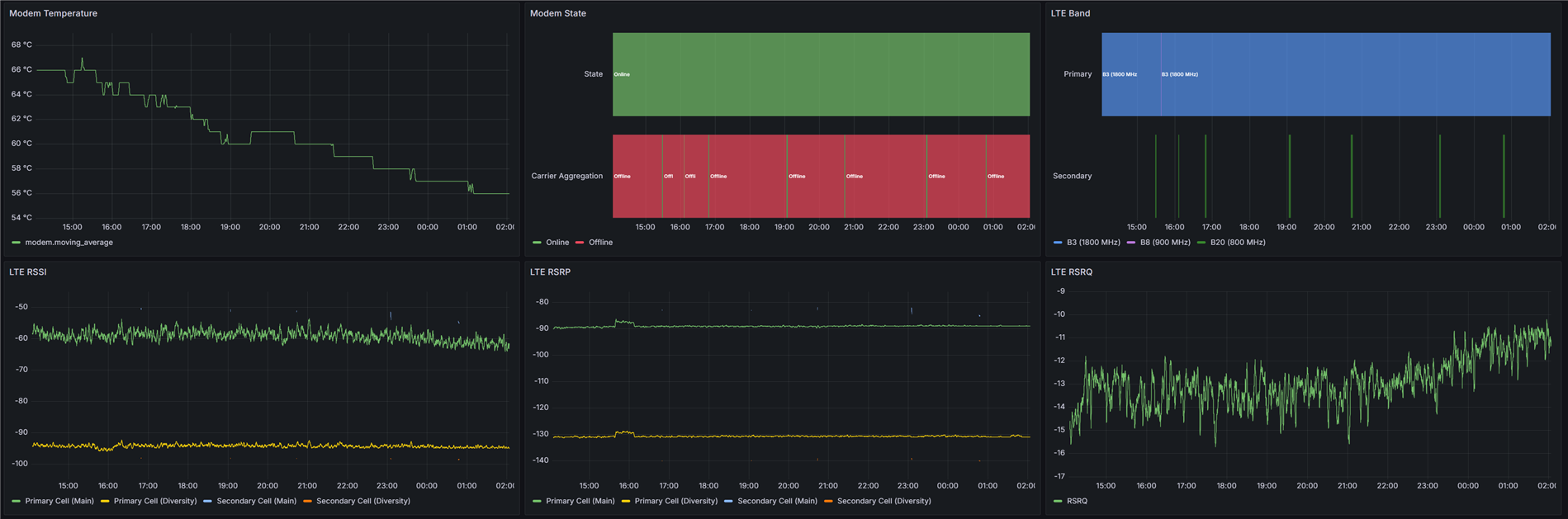
And here are video streaming statistics, along with GPS accuracy and speed data:
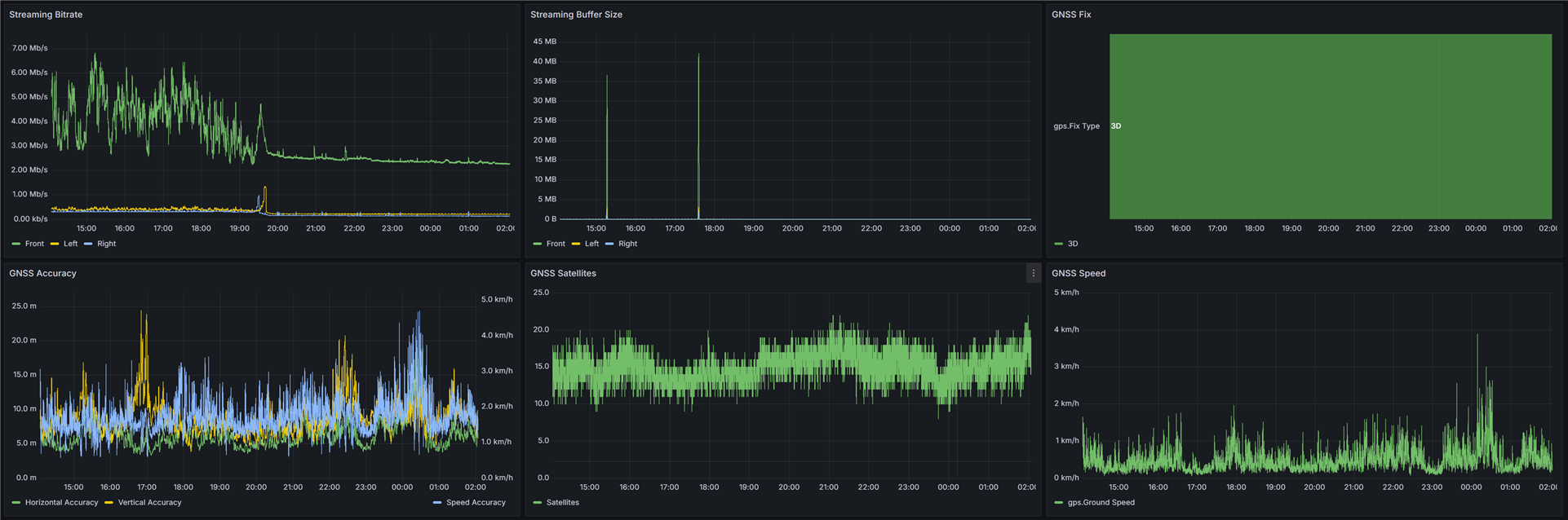
(I had some trouble with the rear camera, probably related to the 4 meter USB2 extension cable used, so that camera is inoperative at the moment)
GPS positioning data is also logged and visualized:
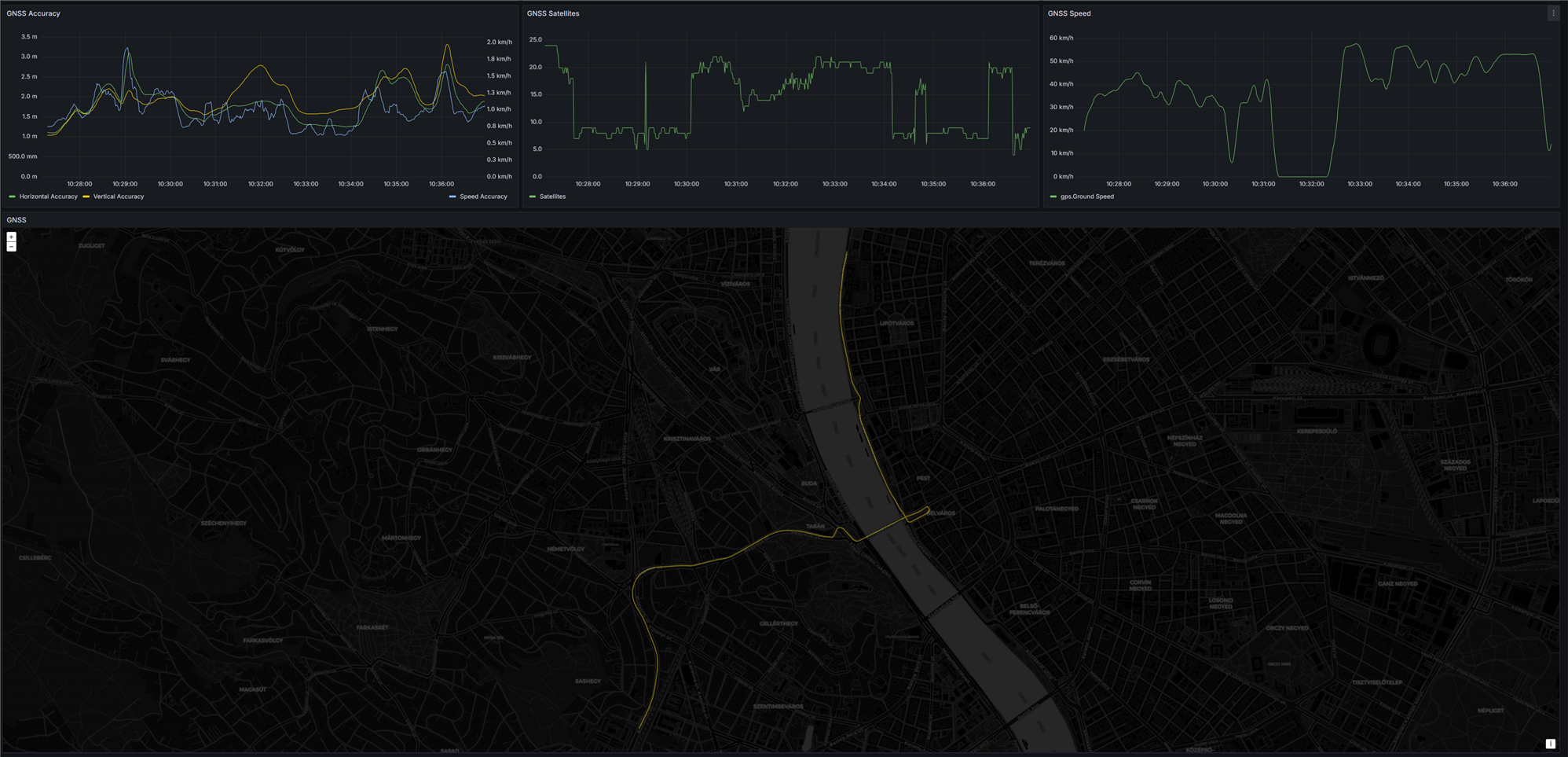
Video Stream Example
And finally, here's a short segment from one of the front camera streams. The filtering and encoding parameters were not tuned particularly well, so the video looks a bit crunchy, but some work will greatly improve the quality later.
Conclusion
I'm very happy with how this project turned out, the battery lasts for about 5 days, and the always-on camera system is a lifesaver when parking on the street. Interestingly, while I was working on this project, someone backed into my parked car, then left. Three of the four cameras recorded the offending car though, so this project has already saved me, even before fully completing it.
Future Improvements
I've already been thinking about how to further improve this system, and there's one last area to work on: video transport, ingest and filtering. The elegant solution would be a massive money pit though, along with taking forever to do, and I'm not sure I'm ready to tackle it anytime soon.
The "proper" way to do things would be to get FPDLink or GMSL serializers on the cameras, and get an AMD Kria K26 FPGA along with FPDLink/GMSL deserializers to handle video filtering and encoding in the FPGA. Designing a PCB for the Kria is a massive step up in complexity compared to what I've done so far though.
But even in its current state, the system is working great, and all future upgrades are just incremental improvements.
Special thanks to E14Alice for helping me with a bunch of shipping issues, and my friend David for helping with sourcing the Orange Pi 5 Plus and dealing with my rants at 3AM about things not working. Also, thanks to Molex for the lovely SPE hardware, which will definitely find its way into some future projects.
On that note, I just had to take apart one of the M12 SPE connectors, to see what it looks like inside:
| {gallery}Molex SPE Connector Teardown |
|---|
|
M12 SPE Connector: removed from outer shell |
|
M12 SPE Connector: inner connector |
|
M12 SPE Connector: outer shell |
|
M12 SPE Connector: outer shell |
|
M12 SPE Connector: shield connection bent out of the way |
|
M12 SPE Connector: inner shield removed |
|
M12 SPE Connector: inner shield |
|
M12 SPE Connector: inner connector without shield |
|
M12 SPE Connector: crimped inner connectors |

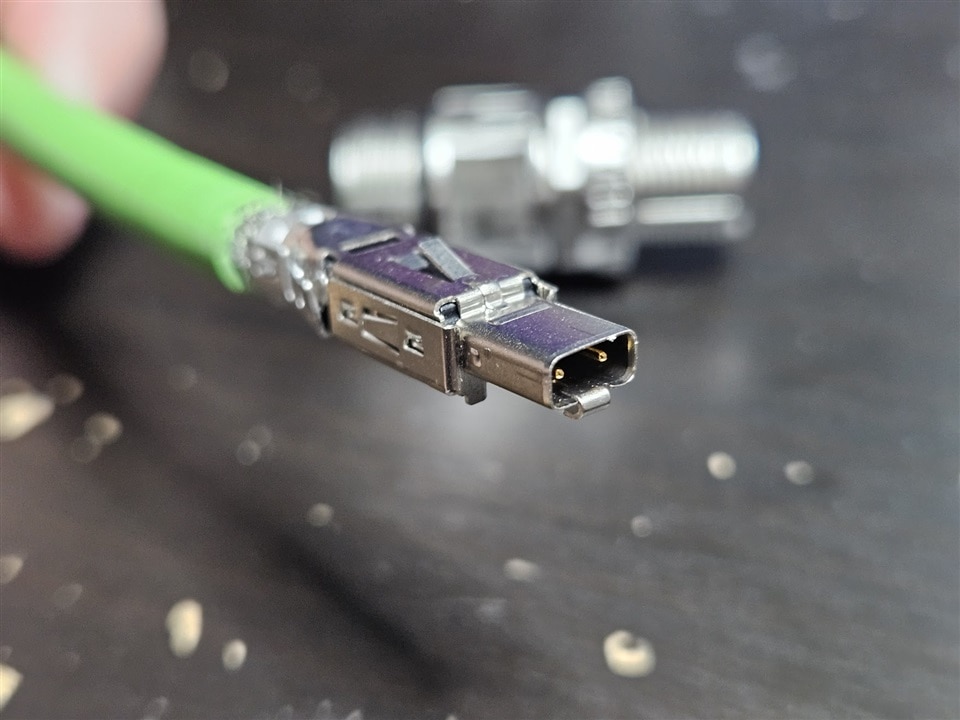
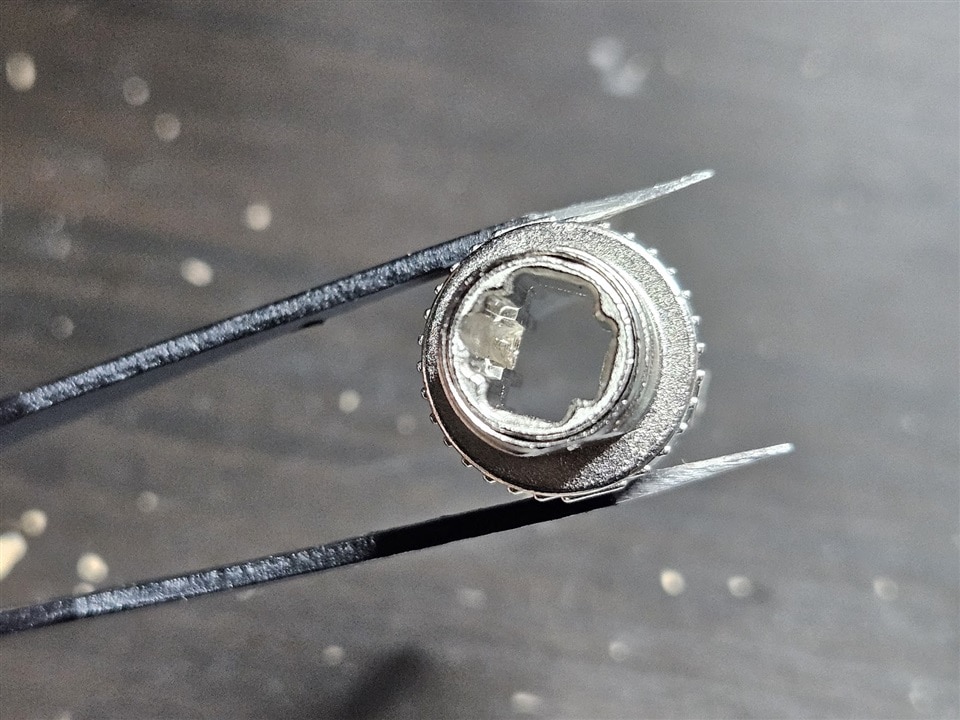
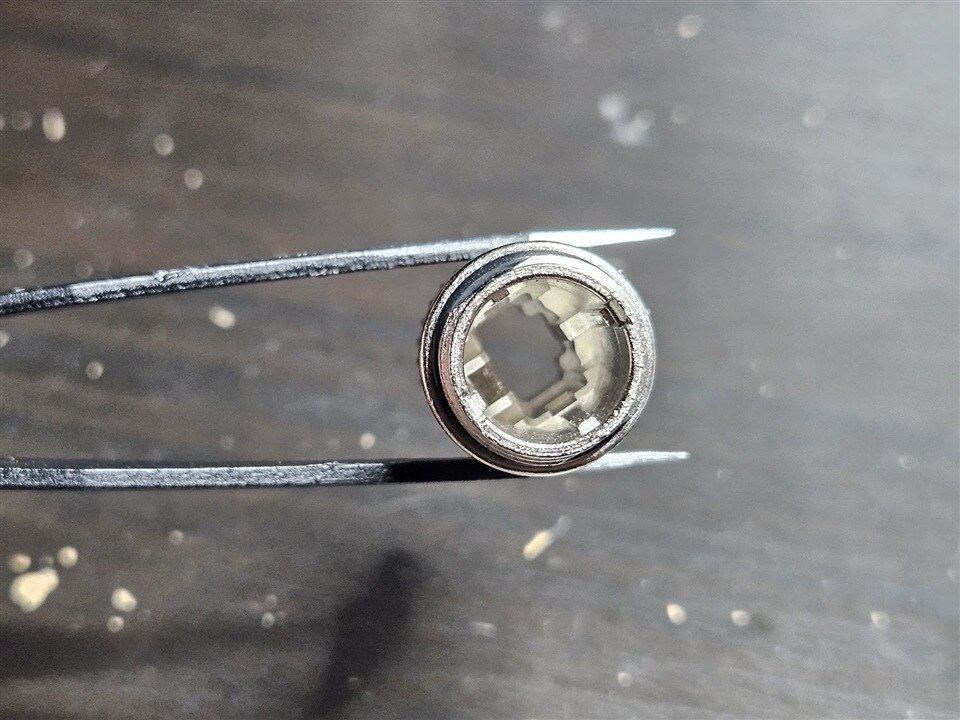
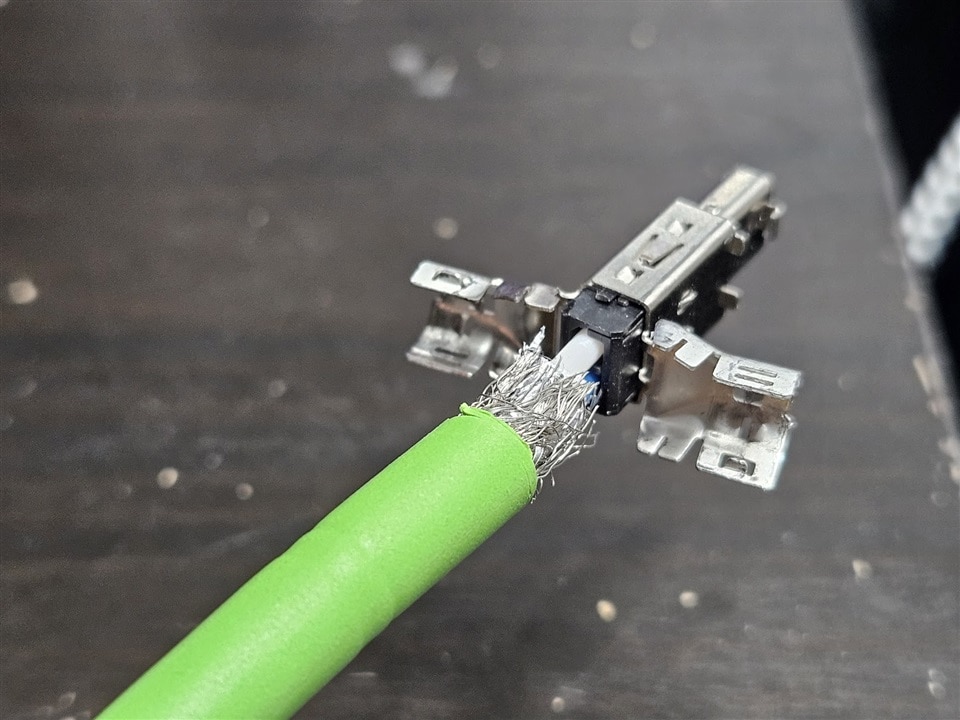

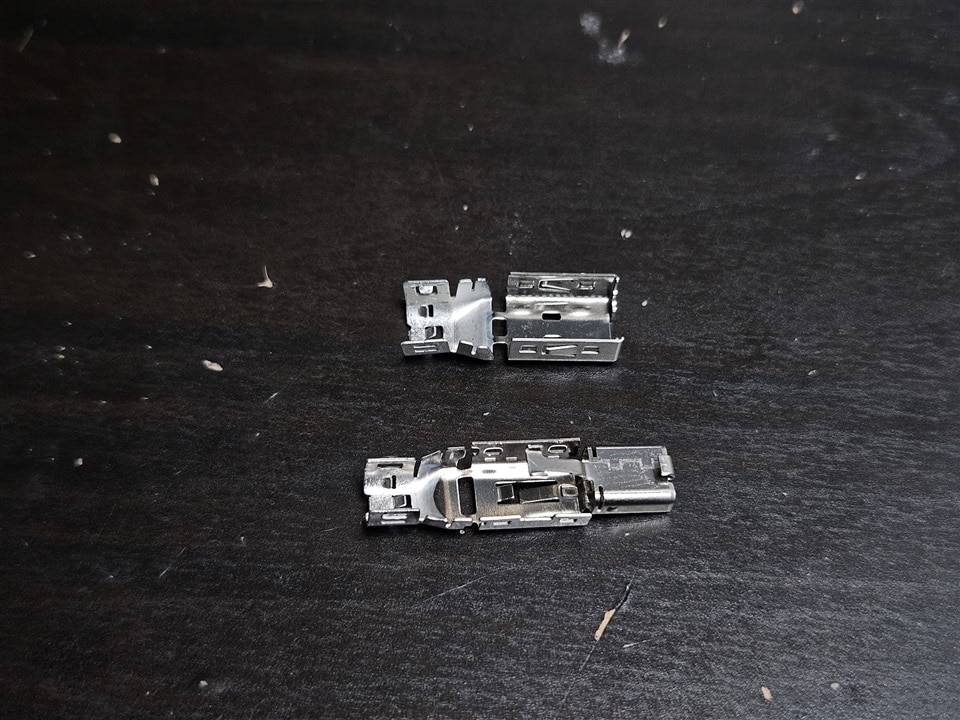

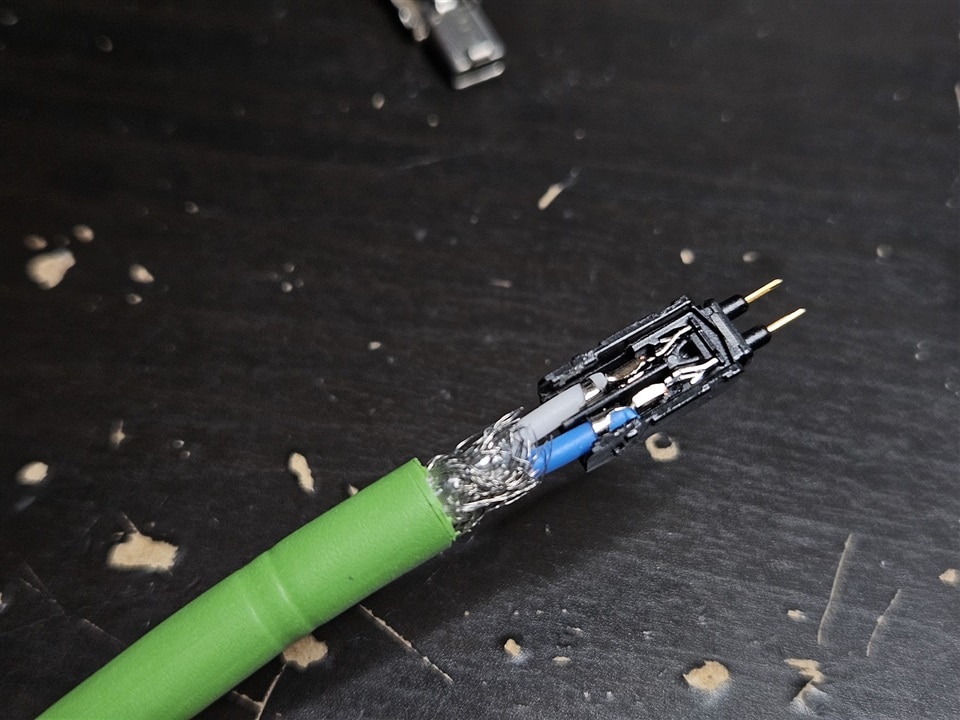
Top Comments
-

genebren
-
Cancel
-
Vote Up
0
Vote Down
-
-
Sign in to reply
-
More
-
Cancel
Comment-

genebren
-
Cancel
-
Vote Up
0
Vote Down
-
-
Sign in to reply
-
More
-
Cancel
Children