


In the previous two posts, I introduced the vision behind EVA Guardian and explained the complete system architecture that combines an intelligent Battery Management System with a Safety & Emergency Node. The battery management system focuses on understanding the health of the EV's energy source, while the safety node is responsible for monitoring the vehicle's motion and responding when something abnormal happens.
Part 1: The Idea behind EVA Guardian
Part 2: The Architecture of EVA Guardian
In this third post, I want to focus entirely on the second half of the project—the Incident Detection System.
This is the part of EVA Guardian that continuously watches how the vehicle moves, understands whether the motion is normal or abnormal, and acts as the first layer of the emergency response system. Unlike conventional systems that rely solely on fixed acceleration thresholds, I wanted to explore whether Edge AI running directly on the Arduino UNO Q could intelligently distinguish between different types of vehicle movements and detect potential accident scenarios.
The Idea Behind This Module
The Incident Detection System continuously reads motion data from an MPU6500 IMU connected to the Arduino UNO Q. The collected motion data is processed locally and passed into a custom Edge Impulse machine learning model. Instead of only measuring acceleration, the model attempts to classify the complete motion pattern into meaningful events.If the ML model detects an accident or abnormal motion event, the system immediately transitions into emergency mode.
At that point, an automatic notification is sent through a Telegram Bot, allowing the users relative or friends to receive an instant alert on their smartphone, motion status, and detection results in real time.
The objective is to demonstrate that intelligent safety features can be implemented entirely on low-cost embedded hardware.
Hardware Used
The primary hardware components include:
- Arduino UNO Q SBC
- GY-91 IMU Module (MPU6500 + BMP280)
- Arduino UNO Q LED Matrix (Available in UNo Q SBC)
- Demo Smartphone
- Wi-Fi Connection
The Arduino UNO Q acts as the central processing unit, acquiring sensor data, running the Edge ML model, updating the LED matrix display, hosting the WebUI dashboard, and communicating with the Telegram Bot.
The MPU6500 provides six-axis motion data consisting of three-axis acceleration and three-axis angular velocity, making it suitable for recognizing different vehicle motion patterns.
Software Stack
Instead of writing everything from scratch, Arduino App Lab provides several software bricks that can be combined to build complete applications.
For this project, I used the following components:
- FastIMU Library
- Motion Detection Brick
- Telegram Bot Brick
- WebUI Brick
- LED Matrix Library
Each of these components contributes to a different part of the application.
- The FastIMU library handles communication with the MPU6500 sensor.
- The Motion Detection Brick provides the interface for running my custom Edge Impulse model.
- The LED Matrix library drives the onboard LED matrix to display vehicle tilt.
- The Telegram Bot Brick enables instant emergency notifications.
- Finally, the WebUI Brick creates a live dashboard that can be accessed directly from a web browser.
Together, these software components allow the Arduino UNO Q to become a compact edge AI platform.
Training My Own Edge AI Model
One of the most exciting aspects of this project was developing a custom Edge AI model specifically for the Arduino UNO Q, rather than relying on a generic pre-trained model. My objective was to train the model using data collected from the exact hardware configuration that would eventually perform real-time inference, ensuring that the deployed model accurately reflects the characteristics of the target platform.
To build the dataset, I interfaced the GY-91 MPU6500 IMU with the Arduino UNO Q and recorded approximately 11 minutes of motion data. During the data collection process, I performed various controlled movements to represent different operating conditions of the vehicle. The collected data was manually labelled into five motion classes:
- Accident
- Idle
- Front and Back
- Right and Left
- Up and Down
These labels were chosen to represent both normal vehicle movements and abnormal events, enabling the model to distinguish between everyday motion patterns and potential accident scenarios.
After importing the dataset into Edge Impulse, I designed an impulse using a Power Spectral Density (PSD) processing block followed by a Classification block. Rather than using the raw accelerometer samples directly, the PSD block transforms the sensor data into the frequency domain, extracting meaningful frequency characteristics from the motion signals. This approach helps the model identify subtle differences between various motion patterns that may not be easily distinguishable in the time domain alone.
The resulting feature extraction process generated 39 input features, which were then fed into a fully connected neural network classifier.
To balance classification performance with the limited computational resources available on the Arduino UNO Q, I selected a lightweight neural network architecture consisting of:
- Input Layer: 39 extracted PSD features
- First Dense Layer: 20 neurons
- Second Dense Layer: 10 neurons
- Third Dense Layer: 5 neurons
- Output Layer: Softmax classifier with five output classes
The model was trained for 50 epochs using a learning rate of 0.0005. This training configuration provided a good balance between model convergence and generalization while keeping the network compact enough for deployment on an embedded platform.
Once the training process was complete, Edge Impulse generated an optimized EIM (Edge Impulse Model) that could be executed directly on the Arduino UNO Q.
The trained model was then integrated into Arduino App Lab using the Motion Detection Brick, allowing the Arduino UNO Q to perform real-time, on-device inference. This means that all motion classification is executed locally on the embedded hardware without requiring cloud connectivity or an external processing unit, making the system faster, more responsive, and suitable for edge AI applications where low latency and offline operation are essential.
| {gallery}Motion Detection Machine Learning model |
|---|
|
|
|
|
|
|
|
|
|
|


Displaying Vehicle Tilt angle on the LED Matrix
To better demonstrate the real-time capabilities of the MPU6500 IMU, I also developed a simple yet intuitive electronic water level indicator using the Arduino UNO Q's onboard LED matrix.
The animation continuously estimates the board's tilt angle from the IMU data and represents it as a moving water level. As the board is tilted, the "water" naturally flows towards the lower side of the display, closely mimicking the behaviour of a physical spirit level.
Although this feature is not directly related to the incident detection algorithm, it serves as an excellent visual demonstration of the IMU's responsiveness and the Arduino UNO Q's onboard LED matrix capabilities. It also provides an easy way to verify that the sensor orientation and tilt calculations are functioning correctly in real time.
This small demonstration showcases how sensor data can be transformed into an intuitive and interactive visualization, making the system easier to understand and more engaging during live demonstrations.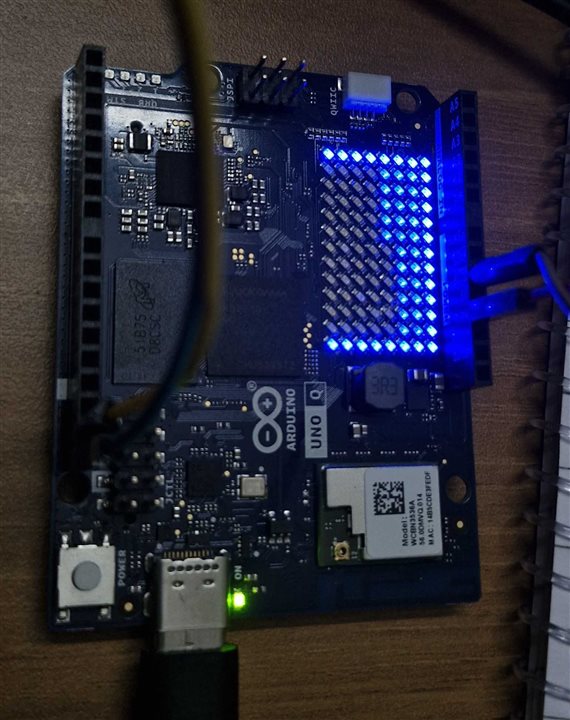
Emergency Notifications Using Telegram
The final stage of the workflow focuses on emergency communication.
When the machine learning model identifies an accident event, the Arduino UNO Q automatically sends a notification through the Telegram Bot. This demonstrates how a low-cost embedded system can immediately notify a user without requiring dedicated communication hardware. For the current prototype, the notification contains information about the detected event like accident detection.
In the future, this feature will be extended to include GPS coordinates from the Safety Node so that emergency contacts receive both the alert and the vehicle location. This fits perfectly with the overall EVA Guardian vision introduced in my first blog, where the Incident Detection System forms the first step of the complete emergency response workflow.
| {gallery}Telegram Notifications and Status |
|---|
|
|
|
|


Bringing Everything Together
The complete software workflow can be summarized as follows:
MPU6500 IMU → Arduino UNO Q → Edge ML Inference → Event Classification → LED Matrix Display → Telegram Notification
During normal operation, the Arduino continuously acquires motion data from the IMU. The Edge ML model classifies the incoming data into one of the trained motion categories. If the system detects normal movement, the LED matrix continues displaying the vehicle tilit. If an accident is detected, the system immediately changes state and sends an emergency notification through Telegram accordingly. This demonstrates how multiple software components can work together to build a complete embedded safety application.
Code Highlights
Arduino App Lab made it possible to build this application by combining multiple software bricks into a single workflow.
Some of the interesting parts of the implementation include:
- Initializing the FastIMU library
- Registering Motion Detection callbacks
- Running Edge ML inference
- Updating the LED matrix
- Sending Telegram messages
Rather than showing the complete source code here, I would like to highlight a few important sections that demonstrate how these individual modules work together.
/**
 * @brief Periodic IMU sampling worker function.
 * @details Reads raw accelerometer values, applies EMA filter, and dispatches data via Bridge.
 * @return void
 */
void update_imu_sample(void) {
  if (micros() - lastSampleTime >= SAMPLING_INTERVAL_US) {
    lastSampleTime += SAMPLING_INTERVAL_US;

    IMU.update();
    IMU.getAccel(&accelData);

    float rawAccX = accelData.accelX;
    float rawAccY = accelData.accelY;
    float rawAccZ = accelData.accelZ;

    /* Exponential Moving Average (EMA) filtering */
    if (isFirstSample) {
      filtAccX = rawAccX;
      filtAccY = rawAccY;
      filtAccZ = rawAccZ;
      isFirstSample = false;
    } else {
      filtAccX = (ALPHA * rawAccX) + ((1.0f - ALPHA) * filtAccX);
      filtAccY = (ALPHA * rawAccY) + ((1.0f - ALPHA) * filtAccY);
      filtAccZ = (ALPHA * rawAccZ) + ((1.0f - ALPHA) * filtAccZ);
    }

    /* Calculate total acceleration (normalized vector in m/s^2) neglecting gravity on Z */
    float accX_ms2 = filtAccX * 9.8f;
    float accY_ms2 = filtAccY * 9.8f;
    float accZ_ms2 = filtAccZ * 9.8f;
    float accZ_ms2_no_g = accZ_ms2 - 9.8f;
    float totalAcc_ms2 = sqrt(accX_ms2 * accX_ms2 + accY_ms2 * accY_ms2 + accZ_ms2_no_g * accZ_ms2_no_g);

    /* Calculate tilt (roll) angle and animate water level indicator */
    float roll_angle = atan2(-filtAccY, filtAccZ);
    render_water_level(roll_angle);

    /* Dispatch filtered telemetry to Python backend */
    Bridge.call("record_sensor_movement",
                filtAccX,
                filtAccY,
                filtAccZ,
                totalAcc_ms2);
  }
}
This function periodically acquires accelerometer data from the MPU6500 at a fixed sampling rate. An Exponential Moving Average (EMA) filter is applied to reduce sensor noise and smooth the measurements before transmitting the filtered X, Y, and Z acceleration values to the Python backend via the Arduino Bridge. The clean sensor data is then used for real-time Edge AI inference.
def run_inference(buffer: list) -> None:
    """!
    @brief Execute Edge Impulse ML motion classification inference.
    @param buffer List of float accelerometer features (126 elements).
    @return None
    """
    try:
        result = motion_detection.infer_from_features(buffer)
    except Exception as e:
        logger.warning(f"Inference failed: {e}")
        return

    cls = result.get("result", {}).get("classification", {})
    if not cls:
        return

    best = max(cls, key=cls.get)
    best_conf = cls.get(best, 0.0)

    logger.info(f"Classification: {best} ({best_conf:.2%})")

    with telemetry._state_lock:
        telemetry.state["last_classification"] = best
        telemetry.state["confidence"] = {k: round(v, 4) for k, v in cls.items()}

        count_key = best if best in telemetry.state["counts"] else "idle"
        telemetry.state["counts"][count_key] += 1

        event = {
            "time": time.strftime("%H:%M:%S"),
            "date": time.strftime("%Y-%m-%d"),
            "classification": best,
            "confidence": round(best_conf, 4),
        }
        telemetry.state["history"].insert(0, event)
        if len(telemetry.state["history"]) > config.MAX_HISTORY:
            telemetry.state["history"] = telemetry.state["history"][: config.MAX_HISTORY]

    # Alert updates on state classification change
    if best == "Accident":
        alert_service.dispatch_accident_alert(bot, cls)
This function performs real-time Edge AI inference using the trained Edge Impulse model. The classification result with the highest confidence is identified, and the system updates the current prediction, confidence scores, event history, and detection statistics. Based on the predicted motion, the application either triggers an accident alert via the Telegram Bot or updates the Arduino UNO Q LED matrix with the current vehicle tilt, enabling intelligent event detection and immediate user notification.
def dispatch_accident_alert(bot: TelegramBot, cls: dict) -> None:
    """!
    @brief Dispatches emergency accident notification to all registered Telegram chats.
    @param bot TelegramBot instance.
    @param cls Classification confidence dictionary.
    @return None
    """
    global _last_accident_ts
    now = time.time()
    if now - _last_accident_ts < config.ACCIDENT_COOLDOWN_S:
        logger.info("Accident alert skipped due to active cooldown period")
        return

    _last_accident_ts = now
    confidence_pct = round(cls.get("Accident", 0) * 100, 1)

    msg = (
        "*CRITICAL ALERT: ACCIDENT DETECTED*\n"
        "-----------------------------------\n"
        f"Confidence Level: `{confidence_pct}%`\n"
        f"Timestamp: `{time.strftime('%Y-%m-%d %H:%M:%S')}`\n\n"
        "System: Arduino UNO Q Incident Monitor"
    )


    alert_sent = False

    if known_chat_ids:
        for cid in list(known_chat_ids):
            for method_name in ["send_message", "send_text", "send"]:
                if hasattr(bot, method_name):
                    try:
                        getattr(bot, method_name)(cid, msg)
                        alert_sent = True
                        logger.info(f"Accident alert sent to Telegram chat {cid} via {method_name}")
                        break
                    except Exception as e:
                        logger.warning(f"bot.{method_name}({cid}) failed: {e}")

    if not alert_sent and hasattr(bot, "broadcast"):
        try:
            bot.broadcast(msg)
            alert_sent = True
            logger.info("Accident alert broadcasted to Telegram users")
        except Exception as e:
            logger.warning(f"bot.broadcast failed: {e}")

    try:
        Bridge.notify("show_alert")
    except Exception as e:
        logger.warning(f"Bridge notification show_alert failed: {e}")
This function generates and dispatches an emergency Telegram notification whenever the Edge AI model classifies an Accident. To prevent repeated alerts for the same event, a cooldown mechanism is implemented. The notification includes the model's confidence level, and timestamp, after which the Arduino UNO Q LED matrix is updated to indicate the emergency state.
Demonstration Video
Seeing the complete system operating in real time is much more informative than simply reading about it.
I have therefore recorded a demonstration showing:
- Live IMU data acquisition
- Edge ML inference running on the Arduino UNO Q
- Vehicle tilt displayed on the LED matrix
- Telegram notification triggered after accident detection
This demonstration provides a complete overview of how all the individual software modules interact to form the Incident Detection System.
Edge Impulse Repo: https://studio.edgeimpulse.com/studio/1076458
Githu Repo: https://github.com/ForgedCircuits/EVA-Guardian.git
