element14 Community
element14 Community
    Register Log In
  • Site
  • Search
  • Log In Register
  • Community Hub
    Community Hub
    • What's New on element14
    • Feedback and Support
    • Benefits of Membership
    • Personal Blogs
    • Members Area
    • Achievement Levels
  • Learn
    Learn
    • Ask an Expert
    • eBooks
    • element14 presents
    • Learning Center
    • Tech Spotlight
    • STEM Academy
    • Webinars, Training and Events
    • Learning Groups
  • Technologies
    Technologies
    • 3D Printing
    • FPGA
    • Industrial Automation
    • Internet of Things
    • Power & Energy
    • Sensors
    • Technology Groups
  • Challenges & Projects
    Challenges & Projects
    • Design Challenges
    • element14 presents Projects
    • Project14
    • Arduino Projects
    • Raspberry Pi Projects
    • Project Groups
  • Products
    Products
    • Arduino
    • Avnet & Tria Boards Community
    • Dev Tools
    • Manufacturers
    • Multicomp Pro
    • Product Groups
    • Raspberry Pi
    • RoadTests & Reviews
  • About Us
    About the element14 Community
  • Store
    Store
    • Visit Your Store
    • Choose another store...
      • Europe
      •  Austria (German)
      •  Belgium (Dutch, French)
      •  Bulgaria (Bulgarian)
      •  Czech Republic (Czech)
      •  Denmark (Danish)
      •  Estonia (Estonian)
      •  Finland (Finnish)
      •  France (French)
      •  Germany (German)
      •  Hungary (Hungarian)
      •  Ireland
      •  Israel
      •  Italy (Italian)
      •  Latvia (Latvian)
      •  
      •  Lithuania (Lithuanian)
      •  Netherlands (Dutch)
      •  Norway (Norwegian)
      •  Poland (Polish)
      •  Portugal (Portuguese)
      •  Romania (Romanian)
      •  Russia (Russian)
      •  Slovakia (Slovak)
      •  Slovenia (Slovenian)
      •  Spain (Spanish)
      •  Sweden (Swedish)
      •  Switzerland(German, French)
      •  Turkey (Turkish)
      •  United Kingdom
      • Asia Pacific
      •  Australia
      •  China
      •  Hong Kong
      •  India
      •  Japan
      •  Korea (Korean)
      •  Malaysia
      •  New Zealand
      •  Philippines
      •  Singapore
      •  Taiwan
      •  Thailand (Thai)
      •  Vietnam
      • Americas
      •  Brazil (Portuguese)
      •  Canada
      •  Mexico (Spanish)
      •  United States
      Can't find the country/region you're looking for? Visit our export site or find a local distributor.
  • Translate
  • Profile
  • Settings
Design Challenges
  • Challenges & Projects
  • More
Design Challenges
Forum RDM3600 RFID COMPONENT
  • Forum
  • Documents
  • Polls
  • Files
  • Mentions
  • Sub-Groups
  • Tags
  • More
  • Cancel
  • New
Actions
  • Share
  • More
  • Cancel
Forum Thread Details
  • State Not Answered
  • Replies 29 replies
  • Subscribers 8 subscribers
  • Views 4523 views
  • Users 0 members are here
Related

RDM3600 RFID COMPONENT

e14 Contributor
e14 Contributor over 11 years ago

I have been using the Arduino platform for a while now(about 6 months) and I tried to hook up the RDM3600 RFID reader to my Arduino Uno and it seems like the reader does not communicate with the board. I present a card, but the serial interface does not display a serial number or anything. I am following this tutorial:


http://tronixstuff.com/2013/11/19/arduino-tutorials-chapter-15-rfid/


I modified the code to get an indication that the setup was complete:


#include <SoftwareSerial.h>


SoftwareSerial RFID(2, 3);


int i;


void setup()

{

  RFID.begin(9600);

  Serial.begin(9600);

  Serial.println("ready");

}


void loop()

{

  if (RFID.available() > 0)

  {

    i=RFID.read();

    Serial.print(i, DEC);

    Serial.println(" next");

  }

}


Does anyone have any idea why I don't get any communication from the RDM3600 when I present a RFID tag.

  • Sign in to reply
  • Cancel
Parents
  • gadget.iom
    0 gadget.iom over 11 years ago

    These issues are often causes by the simple things. image

    Have you tried swapping the TX/RX pins around?


    Can you take a photo or sketch out your connections between the RFID reader and the Arduino.

    • Cancel
    • Vote Up 0 Vote Down
    • Sign in to reply
    • Verify Answer
    • Cancel
  • e14 Contributor
    0 e14 Contributor over 11 years ago in reply to gadget.iom

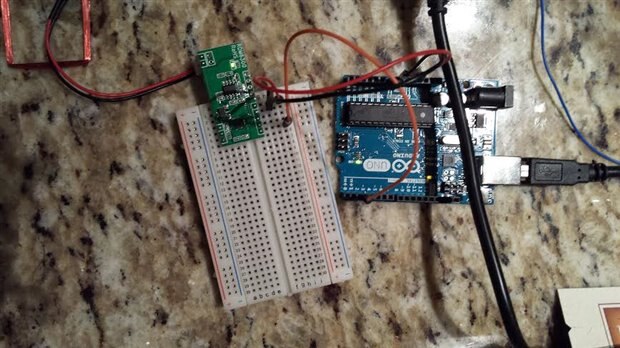
    Here is a picture. Just power, ground, and a jumper to pin 3 on the Arduino Uno and the antenna that came with the RDM3600. I modified the code to change the RX and TX pins to 3 and 4:


    #include <SoftwareSerial.h>


    SoftwareSerial RFID(3, 4);


    int i;


    void setup()

    {

      RFID.begin(9600);

      Serial.begin(9600);

      Serial.println("ready");

    }


    void loop()

    {

      if (RFID.available() > 0)

      {

        i=RFID.read();

        Serial.print(i, DEC);

        Serial.println(" next");

         }

      }

    image

    • Cancel
    • Vote Up 0 Vote Down
    • Sign in to reply
    • Verify Answer
    • Cancel
  • e14 Contributor
    0 e14 Contributor over 11 years ago in reply to e14 Contributor

    I have switched the Rx and Tx pins, in addition to adding the LED function changing digital input pins on the Arduino Uno. I have also bought another RDM6300 board and tried a different Arduino board. Nothing seems to work.

    • Cancel
    • Vote Up 0 Vote Down
    • Sign in to reply
    • Verify Answer
    • Cancel
  • gadget.iom
    0 gadget.iom over 11 years ago in reply to e14 Contributor

    Looking at your wiring it seems you are putting your power pins in a different place to that shown on the guide you linked to.

    Arduino_RFID_reader_setup.jpg

    • Cancel
    • Vote Up 0 Vote Down
    • Sign in to reply
    • Verify Answer
    • Cancel
  • e14 Contributor
    0 e14 Contributor over 11 years ago in reply to gadget.iom

    I was using a WMATA SmartTrip card and some tags I found on Amazon:


    http://www.nxp.com/products/identification_and_security/smart_label_and_tag_ics/ntag/series/NTAG213_215_216.html


    I chose the RDM3600 because I can modify the antenna to increase the read range.

    • Cancel
    • Vote Up 0 Vote Down
    • Sign in to reply
    • Verify Answer
    • Cancel
  • gadget.iom
    0 gadget.iom over 11 years ago in reply to e14 Contributor

    Are you trying to use Mifare tags? If so they operate on 13.56MHz.

    I've just purchased one of these modules, so I should have a better idea whats going on in a couple of days.

    • Cancel
    • Vote Up 0 Vote Down
    • Sign in to reply
    • Verify Answer
    • Cancel
  • e14 Contributor
    0 e14 Contributor over 11 years ago in reply to gadget.iom

    I think my problem is I'm using RFID tags that operate at a higher frequency than the 125kHz that the reader uses.


    I ordered some new tags, I will keep you posted.

    • Cancel
    • Vote Up 0 Vote Down
    • Sign in to reply
    • Verify Answer
    • Cancel
Reply
  • e14 Contributor
    0 e14 Contributor over 11 years ago in reply to gadget.iom

    I think my problem is I'm using RFID tags that operate at a higher frequency than the 125kHz that the reader uses.


    I ordered some new tags, I will keep you posted.

    • Cancel
    • Vote Up 0 Vote Down
    • Sign in to reply
    • Verify Answer
    • Cancel
Children
  • e14 Contributor
    0 e14 Contributor over 11 years ago in reply to gadget.iom

    I was using a WMATA SmartTrip card and some tags I found on Amazon:


    http://www.nxp.com/products/identification_and_security/smart_label_and_tag_ics/ntag/series/NTAG213_215_216.html


    I chose the RDM3600 because I can modify the antenna to increase the read range.

    • Cancel
    • Vote Up 0 Vote Down
    • Sign in to reply
    • Verify Answer
    • Cancel
  • gadget.iom
    0 gadget.iom over 11 years ago in reply to e14 Contributor

    Are you trying to use Mifare tags? If so they operate on 13.56MHz.

    I've just purchased one of these modules, so I should have a better idea whats going on in a couple of days.

    • Cancel
    • Vote Up 0 Vote Down
    • Sign in to reply
    • Verify Answer
    • Cancel
element14 Community

element14 is the first online community specifically for engineers. Connect with your peers and get expert answers to your questions.

  • Members
  • Learn
  • Technologies
  • Challenges & Projects
  • Products
  • Store
  • About Us
  • Feedback & Support
  • FAQs
  • Terms of Use
  • Privacy Policy
  • Legal and Copyright Notices
  • Sitemap
  • Cookies

An Avnet Company © 2026 Premier Farnell Limited. All Rights Reserved.

Premier Farnell Ltd, registered in England and Wales (no 00876412), registered office: Farnell House, Forge Lane, Leeds LS12 2NE.

Follow element14

  • X
  • Facebook
  • linkedin
  • YouTube