


TL;DR
A distributed CAN bus sensor network for a greenhouse, built around Arduino Nano nodes, an Arduino UNO Q hub, and a Python Flask dashboard. Two of the three nodes reliably report temperature and humidity. One has a wiring fault. There was a water cannon. It did not work. LabVIEW almost parsed the JSON.
Introduction
Plants and kids are nice additions to the homeliness of a home. Sometimes you take the kids on holidays and the plants die. The Green Brain is a smart greenhouse monitoring system to stop that happening.
To keep in tune with the On the Line industrial theme I dived into CAN bus — the Controller Area Network protocol used in automotive and industrial control systems — to connect a multi-node sensor network to an Arduino UNO Q as the central host. Throw in some temperature and humidity sensors, a water cannon  (it seemed like a good idea at the time), and a LabVIEW dashboard, and you have a design challenge.
System Architecture
 Arduino Nano     Arduino Nano     Arduino Nano
  Node 1 ⚠️       Node 2 ✅        Node 3 ✅
  DHT11           DHT11            DHT11
  MCP2515         MCP2515          MCP2515
     │                │                │
     └────────────────┴────────────────┘
              CAN bus (500 kbps)
                      │
              ┌────────────────┐
              │  Arduino UNO Q │
              │  STM32 FDCAN   │  ← CAN hub via WCMCU-230
              │  RouterBridge  │  ← IPC to Linux side
              │  Python Flask  │  ← REST API + dashboard
              └───────┬────────┘
                      │ :8080
              Browser / LabVIEW
Each Arduino Nano node reads a DHT11 temperature and humidity sensor and broadcasts an 8-byte CAN frame every ~2.5 seconds. The UNO Q’s STM32 co-processor receives those frames via its hardware FDCAN peripheral and exposes them to the Linux side via RouterBridge — the designed IPC mechanism for the UNO Q. A Python Flask app polls the STM32 and serves a live dashboard.
The CAN frame protocol packs node ID, temperature (×10, big-endian uint16), humidity (×10, big-endian uint16), status flags, a sequence counter, and an XOR checksum into 8 bytes — the fixed maximum for classic CAN.
The Journey
Part I — CAN bus introduction
First steps: Arduino Nano nodes with MCP2515 CAN transceivers, DHT11 sensors, and a loopback test. The first real wiring lesson arrived early — MOSI goes to MOSI, not MISO. I had been doing too much UART recently.
Part II — Dev setup
Getting the UNO Q into the picture. The STM32 and Linux sides of the UNO Q communicate via RouterBridge — you cannot bypass it to access the UART directly because the arduino-router service owns it as root with Restart=always. PlatformIO for the Nano nodes, a Python Flask app on the Linux side, and mise to glue the deploy pipeline together.
Part III — Water Cannon Chaos
I promised a water cannon so I had to deliver, if only for a forum post. The pump motor produced enough EMI to move the servo controllers even with no code driving them — the signal pins were acting as antennas. Water also leaks through electrical tape. And vinyl tubing. The Omega temperature probe did work nicely as a tube holder though.

Part IV — Nodes Well That Ends Well
The most educational part. Getting three nodes onto a bus uncovered four separate problems: a cold solder joint that read CANSTAT=0x00 instead of 0x80, a faulty MCP2515 module on node 1, duplicate node IDs from a careless flash causing CAN ID collisions, and a flat delay(2000) keeping all nodes locked in sync so node 3 always lost arbitration and eventually hit bus-off.
The fixes: a CANSTAT diagnostic before setBitrate, unique NODE_IDs, staggered transmit timing (delay(2000 + NODE_ID * 300)), and bus-off recovery via the EFLG register. Node 1’s wiring fault was never fully resolved.
Part V — LabVIEW visualisation
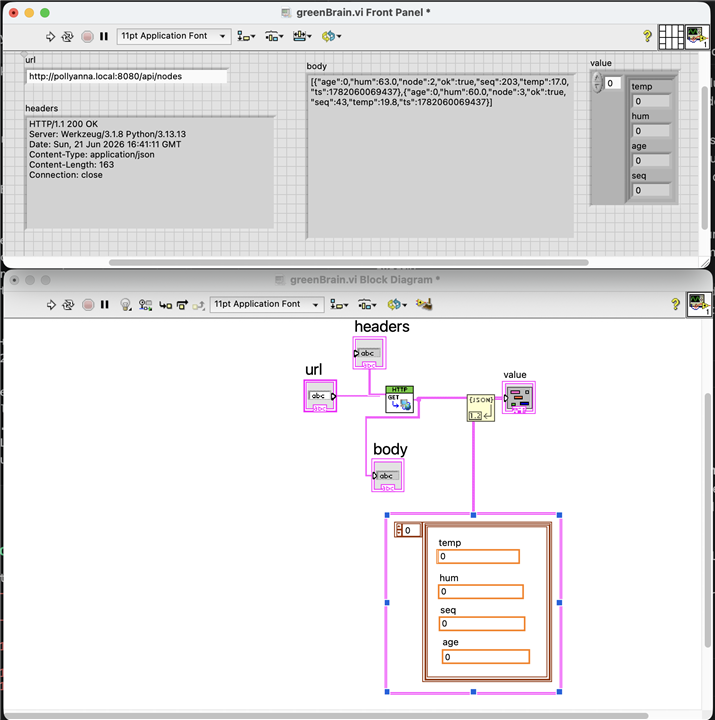
LabVIEW was new territory. The HTTP Client GET VI reached the Flask REST API without trouble. Parsing the JSON response with Unflatten From JSON requires building an array-of-clusters constant that exactly mirrors the JSON structure — outside-in, array shell first, cluster inside, typed constants with matching labels. I hit a type mismatch error (0xFFFA4723) and ran out of time to track down which field was wrong.
What shipped
- Two nodes reporting live temperature and humidity to a web dashboard

- STM32 FDCAN hub via RouterBridge to Python Flask
- CAN bus arbitration, error detection, and bus-off recovery in firmware
- HTTP GET from LabVIEW reaching the REST API
- Twisted pair CAN bus wiring in an actual greenhouse
What didn’t
- Node 1 — wiring fault still unresolved, CANSTAT=0x00 in loopback

- Water cannon — EMI from the pump motor, servo interference, water everywhere

- K-type thermocouples — late shipment, never arrived in time
- LabVIEW JSON parsing — type mismatch with array-of-clusters, one field wrong somewhere
- Soil moisture sensors — YL-69 sensors acquired, never wired up
- Computer vision / plant detection — still a dream
Lessons learned
CAN bus is unforgiving about setup. It handles arbitration and error detection in hardware — but the hardware needs clean wiring, unique IDs, and firmware that can recover from error states. A flat delay() in every node is enough to synchronise them and drive the highest-ID node into bus-off within minutes.
Measure before you guess. A two-line CANSTAT register read before setBitrate immediately told me whether the problem was wiring (0xFF), CS/SCK (0x00), or chip (still 0x00 in loopback). Without that I would have re-soldered the same joint three times.
The RouterBridge constraint is real. The UNO Q’s architecture — Linux MPU talking to STM32 MCU via a root-owned UART service — means you cannot bypass it. Once I understood that, the Python + RouterBridge path was actually clean and well-supported. Fighting the architecture costs time.
Pump motors and servos are enemies. No amount of power rail isolation stopped the EMI from the pump reaching the servo signal pins once the mechanical assembly was complete. A proper ferrite + shielded cable solution was the right answer; running out of time was the actual answer.
Don’t leave the build until the last week. I had time to build the stands and boards well in advance. I used it anyway.
Next
- Fix node 1’s wiring fault
- Add K-type thermocouple nodes via MAX6675
- Finish LabVIEW JSON parsing (Flatten To JSON debug to find the type mismatch)
- Soil moisture sensors on the bus
- Plant the plants

Top Comments