


Hello Everyone,
I am excited to announce my participation in the On The Line – Design Challenge! This challenge provides a perfect opportunity to expand my existing work into the domain of Smart Industry by focusing on edge computing and robust system design. This introductory post serves to outline my initial concepts and detailed ideas for the challenge. My objective is clear: to design, test, and implement a highly robust system, culminating in a detailed project final blog that fulfills the formal competition requirements.
The primary focus of this specific project within the "On The Line" challenge will be the development of a specialized edge node I’m calling the Industrial Line Sentinel (ILS) . My strategic plan is to configure this device to function as a highly connected and intelligent sensor node within the broader ecosystem of my ongoing Adaptive Sentinel: Security & Surveillance Hub project.
By integrating a Smart Industry-themed edge device into the Adaptive Sentinel's existing architecture—which utilizes the Arduino UNO Q as a central coordinator and MAX32630FTHR nodes for distributed intelligence—I aim to demonstrate true cross-challenge synergy. This new node will leverage the established communication framework to feed specialized industrial telemetry back to the central hub, enhancing the overall system's situational awareness.
I am proud to introduce my Smart Industry-themed edge device, the Industrial Line Sentinel (ILS), a high-reliability monitoring system engineered for professional industrial environments. By integrating the high-performance Arduino UNO Q with the Analog Devices MAX33041E Shield, this project establishes a resilient safety hub focused on real-time hazard-zone surveillance and rigorous PPE compliance monitoring.
The ILS is defined by several core technical innovations:
- Dual-Brain System Architecture: The ILS utilizes the dual-core capabilities of the Arduino UNO Q to decouple high-level computational "Intelligence" from deterministic, real-time "Action."
- Cortex-A53 AI Vision: A quantized MobileNet-SSD model is deployed within a Docker container to identify safety equipment and detect unauthorized zone entries.
- Cortex-M33 Real-Time Safety: Dedicated to safety logic and sensor monitoring, this core broadcasts Emergency Stop frames through the CAN shield immediately upon detecting a violation.
- Digital Twin & Telemetry: Remote monitoring and safety heatmaps are managed via Emerson | NI LabVIEW integration.
By leveraging the Arduino UNO Q’s dual-core architecture, my project solves the 'Latency vs. Intelligence' trade-off in industrial safety. While the A53 handles complex AI vision for PPE detection, the M33 ensures a deterministic, real-time response via the ADI MAX33041E CAN transceiver, ensuring that a safety stop is issued in milliseconds, regardless of Linux OS overhead."
The Industrial Line Sentinel (ILS)
A Multi-Core, Multi-Protocol Predictive Maintenance & Quality Control Hub
1. Project Overview
The ILS is a "Smart Edge" gateway that leverages the Arduino UNO Q’s dual-brain architecture to solve two industrial problems simultaneously:
- Vision-Based Quality Control: Using the Cortex-A53 to run a "Lite" version of your Sentinel object-detection model to identify assembly line defects or safety violations in real-time.
- Environmental Telemetry & CAN Connectivity: Using the Cortex-M33 and the ADI MAX33041E Shield to monitor high-temperature/humidity conditions and broadcast system health over a robust industrial CAN bus.
2. Technical Architecture & Component Integration
|
Component |
Role in the ILS |
|
Arduino UNO Q (2GB) |
Primary Hub. The A53 core runs the vision model in a Docker container (using your "Bricks" methodology), while the M33 manages real-time interrupts from sensors. |
|
ADI MAX33041E Shield |
The Backbone. Interfaces the UNO Q with an industrial CAN network. It will broadcast error codes (e.g., "High Temp Alarm") to other machinery or a central PLC. |
|
OmegaDwyer 5SRTC Thermocouples |
Predictive Maintenance. Placed directly on motor housings or heating elements to detect thermal runaway before a failure occurs. |
|
OmegaDwyer Humidity Sensor |
Corrosion Prevention. Monitors the ambient environment of sensitive electronic enclosures on the line. |
|
LabVIEW (Emerson | NI) |
The Digital Twin. I will build a custom LabVIEW dashboard to visualize the vision feed and sensor telemetry, providing a "Command Center" view of the production line. |
|
MAX32666FTHR (External) |
Remote Sensor Node. This board will act as a secondary CAN node, simulating a remote part of the factory floor sending data back to the UNO Q Hub. |
3. Why This Project is Innovative
- Solving "Core Contention": Most projects use an SBC as a simple computer. My project utilizes the RPC Bridge to offload critical timing (CAN frames and Thermocouple ADC reads) to the M33, ensuring that even if the A53 is under heavy vision-processing load, the safety-critical monitoring never skips a beat.
- Fault-Tolerant Communication: By using the MAX33041E, the project demonstrates a level of electrical robustness (+/-40V protection) that is often missing from hobbyist designs but mandatory for the "On The Line" theme.
- Containerized Industrial AI: Building on my previous research, I will document how to optimize the Docker/Debian environment on the 2GB UNO Q to prevent the "Swap Exhaustion" issues I've previously identified, ensuring 24/7 uptime.
NEXT refine the "Vision Model" description to be more specific (e.g. detecting worker safety gear)?
Vision Model & Software Strategy
Given my experience with the Arduino UNO Q and the memory constraints you identified (2GB RAM), I recommend focusing on "Safety-Critical Zone Monitoring" (PPE & Hazard Detection). This is more "Industrial" than simple screw counting and allows you to showcase the Dual-Brain architecture perfectly.
1. The Vision Use Case: PPE & Proximity Enforcement
Instead of just "seeing," the system will act as an intelligent safety gate. It will monitor a specific workstation to:
- Detect PPE Compliance: Ensure the operator is wearing high-visibility vests or safety glasses.
- Hazard Proximity: Define a "Red Zone" around moving machinery. If a human limb enters the zone, the system triggers an immediate stop.
- Environmental Context: Cross-reference vision data with the OmegaDwyer Humidity Sensor and Thermocouples. For example, if humidity is above 80% (slippery conditions), the "Safety Zone" radius automatically increases via software logic.
2. The Software Stack (Optimized for 2GB RAM)
To avoid the Swap Exhaustion issues you noted in your review, the vision pipeline will be strictly optimized:
- Model: A quantized YOLOv8-Small or MobileNetV3-SSD running via OpenVINO or TensorFlow Lite.
- Execution: The A53 core will run a Headless Debian Container (no GUI). I will implement a "Motion Trigger" so the heavy inference engine only spins up when the OmegaDwyer sensors or a PIR sensor detect activity, saving power and memory.
- Communication: I will use the Arduino RPC (Remote Procedure Call) bridge to send a simple 1-byte "STOP" or "GO" signal from the A53 (Linux side) to the M33 (Real-time side).
3. Real-Time Hardware Integration
This is where you win the challenge. Most challengers will just blink an LED. You will:
- CAN Bus Emergency Stop: When the vision model detects a safety breach, the M33 core will immediately broadcast a high-priority CAN Frame via the MAX33041E Shield.
- Fault Tolerance: You can highlight the ±40V Fault Protection of the ADI shield as a reason why this system is "Production Ready"—it won't fry if a high-voltage industrial line shorts to the CAN bus.
- LabVIEW Telemetry: The Emerson | NI LabVIEW dashboard will display a "Safety Heatmap" showing where breaches occur most often, combined with the environmental data from your sensors.
UPDATE May 6 2026
Research Forums and Project Roadmap
Presented below is the proposed outline for a series of collaborative forum posts. This roadmap is designed to facilitate the acquisition of specialized knowledge required to implement the ILS project effectively.
- Forum #1: Project Introduction and Objectives
- Forum #2: Interface & Control: LabVIEW dashboard design and full system integration.
- Forum #3: Hardware Integration & CAN Bus Fundamentals: Establishing a "Hello World" connection between the UNO Q and MAX33041ESHLD CAN Shield
- Forum #4: Machine Vision Optimization: Adapting the Sentinel Vision Model for automated industrial defect detection.
- Forum #5: Sensor Telemetry: Implementing high-accuracy thermal monitoring utilizing OmegaDwyer sensors.
- Forum #6: Performance Stress Testing: Managing 2GB RAM limitations during simultaneous vision and telemetry workloads.
- Project Blog: A comprehensive video demonstration showcasing the "Industrial Line Sentinel NODE" in a live environment.
I intend to utilize these forum posts as a framework for my research into these components and will be providing regular updates on my technical progress.
I possess extensive experience with the Arduino Uno Q, which provides a strong foundation for exploring the integration of the sponsor-provided kit components with this platform. My technical roadmap involves a comprehensive breakdown of the hardware integration for each kit component, alongside the development of the specific programming logic required for their operation. As I have not previously worked with these particular devices, I will be dedicating the upcoming weeks to hands-on experimentation to fully grasp how they can best be applied to this design challenge.
I received the Challenger Kit today (May6,2026)
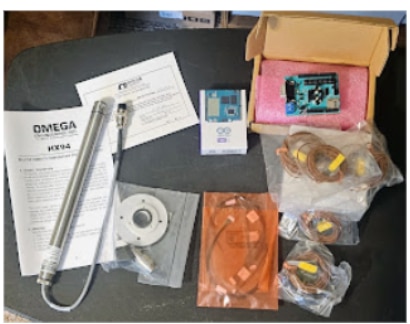
The package came today via Fedex delivery. Now it’s time to dive into the R&D phase for my project. The official competition kit is as follows:
- Analog Devices MAX33040ESHLD# Shield Evaluation Kit
- Arduino UNO R4 SBC, 2GB, ARM CORTEX-A53/M33F
- Omega/Dwyer SSRTC-TT-K-24-12 Thermocouple, K, 0°C, 260 °C, 80", 2 m (Pack of
- Omega/Dwyer Humidity Sensor, CURRENT 30V WAP CONN
- Emerson Ni 3-month free LabVIEW Trial (where to get this)
- Molex 218112-0703 - 7 Pole PicoBlade Socket to Bare End Lead, Pitch 1.25mm, 300mm
- Molex 218112-0300 - 3 Pole PicoBlade Socket to Bare End Lead, Pitch 1.25mm, 75mm
- Molex 218112-0500 - 5 Pole PicoBlade Socket to Bare End Lead, Pitch 1.25mm, 225mm
- Molex 218112-0602 - 6 Pole PicoBlade Socket to Bare End Lead, Pitch 1.25mm, 225mm
- Molex 218112-0202 - 2 Pole PicoBlade Socket to Bare End Lead, Pitch 1.25mm, 75mm
According to the documentation included with the shipment, participants were slated to receive either the MAX33040ESHLD# or one of five MAX33041ESHLD# units based on component availability; my provided kit includes the MAX33040ESHLD# Shield Evaluation Kit.
Additionally, I am looking for further details on how to redeem the Emerson NI three-month LabVIEW trial. My preliminary investigation into LabVIEW licensing hasn't uncovered a clear path to a 90-day trial option. Although I have successfully set up the Community edition, the standard evaluation seems restricted to just 7 days. As I haven't yet located the extended trial mentioned in the challenge materials, I would value any technical guidance JoRatcliffe or other members could offer to the challengers regarding this process.
I am eager to hear from other participants regarding their methods for programming and utilizing these kit components, and I welcome any technical advice or workarounds discovered during the build process.
Looking forward to collaborating with everyone.


