


We are now 2 and half weeks into this challenge and I have finally got my Ultra96-V2 printing out Hello World onto the UART. This feels like a suitable point to write my first ever blog post!
Intro to course
This will be a series of blog posts as I work my way through the Path II Programmable. This is a training course done by Element14 with support from Avnet and Xilinx. Who have kindly provided me with an Avnet Ultra96-v2 development board and 3 sets training modules with labs.
The 3 training modules are for Hardware, Software and Petalinux. These break down in 29 lectures and 26 labs. Lots to keep me busy but so far it looks like a really good, in depth set of material which will give me lots more knowledge and a vastly improved skillset.
Following the training modules I will use these new skills gained to complete a project on Avnet Ultra96-v2.
Setup
The very first thing I had to do was to set up the development platform on my computer. This consisted of setting up a Virtual Machine and installing Vivado, SDK and PetaLinux onto it, it also covered setting up the ethernet bridge, shared folders/clipboard, USB and desktop icons and permissions.
SDSoC could be used instead of Vivado and SDK, however this would have required a SDSoC license so I opted for Vivado which I am also slightly more familiar with.
There was a warning that installing and setting up the virtual machine would take a significant amount of time and boy were they right. It took me the first week of the course to get it set up and that was without encountering any issues along the way!
The instructions were clear and I encountered no issues while following them. Having completed HW Labs 1+2 I was confident that both Vivado and SDK were correctly installed. I decided to use the versions of software that were being used in the lab rather then the latest to prevent additional confusion from changes between versions occurring later in the labs.
Versions of software I used were:
- Ubuntu 16.04 LTS
- Petalinux-v2018.3
- Vivado 2018.3
- SDK 2018.3
My Virtual Machine is set up as follows:
- Base Memory: 8192MB
- 2 Processors (My laptop uses a i7-8565U @1.8GHz)
- 150GB of storage.
This was the maximum I could make room for on my Laptops SDD.
The set up guide recommended 300GB and stated that 150GB is the absolute minimum that can be used and will require the project to be frequently cleaned. Doesn’t that sounds like it will be fun! (I probably will end up getting an external hard drive and setting up another virtual machine with more space later in this course once I get annoyed with constantly cleaning my project!)
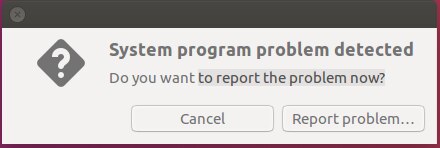
The only other thing to note about my VM is I’ve been seeing a System Program problem message which I just keep ignoring. Anyone else seen this or know what is causing it?
HW Lab 1:
This Lab covered how to create a project in Vivado and how to create a block design inside it. It also gives you a brief overview of Vivado. The instructions were clear and easy to follow, I encountered no issues completing this Lab. Not much else to say on this one.
HW Lab 2:
This Lab builds on Lab 1 and consists of assigning a couple of UART pins, configuration of the clocks and memory, exporting the hardware to SDK and running a simple application on the Ultra96-V2 to print “Hello World” to the UART.
UART Pin Selection:
The instructions to set the UART TX and RX pins were clear and easy to follow. I especially liked how the Lab document pointed to both the Ultra96-V2 SCH and the UG10856-TRM so we know exactly how the UART pin assignments were chosen.
Clock Configuration:
This part of the Lab took us through all the clock assignments to ensure they were correct (unsurprisingly they were). The nice part about this was we now know where the different clocks are assigned. I am however not entirely sure where the clocks values we are using have come from as they were stated without a reference (See image below). I however haven’t spent any time looking into them further, maybe it will become clearer as the course progresses.

We also disabled the PL (Programmable Logic) during these steps as it is not currently in use.
Memory Configuration:
The final part of the hardware setup we had to do was configure the memory. Vivado provides some preset defaults for a few different memory sticks, however ours did not use any of these so we needed to define it ourselves. The guide provided all the values we should use so we didn’t need to go digging through the LPDDR4 datasheet. Luckily, since I haven’t gotten my hands on a copy of the datasheet! (It appears to be available on the Micron website but requires an account being made to download it so I didn’t bother at this point).
Export Hardware to SDK:
Finally we had to generate a bitstream and export the hardware. I encountered a concerning critical warning about my row address count, shown below.

It was confusing because I remembered setting the row address count to 16 in the previous step, I went back and checked what I had it set to and it’s definitely 16, see below.
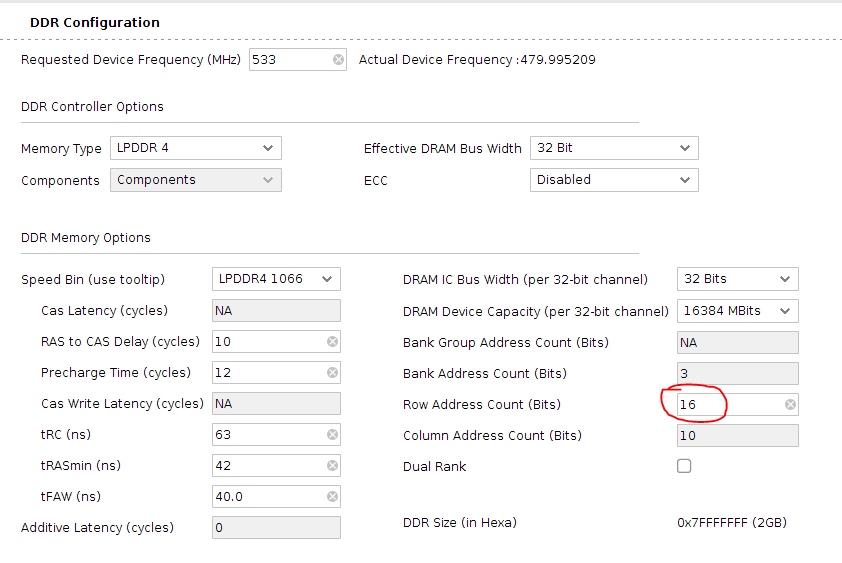
This did not stop the bitstream being generated so I ignored it and just continued, has anyone else seen this or are able to explain it?
Exporting the hardware went much more smoothly without any issues.
Run HelloWorld Application in SDK:
The final part of the lab covered the basics of using SDK to run a sample HelloWorld Application on the hardware exported in the last step.
This section showed some of the basics how to use SDK, I went through it pretty fast since I am sure the SW modules will cover it all in more detail.
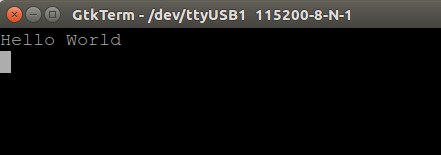
As always the steps were clear and easy to follow (Though I did have to figure out when to power the Ultra96-V2 all by myself). The only issue I had was I had configured my terminal to 9600 not the 115200 that the Ultra96-V2 UART was configured to so my initial attempt returned no data to my terminal. Fortunately I spotted the issue right away, updated my serial settings, reran the application (which takes a little time, I bet there is a better way to reset it!) and was greeted with a “Hello World” message.
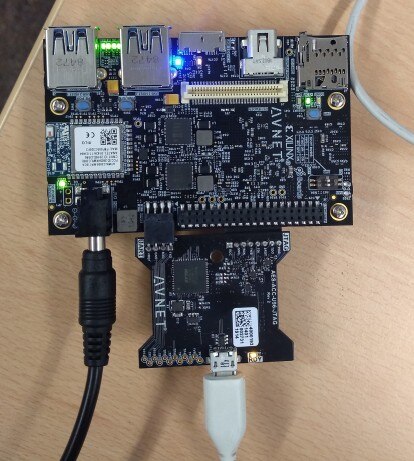
I’ve also included a picture of the hardware, who doesn’t love a selection of brightly coloured LEDs?
-

cmelement14
-
Cancel
-
Vote Up
0
Vote Down
-
-
Sign in to reply
-
More
-
Cancel
Comment-

cmelement14
-
Cancel
-
Vote Up
0
Vote Down
-
-
Sign in to reply
-
More
-
Cancel
Children