element14 Community
element14 Community
    Register Log In
  • Site
  • Search
  • Log In Register
  • Community Hub
    Community Hub
    • What's New on element14
    • Feedback and Support
    • Benefits of Membership
    • Personal Blogs
    • Members Area
    • Achievement Levels
  • Learn
    Learn
    • Ask an Expert
    • eBooks
    • element14 presents
    • Learning Center
    • Tech Spotlight
    • STEM Academy
    • Webinars, Training and Events
    • Learning Groups
  • Technologies
    Technologies
    • 3D Printing
    • FPGA
    • Industrial Automation
    • Internet of Things
    • Power & Energy
    • Sensors
    • Technology Groups
  • Challenges & Projects
    Challenges & Projects
    • Design Challenges
    • element14 presents Projects
    • Project14
    • Arduino Projects
    • Raspberry Pi Projects
    • Project Groups
  • Products
    Products
    • Arduino
    • Avnet & Tria Boards Community
    • Dev Tools
    • Manufacturers
    • Multicomp Pro
    • Product Groups
    • Raspberry Pi
    • RoadTests & Reviews
  • About Us
  • Store
    Store
    • Visit Your Store
    • Choose another store...
      • Europe
      •  Austria (German)
      •  Belgium (Dutch, French)
      •  Bulgaria (Bulgarian)
      •  Czech Republic (Czech)
      •  Denmark (Danish)
      •  Estonia (Estonian)
      •  Finland (Finnish)
      •  France (French)
      •  Germany (German)
      •  Hungary (Hungarian)
      •  Ireland
      •  Israel
      •  Italy (Italian)
      •  Latvia (Latvian)
      •  
      •  Lithuania (Lithuanian)
      •  Netherlands (Dutch)
      •  Norway (Norwegian)
      •  Poland (Polish)
      •  Portugal (Portuguese)
      •  Romania (Romanian)
      •  Russia (Russian)
      •  Slovakia (Slovak)
      •  Slovenia (Slovenian)
      •  Spain (Spanish)
      •  Sweden (Swedish)
      •  Switzerland(German, French)
      •  Turkey (Turkish)
      •  United Kingdom
      • Asia Pacific
      •  Australia
      •  China
      •  Hong Kong
      •  India
      • Japan
      •  Korea (Korean)
      •  Malaysia
      •  New Zealand
      •  Philippines
      •  Singapore
      •  Taiwan
      •  Thailand (Thai)
      • Vietnam
      • Americas
      •  Brazil (Portuguese)
      •  Canada
      •  Mexico (Spanish)
      •  United States
      Can't find the country/region you're looking for? Visit our export site or find a local distributor.
  • Translate
  • Profile
  • Settings
Path to Programmable 3
  • Challenges & Projects
  • Design Challenges
  • Path to Programmable 3
  • More
  • Cancel
Path to Programmable 3
Blog Path to Programmable III: Exploring Video Processing using PYNQ - Ultra96v2
  • Blog
  • Forum
  • Documents
  • Leaderboard
  • Files
  • Members
  • Mentions
  • Sub-Groups
  • Tags
  • More
  • Cancel
  • New
Join Path to Programmable 3 to participate - click to join for free!
  • Share
  • More
  • Cancel
Group Actions
  • Group RSS
  • More
  • Cancel
Engagement
  • Author Author: saadtiwana_int
  • Date Created: 27 Jul 2023 3:58 PM Date Created
  • Views 1931 views
  • Likes 7 likes
  • Comments 7 comments
  • image processing
  • video processing
  • pynq
  • amd
  • Path to Programmable III
Related
Recommended

Path to Programmable III: Exploring Video Processing using PYNQ - Ultra96v2

saadtiwana_int
saadtiwana_int
27 Jul 2023
Path to Programmable III: Exploring Video Processing using PYNQ - Ultra96v2

Introduction

For my path-to-programmable project I have been planning to work on a project that involves live video processing. For this reason, I applied for the Ultra96-v2 FPGA because the ZU3EG FPGA inside has quad A53 cores which are fairly capable "application processors" and so they are much better suited for running these kinds of applications compared to the dual A9 application processors on the Zynq-7000 series FPGAs. Naturally, I have been using this opportunity to explore what different options I have available. One of the options that I have come across and which seems very promising is PYNQ, so I want to explore this further.

Why PYNQ

For me, the main attraction in PYNQ is that it promises ease of use.

http://www.pynq.io/

Generally speaking, FPGAs promise giving a lot of "power" to the developers to build applications that are otherwise not possible with microcontrollers and general processors. However this usually comes at the cost of increased development effort and time. Especially for developing more complex applications. I have developed some "baremetal" applications in the past, which is a decent option for many simpler applications. However, as the complexity level increases, things get harder and you HAVE to eventually move to linux. For many people, myself included, linux can feel overwhelming.

Enter PYNQ: PYNQ brings Python simplicity to FPGA development, making it easier for developers to unleash FPGA's potential without complex hardware languages (or coding low-level applications). It runs over Linux, but provides a familiar Jupyter-based environment on top of it, which feels more welcoming for many of us! Also, there is a vibrant community around PYNQ, meaning many people are willing to help and also share their own creations. All of this helps when you're learning.

Another thing I am coming to appreciate about PYNQ is that it it is very good for prototyping ideas. For example, if you have an idea for a cool image processing algorithm that you want to try out on the FPGA, you can do that much more easily using PYNQ, in a matter of minutes to hours instead of days to weeks (or months!). Then, once the algorithms shows promise, you identify bottlenecks and look into accelerating the parts taking most time in Programmable logic.

Running PYNQ on Ultra96-v2

This topic is covered very nicely by the getting started guide provided on the PYNQ page, so I don't want to replicate the information again. The link to the page I used is:

Getting Started — Ultra96-PYNQ v2.6 documentation

The page says "Ultra96" instead of "Ultra96-v2", however, the information is still valid for the Ultra96v2 also, except for some minor changes like the changed position of the power button on the Ultra96v2. 

In my case I managed to access the board in 3 ways:

  1. From the host computer. This is possible because the board appears as a network adapter on the computer and then can be accessed from a browser from the host computer
  2. Over Wifi
  3. Using USB mouse/keyboard and a monitor connected directly to the display port

The details for how to connect using all these 3 methods is given on the getting started page shared above. Overall, I found the process smooth and easy. It took me less than an hour from start until I was up and running and had starting to explore the example notebooks.

Exploring Examples

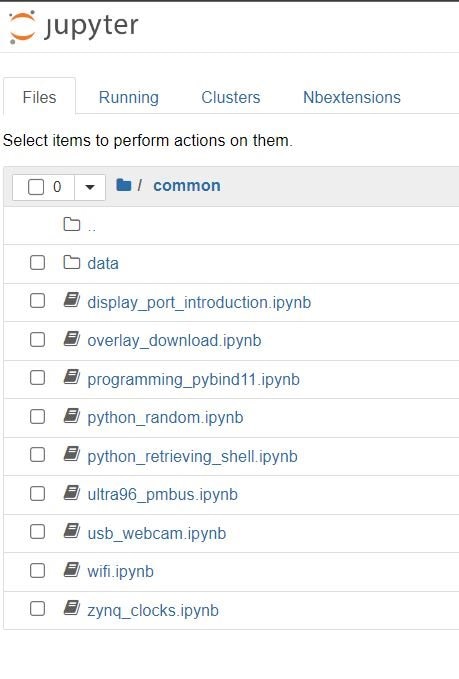
The basic example notebooks are very useful for getting started and give you the boilerplate code for many starter applications. I went through them all and learnt many useful things.
image

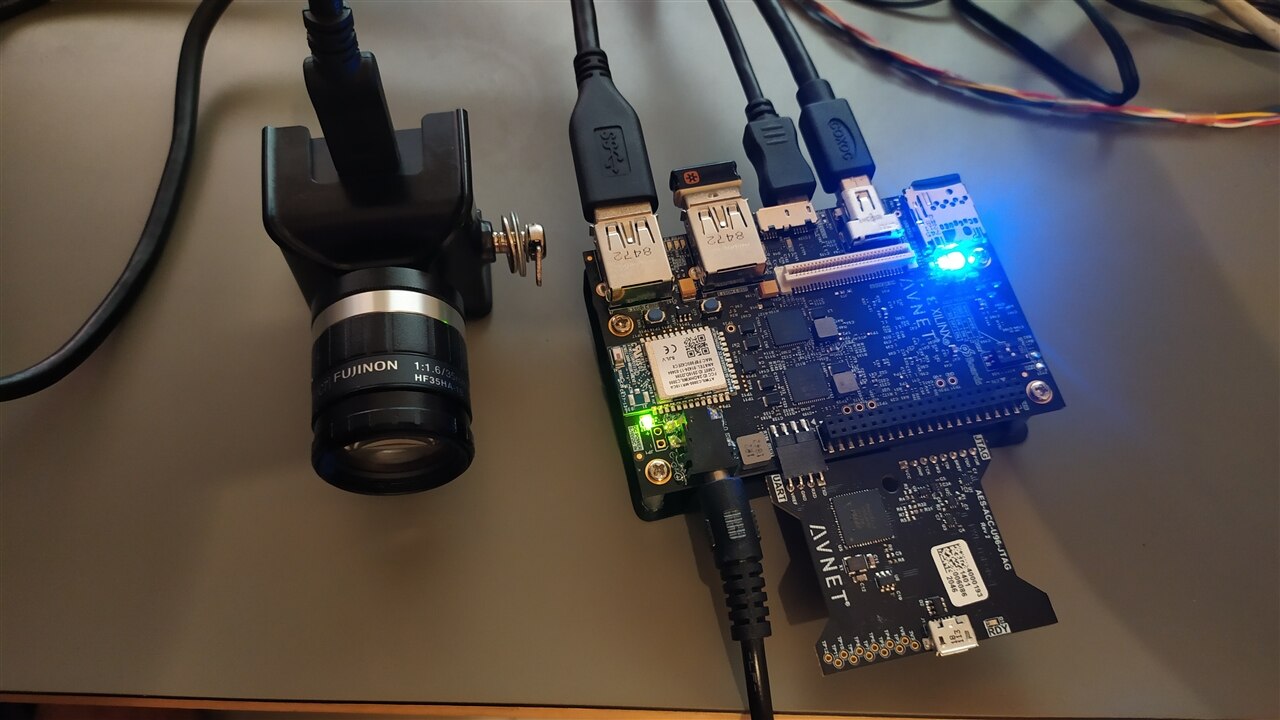
Since I am interested in, above all else, image/video processing on the Ultra96, I found a few notebooks particularly useful. This is because I am using a USB camera "See3CAM_CU30_CHL_TX_BX from e-con systems for capturing images/video, for which the usb_webcam.ipynb helped me get started in no time. And the display_port_introduction.ipynb notebooks helped display the captured /processed images directly on to the connected screen (which had speed advantages). Infact, I reused some of the code in these notebooks in my subsequent experiments. 
image

Adding OpenCV to PYNQ

As I mentioned before, I was, in particular, interested in notebooks related to image and video processing.

Luckily, I found a project called "PYNQ - Computer Vision" that looked promising for this. This project is maintained by Xilinx (now AMD) itself. Best of all, it's open source and all the code is available on github.

https://github.com/Xilinx/PYNQ-ComputerVision

Installing this was easy. I opened a terminal in PYNQ (On the top-right part of the jupyter main page, click "New" -> "Terminal")

Then type the following command in the terminal:

sudo pip3 install --upgrade git+https://github.com/Xilinx/PYNQ-ComputerVision.git

The process took only a few minutes to complete.

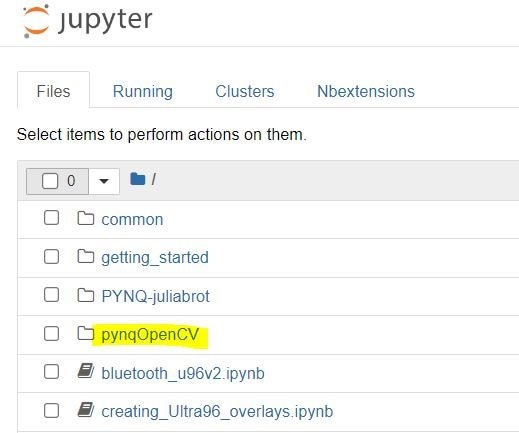
Once it completed, I saw a new folder inside my PYNQ main page
image

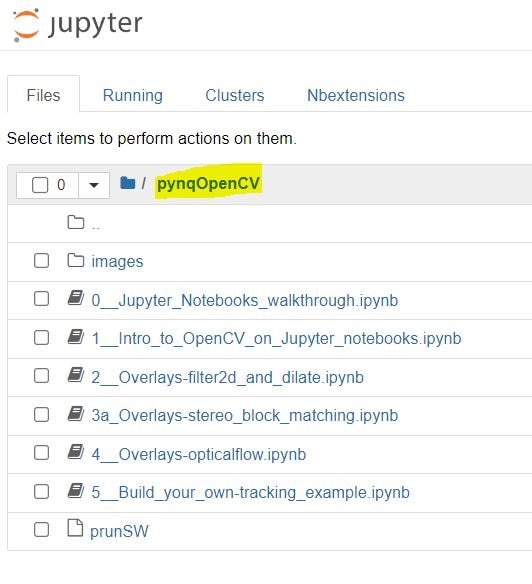
Inside the folder I found several very interesting notebooks:
image

Out of these example,  I was able to run some, but not all. In particular, I could not run the (3a) stereo block matching  in hardware, since it said that the blob was not found. I encountered the same issue with the Optical flow example. 

I tried to dig further into this, and so far the only thing I am able to find is that it's possibly because the OpenCV-for-PYNQ was last compiled for Vitis 2018.3 which is more than 4 years old, while I am using PYNQ v3.0.1. I believe I will need to recompile the OpenCV-for-PYNQ overlays for the current version of Vitis that v3.0.1 is compiled against to get them to work again. I will look more into how to accomplish this.

Next Steps

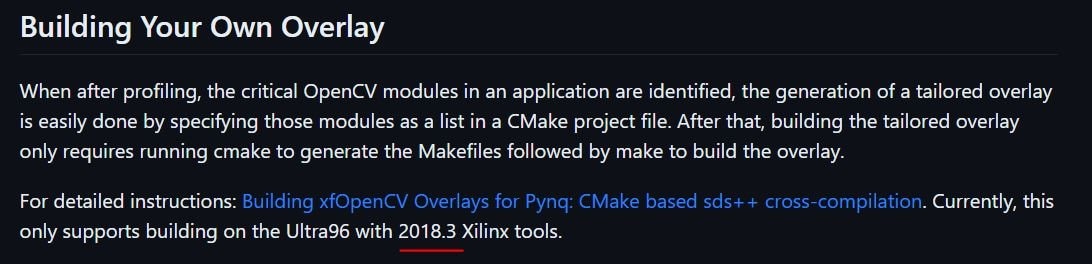
The github page gives a guide on how to compile your own PYNQ "overlays" which is what I am most interested in.
image
However, it also mentions that it only support building with 2018.3 tools, so I will need to look into how to accomplish the same with the latest version of tools instead. I do hope the OpenCV for Xilinx is maintained more actively so that it can deliver the promise of convenience for everyone.

If any of the readers managed to make the Opencv accelerated overlays work, please leave a comment below. I will be interesting in knowing how. 

Thanks for reading. I hope to share more on this as I learn more!

  • Sign in to reply

Top Comments

  • saadtiwana_int
    saadtiwana_int over 2 years ago in reply to manojroy123 +1
    Hi manojroy123 The only way you ca use this camera is if, when you connect it to your computer using a USB, you see it appear as a UVC class device. In other words, if you see it appear as a webcam when…
  • saadtiwana_int
    saadtiwana_int over 2 years ago in reply to rscasny

    Thank you  rscasny . Glad you liked it! Slight smile

    • Cancel
    • Vote Up 0 Vote Down
    • Sign in to reply
    • More
    • Cancel
  • saadtiwana_int
    saadtiwana_int over 2 years ago in reply to manojroy123

    Hi manojroy123 

    The only way you ca use this camera is if, when you connect it to your computer using a USB, you see it appear as a UVC class device. In other words, if you see it appear as a webcam when you connect to your computer. If that is the case, then you can plug it into the ultra96-v2 while running PYNQ (which is basically running on Linux) and you should be able to use the device like a USB camera. 
    If, however, the camera does not appear as a USB camera when you connect it to your computer then unfortunately there is no easy way to accomplish the same. I would instead suggest using any usb webcam that you may have lying around (or buy a cheap one!). 

    Hope that helps!

    Saad

    • Cancel
    • Vote Up +1 Vote Down
    • Sign in to reply
    • More
    • Cancel
  • rscasny
    rscasny over 2 years ago

    great blog

    • Cancel
    • Vote Up 0 Vote Down
    • Sign in to reply
    • More
    • Cancel
  • manojroy123
    manojroy123 over 2 years ago

    image

    I wan't to interface the above camera to ultra96-v2 board for computer vision using pynq. Please let me know can it be done or not.

    • Cancel
    • Vote Up -1 Vote Down
    • Sign in to reply
    • More
    • Cancel
  • saadtiwana_int
    saadtiwana_int over 2 years ago in reply to rajivbishwokarma

    Indeed you are right. Now what I need to find out is how to use these libraries with PYNQ. Doing processing on the A53 cores is much slower, and also kills the purpose of having an FPGA, so hardware acceleration is must!

    • Cancel
    • Vote Up 0 Vote Down
    • Sign in to reply
    • More
    • Cancel
>
element14 Community

element14 is the first online community specifically for engineers. Connect with your peers and get expert answers to your questions.

  • Members
  • Learn
  • Technologies
  • Challenges & Projects
  • Products
  • Store
  • About Us
  • Feedback & Support
  • FAQs
  • Terms of Use
  • Privacy Policy
  • Legal and Copyright Notices
  • Sitemap
  • Cookies

An Avnet Company © 2025 Premier Farnell Limited. All Rights Reserved.

Premier Farnell Ltd, registered in England and Wales (no 00876412), registered office: Farnell House, Forge Lane, Leeds LS12 2NE.

ICP 备案号 10220084.

Follow element14

  • X
  • Facebook
  • linkedin
  • YouTube