


What makes me tick
I am passionate about IoT at work and at home - yep, my wife is "delighted". I am passionate about making life easier. And I am passionate about automating tasks. All this implies that I spend long and healthy hours in the night where, instead of sleeping and resting, I'm creating and interconnecting things at home that simply make me feel I am in a better home, more automated, smarter.
Why I want to become a Element14Challenger
I love to be challenged and stretched beyond my IoT knowledge and think of innovative areas where to make people's life easier, every single day. In this project I put together day-to-day necessities I have at home with future developments and solutions outside the box. By this Design Challenge I hope to broaden my experience, to have fun, participate with other 15+ IoT lovers and test whether my ideas are disruptive beyond my "home-universe".
What's the problem I want to solve
Mainly three. First, I want to emulate that somebody is present at home whenever we leave it for some days. We leave in the ground floor and I don't feel comfortable leaving the flat without knowing if all is ok. Second, create an alarm system that fits my needs by integrating my IP Cam, some PIR detectors and some intelligence on it. Third, I want my home to become as autonomous as I can by knowing more about my home for us to live better, as an example I want to automatically control the humidity to avoid a dry home environment, which is not healthy, by turning on the hoover-robot every few days, etc. Besides the main problems, I'm solving others such as knowing if my wife is already at home, or if I should bike or take the car to work, whether my car is in the garage or many others as detailed below. All this at a lower cost than in the market and 100% customizable for my requirements.
How is this idea disruptive
Raspberry + Arduino + Home automation does not sound very disruptive, right? Well, depends on the details, as usual. Much further than the minimum-to-be features such as temperature and lighting control, I look for a holistic command center at home that, allows distributed intelligence into the different "things", learns from our habits to anticipate our requirements (when to turn on a light or switch off the TV, etc) and also interconnects with existing systems at home rather than having to buy new ones. Since nowadays mobile phones are ubiquitous, the SmartSpace will also be controlled via a mobile app and from the Internet, all securely done.
What's the biggest challenge to get all this working
Time. 14 weeks look like a lot except if you plan to design and implement many of cool features and have them tested. To overcome it, if I become a Challenger, during the first weeks and posts I will focus on prioritizing the features to those that are the most attracting and disruptive. Besides the time challenge, there is the aesthetic challenge and I know who is the "judge" at home for it, meaning that the final solution needs to be neat and nice from the outside, not just from the inside.
Getting into the Details
With this project, I'm transforming three physical places into a SmartSpace all together: my home, my garage and my garden. I am evolving them into more comfortable, more informative and more safe & secure. This all makes a "magic" 3 by 3 matrix of drivers and places:
| Driver vs Place | Home | Garage | Garden |
|---|---|---|---|
| Comfortable | Presence - is my wife already at home? and my in-law? Lighting at every room - automatic and remote as well as controlled via the TV remote control Hoovering - automatic and remote TV and Radio - automatic turn on/off when arriving or leaving home Humidifier - turn on/off depending on room humidity Home temperature control - automatic and remote (future) | Park assistance Presence - did I leave the car inside? Motion Detection and Lighting | Motion Detection and Lighting |
| Informative | Temperature, humidity and luminosity in every room Motion Detection - is somebody at home? Weather forecast (Internet) Pollution forecast - shall I take the bike or car? (Internet) | Temperature and humidity Luminosity - did I leave the lights on? | Temperature, humidity and luminosity Rain detection - to bike or not to bike Soil humidity - shall I water the plants |
| Safe & Secure | Presence emulator when not at home - Automatic Smart Lighting, TV/Radio Alarm Device
| Alarm
| Alarm
IP55/IP66 case |

Modules of the SmartSpace
The above diagram with the flat and the garden should help to better understand the flat distribution, showing where the main components: the Command Control and the Control Panel
Command Center
The Command Center governs the actions required to make my SmartSpace more comfortable and secure. It captures the data, analyses it and, by combining it with the DB knowledge, actuates. The command center allows also manual override. As a fault back plan, the things connected to the Command Center will be designed to allow some autonomy in case they cannot connect with the Command Center after a time threshold - you don't want to have a blinking lamp just because a module lost connectivity with the center...
Knowledge. In the first approach the knowledge (what to do when) will be programmed and as an evolution the Command Center will contain Machine Learning / AI / Neural Networks algorithms to learn from my family and be able to replicate our habits automatically. For example, it will know when we have left the home and automatically turn on the alarm and the presence emulator. Also when we enter home, if there was nobody inside before, it will turn on the lights and put our favorite TV channel if it is the right time.
Hardware and Software. The HW will be the RPI 3 connected to my TV in the living room. It will communicate with the other "things" via the EnOcean and will include as well a RF-433Mhz to control 3 RF-plugs and the hoover, a RF-2,4GHz to communicate with other things, the Pi Camera, the Sense Hat, an IR transmitter and receiver and a PIR. An external HDD will be used to avoid SD corruption - I plan to use a mySQL DB to record the relevant events. Besides the SO and the relevant libraries for the sensors and modules, the Command Center will include the OpenHAB server, MQTT and mySQL, these are great apps to enable human interaction and internal-Linux communication. The Command Center will also determine the presence of people at home via polling the mobiles' IP's and the motion sensors.
Main features to design and implement in the Command Center.
1) Presence detection. It will of course leverage the PIR present in each single module of the rooms (see "Things in the room" section below) as well as my Foscam IPCam (see "Alarm System" section below) and the PI Cams but also it will track the family mobile phones to know who is at home. This can be in two different ways, the first will be ping-based - just sending pings every now and then to check IP connectivity with the phones (they are IP-fixed making this easier). The second way is by making queries to the router, this would be optimal as the router can provide some more in-depth information. I will commence with the first option and deploy the second one in the improvement phase.
2) Automating appliances. I have a hoover-robot that can be controlled via a RF remote control, it is a Solac EcoGenic and I intend to replicate the main commands of the remote to be able to steer it. To do so, I will identify the RF frequency and protocol to use in my SmartSpace. Additionally, I want to automate switching on and off the humidifier in the main room. This can be tricky since apparently does not have a way to control it easily and may require to open it and connect some wires :!
3) Presence emulator. This is one of the key components to implement. The emulator will work with the 3-RF plugs via the 433Mhz transmitter and with the TV or Radio via the IR transmitter. The idea is straightforward, emulate that somebody is at home by turning on and off the lights in an intelligent and random manner as well as the TV/Radio. All this replicating the relevant remote control.
4) Comfortable lighting. We can currently control the living room light via the RF plug and its remote. But, hehe, it happens that we never have the remote handy, since it is on the bedside table. This means that we need to stand up, go to the bedroom, press the button and come back... My intention is to make the home more comfortable: use the TV remote control to act on the light. By adding an IR receiver to the Command Center, it will detect when a seldom utilized key is pressed to turn it on or off. For example, it will interpret a double press on the red key within 3 seconds as "turn on/off" the living room light. This way, if it takes longer, it means I'm managing the TV rather than the light - 3s is usually enough since the TV needs to load this and that page and the "user" needs to read before pressing the same key another time. This will be done for the rest of the lights with the green and yellow buttons.
5) Provide weather and pollution forecast. As I pretend to visualize some key information from home both in the TV and in the Control Panel (see section below), the Command Center module shall also capture from internet the weather and pollution forecasts for my city and add them to the dashboard.
6) Knowledge acquisition. Instead of programming the heuristics on how to react to different sensor data, I plan to use some automated learning for the system to learn our habits during the improvement phase of the project. The idea is that probably a Neural Network can be more efficient on controlling the alarm or the presence emulator than trying to program it all. By providing some patterns with the sensor status (PIR's status, luminosity status, etc) the NN can learn and better react to the changing environment. Training the NN should not be quite time consuming since the variability is more limited than in some other complex environments where neural networks are used.
Note: depending on the performance in real life, it may be required to delegate some of these functions to an Arduino Uno or Pro-mini, such as the IR emitter and receiver or the 2 RF modules. If so, the Arduino would probably be connected via USB to the RPI.
Future development: we leave in a city very cold in winter and adjusting the inside temperature can bring some savings at the end of the month. I´d like to develop a control system and that can turn on and off the heating. However, the heaters require physically turning the knob as shown in the picture. Therefore, the physical module required for this feature can be complex as I'll need a servo strong enough to turn it and small enough to make sure it is aesthetically acceptable.
Solac hoover-robot
| Heating system to physically control
|


[ Picture sources: http://aspirame.es/solac/ecogenic/ http://cdn.xl.thumbs.canstockphoto.pl/canstock22504264.jpg ]
Control Panel
This will allow human interface and will be placed at the door entrance (inside home). It will provide information on the weather forecast and pollution forecast (obtained via Internet, a good starting point is the Weather Underground API), as well as key information from the SmartSpace - like people presence, recommendation on going by car or biking, outside temperature, rain, is the car in the garage, etc.
Hardware and Software. The HW wil be the RPI B+, the LCD Touchscreen and the Pi Camera. Additionally it will include four sensors (temperature, humidity, luminosity and PIR) and the Wifi dongle. Finally it will have a NFC Mifare RFID Card Reader to allow my family to swipe a card to activate/deactivate the alarm, etc. These cards will have access and users controls - restricting some actions to the babysitter or some visitors. The Control Panel will obtain the SmartSpace data from the OpenHab server via Wifi and the weather and pollution via Internet. Depending on the radio coverage (to be tested) with the garage, this module may include the RF unit to communicate with the Thing in the garage or it can be delegated to the Command Center unit.
Main features to design and implement.
1) attractive human interface with key information on the main screen. The key information is the weather and pollution forecast, an icon showing whether the car is in the garage, some icons showing whose presence is detected at home (mobile phones as explained in the "Command Center" section). If there is still enough place while keeping the aesthetic aspect, I will add some other sensor status and actuators (light status, PIR, alarm on/off, etc). On a second page if required, it will be shown all the environmental data (temperatures, etc). In a second phase, it can also show historical data on graphics, the data would be obtained from the Command Center DB.
2) RFID reader. In principle the Control Panel will be autonomous, meaning that the access rights for the card being swiped are included in this module and there is no need to query the Command Center. In a second phase, while implementing, the design shall be modified to allow these queries.
Things in the rooms
In each of the three rooms there will be a module consisting of an Arduino Pro-mini, four sensors (temperature, humidity, luminosity and PIR) and a RF-2,4GHz. These will communicate with the Command Center via radio. Their main function is just to inform of the environment situation and any motion, therefore will be quite a light module. They will be quite light and easy to hide of the eye-sight to avoid non-geek people get stressed
Thing in the garage
This unit will help us with parking the car. It detects via ultrasound the distance between the car and the three walls and advice the right position to park without scratching it Also it will report to the Command Center whether the car is in the garage or not - nothing worse than rushing to the garage and discover that you left the car at the street the night before... Additionally, it will provide environmental data (temperature, etc), flood alarm and automatic lighting.
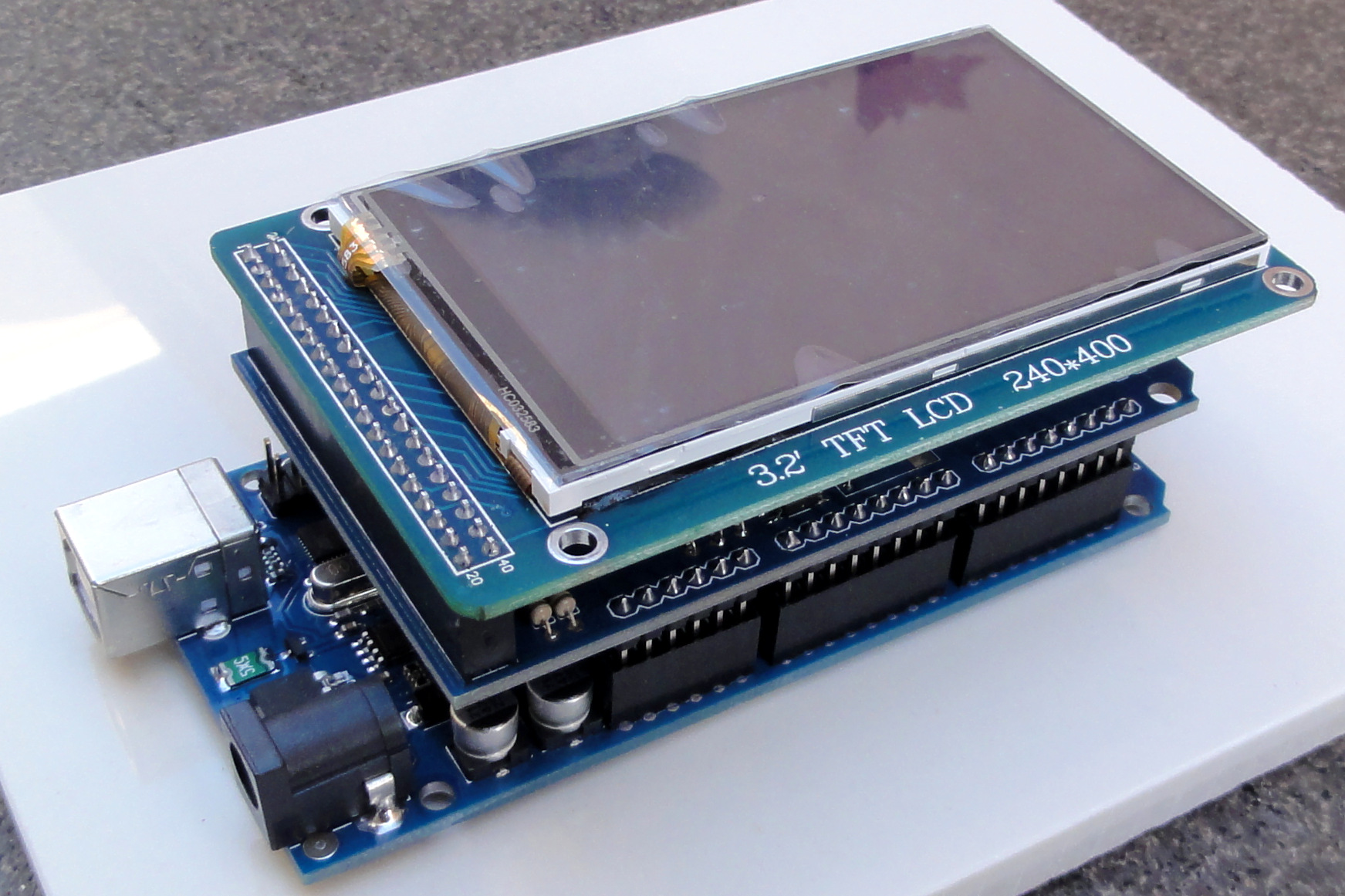
Hardware and Software. The HW will be an Arduino Mega probably with a TFT screen to show the car position. Additionally it will include eight sensors (temperature, humidity, luminosity, PIR, flood detection and 3xultrasound sensors) and a RF-433Mhz to turn on/off the light via a RF-plug. It will communicate with the Command Center either via a RF-2,4GHz or the EnOcean. If the walls and ceiling prove too thick, I will use the RF-433Mhz or try an additional antenna. Physically it will all be included in a IP44 case to avoid problems with water drops and dust.
Main feature to design and implement.
1) Parking assistance. There will be one ultrasound sensor (like the HC-SR04) per side - both sides and the back part of the garage. In principle the information shown int he TFT will be quite simple: the screen will be divided in three columns, one per PIR, each with a Red-Amber-Green status to make it more visual and a numeric number with the distance.
2) Motion detection. The motion detection not only helps on detecting and intruder (if the alarm is set at home) but also when we approach it will turn on the lights and also start displaying the parking assistance on the TFT.
3) Environmental information. Besides sending the environmental data (temperature, humidity and luminosity), this module will show it via TFT if the TFT is touched - this way when I am in the garage and want to check the temperature I don't need to run home but just see it on the TFT.

[ Picture Source: https://hifiduino.files.wordpress.com/2012/03/dsc01440.jpg ]
Thing in the garden
Finally this unit will control what happens in the garden. It should notify if it is raining and how much and will recommend to take the bike or not. I hope not to forget to water the plants (oops) with the soil humidity sensor. A key feature will be detecting movement in the garden, since it will be outside, a PIR may not be suitable, therefore I will need to investigate some other way of detecting "volume" motion in the garden. My idea is to enhance this volume detection so that I can control if there is an adult stepping in, the reasoning behind is to feel comfortable when my little kid is playing in the garden that she is safe from strangers. Another yet important feature to enhance the security at home is to detect if somebody is stepping in the garden, I will control this via weight sensors as well that can even replace the motion sensors, if proved it is not feasible or within budget to use them.
Hardware and Software. In principle the controller will be an Arduino Pro-mini or Nano. Besides the rain-drop counter and the soil humidity, temperature and luminosity sensors, it will require the sensor to detect the volume and the 2 or 3 weight sensors under the tiles. To communicate this unit will use the RF-2,4Ghz. All will be embedded in a IP55/IP66 case.
Alarm System
Among the different systems, I'm very interested in the alarm system. The key components are the Pi Cameras, the Foscam IPCam, the PIR sensors, weight sensor (for the garden tiles) and the intelligence programed in the RPI. The Foscam IPCam includes an API that can move the camera, activate the motion and sound detection, record video and alert via email. Whenever some motion is detected, the Command Center will determine which camera of the three is the best suited to record the possible intruder. If it is the IPCam it will then determine whether the camera should be moved to record the sequence or not. If it was a false alarm and no motion is detected after some time, the Command Center will instruct the IPCam to return to its default position. Once it is confirmed there is an unauthorized person at home it will start recording the event and notify me on my mobile phone via email and in the future also by sms and a phone call (GPRS card required).
Finally it will ring the alarm at home once the first seconds of recording are saved - I want to keep it as a proof. To ring the alarm I will use the Phillips radio and the soundbar in the living room. Since the radio is usually off, the Command Center will turn it on via the IR transmitter, select the audio input as the jack port, the RPI will send the audio via the jack connector. Additionally, the RPI will connect to the soundbar via the Bluetooth module and transmit the alarm buzz.
Intelligence will be implemented to avoid false positives but ensuring I am notified if an intruder breaks in. I will need to figure out the best approach probably via some heuristics or a neural network - don´t want to disturb the neighbours in the middle of the night, specially if it was in the end a false alarm. This heuristic or neural network will take the inputs of all of the sensors, the three cameras and also the latest changes to the actuators - I experienced that sometimes turning on the light triggers the Foscam IPCam motion detection and this needs to be avoided or minimized.
Pi Cams
| + Foscam IPCam
| + PIR Sensors
| + Intelligence (RPI)
| = Advanced Security !! |


[ Picture Sources: Pi IoT - Smarter Spaces with Raspberry Pi 3: The Kit- UPDATED! http://www.foscamaustralia.com.au/image/cache/data/918/foscam-fi8918w-wirelesswired-pantilt-ipnetwork-camera-w-8-meter-night-visionc2a0black-or-white-sale-01-640x480.jpg http://www.sufersa.com/uploads/agrupamientos/142004-1.jpg https://udarajay.com/content/images/2016/02/emotional-intelligence.jpg https://i.ytimg.com/vi/DJ2JjirBw1o/maxresdefault.jpg ]



As a future evolution of the Alarm System, I'm planning to include a movable camera by installing a PICam on top of a small autonomous car. From my experience when I am out of home, I'd like some times to check if I left my computer at home or if the house is tidied up for some unexpected guest, etc. But on top of that, if some motion is detected where there are no cameras, sending the car to patrol the area would be the best thing to do!
To Sum up
I'm very passionate about this Challenge and all the real-life applications I will add to my home, making me feel in a smart, secure and comfortable home. These features should be easily applicable to anybody's home opening a great potential for others to leverage the progress from the final result as well as any blog discussion during the challenge-ing weeks. There will be lots of discussions on how to best training the SmartSpace to learn our habits and bring great value, and also finding a volume sensor within budget will be attracting. There are many enhancement on the presented system and it will be fun to select the most disruptive ones for the Great Final!
Many thanks and looking forward to having some fun!
Sergio Martinez
About myself: for the last 4 years the IoT is being my hobby and my passion. Before that and even before the IoT term, at the University, I loved the microcontrollers, digital circuits and all the opportunities that they open. Then I worked for a leading company as DSP and systems engineer and currently I share my job time with a side role where I'm helping the site IoT center, working closely with start-ups and engineers.
Top Comments
-

rhe123
-
Cancel
-
Vote Up
0
Vote Down
-
-
Sign in to reply
-
More
-
Cancel
-

mg.sergio
in reply to rhe123
-
Cancel
-
Vote Up
0
Vote Down
-
-
Sign in to reply
-
More
-
Cancel
Comment-

mg.sergio
in reply to rhe123
-
Cancel
-
Vote Up
0
Vote Down
-
-
Sign in to reply
-
More
-
Cancel
Children