


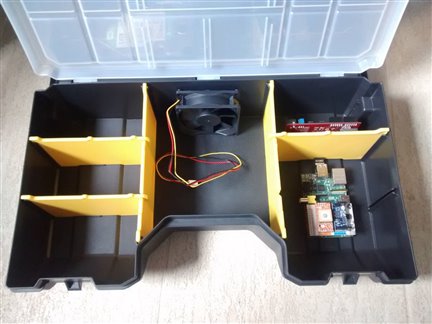
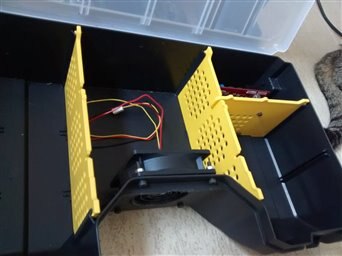
Starting from the selected box that will host the Meditech prototype components the first step has been to prepare the container to host the prototype components. First of all the setting of the cooling fan. The following image shows the general idea on how to use one of the two sides of the box. The other side will contain the default probes, accessories etc.
A modular system
To keep the system totally modular, every specialised device (based on the Raspberry PI) is hosted on one of the yellow frames. The central zone will host the cooling system only because it will contain several control components, a status display, status leds and so on.
Every RPI unit is simple to install and replace for any reason and to keep the things more simple the standard connectors will left untouched so that any non-expert user can repair a unit simply replacing the entire block.
A mechanical microswitch should disable the entire powering until the top lid is not closed.
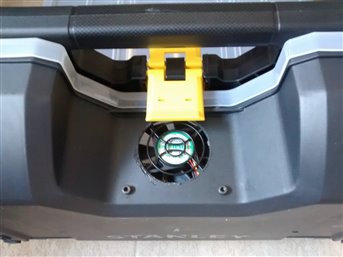
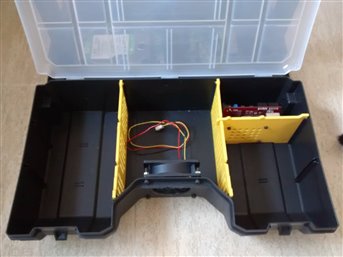
The air circulation is granted by a 12 cm PWM controlled fan and the frames will be adapted to permit to the cooling system to work properly; the fan will start at a sensor detect a critical temperature.Temperature and switch will work autonomously controlled by a program running on the ChipKit PI board that also control the led and other display feedback - despite the LCD monitor - interacting with the RPImaster that controls the entire networked system.
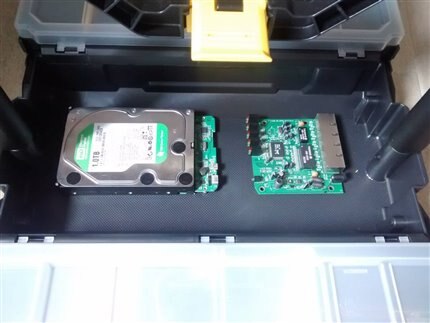
The storage and network hub should be fixed in the center area - together with the powering system - as they will cable the entire system.
First modification: the cooling system
The following three images shows the installation of the fan and the preparation of the forced air circulation.
Top Comments