element14 Community
element14 Community
    Register Log In
  • Site
  • Search
  • Log In Register
  • Community Hub
    Community Hub
    • What's New on element14
    • Feedback and Support
    • Benefits of Membership
    • Personal Blogs
    • Members Area
    • Achievement Levels
  • Learn
    Learn
    • Ask an Expert
    • eBooks
    • element14 presents
    • Learning Center
    • Tech Spotlight
    • STEM Academy
    • Webinars, Training and Events
    • Learning Groups
  • Technologies
    Technologies
    • 3D Printing
    • FPGA
    • Industrial Automation
    • Internet of Things
    • Power & Energy
    • Sensors
    • Technology Groups
  • Challenges & Projects
    Challenges & Projects
    • Design Challenges
    • element14 presents Projects
    • Project14
    • Arduino Projects
    • Raspberry Pi Projects
    • Project Groups
  • Products
    Products
    • Arduino
    • Avnet & Tria Boards Community
    • Dev Tools
    • Manufacturers
    • Multicomp Pro
    • Product Groups
    • Raspberry Pi
    • RoadTests & Reviews
  • About Us
  • Store
    Store
    • Visit Your Store
    • Choose another store...
      • Europe
      •  Austria (German)
      •  Belgium (Dutch, French)
      •  Bulgaria (Bulgarian)
      •  Czech Republic (Czech)
      •  Denmark (Danish)
      •  Estonia (Estonian)
      •  Finland (Finnish)
      •  France (French)
      •  Germany (German)
      •  Hungary (Hungarian)
      •  Ireland
      •  Israel
      •  Italy (Italian)
      •  Latvia (Latvian)
      •  
      •  Lithuania (Lithuanian)
      •  Netherlands (Dutch)
      •  Norway (Norwegian)
      •  Poland (Polish)
      •  Portugal (Portuguese)
      •  Romania (Romanian)
      •  Russia (Russian)
      •  Slovakia (Slovak)
      •  Slovenia (Slovenian)
      •  Spain (Spanish)
      •  Sweden (Swedish)
      •  Switzerland(German, French)
      •  Turkey (Turkish)
      •  United Kingdom
      • Asia Pacific
      •  Australia
      •  China
      •  Hong Kong
      •  India
      • Japan
      •  Korea (Korean)
      •  Malaysia
      •  New Zealand
      •  Philippines
      •  Singapore
      •  Taiwan
      •  Thailand (Thai)
      • Vietnam
      • Americas
      •  Brazil (Portuguese)
      •  Canada
      •  Mexico (Spanish)
      •  United States
      Can't find the country/region you're looking for? Visit our export site or find a local distributor.
  • Translate
  • Profile
  • Settings
Sci Fi Your Pi
  • Challenges & Projects
  • Design Challenges
  • Sci Fi Your Pi
  • More
  • Cancel
Sci Fi Your Pi
Blog Meditech: Networking architecture
  • Blog
  • Forum
  • Documents
  • Files
  • Mentions
  • Sub-Groups
  • Tags
  • More
  • Cancel
  • New
  • Share
  • More
  • Cancel
Group Actions
  • Group RSS
  • More
  • Cancel
Engagement
  • Author Author: balearicdynamics
  • Date Created: 6 May 2015 9:29 PM Date Created
  • Views 782 views
  • Likes 2 likes
  • Comments 5 comments
  • meditech_project
  • wi-pi
  • lan
  • raspberry-pi
  • networking
  • wireless
  • sci_fi_your_pi
  • bridging
Related
Recommended

Meditech: Networking architecture

balearicdynamics
balearicdynamics
6 May 2015

    • Why to avoid other attracting alternatives for the internal boards connection than LAN
      • An alternative, detailed point of view
      • My point of view
      • The most important reason to adopt the Ethernet connection
    • Bridged networking
Introduction

The networking part has two main roles:


  1. Meditech device internal communication between the specialized RPI units that are part of the system and, optionally other RPI connected as add-on
  2. External wireless communication with the display unit that is also the Internet gateway of the entire system when needed


Why to avoid other attracting alternatives for the internal boards connection than LAN

The main issue arised discussing with some Element14 community members about the choice of adopting the wired Ethernet LAN as the standard method connect the Meditech RPI units. In the discussion Epitaxial vs 1N4002 Diodes clem57 suggested to adopt the SPI protocol for the RPI internal connections as apparently more reliable. Frankly - as can be read in my responses to the discussion mentioned above - something sounded strange to me. But I am not a great expert of the SPI protocol usage so I had to document about it. Until now I have used intensively it only to manage the communication between microcontrollers and chip (e.g. analog potentiometer, shift registers and so on).


An alternative, detailed point of view

Then I had the opportunity to make a deeper discussion about this aspect of the project with that got me a more wide view of her personal point of view about the usage of the SPI protocol in this specific context: connect and exchange data with a variable number of separate Raspberry PI devices doing specialised tasks.


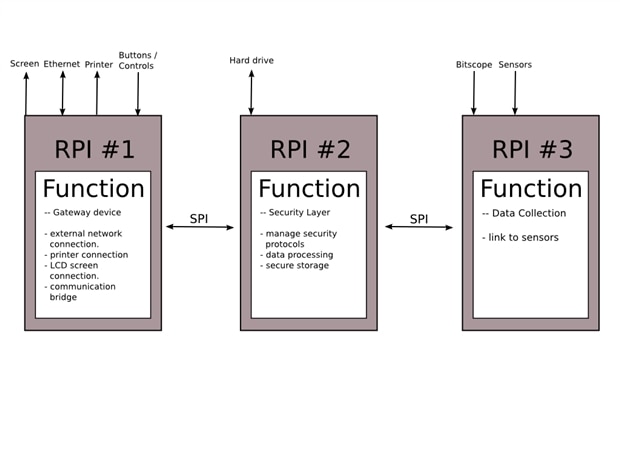
Following there is just the essential about her idea how to connect the devices (note that the Pi roles are only an example to explain the design):


So Raspberry Pi #1 is responsible for all of the user interface. If you are going to use a screen, this would control it. It's the only raspberry Pi to connect to an ethernet (Once the other two have had all of their software installed, they shouldn't ever need any updates). It also controls the printer and takes input from any controls or buttons that are on the device.


RPI2 communicates with RPI1 through an SPI bus. because SPI is controlled through software like python scripts, it means that if RPI#1 sends a request, then your software gets to choose what to do with it. Because of this, you can make your program only handle whatever requests that you want and probably only if it's sent with a password. The harddrive likely contains sensitive patient information so having this layer is important because you can provide security with it. See it as a firewall.


RPI3 communicates with RPI2 through a seperate SPI bus. It collects data then sends it to RPI#2. Any processing on the data should happen here, RPI#2 doesn't have a great amount of processing work to do so this is the best one for processing. If RPI#2 is in storage mode then the data can stream onto the harddrive. If RPI#1 is connected and has a valid password entered, RPI#2 can also stream the data to RPI#1 which decides which of its outputs are going to recieve it.

[...]


These considerations were accomplished with a clear schematic image reported below
 

image

My point of view

The intuitive reason - and probably my decent knowledge on how the networks works - that the adoption of the SPI protocol is not the correct solution has been influenced by several aspects.

  • Just because SPI is under software control while the LAN after the setting is managed by the system it is not a disadvantage but it seems a good way to develop the software in a more clean and linear way. When the Pi devices are correctly set, they can communicate following the established rules, with some dynamic variable elements then this a problem that can be forget. If something is not as expected the LAN settings can be modified until the system interconnects exactly as needed.
  • As I have already worked with SPI almost intensively developing on-board components, I have privileged this kind of bus and always like those chips that can be controlled by the SPI bus. But nothing more, this is the case of different machines that should dialogate.
  • To adopt the SPI bus - always remaining in a context of intuitive vision - seems to me like forcing the devices to do a taks with the wrong tool. As a matter of fact, this is a Serial Protocol Interface, probably slower and less performing in a context of multi-machine connection: this is just the role of the network. It seemed like a sort of step-back in technology.
  • Then I have considered that if SPI is so reliable and works so well between microcontrollers and chips managing bounch of data between computers, with a 10/100 Ethernet unused it sounds really bad.


After the discussion mentioned above I have checked to see if these concepts was confirmed by more reliable documentation then my personal view.


The Serial Peripheral Interface or SPI-bus is a simple 4-wire serial communications interface used by many microprocessor/microcontroller peripheral chips that enables the controllers and peripheral devices to communicate each other. Even though it is developed primarily for the communication between host processor and peripherals, a connection of two processors via SPI is just as well possible.

[...]

The SPI Bus is usually used only on the PCB. There are many facts, which prevent us from using it outside the PCB area. The SPI Bus was designed to transfer data between various IC chips, at very high speeds. Due to this high-speed aspect, the bus lines cannot be too long, because their reactance increases too much, and the Bus becomes unusable. However, its possible to use the SPI Bus outside the PCB at low speeds, but this is not quite practical.


This is what I have found on almost all sites with tutorials explaining how the SPI protocol works and how it should be adopted. The text above is from this tutorial that I attach in pdf to this post for your convenience.


The most important reason to adopt the Ethernet connection

The most important reason that I have finally decided to adopt the Ethernet connection for the internal data flow is because as I mention i the previous posts Meditech is not a fixed system: it is conceived to work with a minimal set of probes organised in a multi-board Pi processors that must be able to accept other specific probes without nothing to be changed. The better solution I see for this kind of cases is that every unit when present share the same networked architecture.


Bridged networking

Then the network architecutre has been defined as follows:


  • RPI Master hosts the bridge-util Linux utilities with the internal network assessed on the IP set 192.168.5.0/255 (the use of the 192.168.5 class is because it is a private network that it is very difficult that is managed by commercial routers)
  • RPI Master include a DHCP server available for extra devices connected to Meditech in future, for any reason. These can be connected to the pre-existing architecture without changing nothing.
  • RPI Master access to the Internet via the Wi-Pi and act as the master router of the Meditech internal wired Ethernet.
  • RPI is also the LAN gateway.
  • All the internal RPI have a static IP of the same 192.168.5.x class pointing to the RPI Master as their gateway
  • All the Meditech RPI has the SSH enabled.


To make the architecture able to connect only with the desired access point the AP connection information are defined statically in the network configuration files. This can be parametrised if a different WiFi AP connection approach is needed.


If you are interested, take a look to the next chronological post where it is explained the command set used to enable the router-bridge on the RPI Master.

Attachments:
imageSPI Interface in embedded systems.pdf
  • Sign in to reply

Top Comments

  • Former Member
    Former Member over 10 years ago +1
    Hi Enrico, Once again, it's important that you use the system that you are comfortable in using and setting up. A big reason I chose that example block diagram is me thinking also towards how I would approach…
  • DAB
    DAB over 10 years ago +1
    Great Blog. At first your setup looked a little over complicated, but I can now see how much power it gives you for expansion and sensor options. I also like the security arrangements, though you might…
  • balearicdynamics
    balearicdynamics over 10 years ago in reply to DAB

    Hi Dab, thank you. As a matter of fact - despite that I don't trust so much to the concept of IoT - I think that the networking has been hyper-simplified in this field. It seems there is a sort of compulsion to connect everything with everything, but networking is not only a fact of IP address, it is something more complex with many resources that are the worth to consider and I hope that someone start discovering this side. There are very good linux open-source routers (most of these are open source, including those of the biggest operators) and these can be first of all the key in the hole to manage the security issues.


    Enrico

    • Cancel
    • Vote Up 0 Vote Down
    • Sign in to reply
    • More
    • Cancel
  • DAB
    DAB over 10 years ago

    Great Blog.


    At first your setup looked a little over complicated, but I can now see how much power it gives you for expansion and sensor options.


    I also like the security arrangements, though you might have to look closely at any IOT sensors you add, they might open a vulnerability.


    DAB

    • Cancel
    • Vote Up +1 Vote Down
    • Sign in to reply
    • More
    • Cancel
  • screamingtiger
    screamingtiger over 10 years ago

    Cool project!  A tri-corder was one of my ideas as well but I figured it may be hard to present a believable application, good job doing that!


    Ethernet sounds like a good idea but the issue I see is you need a hub or router to connect everything together.  Why not use WiFi or better yet, blue tooth so no router needed?


    Then no wires are required to connect things together giving it a much better presentation.  this is the future, and everything is wireless.  In Star Trek, I don't recall anyone ever plugging wires into anything LOL.


    I think your idea is fine and I wanted to just suggest wireless of some sort as I think it would be cool!  Ok and my other motivation is I have a project I want to use Bluetooh for and would like to see someone else figure it out for me image

    • Cancel
    • Vote Up 0 Vote Down
    • Sign in to reply
    • More
    • Cancel
  • balearicdynamics
    balearicdynamics over 10 years ago in reply to Former Member

    Hello Lucie !


    One of the better things of how this project progress is going is to share ideas and concepts with you and the other community guys that are suggesting interesting critics and alternatives.


    About the security, there are two key points that maybe override the password mechanism, more robust than what I can do be software. Also taking in account that there is a limited time to develop - hopefully - the entire prototype. I have in mind to provide - not essential in the prototype version if it is considered before taking space for this - different levels of security:


    • Internal LAN is accessible from the external only through the bridged connection only (or the device is stolen, disassembled and this is another question image ): the bridge can be strongly enforced with a proxy. Always in the LAN environment granting a good level of security. So the internal devices can be accesses via SSH (anyway a reasonable secure mechanism) only t from some authorised networks. Further chap/pap enforcing encryption can be implemented to secure the access too. Data sent on the net through the WiFi and to the Internet will be secured via the widely diffused https protocol and the GET method instead the exposed POST to carry the information packages in the header instead of leaving them visibile. In a general way I consider to adopt everywhere it will be needed asymmetric encryption systems. No  passwords at all.
    • External LAN (WiFi) can be secured in two ways. The first is the bare communication layer, based on the already mentioned HTTPS and the second is a database data exchange secure method based on asymmetric keys exchanged and periodically (on a basis of 10 minutes) updated via a token. As a matter of fact any database information set of packets sent on the net will share a different public key after a first packet to tokenise the keys based on this timeout. I have already followed this approach in past and it demonstrated a good reliability.
    • Last, in case of the need of a very strong security for sensible data transmission, the packets can be sent with encryption / decryption based on PGP/GPG algorythms.


    I hope you read the part I put on bluetooth. Having the ability to interfere with other devices would render this unusable around other medical equipment...


    I don't forget this important point and I will post a document approaching just this aspect. It will be surprising for you, I suppose, the conclusiong.


    Enrico

    • Cancel
    • Vote Up 0 Vote Down
    • Sign in to reply
    • More
    • Cancel
  • Former Member
    Former Member over 10 years ago

    Hi Enrico,


    Once again, it's important that you use the system that you are comfortable in using and setting up. A big reason I chose that example block diagram is me thinking also towards how I would approach the ongoing security debate in the whole IOT scene.


    By adding a security layer that uses a data transfer system that can only send / receive data that you want it to and also add open commands / data and secure commands / data that requires a password or even if the two devices are set up to share 1 password for a user session then secure commands could be encrypted with the password, sending an initial byte that tells the security layer that the next command is encrypted so needs decrypting before it can be interpreted.


    Using this dual controller system where one is a gateway to the big wide world and the other operating a security and only communicating through an internal system would make a pretty robust solution. Of course, there would need to be work on the protocol and also encryption systems. Maybe the two devices could share another separate bus that the user has no access to. Allowing them to share encryption so each secure transfer can be encrypted with a unique key. Anybody who manages to hack through or brute force (lol!)the encryption on one packet of data can't use that same key for the others. (imagine how upset you'd be if you spent 3 weeks successfully brute forcing an encryption key only to find that it doesn't work with anything else...)


    Correct, SPI bus can't send data a long way, the bus capacitance would definitely make high speed transfer untrustworthy. However, since the raspberry pi's are likely to be in very close proximity to each other, I personally wouldn't have any problem using SPI over the very few centimeters involved, using a fine well insulated solid core wire. The SPI bus over the short distance I expect to be between the rPi's shouldn't suffer excess capacitance-infact, it's likely to only be the distance that a standard PCB SPI bus travels for so the performance should be the same.


    I'm not trying to change your mind :-) I just feel that anybody who reads and remembers that a SPI bus can only be used on a PCB might be limiting their knowledge.


    *over short distances for board to board interconnects it's fine to use.

    *over long distances like an external USB cable or cat5 run then don't use... ever...


    The place that I would expect any delay is in the security layer that does the processing. It's got to read data in from one communications bus, possibly perform some post processing then send it back out of a different data port.

    Like most systems that have a delay like this call it latency. I would expect this type of device to have some level of latency, It just depends on what is acceptible.


    I hope you read the part I put on bluetooth. Having the ability to interfere with other devices would render this unusable around other medical equipment...


    wow! another long post!


    It's nice to read through your reasoning, but I wouldn't spend too much more time on it lol!


    Lucie

    • Cancel
    • Vote Up +1 Vote Down
    • Sign in to reply
    • More
    • Cancel
element14 Community

element14 is the first online community specifically for engineers. Connect with your peers and get expert answers to your questions.

  • Members
  • Learn
  • Technologies
  • Challenges & Projects
  • Products
  • Store
  • About Us
  • Feedback & Support
  • FAQs
  • Terms of Use
  • Privacy Policy
  • Legal and Copyright Notices
  • Sitemap
  • Cookies

An Avnet Company © 2025 Premier Farnell Limited. All Rights Reserved.

Premier Farnell Ltd, registered in England and Wales (no 00876412), registered office: Farnell House, Forge Lane, Leeds LS12 2NE.

ICP 备案号 10220084.

Follow element14

  • X
  • Facebook
  • linkedin
  • YouTube