


The networking part has two main roles:
- Meditech device internal communication between the specialized RPI units that are part of the system and, optionally other RPI connected as add-on
- External wireless communication with the display unit that is also the Internet gateway of the entire system when needed
Why to avoid other attracting alternatives for the internal boards connection than LAN
The main issue arised discussing with some Element14 community members about the choice of adopting the wired Ethernet LAN as the standard method connect the Meditech RPI units. In the discussion clem57 suggested to adopt the SPI protocol for the RPI internal connections as apparently more reliable. Frankly - as can be read in my responses to the discussion mentioned above - something sounded strange to me. But I am not a great expert of the SPI protocol usage so I had to document about it. Until now I have used intensively it only to manage the communication between microcontrollers and chip (e.g. analog potentiometer, shift registers and so on).
An alternative, detailed point of view
Then I had the opportunity to make a deeper discussion about this aspect of the project with that got me a more wide view of her personal point of view about the usage of the SPI protocol in this specific context: connect and exchange data with a variable number of separate Raspberry PI devices doing specialised tasks.
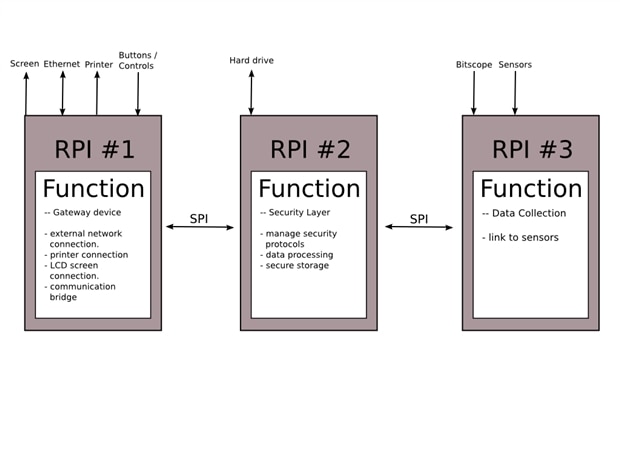
Following there is just the essential about her idea how to connect the devices (note that the Pi roles are only an example to explain the design):
RPI2 communicates with RPI1 through an SPI bus. because SPI is controlled through software like python scripts, it means that if RPI#1 sends a request, then your software gets to choose what to do with it. Because of this, you can make your program only handle whatever requests that you want and probably only if it's sent with a password. The harddrive likely contains sensitive patient information so having this layer is important because you can provide security with it. See it as a firewall.
RPI3 communicates with RPI2 through a seperate SPI bus. It collects data then sends it to RPI#2. Any processing on the data should happen here, RPI#2 doesn't have a great amount of processing work to do so this is the best one for processing. If RPI#2 is in storage mode then the data can stream onto the harddrive. If RPI#1 is connected and has a valid password entered, RPI#2 can also stream the data to RPI#1 which decides which of its outputs are going to recieve it.
[...]
These considerations were accomplished with a clear schematic image reported below
My point of view
The intuitive reason - and probably my decent knowledge on how the networks works - that the adoption of the SPI protocol is not the correct solution has been influenced by several aspects.
- Just because SPI is under software control while the LAN after the setting is managed by the system it is not a disadvantage but it seems a good way to develop the software in a more clean and linear way. When the Pi devices are correctly set, they can communicate following the established rules, with some dynamic variable elements then this a problem that can be forget. If something is not as expected the LAN settings can be modified until the system interconnects exactly as needed.
- As I have already worked with SPI almost intensively developing on-board components, I have privileged this kind of bus and always like those chips that can be controlled by the SPI bus. But nothing more, this is the case of different machines that should dialogate.
- To adopt the SPI bus - always remaining in a context of intuitive vision - seems to me like forcing the devices to do a taks with the wrong tool. As a matter of fact, this is a Serial Protocol Interface, probably slower and less performing in a context of multi-machine connection: this is just the role of the network. It seemed like a sort of step-back in technology.
- Then I have considered that if SPI is so reliable and works so well between microcontrollers and chips managing bounch of data between computers, with a 10/100 Ethernet unused it sounds really bad.
After the discussion mentioned above I have checked to see if these concepts was confirmed by more reliable documentation then my personal view.
The Serial Peripheral Interface or SPI-bus is a simple 4-wire serial communications interface used by many microprocessor/microcontroller peripheral chips that enables the controllers and peripheral devices to communicate each other. Even though it is developed primarily for the communication between host processor and peripherals, a connection of two processors via SPI is just as well possible.
[...]
The SPI Bus is usually used only on the PCB. There are many facts, which prevent us from using it outside the PCB area. The SPI Bus was designed to transfer data between various IC chips, at very high speeds. Due to this high-speed aspect, the bus lines cannot be too long, because their reactance increases too much, and the Bus becomes unusable. However, its possible to use the SPI Bus outside the PCB at low speeds, but this is not quite practical.
This is what I have found on almost all sites with tutorials explaining how the SPI protocol works and how it should be adopted. The text above is from this tutorial that I attach in pdf to this post for your convenience.
The most important reason to adopt the Ethernet connection
The most important reason that I have finally decided to adopt the Ethernet connection for the internal data flow is because as I mention i the previous posts Meditech is not a fixed system: it is conceived to work with a minimal set of probes organised in a multi-board Pi processors that must be able to accept other specific probes without nothing to be changed. The better solution I see for this kind of cases is that every unit when present share the same networked architecture.
Bridged networking
Then the network architecutre has been defined as follows:
- RPI Master hosts the bridge-util Linux utilities with the internal network assessed on the IP set 192.168.5.0/255 (the use of the 192.168.5 class is because it is a private network that it is very difficult that is managed by commercial routers)
- RPI Master include a DHCP server available for extra devices connected to Meditech in future, for any reason. These can be connected to the pre-existing architecture without changing nothing.
- RPI Master access to the Internet via the Wi-Pi and act as the master router of the Meditech internal wired Ethernet.
- RPI is also the LAN gateway.
- All the internal RPI have a static IP of the same 192.168.5.x class pointing to the RPI Master as their gateway
- All the Meditech RPI has the SSH enabled.
To make the architecture able to connect only with the desired access point the AP connection information are defined statically in the network configuration files. This can be parametrised if a different WiFi AP connection approach is needed.
If you are interested, take a look to the next chronological post where it is explained the command set used to enable the router-bridge on the RPI Master.
| SPI Interface in embedded systems.pdf |

Top Comments
-

DAB
-
Cancel
-
Vote Up
+1
Vote Down
-
-
Sign in to reply
-
More
-
Cancel
-

balearicdynamics
in reply to DAB
-
Cancel
-
Vote Up
0
Vote Down
-
-
Sign in to reply
-
More
-
Cancel
Comment-

balearicdynamics
in reply to DAB
-
Cancel
-
Vote Up
0
Vote Down
-
-
Sign in to reply
-
More
-
Cancel
Children