


This is a part that has not yet considered in the software development discussions.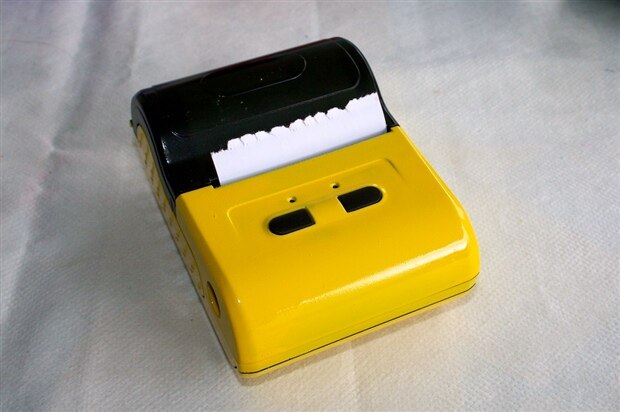
Introduction
As mentioned in a previous post, one of the Meditech peripherals is a small bluetooth 55mm thermal printer, covering a fundamental role, especially in cases of first aid and urgent interventions on-field.
The immediate following procedure expected after the very first aid operations with the help of the Meditech diagnostic probes is moving the patient in a organised structure for his hospitalisation or more adequate treatments.
As all the Meditech operated interventions are monitored and stored on a database, while every record is attached to the GPS absolute position and the precise synchronised date and time, it is possible to generate a short yet complete printout that will describe the patient health status, that will follow him during his transportation.
The first and most important use of these information is to give a summarised bunch of data in a human readable form (fast and reliable) to the doctors and specialised equipe that will support the patient.
The secondary but not less important reason is to keep a documented track on paper of the followed procedure by the first-aid personnel and the afforded strategy, if the patient has been moved, where he was recovered etc. In any case this track represent a testimonial document (that can be further integrated with the more complete diagnostic information stored on the Medited database) following the patient along his path.
There is also another important factor to consider: the availability of a printer can be extremely helpful to produce in any moment specific diagnostic data (e.g. the ECG track, the statistical results of a long period monitoring etc.). The availability of these information in a traditional paper support can be a key factor in certain conditions.
Printing more than text-only data
The Meditech Bluetooth printer works with the widely diffused ESC protocol, or Epson Escape, adopted by almost all the thermal roll printers (also named receipt-printers) by years. This protocol has been created by Epson around the en of 1980 and is actually one of the most reliable methods used by thermal printers. For more details on how the ESC protocol works see the following link on Wikipedia. The full (and few redundant) protocol specification from Epson is detailed in the attached document in pdf format.
While the protocol itself resulted a market winner adoption because of its simplicity its use is not so simple as it seems; as a matter of fact any control command should be sent to the printer in the form of and escape sequence resulting in a complex and difficult to debug code. Another issue approaching this printing protocol directly is its rigidity; every kind of different string should be managed properly taking in account that not all the printers - also supporting the same protocol - are the same and some control codes that works fine on a device can produce unattended effects on another.
Making a protocol parser
To solve the problem one for all it has been implemented a protocol parser, where every command has been converted in a simple function call accordingly with the following rules:
- Commands never generates printing mistakes or errors: if the required parameters are incomplete and it is not possible to apply a default value, the command should have no effect in the printout
- Commands should not send wrong data to the printer in any case
- Commands should be called in-line
- Commands should always return the expected value or an empty string (not NULL)
- Every command function should make a complete consistency check to avoid wrong escape sequences sent to the printer.
The resulting printing mechanism is dramatically simplified enabling the program to work with strings where the control code should simply be appended. So, for example to make a text in bold, there is the boolean call Bold( [ [true], false] ) returning the correct sequence to enable or disable the bold character: the string
"This is a BOLD test"
can be done as
"This is a " + protocolClassInstance.Bold(true) + "BOLD" + protocolClassInstance.Bold(false) +" test";
The same method will be applied to all. The following scriptlet shows the protocol class ESC_Protocol with all the available API; the full code will be posted in the GitHub repository.
class ESC_Protocol {

  public:
  int charSet;
  bool underline;
  bool bold;
  bool strong;
  bool reverse;
  bool bigFont;
  bool doublePrintHeight;
  bool doublePrintWidth;
  bool bitmapHighDensity;
  bool printHRI;
  int printHRIStyle;

  ESC_Protocol(void);
  ESC_Protocol(bool, bool, bool, bool);

  char* ResetPrinter();
  char* Bold(bool);
  char* CustomEsc(int[], int);
  char* Underline(bool);
  char* Underline(int);
  char* Reverse(bool);
  char* PrintAndFeedLines(int);
  char* EndParagraphLines(int);
  char* PrintAndFeedDots(int);
  char* CharTypeFace(int);
  char* HriTypeFace(int);
  char* CharBoundary(int, int);
  char* CharAttributes(int, bool, bool, bool, bool);
  char* AbsolutePosition(int);
  char* PrintingAreaWidth(int);
  char* CharacterScale(int, int);
  char* SelectPaperSensorStop(bool, bool);
  char* SetPanelButtons(bool);
  char* HorizontalTab();
  char* RelativePosition(int, bool);
  char* pagemodeAbsolutePrintPosition(int);
  char* pagemodeRelativePrintPosition(int, bool);
  char* DefaultLineSpacing();
  char* pagemodeFormFeed();
  char* pagemodePrintPage();
  char* NewLine();
  char* LineSpacing(int);
  char* RightCharSpacing(int);
  char* CharSpacing(int);
  char* HriPrintingPosition(int);
  char* BarcodeHeight(int);
  char* BarcodeWidth(int);
  char* Barcode(int, char*);
  void setDefaultSettings();
  void setBitmapDensity(int);
  void setCharAttributes(bool, bool, bool, bool, bool);
  void setCharTypeFace(int);
  void setCharBoundary(int, int);
  void setDotSpacing(int);
  void setLineSpacing(int);
  void setCharSpacing(int);
  char* getBoundary();
  char* getPrintableString(char*);
  char* getBitmapHeader(int, int, int);
  char* UserCharacterSet(bool);
  char* SetHorizontalTabs(int[]);
  char* DoubleStrike(bool[]);
  char* pagemodeSetPageMode();
  char* InternationalCharacterSet(int);
  char* pagemodeStandardMode();
  char* pagemodePrintDirection(int);
  char* pagemodePrintingArea(int, int, int, int);
  char* Rotate90(bool);
  char* SetMotionUnits(int, int);
  char* Justify(int);
  char* OpenCashDrawer(int);
  char* OpenCashDrawer(int, int, int);
  char* CharacterCode(int);
  char* CutPaper(int);
  char* UpsideDown(bool);
  char* LeftMargin(int);
  char* KanjiPrintMode(bool, bool, bool);
  char* SelectKanji();
  char* CancelKanji();
  char* KanjiUnderline(int);
  char* KanjiCharacterSpacing(int, int);
  char* KanjiQuadMode(bool);
  char* stringForPrinter(int[], int);
  char* pagemodeCancelPrintData();
  char* DoubleStrike(bool);
  char* Start();
  char* Max_Peak_Current_324(int);
  char* Max_Speed_324(int, int);
  char* Intensity_324(int);
  char* Status_324();
  char* Identity_324();
  char* Set_Serial_324(int);
  char* EOP_Opto_Type_324(int);
  char* EOP_Opto_Calib_324(int, int);
  char* EOP_Opto_Param_324();
  char* EOP_Opto_CurrLev_324();
  char* Save_User_Param_324();
  char* Factory_Default_324();
  char* Loading_Pause_324(int);
  char* Loading_Length_324(int, int);
  char* Loading_Speed_324(int, int);
  char* Historic_Heat_324(bool);
  char* Msk_App_324(int, int);
  char* Near_EOP_Presence_324();
  char* Near_EOP_Opto_Calib_324();
  char* Near_EOP_Status_324();
  char* Near_EOP_Opto_Curr_Lev_324();
  char* Internal_Font_324(int);
  char* Max_Columns_324(int);
  char* Text_Line_Rotate_324(bool);
  char* Paper_Forward_324(int);
  char* Paper_Backward_324(int);
  char* Graphic_Offset_324(int, int);
  char* Graphic_Print_324(int, int, int, char);
  char* Partial_Cut_324();
  char* Full_Cut_324();
  char* Barcode_Rotate_324(bool);
  char* Mark_Length_324(int);
  char* Tof_Position_324();
  char* Mark_To_Tof_Position_324(int, int);
  char* Opto_Head_Line_Len_324(int, int);
  char* Mark_To_Cut_Position_Len_324(int, int);
  char* Head_Dot_Line_ToCut_324(int, int);

};
| escp2ref.pdf |

-

shabaz
-
Cancel
-
Vote Up
0
Vote Down
-
-
Sign in to reply
-
More
-
Cancel
-

balearicdynamics
in reply to shabaz
-
Cancel
-
Vote Up
0
Vote Down
-
-
Sign in to reply
-
More
-
Cancel
Comment-

balearicdynamics
in reply to shabaz
-
Cancel
-
Vote Up
0
Vote Down
-
-
Sign in to reply
-
More
-
Cancel
Children