


My aplication for Smart Home & Healthcare Challenge is EdgeCare: a combination between a wearable device and professional software, where the primary goal is to create an system capable to map metabolic trends and autonimic system stress.
EdgeCare will be a Multi-Sensor Metabolic & Autonomic Datalogging Wearable with LabVIEW R&D Analytics.
The Architecture:
The system consists of an ultra-low-power wearable bracelet powered by the Seeed Studio XIAO ESP32-C6, which acts as a high-density bio-datalogger. After an initial high-fidelity logging phase, the bracelet transmits the multi-sensor matrix via Bluetooth Low Energy (BLE) to a dedicated desktop gateway (a second ESP32). This gateway streams the data via high-speed Serial communication directly into a custom LabVIEW Front Panel. LabVIEW will handle the complex multi-channel visualization, digital signal filtering, and direct mathematical correlation against a medical-grade Dexcom One+ CGM ground truth.
Technical implementation plan is devided into several phases:
Phase 1:
001. Development Environment Setup & Hello World
- Installation and configuration of VS Code + PlatformIO extension.
- Environment setup for the ESP32-C6 chip's RISC-V compiler.
- Writing, compiling, and uploading a verification demo program (Blink Onboard LED + Serial Monitor output).
002. Wireless Infrastructure: BLE Server-Client Communication
- Creating a BLE 5.3 architecture between two Seeed Studio XIAO ESP32-C6 boards.
- Configuring the Wearable (BLE Server) with a custom Service, Characteristic, and push notification (notify()).
- Configuring the Gateway (BLE Client) for automatic scanning, connection, and packet reception.
- Resolving memory allocation and buffer termination (\0) issues for a clean data stream.
Phase 2:
003. Test Sensor Prototyping (Preliminary Prototype)
- I2C bus interfacing on the ESP32-C6.
- Connection and debugging of the MAX30100 ( used until MAXREFDES117 will arrive) the optical sensor module (resolving I2C logic level / 3.3V pull-up issues).
- Reading raw optical data and integrating it into the BLE data packet sent to the Gateway.
004. Data Packet Formatting & LabVIEW Interfacing
- Defining a standardized data structure (JSON or compact binary packet) for parameters (Temperature, PPG/BPM, Battery Status).
- Configuring the ESP32-C6 Gateway to forward data received via BLE to the USB-Serial port.
- Creating a Virtual Instrument (VI) in LabVIEW for serial data acquisition, string parsing, real-time graph display, and saving to CSV/TDMS files.
Phase 3:
005. Integration of Official Element14 Sensors (Hardware Kit)
- Interfacing the MAX30208 clinical temperature sensor via I2C (register configuration, conversion command).
- Interfacing the next-generation MAXREFDES117 (MAX30101) optical sensor (FIFO configuration, Red/IR/Green LEDs).
- Integration of the SHT40 environmental sensor (I2C) for ambient temperature and humidity.
006. Algorithms & Medical Signal Processing on ESP32-C6
- Implementation of an optical signal processing filter (digital filtering on the PPG signal).
- Extraction of clinical parameters: Heart Rate (BPM) and Oxygen Saturation (SpO2).
- Implementation of an anomaly/critical threshold detection algorithm (e.g., fever, tachycardia).
Phase 4:
007. Power Management & Data Robustness (Flash Storage)
- Implementation of a routine for temporary storage in non-volatile Flash memory (Preferences) to handle BLE disconnection states.
- Automatic data resynchronization algorithm for unsent data upon reconnection with the Gateway.
- Wearable power consumption optimization: Light Sleep / Deep Sleep modes between sensor readings.
008. Schematic & PCB Design (JLCPCB Strategy)
- Integrated electronic schematic design (ESP32-C6 + sensors + PMIC/LiPo battery management).
- PCB footprint design and routing, adhering to thermal guidelines for the SHT40 sensor (isolation slots, exposed GND pad/EP).
- Component selection for JLCPCB Economic Assembly (using DFN-4 / SHT40-N-NF components) and generation of Gerber, BOM, and CPL files.
Phase 5:
009. Enclosure Assembly, Integrated Testing & Calibration
- 3D wearable enclosure design / Ergonomics for body mounting.
- Final prototype assembly (PCB + Battery + Enclosure). Long-term testing (stress test) for BLE link stability, battery life, and data accuracy in LabVIEW.
010. Final Documentation & Element14 Challenge Publication
- Centralizing source code, PCB EDA projects, and LabVIEW VIs on GitHub.
- Creating a demonstration video of the EdgeCare system in operation.
- Writing the final presentation article for the Element14 community.
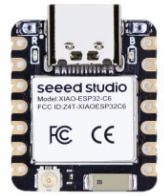 XIAO ESP32C6 MCU used for this project
In this moment, the Phase 1 is finished: I have the VS Code + Platform IO set, I have two Xiao ESP32 working and I set the BLE connection between both ESP32s (one act as master (is connected to sensors) and other act as slave (will communicate with LabView)).
Obs: today, 14.09.2026, I received documents from Custom, for the KIT, so I will continue with Phase 2 using the hardware provided for this project.
See you in the next post.
