In Part 4, I'll walk through getting Bluetooth Low Energy up and running on the MAX32630FTHR
Recap:
The idea is simple enough: stop making people swipe a card and type a PIN at every single door. Instead, the ID card (a MAX32630FTHR + ATECC508A in your pocket) unlocks once via PIN, then silently does challenge-response crypto over Bluetooth every time you walk up to a door. If the card gets yanked off you, the IMU detects the tug and it locks itself. No PIN, no entry. For more details check the Part 1 of the series
- Identity Protocol Part 1 - Plan
- Identity Protocol - Part 2 - Django Server
- Identity Protocol - Part 3 - Unboxing and Blinking with Maxim LPSDK
I was initially happy when i saw an folder exactLE in the LPSDK's file thinking it might be an easy fit, but the rabbit hole just got started. Let's start by telling about the module itself
The Bluetooth Hardware
PAN1326B module a compact module from Panasonic built around the TI CC2564B chip. This gives you Bluetooth Classic + BLE 4.1. The CC2564B talks to the MAX32630 over UART. It is not a standalone BLE SoC unlike nrf52 and it is a radio that needs a host controller library on the MCU side to drive it.
A basic google search took me to BTStack - https://github.com/bluekitchen/btstack and their supported boards here: https://bluekitchen-gmbh.com/btstack/ports/existing_ports.html listed our MAX32630FTHR. I was happy.
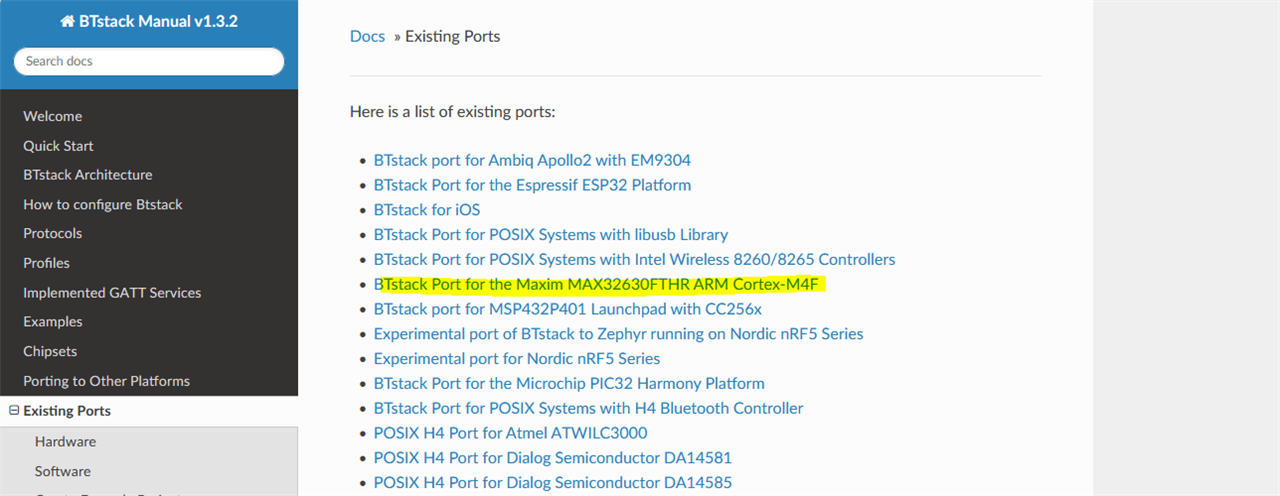
Imported their git repo as a submodule to mine and
git submodule add github.com/.../btstack.git third_party/btstack
funnily enough i had to run the `make` command inside the btstack\port\max32630-fthr folder to generate the examples. The nice part is they also have shipped a copy of the LPSDK source files with BTStack, It brings its own board support file (board.c) written specifically for the FTHR, with UART1 on MAP_A (P2_0/P2_1) as the debug console and UART0 on MAP_B as the CC2564B interface. so nice of them. No toolchain though. That's alright. Its the best way. They even gave a template for the makefile to make a fresh project with BTStack, It was a bit complicated to i asked chatGPT to help me mix my makefile and BTStack to make a makefile which will use the toolchain i already have with the LPSDK and BT Stack they have, which turned out to be like -
PROJECT   ?= ble_beacon
PORT_NAME ?= max32630-fthr

TARGET    = MAX3263x
TARGET_UC := MAX3263X
TARGET_LC := max3263x
COMPILER  = GCC

# ---- User-configurable roots ------------------------------------------------

# Root of this project (auto-detected)
PROJECT_ROOT := $(abspath $(dir $(lastword $(MAKEFILE_LIST))))

# BTstack root (override if needed)
BTSTACK_ROOT ?= $(PROJECT_ROOT)/../../../third_party/btstack
BTSTACK_ROOT := $(abspath $(BTSTACK_ROOT))

# Optional: override from environment instead of sdk.local.mk
LPSDK_ROOT ?=

# Load local overrides if present
-include $(PROJECT_ROOT)/../../sdk.local.mk

ifeq ($(LPSDK_ROOT),)
$(warning LPSDK_ROOT not set — flash target will not work)
endif

# ---- Derived paths ----------------------------------------------------------

PORT_DIR   := $(BTSTACK_ROOT)/port/$(PORT_NAME)
MAXIM_PATH := $(PORT_DIR)/maxim
LIBS_DIR   := $(MAXIM_PATH)/Firmware/$(TARGET_UC)/Libraries
CMSIS_ROOT := $(LIBS_DIR)/CMSIS

# ---- Build flags ------------------------------------------------------------

PROJ_CFLAGS  += -DRO_FREQ=96000000
PROJ_CFLAGS  += -DMXC_ASSERT_ENABLE
PROJ_CFLAGS  += -DENABLE_HCI_INIT
PROJ_CFLAGS  += --specs=nano.specs
PROJ_LDFLAGS += --specs=nano.specs

# ---- Source paths -----------------------------------------------------------

VPATH = . src
IPATH = . src

# BTstack core
VPATH += \
    $(BTSTACK_ROOT)/src \
    $(BTSTACK_ROOT)/src/ble \
    $(BTSTACK_ROOT)/src/classic \
    $(BTSTACK_ROOT)/platform/embedded \
    $(BTSTACK_ROOT)/chipset/cc256x \
    $(BTSTACK_ROOT)/3rd-party/micro-ecc \
    $(BTSTACK_ROOT)/3rd-party/md5 \
    $(BTSTACK_ROOT)/src/ble/gatt-service

IPATH += \
    $(BTSTACK_ROOT)/src \
    $(BTSTACK_ROOT)/src/ble \
    $(BTSTACK_ROOT)/src/classic \
    $(BTSTACK_ROOT)/platform/embedded \
    $(BTSTACK_ROOT)/chipset/cc256x \
    $(BTSTACK_ROOT)/3rd-party/micro-ecc \
    $(BTSTACK_ROOT)/3rd-party/md5 \
    $(BTSTACK_ROOT)/src/ble/gatt-service \
    $(BTSTACK_ROOT)/3rd-party/hxcmod-player

# Port sources
VPATH += $(PORT_DIR)/src
IPATH += $(PORT_DIR)/src

# ---- Board support ----------------------------------------------------------

ADAPT_BOARD_DIR := $(PORT_DIR)/board/$(PORT_NAME)
BOARD_DIR       := $(LIBS_DIR)/Boards/EvKit_V1

VPATH += $(LIBS_DIR)/Boards/Source
IPATH += $(LIBS_DIR)/Boards/Include

include $(ADAPT_BOARD_DIR)/board.mk

# ---- BTstack sources --------------------------------------------------------

SRCS += \
    btstack_audio.c \
	...<LOTS MORE>

# Third-party
SRCS += uECC.c md5.c

# Port + app
SRCS += \
    btstack_port.c \
    hal_tick.c \
    hal_flash_bank_mxc.c \
    main.c \
    ble_beacon.c \
    btstack_link_key_db_stub.c

# ---- Peripheral driver + CMSIS ---------------------------------------------

PERIPH_DRIVER_DIR := $(LIBS_DIR)/$(TARGET_UC)PeriphDriver
include $(PERIPH_DRIVER_DIR)/periphdriver.mk

include $(CMSIS_ROOT)/Device/Maxim/$(TARGET_UC)/Source/$(COMPILER)/$(TARGET_LC).mk

# ---- Output helpers ---------------------------------------------------------

bin: $(BUILD_DIR)/$(PROJECT).elf
	arm-none-eabi-objcopy -O binary $< $(BUILD_DIR)/$(PROJECT).bin
	arm-none-eabi-size $<

# ---- Flash ------------------------------------------------------------------

flash: $(BUILD_DIR)/$(PROJECT).elf
ifndef LPSDK_ROOT
	$(error LPSDK_ROOT not set — cannot flash)
endif
	"$(LPSDK_ROOT)/Toolchain/bin/openocd.exe" \
	    -c "set LPSDK_TOOLCHAIN $(LPSDK_ROOT)/Toolchain" \
	    -f "$(PROJECT_ROOT)/../../openocd.cfg" \
	    -c "program $< verify reset exit"
This raised an error. I figured since BTStack was kind enough to share the LPSDK i thought they would also include the TI's Init Script for the CC2564B. When i checked the code at "btstack\chipset\cc256x\convert_bts_init_scripts.py" it said that "The Makefile include chipset/cc256x/Makefile.inc automates the process of downloading and converting .bts files." but it did not work for me, so i manually ran the python file as per their docs and boom
python convert_bts_init_scripts.py \
    cc256xb_bt_sp_v1.8/initscripts-TIInit_6.7.16_bt_spec_4.1.bts \
    cc256xb_bt_sp_v1.8/initscripts-TIInit_6.7.16_ble_add-on.bts \
    bluetooth_init_cc2564B_1.8_BT_Spec_4.1.c
The Bring-up Sequence
Before getting to application code, it helps to understand what bluetooth_main() in the BTstack port does before it ever calls your btstack_main
- Clock on P1.7 `init_slow_clock()` routes the internal 32 kHz RTC output to P1.7. The PAN1326B needs this as its reference clock.
- nSHUTD on P1.6- the port drives this line high to release the CC2564B from reset. The UART line is not valid until nSHUTD is high and the module has had time to stabilise.
- RTS poll on P0.3- after releasing nSHUTD, the code spins polling the CC2564B's RTS output waiting for it to go low. Only then is the HCI UART initialised.
- Baud rate renegotiation - the init script starts at 115200 baud, then a vendor-specific HCI command bumps it to 4 Mbit/s. BTstack handles all of this inside `btstack_chipset_cc256x`.
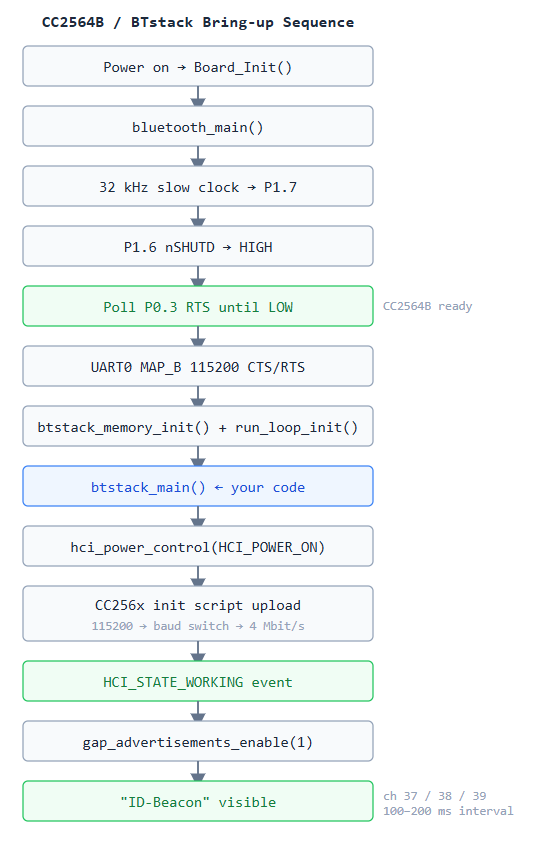
The BTstack MAX32630FTHR port provides its own `main.c` which takes care of all the run loop initialization as well as the transport initialization of the HCI interface. The application code is provided to `btstack_main()`, which is invoked by the port after it initializes itself. Therefore, there is no need to invoke `btstack_run_loop_init()` or `hci_init()`: In other words, there is no main loop in the main.c file. Read more about the Btstacks code architecture here: bluekitchen-gmbh.com/.../examples.html
#define BTSTACK_FILE__ "ble_beacon.c"

#include <stdio.h>
#include "btstack.h"
#include "gpio.h"

/* RGB LEDs — active-low, open-drain */
static const gpio_cfg_t led_r = { PORT_2, PIN_4, GPIO_FUNC_GPIO, GPIO_PAD_OPEN_DRAIN };
static const gpio_cfg_t led_g = { PORT_2, PIN_5, GPIO_FUNC_GPIO, GPIO_PAD_OPEN_DRAIN };

static const uint8_t adv_data[] = {
    0x02, 0x01, 0x06,                               /* Flags: LE General Discoverable */
    0x0A, 0x09, 'I', 'D', '-', 'B', 'e', 'a', 'c', 'o', 'n',  /* Complete Local Name */
};

static btstack_packet_callback_registration_t hci_event_callback_registration;

static void packet_handler(uint8_t packet_type, uint16_t channel,
                           uint8_t *packet, uint16_t size)
{
    UNUSED(channel); UNUSED(size);
    if (packet_type != HCI_EVENT_PACKET) return;

    switch (hci_event_packet_get_type(packet)) {
    case BTSTACK_EVENT_STATE:
        if (btstack_event_state_get_state(packet) == HCI_STATE_WORKING) {
            bd_addr_t zero_addr = {0};
            gap_advertisements_set_params(0x0100, 0x0200, 0, 0, zero_addr, 0x07, 0x00);
            gap_advertisements_set_data(sizeof(adv_data), (uint8_t *)adv_data);
            gap_advertisements_enable(1);
            GPIO_OutClr(&led_g);   /* green on  */
            GPIO_OutSet(&led_r);   /* red off   */
            printf("Advertising as \"ID-Beacon\"\n");
        } else if (btstack_event_state_get_state(packet) == HCI_STATE_OFF) {
            printf("HCI off\n");
        }
        break;
    default:
        break;
    }
}

int btstack_main(int argc, const char *argv[])
{
    UNUSED(argc); UNUSED(argv);

    GPIO_Config(&led_r); GPIO_Config(&led_g);
    GPIO_OutClr(&led_r);   /* red on while initialising */
    GPIO_OutSet(&led_g);   /* green off */

    hci_event_callback_registration.callback = &packet_handler;
    hci_add_event_handler(&hci_event_callback_registration);
    hci_power_control(HCI_POWER_ON);
    return 0;
}
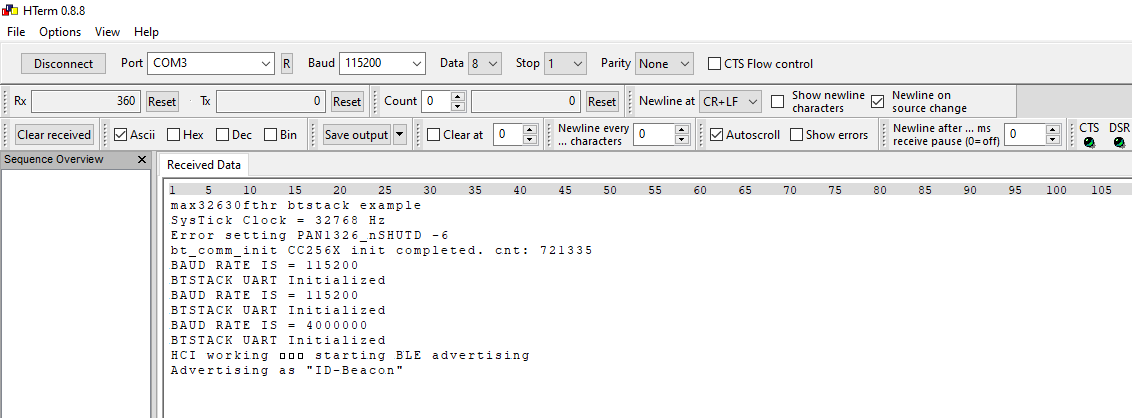
The code ran fine and i was able to verify it's working using the Nordic's Connect App on my phone.
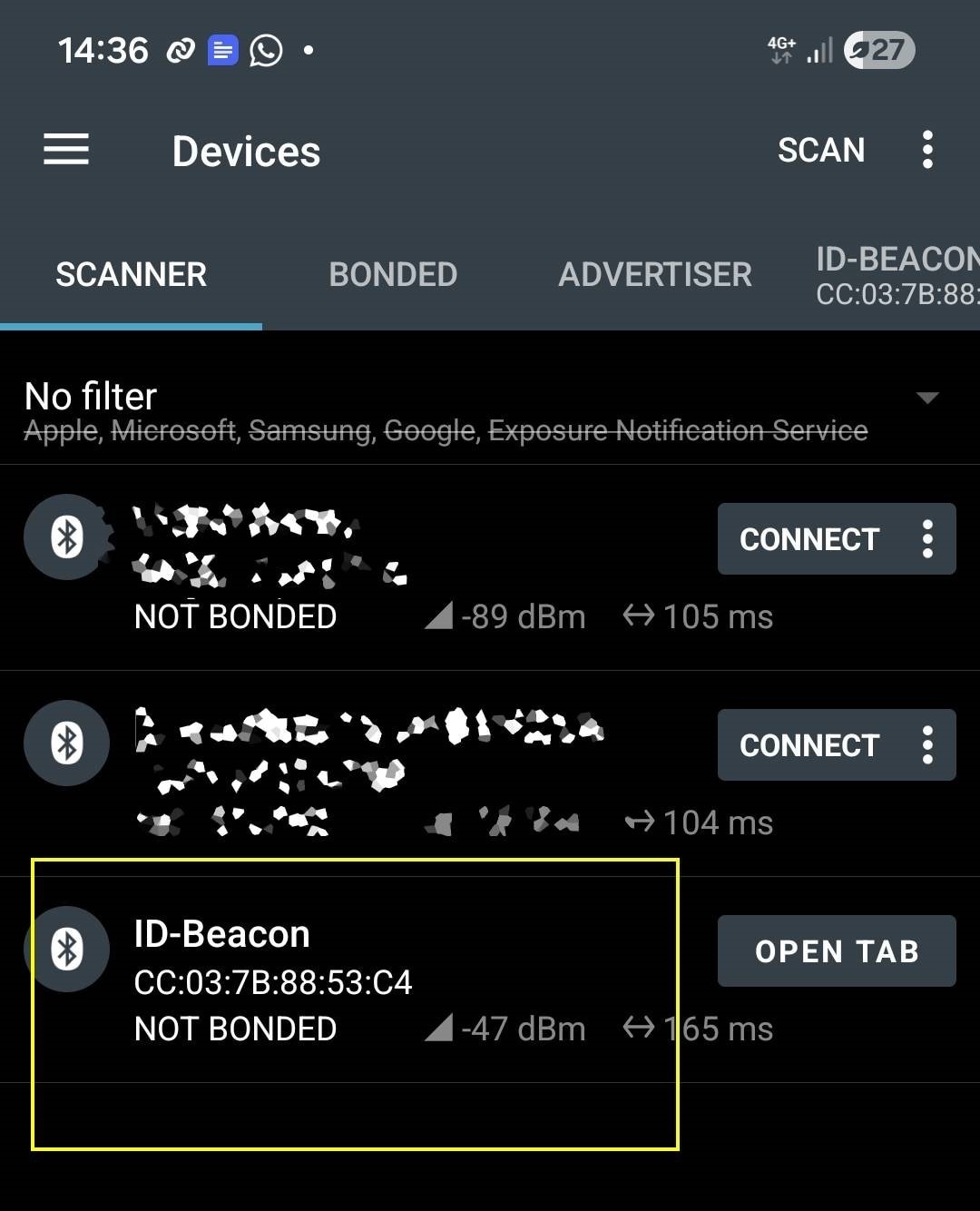
Serial UART log via hterm
The Makefile
I used BTstack's bundled copy of the LPSDK inside port/max32630-fthr/maxim/ rather than the main LPSDK installation. This keeps the BTstack port self-contained a Every BTstack source file is listed explicitly. no wildcard includes. The `-DENABLE_HCI_INIT` flag is critical: it gates the HCI transport setup inside `btstack_port.c`. Without it, the CC2564B is never initialised. I still can't understand why. if anyone can. i'll be grateful to them
PROJECT   = ble_beacon
PORT_NAME = max32630-fthr

BTSTACK_ROOT ?= ../../../third_party/btstack
BTSTACK_ROOT := $(abspath $(BTSTACK_ROOT))

PORT_DIR   = $(BTSTACK_ROOT)/port/$(PORT_NAME)
MAXIM_PATH = $(PORT_DIR)/maxim
LIBS_DIR   = $(MAXIM_PATH)/Firmware/MAX3263X/Libraries

# Machine-specific OpenOCD path only — BTstack uses its own bundled SDK
-include ../../sdk.local.mk

PROJ_CFLAGS += -DENABLE_HCI_INIT

# Core BTstack
SRCS += btstack_memory.c btstack_memory_pool.c btstack_linked_list.c
SRCS += btstack_util.c btstack_run_loop.c btstack_run_loop_embedded.c
SRCS += btstack_crypto.c btstack_audio.c
SRCS += hci.c hci_cmd.c hci_dump.c hci_dump_embedded_stdout.c hci_transport_h4.c
SRCS += btstack_uart_block_embedded.c
# BLE layer
SRCS += ad_parser.c att_dispatch.c sm.c
SRCS += le_device_db_tlv.c btstack_tlv.c btstack_tlv_flash_bank.c
# Third-party crypto
SRCS += uECC.c md5.c
# CC2564B chipset driver + init script
SRCS += btstack_chipset_cc256x.c bluetooth_init_cc2564B_1.8_BT_Spec_4.1.c
# Port-specific files
SRCS += btstack_port.c hal_tick.c hal_flash_bank_mxc.c main.c
# Application
SRCS += ble_beacon.c btstack_link_key_db_stub.c
However, there is one catch. When initializing the MAX32630FTHR port, the `btstack_port.c` file calls `btstack_link_key_db_tlv_get_instance()` and `hci_set_link_key_db()` regardless of whether we compile for BLE only. The problem is that both functions reside in the `#ifdef ENABLE_CLASSIC` block in the BTstack code. Once you define `ENABLE_CLASSIC`, you will have SBC/A2DP audio definitions pulled into your source tree that
The fix is a small stub file (`src/btstack_link_key_db_stub.c`) that satisfies the linker without touching the classic stack at all:
#include <stddef.h>
#include "classic/btstack_link_key_db_tlv.h"

/* Returns NULL — no link-key storage. Safe: classic pairing is never initiated. */
const btstack_link_key_db_t *
btstack_link_key_db_tlv_get_instance(const btstack_tlv_t *impl, void *ctx)
{
    (void)impl; (void)ctx;
    return NULL;
}

void hci_set_link_key_db(btstack_link_key_db_t const *db) { (void)db; }
Now, i tried to capture the signals using my salae logic analyzer but, it took be 10mins after i gracefully took the analyzer out of the box, hooked up the wires and tried to find the Bluetooth pins on the feather. I had the pin-out card in front of me, but realized it too late, that the pins to the Bluetooth is not broken out properly for easy access.
A note on Compiling
Even though i used the tool chain provided by the installation from LPSDK, i used the firmware from the BTStack. So, The build uses the LPSDK's bundled `make.exe` from `Toolchain/msys/1.0/bin/`. You need both the MSYS bin directory and the ARM toolchain on PATH. The cleanest way is to set `LPSDK_ROOT` in your environment (or in `firmware/sdk.local.ps1`) and use the included `build_and_flash.ps1`:
The Code Repository
You can find the project code here - https://github.com/arvindsa/identity-protocol-e14-challenge/tree/main
Next Steps
Sharing data over BLE GATT, Getting the ATECC508A crypto chip talking over I2C, provisioning a key pair, and running a sign/verify round-trip. That's where the actual security story starts.
Final notes
The BTStack helped me quite a lot, their documentation https://bluekitchen-gmbh.com/btstack/ports/existing_ports.html#sec:max32630-fthrPort was quite easy to understand which helped me quite easily. There was a time where i thought of pivoting to mbed or arduino but i stuck to my initial goal. Infact I was sure it will get frustrating that i decided to work on the BLE after my Workation at Goa. Work in the morning and Chill on a beach side with a chilled beer. Here is a photo of my Chillout time. The easy documentation BTStack propelled me and thus managed to get this BLE Working within couple of hours. I still am new to BLE and heavily using Youtube videos and ChatGPT to help me understand it. Yet, i am quite confident i will get it done.