element14 Community
element14 Community
    Register Log In
  • Site
  • Search
  • Log In Register
  • Community Hub
    Community Hub
    • What's New on element14
    • Feedback and Support
    • Benefits of Membership
    • Personal Blogs
    • Members Area
    • Achievement Levels
  • Learn
    Learn
    • Ask an Expert
    • eBooks
    • element14 presents
    • Learning Center
    • Tech Spotlight
    • STEM Academy
    • Webinars, Training and Events
    • Learning Groups
  • Technologies
    Technologies
    • 3D Printing
    • FPGA
    • Industrial Automation
    • Internet of Things
    • Power & Energy
    • Sensors
    • Technology Groups
  • Challenges & Projects
    Challenges & Projects
    • Design Challenges
    • element14 presents Projects
    • Project14
    • Arduino Projects
    • Raspberry Pi Projects
    • Project Groups
  • Products
    Products
    • Arduino
    • Avnet & Tria Boards Community
    • Dev Tools
    • Manufacturers
    • Multicomp Pro
    • Product Groups
    • Raspberry Pi
    • RoadTests & Reviews
  • About Us
    About the element14 Community
  • Store
    Store
    • Visit Your Store
    • Choose another store...
      • Europe
      •  Austria (German)
      •  Belgium (Dutch, French)
      •  Bulgaria (Bulgarian)
      •  Czech Republic (Czech)
      •  Denmark (Danish)
      •  Estonia (Estonian)
      •  Finland (Finnish)
      •  France (French)
      •  Germany (German)
      •  Hungary (Hungarian)
      •  Ireland
      •  Israel
      •  Italy (Italian)
      •  Latvia (Latvian)
      •  
      •  Lithuania (Lithuanian)
      •  Netherlands (Dutch)
      •  Norway (Norwegian)
      •  Poland (Polish)
      •  Portugal (Portuguese)
      •  Romania (Romanian)
      •  Russia (Russian)
      •  Slovakia (Slovak)
      •  Slovenia (Slovenian)
      •  Spain (Spanish)
      •  Sweden (Swedish)
      •  Switzerland(German, French)
      •  Turkey (Turkish)
      •  United Kingdom
      • Asia Pacific
      •  Australia
      •  China
      •  Hong Kong
      •  India
      •  Japan
      •  Korea (Korean)
      •  Malaysia
      •  New Zealand
      •  Philippines
      •  Singapore
      •  Taiwan
      •  Thailand (Thai)
      •  Vietnam
      • Americas
      •  Brazil (Portuguese)
      •  Canada
      •  Mexico (Spanish)
      •  United States
      Can't find the country/region you're looking for? Visit our export site or find a local distributor.
  • Translate
  • Profile
  • Settings
Smart Security and Surveillance
  • Challenges & Projects
  • Design Challenges
  • Smart Security and Surveillance
  • More
  • Cancel
Smart Security and Surveillance
Forum Guardian Sentinel <Part 2> — Getting Started
  • News
  • Projects
  • Forum
  • DC
  • Leaderboard
  • Files
  • Members
  • More
  • Cancel
  • New
Join Smart Security and Surveillance to participate - click to join for free!
Actions
  • Share
  • More
  • Cancel
Forum Thread Details
  • Replies 1 reply
  • Subscribers 46 subscribers
  • Views 70 views
  • Users 0 members are here
  • max32630fthr
  • oled
  • arduino ide
  • maxim
  • arduino
  • MAX32630FTHR#
Related

Guardian Sentinel <Part 2> — Getting Started

meera_hussien
meera_hussien 11 days ago

Guardian Sentinel — Getting Started

<Part 2>

The figure below shows the basic block diagram and idea of how the project will be implemented. The system will consist of two parts: a master and a slave. The master will use the MAX32630FTHR and will be connected to the LAN through an Ethernet FeatherWing. It will also include a OLED FeatherWing to display status or other useful information. The slave will use another MAX32630FTHR together with the DC Motor + Stepper FeatherWing and a gas sensor. This is the basic idea of the project architecture. Along the process of building of this project i will make the necessary changes in order to accomplish the objective of this project.

imageAs i have mentioned previously, in this second post we would like to see in details and initial setup for all the devices used in this project. First lets take a look at the core of this project which is the MAX32630FTHR.

MAX32630FTHR

From my initial research i found that the MAX32630FTHR can be programmed using MBED OS, but unfortunately it will become obsolete or end of life this coming July. Hence while looking for other alternative, i saw the post from Alistair , mentioning about using Arduino to program the MAX32630FTHR. Here is my initial setup and the step to program the MAX32630FTHR using Arduino IDE. Below is the step to program the MAX32630FTHR with Arduino IDE. Please note that, it can be only used with Arduino IDE 1.8.x. I tried using Arduino 2.3.8, but it does not work. 

image

Once the board is installed. I tried to program the board. The setup for programming the board is as shown in figure below

image

Programming the MAX32630FTHR setup.

image

Both the usb need to be connected. The usb on the MAX32630FTHR is for power up the device. And the usb connecting the pico is for programming purpose.

Once the this is done. I try to upload a simple Blink example, to verify. First choose the board as shown in the image below
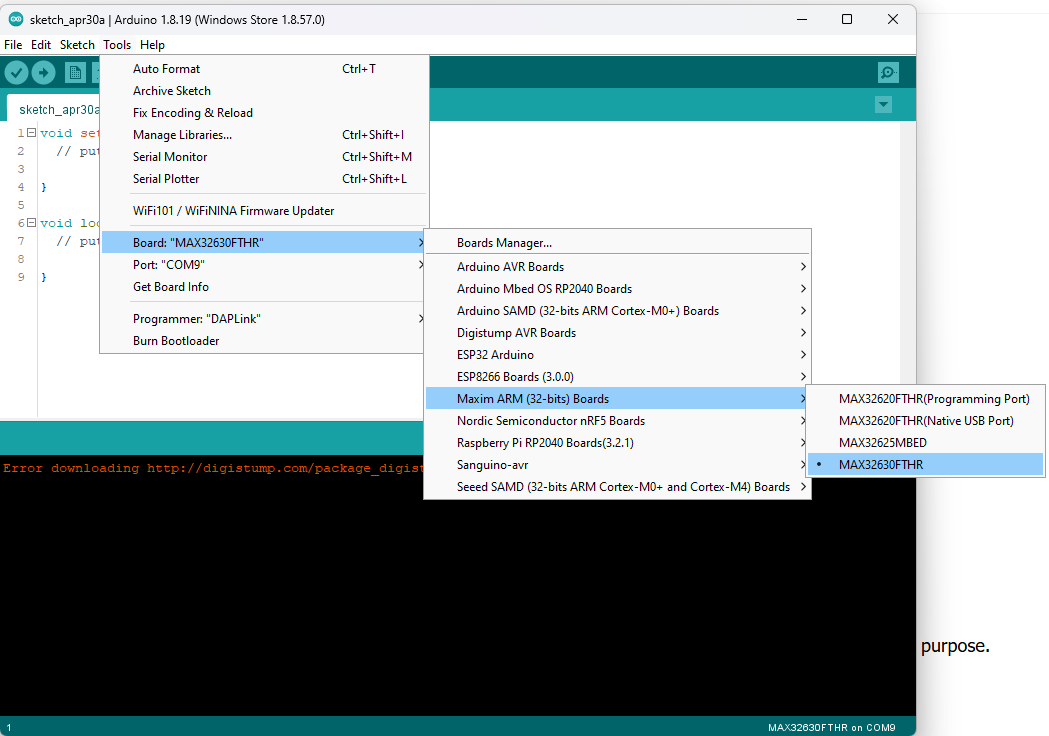
image

Next choose the programmer as shown in image below
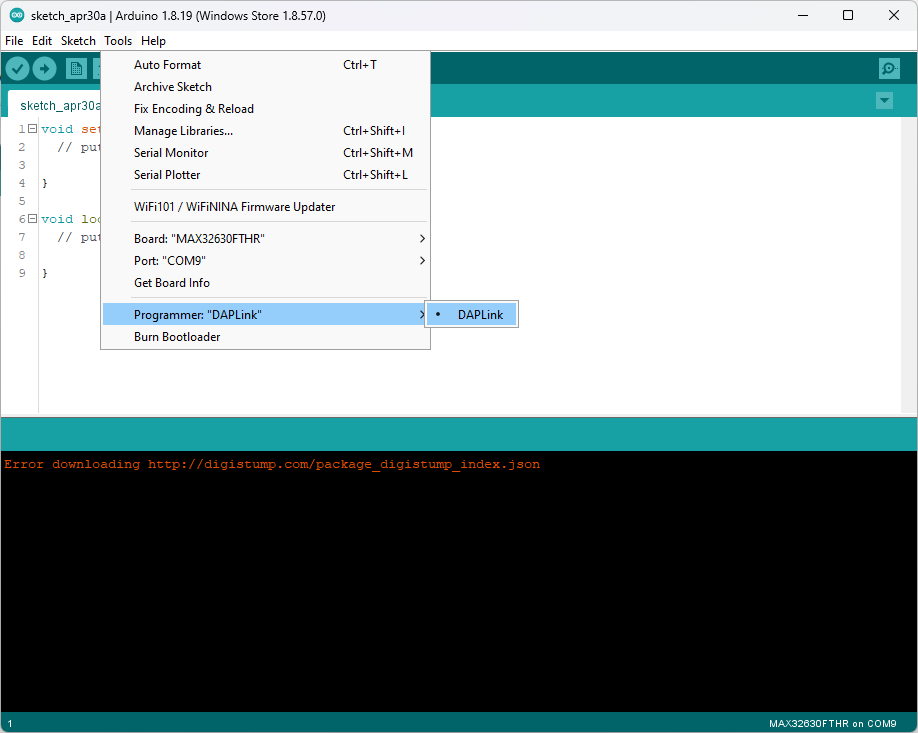
image


Once done, i tested the simple blink program and it works. Below is the demo video

You don't have permission to edit metadata of this video.
Edit media
x
image
Upload Preview
image

The next thing that i would like to test is the Oled FeatherWing which i am using to display the data. For connection between the MAX32630FTHR and the oled i am using the Ethernet FeatherWing. The setup for this is shown in the figure below

image

Once the sample code is uploaded, the oled works.

image

The code for the oled is as shown below. 

#include <Wire.h>
#include <Adafruit_GFX.h>
#include <Adafruit_SSD1306.h>

#define SCREEN_WIDTH 128
#define SCREEN_HEIGHT 32
#define OLED_ADDR 0x3C

Adafruit_SSD1306 display(SCREEN_WIDTH, SCREEN_HEIGHT, &Wire);

void setup() {
  Serial.begin(9600);
  delay(1000);

  Serial.println("MAX32630FTHR OLED Test");

  Wire.begin();

  if (!display.begin(SSD1306_SWITCHCAPVCC, OLED_ADDR)) {
    Serial.println("OLED not found at 0x3C");
    while (1);
  }

  display.clearDisplay();
  display.setTextSize(1);
  display.setTextColor(SSD1306_WHITE);
  display.setCursor(0, 0);

  display.println("Guardian Sentinel");
  display.println("MAX32630FTHR");
  display.println("OLED OK");

  display.display();

  Serial.println("OLED initialized");
}

void loop() {
}

In the next post, i will share on the Ethernet FeatherWing and also the setting up of the dashboard. 

  • Sign in to reply
  • Cancel

Top Replies

  • DAB
    DAB 10 days ago +1
    Nice update.
  • DAB
    DAB 10 days ago

    Nice update.

    • Cancel
    • Vote Up +1 Vote Down
    • Sign in to reply
    • Cancel
element14 Community

element14 is the first online community specifically for engineers. Connect with your peers and get expert answers to your questions.

  • Members
  • Learn
  • Technologies
  • Challenges & Projects
  • Products
  • Store
  • About Us
  • Feedback & Support
  • FAQs
  • Terms of Use
  • Privacy Policy
  • Legal and Copyright Notices
  • Sitemap
  • Cookies

An Avnet Company © 2026 Premier Farnell Limited. All Rights Reserved.

Premier Farnell Ltd, registered in England and Wales (no 00876412), registered office: Farnell House, Forge Lane, Leeds LS12 2NE.

ICP 备案号 10220084.

Follow element14

  • X
  • Facebook
  • linkedin
  • YouTube