


This blog will focus on establishing the wireless link between the glasses and the base unit.
In order to not make it too long, I've decided to split into two parts: The server part and the client part. This post will describe the server part.
Short recap and choice of wireless modules
The idea: Power-tool/heavy equipment safety glasses that will not allow the tool to be switched on unless the operator is actually wearing them. This will be accomplished with the help of various sensors that will be in charge of the "am-I-being-worn-by-the-operator" part and a wireless link that will transfer the information to the base unit. If you recall,the original idea as depicted in the introduction blog was to use Bluetooth transceivers for the wireless communication. I've decided, however, to implement the link using a Wi-Fi connection based around the ESP8266 Wi-Fi module and the CC3100 booster pack. Since the ESP8266 has a built-in uController, it can be directly connected to the mains voltage relay so the design can be a bit simpler and more compact. A possible downside of the Wi-Fi approach is the higher power consumption as compared to Bluetooth (especially Bluetooth Low Energy), a critical parameter for wearable applications. However, in the current case there is no need for continuous Wi-Fi opperation. For example, the CC3100 can be switched on once a minute for a few seconds, report back and go back to standby mode. Of course, a more in depth examination of the power consumption is required but I believe that switching to Wi-Fi will not violate the power consumption requirements.
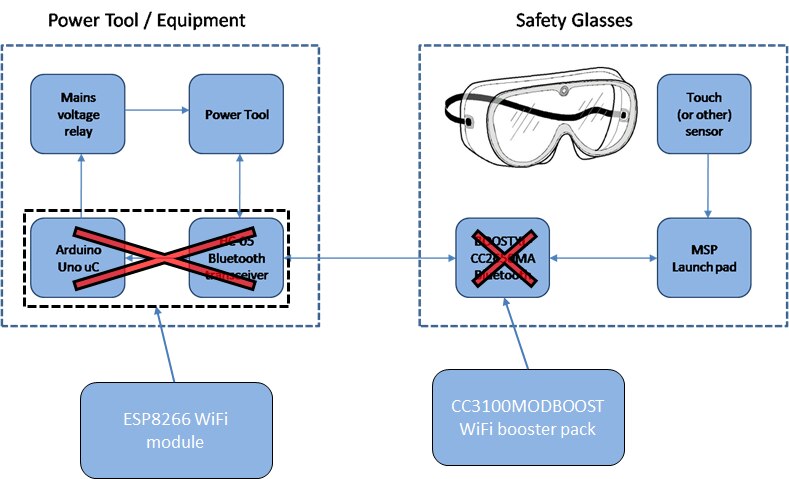
Lets move on to some actual testing
The wireless link bring-up consisted of 4 steps:
1) Configure the ESP8266 as an AP (access point) and as a server. Using the AP configuration will free the WiFi modules from having to connect to a wireless router, which may not be available in a typical working/industrial environment. In the AP mode, the ESP8266 will create its own wireless network which the CC3100 will be able to connect to.
2) Using the PC as a client, test the ESP8266 code to make sure it is working.
3) Configure the CC3100 to coneect to the ESP's network as a client.
4) Test the link by transmitting some information back and forth.
1) Configuring the ESP8266
The module that I've used is the NodeMcu development kit.It is a small PCB based around the ESP8266 WiFi chip. The NodeMcu has on board power regulation and USB2Serial conversion. In addition, it can programmed directly using the Arduino IDE. The built-in examples an online tutorials really ease the development process. A great place to start programming with the ESP8266 is the Acrobotic channel on Youtube.
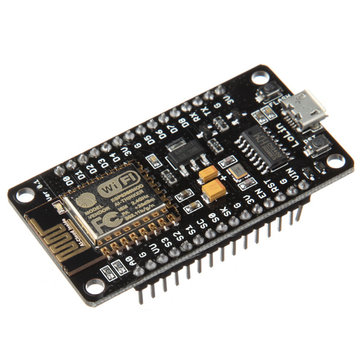
You can see the full Arduino sketch below. The sketch is mainly based on the "WifiWebServer" example with some changes.
At first, the sketch defines the wireless network name and password, and defines a server that listens on port 9999. Then the Serial port, Wifi and server are initialized in the setup() function. Once the client is connected, the server waits for the transmission of some commands. The recognized commands are "ON" and "OFF". Pretty straight forward (once it is actually working).
One thing to note, though, is that the client is disconnected automatically after one string is transmitted. This means that after a transmitting and receiving a single string, the client will have to reconnect to the server. Apparently this is done intentionally to not overflow the number of clients that are connected to the server. So, if you are trying this code out and nothing seem to be working after transmitting a single command , don't be alarmed.
#include <ESP8266WiFi.h>

//As mentioned, the ESP8266 is configured as an access point. So the first is to define the name and password of the wireless network that it will create:
const char* ssid = "SafeAndSound";
const char* password = "Element14";


// Create an instance of the server
// specify the port to listen on as an argument

WiFiServer server(9999);


void setup() {
  WiFi.mode(WIFI_AP);//Configure the module to work as an Access Point
  Serial.begin(115200); // configure Serial port
  delay(10);

  delay(1000);
  Serial.begin(115200);
  Serial.println();
  Serial.print("Configuring access point...");
  /* You can remove the password parameter if you want the AP to be open. */
  WiFi.softAP(ssid, password); // Set up the network


  IPAddress myIP = WiFi.softAPIP(); // Get the IP address of the access point.
  Serial.print("AP IP address: ");
  Serial.println(myIP);

  // Start the server
  server.begin();
  Serial.println("Server started");
}


void loop() {
WiFiClient client = server.available(); // Gets a client that is connected to the server
  if (!client) { // Wait for a client to connect to the server
    return;
  }

  // Wait until the client sends some data
  Serial.println("new client\n\n");
  while(!client.available()){
    if(!client) // Don't get stuck in the loop in case the client got disconnected
    {
    client.stop();
    break;
    }
    delay(100);
  }
  // Read the first line of the request
  String request = client.readStringUntil('\r');
  Serial.print("Received: ");
  Serial.println(request);
  if(request.indexOf("ON")!=-1) // If the received string equals to "ON"
    {
      Serial.println("Sent: Turning on, you better be wearing the safety glasses\n\n");
      client.println("Turning on, you better be wearing the safety glasses");
    }
  else if(request.indexOf("OFF")!=-1)// If the received string equals to "OFF"
    {
      Serial.println("Sent: Turning off, you can take off the safety glasses\n\n");
      client.println("Turning off, you can take off the safety glasses");
    }
  else
      {
      Serial.println("Sent: Unknown command");
      client.println("Unknown command");
    }


  client.flush(); // Clear the input buffer
  client.stop(); // Close the connection to the client
}
2) Testing out the Access point and server
- Once you download the code to the board you will see that a "SafeAndSound" wireless network become available. Connect to the network using the password listed in the code above.
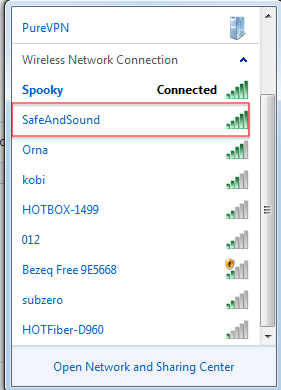
- Open a serial monitor and examine the output. The IP address of the access point should appear.

- Use a tcp client (like PuTTy or SocketTest) to connect to the above IP address on port number 9999. Once connected, send a command and examine the response.
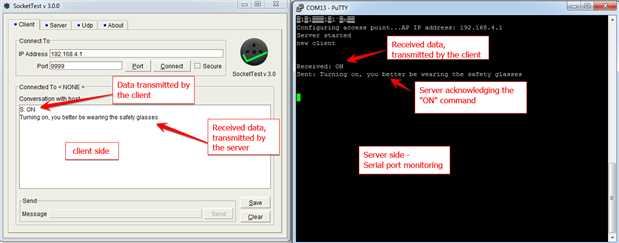
It Works! We sent the "ON" command from the client to the server. The server acknowledged the command by printing a text to its serial port and transmitting the same text back to the client.
Great, now we can move on to the client side - the CC3100 and launchpad, which will be covered in the next blog post.
Top Comments