element14 Community
element14 Community
    Register Log In
  • Site
  • Search
  • Log In Register
  • Community Hub
    Community Hub
    • What's New on element14
    • Feedback and Support
    • Benefits of Membership
    • Personal Blogs
    • Members Area
    • Achievement Levels
  • Learn
    Learn
    • Ask an Expert
    • eBooks
    • element14 presents
    • Learning Center
    • Tech Spotlight
    • STEM Academy
    • Webinars, Training and Events
    • Learning Groups
  • Technologies
    Technologies
    • 3D Printing
    • FPGA
    • Industrial Automation
    • Internet of Things
    • Power & Energy
    • Sensors
    • Technology Groups
  • Challenges & Projects
    Challenges & Projects
    • Design Challenges
    • element14 presents Projects
    • Project14
    • Arduino Projects
    • Raspberry Pi Projects
    • Project Groups
  • Products
    Products
    • Arduino
    • Avnet & Tria Boards Community
    • Dev Tools
    • Manufacturers
    • Multicomp Pro
    • Product Groups
    • Raspberry Pi
    • RoadTests & Reviews
  • About Us
  • Store
    Store
    • Visit Your Store
    • Choose another store...
      • Europe
      •  Austria (German)
      •  Belgium (Dutch, French)
      •  Bulgaria (Bulgarian)
      •  Czech Republic (Czech)
      •  Denmark (Danish)
      •  Estonia (Estonian)
      •  Finland (Finnish)
      •  France (French)
      •  Germany (German)
      •  Hungary (Hungarian)
      •  Ireland
      •  Israel
      •  Italy (Italian)
      •  Latvia (Latvian)
      •  
      •  Lithuania (Lithuanian)
      •  Netherlands (Dutch)
      •  Norway (Norwegian)
      •  Poland (Polish)
      •  Portugal (Portuguese)
      •  Romania (Romanian)
      •  Russia (Russian)
      •  Slovakia (Slovak)
      •  Slovenia (Slovenian)
      •  Spain (Spanish)
      •  Sweden (Swedish)
      •  Switzerland(German, French)
      •  Turkey (Turkish)
      •  United Kingdom
      • Asia Pacific
      •  Australia
      •  China
      •  Hong Kong
      •  India
      •  Korea (Korean)
      •  Malaysia
      •  New Zealand
      •  Philippines
      •  Singapore
      •  Taiwan
      •  Thailand (Thai)
      • Americas
      •  Brazil (Portuguese)
      •  Canada
      •  Mexico (Spanish)
      •  United States
      Can't find the country/region you're looking for? Visit our export site or find a local distributor.
  • Translate
  • Profile
  • Settings
Ultimate RoadTest
  • Challenges & Projects
  • Design Challenges
  • Ultimate RoadTest
  • More
  • Cancel
Ultimate RoadTest
Blog Project "code name" Part 011
  • Blog
  • Forum
  • Documents
  • Files
  • Mentions
  • Sub-Groups
  • Tags
  • More
  • Cancel
  • New
  • Share
  • More
  • Cancel
Group Actions
  • Group RSS
  • More
  • Cancel
Engagement
  • Author Author: COMPACT
  • Date Created: 20 May 2012 12:33 AM Date Created
  • Views 742 views
  • Likes 1 like
  • Comments 1 comment
  • ultimate_roadtest
Related
Recommended

Project "code name" Part 011

COMPACT
COMPACT
20 May 2012
20th May

"But there are alternatives.."

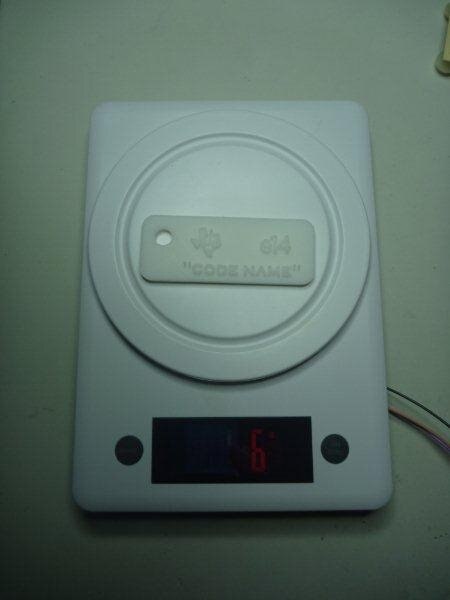
As not to encroach on Nick's work with load cell interfaces, I have interfaced a set of digital scales in a completely different way to retain its original functionality and appearance.
image


My scale has an ASIC with I2C ROM that does all the work and I'm letting it do all the load cell management.


Like my previously mentioned mystery device I have reverse engineered the digital scales to find suitable interface points to tap.

At this moment I am purely using the scales as a pressure switch.

When a preset threshold pressure is reached (either in a positive or negative sense) it will assert a digital signal which the SimpleLink Wi-FI C3300 can process such as send a twitter message or SMS.


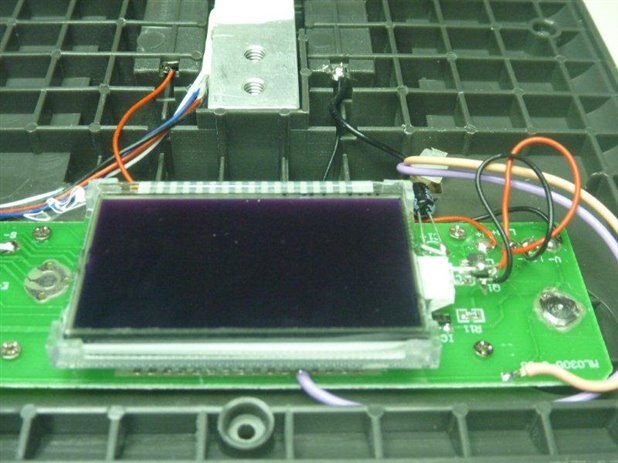
This is accomplished using just 3 wires;

     Ground

     On/Off and Zero Function

     "minus" LCD signal


Depending upon the circumstance, an additional actuator may be necessary to reset the threshold pressure setting or prevent the unit from automatically turning off.

This is to lift or place a calibration weight on the scales to either zero the setting or present signs of activity.


All that is going on is under program control, setting the Zero point to the threshold setting and checking the display for a positive or negative reading. 
image


The On/OFF LCD signal is used to turn the scales on and if necessary reset the desired threshold setting.

The "minus" LCD signal is not a digital logic level signal but an AC multi level LCD drive signal.

With a bit of decoding of this signal can be interpreted as either "minus" segment on or off.

  • Sign in to reply
  • DAB
    DAB over 13 years ago

    When you get the project done, you might want to do some more explaining on the scale tap.


    I know I am interested and I am sure that others will be interested as well.  You know how us tinkerers think. image


    Thanks

    DAB

    • Cancel
    • Vote Up 0 Vote Down
    • Sign in to reply
    • More
    • Cancel
element14 Community

element14 is the first online community specifically for engineers. Connect with your peers and get expert answers to your questions.

  • Members
  • Learn
  • Technologies
  • Challenges & Projects
  • Products
  • Store
  • About Us
  • Feedback & Support
  • FAQs
  • Terms of Use
  • Privacy Policy
  • Legal and Copyright Notices
  • Sitemap
  • Cookies

An Avnet Company © 2025 Premier Farnell Limited. All Rights Reserved.

Premier Farnell Ltd, registered in England and Wales (no 00876412), registered office: Farnell House, Forge Lane, Leeds LS12 2NE.

ICP 备案号 10220084.

Follow element14

  • X
  • Facebook
  • linkedin
  • YouTube