


Vertical Hydroponic System Web Interface Part 1:
Last week I began work on replacing OpenHAB as the web interface. I still have a lot left to do, but I thought it best to give an update since I have gotten the basic framework working. I am using a BeagleBone Black as the hardware for the webserver. I am using a Debian image for the OS and this is an older version of the BBB so I have to run off of an 8 gb SD card. I am using the standard image found here: http://beagleboard.org/latest-images. Creating a custom image is on the list of to-dos, but it is a low priority at the moment.
I decided to use node.js with express for the webserver. I will be using socket.io for data transmission, and d3.js for client side visualization and interaction. Using these packages means that my package.json file looks like this:
{
  "name": "Hydro Shelves",
  "version": "0.0.1",
  "description": "WebSCADA for Hydro System",
  "main": "hydro1.js",
  "dependencies": {
  "express": "4.10.2",
  "socket.io": "^1.3.5",
  "d3": "3.5.5"
  }
}
I created a new directory in the root folder called hydro1. I placed the package.json file in there along with my main file hydro1.js and the hydro1.html file I will be serving. Then I ran: npm install to download the dependencies. These are automatically placed in a new folder called node_modules.
I also created a folder called data and put a text file called main_data.txt in it. Then I made another folder called images. I created simple images of the different parts of my hydroponics system to indicate whether they are on or off and put them in the images folder.
To give a basic idea of what is happening, I have a text file called main_data.txt. This will be used to store the current values of the important variables to display. When a user connects to the webserver, hydro1.js will serve hydro1.html, and open a socket connection with the user's browser to transmit the data. Every second the text file is read and data is sent through the socket. The client side code reads the transmitted data and uses it to create objects suitable for display. The d3.js code then displays different images and text values based on the state of the system.
I created a script called fakedata.js to change the state of a few variables in the text file every five seconds. Doing it this way I can verify that changes to the text file are properly displayed on the webpage. To have this script run automatically in the background, I created a file called fakedata.service:
[Unit]
Description=FakeData Running continuously in background
After=network.target
[Service]
ExecStart=/usr/bin/node /home/root/hydro1/fakedata.js
Environment=NODE_ENV=production
Restart=always
RestartSec=10s
[Install]
WantedBy=multi-user.target
then I placed the file in /lib/systemd/system and ran:
systemctl enable fakedata.service
systemctl start fakedata.service
Finally in the /hydro1 folder I ran:
node hydro1.js
This resulted in the following being displayed on port 8181:

and when the data changes:
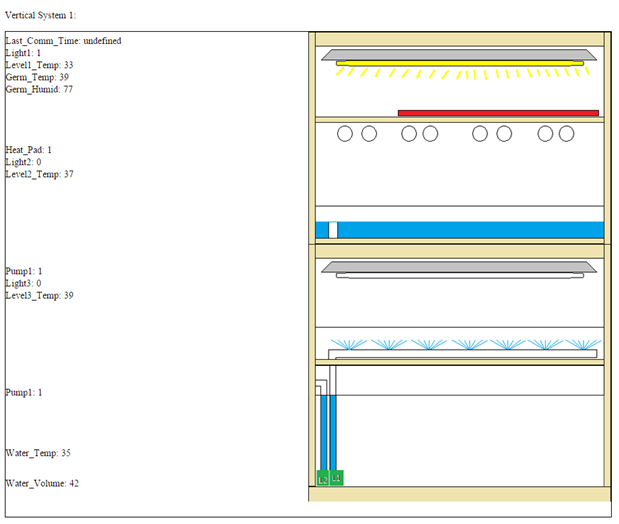
I have verified that this works. So I know that as long as I change the data in the text file I can get what I want displayed on the webpage.
I have attached all of the files I am using. Warning: this code is in a barely usable state. I am pretty new to JavaScript and still don't really understand a lot of how it works. I did enough to get the basics working. The code is not commented well, is inefficient, and may be difficult to follow. I've attached it just so that people can see how I am doing this and ask questions or give criticism if they like.
I have a lot of plans for improving this code and I will probably be creating a github repo for this project. I will be adding the ability to select and graph data. I also want to add the ability to click on a component and change the control parameters. By the end of this contest I want to have this done, and the code in good enough condition so that it is usable by others. All comments and criticisms are appreciated.
Top Comments